Cisco Learning Network Store Promotions Page
Showing posts with label Google Apps. Show all posts

4.16.2015

Lost your phone? Just Google it

 
Becoming reunited with your lost phone just got a whole lot easier. It doesn’t matter if you're alone and don't have access to another phone to ring your cell to see if it has slipped down the back of the sofa. To make life a little easier, Google is rolling out a feature that enables you to conduct a Google search for your phone.
 
Whether you have mislaid it in the house, or somewhere further afield, Google will help you to track down your beloved handset. You just need to make sure that your phone is updated with the latest version of the Google app and you're ready to go phone hunting. It's a bit like an extension of the feature found in Android Wear, so how does it work?
 
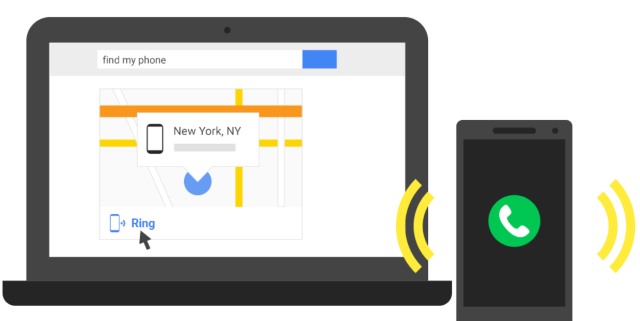
As we've already alluded, sending out a virtual search party for your phone works like a regular Google search. Fire up your web browser, head to Google.com and type -- you've guessed it -- "Find my phone".  Provided you are signed into the same Google account on the computer as on your phone, Google will then work its magic and use your phone's GPS to show you its location on a map.
 
If the map shows that your handset appears to be very close by, there's a handy 'Ring' option which, you know, rings your phone so you can hear where it is. If you have more than one phone connected to your account, there's a drop down menu so you can select which one you are interested in.
 
This is a feature that Google has launched with very little fanfare, but it's one that is sure to come in handy for a lot of people at some point in the future. It might not have all of the features of Android Device Manager (there's no remote wiping, for instance), but as a quick 'n' dirty solution, it's great.
 
~ Mark Wilson

4.05.2014

The fat lady sings for Microsoft, thanks to Google Apps

The office suite battle is really starting to heat up. Last week, Microsoft released Word, Excel and PowerPoint for the iPad, signaling a sea change in the company's focus. However, Google is still pushing forward with its attempt to sway users with its web apps. While both are good, no one can deny that Microsoft's offers more features.
 
With that said, more features does not always equate to better. In other words, if Google's offering meets a user's or business' needs, then it may be more cost effective. Quite frankly, too many features can be seen as noise when unused. One such company, the Glyndebourne opera house, switched from Microsoft to Google with great results.
 
"Before going Google last autumn, we relied on a traditional Microsoft Office, Sharepoint and Exchange infrastructure. This setup required dedicated Windows computers to access all our files on various hard drives and servers, sometimes through complex remote connection processes. It was difficult, stage hands could not always access their email, schedules or documents and often had to use pen and paper to create notes after performance" says, Richard Wells, Head of Information Technology at Glyndebourne.
 
Wells further explains, "with Google giving us email, collaboration, business workflows and our storage needs in the cloud, the IT department has far fewer worries. Staff now spend their time on more meaningful jobs like creating high-quality recordings of our performances and improving our digital presences such as the Glyndebourne YouTube channel. Employees have seen an increase in their ability to focus on our core objective: creating world-class opera. Google Apps helps us bridge the creative and operational sides of the company. This allows us to work from anywhere, anytime so the show goes off without a hitch every night".
 
Yes, the fat lady sings for Microsoft at this opera house. However, it is important to remember that while Google Apps meets the needs for this company, it does not mean that all entities can successfully switch. Quite frankly, Microsoft Office is still more powerful and larger businesses would likely benefit more from it. Still, these stories of switching to Google are becoming more frequent, so Microsoft had better pay attention.
 
What do you think? Tell me in the comments.


~ Brian Fagioli

10.08.2013

Google's Schmidt: Android more secure than iPhone

Summary: Executive chairman dances around straight answer while talking up Android security.
 
ORLANDO — Delivered with a spice of arrogance, Google's executive chairman Eric Schmidt on Monday declared the Android platform more secure than Apple's iPhone.
 
The comparison, made during a question-and-answer session at the Gartner Symposium/ITxpo, drew laughter from a packed-house audience.
 
Gartner analyst David Willis, who is chief of research for mobility and communications and who runs Gartner's Senior Research Board, said to Schmidt: "If you polled many people in this audience they would say Google Android is not their principal platform [...] When you say Android, people say, wait a minute, Android is not secure."
 
Schmidt didn't miss a beat, replying, "Not secure? It's more secure than the iPhone."
 
The Google chairman danced around a straight answer explaining Android has more than a billion users, is a platform that will be around for a while, and therefore goes through rigorous real-world security testing.
 
Schmidt then offered up another complaint he often hears — that the platform is fragmented — and then he shot that down. "With Android we have an agreement for vendors that you keep the Android stores compatible and that is a great breakthrough for Android," he said.
 
Schmidt compared it to his Unix days in the 1980s, saying, "The key thing was that we did not have an app store to keep the Unix people together."
 
Android is the most widely used operating system, based on worldwide market and usage share statistics. And Google has made efforts to upgrade Android's security, including new security features released in August for Jelly Bean 4.3 and the addition of two new features that work with almost all currently used versions of the OS.
 
Schmidt said in the distant future there would be an assumption that nothing is secure and that security will be devised on a per app basis for each user.
 
The iPhone comments and back-and-forth were just a piece of Schmidt's 45-minute question-and-answer session with Willis and his Gartner colleague Drue Reeves, also a Gartner Distinguished Analyst. Schmidt talked about Google as an enterprise application provider, Google Now, Chinese hackers, email, bottoms up management, research on aging, Google management, the computer industry, privacy and trust among other topics.
 
Summarizing what he had heard during the 45-minute session, Willis said to Schimdt, "What I heard was Android is more secure than the iPhone," to which Schmidt replied, "Android is very secure."
 
The audience again gave a hearty chuckle. Schmidt paused and said, "You will be happier with Gmail, Chrome and Android more than you can possibly imagine."
 
The audience chuckled again, and Willis, chuckling himself, responded, "...that makes it a wrap."
 
~ John Fontana

10.22.2012

10 reasons why Ubuntu 12.10 desktop blows away Windows 8

Takeaway: Ubuntu 12.10 has arrived, and Windows 8 is just around the corner. Jack Wallen says there’s no contest between the two.
 History is a grand teacher. And in recent years, Ubuntu Linux has had to deal with a few hiccups in its history. To be specific, when Ubuntu Unity arrived, Ubuntu Linux usage dropped dramatically. When Windows 8 arrives, people are going to have similar issues with the drastic (and not terribly intelligent) changes made to the user interface.
 But it’s not just Windows 8’s shortcomings that make Ubuntu 12.10 the better option. Ubuntu has made some serious progress in the realm of efficiency and user friendliness. With yesterday’s release of 12.10, the improvements continue. Let’s examine some of the reasons why Ubuntu 12.10 will blow away Windows 8.

1: Amazon search

This is something new to every desktop platform. With Ubuntu Unity’s Dash, when you run a search, the search results will include items that can be purchased from Amazon.com. This feature takes online shopping (be it personal or for business) to a new level. Hopefully, at some point, the API for this feature will spread out and users and businesses will be able to include their favorite shopping sites. With all other platforms, you have to go through the steps of opening up your browser, launching the site, searching for the product, and clicking the desired product.

2: Dash previews

When you do search in the Dash, Unity will give you an interactive preview of the results. If the results are audio files, you can right-click the file to get a preview window. You can either show that file in its folder or play the file. If the file is a document, the preview will allow you to open the containing folder, open the file, or email the file.

3: Interface based on efficiency

From the ground up, Canonical and the Ubuntu Unity developers focused on creating an interface that would make day-to-day work as efficient as possible. I can attest, after using Unity since it first launched, that 12.10 is the most efficient desktop interface I have ever used. Those accustomed to switching back and forth between the mouse and the keyboard will happily make user of the Launcher. Users who want a more efficient means of interfacing with their machine will zoom along with the Dash — fingers rarely leaving the keyboard for the mouse.

4: Remote login

This feature is simply amazing. At the Ubuntu login prompt, there are three options: User Login, Guest Session, and Remote Login. The Remote Login allows you to set up remote connections (through UbuntuOne), which you can then log onto from the login screen. No more having to log onto a session and then use a VNC or RDP tool to connect. Now you can gain fast access to those remote machines. You will not find such efficient means of gaining a remote desktop in Windows 8.

5: Integrated Web services

Ubuntu 12.10 has Web services directly integrated into both the Launcher and the Dash, making it one of the most well connected interfaces on the planet. The simplest example of this is the ability to have the arrival of Gmail announced in the notification area. But the Google integration doesn’t end there. Once you’ve authenticated that online account with Unity, you can search your Google Apps account from within the Dash and open files with a simple click.

6: Ease of app installation

This ties into the Dash, as do many other features in 12.10. Open the Dash, click on the Application Lens, search for an application, and right-click the listing to immediately install. There’s not even a need to open the Ubuntu Software Center to install applications. If you left-click on the search result, the Software Center will open. It’s wise to retain this option so that when applications have settings (such as plug-ins that can be installed alongside the application), the user can take advantage of them. Windows 8’s app store includes only Windows 8 (Metro) apps, and it’s not nearly as efficient as the Unity take on installation.

7: Gradual change in UI

Ubuntu 12.10 benefits from a user interface that has been in the wild for more than a year. During that year, Unity has been prodded and polished by users and developers alike. Unity has matured faster than any desktop I can remember. Unlike Unity users, Windows users are going to be tossed into the arena with little-to-no-introduction. Yes, the same thing happened with Unity. But in the case of Ubuntu, users were able to continue using either Classic GNOME or GNOME Shell while they learned Unity.

8: Same interface from server to tablet

One of Mark Shuttleworth’s goals has been to have an identical interface on all Ubuntu-powered devices. Now that the Linux kernel has tackled the ARM issue, Ubuntu will be able to find its way onto tablet devices. With users (and support) being able to enjoy the same interface on tablets, desktops, and servers, life will become much easier across the board.

9: Performance boost

A number of improvements combine to give Ubuntu 12.10 a significant performance increase. The merging of the Unity 2D and 3D, kernel improvements, OpenGL performance boosts, and the inclusion of the new X.org X Windows stack all make for a lightning fast Unity desktop. From Ubuntu 12.04 to 12.10, I have noticed a significant increase in both performance and reliability — and that was an upgrade install!

10: Share Links file sharing

Ubuntu already had a built-in cloud storage system — UbuntuOne. I’ve been using that system for quite some time now and have found it to be much richer than, say, Dropbox. But Canonical wasn’t happy with just the inclusion of cloud storage in Ubuntu. To take this to a new level, it decided to allow users to share files with others via Share Links. This feature lets you copy links to files within your UbuntuOne cloud storage and share those files with other users. Yet another tool in Ubuntu arsenal called “efficiency.”

Watershed release?

The user friendliness keeps piling on with Ubuntu 12.10. I fully believe this will be the release that opens the eyes of the public at large to Ubuntu. Once users see how much more friendly and usable Ubuntu is over Windows 8, they’ll be flocking to the open source desktop.

Do you agree that Ubuntu 12.10 has it all over Windows 8? What other factors do you think make one platform better than the other?

~ Jack Wallen


7.10.2012

Mozilla does the unthinkable

Takeaway: Mozilla made the jaw dropping announcement they are (sort of) halting the development of the single most important open source email client, Thunderbird. Jack Wallen offers his take on this odd news.

I’m sure you’ve already heard the news that Mozilla has decided to “pull the plug” on Thunderbird. In essence, Mozilla is pulling its resources away from Thunderbird development in the hopes that the fans, er, open source community, will take over the development.
First of all — of course they will. The open source community has done this constantly. A good project is dropped (or the developers take the project down a road the project shouldn’t go down) and a group of developers fork the project so the application can continue to live. That will most likely happen here. And maybe Thunderbird will turn into something even greater.
But the big question is “why”? Most speculation surrounds a ubiquitous project named Kilimanjaro. This foundation of this project is “The web is the platform”. What does this say? To me it says that Mozilla has something behind some Oz-ian curtain akin to Google Apps.

Hello Wheel, let me re-invent you.

Sort of.

If, in fact, Mozilla plans on attempting to roll out a Google Apps-like platform, they are going to have a bit of a rough go at it. Why? Because Mozilla simply doesn’t have the resources that Google has; and to create such a platform, it requires resources on a serious level. Besides, to assume everyone wants to go to the way of the cloud is a mistake. Yes, I use Google Apps, but not not as my primary email account. For that I use Thunderbird. Should Thunderbird go the way of the Dodo, I’ll migrate back to Claws Mail. One way or another, I’ll have a client-based email. And should Mozilla roll out a web-based platform, will I migrate from Google Apps? Unless this platform is undeniably superior (which it could be) I doubt it.

The truth of the matter is, Thunderbird is one of the finest client-based email apps available, and to just drop further development is a huge mistake…it’s unthinkable!

One of the strangest quotes (one that I simply cannot wrap my brain around) is Thunderbird Managing Director JB Piacentino saying:
“However, Thunderbird is one of the very few truly free and open-source multi-platform e-mail applications available today and we want to defend these values. We’re not “stopping” Thunderbird, but proposing we adapt the Thunderbird release and governance model in a way that allows both ongoing security and stability maintenance, as well as community-driven innovation and development for the product. This will mean an eventual shift in how we staff Thunderbird at Mozilla Corporation — we are still working out details, but some people will likely end up on other Mozilla projects.”
So they understand that Thunderbird is one of the very few truly free and open source multi-platform e-mail applications, and they want to maintain security and stability… yet they are pulling resources from the project.

Say huh?

How is this going to ensure on-going stability and security? You pull resources and you inject shortcomings… and help to halt the on-going development, stability, and security.

As it stands, none of this makes sense. I’ve already seen a rash of emails both to myself and to various email lists to which I belong, asking either “Why?” or “What app should I switch to?” As to the Why?, no one seems to have an answer. As to the What app?, the nearly-unanimous answer is, as I mentioned earlier, Claws Mail. You can bet I’ll be switching back to Claws Mail should the time come that Thunderbird begins to fall behind. As of now, the client is still good to go, but who knows what the future holds.

Fortunately, this is open source and that means, one way or another, Thunderbird will continue on. It’s just a shame that Mozilla seems to think it’s not the best use of their resources. But then… I’m not knee-deep in the muck and mire of everyday Mozilla corporate life — so maybe, just maybe, this decision is the best for the organization. Even so, Thunderbird is an incredibly important open source project and, in no way, deserves to fade away.

~ Jack Wallen