Cisco Learning Network Store Promotions Page
Showing posts with label Browser. Show all posts

1.27.2016

Apple's Safari browser crashing for some users worldwide: The Verge

A man tests a mobile phone, an iPhone 6 by Apple in a shop in Munich, Germany, January 27, 2016.
REUTERS/MICHAELA REHLE
Apple Inc's Safari search browser is crashing for some users when they run a search from the address bar in both iOS and OS X devices, the Verge reported.

The problem appears to be affecting iOS and OS X devices worldwide, the Verge reported on Wednesday.

Apple's iPhones and iPads run on iOS, while its Mac computers operate on OS X.

The problem, which is related to Safari's search suggestions feature, can be rectified temporarily by disabling the feature or using the private mode option in the browser, the Verge reported, citing an iOS developer Steven Troughton-Smith. (bit.ly/1SiXArK)

Apple was not immediately available for comment.

Apple forecast its first revenue drop in 13 years and reported the slowest-ever increase in iPhone shipments on Tuesday.

~ Lehar Maan

1.25.2016

Chrome and Firefox are about to get a lot faster thanks to Google's new data compression algorithm


Google Chrome is about to get a lot faster, all thanks to a new algorithm called Brotli.Revealed by Google in September last year, the data compression algorithm is said to be 20 to 26 percent more efficient than Zopfli, the existing engine that was launched just over three years ago.

It now looks as if Brotli, which Google is calling a “whole new data format,” will arrive on Chrome quite soon, according to a post by Google's web performance engineer Ilya Grigorik. No word yet on an exact date when this will happen, but it’s expected to be here in the next few weeks.

While Brotli compresses HTML, JavaScript and CSS to allow for "better space utilization and faster page loads,” the biggest area of improvement in compression is said to be HTML, which the new code can squeeze down by 25%.

Google says users should expect to see a noticeable increase in load times once the next version of Chrome is released. The company added that mobile users will also benefit from "lower data transfer fees and reduced battery use," which should help those who eat up their data allowance all too quickly.

Google also hopes that other browsers will eventually support Brotli. It looks as if Firefox will be the first non-Chrome browser to use the algorithm, as it has said it will adopt Brotli in a future update.

When Brotli was first announced, Google found itself unexpectedly caught up in a gender controversy for its plans to use a ‘.bro’ file extension, which some people, quite strangely, said came across as misogynistic and unprofessional. Google eventually changed the extension to ‘.br,’ and put out a statement that read: "there will be no '.bro' in Brotli.”


Anyone using Chrome Canary, Google’s beta/developer version of Chrome, can access a Brotli demo link via Chrome://flags#enable-brotli.

~ Rob Thubron

11.01.2015

Tor Messenger Beta brings ultra-secure messaging to the masses

 
When talk turns to privacy and online anonymity, it isn’t long before Tor enters the discussion. The Tor browser has become famous for its use of .onion domains, making it easier for people to browse the web without fear of being snooped upon.
 
Now there is a new tool for the security-minded to play with. Tor Messenger Beta is -- as you would expect -- a chat tool that routes traffic through Tor. One thing it has in its favor right from the start is that this is not a weird proprietory app -- it can be used in conjunction with existing networks such as Jabber (XMPP), IRC, Google Talk, Facebook Chat, Twitter, Yahoo, and more.
 
Available for OS X, Windows, and Linux, Tor Messenger Beta employs Off-the-Record (OTR) Messaging to keep communication secure. It is based on Mozilla's Instantbird thanks in part to the fact that there are close links between Tor and Firefox; it just made sense in a lot of ways. There have already been three alpha versions release, but this is the first public beta that is available for testing
 
The team behind the chat client says:
Tor Messenger builds on the networks you are familiar with, so that you can continue communicating in a way your contacts are willing and able to do. This has traditionally been in a client-server model, meaning that your metadata (specifically the relationships between contacts) can be logged by the server. However, your route to the server will be hidden because you are communicating over Tor.
Future builds will see the introduction of extra features such as sandboxing, encrypted file transfers, and OTR over Twitter DMs. If you fancy trying it out, grab the Tor Messenger Beta and see what you think.
 
Photo credit: Markus Mainka / Shutterstock
 
~ Mark Wilson

3.04.2015

Apple plans fix next week for newly uncovered Freak security bug

The Apple logo is pictured on the front of a retail store in the Marina neighborhood in San Francisco, California April 23, 2014.  

Credit: Reuters/Robert Galbraith
 
(Reuters) - An Apple Inc (AAPL.O) spokesman said on Tuesday that the company plans to release a fix next week to mitigate the newly uncovered 'Freak' security flaw affecting Safari browsers on its iOS and OS X operating systems for mobile devices and Macs.
 
The vulnerability in web encryption technology could enable attackers to spy on communications of users with vulnerable software, including Apple's Safari browser and Google Inc's (GOOGL.O) Android browser, according to researchers who uncovered the flaw.
 
A representative for Google said he had no immediate comment. 
 
The Washington Post reported that the bug left users of Apple and Google devices vulnerable to cyberattack when visiting hundreds of thousands of websites, including Whitehouse.gov, NSA.gov and FBI.gov. http: 
 
Whitehouse.gov and FBI.gov have been fixed, but NSA.gov remains vulnerable, the paper cited Johns Hopkins cryptographer Matthew D. Green as saying. 
 
A group of nine researchers discovered that they could force web browsers to use an form of encryption that was intentionally weakened to comply with U.S. government regulations that ban American companies from exporting the strongest encryption standards, according to the paper. 
 

Once they caused the site to use the weaker encryption standard, they were then able to break the encryption within a few hours. That could allow hackers to steal data and potentially launch attacks on the sites themselves by taking over elements on a page, the newspaper reported.
 
The group of researchers dubbed the flaw Freak, for "Factoring RSA-EXPORT Keys," according to a website where they described the vulnerability.
  

~ Jim Finkle

3.03.2015

Microsoft's Project Spartan is being armed for assault in the browser wars

Summary:Microsoft is preparing the way for a new Project Spartan browser in Windows 10 by explaining where it's coming from and what it aims to do.
 
Some members of the Project Spartan team at work.... Image credit: Microsoft
With Project Spartan, Microsoft is building a new, modern browser for all Windows 10 devices: PCs, tablets and phones. Although the new rendering engine (Edge) has been forked from the one in Internet Explorer 11 (Trident), it has rapidly diverged from it, and now works well if websites treat it as Google Chrome. However, what may be more important is what Microsoft is leaving out, which is IE's historical baggage.
 
The Spartan codename presumably refers to the Xbox One game, Halo: Spartan Assault, which befits a new assault on the browser market. To those more familiar with ancient Greece than Draetheus V, it has stronger connotations of the city-state famous for the toughness and military prowess of its people. Even today, "Spartan" connotes "sternly disciplined and rigorously simple, frugal, or austere".
 
If, as some are claiming, Google is the new Microsoft, then Project Spartan is the new Chrome.
 
Of course, Google must be aware that today's Chrome is becoming increasing bloated, swallowing more memory and resources than its main rival, Firefox (1). We assume this is one reason why Google forked WebKit to create its own Blink, which is also dumping historical baggage. (Not having to work with Apple is probably another.) But Internet Explorer goes back 20 years, and Microsoft has a lot more baggage to dump.
 
As Microsoft's Jacob Rossi told Smashing Magazine last month: "swathes of IE legacy were deleted from the new engine. Gone were document modes. Removed was the subsystem responsible for emulating IE8 layout quirks. VBScript eliminated. Remnants like attachEvent, X-UA-Compatible, currentStyle were all purged from the new engine. The codebase looks little like Trident anymore (far more diverged already than even Blink is from WebKit)."
 
Given that IE11 is, in most respects, already competitive with Chrome on Windows 8.1, the improvements from Project Spartan could put it significantly ahead. 
 
The Project Spartan team is also fixing thousands of interoperability bugs and adding support for dozens more web standards: see modern.IE for progress reports.
IE Dev Chat on Twitter
 
On Thursday, team members took some time out to explain what they were doing. Their efforts included a major blog post (A break from the past: the birth of Microsoft's new web rendering engine), a witty Ask Us Anything session on Reddit, and an @IEDevChat session on Twitter. If you have any specific queries about Project Spartan, you may well find the answers in one of those.
 
The most important question for businesses is "What happens to websites and intranets built for early versions of IE?"
 
Jacob Rossi's answer is that "Windows 10 will use EdgeHTML for the web (so no more worrying about doc modes) and only load Trident for legacy enterprise sites. This dual-engine approach enables businesses to update to a modern engine for the web while running their mission critical applications designed for IE of old, all within the same browser."
 
However, in "Windows 10 as a service," the new browser will be rapidly and continuously updated, just as Chrome, Firefox and most web apps and services are today.
 
From the comments, it's obvious that Microsoft will have to overcome a major challenge to its credibility, but many of the objections are based on ignorance. There's a whole generation of web developers who don't appreciate that IE6 wasn't just dramatically better than Netscape when it appeared in Windows XP in 2001, it was also more standards-compliant. Some even seem to blame Microsoft for the fact that IE6 doesn't support standards that weren't written until years after it came out, and that many organizations used XP long after Microsoft tried to wean them off it.
 
There are also comments from people who don't seem to be aware of anything that's happened to Internet Explorer in the six years since IE8, if not longer. However, this could be to Microsoft's advantage, because the Spartan browser will look a lot better against IE6-8 than against IE11. If they can be persuaded to give it a fair trial.
 
There are, of course, many things we still don't know about the Spartan browser. One is how much RAM and resources it will devour, because this must be the key competitive advantage against Chrome. (It's one that the "back to Firefox" bandwagon is already exploiting.) Another is the final name.
 
It's possible that the project name will become the brand name - as happened with the Xbox and the Halo-related Cortana - but this seems unlikely with Project Spartan. Maybe something snappy with One in it? I just hope it's not called Internet Explorer. As IE11 is demonstrating, that has enough negative connotations to drown out real advances in quality and performance. 
 
(1) Bloatware is what happens when you build your own operating environment - user IDs, accounts, apps, notifications, security sandbox etc - inside somebody else's operating environment. Just try comparing a blank Google Doc in Chrome with a blank document in a recent copy of Microsoft Word.
 
~ Jack Schofield 

2.18.2015

HTTP/2 has been approved, bringing the promise of a more efficient web

 
The web could be in line for a speed boost as the HTTP/2 standard edges closer to being finalized. The updated standard will be the first major alteration to the protocol since the late 1990s, and it includes a number of important updates that should help to make life online faster and more enjoyable.
 
Although HTTP/2 is yet to be published as a completed standard, it is already supported by some web browsers including Chrome and Firefox. However, it won't be until the standard is far more widely adopted that the real benefits will be felt.
 
The draft proposal for the HTTP/2 standard explains that it will introduce header field compression and allow more simultaneous connections for more efficient use of network resources. As The Next Web suggests, this could also help to reduce the costs associated with running websites and online services by reducing server loads.
 
In a blog post Mark Nottingham, chair of the IETF HTTP Working Group, said:
The IESG has formally approved the HTTP/2 and HPACK specifications, and they’re on their way to the RFC Editor, where they’ll soon be assigned RFC numbers, go through some editorial processes, and be published.
The move to HTTP/2 should be a relatively painless one as it uses the same HTTP APIs. While some finetuning may be needed, Nottingham explains that HTTP/2 is not a completely new standard, rather about "getting the HTTP we know on the wire in a better way". There are also security benefits thanks to improved security options, and the interesting concept of 'cache pushing' that will make it possible to proactively send data to users' caches for later use.
 
It’s not yet known how long it might be before HTTP/2 is formally adopted, but the wheels are now very much in motion.
 
Photo credit: atm2003 / Shutterstock
 
~ Mark Wilson

1.29.2015

Extension support coming to Microsoft's Spartan browser

 
Microsoft is currently in the process of developing a new browser for Windows 10 codenamed 'Spartan', which will be a revamped and modernized version of Internet Explorer. One of the new features set to be included with the browser, finally, is proper support for extensions.
 
Although Internet Explorer 11 currently supports "add-ons", their usefulness and ability to truly enhance the functionality of the browser was limited. Meanwhile, two of the most popular browsers on the web - Mozilla Firefox and Google Chrome - have included wide extension support for years, which has helped them become well liked, feature-filled browsers.
 
At this stage Microsoft has only confirmed that there will be some form of extension support in Spartan, but it's expected that the implementation will be most similar to Chrome's. In fact it has been reported that Microsoft is looking in to some form of easy Chrome extension porting, which will be great for developers who don't want to recreate their extensions from scratch.
 
Spartan will feature a new, streamlined rendering engine called Edge, which is based on a heavily modified version of Internet Explorer 11's Trident engine. Other features already announced include an inking mode for annotating web pages, a new reading mode, and Cortana integration.
 
Spartan will ship with Windows 10, and some versions of the OS will include it alongside Internet Explorer 11 for compatibility reasons.
 
~ Tim Schiesser

6.27.2014

New privacy enhancements coming to iOS 8 in the fall

Summary: iOS 8 adds a number of new user controls that keeps your private information (like contacts and location) out of the hands of increasingly data-hungry apps. 
 
Apple rolled out lots of privacy settings in iOS 7 in 2013, and now it's adding even more granular controls to iOS 8 in order to keep your personal information private.
 
Although it doesn't ship to the masses until this fall (likely in September or October), Apple distributed copies of iOS 8 to developers at WWDC earlier this month and began educating them on what to expect in the new OS. At WWDC14 Apple detailed significant changes that it's making in iOS 8 to protect your data and privacy.
 
Apple's WWDC session 715 ("User Privacy on iOS and OS X") details some of the most important privacy changes that are coming to iOS 8 in the fall. Apple posted the complete video from the session (scroll down to "User Privacy") and the corresponding 109-page slide deck (PDF) for anyone to download.
 
Here are some important new privacy enhancements that are coming to iOS 8 in the fall:

App Privacy Settings

Possibly the most important new privacy setting in iOS 8 is the ability to see and modify an app's individual privacy settings on an app-by-app basis.
 
iOS 7 app privacy settings are controlled in Settings > Privacy sorted by the access it requires. For example, you need to touch Settings > Privacy > Contacts to see a list of the apps that have access to your contacts and Settings > Privacy > Microphone to see apps that have access to your microphone, etc.
 
(Image: ZDNet)
In iOS 8 Apple's consolidating all of an app's Privacy settings in one location: Settings > AppName. This means that if you want to see how much access a certain app has to your data, you'll be able to touch Settings > AppName > Privacy, instead of having to burrow through Settings > Privacy > Location, Contacts, Calendar, Reminders, Photos and so on. As a nice touch, Apple's still keeping the iOS 7 behavior too, so you can easily audit all of the apps with access to your Contacts, Location or Microphone in the old location.

App Notification Settings


Just like the new app privacy settings above, iOS 8 now includes an app's Notification settings in the same panel as the new Privacy settings in Settings > AppName. This give users a second – and more convenient – way to mute a pesky app's notifications. In iOS 7 you have to drill down through Settings > Notification Center > AppName to make changes to an offending app's Notifications settings.

Limiting Access to Location

In iOS 7 it was easy to grant an app access to your location on a permanent location. While this makes sense for apps like Maps, Weather and Camera (if you want to geo-tag your photos, for example), does Evernote really need to know your location all the time? Probably not. Changes to the the iOS 8 Location Services APIs give users even more control over how apps use their location. For example, apps that have permanent access to your location will occasionally re-prompt you for access to location in iOS 8, with a dialog that looks like this:

(Image: ZDNet)
This "location shaming" is a huge privacy win for consumers that blindly grant access to everything an overbearing app asks for upon first launch – referred to as the permission "conga line." Location shaming will force developers to reconsider whether they really need full-time access to a user's location because a user that's startled by an app the dialog above is more likely to click on "Don't Allow" and even uninstall the offending app.

(Image: Jason O'Grady)
But wait, there's more. In addition to location shaming, iOS 8 will also notify a user that an app is using their location in the background with a new, brightly colored, double-height status bar – similar to the one's used for phone calles, navigation, and the Voice Memos apps in iOS 7 (above) – to notify a user that an app's using their location in the background. The new double-height status bar is a welcome addition to iOS 8 that will garner more attention than the "purple triangle" did in iOS 7.
 
In iOS 7 you can audit which apps have access to your location in Settings > Privacy > Location Services. And you're familiar with the behavior of the purple arrow, right?

Safari Cookies

iOS 8 includes a new Safari third-party cookie policy includes an option to block all third-party cookies on the Safari browser, 'regardless of whether the user has visited the site previously." in iOS 7, the options in Settings > Safari > Block Cookies are:
  • Always
  • From third-parties and advertisers (My recommendation)
  • Never
(Image: ZDNet)
In iOS 8 Apple has changed the choices to:
  • Always
  • Not from current website (My recommendation)
  • Not from previously visited
  • Never
Takeaway: iOS 8 will allow users to block cookies from everywhere except the "current website." It's not enabled by default, but when checked it results in a net increase in cookie privacy for the end user because "third-parties and advertisers" is not specific enough. Questionable developers could mis-identify their cookies to get around the iOS 7 setting. If an iOS 8 user selects "Not from current website" all cookies not from that domain will be automatically blocked.

People Picker

(dev settings) The new "People Picker" in iOS 8 allows app developers to request access to only a selected contact instead of having to request access to access to your entire Contacts list. This new option only gives the app a temporary (or "static") copy of a contact rather than full-time access to all contacts, including changes, in perpetuity.
 
I hate it when iOS apps request access to my Contacts (ostensibly to "let me know when my friends join the service" or some similar garbage) because this usually means that the developer copies my entire contact list to its server, at will, where it's stored indefinitely. Once your contacts are on someone else's server, they're vulnerable to abuse (internally) and to hacking (externally). I almost always deny Contacts access and encourage you to do the same. Let's all encourage developers to only request access to Contacts using the People Picker on an as-needed basis.
 
An example of how this could be used is AnyList, an excellent list sharing app that I use often. When I installed it, I granted the app Contacts access so that I could share a grocery list with my wife. I checked Settings > Privacy > Contacts and sure enough, AnyList had full-time and permanent access to my contacts when all it need was access to one contact at one time. I hope that AnyList adopts Apple's new People Picker in iOS 8 out of respect for its customer's privacy.
 
In addition to the five major privacy changes in iOS 8 listed above, Apple's also increasing privacy options in the following areas:
  • Send Location To Apple When Battery Reaches Low Level
  • DuckDuckGo Search
  • Auto-Delete Messages
  • Home data settings
Stay tuned for more.
 
~ Jason D. O'Grady

5.13.2014

Dropbox and Box leak files in security through obscurity nightmare

Box and Dropbox have fallen victim to an exploit that allows privately shared files to be read, due to poor security practices and poor design choices in browsers. 

 
A major vulnerability was identified earlier this week in the online platform of Box and Dropbox that allows for the discovery of private file transfer links. This means private data can be read by third parties or indexed by search engines.

Discovery of the vulnerability

The vulnerability was discovered by cloud-based file locker Intralinks in a Google AdWords campaign in which its services are advertised using keywords that identify its competitors, which in this case are Box and Dropbox. The vulnerability exists when users share files via share links, which are then subsequently inserted into the search box (as opposed to the URL bar) in their browsers; this allowed Intralinks to collect the data in the AdWords campaign management interface.
 
In the same fashion, users are vulnerable to a slightly different attack that involves the relay of HTTP Referrer headers, as Dropbox outlines in this example scenario:
  • A Dropbox user shares a link to a document that contains a hyperlink to a third-party website.
  • The user, or an authorized recipient of the link, clicks on a hyperlink in the document.
  • At that point, the referrer [sic] header discloses the original shared link to the third-party website.
  • Someone with access to that header, such as the webmaster of the third-party website, could then access the link to the shared document.
In the same post, Dropbox notes that the problem with the search box is "well known and we don't consider it a vulnerability." Ultimately, the only protection that the shared files have is that they are difficult to get to, requiring an exceptionally long URL to access -- in effect, security through obscurity.
 
According to Intralinks, "To be clear, we gained access to files because users of file sharing applications often aren't taking simple precautions to safeguard their data. When used this way, all file sharing apps are potentially vulnerable. When using file sharing apps, many people fail to use basic security features and take few precautions with even highly sensitive financial data. In addition, many mingle personal data along with confidential company data, with no security in place."
 
This statement illustrates a problem with the underpinning of such services: The security practices of Box and Dropbox rely on the end user to be competent enough to not expose their private data to the world. Interestingly, users of Dropbox for Business have the option to restrict shared link access to people inside a user group, a feature not offered to standard Dropbox users. Users of Box have somewhat more options; users can add expiration dates and password protection to otherwise open share links.
 
On May 7, 2014, Dropbox announced that it will be gradually re-enabling links that are not susceptible to the vulnerability, and provided a way for users to generate new links that are not susceptible. The following day, the company provided a utility for users to re-enable links regardless of their susceptibility.

Browsers are part of the problem

In the interest of usability, popular web browsers have undergone design changes that fundamentally alter the way people interact with browsers, and how exposed end users are to such technically complex things as URLs. Google Chrome has tested the concept of removing lengthy URLs, instead opting to display only the domain name, sans "http://" and "www." In theory, this type of behavior protects against phishing -- to the extent that adding a directory that looks like a domain name (e.g., http://www.arbitrarydomain.tld/i/yourfinancialinstitution.com/) can appear to people who do not readily understand a web browser as genuinely being the website of their financial institution.
 
In addition, the address bar in Mozilla Firefox can and does pass off data to the default search engine (for users set to default, this is Google) in the event that a URL seems to be malformed. Firefox has the benefit of separating the address and search boxes, though the aforementioned befuddled users who do not understand browsers are prone to typing a URL into such search boxes, which is a vector for the vulnerability with Box and Dropbox.

Post your feedback

Is this issue overblown, or, a critical oversight by consumer cloud storage vendors? Should browser vendors act as an intermediary between the user and such basic things as a URL? Let us know in the comments section.
 
~ James Sanders

3.10.2014

Best Web Browser (Final)


The Straight Dope

With all due respect to diehard Firefox fans, the spunky browser is no longer our favorite vehicle for surfing the web. That distinction now belongs to Chrome, the sleekest and fastest browser available. Our primary gripe with Chrome in our last browser roundup two years ago was that it didn’t support hardware acceleration without mucking around with secret code. That’s long been addressed and our only lingering concern is that Google may cater to advertisers a bit too much, hence it being the last of the major browsers to implement Do Not Track technology, which still isn’t turned on by default.
 
We also have to give props to Microsoft for its work with Internet Explorer 11. If you’re rocking a touchscreen in Windows 8/8.1, you may prefer to use IE11 over Chrome simply because it’s better suited for touch navigation. It’s also fast, though we’re calling shenanigans on Microsoft’s own tech demos, which seem to heavily favor its own browser over the competition, even though others also boast GPU acceleration. Still, it’s the best version of IE yet, and we especially like the side-by-side browsing feature when launching the browser from the Start screen.
 
Where does that leave the others? Firefox is still a great browser with a rich catalog of extensions, and Opera is one to keep an eye on now that it shares DNA with Chrome. That leaves Safari as the odd man out, a decision Apple ultimately made for the masses by discontinuing support for Windows.
 
Note: This article was originally featured in the December 2013 issue of the magazine.
 
Best scores are bolded. Our test bed is an Intel Core i7 930, Asus P6X58D Premium, 12GB Corsair DDR3/1866 RAM, Radeon HD 7970, OCZ Vertex 3 240GB SSD, and Windows 8.1 64-bit.
 
~ Paul Lilly

3.09.2014

Best Web Browser

A ferocious free-for-all among the top web browsers

The landscape is evolving and you can either change with it or be left behind. This is the position browser makers find themselves in as cloud computing and touch interfaces take center stage, as Windows 8 with its vastly overhauled UI continues to wiggle into more homes and businesses around the world, and as web developers push increasing amounts of rich content at site visitors.
 
Assuming all browsers handle online content reasonably well, you might be asking yourself why your choice of browser matters, since they’re all free to use. Don’t sell yourself short—you and every other computer user with an Internet connection matters to browser makers. More than just having an effect on your personal online experience, the browser you select is essentially a vote in favor of which company wields the most control over emerging and evolving web standards, which itself directly impacts how you see and experience the web.
 
Secondly, there are advertising dollars at stake. The majority of Mozilla’s funding for Firefox comes from Google, which pays the open source browser maker an obscene amount of cash (around $300 million annually) to have its search engine the default option.
 
There’s a lot at stake, and on the following postings, we’ll weigh in on each browser’s strengths and weaknesses. When evaluating a browser, we look for standout features, security protocols, privacy options, and raw speed. The stage is set, but which will emerge the victor: Internet Explorer, Firefox, Chrome, Safari, or Opera?

Mozilla Firefox 23

Fast and nimble, but no longer the pack leader
 
In the little more than two years that elapsed since our last major browser brouhaha, Mozilla has taken Firefox from version 4 all the way to version 23, which itself is likely to be a version or two behind by the time you read this. That’s because Mozilla adopted a rapid release schedule that sees a new build around every 6 weeks. Mozilla felt pressured to keep up with fast evolving web standards like HTML5 and decided it was best to push out new features as quickly as possible. As a result, Firefox never gets outdated, though new builds end up feeling more like micro-updates rather than major revisions.

What’s New

If we focus solely on Firefox 23, there’s not a lot that’s new compared to the previous release. Mozilla removed some of the shine from the logo, added a button to the toolbar to share websites with participating social networks like Facebook, and beefed up security. Over the course of the last several releases, however, Firefox added a built-in PDF reader, gained a social API, added support for Retina displays on Mac OS X 10.7 and up, and made a few other tweaks. Somewhere along the line, Mozilla finally managed to plug the infamous memory leak issue that plagued earlier versions.

Security

Mozilla diligently patches security holes in each new release. In Firefox 23, Mozilla shored up its browser’s defenses by injecting a mixed-content blocking mechanism. When a secure HTTPS page loads non-secure, unencrypted content over HTTP (known as mixed content), you’re susceptible to man-in-the-middle attacks. Mozilla’s mixed-content blocker doesn’t let non-secure, active content through by default, thereby providing a layer of protection against these attacks. Cool, right?
 
What’s not so cool is that Mozilla made it unnecessarily difficult to disable JavaScript by removing the option from the Contents tab in the Options menu. To flip the switch, you either have to install a third-party extension or poke around about:config settings.

Privacy

Firefox 23 flexes a fair amount of web-rendering muscle, but it no longer has the quickest draw of the bunch. Out of the five browsers tested, Firefox 23 came in third in its own Kraken JavaScript benchmark, losing to Chrome and Opera. Not by much, mind you, but losing on its home turf underscores the changing of the guard that’s taken place since our last browser roundup (June 2011).

Performance

One feature we hoped Firefox would have added by now is turning on the Do Not Track (DNT) setting by default. Much to the chagrin of advertisers who serve up tracking cookies, Mozilla has long planned to do this, but it keeps getting delayed for one reason or another. Still, it’s there as an option, and so is the infamous private-browsing, which lets you surf the web without leaving any trace of your whereabouts once you close the browser.

Power-User Tips

1. Since it’s not enabled by default, manually turn on Firefox’s Do Not Track feature by clicking on the Firefox menu and navigating to Options > Options > Privacy. Select the radio button that reads, “Tell sites that I do not want to be tracked.”
 
2. To disable JavaScript, type about:config in the URL bar. Find javascript.enabled, right-click, and select Toggle to change the value to False.
 
3. Need more real estate? Click Firefox > Options > Toolbar layout and check “Use Small Icons.”
 
1) New to Firefox 23, you can now share websites on Facebook by clicking a button in the toolbar. Other social sites plan to integrate this function, too.
 
2) To poke your head underneath the hood, type about:config in the URL bar and explore the underlying parts. Be careful though, changing settings can bork your browser.
 
3) Other than the optional sidebar, Firefox 23 is virtually identical in appearance to Firefox 4 from two years ago. Now that Windows 8 is here, we suspect Mozilla will tweak the UI for touch navigation.
 
4) Whoops, did you accidentally close a tab? Bring it right back by pressing Ctrl+Shift+T. If you want even more control over tabs, hunt down the Tab Mix Plus add-on.
 
 
 ~ Paul Lilly

12.12.2013

Mozilla making progress with Firefox’s long journey to multiprocess

Over the last year, the browser has taken steps toward being more stable and secure.

Multiple Firefox processes.
Internet Explorer and Chrome both use a multiprocess architecture to enhance stability and security. They separate the task of parsing and rendering Web pages from the job of drawing the browser on-screen, saving downloaded files, creating network connections, and so on. This allows them to run the dangerous parts—the parts exposed to malicious scripts and exploitative HTML—in a sandbox with reduced permissions, making it harder for browser flaws to be turned into system compromises.
 
It also means that they're much more tolerant of crash bugs; a bug will bring down an individual tab, but shouldn't, in general, bring down the browser as a whole.
 
In 2009, Mozilla announced the Electrolysis project, which was to bring this kind of multiprocess design to Firefox.
 
It's now late 2013, and Firefox still isn't a multiprocess browser. It does have a limited multiprocess design, as it can run plugins in their own process, but everything else is run in a single process, running with the full permissions of the user. The full Electrolysis project was put on hold just over two years ago.
 
Work on Electrolysis resumed in January this year, and Mozilla developers have started to talk about it in detail. Nightly builds of Firefox can now be used with multiple processes. Currently, this is still quite limited when compared to Internet Explorer and Chrome. Where those browsers will create a whole bunch of processes (generally around one per tab), Firefox Nightly creates two: one for the browser window and chrome itself, another for all the tab content.
 
The organization still has a lot of work to do before multiprocess support is ready for prime time. While basic browsing and some add-ons work already, others don't. The Firefox developer tools, for example, are non-functional.
 
Substantial work has been done to make Firefox work with multiple processes. In single process Firefox, add-ins and the browser user interface itself can directly access the page structure. With multiple processes, that's no longer possible: the add-ins and user interface exist in one process, the page structure in a separate one. Every such access has to be passed through a message-passing interface that connects the two processes.
 
To ensure that the user interface doesn't hang and remains responsive, those messages are asynchronous—the message sender doesn't wait for the message to actually be received. The result is a design that can be quite a bit more complicated than in single-process Firefox.
 
This message-passing mechanism has been in place since Firefox 4. Add-ins that use it should be in a good position to work with multi-process Firefox. However, not all do, because at the moment, they don't have to. In the meantime, some kind of fallback solution will have to be devised. Firefox has a second system for passing information synchronously between processes which can fill some of the gaps, but ultimately some add-ons may force the use of a single-process browser.
 
Mozilla has also had to change the way content is actually drawn. In traditional single-process Firefox (and, indeed, most software), a single thread is used to handle input events (like mouse clicks, keyboard clicks, and so on), calculate the layout and appearance of the screen, and then submit it to the operating system/GPU to actually draw. In doing so, the different elements of the page (backgrounds, fixed position items, videos, text) are all drawn onto separate layers. The GPU then flattens the layers together to create a composite image.
 
As part of the work done for Firefox OS, this was split into several threads. The main thread still responds to input events and produces the layers, but the work of moving the layers to the GPU and forming the final composite is done on a separate thread.
 
Multi-process Firefox builds on this work. It extends this split approach to all operating systems (not just Firefox OS), and the new approach is now the default on OS X (though not Windows or Linux). In multi-process Firefox, the content process creates the layers. These are then passed back to the main browser process, which sends them to the GPU and composites them.
 
There's no ETA yet for when Electrolysis will be moved to the stable branch of Firefox or turned on by default. Even when the basic development is complete, ensuring that add-ons remain compatible means that it's a complex project with hard problems to solve. Nonetheless, it's good that this progress is being made. When it's finished, it should make Firefox a much more robust, secure browser, and that's a change we should all welcome.
 
~  Peter Bright

5.20.2012

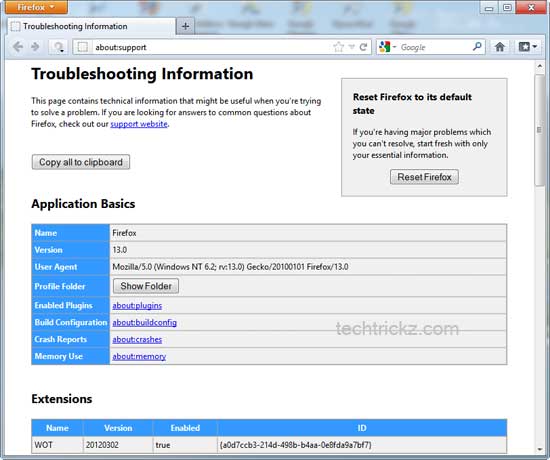
Firefox 13 Will Have Reset Button


The latest Firefox beta contains a feature that has been on the Mozilla support team’s to-do list for, well, “forever.” The “Reset Firefox” option is intended to help users avoid troubleshooting headaches and will be particularly handy when nothing else seems to work. What’s more, you can reset the browser without sacrificing your personal data with this one-click option. Hit the jump to find out how.

According to Mozilla’s Michael Verdi, the realization that not everybody possesses the time and expertise necessary “to identify the exact cause of the problem and just fix that” is what  prompted the non-profit to develop this feature.
“So the support team worked with product and engineering to create the Reset Firefox feature,” he wrote in a recent blog post. “The first implementation of this is a button on the Troubleshooting Information page (about:support). What is [sic] does is create a new profile and migrate your bookmarks, passwords, cookies and form data. Everything else gets set to the defaults.”

However, please note that at the moment this feature only works with the default profile, and saves nothing else except the bookmarks, passwords, cookies and form data associated with that profile. If you’re using a Nightly or an Aurora build of Firefox, the reset feature may not work for you.

Firefox 13 will graduate to the stable channel on June 5, 2012, as per Mozilla's (rapid) release schedule.

~ Pulkit Chandna

5.17.2012

Microsoft bans Firefox on ARM-based Windows, Mozilla says

Raising the specter of last-generation browser battles, Mozilla launches a publicity campaign to seek a place for browsers besides IE on Windows devices using ARM chips.
IE10: the only browser allowed on Windows for ARM-based devices?
Stop me if you've heard this one before: Microsoft muscles aside other browsers and cements the dominance of Internet Explorer. The browser market, deprived of competition, stagnates.

That, of course, is what happened during the first browser war of the 1990s and beyond, on personal computers. Today, Mozilla's top lawyer warned that Microsoft's behavior threatens a repeat of history, because it's telling Mozilla that it's barring Firefox from forthcoming Windows 8 machines that use ARM processors. 

"They're trying to make a new version of their operating system which denies their users choice, competition, and innovation," said Harvey Anderson, Mozilla's general counsel. "Making IE the only browser on that platform is a complete return to the digital dark ages when there was only one browser on the Windows platform."

Anderson has been discussing the matter with his counterparts at Microsoft, but the company hasn't budged, he said. Anderson also detailed concerns in a blog post. 

Microsoft declined to comment for this story.

Microsoft's position raises the prospect not only of refighting the browser wars of more than a decade ago, but also of reviving the grindingly slow antitrust litigation from the U.S. Justice Department, 20 U.S. states, and the European Commission. The U.S. case is closer to today's situation: the accusation that Microsoft abused its monopoly power in Windows to crush browser pioneer Netscape. 

"Microsoft used its monopoly power to develop a chokehold on the browser software needed to access the Internet," then-U.S. attorney general Janet Reno said upon suing Microsoft.

Although Microsoft didn't prevail in those cases, its, uh, competitive spirit appears to be unquenched.

Mozilla isn't considering legal action at this time, and Anderson said going to court would be "a solution of last resort." But it's an option if nothing changes. 

"First I want to really see if Microsoft is intent on pursuing this path. They could have a subsequent release that allows third-party browsers," Anderson said. "Sometimes they need some pressure. If it turns out to be legal pressure, that could be the thing."

Technically, Mozilla could release a version of Firefox for Windows 8's new Metro interface -- it's indeed building one for more traditional Windows 8 PCs that use x86 chips. But that browser would be crippled on Windows RT, said Asa Dotzler, a Mozilla spokesman. 

"First, Microsoft has a browser that runs in Classic mode on Windows ARM. They are not allowing us that same access to run our browser on Classic. Second, Microsoft has a browser that runs in Metro mode on Windows ARM that has access to rich APIs that they are denying to third-party Metro browsers on Windows ARM," Dotzler told CNET. "So, we are denied the ability to deliver any browser on Classic, and we are denied the ability to build a competitive browser on Metro." Dotzler also elaborated on the issue in a first and second blog post.

In terms of worldwide personal computer browser usage, Microsoft's IE is on the rebound after years of declines.
Why bar Firefox?
Microsoft Deputy General Counsel David Heiner told Mozilla it won't permit other browsers for two reasons, Anderson said: 
  • ARM processors, which power virtually all iOS, Android, and Windows Phone smartphones and tablets today, are different from the x86 chips that power PCs. The chips have new requirements for security and power management, and Microsoft is the only one who can meet those needs.
  • Windows RT -- the version of Windows 8 geared for ARM devices -- "isn't Windows anymore."
Anderson scoffs at the arguments. "I'm not aware that Microsoft is the exclusive and sole proprietor of technology capable of working in the ARM environment.... It's a different architecture, but it's not the first time we've had an OS that works on a different architecture," he said of the first point.

Of the second, he says Windows RT uses the same user experience, programming interfaces and Windows Update system. "The idea that it's not Windows it doesn't make sense." 

Browsers, of course, aren't just any old software. They're essentially becoming miniature operating systems unto themselves able not just to show Web pages but to run Web applications. Browsers nowadays have multitasking, hardware-accelerated graphics, pop-up notifications, and built-in videoconferencing. It's no coincidence that IE10 will provide the display engine for some native apps, not just Web apps, running on Windows 8.

Not coincidentally, given their steadily more sophisticated processing capabilities, browsers are also a prime vector for attack. So Microsoft could perhaps be forgiven thinking that running multiple browsers on Windows would mean a bigger attack surface for those trying to compromise computers. 

Pshaw, Anderson said. "I trust Firefox before I trust IE. That's one of the key reasons Firefox took off." 

Overall, it looks like Microsoft is taking pages from the Apple playbook. On iOS, Apple permits only its WebKit browser engine to be used for Web apps and Web pages. That can simplify life for Web developers racing to adapt to mobile browsing -- but other browsers suffer.

And like iOS, Windows RT also only will be available preinstalled -- something that simplifies hardware combinations that can become a support nightmare. Windows RT also only will run software delivered through Windows Update or the Windows Store.

Clearly, Microsoft is concerned about keeping the best possible experience, and it's willing to clamp down on old-style Windows programming methods from the x86 era to do so. In a blog post about programming for Windows 8 on ARM, Microsoft's Windows chief Steven Sinofsky has this to say about moving Windows apps written for x86 chips to the ARM world:
 

Broken promises?
Mozilla also suggests Microsoft has gone back on 12 principles for promoting choice and competition on Windows that General Counsel Brad Smith announced in 2006. 


The Web page about the principles is no longer obviously available on Microsoft's site, but a press release and Smith speech about it remain.

In that speech, Smith extolled the virtues of openness to others' applications.
 
Smith cited iTunes as one example of software that Microsoft graciously accommodated even though it competed directly with its own Media Player product.

However, Smith indicated that not all decisions are final:
 

Reliving history
Internet Explorer's dominance, traces of which remain today especially in China, was indeed a grim period for Web developers in many ways. 


The browser's dominance did simplify programming by letting many code for that single browser, which bucked some Web standards. But then Microsoft left IE6 largely untouched for years. A lot of online application innovation took place instead with Flash Player from Macromedia, later acquired by Adobe Systems.

Mozilla's release of Firefox in 2004 rallied allies who wanted something better. Mozilla and Opera, another browser rival, also began a project called the Web Hypertext Applications Technology Working Group to advance HTML standards when the World Wide Web Consortium decided it didn't want to. Apple later joined, too, and eventually the W3C picked up the baton again.

By the time Google arrived with Chrome in 2008, Microsoft was well on its way to re-engaging with Web standards work and to producing the vastly more competitive IE9. Now its competitive juices in the browser market are clearly flowing again. 

But this is the kind of challenge that could rally Mozilla, too. The non-profit organization rose from the ashes of Netscape, and for years, much of its identity was defined in opposition to Microsoft. Mozilla embraced open-source software and touted the Web standards Microsoft ignored.

Now Anderson generally considers Mozilla's relationship with Microsoft as healthy. 

There's one huge difference from the last-generation browser battles: Apple.

Apple's Safari dominates mobile browsing.
Safari is the dominant mobile browser by far, and on phones and tablets, Microsoft is very much the underdog. On ARM devices today, IE isn't even close to second-place Android.

So a complacent IE team seems improbable at this stage. 

Anderson is still dissatisfied. Sure, people can switch to another mobile operating system by switching devices, but that's not easy.

"If that's your version of choice, I think that's a sad world, and it doesn't have to be that way," he said. 

He remains optimistic that an amicable solution can be found. Microsoft altered course to let other browsers run in Windows 8's Metro interface on x86 machines, and Firefox and Chrome are headed for Windows 8 now. So the company can budge.

And for practical reasons, Mozilla hopes it will. 

"I'm not inclined to look to judicial solutions as the No. 1 way to protect users," Anderson said. "I was at Netscape in the 1996 era. I watched the slow wheels of justice turn."

By that time it was over, Netscape was long gone as an independent company. 

~ Stephen Shankland


4.21.2012

Security vs. convenience: Will users embrace the opt-in?

Takeaway: Patrick Lambert looks at Mozilla’s recent decision to make Flash and other plugins an opt-in feature for users instead of a default. Will users regard it as a nuisance or a safeguard?
One piece of news that’s been making the rounds on security news sites lately is Mozilla’s decision to go “opt-in” with the Adobe Flash plugin, instead of leaving it on by default like it currently is. Right now, when someone installs any browser, they also get Flash built in, and when they go to a website that requires Flash, the plugin gets loaded right away. Instead, according to a new proposal by Mozilla to be implemented in a future version this year, they will change that model to be “opt-in”. When a user visits a website that requires Flash, instead of an automatically-loading plugin, an image or message will appear requiring the user choose whether or not to activate the content by loading the plugin. Because Flash is one of the more popular plugins out there and gets attacked regularly, this will help to prevent malicious sites from loading a hidden SWF file, and infect an unpatched browser. This is the first time a browser maker has decided to go this route with Flash, but is it worth it? Are users going to find this useful or annoying? And more importantly, is it really a useful security measure — something other developers should look at?

There are many ways to implement such a feature, and on the surface it sounds like a good idea, not just for security but for speed as well. Any time a user goes to a website containing content that requires a plugin, or worse several plugins, this slows down the loading time considerably. By asking the user has to specify whether they want to play that content makes the page load faster, and then they get to decide if they want to wait the extra second or two for the plugin to load. Of course, the negative side is that it can be annoying to many users. Extra clicks to get to content may become a nuisance. Users of extensions like NoScript and AdBlock already know what it’s like. They have been able to disable Flash in a very similar fashion for years now. But users that have these extensions also tend to be the more sophisticated ones, and they probably aren’t the targets of this new feature. Instead, it’s the less savvy users who may fall for fake Flash pages.

Whether or not a feature is going to be annoying depends on its implementation. We’ve seen how many people complained about Windows Vista’s user access control, yet with Windows 7, Microsoft refined the feature to be much less of a pain. Here, having a nasty error message on every page that includes a Flash file would not be very elegant. Instead, the best way might be to have a simple bar at the top of the page, something users are used to, where they can click on the Accept button. Then, the browser could remember the preference on a per-site basis. Still, is this really a good security measure? To answer that we only need to look at recent exploits, and how people typically get compromised. In the vast majority of cases, some type of injection is the culprit. Whether a site has an SQL vulnerability, and a remote script is loaded, or it’s a badly designed comment form which allows HTML to be added, the result is the same. People are sent to another site, usually through a frame, to load a JavaScript file. Then, payloads are sent to the browser trying to exploit recent bugs in Flash, Adobe Reader, the browser itself, and so on. So yes, in this case, if a hidden iframe is loaded on a compromised site, then that Flash exploit payload would never get loaded, since the user wouldn’t be clicking on it.

This prompts an interesting question. Is this a better way to build applications, in general? Take another online tool that millions of people use everyday: IM. Whether you use Microsoft Live Messenger, AIM, ICQ or any other, these applications no longer support just text. They allow people to send images, videos, links, music and much more. In fact, IM used to be a big target for hackers around 10 years ago. Every couple of months we would hear of a new virus that spread like wildfire through the IM clients, bot accounts sending corrupted images, or EXE files that would run automatically. Since then, these clients have been hardened to be almost foolproof. Now, if you send anything but text on the majority of these networks, a user action is required. Nothing loads by default, you need to opt in and click the Accept button to view the image, video or presentation. Many of them even blocks binaries entirely. Email has turned out pretty much the same way. The number of computers being infected when users ran Microsoft Outlook, and an email they received ran some JavaScript automatically, even just through the preview pane, was insane. Now, many email providers like Gmail won’t even show images from unknown senders until the user opts in.

It’s not clear yet how the final version of this particular Firefox feature will operate, or how users will react. But if it turns out well, this may be a first of many. This could become the default for all plugins. After all, with HTML5, pages can be created with advanced multimedia and dynamic functions without having to use any plugin, so websites don’t need so many plugins. So if it proves to be a good security benefit, a speed increase, and something users can live with, it might be that we see other browsers doing the same in the future, and even other application developers.

Do you think the majority of browser users will embrace the trend toward opting in? Will it have any real effect on the amount of malware that gets downloaded?

~ Patrick Lambert