Cisco Learning Network Store Promotions Page
Showing posts with label iPad. Show all posts

10.27.2016

Apple unveils new TV App for Apple TV, iPhone and iPad

 
We were expecting Apple to release a new app for Apple TV at its "Hello Again" event, and that was the first thing that the tech giant showed off.
 
Called simply TV, the new app lets you discover and watch TV shows and movies from multiple apps on Apple TV, iPhone and iPad. There’s also a new Siri feature for Apple TV that lets viewers quickly tune in to live news and sporting events.
 
Siri is aware of where sports events and news are being shown, and users can simply say things like, "Watch the Stanford game", "Which football games are on right now?" or "Watch CBS News" (all Apple's own examples) and Siri will switch to the relevant live broadcast.
 
"Using apps on Apple TV, iPhone and iPad has become the primary way for so many of us to watch television", said Eddy Cue, Apple’s senior vice president of Internet Software and Services. "The TV app shows you what to watch next and easily discover TV shows and movies from many apps in a single place".
 
 
Apple showed off the following key features:
  • Watch Now: Watch Now is where viewers will see their collection of available shows and movies from iTunes and apps. From Watch Now, viewers can then go to Up Next or Recommended to choose what to watch.
  • Up Next: Users can enjoy the shows and movies they are currently watching, including recent iTunes rentals and purchases -- all presented in the order they are most likely to watch first. For example, when viewers finish an episode, the next one will automatically appear at the start of the Up Next queue, as will any new episodes as they become available. At any time, users can simply ask Siri to continue watching a show and immediately pick up where they left off.
  • Recommended: Viewers can explore a great selection of curated and trending shows and movies, including collections handpicked by Apple’s curators, and dedicated categories and genres such as kids, sci-fi and comedy.
  • Library: Viewers can access their entire collection of iTunes movies and TV shows that they have rented or purchased on iTunes.
  • Store: If users are looking for something new, they can check out the Store to discover great new content across video services that they have not yet downloaded or are not yet subscribed to, along with the latest releases on iTunes.
  • The TV app will allow users to begin watching on one device and pick up where they left off on another.
 
In addition to the new TV app, customers in the US will have a simplified way of enjoying their pay-TV video apps by using single sign-on. Starting in December, subscribers to DIRECTV, DISH Network and others will be able to sign in once on Apple TV, iPhone and iPad to access apps that are part of their pay-TV subscription.
 
The TV app and single sign-on will be available in December as free software updates for Apple TV (4th generation), iPhone and iPad customers in the US. Live tune-in with Siri is available today.

~ Wayne Williams

9.21.2016

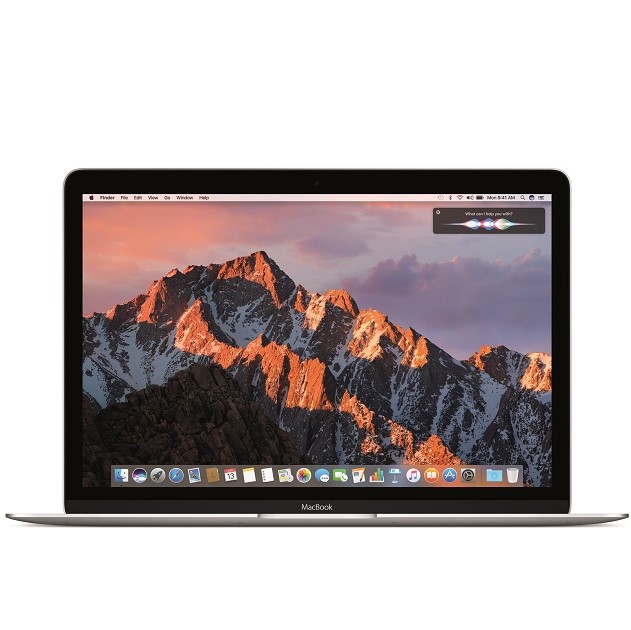
Apple releases macOS Sierra as free upgrade

Apple's Mac computers -- MacBook, iMac, Mac Pro, and Mac mini -- are works of art. Not only is the hardware beautiful, but the included operating system is visually impressive too. Today, after a series of Beta releases, the final 10.12 version of the desktop operating system formerly known as OS X -- now known as 'macOS' -- is available for download. Apple dubs the latest version of the desktop operating system 'Sierra', after a mountain range in the company's home state of California.
 
While Windows 10 is a great operating system for productivity, Microsoft simply cannot match the visual beauty of macOS. Still, Microsoft's latest operating system does offer some unique features, such as the voice assistant Cortana -- something that Apple's desktop did not offer. Today, this changes, as the legendary Siri comes to macOS Sierra. Best of all? As usual, this is a free upgrade for owners of compatible Mac computers!
 
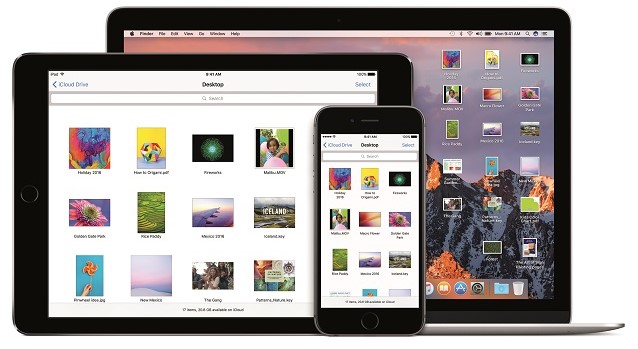
"Siri on the Mac can help send messages and email, find documents, look up information, search a user’s photo library, adjust system preferences and more. Users can also drag and drop Siri results into documents or pin them into their Today view for later reference. Universal Clipboard allows users to copy content from an app on one Apple device and paste it into another app on a different Apple device. With iCloud Desktop and Documents users can now access the files on their Desktop from iPhone and iPad. And Auto Unlock lets users automatically log into their Mac when they are wearing an authenticated Apple Watch", says Apple.
 
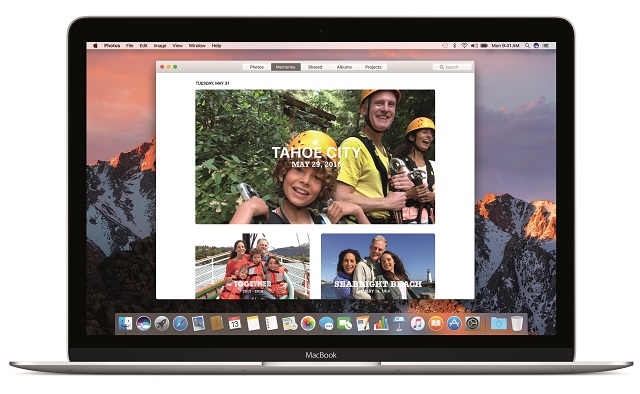
The iPhone-maker further says, "Photos introduces Memories, which highlights favorite and forgotten moments in users’ photo libraries by automatically creating curated collections of occasions like birthday parties or family vacations. Photos uses advanced computer vision to identify faces, objects and scenes in your images, so photos can be searched by who and what is in them. An all-new Brilliance editing tool brightens dark areas and pulls in highlights to make photos look richer and more vibrant".
 
 
One of the biggest pain points of online shopping is the need to enter your information, such as name and address, on every merchant you use. Then, you have to find your credit card and enter those numbers too. It is a real chore. Sometimes I will buy a product on Amazon as opposed to saving money on a new site, simply because it is easier.
 
 
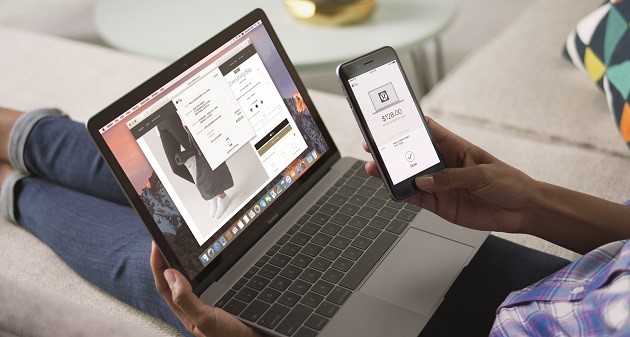
Apple Pay on the web for Safari, new to macOS Sierra, solves this dilemma as it makes shopping even easier. If a merchant supports the feature, you can checkout and pay using your Apple Pay information -- creating an account with the online retailer is not necessary. For added security, the transaction must be verified using an iPhone or Apple Watch. By leveraging a second device, it arguably makes the overall experience safer.
 
 
What else is new in the operating system? Apple shares the following.
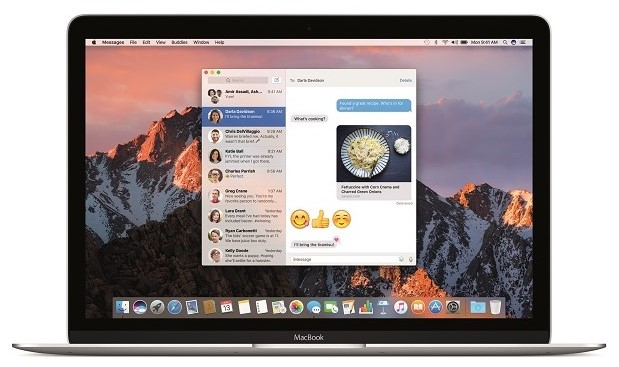
  • Messages makes conversations more interesting, allowing users to preview web links and play video clips from right within the app; respond to messages with a Tapback like a heart, thumbs up and more directly onto a message bubble; and send bigger emoji for more message impact.
  • Tabs are now available across Mac apps that support multiple windows, including Maps, Mail, Pages, Numbers, Keynote, TextEdit, and even third-party apps.
  • Picture in Picture floats video from Safari or iTunes in a window over the desktop. The window can be resized, dragged and pinned to any corner of the screen so users can watch video while they work.
  • Optimized Storage frees up space when a Mac starts getting full by storing infrequently used items in the cloud and helping users remove apps and files they no longer need.
  • Apple Music in iTunes makes it even easier to discover new music and browse exclusives and new releases.
 
This upgrade also blocks applications from improperly accessing the accessibility settings in the operating system. This was most infamously leveraged by Dropbox, and you can read more about it here. While the cloud storage company had good intentions, there was fear that it could be used as a loophole for more nefarious apps -- Apple is wise to close it. If you are a Dropbox user, do not worry -- the company addresses macOS Sierra here.
 
If you own a compatible Mac, you can download macOS Sierra immediately from the App Store here. It looks incredible, so you should definitely not hesitate. Once you download it, please tell me what you think in the comments below.
  
~ Brian Fagioli

5.24.2016

Why aren't we buying tablets anymore?

 
Six years after the release of the iPad, a once booming market is on the verge of a massive shift, one that not many predicted. For those who visited Mobile World Congress, the world’s largest mobile conference earlier this year, you had a better chance of spotting the odd person wearing Google Glasses than any new tablet devices.
 
According to the recent industry analysis conducted by IDC, the tablet market was down by as much as 10.1 percent, last year, with an estimated 206.8 million tablets shipped. That’s down from 230.1 million shipped in 2014. These stats are a bit better if you look at other research numbers, which estimate that 224.3 million tablets were shipped in 2015, compared to 242.2 million in 2014 -- a decline of only 8.1 percent.
 
I can remember how folks were excited about the Nexus 7, but this year it seems big electronic companies aren’t even trying to release new tablet devices. Excluding Lenovo’s attempt at getting into the lower end tablet spectrum and Huawei’s launch of the Matebook (which technically isn’t a tablet), tablet devices weren’t even mentioned by the likes of Samsung, Sony, HTC or LG. With these big brands not having any immediate plans in this space, does this mean that consumers don’t care about tablets anymore?
 
Cannibalized by Large Screen Smartphones
 
The shift away from tablets can be in part explained by the ever growing rate of smartphone adoption, and with the introduction of larger devices, now known as the phablet, it seems that many users are more than happy binging on Netflix via their plus-sized mobiles. The first Samsung Galaxy had a 5.3-inch display, meaning that what was considered at the time to be a phablet is now an average sized mobile device. So big phones have become a norm and are often seen as a deterrent for anyone considering the purchase of a tablet -- it’s just easier to deal with one device instead of two.
 
With an estimated 50 percent of Android tablets shipped last year featuring a 7-inch display, the threat of larger screen smartphones is a clear factor in the decline of tablet sales.
 
Usage Patterns
 
If we take a closer look at the market, it becomes clear that tablets are now a commodity. With perfectly adequate tablets now available for less than £100, little to no differentiation between devices and a saturated market, it’s becoming increasingly harder for companies to make a profit on them.
 
With the introduction of the iPad, nobody was sure how often users would want to upgrade their tablets -- would the pattern be closer to a smartphone or an elongated cycle, more reminiscent of laptop usage cycles?
 
Now we seem to have a better understanding of this industry, as identified by Apple’s own Tim Cook, the usage cycle of iPads is "longer than an iPhone, probably between an iPhone and a PC". Chances are, you have a tablet at home and you mainly use it for browsing the internet, watching Netflix or some light reading during family time. Tablets have become a shared family device, with relatively light usage and software upgrades keeping the devices current, the need to replace them is declining.
 
Laptops Are a Tougher Rival Than Predicted
 
With the rapid success of the iPad and subsequent Android tablets flooding the market, many pointed to the upcoming demise of laptops. However, the industry didn’t anticipate the rise in smartphone screen size, which in turn has resulted in tablets looking more like a luxury device and making laptops hard to resist.
 
Google’s recent introduction of its Chromebook range and new lower price point for entry level notebook devices have hurt tablet sales across established Western markets, with consumers opting to replace their laptops rather than investing in a luxury tablet which does pretty much everything their shiny smartphone can.
 
So Where’s the Innovation or the Way Forward?
 
When looking at all the tablet devices available on the market, it’s hard not to notice the iterative approach in their improvements on previous models. New tablets genuinely lack exciting and innovative features, which in turn are a significant upgrade factor, especially visible in the early adopter groups.
 
On the other hand, what’s left to introduce? Larger screen resolutions; haptic feedback; personalized tablets aimed at specific demographics such as children or gamers? There is no clear upgrade direction within this market, which can easily change with the introduction of interconnected homes or perhaps a shift from the current consumer focus to target schools and businesses with tablet devices.
 
Tablets Can Make a Comeback
 
It is becoming clear that tablets are facing a tough time, however they can still make a comeback if companies analyze the usage patterns closely and address the current market’s needs. Tablets need to clearly differentiate from both smartphones and laptops, providing users with a distinctive, personalized experience. That said, if nothing changes, tablets will be further cannibalized by the increasing rate of smartphone adoption and forever sit on the shelf next to other luxury goods.
 
Milo Trzcinski, Director of Client Services, Pocket App.
 
Published under license from ITProPortal.com, a Net Communities Ltd Publication. All rights reserved.
  
Photo Credit: xavier gallego morell/Shutterstock
 
~ Milo Trzcinski

4.21.2016

SanDisk unveils next-generation iXpand Flash Drive for iPhone, iPad, and iPod touch

Storage for iPhone and iPad can be costly. Since you cannot realistically add more inside later, you must decide at purchase how much you will need. Then, each bump up will cost you about $100. This can make an iOS device purchase a very costly affair.
 
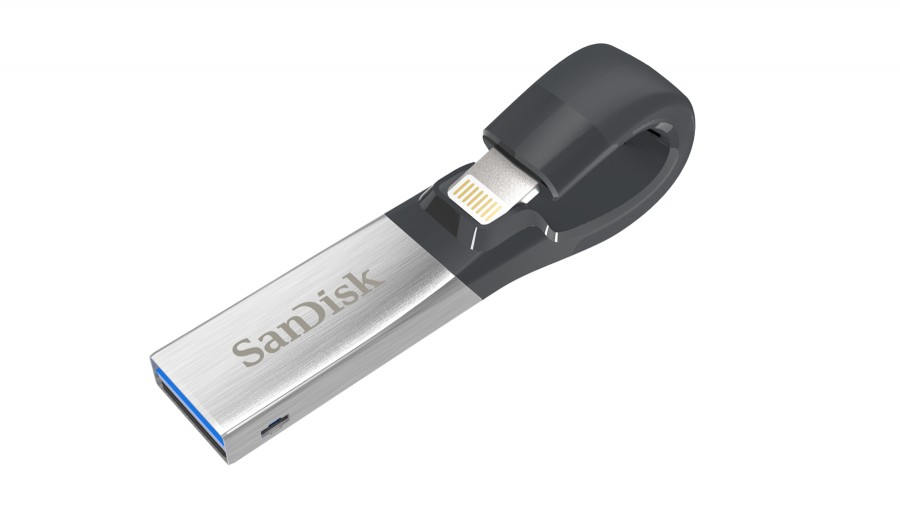
As an alternative, however, you can use flash drives on the iPhone, iPod touch and iPad, but there is a catch; you will need to buy a lightning to USB type A cable, or a flash drive with a lightning connector. While not usually an elegant solution, today, SanDisk unveils an intriguing such product -- the next-generation iXpand Flash Drive -- and it looks really cool.
 
"Designed to be the perfect storage companion for iPhone and iPad, the reinvented iXpand Flash Drive features a flexible Lightning connector and now a USB 3.0 connector so users can quickly and easily move photos and videos between their iPhone and iPad and Mac or PCs. The iXpand Flash Drive allows users to automatically back up their camera roll and contacts, and watch popular video formats straight from the drive. The new drive also includes encryption software that password-protects files, allowing people to share their content while keeping sensitive files secure across devices", says SanDisk.
 
The company further says, "the product features a redesigned app, the iXpand Drive app, which offers new features and an improved user experience. Giving users the option to save space instantly, the app now has a camera function so users can shoot and save photos or videos directly to the drive instead of on their iPhone or iPad. The app also allows users to automatically back up content from popular social networking sites, as well as play back music within the app".
 
What's really cool about the app, is that it will detect the drive being plugged in, and automatically launch. This makes using the iXpand Flash Drive seamless. There is no need to manually launch the app each time. Both the drive and app should work fine on any device that has both a lightning connector and is running iOS 8.2 or higher.
 
The design of the flash drive is quite genius -- the USB Type A connector will fold behind the device when not in use. This should limit the potential of breaking it, as can happen when something -- like the Apple Pencil -- sticks out straight.
 
If you want to buy it, it is available now, starting at $49.99 for 16GB. The highest capacity 128GB variant is $129. The  middling 32GB and 64GB models are $69 and $79, respectively.
 
Will you buy it? Tell me in the comments.
 
~ Brian Fagioli

3.24.2016

You might want to hold off on upgrading to iOS 9.3, OS X 10.11.4 El Capitan

 
Apple earlier this week released new versions of its mobile and Mac operating systems, namely iOS 9.3 and OS X 10.11.4 El Capitan. They come with a significant number of changes, like Night Shift mode, extended Wi-Fi calling support and lots of security fixes, but also introduce bugs which are causing major issues for some early adopters.
 
It is not unheard of a new iOS or OS X release to break things, as Apple seems to be dealing with these kind of things quite frequently nowadays. Not everyone may be affected, but if you have an iPad 2 or use Apple's messaging services often on your Mac you might want to hold off on performing the upgrade.
 
For iPad 2 users, the update to iOS 9.3 leads to an activation issue, which ultimately renders the device "useless". As you may know, in order for any iOS device to work, it has to be able to activate itself by connecting to Apple's servers. Normally this is done in a matter of seconds when connected to a Wi-Fi or cellular network.
 
However, it looks like, following the iOS 9.3 upgrade, iPad 2 devices cannot connect to the server anymore. At least that is the error message that affected users have reported. It is unlikely to be an issue on the server side, and more likely to be a bug in the upgrade process which affects these devices.
 
Users who have reported this issue say that it is possible to bring their iPad 2 back to life by installing iOS 9.3 from scratch using recovery mode; restoring iOS 9.3 on the device has to be performed twice to work. This is not something that everyone might be comfortable doing though.
 
Connection issues also plague a number of OS X 10.11.4 El Capitan users, who have reported that they are no longer able to access Facetime and iMessage on their Macs following the upgrade. As a Mac user myself, I have yet to experience such problems. While writing this story I was able to access both services without issues. However, if you are a heavy user, you might want to postpone the update to OS X 10.11.4 El Capitan for a while.
 
Photo Credit: 9nong/Shutterstock
 
~ Mihăiță Bamburic

2.07.2016

Apple says it is bricking iPhones with Error 53 for security reasons


You wouldn't expect a simple iOS update to completely kill your iPhone, but this is exactly what is happening. Users who took their handsets to a third party for repair and subsequently updated their software have run into error 53 and a bricked handset. Apple is not only aware of the problem, but says that it is intentional.

As we learned the other day, the problem seems to arise for people who have had their home key (specifically) fixed by a non-Apple-authorized repairer. Apple has now admitted that iOS detects the home key has been tinkered with, and says that Error 53 is a move to 'protect our customers' -- customers who will, presumably, think twice before upgrading to an iPhone 7.

The reason for the extreme security measures taken by Apple is that the home key houses the Touch ID sensor. The fear is clearly that the button could be replaced with one that includes a hacked sensor so Apple has decided that in order to prevent unauthorized access to iPhones and iPads, all access will be blocked -- and this is achieved by unceremoniously bricking said devices.

In a statement to the Guardian, Apple defended what is happening by saying:
We take customer security very seriously and Error 53 is the result of security checks designed to protect our customers. iOS checks that the Touch ID sensor in your iPhone or iPad correctly matches your device’s other components.
If iOS finds a mismatch, the check fails and Touch ID, including for Apple Pay use, is disabled. This security measure is necessary to protect your device and prevent a fraudulent Touch ID sensor from being used. If a customer encounters Error 53, we encourage them to contact Apple Support.
It’s hard to imagine a comparable scenario in which the arbitrary disabling of an expensive device, that has not been reported stolen, would be deemed acceptable. Upon contacting Apple Support, an admission by customers that a third party repairer has been used is an admission of violating the company's terms and conditions. This means that Apple charges customers handsomely for the privilege of replacing their bricked handsets, magically recouping the money -- and more -- lost to the third party.

Photo credit: Petlia Roman / Shutterstock

~ Mark Wilson

2.05.2016

Here's how to bypass the iOS lock screen passcode


There are numerous ways to keep your smartphone safe from prying eyes, and a lock screen protected with a passcode is a popular choice. But a newly discovered vulnerability in iOS 8 and iOS 9 means that iPhones and iPads could be accessed by attackers.
  The vulnerability was discovered by security analyst Benjamin Kunz Mejri and it has been assigned a Common Vulnerability Scoring System (CVSS) count of 6.0, as well as a 'high' severity rating. Apple has been aware of the issue since late last year, but has yet to issue a patch.
  Vulnerability Laboratory has issued a security advisory that warns: "An application update loop that results in a pass code bypass vulnerability has been discovered in the official Apple iOS (iPhone 5 & 6 | iPad 2) v8.x, v9.0, v9.1 & v9.2. The security vulnerability allows local attackers to bypass pass code lock protection of the Apple iPhone via an application update loop issue. The issue affects the device security when processing to request a local update by an installed mobile iOS web-application".
  As explained by security expert Graham Cluley, the exploit works by taking advantage of a brief period after rebooting during which passcode authentication is disabled. Vulnerability Laboratory details how to exploit the security hole (text is produced verbatim with the original typos and grammatical oddities):

  • First fill up about some % of the free memory in the iOS device with random data
  • Now, you open the app-store choose to update all applications (update all push button)
  • Switch fast via home button to the slide index and perform iOS update at the same time. Note: The interaction to switch needs to be performed very fast to successfully exploit. In the first load of the update you can still use the home button. Press it go back to index
  • Now, press the home button again to review the open runnings slides
  • Switch to the left menu after the last slide which is new and perform to open Siri in the same moment. Now the slide hangs and runs all time in a loop
  • Turn of via power button on the ipad or iphone ....
  • Reactivate via power button and like you can see the session still runs in the loop and can be requested without any pass code. Note: Normally the pass code becomes available after the power off button interaction to stand-by mode
  • Successful reproduce of the local security vulnerability!
Check out the video below to see the exploit in action:

  Physical access to the device is required, so the advice is to make sure you do not leave your iPhone or iPad unattended.

Photo credit: Twin Design / Shutterstock

~ Mark Wilson

1.27.2016

Apple's Safari browser crashing for some users worldwide: The Verge

A man tests a mobile phone, an iPhone 6 by Apple in a shop in Munich, Germany, January 27, 2016.
REUTERS/MICHAELA REHLE
Apple Inc's Safari search browser is crashing for some users when they run a search from the address bar in both iOS and OS X devices, the Verge reported.

The problem appears to be affecting iOS and OS X devices worldwide, the Verge reported on Wednesday.

Apple's iPhones and iPads run on iOS, while its Mac computers operate on OS X.

The problem, which is related to Safari's search suggestions feature, can be rectified temporarily by disabling the feature or using the private mode option in the browser, the Verge reported, citing an iOS developer Steven Troughton-Smith. (bit.ly/1SiXArK)

Apple was not immediately available for comment.

Apple forecast its first revenue drop in 13 years and reported the slowest-ever increase in iPhone shipments on Tuesday.

~ Lehar Maan

1.12.2016

Apple previews upcoming iOS 9.3 features for iPad, iPhone, and iPod touch

  
If you want a very secure and feature-rich Unix-like mobile operating system, Apple's iOS is incredible. In fact, many forward thinking folks, like myself, envision a day where it becomes a desktop OS too, potentially replacing OS X. While iPad Pro is a good first step, the iOS operating system still has a long way to go in that regard.

Today, Apple announces the features for the upcoming iOS 9.3 -- currently in beta. While hardly revolutionary, this evolutionary upgrade is packed full of some really cool new things. It may even be able to help you sleep better. No, really; iOS 9.3 could improve your overall health and well-being.
"This latest iOS release adds numerous innovations to the world's most advanced mobile operating system. There are improvements to a wide range of apps, along with great new additions to CarPlay. iOS 9.3 may even help you get a good night's sleep. And you'll find a preview of new features that will make using iPad in schools easier and better for students and admins", says Apple.
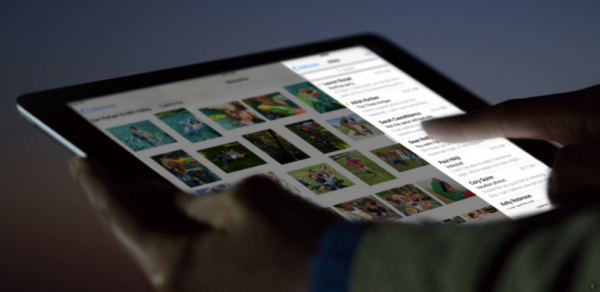
What is this hubbub about iOS helping you sleep better? It is nonsense, right? Actually, no. The company explains, "many studies have shown that exposure to bright blue light in the evening can affect your circadian rhythms and make it harder to fall asleep. Night Shift uses your iOS device's clock and geolocation to determine when it’s sunset in your location. Then it automatically shifts the colors in your display to the warmer end of the spectrum, making it easier on your eyes. In the morning, it returns the display to its regular settings".

 
Apple's technology appears scientifically sound, and Harvard Medical School agrees,stating, "light at night is bad for your health, and exposure to blue light emitted by electronics and energy-efficient lightbulbs may be especially so."
  
It remains to be seen if Night Shift will truly result in a significant sleep improvement. More importantly, users will only embrace the feature if it doesn't negatively impact the overall device experience. In other words, if warmer colors at night make images appear less-than perfect, I can see it being an immediately-disabled feature.
 
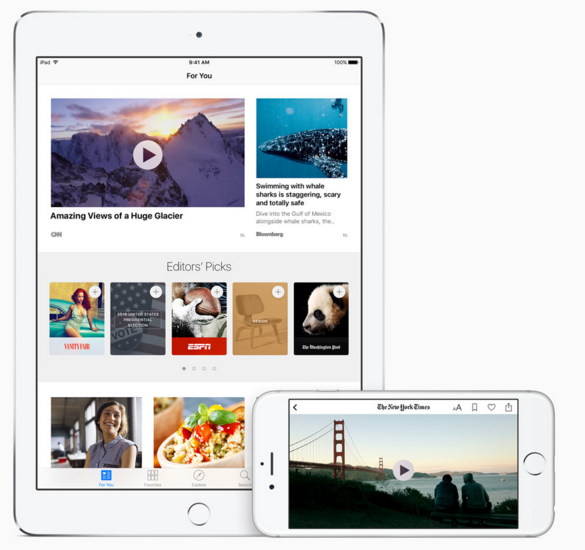
While that is the most newsworthy new feature, it is hardly my most anticipated. No, that would be improvements to the News app. As someone who wants to stay up-to-date on the latest news stories, Apple's app has been a godsend. Not everyone loves it, but I appreciate the overall aesthetics -- the design keeps me hooked. iPhone users will be able to view stories in landscape, and videos can be viewed directly in the feed. Apple even promises faster updates -- the most important thing for news-junkies.
 
 
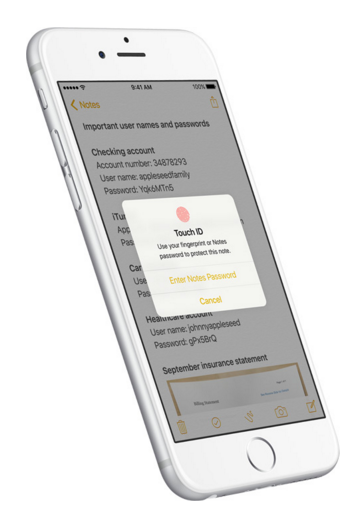
Another cool feature is the ability to lock notes. If you leverage the official Notes app like I do, you probably put a lot of private information in the app. Well, you can now password or fingerprint-protect specific notes. At first, I was perplexed by this -- my iPhone and iPad are protected at login. My colleague Mihaita, however, reminded me that some people share devices or unlock them and hand them to family members. After sharing his insight with me, I can understand the value. You can hand your unlocked device to your kids, for instance, without them accessing private notes. Me? I don't let anyone touch my iPhone or iPad!
 
 
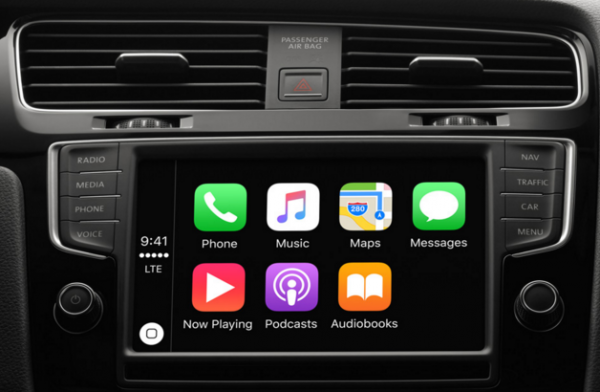
iOS 9.3 also delivers improvement to CarPlay, but this is not something I will be using anytime soon. Unfortunately, I probably have many more years with my old Ford Focus -- a new car with a fancy car stereo is not in my future. With that said, if you are planning on getting a new car with CarPlay support, you can look forward to easier access to predictive playlists from Apple Music and nearby locations in Maps. Need to use the potty? Maps will find you a gas station. Sadly, it will not alert you to toilet cleanliness -- yet.
 
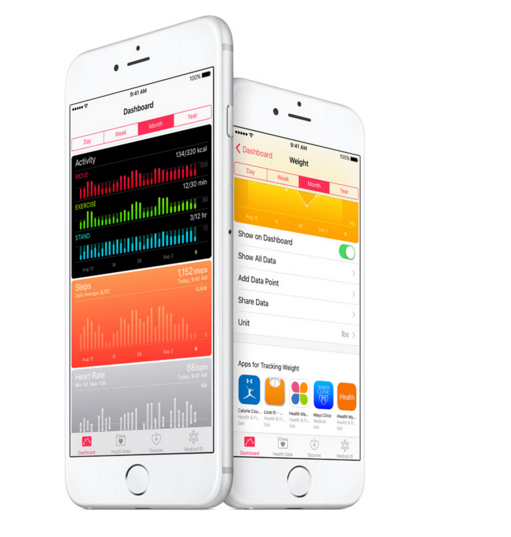
Of course, iOS 9.3 also aims to improve the user. Besides color-trickery for improved sleep, Apple wants to help improve your health in other ways -- including your brain, by way of education. The health dashboard will do a better job at aggregation and visualization, better bringing your health data into one place.
 
 
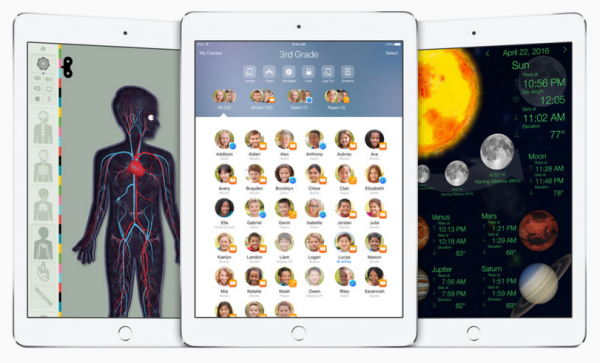
Apple will also introduce a new classroom app, which will improve the iPad experience in schools. In fact, this will allow multiple students to share one iPad -- a huge pain point and hindrance to iOS gaining more traction in the education market.
 
Are you excited for all of these upcoming features? Will Night Shift truly help you get better sleep? Tell me in the comments.

~ Brian Fagioli

1.09.2016

Buying a second-hand iPhone or iPad? Here's how to check it has not been stolen

You can save yourself hundreds of dollars by choosing to buy a second-hand iPhone or iPad. But beware, there are unscrupulous people out there trying to offload stolen devices onto unwary buyers. Here are some simple steps you can take to protect yourself.

Thinking of buying a second-hand iPhone or iPad? Here's a quick and simple way to check to see if the device you are being offered has been stolen.

Note: This works for devices running iOS 7, iOS 8, and iOS 9.

First off, ask the seller for the serial number and/or IMEI of the device. Ideally, get the seller to send you a photo of the information you need because it's much tougher to fake a photo. Details on how to find this information can be found here. If the seller doesn't want to give you this information, walk on by, because it's not like there's a shortage of iPhone and iPads out there.

Next, armed with this information, go to Apple's Check Activation Lock Status page and enter the information. This will tell you if the device is activation locked. If it is, ask the seller to unlock it and try again. If that doesn't happen, walk away from the sale, because if the seller can't unlock it, something's up for sure.

Remember that Activation Lock has to be disabled before you get the handset, otherwise you won't be able use it.

If you're being sent the device in the mail, be sure to check that the serial number and/or IMEI match the information you were provided with.

Here are some other tips:

  • Pick a seller with a good reputation.
  • Be wary of classifieds. Remember that eBay will get you a refund if things go bad (assuming you paid with PayPal).
  • If you're picking up the handset in person, then you can get the current owner to turn off "Find my iPhone" in front of you. If they can't, then it's bad news. If it's already turned off, turn it on and get them to disable it.
  • Verify that a SIM works and that the device has not been locked by the carrier.
  • If you're buying face-to-face, don't be rushed or bullied into the sale. Take your time. For your safety, carry it out in a public place (which preferably has Wi-Fi so you can test the device).
 

11.07.2015

Why Apple is the forbidden fruit of enterprise IT

Users may love Apple products but making them work in business is causing headaches for this tech chief.

 
The irony of the mystical apple which is the forbidden fruit is not lost on me as I struggle to contemplate Apple and its products within my technology domain.
 
Apple is certainly in demand from my user base and the passion with which users consume this brand, and insist on it, is bordering on frenzy.
 
With each new release — however minimal and bland — comes a wave of workers determined to be one of the first to get the device off the shelf and into the office. As consumer tech, while I am not a frenzied fan, I can at least understand the appeal and attraction for iPhones and iPads (although the appeal of the Watch is very much lost on me).
 
However, what people don't understand and what businesses need to know is that Apple is not business friendly enough - for me at least. It's rules require a 30 percent of any app revenue go to Apple, and in addition, their closed infrastructure and rigid development standards mean that developing applications for its devices is certainly not seamless. When I say applications I mean business-driven professional applications that require harmonized infrastructure to fully operate with behind-the-scenes infrastructure and integration.
 
It changes its technologies so fast that mature businesses, that have to temper change, can never catch up to really be able to create the killer business app. The product lifecycles are as short as 12 months which causes even more issues with businesses that want to use and develop their technologies in an ever effective way.
 
I feel businesses are still treated as an afterthought to the development of Apple's products and now more importantly then ever increasing services.
  
I get it, we are not central to Apple's overall strategy nor - based on its success - do we need to be. However, our user base, who are Apple's customers, don't understand why we can't integrate their devices into an ecosystem of applications to allow them to use their precious devices to work.
 
This is the disjoint: users then love Apple but hate IT the people who can't make Apple work in the organization. We are blamed but I think Apple has the problem.
 
The Naked CIO is an anonymous technology executive.
 
~ Naked CIO

9.21.2015

Apple cleans up the App Store after serious malware attack

 
Apple has started a clean-up operation of the Chinese version of its App Store after it was flooded with apps infected with XcodeGhost malware. The problem was not detected by Apple, but a number of security firms who discovered various malicious iPhone and iPad apps littering the Store.
 
The apps made their way past Apple's usually-rigorous vetting process after developers were tricked into using a counterfeit version of the Xcode tool to create them. The attack has been described as "a pretty big deal" although at this stage there are no reported instances of data theft or attacks on victims.
 
Apple spokeswoman Christine Monaghan said: "We've removed the apps from the app store that we know have been created with this counterfeit software. We are working with the developers to make sure they’re using the proper version of Xcode to rebuild their apps". Reuters reports that high-profile apps were targeted, including Uber clone Didi Kuaidi, and chat app WeChat.
 
Apple's wall-garden approach in the App Store has previously kept problems with malicious apps to a minimum. But the approach used this time around -- attacking developers rather than users -- highlights a weakness that could be exploited again.
 
Chinese security firm Qihoo360 Technology said that it had detected 344 apps infected with XcodeGhost. Apple has not yet provided users with any information about how to check their iPhones and iPads to see if they are infected.
 
Photo credit: TK Kurikawa / Shutterstock
 
~ Mark Wilson

9.18.2015

Apple customers report devices crashing on iOS 9 update

The new Apple iPhone 6S and 6S Plus are displayed during an Apple media event in San Francisco, California, September 9, 2015.


9.02.2015

What to expect at Apple's September 9 event: iPhone 6S, Apple TV, and more (roundup)

The technology giant is expected to release new hardware and software in tandem, with the chance of a few surprises along the way.


Here's what we think we know so far.

New iPhones will steal the show

Almost every year since its inception, Apple has released a new iPhone in September. It's almost certain that the company will reveal its latest mobile incarnation, likely to be called the iPhone 6S.
 
And if you were after a mystery or two, you might be disappointed, because almost everything so far has leaked.
 
From the various blogs and rumor mills, it's clear we can expect three new things. The first is a vastly similar if not identical design as its predecessor, but with a few minor modifications. The shell is said to be slightly thicker, making it more rigid, helping to avoid a repeat of the so-called "Bend-gate" issue from last year. The thicker shell may also house an improved, longer-lasting battery. But what's more likely is that Apple will bring its Force Touch technology from the new MacBook to the new iPhone. That would bring pressure sensitivity to the device, opening up a whole range of possibilities for developers.
 
We're also expecting an improved 12-megapixel camera -- a significant bump on the current models -- allowing for super high-resolution 4K video recording. It's also likely that we will see a beefed-up A9 processor alongside more memory, making the smartphone faster and more responsive.
 
While it's reported that Apple will drop the cheaper "C" phone model, the iPhone will still come in two sizes: the regular 4.7-inch iPhone 6S, and the 5.5-inch iPhone 6S Plus.

New software: iOS 9, OS X 10.11, and Watch OS 2

The next iPhone may be front of so many minds, but it's the software that makes the phone what it is.
 
Along with the new iPhone, the company's mobile operating system iOS 9 is also expected to land at the event. The software, first announced at Apple's developer conference in June, comes with a familiar look and feel, but with a wealth of new features.
 
We'll see an "intelligence" update to Siri, which will expand its search results and answers, add support for more in-built apps, and offer third-party support.
 
That alone has spurred on the intelligence assistant era, nudging Microsoft and Google to offer more in their mobile platforms, and even Facebook has recently jumped on board. Other features to arrive with iOS 9 include better battery management, a boost to security settings and privacy features, and a considerable upgrade to Maps, which has been widely considered a flop since its inception.
 
Hands-on with Apple iOS 9 (in pictures) SEE FULL GALLER
 
 
And there's more. Mac users will see a desktop refresh with OS X 10.11 El Capitan, the latest California-inspired operating system that lands with the company's line-up of desktop and notebooks.
 
The focus of the updated software is to squeeze out more of what you already have, like better performance, and faster speeds -- in some cases as much as four-fold. That's done by bringing Metal, the core graphics technology used in newer iPhones and iPads, to the Mac, offering a welcome boost to app rendering performance. And, there are other updates, such as Split View (which to many Windows 7 and later users will be reminiscent of Snap), and smarter Spotlight search, among other features.
 
And, for the wearable crowd, expect the anticipated update to Apple Watch to land at the event, which comes with new watch faces and greater customization.

A new Apple TV? It's about time

Finally. Apple TV is expected to get a massive overhaul, possibly setting the streaming set-top box up for bigger and better things down the line. 
 
Numerous reports have pointed to a long-awaited refresh of the platform. Almost everything there was to leak has leaked -- at least, so we think.
 
With the new hardware and software, Apple is said to want to "actively complete" with gaming consoles, putting the pintsized box in the big-wig league of consoles like Microsoft's Xbox and Sony's PlayStation. The box is also slated to include Siri, pushing the device to the same realm as competitors like Google's Chromecast and Amazon's Fire Stick.
 
The software and hardware improvements may open the platform up to App Store additions in the coming months. We may also see the launch of a cable-cutter friendly Apple-branded television streaming service down the line, potentially rivaling services like HBO and Netflix.
 
How much will it cost? Some are saying as much as $199, more than double the price of the device now.

Will there be a "one more thing?"

Apple has, at least in the past couple of years, pushed out a small yet generous "one more thing" to take away from the presentation.
 
Some have read into the size of the auditorium booked by Apple: is it a hint that we may see something significantly larger, like a car? Project Titan lives, but it may be a while until we see it.
 
Will we see a refreshed iPad? Our sister-site CNET didn't rule out the possibility that the September event, typically centered around its smaller mobile offering, might share the stage with its tablet cousin. It may be possible that we will see the "enterprise-friendly" 12.9-inch iPad at long last.
 
We'll find out for sure -- about everything -- in about a week's time.
 

8.27.2015

Apple iOS flaw Ins0mnia hides malicious apps which run forever

The security vulnerability allows malicious apps to run in the background with no timeout.

 
A security flaw which permitted malicious applications to run in the background of iOS devices for an unlimited amount of time has been patched by Apple.
 
The vulnerability, dubbed Ins0mnia by FireEye researchers, allowed iOS applications to continue to run in the background of an Apple device even when the process was terminated by the user and no longer visible in the task switcher -- bypassing Apple background restrictions and timeout protocols.
 
If an application is downloaded to an iOS system, the application has a set time imposed by Apple before the app is suspended and operations stopped. FireEye researchers say in general, this time limit can be counted in minutes. This can prevent an app from eavesdropping in the background -- for example, a music app which asks permission for GPS information can be legitimate, but few users would want this program continually monitoring GPS locations.
 
Therefore, the control over such application processes is meant to protect the abuse of permissions granted by a user.
 
If the owner of the iPad or iPhone uses the iOS task switcher, they can view a list of recently opened apps. When an app is closed down, the software will be pushed into the background -- and is subject to the same time limit restrictions -- or the user can choose to completely close the app by removing it from the list.
 
However, the Ins0mnia vulnerability allows applications to bypass these Apple-imposed controls. The exploit fools the device into believing the system is being debugged, and therefore the system suspends any timeout features relating to the malicious app.
 
The malicious app could then run in the background and steal user data for an unlimited amount of time, and could also be used to hamper device performance and battery life.
 
According to FireEye:
"To fool iOS, a malicious application could leverage ptrace, and utilize the ptrace code that handled the PT_TRACE_ME request to set the flag P_LTRACED and gracefully return 0. By setting the P_LTRACED flag, the application prevented the assertiond process from suspending the malicious application. Note that PT_TRACE_ME was a request made by the traced process to declare that it expected to be traced by its parent.
If an app exploited this vulnerability and the user removed the app from task switcher, the application would continue to run in the background, while the user believed the application had been completely shut down."
The researchers also noticed that an iOS app does not need the get-task-allow entitlement to be set to true or any other specific background modes set. As a result, hypothetically, the flaw would "not need anything not allowed by Apple," according to FireEye. Therefore, such an app could pass through Apple's App Store review without a hitch.
 
Apple has been informed of the vulnerability and patched the problem in iOS version 8.4.1, released earlier this month.
 
A recent security breach which took place on the iOS platform left 220,000 iCloud users vulnerable to spying and remote hijacking. However, as reported by Hack Read, the security issue is caused by the installation of a malicious jailbreak device tweak -- and as you void your warranty and compromise your own security when you jailbreak a device, this has nothing to do with Apple security in itself.
 
This week, FireEye's 2015 Advanced Threat Report revealed that China and Russia are prime locations for launching advanced persistent threats (APTs) against targets including telecommunications firms, government entities, education, technology firms and the finance sector.