Cisco Learning Network Store Promotions Page
Showing posts with label Trojan. Show all posts

3.28.2016

ESET discovers 'unique' self-protecting USB trojan

 
ESET has detected an undetectable malware. The security firm recently said to have discovered what it now calls Win32/PSW.Stealer.NAI, also known as the USB Thief.
 
The malware is designed to steal data and is, according to the firm, basically undetectable. It cannot be copied or reverse-engineered, making it extremely difficult to detect or analyze.
 
However, the vast masses of the internet are pretty safe -- it’s bound to a single USB device, preventing it from leaking from the target systems. ESET’s malware analyst Tomáš Gardoň said it looks as this malware was designed for "targeted attacks on systems isolated from the internet".
 
What makes it difficult to discover is that it behaves as a plugin source of portable applications or just a library -- DLL -- used by the portable application. ESET gives an example: if an app like Firefox portable is executed, the malware is run with it.
 
"This is not a very common way to trick users, but very dangerous. People should understand the risks associated with USB storage devices obtained from sources that may not be trustworthy", warns Tomáš Gardoň.
 
Explaining the technical details of the malware on its blog, ESET says this self-protecting multi-stage malware is very powerful, mostly as it leaves no traces of ever being present on a system. "After the USB is removed, nobody can find out that data was stolen", it says, adding that it currently "just" steals files, but could be redesigned to do pretty much anything else.
 
Published under license from ITProPortal.com, a Net Communities Ltd Publication. All rights reserved.
 
Photo Credit: andriano.cz/Shutterstock
  
~ Sead Fadilpašić

3.10.2016

Android Trojan targets customers of major banks and can bypass 2FA

 
Researchers at security company ESET have uncovered a new strain of Android malware that can steal the login credentials of mobile banking users.
 
Named Android/Spy.Agent.SI, the malware presents victims with a fake version of the login screen of their banking application and locks the screen until they enter their username and password.
 
Using the stolen credentials, thieves can then log in to the victim's account remotely and transfer money out. They can also use the malware to send them all of the SMS text messages received by the infected device, and remove them.
 
"This allows SMS-based two-factor authentication of fraudulent transactions to be bypassed, without raising the suspicions of the device's owner," says Lukáš Štefanko, ESET Malware Researcher specializing in Android malware.
 
The Trojan spreads by imitating a Flash Player application. After being downloaded and installed, the app requests device administrator rights, to protect itself from being easily uninstalled. After that, the malware checks if any target banking applications are installed on the device. If it finds any it loads fake login screens for each banking app from its command and control server. When the victim launches a banking app, a fake login screen then appears over the top of the legitimate app, leaving the screen locked until the victim submits their banking credentials.
 
The campaign uncovered by ESET researchers targets major banks in Australia, New Zealand and Turkey. However, "The attack has been massive and it can be easily re-focused to any another set of target banks," warns Štefanko. In fact, the 20 financial institutions currently targeted by the app include the largest retail banks in each of the three countries.
 
The malware is also said to be subject to ongoing development. While its first versions were simple, and their malicious purpose easily identifiable, the most up-to-date versions feature better obfuscation and encryption.
 
More information on the malware and how to remove it can be found on the ESET WeLiveSecurity blog.
 
Image credit: wk1003mike / Shutterstock
 
~ Ian Barker

1.14.2016

Updated Android.Bankosy malware steals passwords sent through voice calls

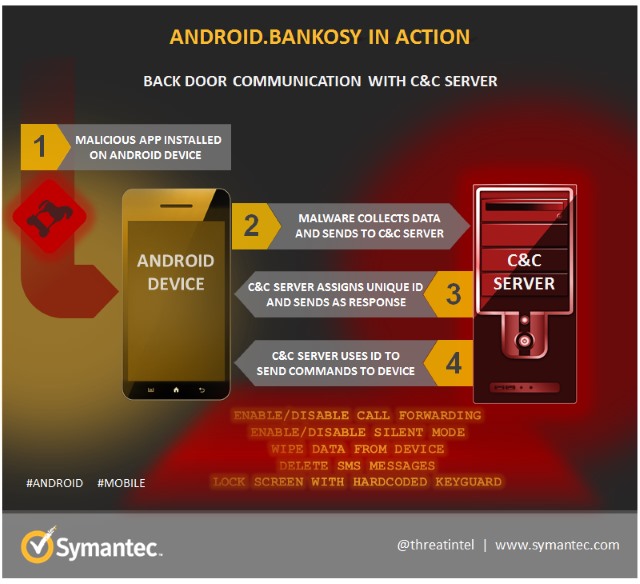
Around a year and a half ago, Symantec warned about the personal data stealing malware Android.Bankosy. Now the Trojan has been updated so it can steal passwords delivered via voice call-based two-factor authorization systems.
  
Such 2FA systems are is often used by banks to communicate one-time passcodes to people. While these have usually been delivered via SMS, voice call delivery is becoming increasingly common. Malware makers are keen not to miss out on data stealing opportunities, and the Android.Bankosy introduces a call-forwarding feature that sends 2FA calls to a C&C server so the code can be intercepted and exploited.
  
The malware enables call-forwarding on an infected phone, and is also able to enable silent mode to avoid alerting a victim about incoming calls. A successful attack is dependent on a victim's basic login credentials having already been stolen, but the malware represents a worrying new development in breaking through banking security.
Detailing how Android.Bankosy works, Symantec's Dinesh Venkatesan says:
Once the malware is installed on the victim's device, it opens a back door, collects a list of system-specific information, and sends it to the command and control (C&C) server to register the device and then get a unique identifier for the infected device. If the registration is successful, it uses the received unique identifier to further communicate with the C&C server and receive commands.
Most of the commands supported by the malware are common and trivial for typical back door or financial Trojans, such as intercepting incoming SMS, deleting SMS messages, wiping the data, etc. Out of these multiple commands, the most relevant for Android.Bankosy is call_forwarding; when this command is received by the malware from the C&C server, it executes a payload to enable call forwarding.
 
Full details of the malware is available from Symantec.
 
Photo credit: Mmaxer / Shutterstock

~ Mark Wilson

12.05.2014

Macs and Linux come under attack as the threat landscape shifts

 
The latest monthly report from internet security specialist Doctor Web shows that whilst Windows and Android users have no cause for complacency, November saw substantial numbers of malicious programs aimed at Mac OS X and Linux platforms.
 
Trojans remain the most popular form of attack making up 8.7 percent of all malware detected. Trojan.InstallCore.12, which installs different adware, toolbars and browser extensions, ranks first. BackDoor.Andromeda.404, which downloads other malicious programs into an infected system when commanded to do so by intruders, ranks second.
 
In November BackDoor.Andromeda.404 was distributed in large quantities by email thanks to a mass spam campaign. It accounted for 2.4 percent of the malware detected by Doctor Web. The malware top 10 includes a number of other programs that seek to steal confidential information.
 
Several new examples of OS X malware have been added to Doctor Web's database. These include Mac.BackDoor.Ventir.2 a backdoor that can execute commands from a remote server, log key strokes and relay information to criminals. Particularly sneaky is Mac.BackDoor.WireLurker.1 which waits for the moment when an iOS device is connected to an infected Mac and then uploads its files onto the device. It even comes in two versions, one intended for jailbroken devices, while the other is for unaltered iOS devices. It takes advantage of the "enterprise provisioning" feature that enables companies to bypass the AppStore and install applications onto its employees’ devices.
 
Linux systems have been targeted by Linux.BackDoor.Fgt.1 which scans random IP addresses on the internet and launches a brute force attack in an attempt to establish a Telnet connection with their nodes. If successful, it commands the attacked host to download a special script. The malware’s command and control server stores versions for various Linux distros and versions allowing it to infect not only internet-connected servers and PCs running Linux, but also other devices, such as routers.
 
Android doesn't escape the onslaught, with a large number of malicious programs being detected. Many of these are banking trojans aimed at stealing money from accounts accessed on compromised devices. For example Android.BankBot.33.origin is aimed at Russian internet banking users. It employs SMS commands to covertly transfer money to the intruders' account and hide SMS replies from the bank, so that the user won't notice unauthorised transactions. In addition it can load a bogus web page in the browser to lure users into submitting their online credentials.
 
For more information about the latest virus activity and a free online scanner for malicious files and links you can visit the Doctor Web site.
 
Photo Credit: Jirsak/Shutterstock

~ Ian Barker

7.01.2014

Latest ransomware, Cryptolocker, hits systems and pocketbooks hard

Cryptolocker, a ransomware Trojan virus, encrypts a victim's files and then demands payment for the key, and is indicative of the lengths nefarious types will go to for a few dollars of ill-gotten gains. 

Ransomware is on the rise and thanks to more than a few nefarious types and their victims, is proving to be an all too common way for electronic extortion to move into an enterprise. In many cases, it proves to be cheaper to pay for the privilege to unlock your data than it would be to remediate the impacted system, which only makes matters worse.
 
 
Take for example Cryptolocker, a ransomware Trojan that encrypts files and can spread in many ways, including in phishing emails that contain malicious attachments or links, or via drive-by download sites. Often, Cryptolocker arrives as a file with a double extension, such as *.pdf.exe and can be hard to recognize, simply because Windows hides file extensions by default - that file may look like a PDF file rather than an executable.
 
Double clicking on the Cryptolocker infected file launches an executable, which infects computers just like any other malware by placing its files in Windows directories and creating registry entries that allow it to restart after a reboot. Cryptolocker also attempts to contact its command and control (C&C) server using a random domain name generation algorithm to try and find a current C&C server. Some sample Crytpolocker domains might look like this:
 
jkamevbxhupg.co.uk
 
uvpevldfpfhoipn.info
 
Once Cryptolocker contacts its C&C, it generates a public/private cryptographic key for the specific computer, using very strong and standard RSA and AES 2048-bit encryption. The private key is only stored on the attacker's C&C servers, but the public key is saved in a registry entry on the computer. Cryptolocker then uses that key pair to encrypt many different types of files on the computer, including 
 
*.odt, *.ods, *.odp, *.odm, *.odc, *.odb, *.doc, *.docx, *.docm, *.wps, *.xls, *.xlsx, *.xlsm, *.xlsb, *.xlk, *.ppt, *.pptx, *.pptm, *.mdb, *.accdb, *.pst, *.dwg, *.dxf, *.dxg, *.wpd, *.rtf, *.wb2, *.mdf, *.dbf, *.psd, *.pdd, *.pdf, *.eps, *.ai, *.indd, *.cdr, *.jpg, *.jpe, *.jpg, *.dng, *.3fr, *.arw, *.srf, *.sr2, *.bay, *.crw, *.cr2, *.dcr, *.kdc, *.erf, *.mef, *.mrw, *.nef, *.nrw, *.orf, *.raf, *.raw, *.rwl, *.rw2, *.r3d, *.ptx, *.pef, *.srw, *.x3f, *.der, *.cer, *.crt, *.pem, *.pfx, *.p12, *.p7b, *.p7c.
 
After the encryption process completes, Cryptolocker displays screen with a warning that requires a payment of either $300 or £200 within 72 hours to regain access to the files.

What should I do if I get infected?

If you are infected with Cryptolocker, the first thing you should do is disconnect the infected PC from the internet. If Cryptolocker can't access its C&C, it can't encrypt files. Disconnecting the machine may prevent further files from being encrypted.
 
There are many tools that will totally clean a Cryptolocker infection, but most victims are more concerned with recovering encrypted files. Unfortunately, you will not be able to crack Cryptolocker's encryption. It uses a very strong and reliable public/private key implementation that is similar to what commercial encryption products use. It would take decades to centuries to crack today.
 
If Cryptolocker encrypts some of your files, you should check if you have a backup, which would be the best chance for recovering the lost data. Adding insult to injury is that there are reports claiming Cryptolocker's decryption does work, and paying the ransom may only result in the loss of your money.

How can I avoid Cryptolocker?

Most commercial antivirus (AV) products can detect many variants of Cryptolocker, which means protection starts with using both host-based and network-based AV products that are kept up to date. However, Cryptolocker's authors are very aggressive at re-packing their malware to make the same executable file look different on a binary level, which helps it evade some AV solutions. In short, though AV helps, some variants may get past some AV solutions. Other defenses are becoming a must as well, such as reputation based defense systems that keep track millions of malicious URLS and web sites. That means access to sites that distribute or support malware can be blocked, effectively preventing infected hosts from reaching C&C servers. 
 
Awareness proves to be one of the best defenses, Cryptolocker typically spreads via some obvious phishing emails. The emails may pretend to be FedEx or UPS related messages, which contain zip files that hide a double-extension executable. Training users to recognize some of the common phishing and malware signs, such as unsolicited emails from shipping providers, double-extension files, links that point to the wrong sites, and so on should prove to be an effective first line of defense. 
 
~ Frank Ohlhorst

8.09.2013

Linux gets hit by a trojan -- it's time to sudo apt-get scared!

When evangelists pontificate the benefits of Linux, the topic of security always comes up. A big selling point of Linux-based operating systems are that they are generally immune to viruses, trojans and malware. However, this is a falsehood -- no OS is 100 percent safe when it comes to these things. According to security company RSA, a team of Russian cyber-criminals have developed a trojan, named "Hand of Thief", which targets Linux.
 
The security company explains that the trojan is "designed to steal information from machines running the Linux OS. This malware is currently offered for sale in closed cybercrime communities for $2,000 USD (€1,500 EUR) with free updates. The current functionality includes form grabbers and backdoor capabilities, however, it's expected that the Trojan will have a new suite of web injections and graduate to become full-blown banking malware in the very near future. At that point, the price is expected to rise to $3,000 USD (€2,250 EUR), plus a hefty $550 per major version release".
 
This seems excessively expensive given Linux's very small footprint with home users. However, it does seem to work against some popular distributions. "The Trojan's developer claims it has been tested on 15 different Linux desktop distributions, including Ubuntu, Fedora and Debian. As for desktop environments, the malware supports eight different environments, including Gnome and KDE", says RSA.
 
According to RSA, the trojan has the following functionality:
  • Form grabber for both HTTP and HTTPS sessions (Firefox, Google Chrome, Chromium, Aurora and Ice Weasel)
  • Block list preventing access to specified hosts
  • Backdoor, backconnect and SOCKS5 proxy
  • Anti-research tool box, which includes anti-VM, anti-sandbox and anti-debugger
While this trojan does seem nasty and scary, it is unlikely to spread easily given Linux users' propensity towards common-sense about installing software. If a user sticks to only installing software from trusted repositories, they should continue to be safe and secure.
 
Linux users, does this new trojan have you worried? Will you be rushing to install Windows? Tell me in the comments.
 
~ Brian Fagioli