Cisco Learning Network Store Promotions Page
Showing posts with label Gnome. Show all posts

5.18.2015

Netrunner 16 'Ozymandias' is here -- the best KDE Linux distro gets better

 
One of the wonderful things about Linux distributions is the various desktop environments available. Unlike Windows and OS X, if you do not like the user interface, you can simply change it. I am a big fan of GNOME 3, but I know that many people dislike it. That's OK -- different strokes for different folks as they say.
 
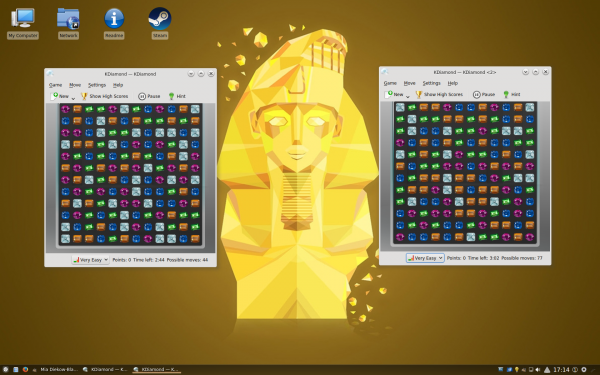
Another desktop environment I like, and recommend to many, is KDE Plasma. The latest version, Plasma 5, is wonderful, and former Windows users will feel comfortable with it. Today, the best KDE distribution, Netrunner, reaches version 16. Dubbed "Ozymandias", it embraces KDE Plama 5.
 
In what is probably the most bizarre operating system release announcement I've ever read, Clemens Toennies explains why they chose the name "Ozymandias". You have been warned of the oddness!
 
"I met a traveler from an antique land…And he told that there once was a mighty king in the land of ancient desktops, called KDE -- The King of DEsktops! And though the name and places have changed, its stories are still told and memories recalled. As it is known, there comes a point in time, where all things present must become a thing of the past to make way for the new and shiny", says Toennies.
 
Toennies further shares, "much like sand exposed to heat is transformed into something new called silikon, Plasma was formed out of the building blocks of its ancestor KDE 4. And so the old king is back – in its new incarnation called Plasma Desktop 5 ! The Plasma Desktop carries all the DNA of its predecessor and molds it into something new: A thing of the future, for the next generation to come. So when using Plasma 5 today, let’s not forget: We’re standing of the shoulder of Giants! Like Plasma5 followed KDE4, from the fires of Prometheus emerged Ozymandias, ready to roam the realms of computing."
 
Wow. OK. Nonsense aside, here are the following updated packages in the release.
  • Kernel 3.19.0~16
  • Plasma 5.3
  • KDE Applications 15.04
  • Firefox 37.0
  • Thunderbird 31.6
  • LibreOffice 4.4
  • VLC Media Player 2.2
  • Gmusicbrowser 1.1.14
  • Audacious 3.5
  • Krita & Karbon 2.8.5
  • Gimp 2.8.10
  • Pidgin 2.10.9
  • vokoscreen 2.1
 
So why do I call Netrunner the best KDE Linux distro? First off, it is based on Kubuntu, meaning there is plenty of support and available packages. Ubuntu users should be right at home.

What sets the OS apart, however, is the level of polish -- it is beautiful and chock full of useful pre-installed software. You can tell that the developers truly care about this operating system. I suggest trying it out for yourself to see what I mean.
 
If you are interested, you can download the ISO using the Torrent here.

~ Brian Fagioli

3.17.2015

Geeky students, act fast -- Google accepting applications for Summer of Code 2015

 
Geeky students have it made nowadays. You see, there are many outlets for their minds to be put into use. Sadly, before the Internet, it could be difficult for like-minded tech geeks to communicate and collaborate. Quite frankly, a curious mind could go undernourished as a result.
 
One of the coolest programs for tech-focused students is the Google Summer of Code. Why? For one, it is run by Google, so it is well funded and organized. More importantly, however, is that all of the projects in the program are open source. Today, the search giant begins taking applications. With that said, the window to apply is fairly small, so you had better do it soon.
 
"Interested students can submit proposals on the website starting now through Friday, March 27 at 19:00 UTC. Get started by reviewing the ideas pages of the 137 open source projects in this year's program and decide which projects you're interested in. Because Google Summer of Code has a limited number of spots for students, writing a great project proposal is essential to being selected to the program -- be sure to check out the Student Manual for advice", says Carol Smith, Google Open Source team.
 
Smith further explains, "students who are accepted into the program will put the skills they have learned in university to good use by working on an actual software project over the summer. Students receive a stipend and are paired with mentors to help address technical questions and concerns throughout the course of the project. With the knowledge and hands-on experience students gain during the summer, they strengthen their future employment opportunities. Best of all, more source code is created and released for the use and benefit of all".
 
To learn more and apply, you should head over to the official site here. The last day to apply is March 27th, so you had better apply soon. Look, I know how it is to be a student -- you say "I'll do it later", and before you know it, later is now. Be motivated and apply soon. This is a wonderful opportunity -- don't miss out!
 
If you are a Linux fan, both KDE and GNOME are participating -- how cool would it be to contribute to those projects?
 
~ Brian Fagioli

6.10.2014

Apple introduces Unity Scopes-like search and no one cries foul


Jack Wallen ponders the borrowing of Unity Scopes in OS X Yosemite and explains why he has disparate attitudes toward each. 

 
This week, Apple announced the new OS X Yosemite, and Linux users across the Linux-verse stood up and proclaimed "Oooo, I'd like to lay my hands on the lily-livered swab is writ that forgery!" Why so up in arms? Because Apple has done what Apple does -- riff on features from other platforms and claim they've recreated a wheel that will make your life far easier. What did they do this time? Let's chat.
 
One of the big features of OS X Yosemite is included in the Spotlight tool. For those who don't know, Spotlight is the OS X search tool that, up until Yosemite, searched the local drive. As of Yosemite, anyone who has touched the Ubuntu Unity Dash will notice something very similar to Scopes.
 
What are Scopes? If you open up the Unity Dash and do a search, the results will include local files and online results. In fact, Unity Scopes can search over 100 sources (users can configure what sources to use), which results in one of the single most powerful search tools on any desktop of any kind.
 
Apple has finally decided to add a Scopes-like feature into OS X (Figure A). When you press the [Command] + [Space] buttons, a new Spotlight box appears where you can search local and/or online results.
 
Figure A
 
 
Ubuntu Unity Scopes compared to Yosemite searching.
This functionality isn't new or unique to Unity. GNOME Do did the same thing (although not nearly as well, nor to the extent of Scopes). But when OS X adds previews of the search results in the Spotlight box, things start to feel hauntingly similar to Unity's Dash search.
 
There's a HUGE difference between these two features. The difference isn't in functionality, features, look, feel, or overall experience. What then, is the big diff?
 
Acceptance.
 
When Ubuntu released Unity Scopes, a very large and very vocal group from the Linux community cried foul, that Scopes was an invasion of privacy, was insecure, and would probably steal their identity...
 
...maybe not that last bit. But there was plenty of backlash from the community (many of whom didn't even use Ubuntu).
 
How will the Apple community react when they start using the Scopes-like feature in Yosemite? They'll love it. They'll realize how convenient it is to be able to, from one location, search their local drive, Wikipedia, Amazon.com, and countless other sources. There won't be an outcry about privacy. Why? There are a lot of reasons, some positive, some negative. For instance:
  • Apple users aren't nearly as paranoid about security
  • Apple users think of the future, not the present or the past
  • Apple users want the most convenient and user-friendly experience possible
This isn't to say that they are right or wrong. One of the reasons the Linux platform is as secure as it is rests squarely on the shoulders of the paranoia in the Linux community. That's a huge plus. But this same paranoia causes some users to point the finger of "security breach" at undeserving features. It has yet to be proven that Scopes is a real risk to security. Sure, Scopes can track your search history, but so can every browser that isn't in incognito mode.
 
As someone who frequently uses Scopes, I've never understood the outcry for something that makes your life exponentially easier. And now, Apple is going to have a Scopes-like feature that will flourish and might well grow beyond Unity Scopes in functionality -- simply because the users accept the feature with open arms. I've been using Linux for nearly two decades. I've fought hard to aid in the acceptance of the platform. There are times, however, when that fight seems to sometimes turn inward -- when members of the community begin to fight against those who try to extend the reach of the Linux desktop to a forward-thinking, modern user base. 
 
I'm not a fan of Apple products. I am, however, a fan of how Apple has managed to turn their product into something users want as much as they need. They've done this by making sure their product not only fits into the scope of today's computer usage -- but by also borrowing other technology and elegantly folding into their platform. In the end, Apple looks like they've re-invented a wheel that had already been re-invented. The difference is that Apple also re-invented they way users want and need to use their desktop.
 
Ubuntu says, "The ability to search online sources from your desktop will make your life easier," and the Ubuntu-using masses cross their arms and cry foul. Apple says, "The ability to search online sources from your desktop will make your life easier," and the OS X-using masses hold their arms up and cheer. 
 
Where's the disconnect?
 
What do you think? Is it time for a shift in attitude in either the Linux or OS X landscape? Should Linux users be less concerned with the security of features like Scopes, or should OS X users be more concerned? Share your thoughts in the discussion thread below.
 
~ Jack Wallen

6.05.2014

Mint 17: The best Linux desktop to date

Summary: I've used hundreds of Linux desktops over the years, and Mint 17 with Cinnamon is my favorite one to date.
 
Over the decades—yes decades—I've been using Linux desktops, I've had many favorites. Now, I have a new one: Linux Mint 17. I expect it to be my favorite for a long time to come.
 
Linux Mint 17 "Qiana"
I can say that because this version, now a late release candidate. like its base operating system, Ubuntu 14.04, is a long-term support edition. It will be supported until 2019. This makes this edition one that businesses should consider.

In particular, I love Linux Mint 17 with the Cinnamon 2.2 interface. This GNOME 3.x-based desktop is a great windows, icons, menus, and pointer (WIMP) interface. Windows XP users will find it far more familiar than Windows 8's oddball tiled desktop. I also like the MATE interface, which builds on top of the GNOME 2.x interface; but for simplicity's sake I'm going to focus just on Cinnamon.
 
Like almost all Linux desktops, Mint is free and it can run on almost any PC you have at hand. All it requires is an x86 processor; 512 MBs of RAM (you'll be happier though with 1GB); 5 GBs of disk space; a graphics card that can handle 800×600 resolution; and a DVD drive or USB port. That's all.
 
Unlike most of its Linux brothers and sisters, Mint also includes many proprietary programs. So, for example, you can play Adobe Flash videos and DVDs from your Mint PC without jumping through any hoops. Mint doesn't include proprietary drivers such as the ATI or NVIDIA drivers; it does make it easy to install drivers.
 
Another nice feature, which Mint does shares with most modern Linux distributions, is that you don't have to commit yourself to it. You can try it out by running it from a live USB thumb-drive or DVD drive before actually installing it.
 
In my case — since I know Mint like the back of my hand — I went ahead and installed it not just on test systems but on my production desktop and laptop. Yes, I'm a brave Linux user!
 
My work desktop is a Dell XPS 8300. This PC uses a 3.4GHz quad-core Intel Core i7 processor, has 8GBs of RAM, and an AMD/ATI Radeon HD 5770 graphic card. Mint 17 “Qiana” ran perfectly on it. The new Mint also ran flawlessly on my Lenovo ThinkPad T520 laptop. This computer comes with a 2.5GHz Intel Core i5 processor, 4GBs of RAM, a 500GB hard drive and an integrated Intel HD Graphics 3000 processor.
 
This didn't come as a surprise. I haven't had a hardware compatibility problem with any Linux in years. The one annoying thing about Mint, however, is that you can't just upgrade from one version to another. Instead, you must over-write your existing system.
 
On both systems, installing Mint was as easy as falling off a log. There's nothing complicated about it. You just hit yes to most of the questions, give your computer a name, give yourself a login name, and you're in business.
 
Another potential problem for some users is that to install Mint 17 on a Windows 8 PC with Secure Boot, you'll need to turn Secure Boot off. Since I find Secure Boot much more of an annoyance than a benefit this doesn't bother me in the least.
 
For its default programs, Mint sticks with its tried-and-true formula of LibreOffice 4.2 for its office suite; Firefox 28 for its Web browser; Thunderbird 24.4 for its e-mail; and Pidgin 2.10 for instant messaging. Personally, I prefer Chrome for my Web browser and Evolution for e-mail. Mint makes it easy to mix and match my software of choice to its distribution.
 
Indeed, in a related development, this new version of Mint makes both updating the system, your installed software, and your drivers much easier. For example, besides simply having a better display with more information, Update Manger now tracks all your system's upgrades no matter how they were made: Update Manager, apt-get, aptitude, gdebi or dpkg, whatever you use — it now records what you've changed.
 
The operating system and Cinnamon paired together have had many minor improvements. For instance, previous versions of Cinnamon came with a hard-coded list of system tray icons to hide. This list is now gone and Cinnamon now dynamically shows relevant system tray icons when applets are removed, or to dynamically hide them when applets are added.
 
Expert users will also appreciate that hot corners, settings to make use of the display's four corners, have now been made easy to customize.
 
Put it all together and you have a very fast, very secure, and very smooth and easy to use desktop. While other operating systems lately seem to be determined to make things harder for users—and no, I'm not just talking about Microsoft and Windows—Mint's developers keep improving an already superb desktop experiences.
 
You don't have to take my word for it. Download and install it for yourself and you'll see what I mean.
 
~ Steven J. Vaughan-Nichols 

4.19.2014

Hands on with Ubuntu 14.04: The best Ubuntu desktop ever

Summary: I still find Ubuntu with Unity the best desktop of all for users who don't know computers and just want something easy to use.
 
Lately, Ubuntu has been getting a lot of flack from other Linux users for going its own way. For example, Canonical, Ubuntu's parent company, eventually plans on using its own Mir display server instead of the more broadly supported Wayland, and that's annoyed many non-Ubuntu Linux developers.
 
That "inside baseball" criticism aside, I've found the latest release of Ubuntu 14.04 , Trusty Tahr, to be an outstanding Linux desktop both for new users and for professionals.
 
Ubuntu 14.04 with Unity 7 desktop.
I've been checking out the Trusty Tahr since its beta two release and I've been very pleased with it. I've been testing it in a VirtualBox virtual machine (VM) on a newer high-end Dell system and on two older test systems: The first was my 2007 Dell Inspiron 530S, which is powered by a 2.2-GHz Intel Pentium E2200 dual-core processor. This PC has 4GBs of RAM, a 500GB SATA (Serial ATA) drive, and an Integrated Intel 3100 GMA (Graphics Media Accelerator) chip set. The second was a 2008-vintage Gateway DX4710. This PC is powered by a 2.5-GHz Intel Core 2 Quad processor, 6GBs of RAM, a 1TB SATA drive, and an Intel GMA 3100 for graphics.
 
My point in listing these systems' stats in detail is that Ubuntu works just fine even on seven-year old systems.
 
It's also worth noting that Ubuntu 14.04 is a long-term support (LTS) version. That means that Canonical will be supporting this desktop Linux for five years. In turn, if you use an older PC you could get as much as 13 years of use out of it before you'd need to buy a new PC—just try that with Windows.
 
Installing Ubuntu remains as easy as ever on older PCs: Download the Ubuntu ISO, burn it to a DVD, boot your PC from the DVD and follow the instructions. If you're stuck with a Windows 8/8.1x PC, dealing with Secure Boot can still be a pain. The easy way around this is to go to the UEFI menu as you boot your PC and disable Secure Boot.
 
As an LTS, Ubuntu 14.04 doesn't have a lot of new features nor has there been much in the way of changes under the hood. Canonical has decided, for example, to not pull the old stable X window server and the Unity 7 shell for the graphical interface for the newer Mir graphics stack and Unity 8. You'll see those appear first in Ubuntu's smartphone and tablet efforts.
 
If you want, you can give Mir and Unity 8 a try. To do that, open a terminal and enter the following command:
 
sudo apt-get install unity8-desktop-session-mir
 
That's the quickest, cleanest way to install Mir and Unity 8. Both projects are under heavy development so be ready for regular changes.
 
That said, Unity 7 is a completely polished desktop now. If you still love GNOMEKDE, or one of their variations such as the GNOME-based Cinnamon you're not going to love Unity. There are, of course, versions of Ubuntu 14.04 that use other desktops. These include: Ubuntu GNOME; Kubuntu with KDE, and Lubuntu with LXDE.
 
If you haven't tried Unity lately, though, and you can keep an open mind, you should give Ubuntu 14.04 with Unity a try. It's much smoother than when it first appeared. In addition, I still find Ubuntu with Unity the best desktop of all for users who don't know computers and just want something easy to use.
 
Ubuntu has made several minor changes to Unity that have lead to major advantages in usability. The first of these is that Unity now has the option of using local menus again. In earlier versions of Unity you had to live with your applications' menu choices being in the master menu bar, ala Mac OS X. That's OK, but if you use a big display—I'm writing this using a 23-inch Samsung monitor—then your menu choices can be a long, long way from your application. By giving you a choice of having them on the main menu bar or on a more traditional local application menu bar, you get to pick what works best for you. For me, with my large monitors, its local menus all the way.
 
As for its base operating system, Ubuntu uses the Linux 3.13 kernel. This includes security and networking improvements.
 
For applications, Ubuntu has stuck with its usual defaults. It now uses LibreOffice 4.2.3 for the office suite; Thunderbird 24.4 for e-mail; and Firefox 28 for the Web browser. As always, you can install the programs you want if those don't please you via the Ubuntu Software Center.
 
Canonical has also taken out one feature: its own personal cloud storage program Ubuntu One. You can replace its functionality with Dropbox, Google Drive, or any of many other personal cloud storage services.
 
At the same time, it's kept one controversial feature: Built-in search scopes for such commercial sites as Amazon and eBay.
 
If you can't stand these built-in searches, you can disable them manually by going to the terminal with the following command:
 
settings set com.canonical.Unity.Lenses disabled-scopes "['more_suggestions-amazon.scope', 'more_suggestions-u1ms.scope', 'more_suggestions-populartracks.scope', 'music-musicstore.scope', 'more_suggestions-ebay.scope', 'more_suggestions-ubuntushop.scope', 'more_suggestions-skimlinks.scope']"
 
Personally, these smart searches don't bother me.
 
Put it all together and what I see is a mature, smooth Linux desktop that would work well for either business or personal use. While old-school Linux users may never learn to love Unity, I think most others will find this latest Ubuntu a true pleasure to use. I know I did.
 
~ Steven J. Vaughan-Nichols


3.07.2014

Linux desktop environment Mate achieves 1.8 release

 
Linux users do not like change. Well, actually, they do not like change for the sake of change. If something works, they typically hang on to it until something truly better comes along. A good example of this is GNOME 2. People love it and it works well. However, the GNOME Project moved to version 3 and radically changed how it works. GNOME purists were angry as version 2 worked just fine -- for them. And so, many hung onto the outdated version, shunning version 3.
 
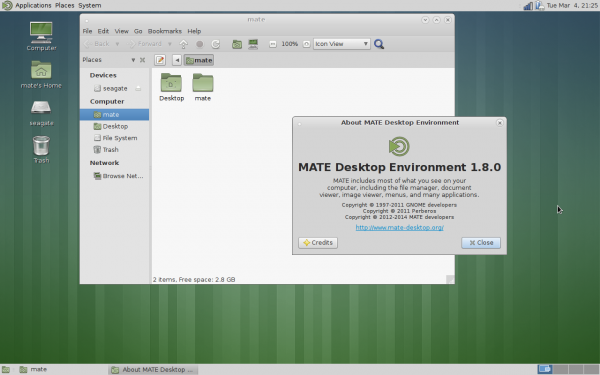
Luckily, Linux and open-source software enables forking. Forking is basically taking source code, but taking it in a different direction than the original creator. And so, The Mate Desktop was created as a fork from the ashes of GNOME 2. Today, Mate 1.8 releases to the world.
 
Wolfgang Ulbrich, MATE maintainer for Fedora says, "during the Fedora 15/16 releases I was very dissatisfied about the desktop solutions included. After 10 month of using XFCE I got noticed about the MATE desktop, so I decided to build my own desktop for Fedora in December 2011. This work resulted in the first external MATE Desktop repository for Fedora and was used by many users worldwide [...] MATE 1.8 is currently in Fedora rawhide and will be released with Fedora 21 in summer".
 
Stefano Karapetsas of the Mate team highlights the following changes:
Caja (file manager)
  • Added option to use IEC units instead of SI units
  • Added “Open parent location” option in context menu in search view
 Marco (window manager)
  • Added side-by-side tiling (windows snapping)
Panel
  • Added support to run dialog and main menu opening with metacity keybindings
  • Show a progress bar in logout dialog
 Control center
  • Added support for Metacity as window manager
MATE Desktop library
  • Added MATE User Guide
  • Added mpaste tool for paste.mate-desktop.org
 Eye Of MATE (image viewer)
  • Added shuffle mode in slideshow
Engrampa (file archiver)
  • Show always the “extract to” action in caja extension
Screensaver
  • Show date and time in lock dialog
Applets
  • Added undo functionality to sticky note applet
  • New “command” applet to show the output of a command
  • Rewritten “timer” applet in c
  • Mouse middle click on volume applet toggles mute state
Dropped packages
  • Replaced mate-doc-utils with yelp-tools
  • Replaced libmatekeyring/mate-keyring with libsecret/gnome-keyring
  • Replaced libmatewnck with libwnck
  • Replaced mucharmap with gucharmap
  • Replaced mate-bluetooth with blueman
  • Merged all caja extensions in a single package
Other improvements
  • Fixed a lot of code deprecations
  • Fixed a lot of bugs
  • Added and improved a lot of translations
Overall, this looks like a winner. Mate is a great desktop environment that is intuitive and easy on system resources. This is why I recommended it to Windows XP users looking to upgrade to Linux.
 
Do you use Mate? On which Linux distribution? Tell me in the comments.
 
~ Brian Fagioli


10.02.2013

The top 5 problems with Linux


I have been using Linux for many years. I consider myself well-versed in the open-source kernel and its associated operating systems. When I first started using Linux distributions, the community dreamed of a day when it would become the dominant force in computing.
 
Well, arguably, the time is now. You see, Android is now the most popular mobile operating system and ChromeOS is making big strides in education -- both operating systems use the Linux kernel. Also, Unix-like operating systems power 66 percent of the web (47 percent of which is Linux). However, Linux is not perfect and is still trailing on the desktop to Microsoft. Below are what I view as the top five problems with Linux.
 
5. Different desktop managers lead to a fragmented experience
 
I am a big fan of the Gnome desktop environment and conversely I dislike KDE (but I do respect it). Unfortunately, in the Linux community, this story is all too common. It equates to the old Chevy vs. Ford, Coke vs. Pepsi and Xbox vs. PlayStation debates. However, with Linux, there is also XFCE, Unity, Cinnamon, etc. -- all of which have associated "fan-boys". In other words, the community is vastly divided by tribal identity.
 
While many may point to the freedom of user-interface choice as a positive (and it can be), I would also argue that it is a negative. You see, from a trouble-shooting perspective, it is almost impossible to direct a Linux user over the phone or instant-messenger by just knowing their distribution. If a user seeking help says they are on Ubuntu, you cannot be sure that they are on Unity -- they may be on KDE, Gnome or something else which ultimately can lead to confusion.
 
A lack of familiarity and shared experiences fragments users since they do not have a shared rallying point. A screenshot of an OS X or Windows desktop is immediately recognizable; the countless Linux desktops? Not so much.
 
4. Too many package managers makes Linux hard to learn and master
 
Many Linux newbies start with Ubuntu. This should not take away from Ubuntu; it is a testament to its smart design and ease of use. In the terminal or on the command-line, these users will learn the apt package manager commands, as that is what Ubuntu uses. Sadly, these new Linux users will think the apt package manager is the only package manager. There are many other managers such as YUM and Pacman. These package managers use entirely different commands which can be confusing.
 
For the most part, that is fine if they never stray from Ubuntu. However, if they do stray, they will be in for a rude awakening and frustration when the commands they know and love no longer work. How can a user master Linux and become an expert when an unfamiliar package manager can cause a beginner-like regression?

3. Lack of software 
 
This is a sore subject for many, as Linux-purists and loyalist will eagerly point you to wonderful alternatives that can be acceptable. Need Adobe Photoshop? Use Gimp. Need Microsoft Office? Use LibreOffice. For basic users, these alternatives may work (and work well). However, true professionals cannot trust their careers and reputations to alternative software. Open-source ideology be damned, Microsoft Office will create more compatible files and lead to a more successful employee.
 
While Linux distributions offer wonderful photo-managing and editing, video-editing is poor to non-existent. There is no way around it -- to properly edit a video and create something professional, you must use Windows or Mac.
 
A good example of software woe is, to protect my father from malware, I built him a computer using Linux Mint. I figured, since he lives in the browser, a Linux desktop with Google Chrome would be ideal and safe. For a while, this worked like a dream. However, one day his printer broke so he had to go to the store to buy another.
 
He wanted a wireless one so he could put the printer in another room. Of course, the HP setup CD-ROM did not support Linux and setting up a networked printer manually was not something he knew how to do. This lead to headaches and disappointment and in the end he had to return the printer (I later installed Windows 7 at his request and installed the printer for him).

Overall, there are no true killer Linux applications that a Windows user would lust over. However, conversely, Linux users have plenty to be envious of -- Microsoft Office, Adobe Photoshop, Netflix support and much more.
 
2. Hardware compatibility
 
Linux has come a long way regarding hardware compatibility. In fact, I would say that Linux now offers a better out-of-the-box experience than Windows or Mac for basic hardware detection. However, out-of-the-box is not the end-all-be-all. Hardware will be released after that kernel release and some accessory hardware will not have the needed software to interface.
 
When I bought my first Nexus phone, the Galaxy Nexus, I was in pure Android heaven. However, that device did away with USB Mass Storage and opted instead for MTP. Sadly, this caused the device not to interface with Linux properly. It was not until much later that lengthy and convoluted instructions were posted on the internet that enabled flaky performance at best. It is only very recently that MTP support has started working out of the box.
 
Another example happened to a friend of mine who is in the Army and purchased a Garmin GPS running watch. After running and working out, you can connect the watch to a computer to upload the data. Unfortunately, the watch was not recognized by Linux (Ubuntu 13.04) and even if it had been, there was no Garmin software for it to interface with. Unfortunately, I had to set up a dual boot with Windows; an embarrassing moment since I was the one who got him started on Linux.
 
1. Linus Torvalds is mortal
 
Linus Torvalds, the founder of the Linux kernel is a remarkable man. However, his intelligence and prowess is rivaled by his outlandish and controversial behavior -- hurling profanities at Nvidia and insulting kernel developers are two examples that come to mind. Ultimately, it is his project and he is the keeper of the kernel; he maintains it. The problem is, Linus will not live forever and his death can cause grave consequences. You see, once Mr. Torvalds is no longer living, a new top kernel maintainer and protector must be named. This can potentially cause a schism in the project or even worse -- lead to its demise.
 
Linus Torvalds is both a gift and a curse for the Linux community. Obviously, the entire thing would not exist without him. However, developers and users only tolerate his behavior as he is the father of the creation; he is not often second-guessed (those that do will feel his wrath). Even if a capable successor is named, their intentions and decisions will always be questioned. Eventually, the entire project could be forked into irrelevance.
 
Conclusion
 
Despite these five problems, Fedora will continue to be my main operating system at home on my desktop; I can personally get by without Windows or Mac. However, I still maintain Windows and Hackintosh installs just in case.

What about you? Can you get by with Linux exclusively? Do you agree with my problems list? Tell me in the comments.
 
~ Brian Fagioli

8.30.2013

Linux environment Gnome fires Google over security concerns

I love Linux, it is no secret. Sure, I may stray to Mac and Windows every once in a while, and bash code-names, but I always come back to my first love; Linux. This week, I even had an argument with its creator Linus Torvalds over some measles, but even that can't stop my love.
 
My love for Linux, however, is very much focused on Fedora and Gnome3. And so, I am happy to see that Gnome has kicked Google to the curb as the default search engine for its Epiphany Web Browser (aka "Web"). Instead, it will use the privacy-focused DuckDuckGo.
 
"The GNOME project has decided [...] to make an extra effort towards ensuring users' privacy, and we, the Web developers, believe we need to align with this goal. Using Google's search engine by default is counterproductive to this effect, unfortunately. I assume I don't need to go into details on the many ways in which Google tracks what their users do. DuckDuckGo, on the other hand, does not collect or share personal information", says developer Claudio Saavedra.
 
People tend to not like change. However, Claudio aims to calm fears with the following points:
  • This partnership is for a limited time, and we will evaluate whether its continuation makes sense, in the long-term. The feedback we receive from our users will naturally have an impact on whatever decision we make in this regard.
  • If you can't stand this, you can always customize the search engine used, choosing whatever suits you best. Simply follow the instructions as documented in the wiki.
  • If you have already customized your search engine, don't worry, this change won't affect you unless you go back to the default.
I applaud this decision by Gnome. After all, Google was named in the big PRISM scandal and Linux users tend to be security and privacy-focused. However, Gnome still has a long way to go before most users choose Epiphany over the more popular Firefox and Chromium. After all, if no one uses Epiphany, the search engine change will be for naught.

~ Brian Fagioli