A potential successor to SMS has received strong backing from Google as
it partners with Telenor to launch RCS messaging in Europe and Asia.
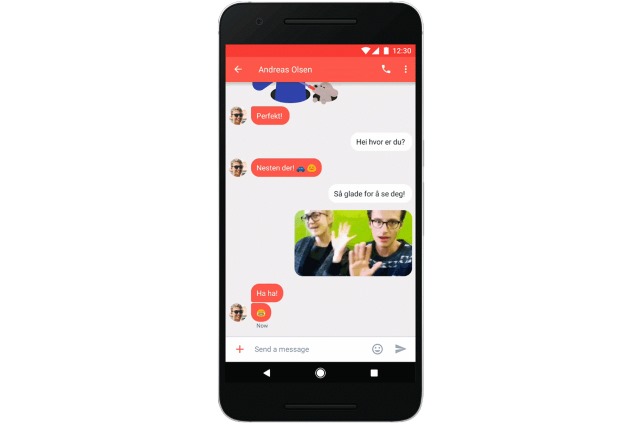
Rich Communications Services is more feature-rich than traditional SMS
and Google's latest partnership sees the technology spreading outside of
the US and Canada.
With support for features such as group chat, read receipts and high
resolution image sharing, RCS has a lot going for it. There's just one
catch. In integrating RCS support into Android, Google is providing the
"upgraded SMS experience" through its own Messenger app.
The deal means that RCS messaging is making its way to 214 million
Telenor subscribers, and a successful rollout will almost certainly mean
that Google will expand the technology even further. As this is little
more than a switch of protocols, RCS can be used on older devices as
well as new ones -- all that's required is an upgrade to the latest
version of Google Messenger, and the app will be preinstalled on new
Telenor handsets.
Google says:
In markets where RCS is launched, Telenor subscribers who
already have the Messenger app on their phone will automatically get
access to RCS services through an app update. Subscribers who don't have
the app can install the Messenger app from the Google Play store. In
addition, as part of the partnership with Telenor, many new Android
devices will come with Messenger for Android preloaded as the default
SMS and RCS messaging app.
This RCS messaging implementation supports the GSMA universal profile
-- a standard supported by more than 58 carriers and manufacturers
collectively covering a subscriber base of 4.7 billion people globally.
We’ve launched RCS messaging using the universal profile with carriers
in the U.S. and Canada, and plan on launching RCS in more countries in
the coming months.
Do you feel the need for RCS, or are you happy with standard SMS? ~ Mark Wilson
Those who have followed me over the years know that I came somewhat late
to the mobile computing party. I didn’t buy my first smartphone until
2014 -- an el-cheapo Samsung Galaxy Avant running Android 4.4.2.
However, after languishing in the hinterlands of abandoned devices
(Samsung never bothered to updated the Avant’s OS past "KitKat"), I
finally bit the bullet and this past August splurged on a Galaxy S7 (I
went for the nondescript black model to discourage phone thieves).
No question, the Galaxy S7 is a wonderful "piece of kit" (as my UK
friends would call it). It’s fast, has plenty of RAM (4GB), and is
expandable via microSD card (unlike its immediate predecessor, the
Galaxy S6). But while it runs circles around my old Avant in terms of
performance, I found the phone’s TouchWiz-enhanced Android 6.0
Marshmallow UI to be uninspiring.
Frankly, I had expected more in the way of a functional improvement over
my aging Avant -- though, to be fair, I had significantly modified my
old phone via myriad homebrew ROMs based on the Android Open Kang
Project (AOKP). So, in the end, I simply chalked my experience up to
unrealistic expectations and settled in for a long relationship with my
new mobile companion.
Then a funny thing happened: Samsung released a public Beta version of
is upcoming Android 7.0 Nougat implementation for the Galaxy S7/Galaxy
S7 edge. Up until then, most of what I’d read about the new OS was
nearly as uninspiring as my initial Marshmallow observations. There was
talk about virtual reality (not interested), additional UI customization
options (been there, done that with AOKP), and some boot-time security
stuff (boring). Basically, nothing exciting, and certainly not worth the
2GB download.
But then I heard from other Galaxy S7 users who were proclaiming what a
wonderful job Samsung had done with Android 7.0. Phrases like "sleek and
clean" and "complete UI overhaul" kept bouncing around the web forums.
So, with my curiosity no thoroughly piqued, I bit the bullet and pulled
down the massive ZIP archive. I then decompressed the four component
files that make up the build and flashed them to my S7 via the Samsung
Odin side-loading tool.
After a lengthy initial boot-up, I entered my SIM card PIN and began the
"new phone" setup process. Much looked the same from my earlier
experience setting up Android 6.0, but then the process was done and I
started to poke around the UI a bit.
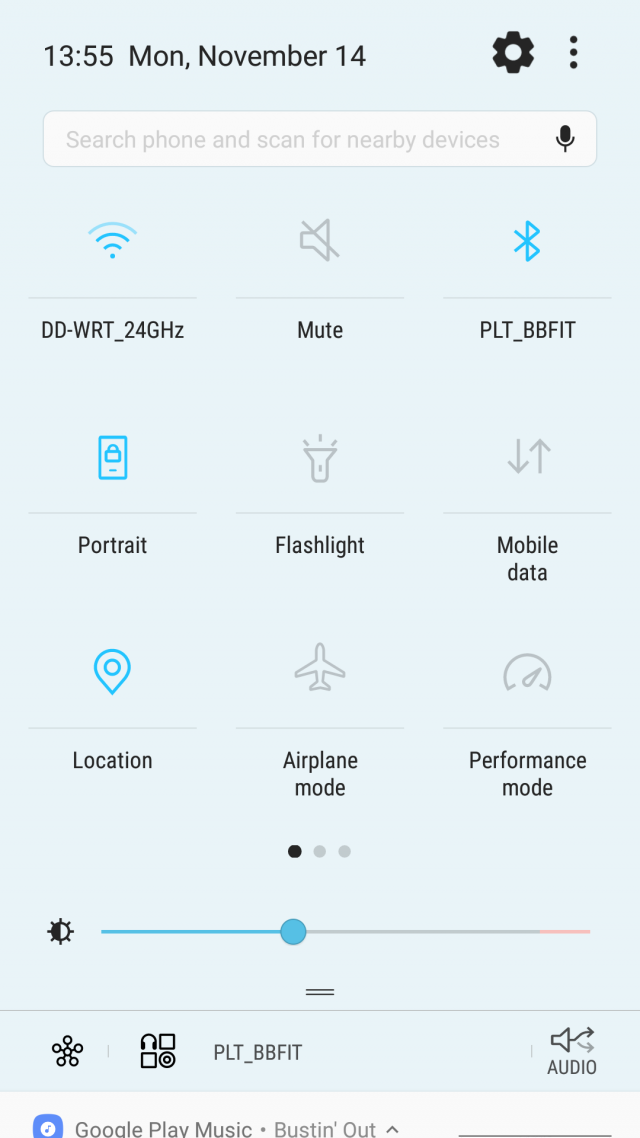
The first thing that jumped out at me was the new Quick Settings panel.
Samsung has moved to a gorgeous, aqua-esque blue/gray color scheme on a
near white (hint of light blue dithering) background. The icons are
minimalist and the whole effect feels quite iPhone-like, especially the
smoothness of the tray’s integration with the notification shade. It
just "pops and snaps" in a way I hadn’t experienced before under
Android.
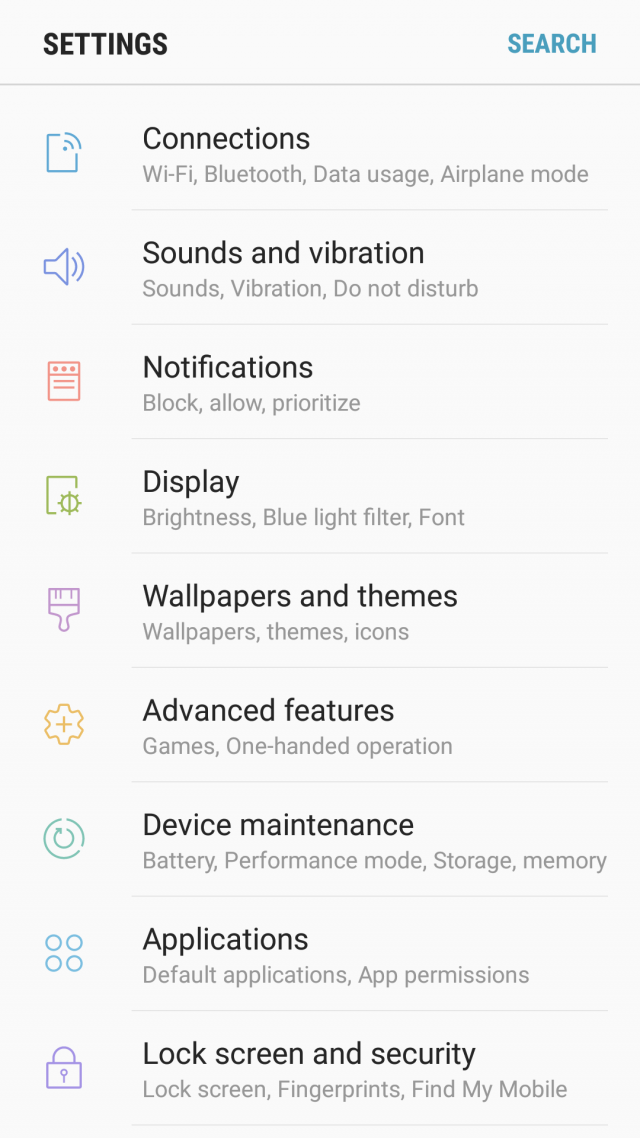
I was similarly delighted by the new Settings page. The minimalist
approach from the Quick Settings panel carries over here, but this time
the icons are drawn in colored outlines to make them easier to
differentiate from one another. Gone is the ugly grouping of functions
and generally bifurcated feeling of TouchWiz on Marshmallow. Samsung’s
implementation in Android 7.0 is clean, easy to navigate/search, and a
welcome departure from heavy-handed treatments in the past.
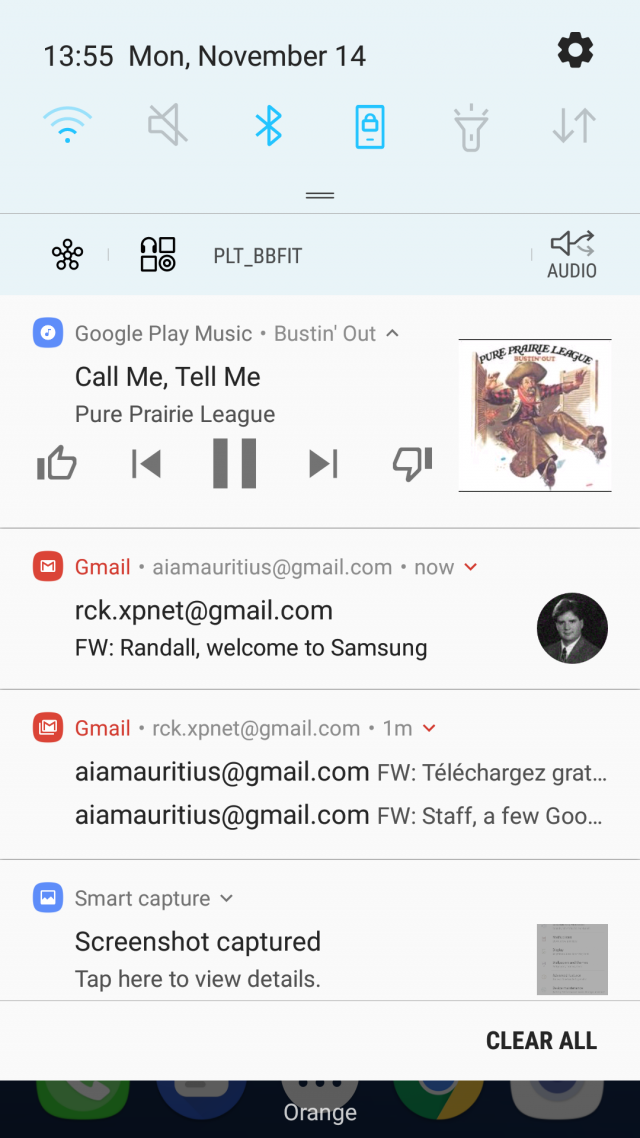
Another UI area they’ve cleaned-up is the handling of notifications.
They’re now grouped by application type and presented as expandable
bundles, making it easier to focus on important items (like work emails)
and ignore lower-priority stuff (like Facebook/Twitter updates). Also,
the ability to reply in-line to a text message has been streamlined and
now appears as an integrated text-entry field (as opposed to the pop-up
style I was familiar with from Android 4.4). Basically, the entire
Notification shade is more interactive and, frankly, a joy to use.
Animations are smooth and the whole experience has a better flow than
any previous version I’ve encountered.
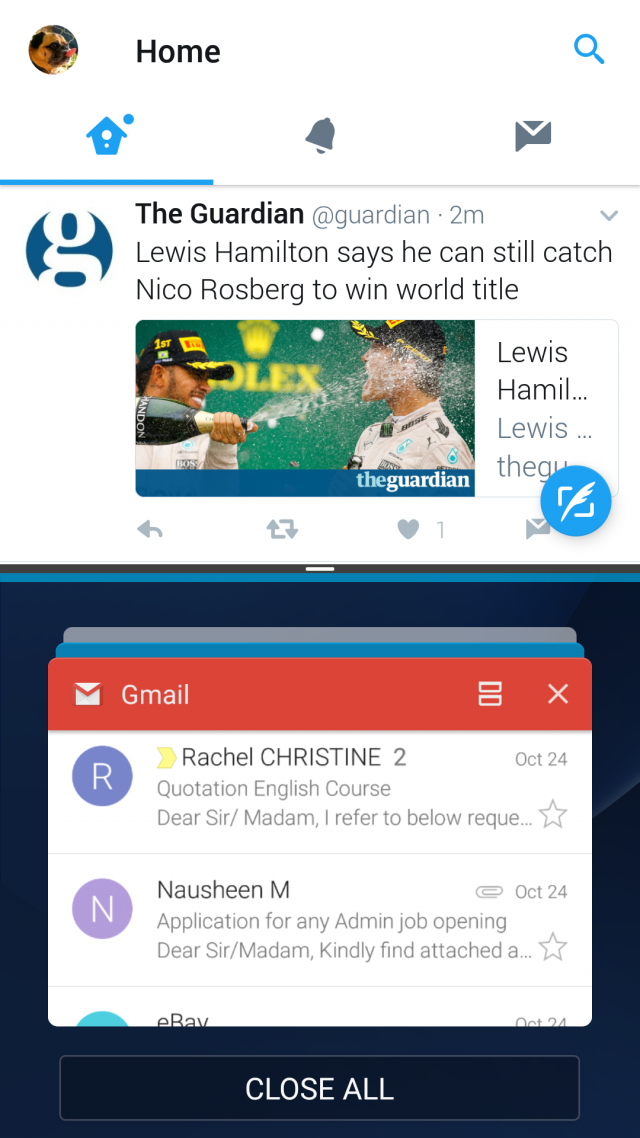
Finally, the piece de resistance: Multi-window support. Samsung has been
shipping its own, proprietary multi-windowing implementation for a
while now. However, with Google baking a standardized mechanism into
Android 7.0, Samsung has smartly incorporated the Mountain View
company’s approach as a baseline feature while preserving its clever
floating windows capability via a custom swipe gesture. Together, they
make task switching under Android a much more natural experience, and
I’ve found that most of my favorite apps (Twitter, Gmail, Office,
SoundCloud, Play Music) work seamlessly with the new split-screen view
mode.
Of course, I’d be remiss if I didn’t mention the expanded functionality
of Samsung’s Always On screen feature. With Android 7.0, I can now see
notification icons and even the currently playing track in Google Play
Music -- all without waking the phone. It’s the kind of at-a glance
functionality that I’ve quickly come to appreciate and wonder how I ever
lived without.
Bottom line: Android 7.0 Nougat for the Galaxy S7 is shaping up to be a
solid release full of useful functional upgrades and some nice visual
tweaks. I was happy with my Galaxy S7 before I installed the beta. I’m
doubly happy now that I can see what a great user experience Samsung has
in store for me when the final version drops next year. Photo Credit:BigLike Images/Shutterstock ~ Randall C. Kennedy
In a bid to make its browser faster than ever, Google has started using Microsoft’s Profile Guided Optimization (PGO). Introduced in Chrome 53, this technology can help optimize high-use functions in the browser.
The nightly Chrome builds track how often functions are used, and these
functions are then optimized by PGO, sometimes increasing their binary
size. In addition, PGO optimizes the memory location of the browser
code, keeping rarely and frequently used functions away from each other.
PGO was first introduced into the 64-bit build of Chrome in version 53.
It has since been added to the 32-bit build in Chrome 54.
As to the impact PGO has already had on Chrome’s load and startup times, Google shares the following stats:
New tab page load time 14.8% faster
Page load (time to first paint) 5.9% faster
Startup time 16.8% faster
Have you noticed Chrome getting faster recently? Photo Credit:Faber14/Shutterstock ~ Wayne Williams
Despite a desire to be more connected than ever before, people are
simultaneously more concerned than ever about their security and
privacy. This is certainly true when it comes to messaging tools, and
the privacy features offered by a particular app or service can be what
sways your decision to use it one way or the other.
Justice group Amnesty International has spent some time analyzing the
privacy and encryption found in a number of popular messaging tools and
compiled results in a ranked list. The findings make for interesting
reading, not least because Facebook is ranked the most highly.
The organization looked at 11 popular messaging services, checking not only whether they made use of encryption, but also at the attitudes of the companies behind each of the services.
So what is Amnesty International interest in all of this? The
organization is keen for human rights campaigners, whistle-blowers and
people in need to be able to communicate securely without having to
worry about whether their messages are being read by others.
Our communications are under constant threat from
cybercriminals, malicious hackers, and unjustified spying by state
authorities. Young people, activists and journalists who share personal
details over messaging apps are especially at risk.
Many of us trust these apps with intimate details of our personal
life. Companies that fail to take basic steps to protect our
communications are failing that trust.
The group goes on to say:
Amnesty International is calling on companies to apply end-to-end
encryption as a default. It is also calling on technology companies to
clearly inform users of the level of encryption applied to their
messaging services.
Facebook is praised for WhatsApp and Messenger for offering end-to-end
encryption (although not by default in the latter) and for its
transparency and interest in human rights. Apple finds itself in second
place, and praised for its opposition to backdoors, while Google nestles
in fourth position, largely because of Hangout's more questionable
security and privacy.
Microsoft is in a very disappointing eighth place -- disappointing for
both the company and users of its products. Skype is criticized for
having been "a major target of government surveillance worldwide".
Amnesty International also says: "Despite Microsofts strong policy
commitment to human rights, it is still using a weak form of encryption
on Skype."
Here's the chart in full:
Many companies like to talk about diversity and inclusion nowadays, but
for some, it seems to be nothing more than a way to get positive
publicity. True diversity is not about having a balanced employee pie
chart to show off to the media, but giving everyone opportunities
despite things like gender, skin color, sex, and religion.
Today, Google announces that its 'Code Next' initiative is officially
launching in Oakland, California. What is it, exactly? The search giant
is looking to help Black and Hispanic students to get excited about
computer science. Sadly, according to Google,
more than half of Black students, and close to half of Hispanic
students, do not have access to computer science learning. 'Code Next'
is looking to change this.
"Code Next aims to create 'aha!' moments that connect computer science
to students' everyday lives. It's funded entirely by Google, and free
for all participants. Partner organizations, such as Black Girls Code
and local middle schools, nominate students to join, and the fun and
culturally-relevant curriculum focuses on general CS concepts.
Participants drive their own projects -- such as designing and
programming a robot and 3D printing an Android chess set -- and after
months of learning, become creators of technology that they can share
with their community", says Nilka Thomas, Director of Diversity and Inclusion, Google
Thomas further explains, "we've been running a pilot program for Code
Next since January, 2016, but with the opening of our inaugural space,
we're ready for prime time. The Oakland location is a 1,500-square-foot
lab conceived in collaboration with MIT Media Lab, The Unity Council and
Kurani design. We're also opening up a space in Harlem, New York, in
2017 -- until then, students will attend classes at Google's New York
headquarters. We selected Oakland and Harlem based on density of the
target student population and commitment to CS education at both the
grassroots and partner levels. In the long term, our goal is to
open-source the curriculum to educators everywhere".
Wow, Google is actually putting its money where its mouth is! This is
undoubtedly an amazing program that will empower Black and Hispanic
students to seriously consider careers in computer science. Rather than
talk about diversity and inclusion, the Pixel-maker is acting on it.
While some folks will chastise the program for not being open to other
skin colors or heritages, the eventual open source nature of the program
should close any gaps. In other words, any school or organization can
leverage an open source curriculum -- for all students. Ultimately, it
would be wrong to criticize the search giant for focusing 'Code Next' on
only these two groups, when the data shows that is where help is
needed.
Of course, Google's money is a big perk for 'Code Next' -- an
open source curriculum on its own will not likely flourish without
funding. Hopefully the search giant keeps the cash flowing for a long
time!
What do you think of this new Google initiative? Tell me in the comments. ~ Brian Fagioli
Ubuntu comes with a lot of quality software pre-installed.
Unfortunately, the default web browser, Mozilla Firefox, has been on the
decline -- it is slow and clunky. On Linux, Google Chrome is now the
top web browser, and it is the best way to experience Adobe Flash
content too (if you still need it).
Installing Google Chrome on the Linux-based operating system is not
totally straightforward. This is unfortunate, as the search-giant's web
browser is an important part of having an overall quality experience on
Ubuntu. Don't worry, however, as we will help you to both install the
wonderful Google Chrome and uninstall the disappointing Mozilla Firefox.
First things first, you must download the appropriate file here.
Scroll down until you see "Linux". There are three available versions
-- Stable, Beta, and Dev. You will want to select 'Stable' as it is
quite literally the most stable. It is designed for end users that are
wanting to surf the web with as few bugs as possible. Beta and Dev are
designed for bug-hunters and developers and should be avoided by home
users.
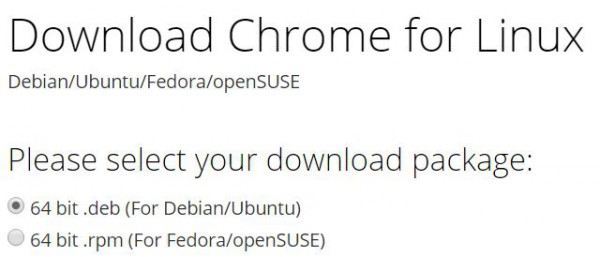
You will then be given the options of "64 bit .deb (For Debian/Ubuntu)"
and "64 bit .rpm (For Fedora/openSUSE)". Since you are using Ubuntu, you
will want to select the former. If you are coming from Windows, you can
think of a .deb file as being sort of like a .exe file. You will want
to double-click the file from where you downloaded it.
Once opened, it will launch the Ubuntu Software Center. This center is
designed for not only finding available packages, but installing
downloaded .deb files too. Once it completes installing the browser, you
can launch Google Chrome immediately by searching for "Chrome" in
global search. You can save it to the launcher for convenience too
(recommended).
Lastly, you will want to uninstall Firefox, but this is not required.
Having two web browsers is not necessarily a bad thing, but if you won't
be using Mozilla's browser, why keep it? You can remove it easily in
Terminal with the below command. You will be prompted for your password
to start the process.
"sudo apt-get remove firefox"
Congratulations! You have now removed Mozilla Firefox and installed Google Chrome. Image credit:Mascha Tace/Shutterstock ~ Brian Fagioli
Gmail was designed to be a cross-platform email tool, but even Google
recognizes the fact that it is far from perfect. With this in mind,
Gmail -- and Inbox by Google -- are undergoing a redesign to improve
things.
With the redesign, Google says that it is focusing on adjusting the
formatting and general look so that it better suits the device emails
are being viewed on. You may well have thought that this should have
been the case from the beginning, but it seems that an update is in
order.
Later this month, a new version of the Gmail app will roll out to
Android devices, while web users will also see a tweaked version of
Gmail. What the changes mean is that screen elements will be more
intelligently resized according to the device they’re being viewed on.
Google is referring to it as a new 'responsive design' and there are guidelines for developers to follow.
Writing on the Gmail blog, Google says:
Starting later this month, Gmail and Inbox by Gmail will support emails
created with responsive design, meaning their content adapts to fit
screens of all sizes. Text, links, and even buttons will enlarge to make
reading and tapping easier on a smaller screen. If you’re on desktop,
you’ll also see improvements, since emails designed for mobile can also
adapt to fit larger screens.
When it comes to get working done, I leverage many operating systems --
Windows 10, Ubuntu, iOS, and believe it or not, even Chrome OS. Google's
cloud-focused desktop OS is actually quite capable -- depending on
needs, of course. Many things work wonderfully in a browser nowadays,
such as word processing, spreadsheets, and photo editing.
Apparently, Charles Schwab has seen the light on Chromebooks too, as the
financial company has chosen them for a specific need -- in-person
account opening. In other words, the much-respected company did not
choose Windows 10 for this project. Sorry, Microsoft!
"We needed an intuitive interface that not only educated potential
clients about our product but also made it easy to sign up. We tested
several laptops and tablets that weren’t the right fit, before I reached
out to Google. That was on a Friday and the following Monday, Google
engineers came into our Phoenix engineering facility. By lunchtime, we
landed on a solution that was quick to deploy, very easy to manage and
use, and offered the high level of security that we demanded:
Chromebooks", says Ed Obuchowski, Senior VP of Advisor Technology Solutions, Charles Schwab.
Obuchowski further explains, "opening a Schwab Intelligent Portfolios
account on a Chromebook is easy. When a client walks into one of our
branches to learn more about automated investing, an associate hands the
client a Chromebook. Within seconds, the client is guided to a Charles
Schwab webpage, where he or she can learn about the product, complete a
questionnaire and open an account. The whole process is electronic, so
there’s no paperwork -- minimizing errors and time spent on
administration."
True, the need here is not very heavy -- a Windows 10 computer would be
overkill for a webpage-focused account application. But that is the
beauty of Chrome OS! There is no need to worry about malware and high
administration costs -- Chromebooks and Chromeboxes just work! For a
client-facing portal, the Linux-based operating system is a brilliant
way to keep sensitive information secure.
The company was able to implement 1,000 of the computers in just two
months time. The company was so impressed with the results, that it is
now looking to implement Chrome OS desktops (Chromeboxes) in locations
too.
Was Charles Schwab smart to choose Chromebooks over Windows 10 laptops? Tell me in the comments. ~ Brian Fagioli
For any site you visit nowadays, HTTPS should be offered by default. I
don't care about the content of the site -- there is no reason to go
HTTP only in 2016. Security matters, folks.
Google.com -- one of the world's most popular domain names -- is aiming
to get even safer by implementing HSTS. The search giant has recently
enabled this technology for the benefit of its users, and it should
start paying security dividends immediately.
"We've taken another step to strengthen how we use encryption for data
in transit by implementing HTTP Strict Transport Security -- HSTS for
short -- on the www.google.com domain. HSTS prevents people from
accidentally navigating to HTTP URLs by automatically converting
insecure HTTP URLs into secure HTTPS URLs. Users might navigate to these
HTTP URLs by manually typing a protocol-less or HTTP URL in the address
bar, or by following HTTP links from other websites", says Jay Brown, Sr. Technical Program Manager Security.
Brown also shares, "encrypting data in transit helps keep our users and
their data secure. We’re excited to be implementing HSTS and will
continue to extend it to more domains and Google products in the coming
months".
If you are wondering why Google is slow to roll out HSTS across the
board for all products, it isn't as easy as just flipping a switch.
Actually, in testing last year, implementation on the search-giant's
famed 'Santa Tracker' rendered it temporarily broken -- almost ruining
the much-celebrated app during Christmas. Since this is such a
significant change, Google is smart to be a bit gun-shy.
Does Google's continued focus on safety and security increase your confidence regarding its products? Tell me in the comments. Photo Credit:Joel O'Brien/Shutterstock ~ Brian Fagioli
Apple held its annual Worldwide Developers Conference (WWDC) on June 13
in San Francisco, where Tim Cook and his team announced a wide array of
new features and functionality across Apple platforms, including a major
update to iOS, the renaming of mac OS X to macOS (the new version will
be named Sierra) and updates to watchOS, and tvOS were also announced.
After reading about it though, I can’t help but think that we already
have a lot of the features talked about in a number of Android devices
and personally feel that Apple is merely playing catch-up to Android.
That said, I will leave you to make up your own mind.
Developer previews are already released and there will be public betas
for most of the new software in July. Everything will be publicly
available on Apple devices from September onwards. Meantime, you will
have all the news about these latest enhancements sent directly to your
Mac, your iPhone, iPad, Apple Watch, and Apple TV. A lot of the new
features focus on improving the use of the iPhone and the iPad such as:
Raise to Wake is a key feature which means that as soon as you take your
phone out of your pocket your screen lights up letting you check
notifications on the iPhone’s screen without touching a single button.
Android has had this feature for a while, Google introduced Ambient
Display in Android Lollipop, so I don’t see this as anything to shout
about.
Universal Clipboard is another new feature. What this means is that if
you have an iPhone, you can copy what you have on your phone to the
Universal Clipboard and sync this to your Mac. This is very handy for
pasting images, links and so on. Clearly great if you own an iPhone, a
Mac and an Apple Watch whereby everything immediately syncs. I tend to
use Dropbox and my Android phone where all my photos immediately appear
and sync.
So if I screen shot on my device, it will automatically appear in my
Dropbox and I can then even paste this immediately into a presentation
for example. Google also provides "carry over search" so if you are
using Chrome on both devices it synchronizes but clearly this is not a
clipboard. As a visual copy feature this is very good so now instead of
selecting copy/paste you have Universal Clipboard. This new feature
definitely gets the thumbs up from me.
Photos App: If you take a load of photos in one area, it makes a little
clip out of these and groups them together. Google Photos on Android has
been doing this for a while and it does provide a better visual search.
It is really quite clever because if you are looking for a photo you
can search for a person using facial recognition.
Apple Maps: This has been redesigned to make it easier to navigate
around. In effect, it is more accurate and it is now integrated with Car
Play to give you more of a Sat Nav guide on your car screen. But all
these handy new features were already available in Google Maps,
including traffic information, support for additional stops, and
third-party integrations.
Voicemail Transcriptions: Instead of having to dial your voicemail, the
iPhone automatically translates these and sends you a message with your
voicemail. This is very handy for mobile numbers and email addresses.
There was a service called Spin box, that did something similar, that
was launched in late 2000, but it seems to have disappeared.
Spam Filters stop you from receiving spam calls such as "have you had a
car accident", or "your latest PPI claim". The iPhone now filters out
these numbers. But again this is the same as the Android. For example,
Android 6.0 undertakes reverse look-ups for telephone numbers and
populates your screen. I recently ordered a pizza and when the
restaurant rang me back it automatically showed me the restaurant name,
but this was not in my phone contacts book.
Apple Music: This feature has been redesigned from the ground up to make
it easier to navigate around and it will be interesting to see how
users now find this and whether it will regain momentum. Apple
originally launched this feature on the basis that you would own music
and Apple Music would integrate with your music and your device.
However, when Spotify came into the market, people realized that they
didn’t need to own their own music.
There were big improvements to the watchOS 3 such as loading times being
seven times faster and a revamped UX making using the watch much
simpler with new features and different swipes to access different
capabilities. Additionally, certain apps have been revamped and
improved. For example, there are four new watch faces and a call the
police feature, whereby if you hold the middle button for four seconds
it automatically dials 911.
And finally, Apple Pay was the last major announcement. The key news
here is that Apple Pay is now available via the web browser. In effect,
you pay for items using your Safari browser by using your phone to pay
for items on the web via thumb recognition. So you no longer have to
type in your card number every time you make a purchase.
All of the above is not exactly revolutionary. I have certainly seen
many of these features or similar in Android. However there was
definitely a lot of hysteria on show at the event, so let’s hope the new
features meet user demand. Paul Swaddle, Chairman, Pocket App. Published under license from ITProPortal.com, a Net Communities Ltd Publication. All rights reserved. Photo Credit:Jacob Lund/Shutterstock ~ Paul Swaddle
Security researchers from Ben-Gurion University Cyber Security Research
Center (CSRC) have unearthed a vulnerability in Google Chrome that can
be exploited to make copies of DRM-protected video streams. The problem
affects all Chromium-based browsers, and makes it possible to circumvent
Widevine encryption technology Google uses to secure streams.
Widevine has been used in Chrome for a while, after Google acquired it
back in 2010. It has been used to prevent piracy of premium YouTube
channels, and is also used to protect Amazon Prime and Netflix streams.
Google was informed about the problem back in May, but is yet to issue a
patch.
Researchers David Livshits and Alexandra Mikityuk say the flaw means
that it is relatively easy to save copies of streamed videos, Wired reports.
Widevine's encrypted media extensions are used to decrypt protected
streams ready for playback, and the exploit takes advantage of the fact
that the system fails to perform proper checks to ensure that the
decrypted stream is only playing in the web browser. It is possible to
intercept the video as it is passed from the CDM (Content Decryption
Module) to Chrome's media player, and make a copy.
The researchers who discovered the problem have released a video that shows the exploit in action:
Full details of how the exploit works have not -- for obvious reasons --
been released, but it is described as being a simple bug. Google has
not only failed to produce a patch, but does not seem in any rush to do
so. In an email to Wired, a spokesperson said:
Chrome has long been an open-source project and developers have been
able to create their own versions of the browser that, for example, may
use a different CDM or include modified CDM rendering paths.
The Widevine CDM is also used by Firefox and Opera, but these browsers
have not been probed to see if they are similarly vulnerable. Photo credit:Evan Lorne / Shutterstock ~ Mark Wilson
One of the advantages of buying a Nexus device is the guarantee that
you're in line to receive updates for longer than devices from most
other manufacturers. Google issues not only Android updates, but also
monthly security patches for Nexus phones and tablets, and the company
has just published its latest end-of-life list.
Next in line to drop off the support list are the Nexus 6 and Nexus 9.
These devices will not receive "guaranteed Android version updates"
(such as updates to Android N and Android O) after October 2016, but
Google has also revealed when the Nexus6P and Nexus 5X will drop off the
radar.
Google has always been fairly upfront about the length of time its
devices are supported for -- something other companies should really
consider aping. When it comes to Android version updates, Google says
that these will be provided "For at least two years from when the device
became available on the Google Store". Security patches are made
available for even longer: "For the longer of 3 years from availability
or 18 months from when the Google Store last sold the device".
The Nexus support page shows that both the Nexus6P and Nexus 5X support cycle comes to an end in October 2017. Here's the full list:
Google's approach is slightly vague, and the use of the word
'guaranteed' is important. After the dates listed above, you probably
won't get any more update -- but you might. ~ Mark Wilson
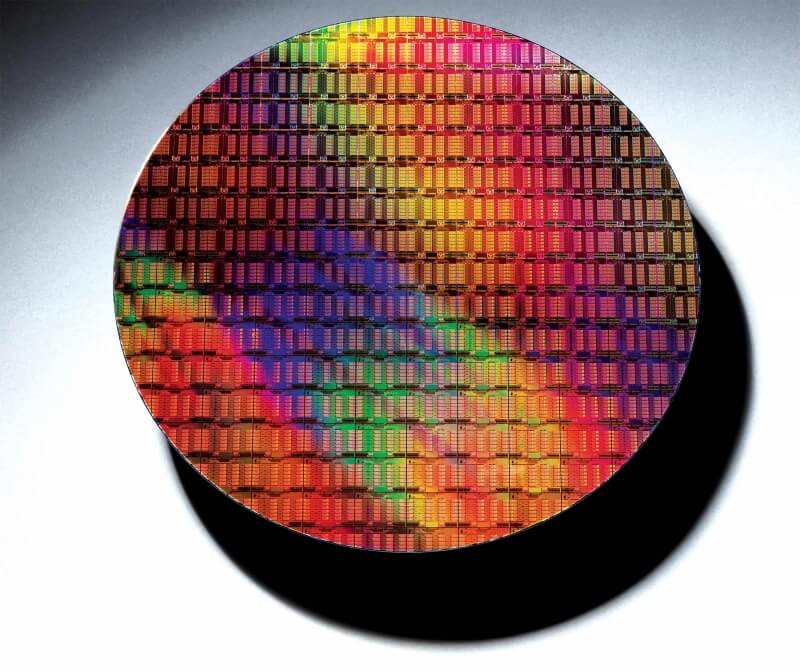
How Intel makes a chip Before entering the
cleanroom in D1D, as Intel calls its 17 million-cubic-foot
microprocessor factory in Hillsboro, Oregon, it’s a good idea to
carefully wash your hands and face. You should probably also empty your
bladder. There are no bathrooms in the cleanroom. Makeup, perfume, and
cosmetics are forbidden. Writing instruments are allowed, as long as
they’re special sterile pens; paper, which sheds microscopic particles,
is absolutely banned. Bloomberg Google comes down on the wrong side of the TPP This
is extremely unfortunate, but not surprising. Google has made some
noise sounding supportive of the TPP over the past year or so, and now
it's put out a blog post strongly supporting the agreement, and claiming
that it's good for intellectual property and the internet. The company
is wrong. The statement is right about a big problem on the internet --
the growing restrictions and limitations on the internet in different
jurisdictions: Tech Dirt (The Trans-Pacific Partnership: A step forward for the Internet) NSA looking to exploit internet of things, including biomedical devices, official says The
National Security Agency is researching opportunities to collect
foreign intelligence -- including the possibility of exploiting
internet-connected biomedical devices like pacemakers, according to a
senior official. "We’re looking at it sort of theoretically
from a research point of view right now," Richard Ledgett, the NSA's
deputy director, said at a conference on military technology at
Washington's Newseum on Friday. The Intercept (also, Tech firms say FBI wants browsing history without warrant) Over 8 billion devices connected to the internet By the end of 2015, there were 8.1 billion internet-connected, claims a report by IHS Technology.These
devices consist of smartphones, tablets, PCs, TVs and TV-attached
devices such as Apple TV and Chromecast, and audio devices. Averaged out
across the globe, this works out at four devices per household. The
breakdown of those devices is also quite an eye-opener. Smartphones are
without a doubt the dominant device, outnumbering PCs by about 1.8 to
one, and outnumber tablets by around 4.6 to one. ZDNet Prosthetic arms inspired by 'Deus Ex' are coming next year Remember
that prosthetic arm, inspired by Metal Gear Solid, that Konami
developed for a British amputee? Well, it seems the company has started a
trend. Square Enix and Eidos-Montréal have now teamed up with Open
Bionics, a specialist in low-cost prosthetics, to develop some designs
based on the world of Deus Ex. The franchise delves deep into a possible
future where human augmentation is commonplace, changing society and
warfare in equal measure. Engadget
The all-American iPhone Donald Trump says that
if he becomes president, he will “get Apple to start making their
computers and their iPhones on our land, not in China.” Bernie Sanders
has also called for Apple to manufacture some devices in the U.S.
instead of China. Neither candidate could instantly make that happen. As
Steve Jobs once told President Obama when he asked why Apple didn’t
make phones in its home country, the company didn’t hire manufacturers
in China only because labor is cheaper there. MIT How Fable Legends took down Lionhead Earlier this
year, the UK lost one of its longest-standing game developers. Lionhead
Studios, founded in 1996 and bought by Microsoft in 2006, was closed on
the 29th of April, with the loss of around a hundred jobs. The game
Lionhead was working on,Fable Legends, a four-versus-one fantasy-themed
multiplayer game that was already in closed beta, was cancelled. Despite
the reported emergence of several interested buyers before Lionhead’s
closure, neither the studio nor the game was saved. Kotaku Cryogenically frozen RAM bypasses all disk encryption methods Computer
encryption technologies have all relied on one key assumption that RAM
(Random Access Memory) is volatile and that all content is lost when
power is lost. That key assumption is now being fundamentally challenged
with a $7 can of compressed air and it's enough to give every security
professional heart burn. ZDNet Spaceship Apple Three miles from Apple’s Cupertino,
California headquarters, the tech giant is building something as massive
as its own global reach: Apple’s Campus 2. The Spaceship, as many have
nicknamed it, is over one mile in circumference -- that's wider than the
Pentagon. When it’s completed later this year it will house 13,000
employees -- including design grandmaster Jony Ive, who helped sculpt
the iPhone, and CEO Tim Cook, who helps keep profits in the
"billions-with-a-B" territory. Popular Science
Apple's Glass Houseby PopSci Open access: All human knowledge is there -- so why can't everybody access it? In 1836, Anthony Panizzi,
who later became principal librarian of the British Museum, gave
evidence before a parliamentary select committee. At that time, he was
only first assistant librarian, but even then he had an ambitious vision
for what would one day became the British Library. He told the
committee... Ars Technica How a bad UI decision from Microsoft helped macro malware make a comeback Following
numerous reports from various security firms about a large number of
malware variants that use macro scripts embedded in Office documents to
infect users, the US-CERT team has issued an official alert to all
organizations about this resurging threat. Macros are not malicious by
nature, being added to automate various operations in the Office suite. Softpedia Postmortem: Offworld Trading Company's Early Access campaign The
most common problem in the games industry is waste -- wasted time,
wasted effort, and wasted money on design ideas that aren't actually fun
in practice. Often, this discovery is not made until shortly before
shipping when the game is finally played outside of the development
team. Basic assumptions about how the game should be played might be
wrong, and a community more dedicated to winning can easily find holes
in the balance. Gamasutra Meet the new Apple tax, same as the old Apple tax Here’s
the good news: The famous “Apple Tax” is dropping to 15% after one
year, and developers can finally offer subscriptions. Here’s the bad
news for app developers: Apple still owns your billing relationships,
which means it owns your customer relationships. We’ve been here before.
Venture Beat ~ Matthew DeCarlo
Due to be announced next week on June 16, Bluetooth 5 has a great deal
to offer. Ahead of the announcement, Bluetooth Special Interest Group
executive director Mark Powell has revealed a little about what we can
expect.
The headline-grabbing specifications for the latest version of the
wireless standard are a doubling of the current range, and a quadrupling
of the current speed. Slightly less exciting is the change in
naming convention which is a move to simplify the communication of major
changes, but another key feature of Bluetooth 5 is support for
location-aware services.
This is something that other companies are already implementing in different ways, and in the last few days Google launched Nearby
which makes use of beacons to promote apps and services based on
location. As Bluetooth 5 becomes widely adopted, we’re likely to see far
more things like this. This is really what Bluetooth SIG is promoting,
having already talked about the speed and range improvements earlier in
the year.
In a letter published in the Bluetooth newsletter, Blue News, Mark Powell says:
Bluetooth 5 will also provide significant new functionality for
connectionless services like location-relevant information and
navigation. By adding significantly more capacity to advertising
transmissions, Bluetooth 5 will further propel the adoption and
deployment of beacons and location-based services to users around the
world. It’s a great story and one we’re looking forward to telling from
our upcoming media event in London on 16 June.
We can expect to see Bluetooth 5 implemented in future smartphones,
tablets and laptops, as well as featuring in upcoming IoT devices. The
full launch takes place in London on Thursday. Photo credit:Wiktoria Pawlak / Shutterstock ~ Mark Wilson
With all of the negative press
surrounding Windows 10, many folks in my private life are asking me
about alternatives. Believe it or not, Linux is often the answer. The
first thing I ask them is, for what do you use your computer? Almost
everyone tells me things like Facebook, email, and word processing.
Well, a combination of Google Chrome and LibreOffice on top of an
easy-to-use distro meets those needs perfectly.
The big decision, however, is selecting a Linux-based operating system.
Ubuntu is always a good choice, although Unity can be a bit confusing
for a transitioning Windows user. Manjaro is a solid choice too, and I highlighted that recently.
Ultimately, however, Linux Mint is probably the wisest choice for
someone totally new to Linux -- it is familiar, beautiful, and easy to
use. Today, version 18 -- named Sarah
-- becomes available with both Cinnamon and Mate desktop environments.
While newbies should avoid it until the final release, Linux experts can
safely jump in.
"In 2007, Linux Mint 3.1 introduced the 'apt' command, a handy shortcut
to apt-get, aptitude, apt-cache and other commands related to package
management, and since then this command was improved, slightly, release
after release. In 2014, Debian came up with the same idea but
implemented it differently. Although their 'apt' command was missing
some of the features we supported, it also introduced a few
improvements. The Debian 'apt' command made its way into Ubuntu and many
tutorials now refer to it. In Linux Mint 18, 'apt' continues to support
all the features it previously had, but also now supports the syntax of
the Debian 'apt' and benefits from the improvements it introduced",
says Clement Lefebvre, Linux Mint leader.
The update manager is receiving some important updates too. Lefebvre
explains, "the main screen and the preferences screen now use stack
widgets and subtle animations, and better support was given for
alternative themes (toolbar icons are now compatible with dark themes,
application and status icons are now themeable and dimmed text is now
rendered with dynamic colors). Two new settings were added to let you
see and select kernel updates. Even though these aren’t really updates,
but the availability of packages for newer kernels, the manager is now
able to detect them and to present them for installation to you as a
traditional update. These are level 5 updates but the new settings let
you configure them independently."
While Linux Mint beta releases are usually quite stable and pain free,
it is still not recommended to use pre-release software on production
machines. With that said, you may want to test it on a virtual machine
instead. The final version should be absolutely rock solid, not to
mention supported until 2021!
No matter how you decide to install it, you can download the appropriate
ISO using the torrent links below. While both desktop environments are
nice, I find Cinnamon to be a bit more polished and modern. Those with
slower machines may want to opt for the also-nice Mate version, however. Cinnamon (x64) Mate (x64) ~ Brian Fagioli
Mozilla has released Firefox 47 FINAL
for Windows, Mac and Linux. Version 47 adds support for Google’s
Widevine CDM, enabling compliant sites including Amazon Video to stream
DRM-protected video natively using HTML5 rather than via a third-party
video plugin.
Elsewhere the new build drops support for add-ons that use the Firefox
User Extension Library, plus implements a tweak that allows pages in
Reader Mode to be read aloud to the user.
Support for Google’s Widevine CDM -- which is currently limited to
Windows and OS X -- was first introduced to the Nightly build of Firefox
two months ago, and has made a seamless transition to the stable build.
It enables supported web sites -- with Amazon Video a prime example --
to stream DRM-protected content using HTML5 rather than forcing users to
use a third-party plugin (Microsoft Silverlight in Amazon’s case).
The feature has also been joined by Firefox’s newly acquired ability to
stream embedded YouTube videos using HTML5 when the built-in Flash
plugin, often a source of security and privacy concerns, has been
disabled.
Another new feature sees secure web pages no longer automatically
reloading when users navigate use the back or forward button -- this has
been implemented for security purposes.
Users can now extend Firefox’s accessibility features to also read out
loud pages in Reader Mode, while one final addition sees the VP9 video
codec enabled on faster machines for better video performance.
One key change sees support for the Firefox User Extension Library
(FUEL) dropped in favor of Firefox’s add-on SDK -- developers should
have already updated add-ons and extensions accordingly, but those that
haven’t been updated will no longer work as of Firefox 47.
Another change sees the ‘click-to-activate plugin’ whitelist removed,
while a third tweak resets the 'browser.sessionstore.restore_on_demand'
preference to its default true value for performance reasons.
Developers will find a number of improvements in Firefox 47, the most
notable of which is the ability to review Firefox performance data via
the 'about:performance' page. Android updates Firefox 47 for Android
is also due for release, and adds an option to show and hide web fonts
under its Advanced settings to reduce data and bandwidth usage.
Other tweaks include renaming 'Open multiple links' under the Customize
setting to 'Tab Queue', plus removed support for Android web runtime
(WebRT) as well as Favicons in the Awesomebar to prevent HTTPS spoofing.
This is also the final release that will support Android Gingerbread. Firefox 47 FINAL and is available now as free, open-source downloads for Windows, Mac and Linux. Firefox 47 for Android should be released imminently. ~ Nick Peers
Newsprompt
is a free Chrome extension which finds, sorts and displays 50+ of the
latest news stories on your new tab page. The add-on scans 1,000+ top
websites covering broad and niche categories, uses smart algorithms to
remove any duplicates, and presents you with the results: a picture,
headline, source and date per story.
Just skimming through the recent results will get you up-to-date in
seconds. Click anything interesting and the source article opens in new
tab.
A sidebar has more specific links, covering trending stories (Highly
Read, Highly Shared, Recommended) and specific topic areas (World, US
News, Business, Entertainment, Sports, Technology, Science, Health).
Or, if you’ve had enough of the news, you could carry on browsing with a Yahoo!-powered search box.
There’s apparently some intelligence here, with the developer claiming
Newsprompt offers recommendations based on your browsing history, sites
and topics you like.
What you don’t get is any manual control or configurability. You can’t
tell the add-on to always display sports stories first, for instance,
and it won’t remember and redisplay whatever category you were viewing
last time.
Still, if you’re mostly looking for general news then Newsprompt
delivers, quickly presenting you with all the latest stories across a
host of sources and categories. Newsprompt is a free extension for Google Chrome. ~ Mike Williams
Google wants to do away with traditional passwords on Android and replace them with "trust scores".
The company outlined how it is planning to make the transition away
from passwords on its mobile platform by 2017 during its I/O conference
last week. By using a variety of different metrics, Google’s Trust API
technology would be able to replace traditional passwords and pins used
to unlock its smartphones.
Typing speed, vocal inflections, facial recognition and how close a
user’s device is to familiar Wi-Fi hotspots and Bluetooth devices are
some of the metrics that the new system will use to determine if the
user accessing the device is indeed its owner.
Google will allow access to games and basic tools even if a low trust
score is detected. This would allow other users to access the core
functionality of a device without delving into more private sensitive
data. A device could then be used in what is essentially guest mode
without the need to switch from its primary account. Apps that are more
sensitive such as email and online banking apps would require correct
Wi-Fi and Bluetooth data along with a high score to open.
While it will be easier for other users to access a phone, Google’s
new trust score system could lead to possible privilege exploitation
attacks. However if a user sets a passcode and then forgets it, they
will be locked out and unable to access their own data. So essentially
Google has made a trade-off between security and convenience with its
trust score system. This is quite different from how Android currently
operates as it lets a user access every app on a device once it has been
unlocked.
Richard Lack, director of Sales EMEA at identity management firm
Gigya, is in support of Google’s new initiative: The future lies in
methods of authentication without passwords, which consumers clearly
favor both in terms of convenience and enhanced security.
"Biometric authentication is a powerful enabler allowing businesses
smart enough to deploy it to significantly increase rates of
registration, gaining data and insight about their customers, while also
increasing customer security. This is a win/win scenario which sounds
the death-knell for awkward and insecure passwords sooner than we may
imagine". Published under license from ITProPortal.com, a Net Communities Ltd Publication. All rights reserved. ymgerman / Shutterstock.com ~ Anthony Spadafora
The world wide web used to be like the wild west (and still sort of is).
Visiting the wrong site would often mean an infection with malware
or other nastiness, such as getting taken by scams. While that can still
happen today, web surfers are much more protected. Some security suites
don't only scan for and remove viruses on your hard drive, but prevent
the download entirely. Not to mention, users are often better trained to
recognize a scam.
Unfortunately, no web browser or security software package is infallible
-- nor is any user. Thankfully, Google is working around the clock to
keep the world protected. Its Safe Browsing API is available to
developers, allowing software -- such as Chrome -- to warn a user before
they visit a dangerous site. Today, the search giant launches the
fourth version of the API.
"With protocol version 4, we've optimized for this new environment with a
clear focus on maximizing protection per bit, which benefits all Safe
Browsing users, mobile and desktop alike. Version 4 clients can now
define constraints such as geographic location, platform type, and data
caps to use bandwidth and device resources as efficiently as possible.
This allows us to function well within the much stricter mobile
constraints without sacrificing protection", says Emily Schechter and Alex Wozniak, Safe Browsing Team.
Schechter and Wozniak explain to developers, "a single device should
only have a single, up-to-date instance of Safe Browsing data, so we're
taking care of that for all Android developers. Please don't implement
your own Version 4 client on Android: we're working on making a simple,
device-local API available to prevent any resource waste on device.
We’ll announce the availability of this new device-local API as soon as
possible; in the meantime, there’s no need to develop a Version 4 client
on your own".
That Android device-level implementation is rather genius. Think about
it. If every app had to individually implement this, it would not only
be a waste of resources, but a risk that a lackadaisical developer could
stop updating for the newer API versions. By tying into a local API,
developers can prevent their apps from becoming outdated from a Safe
Browsing perspective.
Developers leveraging the prior version don't need to panic. Version
three will continue to be supported until 2017. Google does not share a
specific date, so this could possibly be pushed back even further.
While Safe Browsing is undeniably beneficial, there is a downside. All
of the URLs you visit are passed to Google. After all, it needs to check
the address against its server-side database. This is yet another way
for the search giant to suck up valuable data. With that said, the
benefits -- being protected from malware and phishing scams -- arguably
outweigh any conspiracy theories.
What do you think of Google's Safe Browsing? Tell me in the comments. ~ Brian Fagioli
Answer: Your kids. Chromebook leads laptop and desktop sales through
U.S. commercial channels to schools, according to NPD. Education is
overwhelmingly the primary market for the computers. The institutions
can't buy enough of the thangs, for their utility and low-cost compared
to notebooks running either OS X or Windows. That cost is as much about
extended webapps and services from Google (or its developer partners),
available for free or comparatively next-to-nothing, set against
software for the other platforms.
Wrinkle in the Google firmament: iPhone and Chromebook are like water
and dirt. The sediment settles unless shaken up. Sure youngsters can do
all their Googly things—Docs, Gmail, Maps, Photos, YouTube, etc.—on iOS
but the experience is smoother and more homogenous when mixed Android
and Chrome OS. What the kiddies lack, and their educators, is a swath of
useful apps like the Apple kids get. Market That Matters
Think about it. Yesterday at its annual developer conference, Google
unveiled plans to bring Android apps to Chrome OS, which churned some excitement across the InterWebs. But for whom? Coincidentally, or not,
a month after IDC released first quarter PC shipments there were news
stories about Chromebooks outselling Macs. How conveniently timed for
Google.
"Chromebooks have outsold Macs in commercial channels during the 'high
season' for K-12 sales (April-August) for the last three years", Stephen
Baker, NPD's vice president of industry analysis, says. "Even
off-season Chromebooks in commercial channels outsell Macs and iPads
combined—so this is a trend that has been happening for awhile".
Three years? The majority go to schools, and adoption accelerates.
"Chromebook sales in commercial channels have increased by 28 percent in
the first four months of 2016 vs last year", Baker says.
Putting Android apps on Chromebook creates greater synergy among devices
running either of Google's platforms. The Alphabet subsidiary seeks to
make Android all the more appealing for the most-likely Chromebook user:
School kids. Apple devices are the intended collateral damage, despite
Big G's continued support for iOS. Device Synergy
Mobile is huge for the search subsidiary, regardless of platform. During the first day Google I/O keynote, execs revealed
that: more than half of search queries come from mobile devices;
one-quarter of queries are from voice ("OK, Google"); 600-plus new
Android smartphones launched this year (Seriously?); there have been 65
billion app installations from Google Play.
Meanwhile, a bunch of new home-grown Android apps or services are coming in 2016—Allo, Assistant, Daydream, Duo, and Family Library,
among others. With more American K-12 students using Chromebook every
month, many of them also using Android, and Google wanting to increase
their numbers, the new strategy is as much about the kids as
adults—greater based on my analysis.
Ah, but there is a catch. The earliest school adopters may find their
laptops hanging from the gallows in a cold wind. Initially, starting
next month, only three models—Acer R11, Asus Flip, and Google Pixel
2—will support Android apps on Chrome OS. A much, much, much
longer list will be certified later in the year. But there are some
surprising, head-turning omissions, like the original Pixel, which
remains a powerhouse compared to most of the other laptops listed.
That said, most Chromebooks will be certified for Android apps, and,
again, the majority are used in schools—in the United States, at least. ~ Joe Wilcox