Cisco Learning Network Store Promotions Page
Showing posts with label Snapdragon. Show all posts

10.29.2014

Samsung Galaxy Note 4 Review... Continue ~ Final Thoughts

Final Thoughts

With the fourth generation of the Galaxy Note, Samsung has finally got it right. The Galaxy Note 4 is an awesome combination of useful software features and top-notch, cutting edge hardware. If you want a large-screened smartphone that succeeds in nearly all key areas, it’s hard to look past Samsung’s latest and greatest.
 
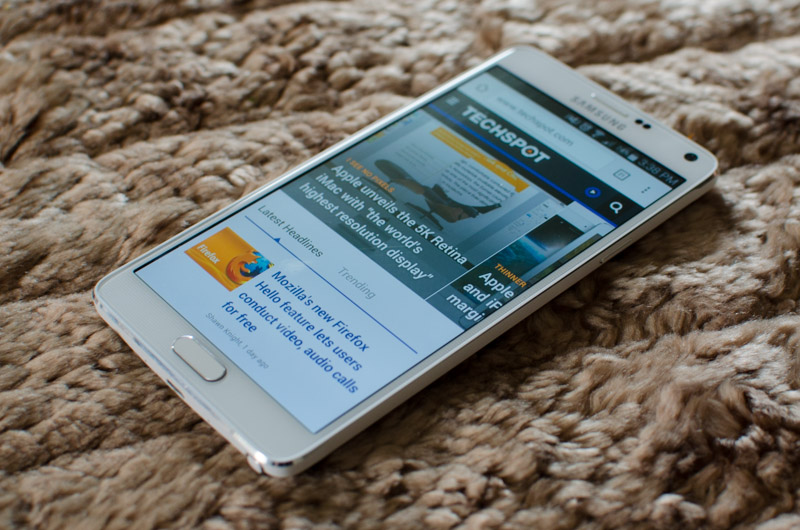
The biggest and most obvious change to the Note line is the refined design. Samsung finally ditched the cheap plastic in favour of a part-metal design, improving the plastic back cover in the process. The Note 4 is truly the first Galaxy product I’ve used that feels and looks like it’s worth the asking price, which is a massive step forward for the company. And this isn’t just token praising of improvement and effort: the Note 4’s has one of the better designs of the year.
 
 
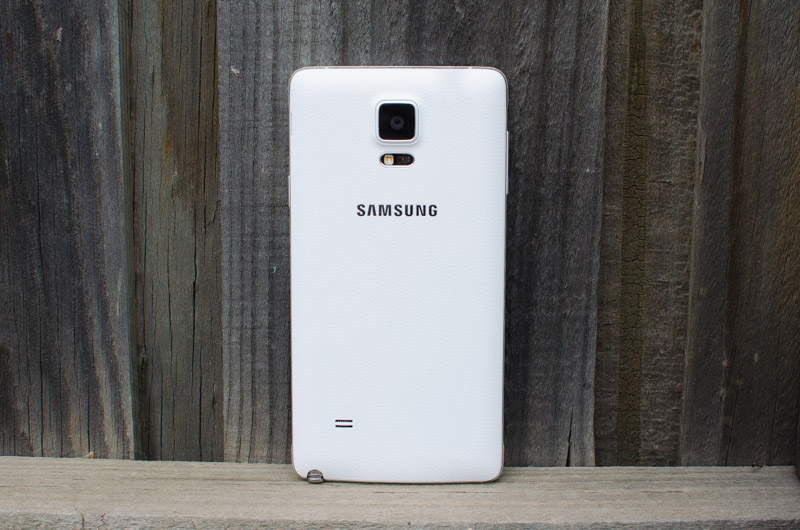
The Note 4 camera is simply superb. It takes the stellar Galaxy S5 camera sensor and adds in the final piece of the puzzle, optical image stabilization, allowing it to deliver fantastic photos in nearly all conditions. Paired with a top-notch HDR mode, an improved selfie camera, and Ultra HD video recording, and you’re left with one of the best – if not the best – smartphone cameras available.
 
Samsung hasn’t held back when it comes to packing in the latest technology. Both models come with brand new SoCs, and each are exciting in their own right. The Exynos variant is one of the only SoCs on the market with ARM’s 64-bit CPU cores inside, while the Snapdragon 805 is Qualcomm’s beastly chip designed for Quad HD devices. Alongside up to Cat. 6 LTE, Wi-Fi 802.11ac and Bluetooth 4.1, this a potent hardware combination.
 
It’s also great to see the Note 4’s Exynos model holding its own against the Snapdragon model for the first time in generations. Benchmarks reveal the Exynos model has a 7% faster CPU, and most importantly a GPU that’s just marginally slower, which is a significant step forward for Samsung’s silicon division. No matter which variant you opt for, you’ll be blessed with top of the table performance that’ll satisfy you throughout a standard two-year contract.

The jury’s still out on whether upgrading to 2560 x 1440 displays is really necessary, though there’s no doubting the Note 4 packs an excellent Quad HD Super AMOLED. Brightness is the only real concern with this display, as it excels in viewing angles, sharpness, contrast and color quality (after a bit of tweaking). The size is also great for media consumption and note taking, so long as you can handle it.
 
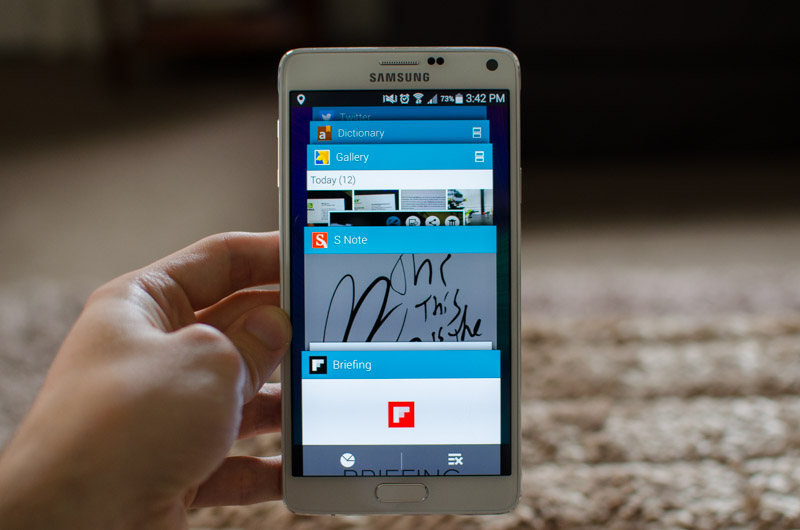
Samsung’s software offering is as refined as it’s ever been. The S Pen is very responsive and provides some genuinely useful features throughout the operating system. S Note and S Health are great first-party apps, even if the new sensors for the latter are gimmicky, while other features like multi-window are much improved.
 
Despite all the strong points of the Note 4’s software, Samsung hasn’t been able to fully eradicate some of the clunkiness. Although improved, the settings screen is still long and somewhat hard to navigate, with options left, right and center. Some parts of TouchWiz don’t meld well with the stock Android experience either, giving the handset a disjointed feel from time to time.
 
 
As for battery, at this stage I’ve only been able to benchmark the Exynos variant, though it performs quite well. In most of our tests it produced better battery life than the Snapdragon variant of the Note 3, which is a big achievement for Samsung's SoC division and a great result for anyone looking to pick up the Note 4.

All things considered the Galaxy Note 4 is a terrific device, by far the best Samsung smartphone I’ve ever used, and a contender for the best large-screened handset you can buy.
 
~ Tim Schiesser  
Article Index


10.28.2014

Samsung Galaxy Note 4 Review... Continue ~ Exynos & Snapdragon Performance

Exynos & Snapdragon Performance

For this review, thanks to the assistance from fellow editor Shawn, I’ve managed to compile benchmarks for both the Snapdragon 805 model and the Exynos 5433 model. Personally I’ve been using the Exynos variant, so my impressions of the phone are based on that handset, but it appears as though both handsets are quite evenly matched.
 
 
There are a large number of Galaxy Note 4 models on the market, larger than the number of SoCs Samsung has used, so the model numbers seen in the benchmarks that follow may not correspond to what you’ll see in your country. However, the vast majority of the hardware between the Snapdragon variants and the Exynos variants is the same, so you should expect near identical performance.
 
The Exynos model we used is the SM-N910U, which is the model on sale in Asia. For the Snapdragon variant, Shawn benchmarked the SM-N910T, the T-Mobile model in the United States. These devices can easily be compared to the Galaxy Note 3 models: the SM-N900 for Exynos, and SM-N9005 for Snapdragon; and the Galaxy S5: G900H for Exynos and G900F for Snapdragon.


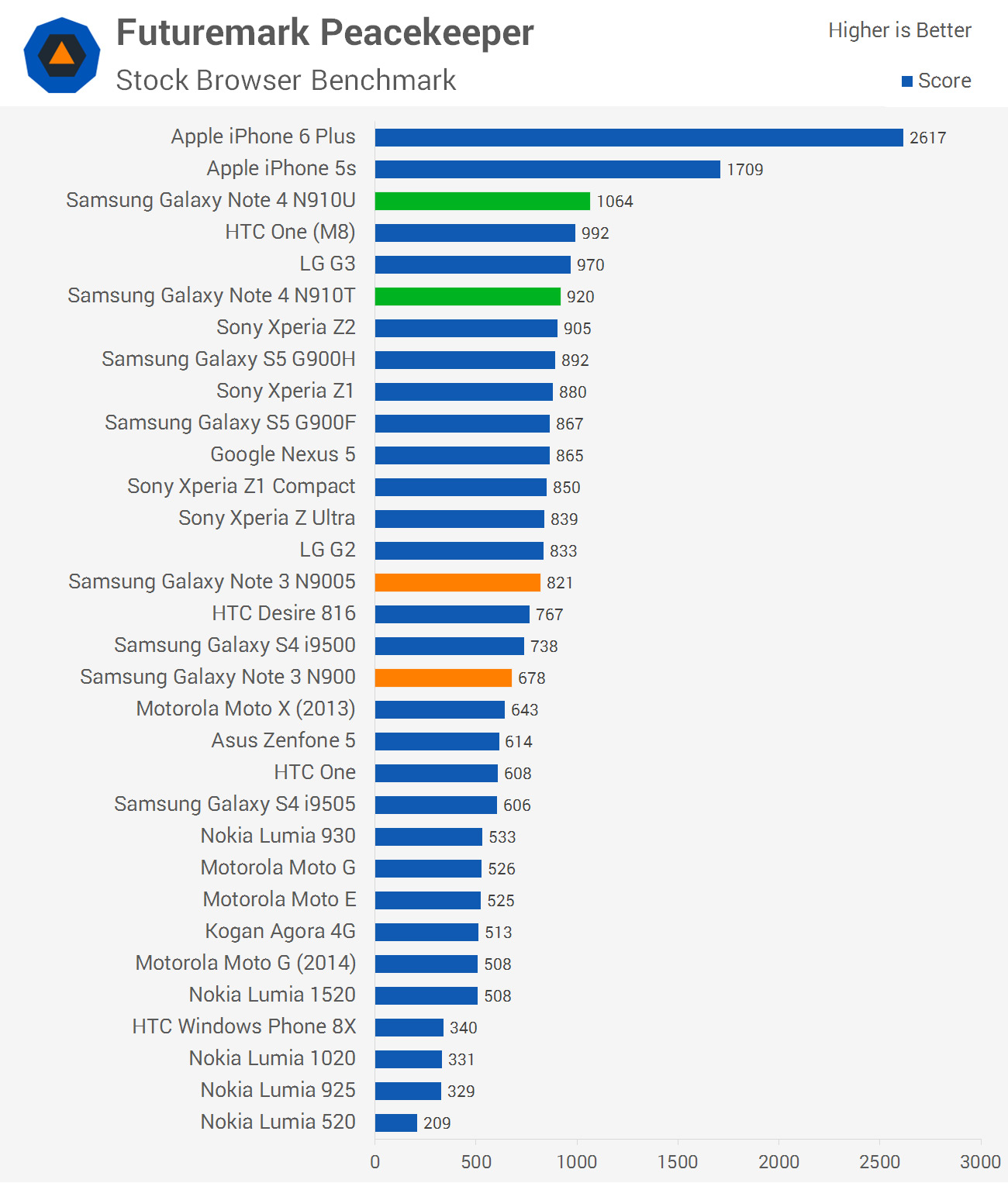
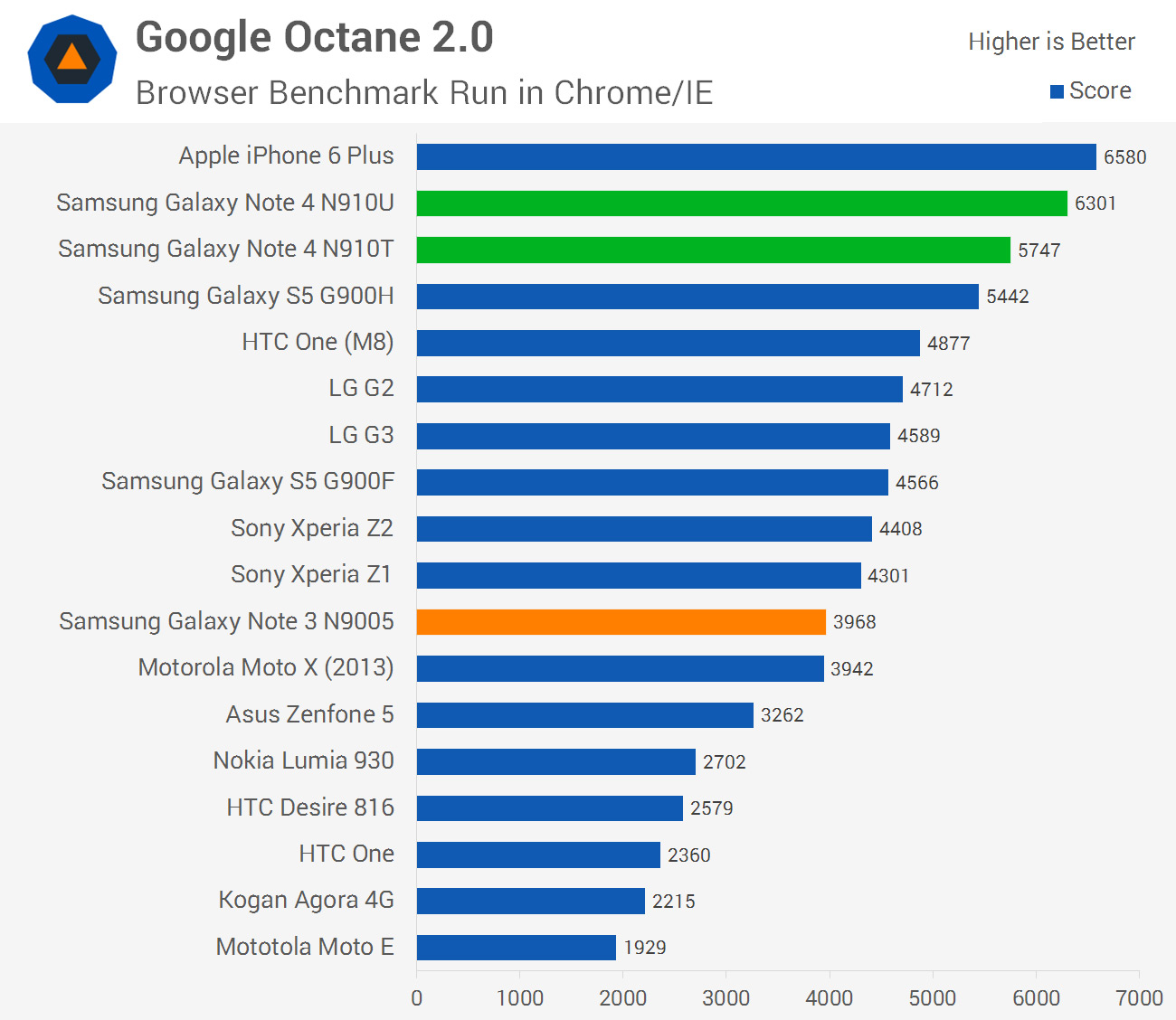
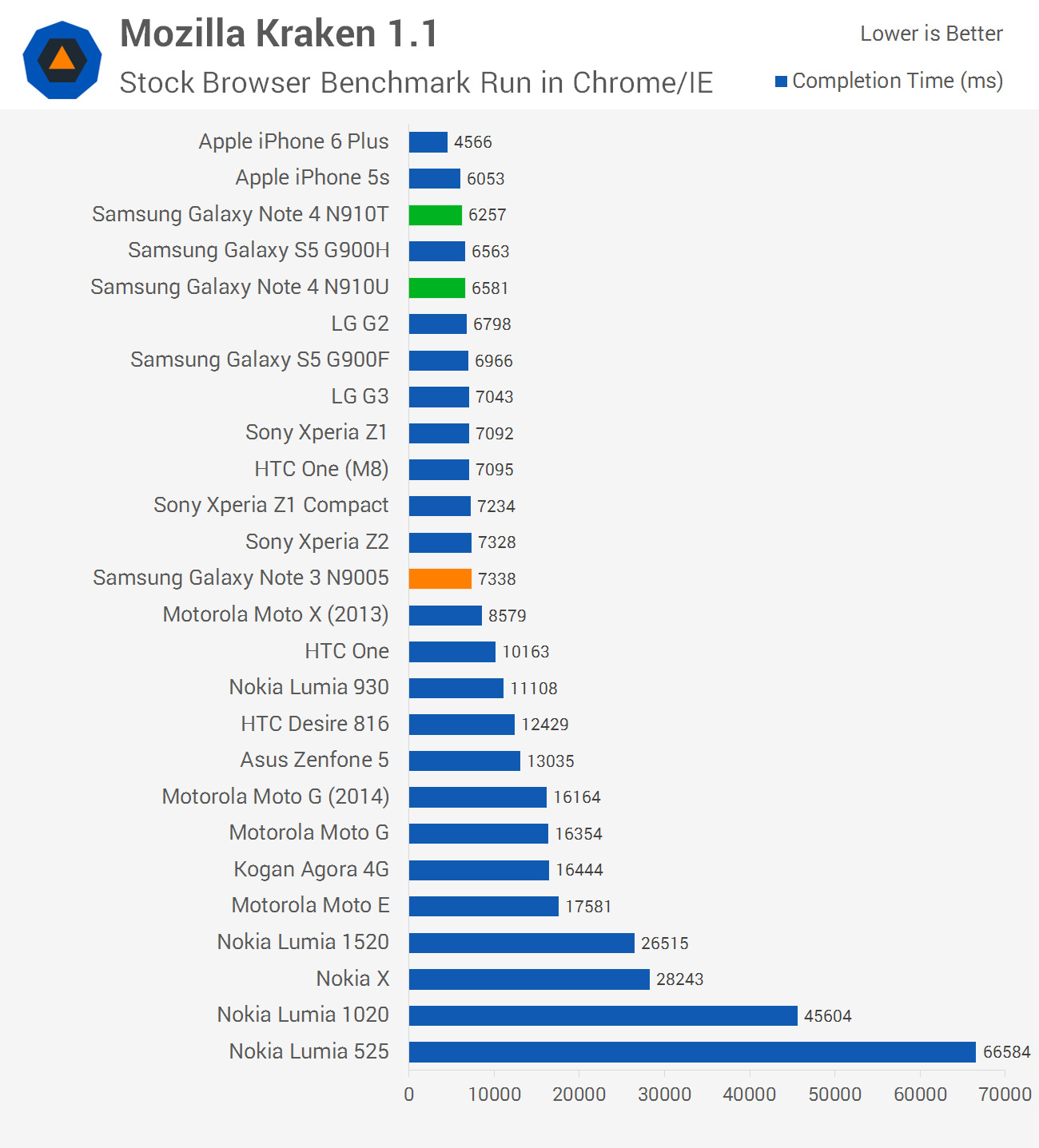
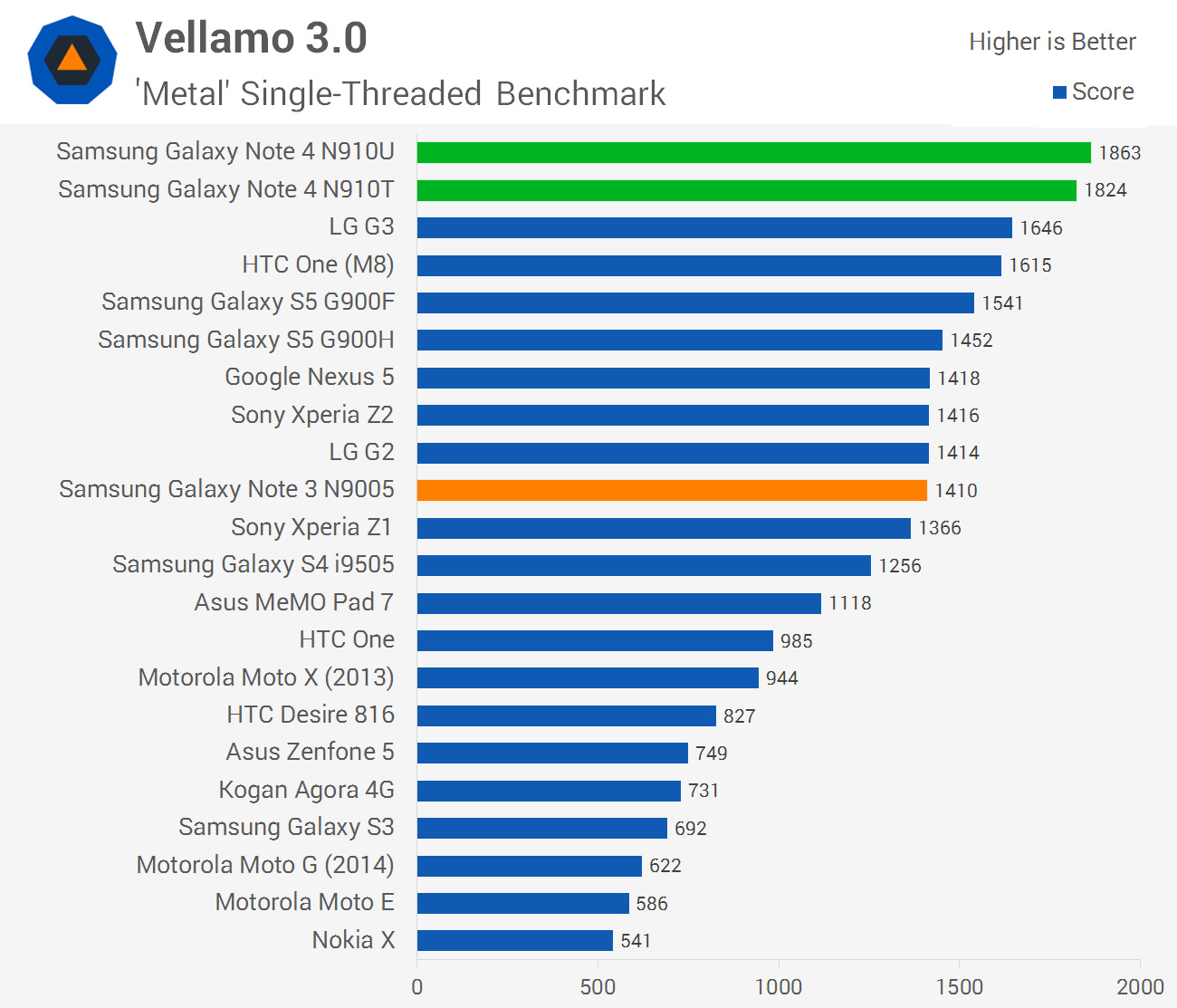
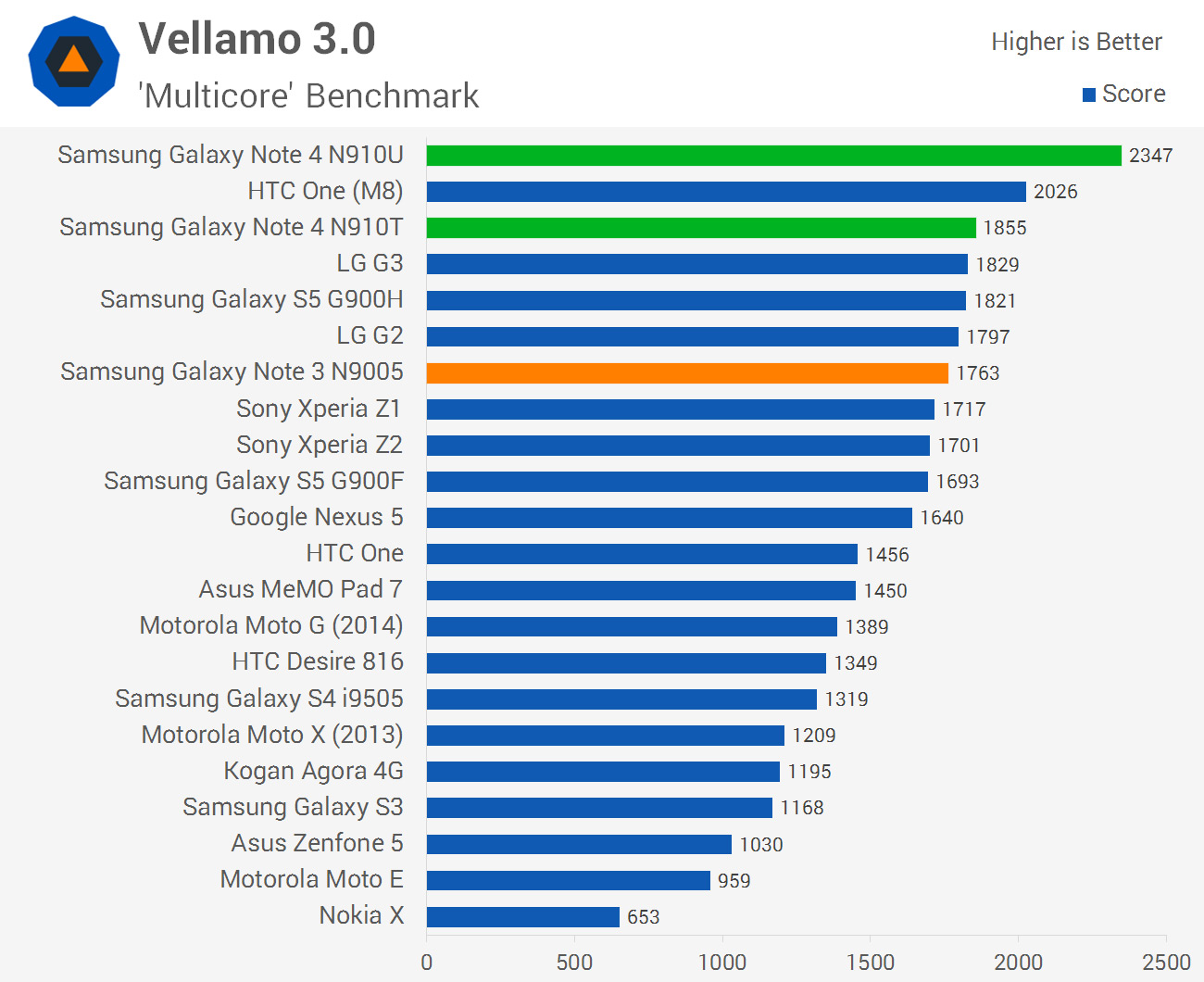
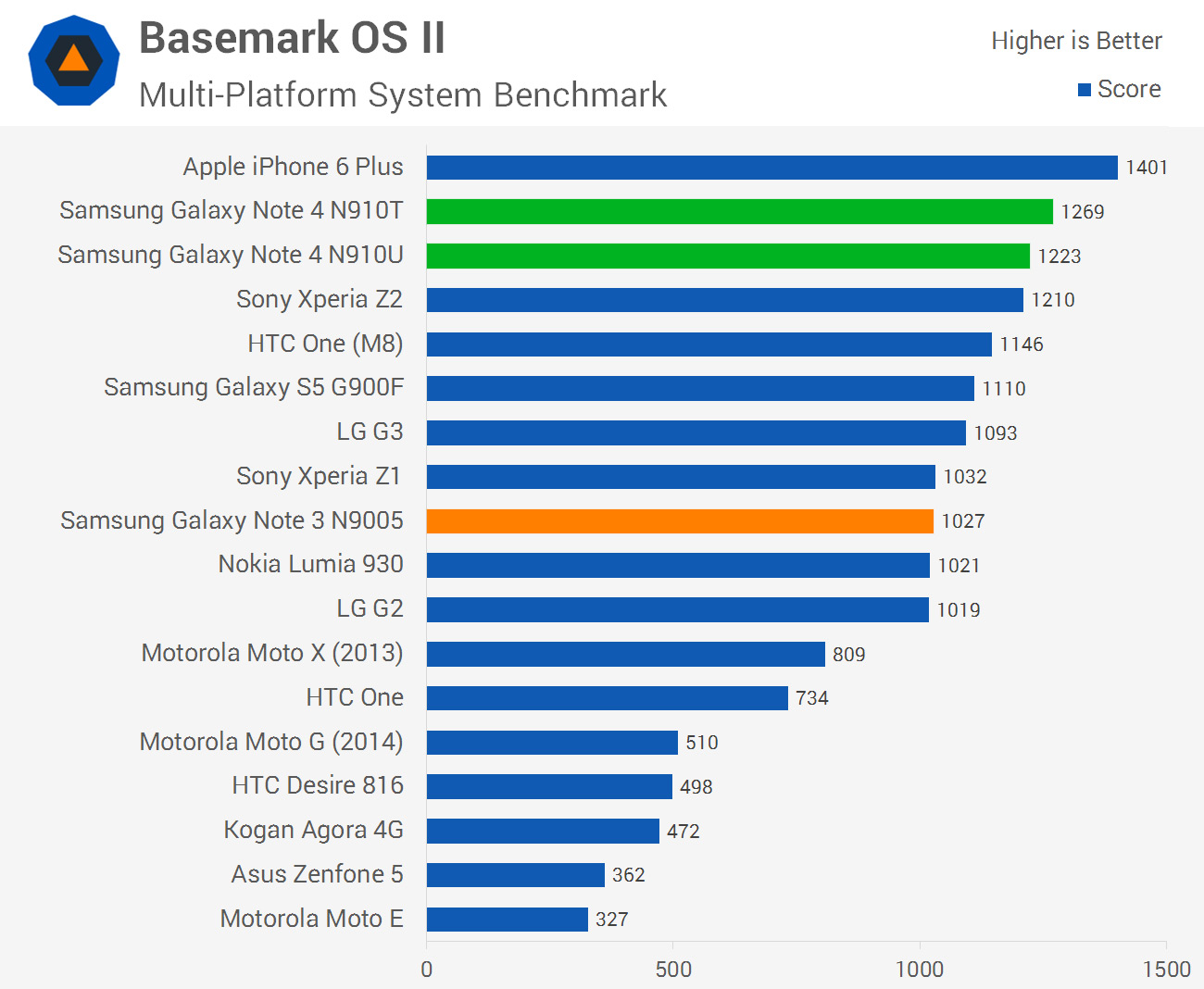
Across our CPU-heavy benchmarks, we get the first glimpse of how powerful both the Snapdragon 805 and Exynos 5433 are. Starting with the Snapdragon 805, we’re seeing an average performance increase of 13% over the 2.5 GHz quad-core Snapdragon 801, which is slightly higher than the corresponding jump in clock speed between the chips. This corresponds well from the information available on the new Krait 450 CPU cores in the Snapdragon 805, which have been upgraded slightly from an architecture standpoint.


What gets really interesting is the Exynos 5433. Samsung absolutely aren’t backing down when it comes to their home-grown silicon, boasting comparable CPU performance to Qualcomm’s top-end chip. Admittedly this is achieved over eight cores working in tandem, but it gives you an idea of how powerful ARM’s Cortex-A57 cores are compared to Qualcomm’s high-end offering. At 1.9 GHz and paired with some Cortex-A53s, the Exynos 5433 model is, on average, 7% faster than the 2.7 GHz Snapdragon 805 in CPU-heavy tasks.
 
Compared to the last Exynos model I benchmarked, the Exynos 5 Octa 5422 found in the Galaxy S5 G900H, we can get a near like-for-like look at what performance improvements we’re getting from ARM’s new architecture. The Exynos 5422 has four Cortex-A15 CPU cores clocked at 1.9 GHz paired with four Cortex-A7s clocked at 1.3 GHz in a big.LITTLE environment. These clock speeds are identical to the Exynos 5433, but with new architecture we can expect better performance, even while running in 32-bit mode.
 
On average, the Exynos 5433 is 18% faster than the Exynos 5422 in CPU-loaded tasks. ARM expects a 20-30% performance improvement going from A15 to A57 CPU cores in 32-bit mode, so I’m pretty happy with what the results show. Keep in mind that these benchmarks will also be utilizing the A53 cores in the Exynos 5433, which might not see as large a performance gain over the A7s (and the results hint in this direction).


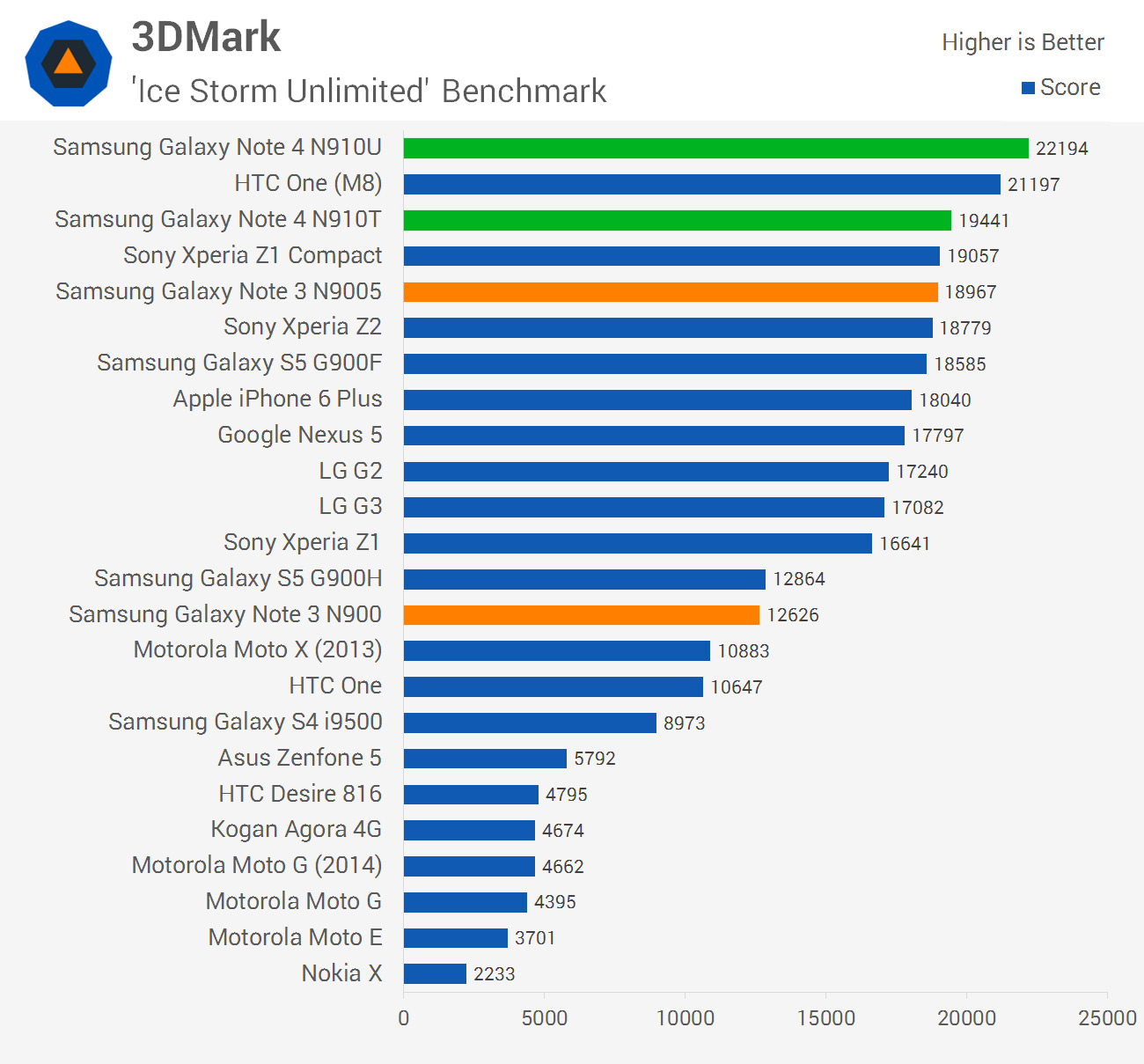
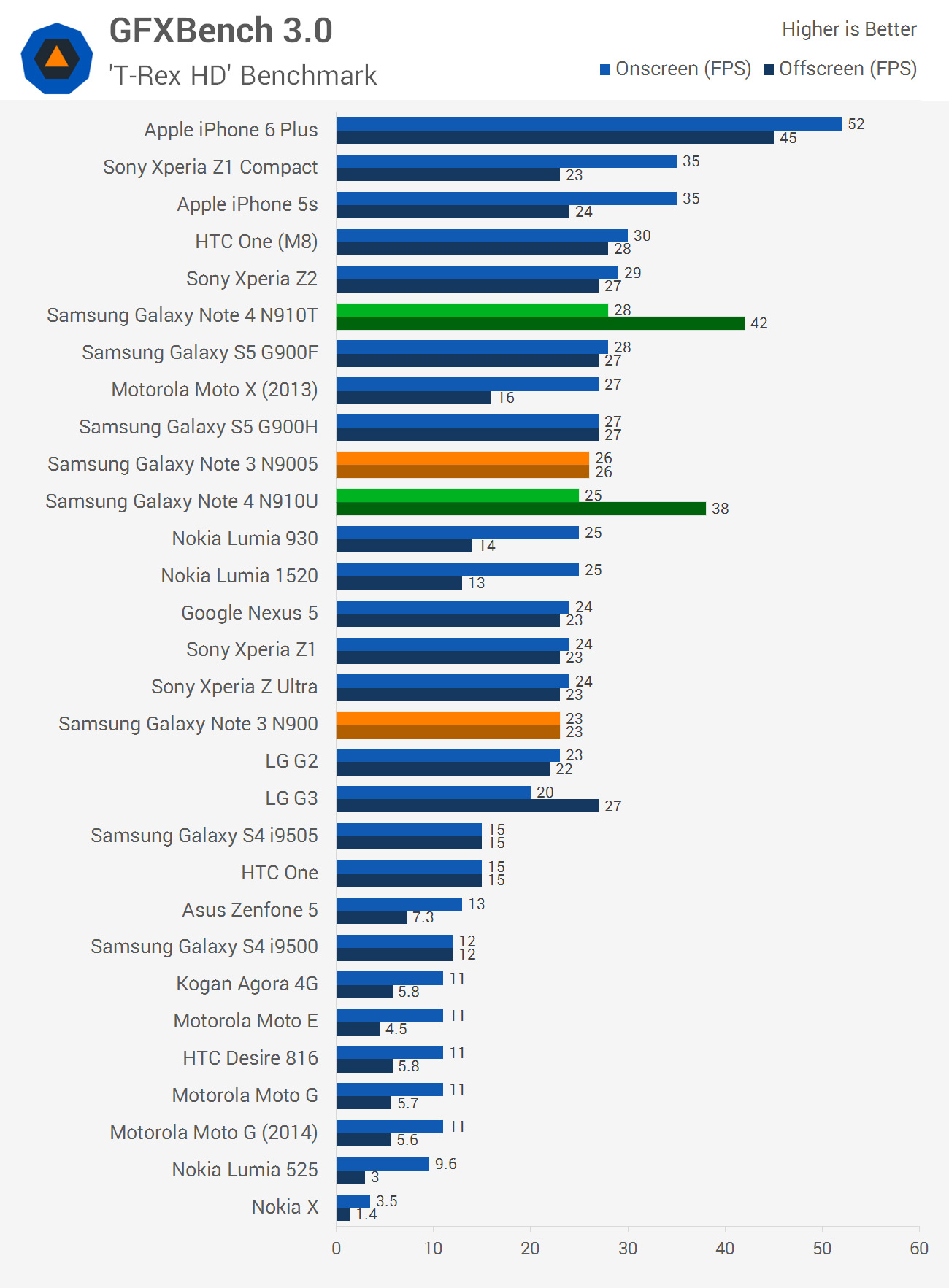
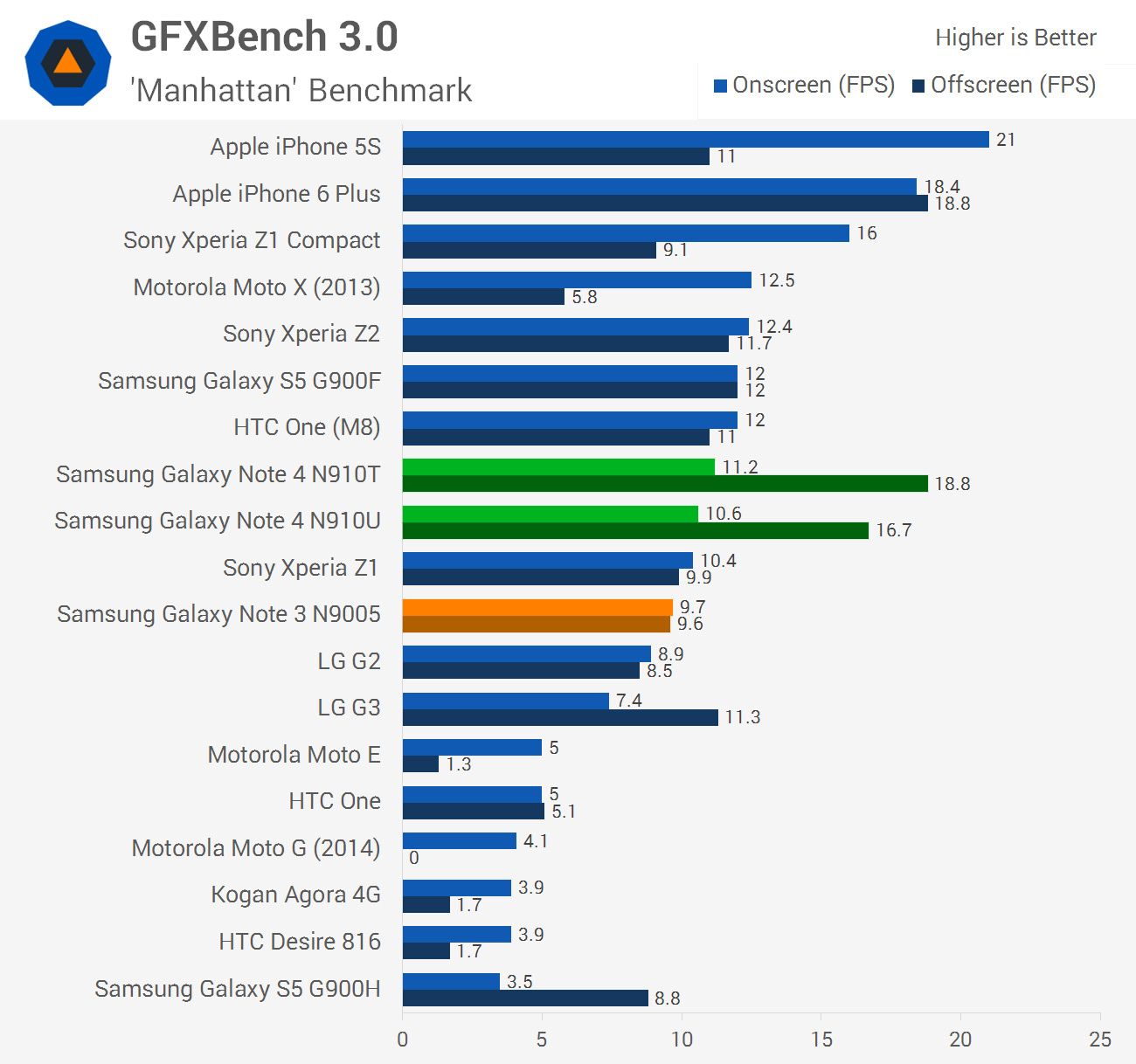
Graphics has, over the past few generations, been a weak point for Samsung’s Exynos chips. I’m glad to say that this is no longer the case, with the Exynos 5433 bringing a significantly improved GPU to the table that holds its own with the Snapdragon 805, which itself has improved over past chips. The Snapdragon model holds just a 5% lead over the Exynos model on average, which is a massive improvement over the 67% lead the Snapdragon 801 had over the Exynos 5422.
 
In this respect, I can safely conclude that the GPUs in each Note 4 are on par. This is a significant win for Samsung’s microprocessor division, and removes one of the main downsides to purchasing the Exynos variant of a Galaxy product.
 
While I’m on the topic of the Exynos 5433, its Mali-T760 GPU was a whopping 58% faster than the Mali-T628 in the Exynos 5422 in my testing. This indicates that, as I expected, Samsung is using the Mali-T760MP8 in the Exynos 5433, which is certainly a performance beast. The Mali-T628 in its configuration in the Galaxy S5 was really only suitable for flagship graphics on a 720p display, whereas the Mali-T760 is a true Quad HD GPU.
 
Gains aren’t as drastic in the Snapdragon 805 model, but Qualcomm didn’t need to advance as rapidly in this area, as they already had a strong graphics division. On average the Adreno 420 GPU in the Snapdragon 805 is 39% faster than the Adreno 330 in the Snapdragon 801: certainly nothing to sneeze at.
 
These two new GPUs do have to render to 1440p displays that feature 77% more pixels than previous-gen 1080p panels, and in this respect they’re both well suited. You won’t get quite as high frame rates in intense 3D applications as you would from a Snapdragon 801 rendering to a 1080p display, but these more powerful chips are still very capable of running flagship titles from the Play Store.


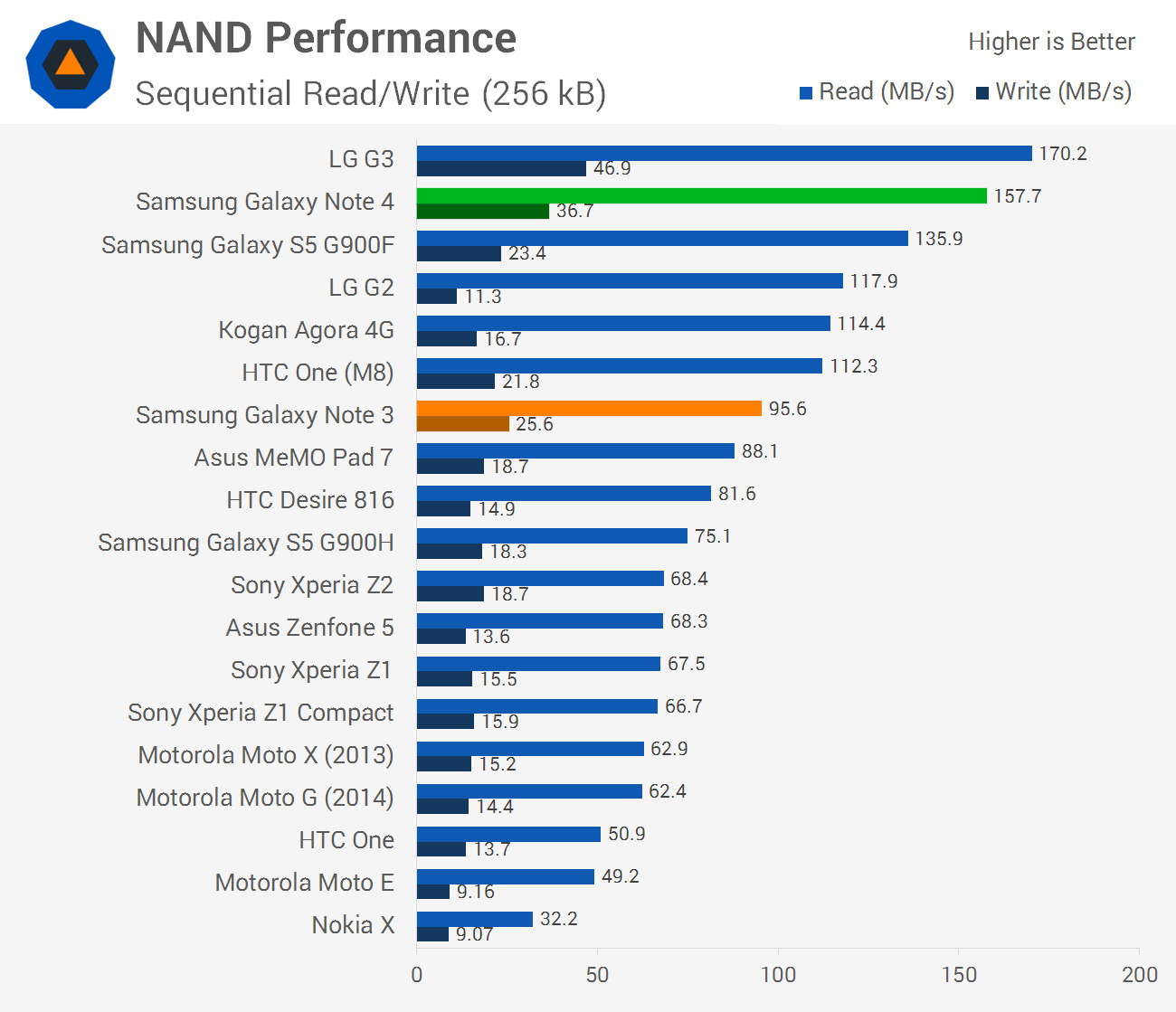
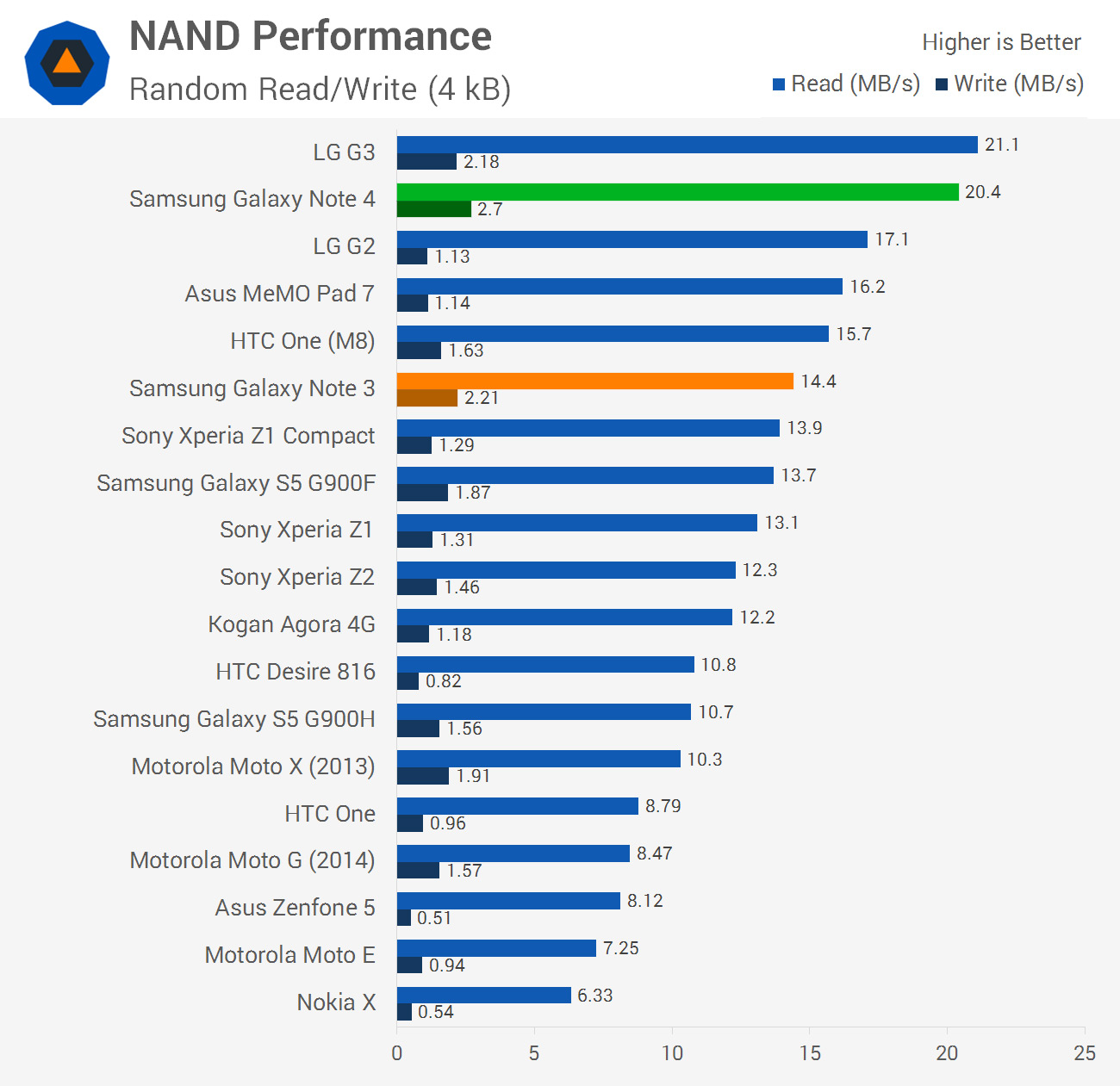
The Galaxy Note 4 slots in behind the LG G3 to take second spot in NAND performance. It’s good to see Samsung especially addressing random read/write performance in the hardware upgrade coming from the Galaxy S5, which was a weak spot in past handsets.

One thing that should be noted is that Samsung has decided to drop the microUSB 3.0 port in favour of standard microUSB 2.0. This means that read/write speeds drop from 100/60 MB/s to 35/35 across USB, which slows down transfers. I imagine the regression in this area is for aesthetic reasons: microUSB 3.0 is a large and potentially awkward port (if you’re trying to use a microUSB 2.0 cable), so it looks like Samsung may be waiting for the Type-C connector to become more widespread before switching back to high-speed USB.
 
Just on storage, the Galaxy Note 4 comes with 32 GB of internal NAND that can be expanded through the microSD card slot found beneath the rear cover. Can’t complain with this setup, though I wouldn’t say no to more internal storage.
 
 
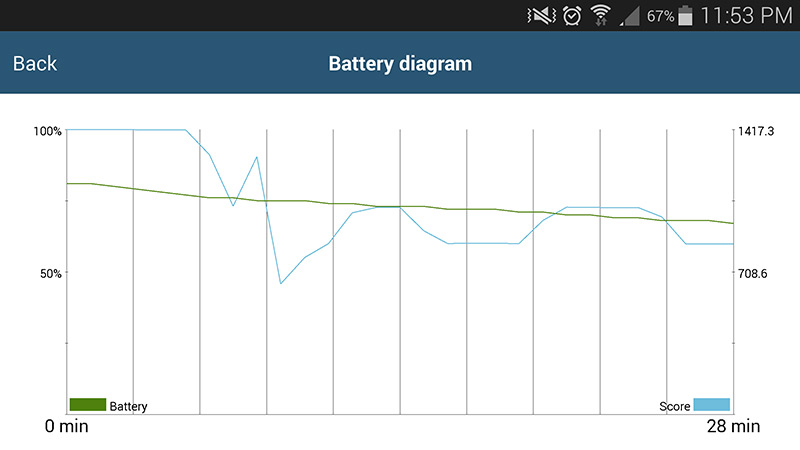
I did notice throughout my benchmarking runs that the Galaxy Note 4 throttles its SoC to a pretty significant level after around five minutes of heavy CPU/GPU load. After the end of a 30 minute run the Note 4 had lost just under 50% of its peak performance, as you can see in the graph above. Note that these results are for the Exynos model; I’ll have to examine the Snapdragon model in more detail later, although I suspect it throttles to a similar extent.

Also note that average peak performance is what we have listed in our benchmarks. That is, the benchmarks illustrate the performance you can expect when the SoC isn’t being throttled.


Article Index


1.01.2013

Superphone showdown: HTC Droid DNA vs. Samsung Galaxy S3

One of the curious things about the Android vs. iOS argument is that there’s some confusion as to which Android phone is the best, which makes it hard to compare any one piece of hardware against Apple’s latest iPhone. Inside Android circles there are smaller groups of fans that support one manufacturer or another so, when deciding which Android phone is the best you really have to look at the flagship from each manufacturer.

Now, both HTC and Samsung have a handset that could easily be considered the Android flagship. When you compare the Samsung Galaxy S3 to the HTC Droid DNA, which comes out on top?

     Build quality


HTC and Samsung have always had wildly different design ideas. While both manufacturers use a lot of plastic in their phones, Samsung tends to go for high gloss and high shine, while HTC uses matte surfaces and darker colors. On paper, these two phones are very similar. The Droid DNA features a 5-inch screen and weighs in at 138g while the Galaxy S3 features a 4.8-inch screen and weighs in at 133g. Both phones are 2.78 inches across, but the S3 is 4.4mm shorter and 1.3mm thinner than the thickest point of the Droid DNA.

Ultimtely, the Galaxy S3 is a flat slab of plastic and glass, while the back of the DNA curves to feel more comfortable in the hand. The DNA also features a soft touch coating on the back, making the it feel much more stable in your hand.

HTC takes the point here for build quality, but there is something to be said for the hit to usability that Droid DNA takes if you have smaller hands.

     Under the hood


Depending on which Samsung Galaxy S3 you are using, the Droid DNA offers a spec boost in one direction or another. The GSM variant of the S3 features a quad-core 1.4GHz Exynos processor with 1GB of RAM, while the LTE variant uses a dual-core Snapdragon with 2GB of RAM. The Droid DNA only comes in Verizon LTE form, and features a 1.5GHz Snapdragon S4 Pro and 2GB of RAM.

Samsung’s GPU, a Mali 400, does a pretty good job of standing up to the DNA’s Adreno 320. If the Droid DNA and the GS3 had similar screen resolutions the Adreno 320 would overpower the Mali 400, as was demonstrated when comparing the Galaxy S3 and the LG Optimus G. Since the Adreno 320 has to work a lot harder to drive the 1080p screen on the Droid DNA, the Galaxy S3 actually outperforms the HTC phone in graphics benchmarks.

The Galaxy S3 comes in 16, 32, and 64GB sizes, with an external storage slot capable of holding another 64GB. The Droid DNA advertises having 16GB on board, but the user only has access to 11 of those gigabytes. Since there’s no removable storage, you’re stuck relying on either the cloud or something like a Kingston Wi-Drive for holding extra music and movies.

HTC clearly has a more powerful phone on paper, but if your smartphone is where you play video games or listen to music the Samsung Galaxy S3 is likely the more functional phone in real world cases.

     Display


Both phones use Corning’s Gorilla Glass 2 to protect the screens, but the displays underneath couldn’t be more different. Samsung uses a Super AMOLED display with a 1280×720 resolution at 306ppi. The Droid DNA uses a Super LCD 3 display with a 1920×1080 resolution at 440 ppi. Typically Samsung AMOLED displays are capable of outperforming LCD displays outdoors, but the Droid DNA handles itself well even in direct sunlight. The Droid DNA is also a big winner when trying to use the phone in a completely dark room, while even on the dimmest setting the Galaxy S3 can be irritatingly bright.

While both of these smartphones feature color rich displays that function well both indoors and outdoors, the screen on the Droid DNA is undeniably superior when holding the phones up close. Text is sharper, images clearer, but video playback is almost identical.


HTC chose a great display for the Droid DNA, and is the clear winner in this category.

      Camera


It has been a little while since we have seen anything from Samsung or HTC that didn’t ship with a great rear camera. Both phones have 8MP cameras that record video 1080p at 30fps, and both phones have flash. HTC’s ImageSense offers a backlit sensor that takes great shots in low light, but Samsung’s camera does a better job with HDR shots and offers way more in the way of photo features.


HTC has recently made some huge improvements to their front-facing camera, which is now a 2.1MP camera instead of the 1.9MP on the Galaxy S3. The camera on the front of the Droid DNA is also capable of grabbing a wider field, which makes things like video chats a much more enjoyable experience.


Overall, HTC and Samsung offer very similar experiences, but the Droid DNA’s front-facing camera puts it out in front. 


     And the winner is…


While it may seem like the HTC Droid DNA won in a landslide, it’s important to point out that this is just a handful of small victories added up. The Droid DNA and the Galaxy S3 are both great phones in their own respects, and the Galaxy S3 is available everywhere while the DNA is stuck on Verizon Wireless.


If you are looking at a new phone on Verizon, or a good excuse to switch to Big Red, the HTC Droid DNA is easily the best phone on their network right now.

Russell Holly