Cisco Learning Network Store Promotions Page
Showing posts with label iOS 8. Show all posts

2.05.2016

Here's how to bypass the iOS lock screen passcode


There are numerous ways to keep your smartphone safe from prying eyes, and a lock screen protected with a passcode is a popular choice. But a newly discovered vulnerability in iOS 8 and iOS 9 means that iPhones and iPads could be accessed by attackers.
  The vulnerability was discovered by security analyst Benjamin Kunz Mejri and it has been assigned a Common Vulnerability Scoring System (CVSS) count of 6.0, as well as a 'high' severity rating. Apple has been aware of the issue since late last year, but has yet to issue a patch.
  Vulnerability Laboratory has issued a security advisory that warns: "An application update loop that results in a pass code bypass vulnerability has been discovered in the official Apple iOS (iPhone 5 & 6 | iPad 2) v8.x, v9.0, v9.1 & v9.2. The security vulnerability allows local attackers to bypass pass code lock protection of the Apple iPhone via an application update loop issue. The issue affects the device security when processing to request a local update by an installed mobile iOS web-application".
  As explained by security expert Graham Cluley, the exploit works by taking advantage of a brief period after rebooting during which passcode authentication is disabled. Vulnerability Laboratory details how to exploit the security hole (text is produced verbatim with the original typos and grammatical oddities):

  • First fill up about some % of the free memory in the iOS device with random data
  • Now, you open the app-store choose to update all applications (update all push button)
  • Switch fast via home button to the slide index and perform iOS update at the same time. Note: The interaction to switch needs to be performed very fast to successfully exploit. In the first load of the update you can still use the home button. Press it go back to index
  • Now, press the home button again to review the open runnings slides
  • Switch to the left menu after the last slide which is new and perform to open Siri in the same moment. Now the slide hangs and runs all time in a loop
  • Turn of via power button on the ipad or iphone ....
  • Reactivate via power button and like you can see the session still runs in the loop and can be requested without any pass code. Note: Normally the pass code becomes available after the power off button interaction to stand-by mode
  • Successful reproduce of the local security vulnerability!
Check out the video below to see the exploit in action:

  Physical access to the device is required, so the advice is to make sure you do not leave your iPhone or iPad unattended.

Photo credit: Twin Design / Shutterstock

~ Mark Wilson

9.18.2015

Apple customers report devices crashing on iOS 9 update

The new Apple iPhone 6S and 6S Plus are displayed during an Apple media event in San Francisco, California, September 9, 2015.


6.11.2015

This is how you downgrade back to iOS 8.3 from iOS 9 beta

 
After Apple released the beta version of its latest operating system, iOS 9, many users wanted to see what the new release of their favorite OS brings.
 
However, as with any other beta version of any program out there, iOS 9 comes with untested bugs and broken features, making it unviable for daily use.
 
If you are among the curious bunch that tried iOS 9, and now want to go back to the tried and tested iOS 8.3 (the latest-available stable version at the time of writing this article), here’s how you do it:
 
Warning: Before proceeding, make sure you backup whatever information you have on your device. You never know when things can go haywire, and you don’t want to lose all those cat photos you’ve been saving for years on your iPhone.
  1. Download the latest version of iOS 8 for your device. All firmware can be found on this iClarified site.
  2. Launch iTunes on your Mac or Windows PC
  3. Boot your device into DFU mode (press and hold the Home button and the Sleep/Wake button at the same time).
  4. Wait for 10 seconds, then release the Sleep/Wake button. Continue holding the Home button until your device gets detected in recovery mode in iTunes.
  5. Press and hold the Alt/Option key (Shift in Windows) and then hit the Restore iPhone/iPad button.
  6. Choose the firmware file you downloaded earlier from the pop-up window.
  7. Click Restore button once again to confirm and continue with the restore process.
~ Sead Fadilpašić

2.03.2015

Wi-Fi, calendar, and Bluetooth issues continue to plague iPhone and iPad owners

Summary: Nearly four and a half months since the release of iOS 8, and some owners of iPhone and iPads continue to suffer from show-stopping Wi-Fi and Bluetooth issues.
Nearly four and a half months since the release of iOS 8, and some owners of iPhone and iPads continue to suffer from show-stopping Wi-Fi and Bluetooth issues.
 
iOS 8.1.3 is Apple's sixth stab at patching the platform, but Apple's support forum continues to be awash with complaints.
 
The most serious of these problems relates to Wi-Fi stability issues that cause devices to drop the connection periodically, forcing the user to disconnect and reconnect. A thread that was started back when iOS 8 was made available for download has now grown to over 100 pages and gathered over half a million views
 
While a number of possible solutions have been suggested for this problem, no amount of end-user tinkering seems to help.
 
Another bug that is pretty show-stopping for corporate and BYOD users is a calendar bug where events are displayed with GMT times rather than local time. Again, no amount of end-user voodoo seems to solve this issue.
 
Bluetooth also appears to be just as glitchy as Wi-Fi, with connectivity issues running rampant across devices ranging from keyboards to car audio systems. Some of these issues have workarounds while others do not, so if you are affected it might be worth your while having a nose around the support forums
 
Apple might be able to sell 74 million iPhones in a quarter and pull in billions of dollars in revenue, but it can't seem to squash these annoying bugs.
 

~ Adrian Kingsley-Hughes

1.02.2015

Apple facing lawsuit over shrinking iPhone and iPad storage following iOS 8 update

Summary: Apple is facing a lawsuit over the amount of space that the iOS 8 update takes up on iPhone, iPads, and iPods.
 
Apple is facing a lawsuit over the amount of space that the iOS 8 update takes up on iPhone, iPads, and iPods.
 
The complaint, filed in California by Miami residents Paul Orshan and Christopher Endara, claims that the 16GB iPhones and iPads they purchased had less than the stated amount of usable space, and that this was further reduced after upgrading his iPhone 5S from iOS 7 to iOS 8.
 
The complaint claims that iOS 8 can occupy more than 23 percent of the storage available on some devices, and further goes on to claim that upgrading devices from iOS 7 to 8 can cause users to lose a further 1.3GB of storage.
 
"Apple's misrepresentations and omissions are deceptive and misleading because they omit material facts that an average consumer would consider in deciding whether to purchase its products," the complaint says.
 
"Rather ironically, Apple touts iOS 8 as 'The biggest iOS release ever.' Of course, Apple is not referring to the literal size of iOS 8, which appears to be entirely undisclosed in its voluminous marketing materials extolling the purported virtues of iOS 8."
 
Orshan/Endara complaint
Further, the complaint goes on to assert that users who purchased iPhones, iPads, and iPods with 16GB of storage are being pushed to purchase iCloud storage because of this storage grab.
 
"Using these sharp business tactics, [Apple] gives less storage capacity than advertised, only to offer to sell that capacity in a desperate moment, e.g., when a consumer is trying to record or take photos at a child or grandchild's recital, basketball game or wedding," the complaint says. "To put this in context, each gigabyte of storage Apple shortchanges its customers amounts to approximately 400-500 high resolution photographs."
 
The complaint seeks class action status for others who purchased 16GB Apple devices and damages in excess of $5 million.
 
Apple has not commented on this complaint.
 
~ Adrian Kingsley-Hughes

11.28.2014

Pro tip: Troubleshooting 10 known OS X Yosemite issues

Jesus Vigo reviews 10 documented issues affecting OS X Yosemite and offers troubleshooting tips to work through them.  

Apple's Yosemite has been the most ambitious OS X release in unifying the desktop and iOS mobile devices. Some of the benefits, however, can only be enjoyed by installing OS X 10.10 and iOS 8 on your respective devices.
 
As advancements are made, there are certain concessions if the technology is to move forward, and sometimes this requires upgrading older hardware to take advantage of newer features. However, as with any new product, bugs will be identified that prevent some functions from working as advertised.
 
Thankfully, most of the difficulties surrounding Yosemite can be resolved with some troubleshooting and/or software updates. Let's review below 10 of the more common issues affecting Yosemite and how to resolve them.

1. Wi-Fi connectivity

Symptoms: Wireless connection drops connectivity and goes offline for approx. 30-45 seconds at a time, often at 10-15 minute intervals between loss of connections.
 
Causes: The issue usually pertains to a buggy Wi-Fi driver. Unfortunately, this relies squarely on Apple's shoulders, as the driver must be updated before a permanent solution may be found. Sometimes the issue pertains to router and/or specific wireless settings.
 
Solution: As of this writing, the current version of OS X is 10.10.1, which includes better Wi-Fi reliability. While this has been known to resolve some issues, many users are still experiencing trouble and holding out hope for the forthcoming 10.10.2 update.
 
Additional troubleshooting steps involve reviewing wireless and/or router settings on your home equipment to verify compatibility and check for common wireless issues, such as distance, obstacles (i.e., concrete walls, which are known to impede signals), and interference brought on by multiple wireless access points concentrated in a general area, since the 2.4 Ghz band Wi-Fi typically operates on is susceptible to overcrowding from cordless phones, neighboring routers, and other gadgets operating on the same frequency.

2. Trouble booting OS X

Symptoms: Mac computer powers on and initiates the boot process, yet the progress bar fills up about halfway and then just hangs there for an unspecified amount of time.
 
Causes: Boot issues are difficult to troubleshoot, since there are so many variables that can affect the process. You could be experiencing hardware failure, software extensions gone awry, or a combination of multiple issues could be keeping your Mac computer from starting up properly.
 
Solution: Best practices in troubleshooting are the best offense to tackling boot issues affecting your Mac. Combined with a little common sense, boot issues can be resolved relatively quickly and painlessly.

3. Excessive RAM usage

Symptoms: RAM usage is throttled to its maximum capacity, preventing the use of certain applications or features.
 
Causes: RAM is used by a computer to keep application information moving as it transitions from storage to the CPU for processing and back. Yet, somewhere along the line, a process takes on more than its share of allocated memory or an app has a memory leak that causes it to continue to use up RAM until nothing is left for the system to run stably.
 
Solution: The quickest way of identifying an offending application or process is by launching the Activity Monitor.app from the Applications | Utilities folder. Checking the memory tab will list each process currently running and the total commit of RAM being used by each app in descending order from greatest amount used.
 
Many times, unsuspecting applications are loaded when a user logs on to a computer, and these apps continue to run, unfettered and often times needlessly, which negatively impacts memory performance. Quitting these processes will reallocate the previously used RAM back to the systems pool of available RAM.

4. Apple Mail trouble

Symptoms: Apple Mail has difficulty sending/receiving email for previously configured accounts. Also, certain messages can't be viewed when the message is selected.
 
Causes: Regarding the former, this is a known issue that affects Macs upgraded to Yosemite from a previous version of OS X. Apple Mail seemingly "forgets" email server settings -- typically the SMTP server settings -- allowing users to only receive email but not send out. As for the latter, one needs to look at how Mail stores messages in the .MBOX format. These files, much like their Microsoft Outlook counterparts, .PST files, become corrupt at times, preventing the retrieval of stored messages in folders.
 
Solution: Correcting send/receive errors are as easy as contacting your email service provider or searching for the POP/IMAP/SMTP settings on their support page and reconfiguring the incoming/outgoing server settings for the affected email accounts.
 
Fixing stored messages in Mail requires a bit more work to resolve. If you can see the messages listed in Mail but can't access them, click on the folder that contains the affected messages and select Mailbox | Export Mailbox... from the menu bar. A window will open, prompting you to select a location to backup the file. Click choose, and the messages will be backed to the selected location, including folder hierarchy.
 
Once the files have been backed up, delete the folders from Apple Mail and import the newly created .MBOX folder by selecting File | Import Mailboxes... and selecting the back-up file to import.

5. Handoff prompts after disconnecting phone call

Symptoms: Handoff prompts you to answer an incoming phone call from your iPhone, and after disconnecting or ending the call, OS X continues to prompt you and does not allow you to end the call.
 
Causes: The exact cause of this phenomenon isn't exactly known -- it can be attributed to OS X, iOS, or Wi-Fi/Bluetooth that's used for connectivity.
 
Solution: Typically, Continuity-related issues are fleeting. Simply re-establishing a Wi-Fi/Bluetooth connection by powering them off temporarily and restarting them resolves the hiccup. An additional step would involve rebooting OS X and iOS, which causes the devices and connection protocols to resynchronize with each other.

6. AirDrop between iOS/OS X

Symptoms: AirDrop service not detected between OS X and iOS, preventing data transfer.
 
Causes: AirDrop can be a little finicky between iOS and OS X. The majority of the disconnection occurs when the feature is used on unsupported hardware.
 
Solution: Verify that both your Mac and iOS device meet the minimum requirements for cross-AirDrop support. Once that's done, check to make sure AirDrop is enabled on both OS X/iOS devices and that both devices have Wi-Fi and Bluetooth enabled. If AirDrop is still not communicating, try these troubleshooting steps to mitigate the issue.

7. App-specific issues

Symptoms: Applications not working as advertised or certain features/functions are disabled.
 
Causes: Changes in OS X, particularly with all the new API additions for developers to utilize when coding their applications, bring a host of random issues when it comes to app compatibility.
 
Solution: Most of the time, developers have time to sort out any bugs that present themselves by the time an OS is ready for public release. However, as stated before, some issues are unforeseen and require updates or patches to correct. The best practice is to ensure that OS X is fully updated, plus any applications that might be experiencing trouble with Yosemite. Checking the vendors' support pages will often yield download links for updated versions of software or patches and workarounds for known issues affecting users.

8. Battery life

Symptoms: Battery life is drastically reduced when compared to its current use with Yosemite and the previously installed version of OS X on your Apple laptop.
 
Causes: Any potential hardware defects aside, such as malfunctioning cells in the battery themselves, changes in battery life for typical usage is usually a direct result of a driver issue within the OS itself and/or the use of software that may not be optimized for Yosemite.
 
Solution: Similar to issue #7 above, ensure that your MacBook is using the latest version of OS X 10.10.x and that all software applications are also updated to their latest versions, since this code typically has been optimized for use with the latest version of OS X.
 
An excellent technique that one could use to deduce any offending apps is located in the Energy tab of the Activity Monitor.app in Yosemite. A listing will be presented of all the applications currently running on your device, along with the Energy Impact -- updated in real time -- and the average Energy Impact as determined by use over a period of time. Additionally, with certain apps, like Safari for example, plugins are also included by selecting the arrow to expand and display such services and their respective impact on your systems power consumption.
 
Any outstanding offenders displayed here might be unknown to the software developers, and you may be able to submit a bug report on the developer's website explaining the problem so that they can issue a patch or rework the code in a future update.

9. Lag brought on by Spotlight indexing

Symptoms: Yosemite may, at certain times, become extremely slow and lag while you're trying to work on the computer.
 
Causes: Spotlight -- Apple's system-wide search function -- must index data located on your computer in order to be able to report lightning-fast searches. This indexing builds a catalog of all the data on your device. Depending on the amount of data, completion of this process may take some time, which will impact the resources on your computer while it's building the index.
 
Solution: If Spotlight is not used and you wish to turn the service off, it can be done so by executing the following command in Terminal:
 
sudo launchctl load -w /System/Library/LaunchDaemons/com.apple.metadata.mds.plist
 
However, since Spotlight is a useful piece of technology, you may wish to keep it enabled and just limit what is indexed. To do so, launch System Preferences | Spotlight and select the Search Results tab. There, you'll find a number of search categories. Uncheck the selections you wish to exclude from indexing, and they'll be removed immediately. Similarly, if there are specific files or folders you wish to exclude, or even a particular drive, click the Privacy tab and use the plus sign [+] to add paths you wish to have excluded from Spotlight. All paths added will immediately be excluded from indexing and removed from the index catalog to keep Spotlight optimized.

10. Upgrade vs. clean installation

Symptoms: Prior to installing Yosemite (and perhaps given the number of issues affecting this latest version of OS X), users must decide how they wish to install the newest OS to maximize the operating system potential and minimize any possible issues.
 
Causes: Installing the latest version of OS X offers two paths: Upgrade and Clean Install. Which one you choose will depend on your specific needs, available storage space, and whether data has been backed up.
 
Solution: Upgrading is the easiest solution and the one most will choose. It allows end-users to keep their data, apps, and settings in place while replacing the previous OS with Yosemite.
 
The downside to upgrading is that any issues that existed with OS X previously will continue to plague the system after upgrading to Yosemite. Also, possible incompatibilities with apps or corrupt files might be enough to destabilize OS X Yosemite, and it may lead to some of the known bugs users have been experiencing.
 
Clean installs effectively format the HDD/SSD and installs a fresh copy of Yosemite on your Mac. During the format process, all data is lost -- as are settings, preferences, and pretty much everything else. But once the process is complete, you have a brand new installation of your OS, and none of the previously installed apps or settings will be there to conflict with OS X.
 
The main caveat to clean installs is data loss. This isn't much of a problem for users who practice regular backups of their data. However, it will be an issue for users who haven't backed up, since they'll have to first backup any data they don't want to lose, which adds considerable time to the overall process. Any settings will also be lost, passwords remembered, email configurations, etc. You'll basically be starting from scratch, which might be a deal breaker if you use your Mac for work or critical functions.
 
I personally advocate for a clean install, since the payoff of having a sanitized system far outweighs any time it will take to reconfigure certain apps or settings. Plus, since my data is regularly backed up, it's easy to restore my files once my clean copy of OS X is ready for use. However, I do recognize that it's less than ideal for some solutions, so tread lightly and consider benefits vs. time before making the decision either way.
 
Lastly, troubleshooting is going to be essential with any OS -- Apple, Microsoft, or Linux. Things happen, updates may fix one problem only to open another issue somewhere else. Such is the way of computers and code generated by humans -- they are both prone to occasional error. The silver lining is that it keeps IT working and certainly never makes for a dull moment.
 
What other troubleshooting tips would you recommend for OS X Yosemite? Share your experience in the discussion thread below.
 
~ Jesus Vigo

11.02.2014

iPad Air 2: Overkill and underwhelming

Summary: Apple's newest tablet is their thinnest and most powerful yet. So why am I disappointed?

They've reduced the form factor and it's faster!
As I mentioned a few weeks ago, I sold my original iPad Air back to Amazon, and ordered the new iPad Air 2.
 
I knew at the time that it was going to be thinner and the processor would be more powerful and have more memory.
 
It has the Touch ID and the anti-reflective coating. It has new cameras.
 
All of this is great, right? Well, mostly, I guess.
 
It's not like the original iPad Air was a slow tablet or not thin enough. Frankly, the Air was already too thin for my tastes, if they had stuck with the thickness of the iPad 4, the tablet could have accommodated a much larger battery.
 
My only major complaint about the iPad and the iPhone is that the designs are overall too fragile and require highly protective cases to prevent them from being damaged with regular use. But this is true of most tablet and smartphone designs, including Android ones, although Apple products are particularly susceptible to damage.
 
When friends and family have asked me about which iPad they should buy -- the Air 2 or the original Air, I ask them about what they actually do with the things. Many, if not all of them answer "Use email, Facebook, browse websites, play casual games and watch Netflix."
 
My answer is almost always "You don't even need an iPad for that." But if they press, I tell them they could probably get a nice deal on a previous generation device at Apple Outlet. If you are in the market for an iPad (or even a Mac) but don't need the latest and greatest, you can buy certified and refurbished stuff there that is good as new.
 
So what has my practical experience with the Air 2 been like? Well, first of all, before I even opened the packaging I did a Dremel job on a hard shell Trident Aegis iPad Air case, along with some cardboard for padding, to protect the new device until I could get one of the current generation hard shell cases in.
 
The volume controls don't work because their position has been moved and the mute button is now gone (I have it pre-set to an acceptable volume) and the camera is out of alignment and partially blocked. But the power button works ok and I have access to the charger port and with the Dremel job, the Touch ID.

That's not a major complaint though. I understand why Apple changes designs. And there's a whole accessories industry to keep alive.
 
The endless pursuit of thinness though is becoming a bit ridiculous. And it has had a detrimental effect on battery life, never mind the need to produce thicker and tougher case accessories.
 
I used to be able to get a solid 10 hours of use on an iPad Air. Now, I'm maybe getting eight, best case scenario. Other reviewers have reported they used to get around 12, but now get get 10.
 
The variation has to do likely with how bright you set the display (I like mine brighter than most) and how CPU and graphics-intensive the apps you use are. But the general consensus is that the iPad Air 2 has a worse battery life than its predecessor.
 
It's true that the CPU is faster. There is some improvement in how the Safari web browser responds and how fast pages load, and in the performance of a number of apps. However, it isn't like the performance of the previous generation was bad. It was excellent.
 
So while the Air 2 is faster, it doesn't feel so much faster that most people will notice a difference with the mix of apps they normally use.
 
What is worth mentioning, however, is that there are only a scant few apps for iPad that can actually fully exploit the power of the Air 2. There are some games I play that are probably the most graphically and CPU intensive you can find on the iOS platform, such as Real Racing 3, Asphalt 8, X-Plane 9, Infinity Blade 2, and Godus.

Most iPad games I play, though, are not super CPU or graphics intensive. Boom Beach, which is one of the highest grossing games on the platform, plays just as well on an Air, or an iPad 4th Generation. You could say the same for This is War! which is similar "attack the base" sort of isometric game.
 
Of all of those, only Asphalt 8 is iOS 8 "Metal" enhanced, and there are only 7 Metal-enhanced games for iPad in the App Store today. So if you have an iPad Air 2, chances are, there are only few apps that can actually take advantage of the thing. I expect this to change over time, but right now, most of the horsepower of the Air 2 (and even the iPad Air, for that matter) is wasted.
 
By far the most popular apps on the iOS platform do not require an iPad Air 2, or even an iPad Air to run well, and that's because of the very modest memory capabilities of the earlier devices the developers have to shoot for.
 
Don't get me wrong, it's nice to have the additional RAM, the 2GB on the Air 2 versus the 1GB on the original Air. There's less chance of stuff crashing, particularly with more resource-intensive games like Godus or Real Racing 3, should you have other processes running in the background.
 
What about the faster networking, the 802.11ac MIMO? Well, I have a 3000 square-foot, 5 bedroom home. I never had serious reception issues using 5Ghz bands on the previous model.
 
Although 802.11ac MIMO is a nice to have, and I have an 802.11ac router here, it's not like I can exceed the throughput of my broadband connection anyway, which is 50Mbps.
 
Even the previous Air was able to push it to near-wireline speeds on a good day. So unless Google Fiber comes to town, I'm probably not taking full advantage of that either. However, if an Apple TV 4th-Generation makes an appearance that permits the Air 2 and iPhone 6 to do AirPlay and screen mirroring at those speeds, that's another story.
 
Am I disappointed that I upgraded? For the time being, yes.
 
I'm sure that at some point, we'll see some apps that can actually put this device through its paces. But for now, until those apps materialize, I'm underwhelmed by the iPad Air 2, and I'm convinced the product is overkill for most folks who would be better served by previous generation devices, especially if they haven't done an upgrade in several years.
 
What do you think of your iPad Air 2? Talk Back and Let Me Know.
 
~ Jason Perlow

10.21.2014

Apple seeks to allay concerns over Yosemite Spotlight data collection

Summary: Apple is ruffling features by collecting search and location data from OS X Yosemite users through Spotlight features that some argue should be off by default.
 
 
Apple's quest to be known as a company that makes products with built-in privacy hit another snag on Monday amid concern over query and location data it's collecting through Spotlight in iOS 8 and OS X Yosemite.
 
Spotlight for OS X Yosemite, as reported in the Washington Post on Monday, contains a little surprise for users, with the search tool now sending queries and location data to Apple. And thanks to a deal between Microsoft and Apple to display Bing results in Spotlight, it's also sending some data to Microsoft.
 
The feature update has annoyed some users, including developer Landon Fuller, who posted details at fix-macosx.com on how to restore privacy in OS X, chiefly by disabling several Spotlight settings in not just Spotlight but Apple's Safari browser too.
 
While Apple does outline Spotlight's new features in its documentation, Fuller doesn't like that the potentially invasive features are on by default — which he considers a break from past versions of OS X.
 
Apple explains in its "about" section for Spotlight that search queries and any Spotlight suggestions it offers are sent to Apple, while search results are not. Apple will also collect a user's location when users make a search and location data is on.
 
In response to the kerfuffle over the privacy implications of the feature, it's also published a separate support note explaining how to deactivate the features.
 
Apple issued a statement to iMore outlining that it doesn't retain the IP addresses of users' devices and "blurs" the location of the device so that Apple doesn't see the exact location. Also, the device identifier it does collect changes every 15 minutes, preventing it or third-parties from creating a profile based on search history. It also clarified that Apple only forwards commonly searched terms and city-level location information to Bing, while Microsoft doesn't store search queries or receive a user's IP address.
 
The company explains as much in its page about built-in privacy, pointing out that before Spotlight provides suggestions, it "considers things like context and location while protecting your privacy by using an anonymous identifier that refreshes every 15 minutes. You can always opt out of Suggestions and continue to use Spotlight solely for local search on your device."
 
Apple has attempted to distinguish itself from rivals, in particular Google, by claiming its business doesn't rely much on the collection of user data for advertising. It's also stepped up that messaging in response to concerns its products have backdoors and that it works with government agencies — a concern that held up the iPhone 6 and 6 Plus launch in China as regulators there extracted promises from Apple that its device was not a security and privacy risk. The third major privacy issue it's faced in recent months, of course, is Celebgate.
 
~ Liam Tung

10.16.2014

Apple releases OS X Yosemite for Mac for free; iWork updated

Summary: Apple's latest desktop operating system lands on existing and new iMacs and MacBooks for free. Also updated, the company's iWork productivity suite.
 
(Image: CNET/CBS Interactive)
Four months after Apple announced its next-generation desktop and notebook operating system, the company is ready to set it free.
 
At an event at Apple's headquarters in Cupertino, California on Thursday, the iPhone and iPad maker revealed something for its Mac lineup, too.

Meet the latest version of the Mac's software: OS X 10.10, dubbed "Yosemite."
 
The tenth iteration of the popular Mac software since 2001, and the second in the California-focused naming scheme after OS X 10.9 Mavericks, Yosemite lands with a number of visual improvements.
 
iWork has also been updated, including a new user interface. The office suite, which includes Pages for writing, Numbers for spreadsheets, and Keynote for presentations, comes with iCloud integration.
 
But the star of the software show was undoubtedly Apple's operating system.
 
Yosemite's user interface is familiar but improved. Users will see a redesigned Dock menu bar, "dark mode" for night-time working, a new system-wide font, and other user interface and experience tweaks, which give the software a "fresh lick of paint" feel.
 
Yosemite also comes with a bevy of new features designed to bridge the gap between its desktop and mobile users.
 
Featured in the new operating system, its flagship Continuity feature, which essentially provides near-infinite connectivity and seamless productivity between its Mac, and iPhones and iPads.
 
Part of Continuity, a feature Apple calls Handoff, allows iPhone and iPad users to work on one application and carry on working on the Mac, so long as the devices share the same iCloud account.
 
Continuity also allows iPhone users to share their connection with their Mac when there isn't a Wi-Fi connection nearby. And, if you receive a phone call from your iPhone, you can pick it up from your Mac and carry it on from your iPhone or iPad without missing a beat.
 
Of course, these features have yet to be widely documented because, until Yosemite's release, iPhone and iPad owners running the latest iOS 8 version haven't been able to use it.
 
Now that the remainder of iOS 8's unreleased features — arriving thanks to Yosemite's support — will complete the mobile software, it's hoped this will boost usage figures.
 
Apple's share among existing iPhone and iPad users remains stale, almost a month after it first launched. With an install rate of just 47 percent— the exact same share of its older iOS 7 mobile operating system, with the remaining for much older devices — it failed to immediately take off.
 
Many suggested it was due to iterative update problems with iOS 8.0.1, putting many users off upgrading to the software. Others believed it would slow down their older devices. Others, notably Apple watcher John Gruber, believed it was due to the amount of storage space the upgrade required.
 
There remains a strong case, however, that many were waiting for the final bits of iOS 8 to land — features which coincide with Yosemite's launch.
 
Apple's recent third-quarter earnings (its fourth-quarter earnings are later this month) showed the company has more than four million Mac sales each month, accounting for about 4.1 percent of the overall market share for OS X Mavericks, latest NetMarketShare statistics show.
 
Both OS X Yosemite and iWork are available for free for immediate download on Thursday through the Apple App Stores on Mac and iOS.

~ Zack Whittaker 

10.01.2014

Is iOS 8 Spotlight Search Similar to the Ubuntu Dash?

If you’ve played with an iPhone or iPad running iOS 8 you might have spotted a new feature in Spotlight — a feature that bears more than a passing resemblance to a key part of the Ubuntu desktop.
  
Let me preface this by saying that good ideas catch on. That is a good thing. In culture, in literature, or in technology: we all benefit when people are free to take an idea and develop it in new, different ways. It’s a concept that most open-source frameworks are built on. Don’t like something? Fork it!
 
Back to Apple’s rejig of the Spotlight search feature in iOS 8. Apple has given Spotlight new features, features similar to those debuted by Ubuntu a few years back. Spotlight is now a search hub, for want of a better word.
 
Like in the Unity Dash, Spotlight in iOS 8 will throw up results from online sources, including iTunes, Wikipedia and Bing, alongside local files, photos and apps. It will even serve up relevant app suggestions where applicable — just like Unity’s ‘recommended software’ section.
 
 
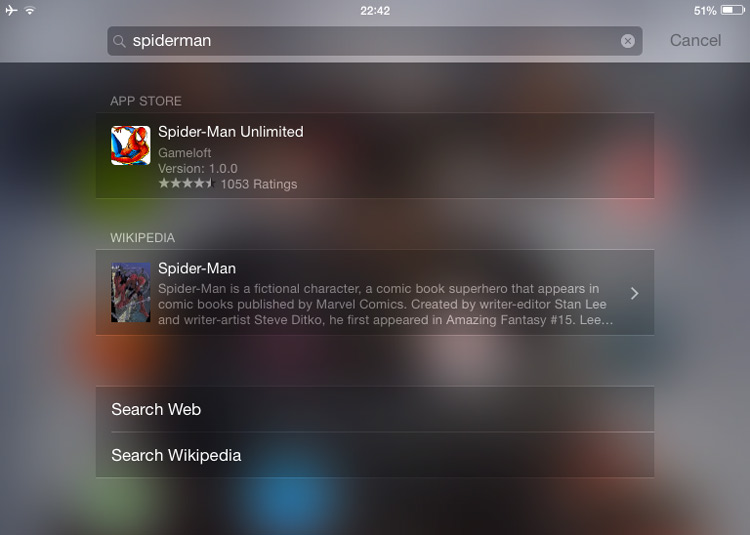
Results are grouped based on their source, with a small thumbnail shown alongside a brief snippet or link.
 
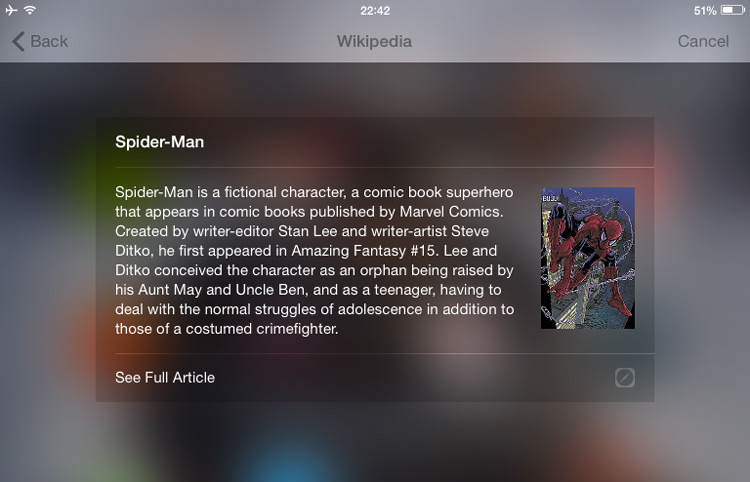
For example, typing in “Spiderman” throws out an App Store link and Wikipedia entry on the comic book character. Depending on the search term you may see movie times, nearby events or business, relevant web links, and so on.
 
 
Again, as with Unity, certain results can be clicked to reveal a short preview or snippet:
 
 
But unlike the Unity Dash there are no Amazon product results rearing their head thus far. But when you’re a company worth over half-a-trillion dollars, it’s not like you need them!
 
Apple do not (yet) have plans to allow third-party services to add in and extend the search functionality, something Ubuntu does allow through its “Scopes”.

Applentitlement

Now, by this point in the comparison, fervent Mac fans will be foaming at the mouth, incredulity rushing to their fingers, calling them into commenting action. To be fair, they have some reason to feel the need to rebut through Helvetica ALL CAPS.
 
Why? Well, firstly, the notion of a visual hub collating local files, apps, emails, contacts, music and other items is not novel or ‘unique’ to Ubuntu. Spotlight has long been a mainstay of Apple’s mobile and desktop OSes, and various Linux desktop shells/apps over the years have attempted similar things.
 
Secondly, it can be argued that the first true fusion of local and remote results to use smart matching began with productivity apps like Alfred, which served as inspiration for GNOME Do, Kupfer and, by extension, Synapse.
 
But it is only with iOS 8 (and the upcoming release of OS X 10.10 ‘Yosemite’ on the desktop) that Apple is expanding its search reach to cover ‘contextually relevant’ results in a way more accessible to the user.
 
Ubuntu amped up search on the Unity desktop shell through ‘Smart Scopes’ back in 2013.

Seriously, Don’t Miss the Point

Playing a game of “Who did what first” never ends well. And it’s not really what this article is supposed to be about. It’s about showing how different companies, projects and OSes tend to converge on the same problems but go about solving them in different — or not so different in this case — ways.
 
There is no shame in this. Is it likely that Apple actually flat out copied Ubuntu? Probably not. Inspired by it? Possibly…but given the insular nature of the Cupertino design team, even that would be a little arrogant to assume.
 
What this feature does show is that Canonical, in bringing this feature to the desktop and making it front and centre of their mobile OS, is acutely tuned to react and adapt to changing habits of users. While not always a hit in the implementation — the smart scopes server matching remains a little scattershot — they are often ahead in willing to break the status quo.
 
This instinct for what’s next bodes well for their mobile domination plans.
 
~ Joey-Elijah Sneddon

9.25.2014

Unofficial fix for iOS 8.0.1? Roll back to iOS 8. Here's how

Summary: Here's how to roll back your iPhone 6 or iPhone 6 Plus to iOS 8, and get the cellular connection and Touch ID working again.
 
 
What follows is an unofficial fix for the cellular and Touch ID issues introduced by the iOS 8.0.1 update.
 
I present this as is, and offer no endorsements or warranties. If it goes wrong, then you're on your own. However, this worked for two devices we tested, the iPhone 6 in the New York newsroom and the iPhone 6 Plus one in the UK.
 
1. Download the iOS 8.0 firmware (for iPhone 6, and iPhone 6 Plus) file from Apple.
  • iOS 8.0 (iPhone 6 Plus): iPhone7,1_8.0_12A366_Restore.ipsw
  • iOS 8.0 (iPhone 6): iPhone7,2_8.0_12A365_Restore.ipsw
2. While the file you need is coming in, go into Settings > iCloud and turn off Find My iPhone.
 
3. Next, connect the iPhone to a PC or Mac running iTunes using a cable connection (not Wi-Fi), and allow the two to connect.
 
4. Make a local backup using iTunes before you do anything else by clicking on the Backup Now button. Make sure you update to "this computer," rather than iCloud, encrypt the backup if you want to keep passwords, and make sure to include apps. Allow that to complete.
 
5. From the iPhone screen in iTunes, hold down Alt (on Mac) and Shift (on Windows) and click on Restore iPhone and point iTunes to the file you downloaded earlier.
 
6. Allow the restore to take place and when you iPhone reboots it will be running iOS 8.
 
7. Reload your data and apps by clicking on Restore from this backup and allow the process to complete.
 
8. Re-enable Find My iPhone.
 
If you followed the steps then you're handset is back to running iOS 8.0, and the Touch ID and cellular connection should be working again.
 
~ Adrian Kingsley-Hughes

9.19.2014

BYOD users: Don't rush into that iOS 8 or iPhone 6 upgrade

Summary: While most users can safely upgrade to iOS 8 or a new iPhone 6 without much worry, BYOD users should wait until their IT department gives them the nod that it's safe to do so.
 
(Source: Apple)
There's always a great deal of interest surrounding iOS releases, and the latest iOS 8 update will be no exception. And when that software update notification hits your iPhone or iPad, you might be tempted — even feel compelled — to join in the download frenzy and install it as soon as possible. But if you use your iPhone or iPad in a BYOD (Bring Your Own Device) scenario then you might want to hold off on that upgrade.
 
Before installing the update, it might be a good idea to check with your IT department as to whether they are ready to support iOS 8. Don't guess or assume anything. Unless you've heard specifically that it's OK to go up to iOS 8, get in touch with the department and see what they have to say.
 
Some on-the-ball IT departments will already be clued up and should be ready to support iOS 8 as soon as it lands, but others might not be, or might be waiting on an update for some critical software.
 
Prematurely upgrading to iOS 8 without the necessary support could result in critical apps and services that you rely on being buggy or not working at all, and you could find your device locked out of the corporate network.
 
And remember, as compelling as it might be to kick off that update, once you upgrade your device to iOS 8, there's no rolling back or undoing it, so you could be stuck for some time.
 
The same applies to upgrading your handset to the new iPhone 6 or iPhone 6 Plus, which will be released this Friday. Remember that these devices run iOS 8, and as such may not initially be supported by your IT department.
 
Again, don't guess or assume anything, as it might backfire on you.
 
There are several other good reasons why you might want to hold off from upgrading to iOS 8, but this one is of particular importance to those who BYOD their iDevices.
 
~ Adrian Kingsley-Hughes

9.12.2014

Android smartphones are too far ahead for iPhones to ever catch up

 
Apple has finally conceded that big screens are better, as its new iPhones offer 4.7-inch and 5.5-inch displays. It has also finally conceded that a mobile operating system is better when it's more open, as iOS 8 supports third-party keyboards and inter-app communication. It's almost like Apple is saying that Steve Jobs was wrong while rival Android manufacturers and Google were right all along. Oh, the horror. How will Apple fanbois be able to explain this?
 
But, even as Apple is doing all these things, that some of us have already been enjoying for too many years to count, iPhone 6 and iPhone 6 Plus are still outclassed by rival Android flagships. In fact, the new iPhones are not much different than Samsung Galaxy S3 or Galaxy Note 3, and, as you may know, neither of the two is the latest incarnation in their respective series. Ouch!
 
Before seeing the new iPhones, I imagined that Apple would reveal something truly special this year (no, Watch isn't it either), that would make buying an Android flagship a silly idea. Apple could have stunned us with high-resolution displays and cameras that at least rival what the Android fold can offer, designs better optimized for big screens, much better battery life, more storage in the entry-level models and, you know, other features which are to be expected out of a high-end device unveiled in 2014, like being able to see more than one app on the screen, access to internal storage for apps and, who knows, maybe even something a bit more modern than a grid of icons on every single homescreen. As it turned out, old habits die hard.
 
Of the two new iPhones, only iPhone 6 Plus manages to impress, and that's by iPhone standards. The normal iPhone 6 is outdated before it even hits store shelves. Compared to it, iPhone 6 Plus offers a much more impressive resolution (1,080 by 1,920), better camera (because of optical stabilization) and better battery life (no doubt because of a bigger battery), which are features many wanted to see introduced in iPhone 6 too. Tough luck. Maybe next time. Hey, Apple has to make money somehow, right? Why not save modern features for next year?
 
On the other side of the fence, what the Android fold offers is so much better. First of all, there are so many good options to choose from. If you want a great design, the best in its class, look no further than HTC's One (M8). Heck, the new iPhone design is reminiscent of it, so why not get the real deal, which also packs a bigger, much-higher resolution screen than iPhone 6?
 
Even China's Xiaomi with its Mi 4 is no slouch; same goes for the upcoming Galaxy Alpha. There's something for everyone, even for those who believe that having a metal-made smartphone is not a priority -- that would be all of Samsung's customers, who far exceed iPhone users. Polycarbonate (or, plastic, if you will) has its perks; one of its advantages is its resilience, which is superior to metal. If you drop or scuff your phone, a plastic shell will look better over time than a metal one.
 
If you want a really big display in a manageable body, then LG's G3 is the first device to consider. I owned one for a brief period of time, and was impressed by how small it feels in the hand considering its 5.5-inch panel, which is as large as iPhone 6 Plus' screen (except with a much higher 1,440 by 2,560 resolution, compared to the latter's 1,080 by 1,920).
 
Just take a look at these numbers -- 146.3 x 74.6 x 8.9 mm and 158.1 x 77.8 x 7.1 mm -- and guess which ones are for iPhone 6 Plus. I'll give you a hint -- it's sure not the first set, as that would be G3. G3 is also much lighter at 149 grams, compared to iPhone 6 Plus' 172 grams. In all fairness, Apple's use of the word "Plus" is telling. But, it's not fair to pick on iPhone 6 Plus for being fluffy anyway. I should know better.
 
If you want a great camera, then Samsung's Galaxy S5 with its 16 MP shooter, which uses phase-detection, will take some great pictures, with a lot -- and I mean a lot -- of nice detail. I am impressed by how good they look, considering it was a smartphone which took them. On the other hand, the 8 MP snapper on the back of the new iPhones will fail to capture as much detail. Does it matter? Yes, yes it does, because the advancements in display technology are giving us higher and higher resolutions. In fact, today's 4K displays have more pixels than the new iPhones' camera.
 
If you want a great camera, then Samsung's Galaxy S5 with its 16 MP shooter, which uses phase-detection, will take some great pictures, with a lot -- and I mean a lot -- of nice detail. I am impressed by how good they look, considering it was a smartphone which took them. On the other hand, the 8 MP snapper on the back of the new iPhones will fail to capture as much detail. Does it matter? Yes, yes it does, because the advancements in display technology are giving us higher and higher resolutions. In fact, today's 4K displays have more pixels than the new iPhones' camera.
 
Ever wondered why the new iPhones can't record 4K video? Well, that's because the sensor is too darn small for it. Not so with G3 or Galaxy S5, both of which can record 4K video. Heck, even the year-old Galaxy Note 3 can record 4K video. Optical image stabilization? Well, it's an old trick by now. Android smartphones have had it for at least a year, with Google's Nexus 5, One (M8), G3 and Galaxy Note 4 being prime examples of OIS-equipped Android smartphones.
 
I suppose that at this point I should not even mention the elephant in the room -- Nokia Lumia 1020 -- which will humiliate iPhone 6 and iPhone 6 Plus without breaking a sweat when it comes to imaging quality. Don't get me wrong, it's a Windows Phone, and we are not talking about Windows Phones here.
 
But, if you want a great phablet? Well, then the Android fold is once again happy to oblige. The upcoming Galaxy Note 4 appears to be the most competent device in its class; its specs are far superior to any of the new iPhones, and its stylus adds real value for those who treat their phablet as a small PC. It can do proper multitasking, as more than one app can be displayed on the screen, has very powerful internals, a monster battery and, on top of this, a really nice external design. Should I also mention that it offers expandable storage and a removable battery, two features which no iPhone has ever had?
 
Someone will surely point out that the new iPhones finally have NFC and it's as huge as the Second Coming. Well, so what if they have NFC? Other than Apple Pay, which is useless right now for everyone living outside of the US (that is most of the world's population), there is nothing else that Apple wants to use this newfound hardware for. Android flagships at least give users the ability to transfer files, which, believe it or not, is still kinda cool and useful at times. Oh, wait, Apple doesn't think that's a thing yet, right? Darn! Let's wait a few more years, maybe it will happen.
  
And, despite the improvements made to iOS 8, Android is still the more advanced operating system of the two. Sure, iOS 8 supports third-party keyboards and inter-app communication, but Android has had that and more advanced notifications, widgets, the option to change default apps (which works for built-in apps too) and the launcher, access to internal storage (which means it's very easy to save stuff for offline viewing), seamless Google Now integration, file managers and much, much more. It will take iOS years to catch up. And we have yet to see what Android L brings to the table.
 
Don't get me wrong. The new iPhones are not bad, but they are not great either. They're the jack of all trades, master of none. Apple should look across the fence to see just how far its rivals are nowadays, and stop thinking that we are all living in a time when modest upgrades give us orgasms. While iPhones finally look to the recent past, doing what the competition has been able to do for years, Android smartphones are too far ahead.
 
Photo Credit: RTimages/Shutterstock
 
~ Mihaita Bamburic

8.29.2014

Apple announces September 9 event for iPhone 6 reveal

Summary: It's time to meet the new iPhone, and maybe a long-awaited wearable device.

(Source: Apple)
Apple has sent out media invites confirming the previously rumored September 9 event.
 
The invite cryptically reads: "Wish we could say more."
 
While Apple is being tight-lipped about what the event relates to, we can make the assumption that this is when it will unveil the long-anticipated iPhone 6. 
 
The sensible money says the new iPhone will sport a 4.7-inch display to allow it to better compete with products from Samsung, LG, HTC and Sony.
 
A second new iPhone with a larger 5.5-inch screen has also been rumored.
 
When it comes to a wearable, this is a lot more uncertain. There have been plenty of rumors, and the competition is undoubtedly homing in on this market, but it is as yet unknown if this is an area that Apple is ready to enter into just yet.
 
It is also probably a safe bet that we will also hear more about iOS 8, along with OS X 10.10 Yosemite, along with release dates for both.
 
This event will be held in Apple's home city of Cupertino, California at the Flint Center for the Performing Arts, the venue where the Mac was originally unveiled back in 1984.
 
The event will kick off at 10am (Pacific) sharp.
 
No word yet as to whether the event will be streamed or not. 
 
~ Adrian Kingsley-Hughes