Cisco Learning Network Store Promotions Page
Showing posts with label Mozilla. Show all posts

11.16.2016

Mozilla Firefox 50 trims start-up times, widens download protection

 
Mozilla has released Firefox 50.0 for Windows, Mac and Linux, with Firefox for Android 50.0 due imminently. For the second release in a row it’s launched a week late, but this time the reason behind the pause is different.
 
The extra week gave Firefox 50 time to unveil its headline new feature: significant start-up improvements, achieved through an overhaul of the application’s add-on SDK module system. Elsewhere download protection covers a wider range of executable files, plus Firefox 50 introduces a smattering of useful usability improvements.
 
The existing add-on SDK’s module system was described as a "performance disaster" in the bug listing accompanying this improvement. Long story short, one developer has claimed start-up time has improved from 35 percent (around 0.3 seconds) on a system with no add-ons, to 65 percent on a Firefox install with three add-ons.
 
The new release has four interesting new features that improve functionality. Users can now print a page in Reader Mode for a clearer printout, plus switch to Reader Mode via a new keyboard shortcut: [Ctrl] (or [Cmd] on Mac) + [Alt] + [R]. Firefox 50 also widens its download protection support to cover a much broader range of executable files found on Windows, Linux and Mac systems -- now everything from compressed files and generic exe/bin/app packages to Office executables and scripts will be subject to the download scan.
 
The Search bar has a new "Whole Words" button -- click this to restrict in-page web searches to complete words only. Users can also choose to assign the [Ctrl] + [Tab] shortcut to cycle through tabs in the most recently accessed order -- go to Options > General and tick the new setting under Tabs to enable it.
 
Last, but not least, those running operating systems without native support for Emojis -- namely Windows 8 or lower and Linux -- gain a built-in Emoji set.
 
 
Elsewhere, support for WebGL has now been widened to cover more than 98 percent of PC users running Windows 7 or later, while Windows and Mac users also gain support for WebM EME content protected by Widevine DRM.
 
There’s a fix for the rendering of dashed and dotted borders with rounded corners, while libavcodecs older than 54.35.1 have been blocked. There are also a large number of updates for Web developers.
 
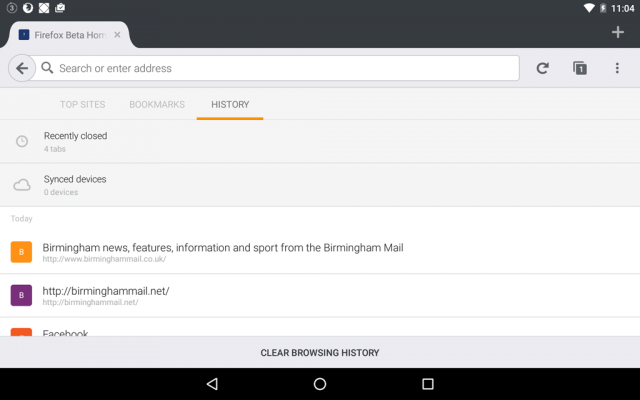
Firefox 50.0 is available now as a free, open-source download for Windows, Mac and Linux. Also due for release is Firefox for Android 50.0. This adds support for HLS video via a player overlay, plus simplifies the user interface by combining the Recent Tabs and History panels.
 
~ Nick Peers

8.02.2016

Firefox 48 FINAL improves download protection as part of wider security crackdown

 
Mozilla has unveiled Firefox 48 FINAL for desktop. After the relatively minor releases of late, Firefox 48 contains a number of notable new features, both visible and behind the scenes, to excite users.
 
There’s improved protection against potentially malicious downloads, the requirement for add-ons to be both verified and signed by Mozilla before they will load, and a number of WebRTC enhancements -- and that’s just for starters.
 
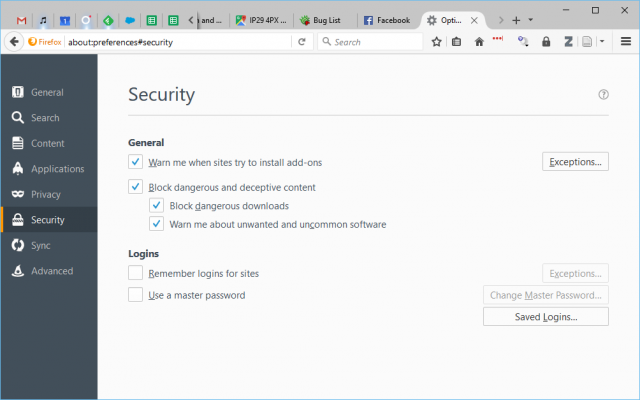
Firefox 48’s somewhat cryptic battle cray is "roar for moar protection against harmful downloads!". It refers to new features for blocking potentially malicious downloads and sees the Security tab of Firefox’s Options get a shakeup.
 
Users will now find a new "Block dangerous and deceptive content" option that includes two further options: "Block dangerous downloads" and "Warn me about unwanted and uncommon software", both of which are ticked by default.
 
Other security improvements include all add-ons requiring a digital signature (and verification) from Mozilla before they will load, while the media parser has also been redeveloped using the Rust memory-safe programming language to protect against potential exploit-based attacks.
 
Selected users will also see process separation enabled, splitting the main Firefox browser process from all loaded web content. This allows the latter to be sandboxed, blocking direct access to the filesystem for security purposes, but should also yield stability and performance improvements too.
 
One usability improvement sees the Awesome bar’s results list include a number of handy icons to help identify results from a user’s history, bookmarks or open tab.
 
WebRTC improvements include enabling delay-agnostic AEC, full duplex for GNU/Linux and support for ICE Restart & Update, while a bug leading to frequency distortions on Jabra and Logitech C920 webcams has also been fixed.
 
Windows users will now find the [Tab] and [Shift]+[F10] key combos work as they should when in customization mode, while GNU/Linux users gain visible Canvas performance improvements through support for Skia.
 
Developers gain a multitude of new features, including a geometry editor for moving absolute and fixed positional elements and the addition of a tree-map view to the memory tool for debugging purposes. Content Security Policy (CSP) is now enforced for all WebExtensions. The Firebug Theme has also been enabled for Developer Tools.
 
Firefox 48 FINAL is available now as a free, open-source download for Windows, Mac and Linux. Support for OS X 10.8 and earlier has now been dropped, while version 48 will also be the last version to run on Windows PCs without SSE2 CPU extensions.
 
~ Nick Peers

6.07.2016

Firefox 47 widens HTML5 video support to include DRM-protected streams

 
Mozilla has released Firefox 47 FINAL for Windows, Mac and Linux. Version 47 adds support for Google’s Widevine CDM, enabling compliant sites including Amazon Video to stream DRM-protected video natively using HTML5 rather than via a third-party video plugin.
 
Elsewhere the new build drops support for add-ons that use the Firefox User Extension Library, plus implements a tweak that allows pages in Reader Mode to be read aloud to the user.
 
Support for Google’s Widevine CDM -- which is currently limited to Windows and OS X -- was first introduced to the Nightly build of Firefox two months ago, and has made a seamless transition to the stable build. It enables supported web sites -- with Amazon Video a prime example -- to stream DRM-protected content using HTML5 rather than forcing users to use a third-party plugin (Microsoft Silverlight in Amazon’s case).
 
The feature has also been joined by Firefox’s newly acquired ability to stream embedded YouTube videos using HTML5 when the built-in Flash plugin, often a source of security and privacy concerns, has been disabled.
 
Another new feature sees secure web pages no longer automatically reloading when users navigate use the back or forward button -- this has been implemented for security purposes.
 
Users can now extend Firefox’s accessibility features to also read out loud pages in Reader Mode, while one final addition sees the VP9 video codec enabled on faster machines for better video performance.
 
One key change sees support for the Firefox User Extension Library (FUEL) dropped in favor of Firefox’s add-on SDK -- developers should have already updated add-ons and extensions accordingly, but those that haven’t been updated will no longer work as of Firefox 47.
 
Another change sees the ‘click-to-activate plugin’ whitelist removed, while a third tweak resets the 'browser.sessionstore.restore_on_demand' preference to its default true value for performance reasons.

Developers will find a number of improvements in Firefox 47, the most notable of which is the ability to review Firefox performance data via the 'about:performance' page.
 
Android updates
Firefox 47 for Android is also due for release, and adds an option to show and hide web fonts under its Advanced settings to reduce data and bandwidth usage.
 
Other tweaks include renaming 'Open multiple links' under the Customize setting to 'Tab Queue', plus removed support for Android web runtime (WebRT) as well as Favicons in the Awesomebar to prevent HTTPS spoofing. This is also the final release that will support Android Gingerbread.
 
Firefox 47 FINAL and is available now as free, open-source downloads for Windows, Mac and Linux. Firefox 47 for Android should be released imminently.
 
~ Nick Peers

5.13.2016

Mozilla asks the FBI for details of Tor vulnerability that could also affect Firefox

Mozilla is fighting to force the FBI to disclose details of a vulnerability in the Tor web browser. The company fears that the same vulnerability could affect Firefox, and wants to have a chance to patch it before details are made public.
 
The vulnerability was exploited by FBI agents to home in on a teacher who was accessing child pornography. Using a "network investigative technique", the FBI was able to identify the man from Vancouver, but Mozilla is concerned that it could also be used by bad actors.
 
Perhaps unsurprisingly, the government says that it should be under no obligation to disclose details of the vulnerability to Mozilla ahead of anyone else. But the company has filed a brief with a view to forcing the FBI's hand. The argument is that users should be kept protected from known flaws by allowing software companies to patch them.
 
Denelle Dixon-Thayer, Chief Legal and Business Officer at Mozilla Corporation, said:
The Tor Browser is partially based on our Firefox browser code. Some have speculated, including members of the defense team, that the vulnerability might exist in the portion of the Firefox browser code relied on by the Tor Browser.
She added:
At this point, no one (including us) outside the government knows what vulnerability was exploited and whether it resides in any of our code base. The judge in this case ordered the government to disclose the vulnerability to the defense team but not to any of the entities that could actually fix the vulnerability. We don’t believe that this makes sense because it doesn’t allow the vulnerability to be fixed before it is more widely disclosed.
Mozilla argues that disclosing the vulnerability to allow patching will help to make the web more secure, but the FBI is unlikely to want to give up what it will clearly see as a valuable weapon (a backdoor by another name, essentially) in its arsenal.
 
~ Mark Wilson

3.09.2016

Firefox 45 unveils improved Synced Tab features, but removes Tab Groups

 
Mozilla has unveiled Firefox 45 FINAL, its desktop browser for Mac, Linux and Windows. The new release focuses its changes on the browser’s use of tabs, and also becomes the base for the new Extended Support Release.
 
New features include instant tab sharing in Hello and a new Synced Tabs button, but one feature has been removed: Tab Groups.
 
Once again, Mozilla focuses on extending its new Hello chat feature, this time by adding support for sharing the currently selected browser tab. The feature is enabled by default, but users can switch it off by clicking the "Stop" button at the top of the browser window.
 
Firefox’s button-based menu bar also gains a new Synced Tabs button, making it possible for users to quickly view synced tabs from other devices -- they’ll be prompted to switch the feature on if it’s not already enabled. These tabs also now appear in the dropdown area of the Awesome bar during searches.
 
Mozilla has removed the ability to group tabs together to "make it easier for us to improve Firefox". Wary of a likely backlash, the company has made it clear that the feature can be preserved through the installation of an add-on and recommends users of the feature install the Tab Groups add-on prior to upgrading to version 45 to preserve existing tab groups.
 
Other new features in the desktop release include a new preference that -- by default -- blocks access to sites using the .onion suffix (part of the hidden Tor network) at DNS level. To allow this feature, open about:config, then search for network.dns.blockDotOnion and set the value to "false".
 
Developers gain more new and improved features, HTML5 support now includes include Push API and the Web Speech synthesis API, but one regression -- support for the on-screen keyboard in Windows 8 and 8.1 -- remains unresolved.
 
Firefox 45 also becomes the new Extended Support Release for those users who prefer less frequent updates.
 
Also due for release is Firefox 45 for Android, which adds a click-to-view images option, toggle for disabling the sharing of camera and microphone for family friendly browsing and an optimized Settings under the main menu.
 
Firefox 45 FINAL and Firefox ESR 45.0 are both available now as free, open-source downloads for Windows, Mac and Linux. Firefox 45 for Android should be released imminently.
 
~ Nick Peers

1.26.2016

Firefox 44 adds H.264 video support on desktop, supports cloud printing on Android


Mozilla has released Firefox 44 FINAL for Windows, Mac and Linux, with Firefox 44 for Android hot on its heels. Like the previous release, the most visible changes are reserved for the mobile build.

Android users gain support for cloud printing and improved search tools, while desktop users can now watch H.264 video on supported systems. Most other changes are under the hood or aimed at developers.

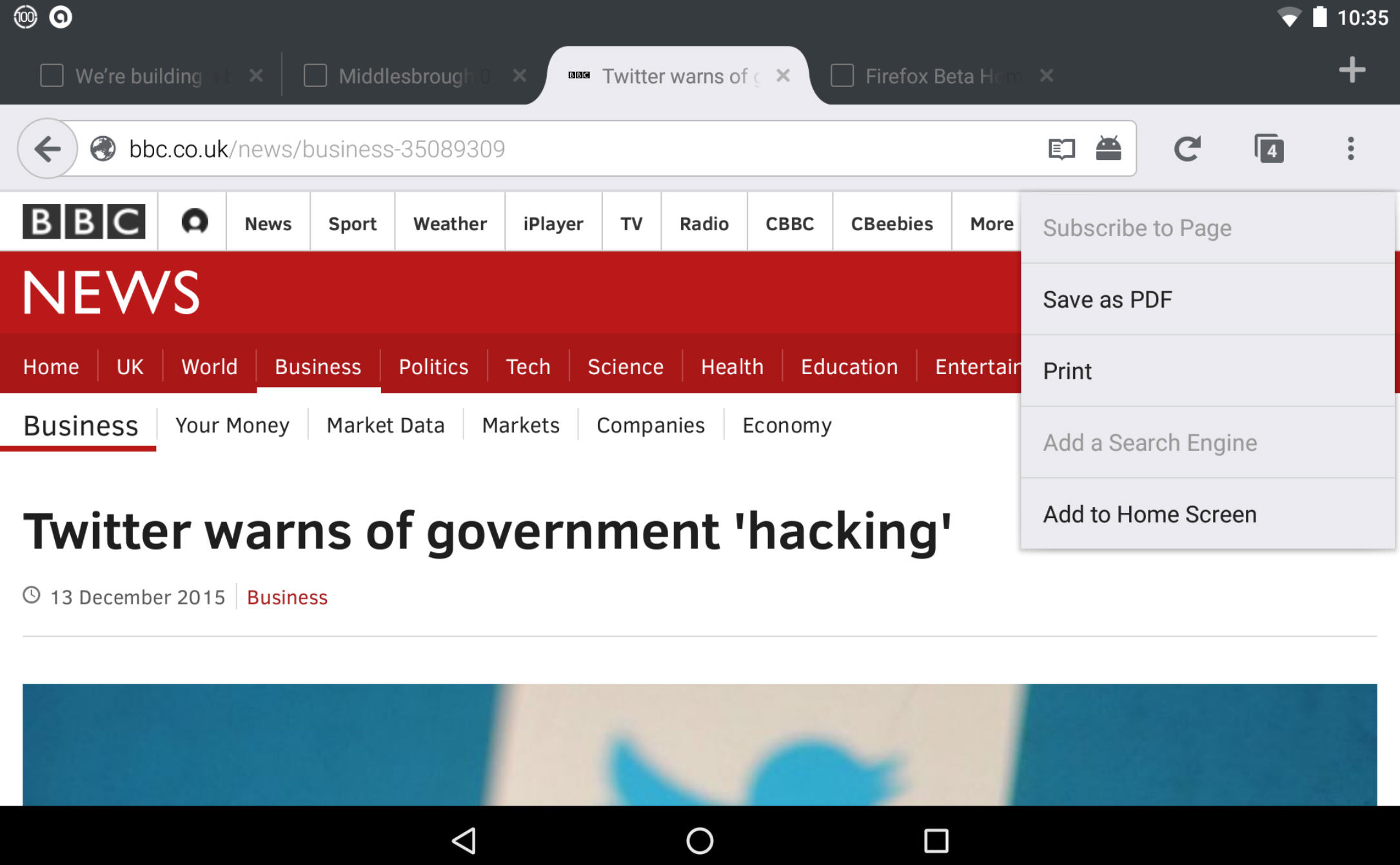
Once again, the Android release is the one that will turn heads. Users can now send pages to their cloud-enabled printer using the Android print service via the new Page > Print command.

Other new features include an improved tab tray on phones, the ability to choose a specific home page (rather than the Top sites panel) when launching Firefox, and a web-based Firefox Accounts page.

Three new search features include the showing of search history suggestions, easier access to search settings when performing a search, and a link to the option for customizing search providers when users tap the search label in the quick search bar.

Users will also now be prompted when in Private Browsing mode if they tap a link that launches an app direct from a web page. The Android build also now supports URIs that use the mms: protocol.

The desktop build will now enable H.264 video if a system decoder is present, or fall back to WebM/VP9 on systems that don’t support it. There are also improved warning pages for certificate errors and untrusted connections.

Developers gain many improvements, including one to the recently introduced Animations view in Page Inspector, with lightning bolt icons signifying those animations running on the compositor thread.

There’s also support adding for the brotli compression format via HTTPS content encoding, which should help speed up web browsing on supported secure sites.

Changes include removed support for the RC4 decipher, a new SHA-256 signing certificate to meet new signing requirements for Windows builds. It also no longer trusts either Equifax Secure Certificate Authority 1024-bit root certificates or UTN-DATACorp SGC when validating secure websites.

One regression is that support for on-screen keyboards in Windows 8 and 8.1 has been temporarily turned off. A bug preventing the disabling of the XP and Vista screensaver when watching videos has -- however -- been fixed.

Firefox 44 FINAL is available now as a free, open-source download for Windows, Mac and Linux. It’ll soon be joined by Firefox 44 for Android.

~ Nick Peers

8.12.2015

Mozilla rolls out Firefox for Windows 10 with browser-choice cues

Mozilla's Firefox 40 for Windows 10 includes built-in browser-choice mechanisms meant to unseat Microsoft's Edge and Bing search engine defaults.

After complaining that Microsoft has made choosing a browser other than its own Edge too difficult with Windows 10, Firefox officials have taken browser-choice into their own hands.
 
 
Firefox 40 for Windows 10, made generally available on August 11, includes new "support materials to show you how to restore or choose Firefox as your default browser in Windows 10."
 
The new Firefox for Windows 10 goes further. When Windows 10 users look to the Cortana search box built into the task bar, web searches done from that search box will "show results in the default search engine you choose in Firefox," rather than defaulting to Bing, Firefox officials said.
 
The Firefox for Windows 10 browser supports third-party add-ons -- unlike Microsoft's Edge at this point, though add-on support is coming, Microsoft officials have said. Mozilla is distinguishing between Mozilla-certified add-ons and non-certified ones. Non-Mozilla-certified add-ons currently include warnings, and in the future, will be disabled by default.
 
The new Firefox also includes user interface tweaks, including bigger and bolder design elements.
 
Firefox 40 for Windows 10 is available for download from Mozilla's web site.
 

4.09.2015

Firefox helps you cover your assets with latest Tracking Protection feature

Did you know that not all websites honor Do Not Track? If privacy while browsing is at the top of your priority list, Jack Wallen offers up a Firefox tip that just might allow you to sigh a breath of private air.  

 
Did you know that even when browsing in Incognito Mode (regardless of browser), some websites can still collect data from you? Cookies, metadata... if a website really wants your information, they'll go to all means to get it. Thankfully, browsers like Firefox are doing everything they can to ensure users can experience as much privacy as possible while browsing.
 
In the latest release of Firefox, there's a new feature called Tracking Protection. According to Mozilla:
"Tracking Protection allows you to take control of your privacy online.
While Firefox has a Do Not Track feature that tells websites not to monitor your behavior, companies are not required to honor it. Firefox's Tracking Protection feature puts the control back in your hands by actively blocking domains and sites that are known to track users."
In other words--those companies that refuse to honor the Do Not Track features of incognito browsers will finally see their efforts thwarted with Tracking Protection.
 
Tracking Protection works with a blocklist. The initial blocklist is based on Disconnect and should grow with usage.
 
Before I show you how to enable the Tracking Privacy feature, let me first walk you through the process of enabling Do Not Track. This feature is more user-friendly and will prevent sites that honor the setting from tracking you. The steps to enable Do Not Track are as follows:
  1. Open Firefox
  2. Click the menu button (three horizontal lines in the upper right corner)
  3. Click Preferences
  4. Click the Privacy button
  5. Click to enable Tell site that I do not want to be tracked (Figure A)
  6. Click Close
Figure A
 
Enabling Do Not Track on Firefox.
You have now opted out of third-party tracking whenever you browse with Firefox.
 
But is it enough? Not when sites refuse to abide. Fortunately, Firefox still has you covered. In the newest releases of Firefox (mine stands at 37.0.1), you won't find Tracking Protection in the Preferences because the feature is still very new. You can, however, enable it. Here's how:
  1. Open Firefox
  2. In the address bar, type about:config
  3. Promise you won't muck everything up by clicking I'll be careful, I promise!
  4. Search for privacy.trackingprotection.enabled (Figure B)
  5. Under Value (in the privacy.trackingprotection.enabled row), double-click false to set it true
  6. Restart Firefox
Figure B
 
Setting Tracking Protection to enabled.
That's it. With this one-two punch, your Firefox browser should now be able to prevent sites from tracking you, whether they honor Do Not Track or not.

Privacy has become one of the single most important issues of modern internet usage. Every time a browser or app creates a new way to prevent sites from tracking their data, sites overturn that method with yet more ways to play "watcher." It's a good thing the "watchers" are being watched and browsers like Firefox are doing everything they can to bring privacy back to web browsing.
 
Is privacy a primary concern for you? Is the addition of Privacy Tracking enough to send you back to the open-source Firefox browser? How do you prevent browsers from tracking your data? Let us know in the discussion thread below.
 
~ Jack Wallen

1.15.2015

Firefox 35 includes streamlined Hello video chat, MP4 support on Mac, easier social network sharing

 
Version 35 of Mozilla’s Firefox web browser is now available for download. Arriving roughly five weeks after its predecessor, the latest iteration includes a handful of noteworthy features in addition to the usual gamut of minor updates and behind-the-scenes fixes.
 
Firefox Hello, Mozilla’s WebRTC-based real-time video and audio calling service, has been streamlined a bit. Previously, users had to simply wait idly for the person on the other end to connect to the call. In Firefox 35, a small window opens showing a self view until the invited person joins and in the meantime, the caller can perform other tasks like surfing the web.
 
  
It’s a small change but any way to add productivity is welcomed in my book.
 
Another time-saver is the ability to create multiple conversations and save them for later use which makes it easier to reconnect with people you talk to on a regular basis without having to create a new link each time. All of this can be done without having to create an account or forfeit any user information.
 
Elsewhere, Firefox 35 enables desktop users to access the Firefox Marketplace, built-in support for MP4 playback on Mac OS X (Snow Leopard and newer) and makes it easier to share web content on social networks like Facebook, Twitter, Tumblr, LinkedIn and Google+. Mozilla has also fixed nine security-related issues in the new release according to its securities advisories page.
 
Firefox 35 is available for Windows, Mac and Linux.
 
~ Shawn Knight

11.20.2014

Yahoo is the new default search engine in Firefox -- Google gets kicked to the curb

 
Google is one of the best search engines, providing relative results with a clean design. There is a problem though -- Google also offers a web browser. Why is that a problem? Well, it is a strange thing for a competing web browser to use the Google search engine. It's like Ford using Chevy parts in its cars -- blasphemy!
 
A great example of this is Mozilla Firefox. The Chrome web browser is slowly eroding Firefox usage share, so it has felt odd that Mozilla was sticking with Google's search engine for so long. Well, today everything changes, as Mozilla selects Yahoo as the new default search engine in Firefox for both desktop and mobile. Will users applaud or decry the announcement?
 
"Today, I'm thrilled to announce that we've entered into a five-year partnership with Mozilla to make Yahoo the default search experience on Firefox across mobile and desktop. Mozilla is an inspirational industry leader who puts users first and focuses on building forward-leaning, compelling experiences. This is the most significant partnership for Yahoo in five years and we’re so proud that Mozilla has chosen us as their long-term partner in search", says Marissa Mayer, Yahoo CEO.
 
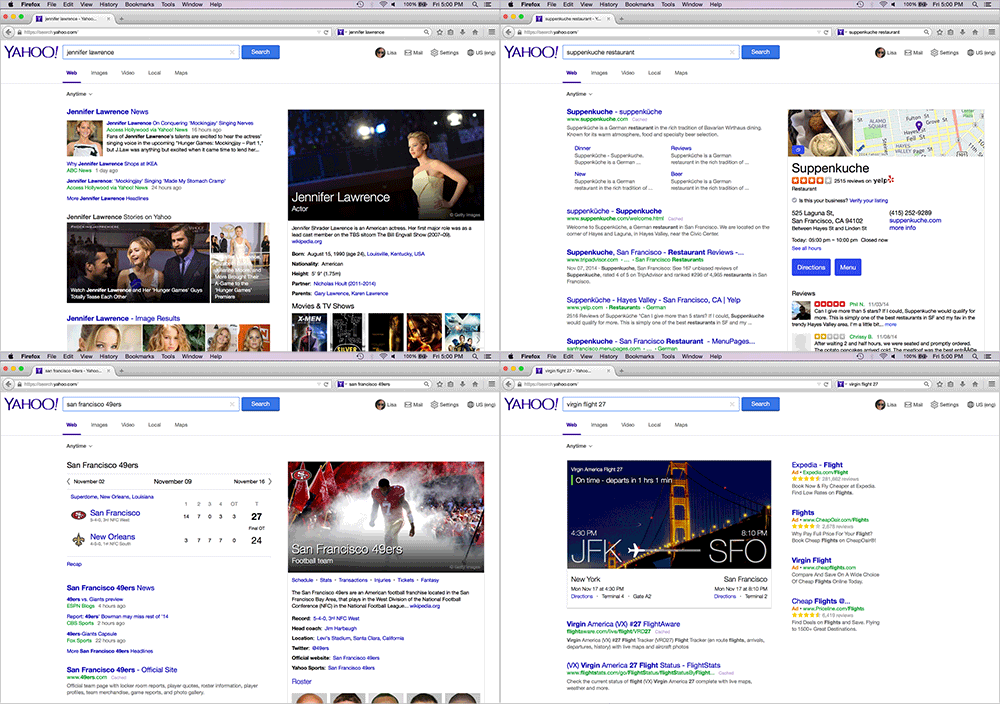
Mayer further explains, "our teams worked closely with Mozilla to build a clean, modern, and immersive search experience that will launch first to Firefox’s U.S. users in December and then to all Yahoo users in early 2015. The interactive and integrated experience also better leverages our world-class content and personalization technologies".
 
 
This is sure to upset some Firefox fans, however, I think anger is the wrong emotion. Sure, Google is currently the better search engine, but with the emergence of Google Chrome, Mozilla needs to forge new relationships and move away from the search-giant. Don't forget, you can still select Google as your search engine, it just won't be selected by default. Quite frankly, it would probably be best if no search engine was default, and the user was given a choice at first-run, but that probably won't happen anytime soon.
 
If you do not like this move, there is no need to panic -- it does not go into effect until December. You have time to mentally prepare.
 
Photo Credit: Jaimie Duplass / Shutterstock
 
~ Brian Fagioli

11.13.2014

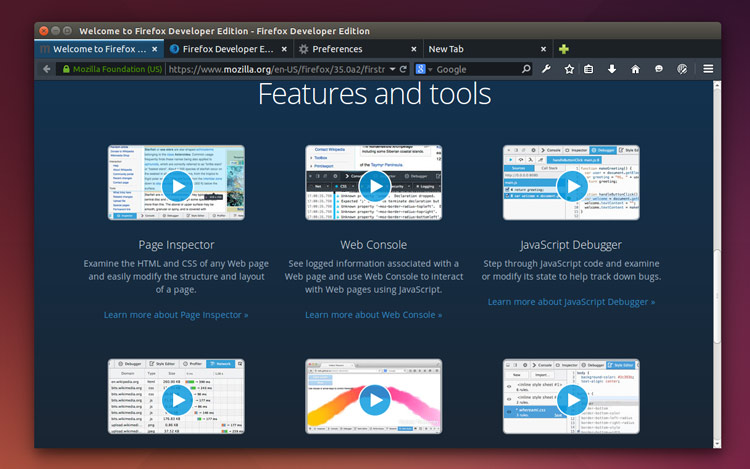
Mozilla Releases ‘Firefox Developer Edition’ for Windows, Mac and Linux

 
Mozilla has released the new Firefox Developer Edition for the 10th anniversary of the Firefox browser.
 
The Developer Edition is exactly what it says on the tin: a browser built around the needs of web developers. 

The Firefox team set out to bring together tools needed to keep developers productive across a multi-device and multi-platform environment, “creating a focal point to streamline your development workflow.” Though the Firefox Developer Edition has a touch of the familiar, the rejigged UI and features make it a formidable development environment while still the fully capable browser Firefox users know and love.
 
The biggest change you’ll notice is the dark UI of the slick inspector applied to the rest of the browser. Not your style? You can revert to the familiar light theme by heading into the Customize options at the bottom of the “hamburger” menu and clicking “Use Firefox Developer Edition Theme”.

Developer Features

 
Among the features headlining the first Developer Edition release are WebIDE and Valence.
 
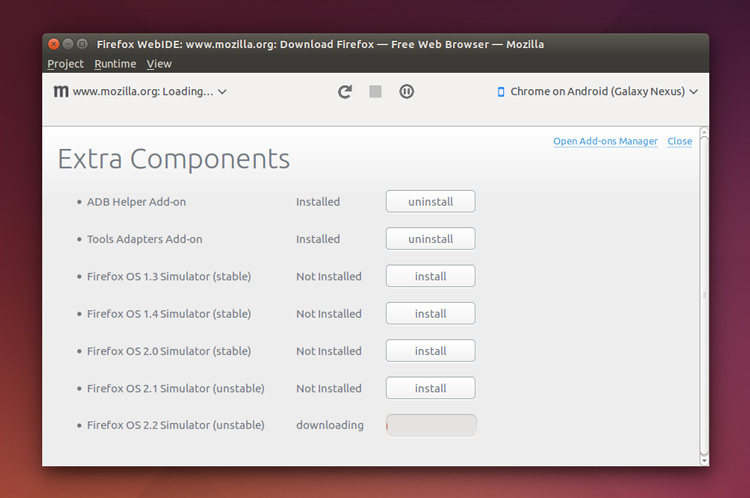
WebIDE gives you an integrated editor for working with Firefox OS apps in simulators, Firefox OS devices, or through Firefox for Android. The editor has autocomplete functionality, popovers detailing function arguments, and manifest validation. A built-in debugger also lets you pause apps, inspect elements, and play around with their contents.
 
Valence extends the functionality of WebIDE, letting you connect to Chrome for Android or Safari on iOS (whether an iPhone, iPad, or iOS simulator) and inspect and modify content as if it were opened in Firefox. While desktop Chrome has let you inspect content on Chrome for Android for quite some time – including debuggable WebView content in apps on KitKat and above – Valence takes the feature above and beyond in supporting multiple browsers across mobile OSes. What’s more, debugging Safari on iOS is also available for us Linux users (with a proxy)!

Get Firefox Developer Edition

You can grab the new Firefox Developer Edition straight from the Mozilla website and have a gander at all of the developer-oriented features included. The Developer Edition is currently based on Firefox 35.0a2.
 
 Get Firefox Developer Edition
  
~ Sam Tran

9.28.2014

Oculus Rift in the classroom: Immersive education's next level

Summary: The popularity of immersive education is growing. But as cool and cutting-edge as the technology is, is a virtual reality environment conducive to learning? 
 
 
Barbara Mikolajczak is an information technology professor at Boston College who teaches a 4th to 6th grade after-school “immersive education” class in which virtual reality, game-based learning and immersive environments are used as teaching techniques.
 
A year ago, she started adapting the popular video game Minecraft, in which players build things, to teach her students how, for instance, to make a torch, which they need in the game. They learn where wood, coal and flint come from and obtain them.

“They’re going through the scientific method, essentially — okay, now that we have all the ingredients, what amounts do we need to [make fire]? Can we create it? Will this work? Can we repeat the process? It’s a lot more fun for them, as opposed to a teacher saying, this is what the process is, and reading it from a textbook,” she says. The kids get so excited that they will holler across the lab “You gotta see what I created!”
 
Since the 1990s, different forms of immersive education have crept into the classroom, with simulations being used in medical school and the military, and gaming, such as Minecraft, being used in K-12 to teach a variety of subjects ranging from American history to space travel to arts and culture. Such learning could soon reach another level with the arrival of headsets like the Oculus Rift and Sony Morpheus, in which students don’t look at two-dimensional screens but perceive themselves to be in all-encompassing virtual worlds.
 
Aaron E. Walsh, director of the Immersive Education Initiative, a 7,000-member non-profit consortium of colleges, universities and companies developing standards and best practices for virtual reality-based learning, says though the first virtual reality headsets came about in the 1990s, “[for] every one of these immersive technologies, it takes decades of refinement and enhancement before it gets to a point where it’s actually viable.” He believes the arrival of the Oculus Rift and Sony Morpheus, both expected to be priced at a few hundred dollars, signal the crossing of that threshold for headsets. Over time, they could be more cost-effective, than, say, field trips.
 
While there are multiple hurdles to adoption of headsets in classrooms — mainly bandwidth and price — educators are already thinking up new ways to take advantage of such technology. One Kansas City Public Library program funded by Google and Mozilla will launch as soon as its Oculus Rift headsets arrive at the three library branches selected, all of which are located in areas where resident youth tend to have little to no connectivity in the home.
 
Because Kansas City is one of the cities to enjoy Google Fiber’s 1 Gigabit-per-second Internet service, the library project is meant to showcase the capabilities of Internet that’s 100 times faster than average broadband. It uses the combination of Oculus Rift and Minecraft (unofficially dubbed Minecrift) to allow the students to re-imagine their neighborhoods. The idea for the project came out of a discussion between Marcus Brown, the digital youth engagement associate, and a student who was wondering why his neighborhood didn’t have the sort of upscale restaurants or shopping he saw in other areas of town.
 
Though the headsets haven’t arrived yet, the students are already using Minecraft alone to build existing aspects of the community such as the library and its environs, plus deciding on what new structures they want to include — from hospitals to roller coasters. The headsets will be “where they get that immersive component, so they can interact in a first-person experience with the world, so it’ll be a community where they’re building things up, where there’s game play involved, where there’s goods and services exchanged,” says Brown. They will also enable real-time interaction between remote participants in the three branches.
 
But as cool and cutting-edge as the technology is, is a virtual reality environment conducive to learning?
 
“To harken back to Marshall McLuhan, the medium is the message,” says Rabindra Ratan, a Michigan State University professor who studies the psychological experience of video games and other interactive environments. “So in the case of the Oculus Rift, there is a higher level of presence or telepresence in the psychological experience of the medium, which is good for learning because it makes people pay attention and directs attention in ways that are more deliberate.”
 
But a headset or any kind of hardware isn’t enough on its own, he says. Educational software must be designed to take advantage of the way the mind learns. For instance, will the software or the game capitalize on the concept of presence — making people feel as though certain objects or occurrences in the environment are important for their survival? If so, “you can use the mechanics in this world to induce attention which leads to learning,” he says.
 
Another aspect that could be built into such software is called transformed social interaction (TSI) which makes it possible for the players in the world to interact in ways that are impossible in real life. So for instance, to take advantage of the fact that people are more likely to pay attention if someone is looking them in the eye, the game can make each player feel like another player (such as the teacher) is looking right at them, when in real life, a teacher would only be able to hold the gaze of one student at a time.
 
Another way the software can use TSI is by having a teacher mimic the head movements of the student as the student is talking, or by making the teacher look slightly more like the student — techniques that have been shown to make the mimicked person like the other person more. “Social learning happens when people think they’re similar to the people they’re learning from,” says Ratan. So, a virtual teaching environment could use one audio track, but tailor the teacher’s movements or physiognomy for each student.
 
Ratan, who researches how avatars affect behavior, said that after the environment and social interactions, the self, in the form of an avatar, “the medium within the medium,” can also be used to cultivate learning. For instance, researchers have noticed what’s called a Proteus effect, which occurs when players engage in the behaviors associated with their avatar. For instance, people with taller avatars negotiate more aggressively, those with attractive avatars stand closer to people in the virtual environment, people with older avatars choose longer-term investment portfolios, etc. So students who choose a superhero avatar might exhibit selflessness, strength and pro-social behaviors. “We might expect them to help out their classmates more, post study guides for them, stuff like that,” Ratan says.
 
Though it’s too soon to tell, one open question is how well immersive education can teach abstract concepts. Ratan says some research suggests that the visual nature of virtual reality environments is good for teaching more concrete things. “But if the environment is focused too much on immersion at the concrete level, it might impede thinking at the abstract level,” he says. So a virtual world might be able to show the textures of various rocks in great detail, but too much sensory stimulation might detract from more abstract geological concepts like the rock cycle. However, he says some preliminary research shows that having the virtual environment switch back and forth between concrete representations of, say, a rock, to abstract representations of geological concepts could facilitate abstract learning.
 
Indeed the inherent adaptability of virtual environments means they can be made useful for teaching rote and creative skills, says Ratan. For example, a virtual environment that has a tooth and a training tool is an excellent way to learn how to practice and refine a skill like performing a root canal. And so-called “sandbox” virtual environments, like Minecraft and Second Life, in which people create things and there are few prescripted rules of user behavior, are conducive to deeper, more creative learning.
 
Although the Kansas City library is starting with this community-building project, Brown has personally experienced several other educational applications for the Oculus Rift, such as a Virtual Museum of Harlem in which he could hear poetry readings, go to music clubs and see artwork from the Harlem Renaissance period. Boston’s Mikolajczak has used Minecraft to teach aspects of American history like Boston Freedom Trail.
 
But ultimately, how well educators are able to take advantage of virtual environments remains to be seen. “I could imagine a dystopian world in which only the rich kids go on field trips, whereas the have-nots are forced to view things in virtual environments,” says Ratan. On the other hand, he can envision a utopian world in which virtual field trips make education more accessible to everyone. As technology advances and the obstacles of bandwidth and price fall away, we’ll see what happens next.
 
~ Laura Shin 

9.02.2014

Firefox 32 FINAL released for desktop, shows off HTTP caching improvements and other minor tweaks

Mozilla has released Firefox 32.0 FINAL for desktop, with Firefox for Android 32.0 due to follow.
 
While there are a lot of changes to both desktop and mobile builds, Firefox 32 doesn’t throw up any standout new features, instead concentrating on tweaks and minor improvements.
 
Firefox 32 FINAL now enables a new implementation of HTTP caching (dubbed v2) by default. This promises improved performance through tweaks such as optimized request prioritization, which should cut the loading times for large content while offering increased stability. The new feature is joined by the integration of generational garbage collection.
 
Firefox 32 also debuts support for Public key pining, which should prevent man-in-the-middle attacks through tighter checks of website certificates, which are used to verify a site’s identity and security.
 
Other new features see login metadata made visible in the Password Manager, while the Find toolbar now displays the number of found items. The Scratchpad developer tool also gains inline documentation and code completion.
 
The update also adds HiDPI/Retina support in the Developer Tools UI, and now displays hidden nodes differently when in mark-up review. The Inspector button has shifted position to the top left of the Developer pane and there’s a new Web Audio Editor – this needs to be enabled via the Developer settings button.
 
The new build also widens its HTML5 support, promises performance improvements for both Password and Add-on Manager tools and fixes a couple of platform-specific problems – [Cmd] + [L] should now open new windows even when no window is available on OS X, while text rendering issues in Windows 8.1 (and Windows 7 with Platform Update KB2670838) have also been resolved.
 
The update, which is officially released tomorrow, will be followed by Firefox 32 for Android. Platform-specific improvements include the ability to switch languages without closing the browser. A new Clear History control has been added to the History panel and the Gamepad API is finally enabled.
 
Other Android-only improvements include support for URL autocomplete on composition-focussed keyboards such as Swype. Support for Android 2.2 and ARMv6 processor chipsets have, however, been dropped. Other major unresolved issues mean that neither MP4 nor Flash videos will play.
 
Firefox 32.0 FINAL for Windows, Mac and Linux is available now as a free, open-source download.Firefox 32.0 FINAL for Android should be available shortly.
 
~ Nick Peers

3.15.2014

Mozilla disses Microsoft -- cancels Modern UI version of Firefox for Windows 8.x

The hatred of Modern UI and its associated Start Screen is well documented. Many users dislike the full-screen Windows apps, stating they are less productive with them. There can be truth to that -- working with multiple open programs and apps simultaneously can be problematic. Not to mention, there are very few apps compared to legacy programs. Some users may feel that if they cannot go "all in" on Modern UI, they don't want to use it at all.
 
It is hard to blame developers for not embracing Modern UI -- Microsoft hasn't even done so with Office. One notable app that has been conspicuously absent, is Firefox. Mozilla developers have been working on it, but a final, stable version never came to fruition. Sadly, Mozilla announces that it is cancelling the project, dealing Microsoft's Windows 8.x a significant blow.
 
"We've been watching Metro's adoption. From what we can see, it's pretty flat. On any given day we have, for instance, millions of people testing pre-release versions of Firefox desktop, but we've never seen more than 1000 active daily users in the Metro environment", says Johnathan Nightingale, VP Firefox.
 
Nightingale further explains, "we could ship it, but it means doing so without much real-world testing. That's going to mean lots of bugs discovered in the field, requiring a lot of follow up engineering, design, and QA effort. To ship it without doing that follow up work is not an option. If we release a product, we maintain it through end of life. When I talk about the need to pick our battles, this feels like a bad one to pick: significant investment and low impact. Instead, we pull it".
 
Many will claim the cancellation is an indictment of Windows 8.x and Modern UI and maybe it is. However, I am not so sure. Mozilla is citing low usage of pre-release software and projecting this on users of stable versions. This may be a mistake, as the behaviors of these two groups are likely very different. There is no guarantee, but it is possible that normal users would flock to it. Mozilla should at least give it a chance.
 
I also sense an air of negativity and petulance on behalf of Mozilla in its announcement. Nightingale repeatedly refers to the Modern UI as "Metro" -- something it has not been called in a while. Microsoft notoriously does not like the "Metro" moniker being used. Mozilla's use of the name comes across as a possible needling of Microsoft -- that is the perception, true or not.
 
Is Mozilla making a mistake or is this a smart move? Is it dissing Microsoft? Tell me in the comments.
 
~ Brian Fagioli

3.09.2014

Best Web Browser

A ferocious free-for-all among the top web browsers

The landscape is evolving and you can either change with it or be left behind. This is the position browser makers find themselves in as cloud computing and touch interfaces take center stage, as Windows 8 with its vastly overhauled UI continues to wiggle into more homes and businesses around the world, and as web developers push increasing amounts of rich content at site visitors.
 
Assuming all browsers handle online content reasonably well, you might be asking yourself why your choice of browser matters, since they’re all free to use. Don’t sell yourself short—you and every other computer user with an Internet connection matters to browser makers. More than just having an effect on your personal online experience, the browser you select is essentially a vote in favor of which company wields the most control over emerging and evolving web standards, which itself directly impacts how you see and experience the web.
 
Secondly, there are advertising dollars at stake. The majority of Mozilla’s funding for Firefox comes from Google, which pays the open source browser maker an obscene amount of cash (around $300 million annually) to have its search engine the default option.
 
There’s a lot at stake, and on the following postings, we’ll weigh in on each browser’s strengths and weaknesses. When evaluating a browser, we look for standout features, security protocols, privacy options, and raw speed. The stage is set, but which will emerge the victor: Internet Explorer, Firefox, Chrome, Safari, or Opera?

Mozilla Firefox 23

Fast and nimble, but no longer the pack leader
 
In the little more than two years that elapsed since our last major browser brouhaha, Mozilla has taken Firefox from version 4 all the way to version 23, which itself is likely to be a version or two behind by the time you read this. That’s because Mozilla adopted a rapid release schedule that sees a new build around every 6 weeks. Mozilla felt pressured to keep up with fast evolving web standards like HTML5 and decided it was best to push out new features as quickly as possible. As a result, Firefox never gets outdated, though new builds end up feeling more like micro-updates rather than major revisions.

What’s New

If we focus solely on Firefox 23, there’s not a lot that’s new compared to the previous release. Mozilla removed some of the shine from the logo, added a button to the toolbar to share websites with participating social networks like Facebook, and beefed up security. Over the course of the last several releases, however, Firefox added a built-in PDF reader, gained a social API, added support for Retina displays on Mac OS X 10.7 and up, and made a few other tweaks. Somewhere along the line, Mozilla finally managed to plug the infamous memory leak issue that plagued earlier versions.

Security

Mozilla diligently patches security holes in each new release. In Firefox 23, Mozilla shored up its browser’s defenses by injecting a mixed-content blocking mechanism. When a secure HTTPS page loads non-secure, unencrypted content over HTTP (known as mixed content), you’re susceptible to man-in-the-middle attacks. Mozilla’s mixed-content blocker doesn’t let non-secure, active content through by default, thereby providing a layer of protection against these attacks. Cool, right?
 
What’s not so cool is that Mozilla made it unnecessarily difficult to disable JavaScript by removing the option from the Contents tab in the Options menu. To flip the switch, you either have to install a third-party extension or poke around about:config settings.

Privacy

Firefox 23 flexes a fair amount of web-rendering muscle, but it no longer has the quickest draw of the bunch. Out of the five browsers tested, Firefox 23 came in third in its own Kraken JavaScript benchmark, losing to Chrome and Opera. Not by much, mind you, but losing on its home turf underscores the changing of the guard that’s taken place since our last browser roundup (June 2011).

Performance

One feature we hoped Firefox would have added by now is turning on the Do Not Track (DNT) setting by default. Much to the chagrin of advertisers who serve up tracking cookies, Mozilla has long planned to do this, but it keeps getting delayed for one reason or another. Still, it’s there as an option, and so is the infamous private-browsing, which lets you surf the web without leaving any trace of your whereabouts once you close the browser.

Power-User Tips

1. Since it’s not enabled by default, manually turn on Firefox’s Do Not Track feature by clicking on the Firefox menu and navigating to Options > Options > Privacy. Select the radio button that reads, “Tell sites that I do not want to be tracked.”
 
2. To disable JavaScript, type about:config in the URL bar. Find javascript.enabled, right-click, and select Toggle to change the value to False.
 
3. Need more real estate? Click Firefox > Options > Toolbar layout and check “Use Small Icons.”
 
1) New to Firefox 23, you can now share websites on Facebook by clicking a button in the toolbar. Other social sites plan to integrate this function, too.
 
2) To poke your head underneath the hood, type about:config in the URL bar and explore the underlying parts. Be careful though, changing settings can bork your browser.
 
3) Other than the optional sidebar, Firefox 23 is virtually identical in appearance to Firefox 4 from two years ago. Now that Windows 8 is here, we suspect Mozilla will tweak the UI for touch navigation.
 
4) Whoops, did you accidentally close a tab? Bring it right back by pressing Ctrl+Shift+T. If you want even more control over tabs, hunt down the Tab Mix Plus add-on.
 
 
 ~ Paul Lilly

2.09.2014

Mozilla unveils Firefox Accounts -- sets sights on Google Chrome

Firefox is my favorite browser, but i don't use it. While that sounds crazy, and it sort of is, there is a method to my madness. You see, Google Chrome utilizes Google accounts, which makes my life easier.
 
By utilizing Google accounts, Chrome can sync across multiple devices -- that includes things like bookmarks and passwords. And so, the convenience of Chrome caused me to abandon my trusty Firefox. Luckily, Mozilla is looking to bring parity with all-new Firefox Accounts.
 
"We're introducing Firefox Accounts as a safe and easy way for you to create an account that enables you to sign in and take your Firefox with you anywhere. With Firefox Accounts, we can better integrate services into your Web experience, like the new Firefox Sync", says Mark Mayo of Mozilla.
 
Mayo further explains, "Firefox Sync enables you to take your browsing data like passwords, bookmarks, history, and open tabs across devices, just as it always has. But now we've made it even easier to setup the service and add multiple devices, while still delivering the same browser-based encryption".
 
In other words, Firefox will soon be more attractive to people that enjoy the convenience of syncing across multiple devices by using an account. While Mozilla never mentions Chrome in its announcement, this is clearly in response to Google's accounts and associated syncing.
 
Sadly though, these accounts will not be available right away -- at least not for the stable release. It is however, available now for the Aurora build of the browser, which is pre-beta. It is not recommended to use pre-beta software on a production machine.
 
Unfortunately for Mozilla, Chrome will continue to have two advantages -- iOS and Chrome OS. Mozilla has sworn to avoid Apple's mobile OS until it can use the Firefox engine, something Apple is not likely to ever allow. This means that iOS users cannot sync across all devices with Firefox, while they can with Chrome. Of course, Chrome OS does not allow any alternative browsers. While Mozilla has an advantage with Firefox OS, that operating system is a non-factor -- for now.
 
Chrome users, will you switch to Firefox as a result? Tell me in the comments.
 
~ Brian Fagioli

12.12.2013

Mozilla making progress with Firefox’s long journey to multiprocess

Over the last year, the browser has taken steps toward being more stable and secure.

Multiple Firefox processes.
Internet Explorer and Chrome both use a multiprocess architecture to enhance stability and security. They separate the task of parsing and rendering Web pages from the job of drawing the browser on-screen, saving downloaded files, creating network connections, and so on. This allows them to run the dangerous parts—the parts exposed to malicious scripts and exploitative HTML—in a sandbox with reduced permissions, making it harder for browser flaws to be turned into system compromises.
 
It also means that they're much more tolerant of crash bugs; a bug will bring down an individual tab, but shouldn't, in general, bring down the browser as a whole.
 
In 2009, Mozilla announced the Electrolysis project, which was to bring this kind of multiprocess design to Firefox.
 
It's now late 2013, and Firefox still isn't a multiprocess browser. It does have a limited multiprocess design, as it can run plugins in their own process, but everything else is run in a single process, running with the full permissions of the user. The full Electrolysis project was put on hold just over two years ago.
 
Work on Electrolysis resumed in January this year, and Mozilla developers have started to talk about it in detail. Nightly builds of Firefox can now be used with multiple processes. Currently, this is still quite limited when compared to Internet Explorer and Chrome. Where those browsers will create a whole bunch of processes (generally around one per tab), Firefox Nightly creates two: one for the browser window and chrome itself, another for all the tab content.
 
The organization still has a lot of work to do before multiprocess support is ready for prime time. While basic browsing and some add-ons work already, others don't. The Firefox developer tools, for example, are non-functional.
 
Substantial work has been done to make Firefox work with multiple processes. In single process Firefox, add-ins and the browser user interface itself can directly access the page structure. With multiple processes, that's no longer possible: the add-ins and user interface exist in one process, the page structure in a separate one. Every such access has to be passed through a message-passing interface that connects the two processes.
 
To ensure that the user interface doesn't hang and remains responsive, those messages are asynchronous—the message sender doesn't wait for the message to actually be received. The result is a design that can be quite a bit more complicated than in single-process Firefox.
 
This message-passing mechanism has been in place since Firefox 4. Add-ins that use it should be in a good position to work with multi-process Firefox. However, not all do, because at the moment, they don't have to. In the meantime, some kind of fallback solution will have to be devised. Firefox has a second system for passing information synchronously between processes which can fill some of the gaps, but ultimately some add-ons may force the use of a single-process browser.
 
Mozilla has also had to change the way content is actually drawn. In traditional single-process Firefox (and, indeed, most software), a single thread is used to handle input events (like mouse clicks, keyboard clicks, and so on), calculate the layout and appearance of the screen, and then submit it to the operating system/GPU to actually draw. In doing so, the different elements of the page (backgrounds, fixed position items, videos, text) are all drawn onto separate layers. The GPU then flattens the layers together to create a composite image.
 
As part of the work done for Firefox OS, this was split into several threads. The main thread still responds to input events and produces the layers, but the work of moving the layers to the GPU and forming the final composite is done on a separate thread.
 
Multi-process Firefox builds on this work. It extends this split approach to all operating systems (not just Firefox OS), and the new approach is now the default on OS X (though not Windows or Linux). In multi-process Firefox, the content process creates the layers. These are then passed back to the main browser process, which sends them to the GPU and composites them.
 
There's no ETA yet for when Electrolysis will be moved to the stable branch of Firefox or turned on by default. Even when the basic development is complete, ensuring that add-ons remain compatible means that it's a complex project with hard problems to solve. Nonetheless, it's good that this progress is being made. When it's finished, it should make Firefox a much more robust, secure browser, and that's a change we should all welcome.
 
~  Peter Bright

12.09.2013

Five free Firefox add-ons for the security conscious user

There are always ways to improve the already outstanding security in the Firefox browser with add-ons.
 
If you are a serious browser/user of the web, you know Mozilla Firefox is tops when it comes to remaining secure. But even Firefox is not perfect. There are always ways to improve the already outstanding security in the open source browser with add-ons. The Firefox add-on library is massive and includes nearly any additional feature you could want. Included in the library is an ever-growing number of security add-ons. For those that do not want to wade through the tide of installable features, I have brought together five of my favorite security add-ons for Firefox. With these five added features, you should find that Firefox will meet your highest security standards (within reason of course).
 
Each of these add-ons are free and can be found (and installed) from Firefox's add-ons manager.

Five apps

1. NoScript Security Suite

NoScript Security Suite is one of the best ways to prevent JavaScript, Java, Flash, Silverlight, and other executable content from running within non-trusted domains. With this add-on you can dictate the domains which are allowed to run executable content. This add-on goes a long way to prevent cross-site scripting attacks, cross-zone DNS rebinding, router hacking, and Clickjacking. Domains can be blocked permanently or on a temporary basis (Figure A). 

Figure A

Quickly add sites to either white or black list from the options menu.
NoScript can whitelist or blacklist a domain for easy configuration and control. Once installed, you will also find a number of ads get caught up in the blocking – making your browsing faster and more secure. NoScript has plenty of options available, ranging from the simple to complex (Figure B).

Figure B

Plenty of options available in NoScript.

2. LastPass Password Manager

LastPass Password Manager is for anyone who needs to be able to keep the only kind of truly secure passwords – those you cannot remember. For that type of password, you need a password manager. But why bother installing yet another tool to have to open from your Dash, Start Menu, or Tiles? Instead, add LastPass Password Manager and gain access to that ever-burgeoning list of passwords. You do have to create an account with LastPass. During the setup of LastPass, you set up your account (make sure you use a strong password here – Figure C) and disable Firefox's insecure password manager.

Figure C

Setting up your account for LastPass.
During the setup of LastPass, you can even set up a profile which will be used when filling in forms (Figure D) – which is much more secure than having the browser retain your form information.

Figure D

Set up a profile which will be used when filling in forms.

3. HTTPS Everywhere

HTTPS Everywhere is a means to force your browser to use HTTPS with all sites that support secure HTTP. Some users don't realize the difference between HTTP and HTTPS; including this extension on your end-users browser will ensure you do not have to concern yourself with educating them on the difference or how to point their browsers to the secure version of a site. You will notice the included link does not direct to the Firefox Extension page, but to the www.eff.org page. This was due to a Firefox policy. Hopefully the extension will find its way back to the Extension page soon. Upon reboot (after installation), you will be prompted to opt into the SSL Observatory (Figure E).

Figure E

Opting into the SSL Observatory.
Once installed, you will find a menu to the right of the address bar, where you can gain quick access to the HTTPS Everywhere features. One of the more important features is the Enable/Disable Rules (Figure F).

Figure F

Enabling and disabling rules with HTTPS Everywhere.
You can enable/disable HTTPS Everywhere for all included sites in the Rules window.

4. AdBlock Plus

AdBlock Plus is one of the first add-ons you should include with Firefox. If you find advertising slows down your browsing, it's possible that reduction in speed is caused by advertising. Or, if you're trying to find that tool to install, but get confused by the Download buttons created by advertisements, it's time to take control. To curtail this behavior, install AdBlock Plus. With this add-on you can blacklist and whitelist specific advertisers. This, of course, is a tricky proposition, as many of the sites you visit are able to offer you free content thanks to the ads on the site. So take that into consideration when you begin blacklisting sites. It is also possible to block known malware domains (Figure G).

Figure G

Blocking malware and removing social networking buttons with Adblock Plus.
From within the add-on preferences, you can easily add filter subscriptions (Figure H). 

Figure H

Just remember to keep the Allow some non-intrusive advertising box checked.

5. Disconnect

Disconnect prevents tracking by 2,000+ third-party sites. With this easy add-on you can stop ad trackers, social widgets, and most other tracking tools before they load. This will not only speed up your browsing, it will also effectively prevent those endless attempts at tracking everything you do on the web. As you use your "Disconnected" browser, you will get immediate feedback on what is trying to track you (Figure I).

Figure I

The disconnect tracking window.
After visiting a single page (clicked from within Facebook), Disconnect caught 20 attempts at tracking and sped up the page load by 6% (Figure J).

Figure J

Results of Disconnect blocking tracking elements.

Bottom line

If you're looking to gain an edge on security within your Firefox browser, add one or more of these add-ons and see if you're not happier with the level of gained security. Each of these offers a unique addition to the open source browser, extending the capabilities and security to a more acceptable level.
 
~ Jack Wallen

2.27.2013

Firefox betas pull the shades per-tab on 'porn mode'

The latest versions of Firefox Beta and Firefox Beta for Android come with the ability to browse privately on a per-tab basis, among other improvements.
Desktops get a new Download Manager in Firefox 20 Beta.
Private browsing, or 'porn mode' for people with more prurient Web browsing requirements, will soon be available in Firefox on a per-tab basis.

The latest versions of Firefox 20 Beta (download for Windows, Mac, and Linux) and Firefox 20 Beta for Android (download) have been updated to allow people to choose private browsing on a per-tab basis. Private browsing disables built-in browser recording, including history and cookies.

This is a pretty big change for Private Browsing aficionados, since previously in Firefox switching to Private Browsing would save all your tabs, close the window, and open a new Private Browsing window without any previously-running tabs. The new behavior allows Private Browsing tabs to run side-by-side with non-Private tabs.

Mozilla continues to crack down on unexpected or unauthorized alterations to the browser. In this beta, Firefox will offer to reset the location bar search provider to the default if it has been changed by a third-party such as an add-on provider.

Other improvements to Firefox Beta for desktops include a new Download Manager that moves the feature to the browser's toolbar from its traditional management pane in a new window, and a plug-in warning that lets you know when a plug-in has been frozen for more than 45 seconds. It gives you the option of restarting the plug-in, instead of the entire browser.

Under the hood, the new Firefox Beta for desktops now supports getUserMedia for recording from your mic or webcam in the browser; CSS FlexBox, for having site content automatically resize depending on screen dimensions; the Developer Toolbox, for quickly accessing developer tools; and Canvas Blend Modes for improved visual effects.

In addition to the Private Browsing changes, Firefox 20 Beta for Android comes with the ability to customize your Home screen shortcuts, and system requirements for Firefox for Android have been lowered again. The browser will now work on Android devices with 384MB of RAM and QVGA displays, including but not limited to the Samsung Galaxy Next, HTC Aria, HTC Legend, Samsung Dart, Samsung Galaxy Pop, and the Samsung Galaxy Q.

A full list of changes are available for Firefox 20 Beta for desktops and Firefox 20 Beta for Android.

~ Seth Rosenblatt