Cryptolocker, a ransomware Trojan virus, encrypts a victim's files and
then demands payment for the key, and is indicative of the lengths
nefarious types will go to for a few dollars of ill-gotten gains.
Ransomware is on the rise and thanks to more than a few nefarious types
and their victims, is proving to be an all too common way for electronic
extortion to move into an enterprise. In many cases, it proves to be
cheaper to pay for the privilege to unlock your data than it would be to
remediate the impacted system, which only makes matters worse.
Take for example Cryptolocker, a ransomware Trojan that encrypts files
and can spread in many ways, including in phishing emails that contain
malicious attachments or links, or via drive-by download sites. Often,
Cryptolocker arrives as a file with a double extension, such as
*.pdf.exe and can be hard to recognize, simply because Windows hides
file extensions by default - that file may look like a PDF file rather
than an executable.
Double clicking on the Cryptolocker infected file launches an
executable, which infects computers just like any other malware by
placing its files in Windows directories and creating registry entries
that allow it to restart after a reboot. Cryptolocker also attempts to
contact its command and control (C&C) server using a random domain
name generation algorithm to try and find a current C&C server.
Some sample Crytpolocker domains might look like this:
jkamevbxhupg.co.uk
uvpevldfpfhoipn.info
Once Cryptolocker contacts its C&C, it generates a public/private
cryptographic key for the specific computer, using very strong and
standard RSA and AES 2048-bit encryption. The private key is only stored
on the attacker's C&C servers, but the public key is saved in a
registry entry on the computer. Cryptolocker then uses that key pair to
encrypt many different types of files on the computer, including
*.odt, *.ods, *.odp, *.odm, *.odc, *.odb, *.doc, *.docx, *.docm, *.wps,
*.xls, *.xlsx, *.xlsm, *.xlsb, *.xlk, *.ppt, *.pptx, *.pptm, *.mdb,
*.accdb, *.pst, *.dwg, *.dxf, *.dxg, *.wpd, *.rtf, *.wb2, *.mdf, *.dbf,
*.psd, *.pdd, *.pdf, *.eps, *.ai, *.indd, *.cdr, *.jpg, *.jpe, *.jpg,
*.dng, *.3fr, *.arw, *.srf, *.sr2, *.bay, *.crw, *.cr2, *.dcr, *.kdc,
*.erf, *.mef, *.mrw, *.nef, *.nrw, *.orf, *.raf, *.raw, *.rwl, *.rw2,
*.r3d, *.ptx, *.pef, *.srw, *.x3f, *.der, *.cer, *.crt, *.pem, *.pfx,
*.p12, *.p7b, *.p7c.
After the encryption process completes, Cryptolocker displays screen
with a warning that requires a payment of either $300 or £200 within 72
hours to regain access to the files.
What should I do if I get infected?
If you are infected with Cryptolocker, the first thing you should do is
disconnect the infected PC from the internet. If Cryptolocker can't
access its C&C, it can't encrypt files. Disconnecting the machine
may prevent further files from being encrypted.
There are many tools that will totally clean a Cryptolocker infection,
but most victims are more concerned with recovering encrypted files.
Unfortunately, you will not be able to crack Cryptolocker's encryption.
It uses a very strong and reliable public/private key implementation
that is similar to what commercial encryption products use. It would
take decades to centuries to crack today.
If Cryptolocker encrypts some of your files, you should check if you
have a backup, which would be the best chance for recovering the lost
data. Adding insult to injury is that there are reports claiming
Cryptolocker's decryption does work, and paying the ransom may only
result in the loss of your money.
How can I avoid Cryptolocker?
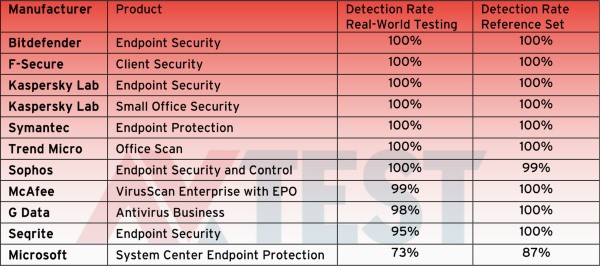
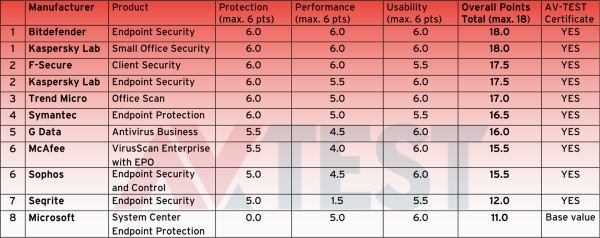
Most commercial antivirus (AV) products can detect many variants of
Cryptolocker, which means protection starts with using both host-based
and network-based AV products that are kept up to date. However,
Cryptolocker's authors are very aggressive at re-packing their malware
to make the same executable file look different on a binary level, which
helps it evade some AV solutions. In short, though AV helps, some
variants may get past some AV solutions. Other defenses are becoming a
must as well, such as reputation based defense systems that keep track
millions of malicious URLS and web sites. That means access to sites
that distribute or support malware can be blocked, effectively
preventing infected hosts from reaching C&C servers.
Awareness proves to be one of the best defenses, Cryptolocker typically
spreads via some obvious phishing emails. The emails may pretend to be
FedEx or UPS related messages, which contain zip files that hide a
double-extension executable. Training users to recognize some of the
common phishing and malware signs, such as unsolicited emails from
shipping providers, double-extension files, links that point to the
wrong sites, and so on should prove to be an effective first line of
defense.
~ Frank Ohlhorst