Cisco Learning Network Store Promotions Page
Showing posts with label Chess. Show all posts

8.18.2016

Watch and analyze chess games with Kvetka

 
If you’re looking to improve your chess skills then watching the best players at work will usually teach you a lot. There are plenty of chess sites to help you do just that, but they mostly offer only a very basic view of the game with few tools or options.
 
Kvetka is a free Windows package which can display games from chess.com, chessbase.com, chessgames.com, chessok.com and many other sites, as well as opening PGN, FEN and other formats, and importing games from the clipboard.
 
The program comes bundled with the Stockfish engine for analyzing games, although it works with other UCI engines too.
 
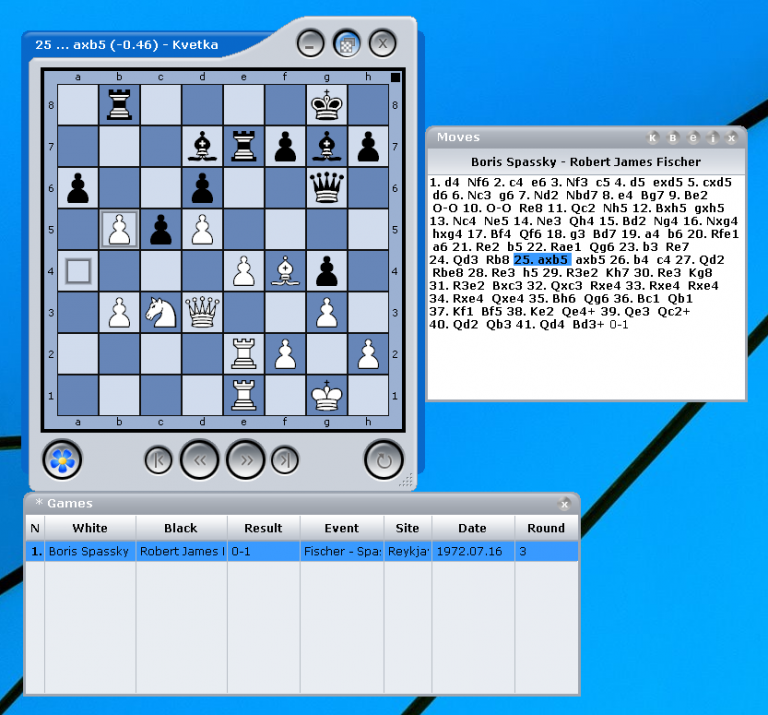
Launch Kvetka and it displays an opening board, along with your list of games, which initially just has a single "Anonymous vs Anonymous" placeholder.
 
To get started, we went to chessgames.com, selected one of the "Hot Games" and copied the URL to the clipboard (http://www.chessgames.com/perl/chessgame?gid=1044727).
 
We then double-clicked Kvetka’s placeholder game, right-clicked in the empty "Moves" box and selected Paste > Load.
 
The details of the game (Spassky vs Fischer) appeared in the list, and we were able to follow it move by move, or by jumping directly to any move of interest.
 
Kvetka also allows you to flip the board, move and place pieces, copy position data or game screenshots to the clipboard, run and view your analysis, and more.
 
Figuring all this out takes a while as features aren’t always clearly labelled, or where you’d expect them to be. But the tutorial page will get you started (once you’ve translated it from the original Russian) and overall Kvetka could be a useful step on your route to chess grand-mastery.
 
Kvetka is a free tool for Windows 7 and later.
 
~ Mike Williams
7.04.2014

Three ways to improve your chess-playing skills

 
Mastering chess can be difficult. Very difficult. Even if you have time, patience and a gift for strategic thinking, you’ll still need to find plenty of challenging opponents to develop your skills.
 
Still, if you’re running short of real-life candidates then you could always turn to your computer, where there’s plenty of help for players of every level.
 
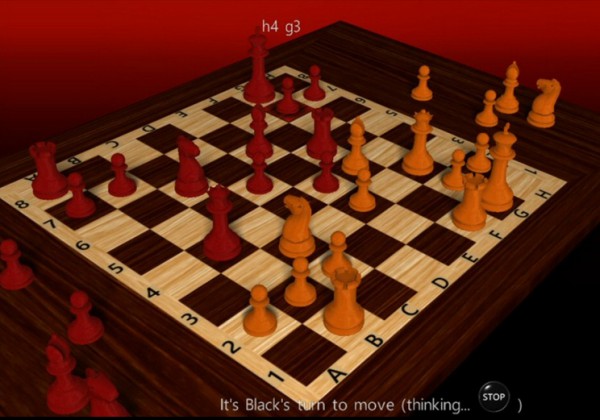
If you’re more an occasional player than an aspiring grandmaster, then you might appreciate 3D Chess Game (Android and Windows 8). The straightforward interface means you’ll be playing within moments, the graphics are great, and adjustable skill levels ensure a challenging game.
 
There aren’t multiple chess engines here, and you can’t play against someone over the internet, but that’s no surprise. 3D Chess Game provides some good opponents as well as a few small extras (timed games, the ability to review play later), and it’s ideal for casual use.
 
At first glance WinBoard (the Windows port of XBoard) seems more basic, thanks to its 2D graphics and slightly cluttered look -- but the reality is very different.
 
The program supports multiple chess engines, many very configurable, giving you a wide range of opponents. You’re able to connect to various chess servers, helping you find and play chess with people from all over the world. It’s possible to play by email, if you don’t have time for a full game, and WinBoard also supports a host of chess variations including shogi (Japanese chess), Makruk, Berolina, Spartan and many others.
 
Unsurprisingly, all this power does bring some complexity. WinBoard isn’t updated so often these days, either, but if you’re aiming for real chess mastery then it still has plenty to offer.
 
For us, though, Arena is a better choice which is nicely pitched between the other two. It doesn’t have the graphics of 3D Chess Game, for instance, but the interface still looks good, and is better organized and easier to use than WinBoard.
 
The program can be used with 250+ chess engines, and supports playing online games against people worldwide, so you’ll have no problems finding opponents. Good support for analyzing games will help you understand strategies, if that’s what you need. And if you like Arena so much that you’re playing when you really shouldn’t, no problem -- a built-in Boss Key (Ctrl+0) will instantly dismiss Arena to the system tray.
 
~ Mike Williams