Cisco Learning Network Store Promotions Page
Showing posts with label Chrome Browser. Show all posts

9.29.2016

How to: Install Google Chrome web browser on Ubuntu Linux (and uninstall Firefox)

 
Ubuntu comes with a lot of quality software pre-installed. Unfortunately, the default web browser, Mozilla Firefox, has been on the decline -- it is slow and clunky. On Linux, Google Chrome is now the top web browser, and it is the best way to experience Adobe Flash content too (if you still need it).
 
Installing Google Chrome on the Linux-based operating system is not totally straightforward. This is unfortunate, as the search-giant's web browser is an important part of having an overall quality experience on Ubuntu. Don't worry, however, as we will help you to both install the wonderful Google Chrome and uninstall the disappointing Mozilla Firefox.


First things first, you must download the appropriate file here. Scroll down until you see "Linux". There are three available versions -- Stable, Beta, and Dev. You will want to select 'Stable' as it is quite literally the most stable. It is designed for end users that are wanting to surf the web with as few bugs as possible. Beta and Dev are designed for bug-hunters and developers and should be avoided by home users.
 
 
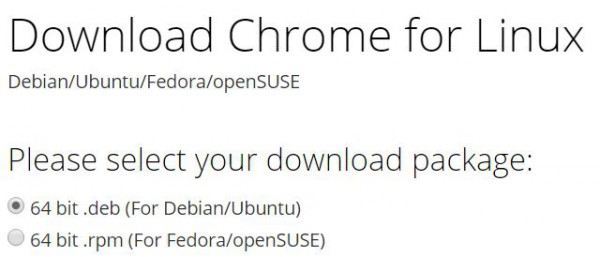
You will then be given the options of "64 bit .deb (For Debian/Ubuntu)" and "64 bit .rpm (For Fedora/openSUSE)". Since you are using Ubuntu, you will want to select the former. If you are coming from Windows, you can think of a .deb file as being sort of like a .exe file. You will want to double-click the file from where you downloaded it.
 
Once opened, it will launch the Ubuntu Software Center. This center is designed for not only finding available packages, but installing downloaded .deb files too. Once it completes installing the browser, you can launch Google Chrome immediately by searching for "Chrome" in global search. You can save it to the launcher for convenience too (recommended).
 
Lastly, you will want to uninstall Firefox, but this is not required. Having two web browsers is not necessarily a bad thing, but if you won't be using Mozilla's browser, why keep it? You can remove it easily in Terminal with the below command. You will be prompted for your password to start the process.
"sudo apt-get remove firefox"
Congratulations! You have now removed Mozilla Firefox and installed Google Chrome.
 
Image credit: Mascha Tace/Shutterstock
 
~ Brian Fagioli

5.07.2015

Dropbox arrives in your Gmail with improved features

Dropbox is one of the most popular services for storing and sharing files online. Combine that with Google's Gmail, a widely used email service, and you serve up a recipe for success. Or at least the storage service thinks and hopes so.
 
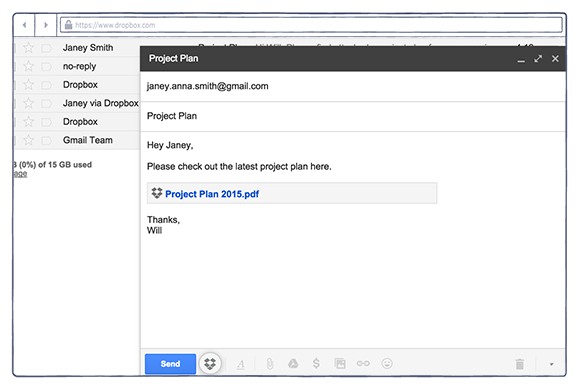
Dropbox is now arriving with improvements for that Gmail account you have, bringing easy storage sharing right to your desktop. This isn't entirely new -- an extension for Chrome has been available for a while now, but this update improves on things.
 
"For many of you, Gmail is one of those tools, helping you share information and stay connected. That’s why we recently built an extension for your Chrome browser that lets you attach Dropbox files right from your Gmail account. Today, we have a new version with improvements based on feedback from early users".
 
The new update allows you to send large files with just a click of the button, no more zipping up of files, make files easily accessible to anyone -- "Even if they don’t have Dropbox or the extension, recipients can see and download the attachments you send them". Finally, the ability to quickly save the files sent to you with just a simple click.
 
You can download the extension now and, if you already have it installed, then an update will be coming very soon.
 
~ Alan Buckingham

4.30.2015

Google launches security feature for Chrome web browser

A logo is pictured at Google's European Engineering Center in Zurich April16, 2015.


4.15.2015

Chrome 42 is out now, includes push notifications that can ping you even after you close the browser

 
Chrome 42 has graduated to a stable release and is now available to download for Windows, Mac and Linux. In addition to the usual list of security fixes (45 in total) and under-the-hood changes for stability and performance, Google’s latest release includes its new Push API and Notifications API.
 
Together, these two new APIs allow websites to send notifications to web surfers even after they’ve closed or navigated away from said site. Obviously, there’s a fine line between being useful and obtrusive when dealing with notifications. Fortunately, Google mandates that developers must acquire consent for permission to use the Push API.
 
Once permission has been granted, developers are free to use Google Cloud Messaging to use a service worker to display said notification.
 
 
As an example of how the new APIs could be used, imagine you’ve bid on something on eBay. Afterwards, you navigate away or close the browser window completely. If you are outbid on the item, you could get a notification on your desktop letting you know right away.
 
A number of the security fixes in Chrome 42 were found by security researchers through Google’s bounty program. Their awards (when applicable) are listed alongside the security fixes on the Chrome Release Blog if you want to check them out.
 
In the event your browser doesn’t automatically download and install Chrome 42 via the automatic update mechanism, you can snag the Windows version by clicking here (Mac and Linux versions here and here, respectively).
 
Image via Venture Beat
 
~ Shawn Knight

9.01.2014

Bigger, better 64-bit Chrome Web browser now available for Windows

Summary: Google delivers a faster, better and more secure version of its Chrome Web browser for Windows. Indeed, the 64-bit version may just be today's best Windows Web browser. 
 
Like clockwork, Google has delivered its latest version of its Chrome Web browser for Linux, Mac, and Windows users, but it's the 64-bit Windows users who will get the most from this latest upgrade: Chrome 37.
 
64-bit Chrome for Windows is the best Windows Web browser available today.
Will Harris, a Google Software Engineer, blogged, "64-bit Chrome offers many benefits for speed, stability and security." While 64-bit Chrome has long been available for Linux, this is the first 64-bit version in Chrome's stable channel. The 64-bit Chrome for Mac OS X is now in beta.
 
Harris added that "The native 64-bit version of Chrome has improved speed on many of our graphics and media benchmarks. For example, the VP9 codec that’s used in High Definition YouTube videos shows a 15% improvement in decoding performance." So, is it really faster?
 
To find out, I ran benchmarks on 32-bit Chrome 36m the new 64-bit Chrome 37, and 64-bit Internet Explorer (IE) 11 on a Gateway DX4710 running 64-bit Windows 7 SP1. You must be running 64-bit Windows to run a 64-bit application, but you can run 32-bit applications on a 64-bit system.
 
By default, IE 11 on the desktop runs its tabs as 32-bit processes. That's because historically, 64-bit IE runs far more slowly than 32-bit IE. In addition, Microsoft runs IE 11 processes as 32-bit for compatibility with older plugins. If you choose to run 64-bit IE, however, you'll be operating with more security because this also invokes Enhanced Protected Mode. For these benchmarks, to make sure IE showed to its best advantage, I ran IE in its default 32-bit mode. 
 
My benchmark PC is powered by a 2.5-GHz Intel Core 2 Quad processor and has 6GB of RAM and an Intel GMA (Graphics Media Accelerator) 3100 for graphics. It's hooked to the Internet via a Netgear Gigabit Ethernet switch, which, in turn, is hooked up to a 100Mbps (Megabit per second) cable Internet connection. For the benchmarks, I used Sunspider 1.02Futuremark's Peacekeeper; Octane 2.0, Google's own Web browser benchmark; and Mozilla's Kraken 1.1 benchmark.
 
On Sunspider, which is a popular, simple JavaScript benchmark, the lowest scores are the best. In this benchmark, IE 11 was the clear winner at 184.3-milliseconds. It was followed by Chrome 36 at 264.3-milliseconds and the newest 64-bit Chrome at 288.3-milliseconds. Clearly, for this test anyway, the new Chrome isn't that fast.
 
With Futuremark's PeaceKeeper, which examines almost all aspects of a browser's end-user performance, it was a different story. On this benchmark, where higher scores are better, Chrome 37 won with a score of 2,409, well ahead of the 32-bit Chrome 36's 2,214, and far, far ahead of IE 11's 1,632.
 
In Kraken, which gives browsers' JavaScript engines a good work-out, low scores are again better than higher ones. Here, the new Chrome once more won by a nose, with a score of 2,638.5-milliseconds over Chrome 36's 2661-milliseconds. IE 11, with 5,136.3, was in the rear.
 
Finally on Octane 2.0, Google's house Web browser benchmark, where higher is better, it should come as no surprise that Chrome 37 was the victor with a score of 13,156, well over Chrome 36's 12,895 and way ahead of IE 11's 8,142.
 
Google also claims that the new 64-bit Chrome displays high-definition (HD) video better. While I was unable to benchmark this, it certainly appeared to my eyes that YouTube HD videos, such as The Emmys 2014: Robin Williams Tribute (Highlight) and the Homeland Season 4: Teaser Trailer appeared quite sharp without any frame drop-outs.
 
For now, the 64-bit version of Chrome is optional. If you want to use it, click on the new “Windows 64-bit” link on the Chrome download page. Harris noted, however, that one "significant known issue is the lack of 32-bit NPAPI [Netscape Plugin Application Programming Interface] plugin support." NPAPI is an obsolete technology and Google is depreciating it, but there are still a handful of older Web services and out-of-date Web sites that use it. 
 
The 32-bit channel will remain fully supported for the foreseeable future. In addition, Chrome will continue to support 32-bit plugins until NPAPI is removed from Chrome.
 
Regardless of whether you use 32- or 64-bit Chrome on Windows, the new Chrome now supports DirectWrite support on Windows for improved font rendering. DirectWrite has been around since Windows Vista, but Google had continued to use the mid-80's Graphics Device Interface (GDI) for font rendering. That was fine in the day when VGA's 640x480 resolution was the best you could expect, but it's completely out of date today.
 
Not everyone is happy with this change. Some users are reporting that with DirectWrite, "Chrome appears zoomed in and blurry, including the header bar (address bar, tabs, bookmarks bar)."  I was unable to reproduce this problem on any of my Windows 7 or 8 systems. I strongly suspect this problem is because of a combination of individual factors rather than a Chrome bug.
 
One user has suggested that if this happens to you, you can try "Right-clicking the Chrome shortcut and then click Properties. On the Compatibility tab, select Disable Display Scaling On High DPI Settings, and then click OK. This causes the text in the application to appear clearer." This fix is based on a fix for Windows applications having trouble with high DPI displays. 
 
Both 32- and 64-bit Windows versions, as well as those for Linux and Mac OS X, also received numerous stability, security, and performance fixes.
 
To me, this is a no-brainer. If you want the best possible Web browsing experience on Windows, especially 64-bit Windows, get Chrome today.
~ Steven J. Vaughan-Nichols

6.06.2014

64-bit Chrome browser arrives for Windows, said to be faster with better security and stability

 
A dev-oriented 64-bit version of Google’s Chrome web browser is now available for use in Windows 7 and Windows 8. In a blog post on the matter, Google software engineer Will Harris said a 64-bit browser allows Google to take advantage of the latest processor and complier optimizations, a more modern instruction set and a calling convention that allows more function parameters to be passed quickly by registers.
 
In addition to speed, the browser should be more secure as the extra bits help better defend against exploitation techniques such as JIT spraying and improve the effectiveness of existing security features like heap partitioning.
 
Finally, Harris notes they’ve observed a marked increase in stability for 64-bit Chrome over its 32-bit counterpart. Specifically, he said crash rates for web content processing are nearly half that of the 32-bit version.
 
Google’s 64-bit browser is available as a beta through the Developer and Canary channels. This new version will replace your existing version while preserving all of your settings and bookmarks so there’s no need to uninstall a current version first. Just keep in mind that it is a beta release so there are bound to be a few bugs here and there.
 
Given its release into these channels, it wouldn’t be a stretch to see a 64-bit version hit the mainstream channel later this year. No word yet on whether or not Google is planning a 64-bit release for the Mac, however. Direct downloads here:
 
Google Chrome 64-bit Dev 35.0.1916.114
 
Google Chrome 64-bit Canary 37.0.2029.0
 
~ Shawn Knight

4.08.2014

Windows XP support ends: Survival tips to stay safe

Summary: If you're late to upgrade or have decided not to change your operating system, check out these tips to keep the system as secure as possible

Do not use Internet Explorer

It is not advisable to keep running Microsoft's Windows XP operating system now that support has ended.
 
Today, Microsoft will release its last batch of security updates, patches, and fixes for Windows XP, and after this date, core vulnerabilities or security issues that could leave you open to cyberattack will not be investigated or fixed. You won't have a permenant blue wheel of death the moment support ends, but vulnerabilities stored up by cybercriminals for use after this date will not be fixed.
 
Tip one? Stop using Internet Explorer.
 
The most common version of IE used on XP systems is version 8, and considering that Internet Explorer is now up to version 11, you can see how old and obsolete the browser is. Not only this, but Internet Explorer 7 and 8 will also not be updated further, leaving your system vulnerable to malware that exploits this old program.
 
Both Mozilla's Firefox and Google's Chrome browsers will continue support for Windows XP after expiration, and so use one of these browsers instead of Internet Explorer if you are still running XP. This will at least give you a little more time, but be aware that Chrome on XP will only be supported for one more year, and it is not known how long Firefox will offer support.
 
In addition, don't forget to change your browser from the IE default.


Keep third-party software up to date

The fewer software packages you have installed on your computer, the fewer routes that hackers can take to infiltrate your system.
 
Any software you can't live without, especially if used in tandem with an Internet connection, must be kept fully updated at all times. Adobe Flash, Adobe Acrobat PDF reader, and Java are of particular concern, as they are often targets for hackers -- and while modern versions check for updates automatically, older versions may skip checks altogether.
 
If you don't need the Java browser plugin, disable it, and you should do the same for Adobe Flash. The fewer outlets you provide for vulnerabilities to be exploited the better. While these are all stop-gap solutions instead of the ultimate protection — killing your Windows XP system altogether — it may keep your system a little safer.


Turn on the Windows XP firewall

It may seem like an obvious tip, but it is amazing how often this critical security feature is turned off and forgotten about.
 
Go to your control panel, select Windows Firewall, and turn the security barrier on — and leave it that way.
 

Update everything

It is not just third-party apps and plugins that should be updated — don't forget the most important element, upgrading all of your Microsoft applications and services to their most modern states.
 
From the Start menu, select All Programs and then Windows Update to see the status of your system. Install anything deemed "Important," and set Windows Update to install any future fixes automatically. In addition, as Microsoft Office 2003 is also being abandoned, leave it alone and switch to an open-source suite such as OpenOffice, or move along to the Web and use Google Docs or OneDrive.


Limit user accounts to limit potential damage

If you use a full-system administrator account, this type of user is able to install programs as well as modify and remove software, and often malware will use these privileges to achieve its malicious ends.

While many versions of malware are able to modify user privileges anyway — and so this advice is limited — creating a limited user account may mitigate some of the damage malicious software can do if it arrives on your system. This restricts your ability to make changes to the operating system, but should be fine for daily tasks. You can always switch back to an Administrator account if you need to install software — but make sure you scan it for problems or malicious code first using an antivirus program.


Protect yourself against zero-day malware and exploits

Microsoft's Windows XP will not be updated and protected against major flaws any longer, but this does not mean security needs to go entirely out of the window.
 
Microsoft says you'll be facing a zero day forever scenario by clinging on to the old operating system, and that's likely, but it doesn't mean you'll immediately be left out in the cold by many security vendors.
 
The Redmond giant's Microsoft Security Essentials will support XP for one more year, and this seems to be the approach taken by many third-party security vendors. 
 
Considering that you'll be saving money by not upgrading your computer, it's worth considering the purchase of premium antivirus products to give Windows XP the best chance of staying secure. AVG, Avast and MalwareBytes are antivirus vendors with real-time scanning that you may want to consider.
  

Stay safe and vigilant

If you're using an archaic operating system, being careful when you browse the Web will now be critical to staying safe.
 
Do not click on emailed attachments or links that are suspicious, and if you receive an email which seems legitimate — whether from the tax office or bank — ring them first and clarify the contents before submitting any personal data. Stay away from websites that are known sources of malware, adware, and spyware, and be careful about visiting websites with expired security certificates.  
 
If you can, unplug from the Internet entirely. This may be an extreme solution, but if you're running the risk of using an outdated, vulnerable system, connecting up to a source of security issues isn't going to help matters. 


Upgrade your operating system or computer entirely

The final, and most useful tip? Changing, updating and shoring up the system are only temporary measures. If you want to stay safe, you need to upgrade the operating system to a newer version, such as Windows 7, or change your OS altogether.
 
Microsoft offers Laplink, a free data migration tool, to help you transfer files, settings, and profiles from your Windows XP PC to your new Windows laptop, desktop, or tablet — as long as they are running Windows 7, Windows 8, or Windows 8.1.
 
The problem is that many old computers still running Windows XP simply won't have the memory, storage, or capabilities to cope with a modern operating system, and so if you can't upgrade, you'll have to invest in a new machine. 
 
But what's worse — a few hundred dollars for a new machine or your account emptied when a hacker installs malware, keyloggers, and steals your financial data due to XP security vulnerabilities?
 
Chris Boyd, Malware Intelligence Analyst at Malwarebytes told ZDNet:
"The research team at Malwarebytes, myself included, is keeping an attentive eye on how cybercriminals respond to the threat to XP users. Whenever there is an event that gains a lot of media attention, there will always be individuals with criminal intent seeking to capitalise. 
The problem is that XP being retired isn't just a software issue but a hardware issue too. Many end-users running XP may well be running old PCs and may struggle to upgrade to Windows 7 or 8. It's going to take some time for those people to upgrade and we need to do everything we can to ensure their machines are as safe as can be in the meantime, which is why we're continuing to support them."
~ Charlie Osborne


11.11.2013

Google tightens Chrome security, bans extensions from outside sources

Google has announced it will lo longer allow installing Chrome browser extensions in Windows unless they come from the Chrome Web Store. The new policy goes into effect starting January for the stable and beta channels, meaning the change will mostly affect end users and not developers or Enterprises running local extensions.
 
For those who are unaware, extensions are small applications that extend a browser's functionality. You can use an extension to quickly post to social networks, get email notifications, manage passwords and so on.
 
Erik Kay, Engineering Director at Google, said that the existing security mechanism is being abused as extensions are getting installed silently without any prompt. These malicious extensions are then able to do things like altering browser settings, replace the new tab page without approval, etc. He cited numerous complaints that the company has been getting from Windows Chrome users, in support of this decision.
 
As far as extension developers are concerned, they can easily migrate their applications to the Chrome Web Store. The migration process will have no impact on users, who should be able to continue using extensions without noticing the change, if the developer follows through of course. A point worth noting here is that Google will require extension developers to shell out a one time $5 registration fee and a 5% cut on each transaction done through Chrome Web Store Payments, the built-in payment system.
 
This is the latest of several security-oriented moves for Chrome. Recently, the company added a Reset browser settings button that lets users go back to the original browser settings should they notice any strange behavior.

~ Himanshu Arora

9.03.2013

New stats show Windows 8 usage up sharply as XP usage plummets

Summary: The latest monthly NetMarketShare reports contain a few eyebrow-raising numbers. Windows 8 is up sharply, XP usage has plummeted, and Google's Chrome browser seems to be falling out of favor. But this month's report might need a big asterisk to account for a key methodology change.
 
On the first day of each month, the good folks at Net Applications release their NetMarketShare statistics, which measure worldwide usage share of desktop and mobile operating systems and browsers.
 
This month’s numbers, covering August 2013, contain several eyebrow-raising blips:
  • After posting steady but unspectacular monthly gains since its launch last October, Windows 8 usage spiked up dramatically, going from 5.42 percent to 7.65 percent of worldwide web usage in the course of a single month.
  • Windows XP usage, which had been dropping at a similarly steady but unremarkable pace, suddenly and dramatically plummeted from 37.19 percent to 33.66 percent.
  • Google’s Chrome browser showed a sudden drop in usage, plunging in one month from 17.76 percent to 16 percent. Every other browser gained in percentage terms, with Internet Explorer hitting a two-year high of 57.6 percent.
With a worldwide installed base of nearly 1.5 billion PCs, each one of those moves represents a shift of tens of millions.
What happened? Did 40 million people suddenly wake up to the fact that support for Windows XP is ending in a matter of months and rush out to replace their outmoded machines with shiny new Windows 8 devices?
 
Sorry, no.
 
The real explanation might be more prosaic: Net Applications recently changed its formula for measuring usage. In an undated note labeled “Important methodology change,” the company explains:
This month we start deducting hidden pages from our usage share statistics. Hidden pages are pages that are rendered but never viewed by the user, therefore, they should not be included in usage share data. An example of a hidden page is a page that loads in a background tab upon the launch of the browser and is never made visible.
That note appears to have been added to the site in July, although it's not clear from the note when the new methodology took effect. The change in methodology is intended to help measure actual behavior by PC users rather than background activities performed by browser code. Previously, the company’s stats had excluded prerendered pages, which Chrome uses to load pages in the background as a Google user types a search request. In February 2012, prerendered pages accounted for 4.8 percent of Chrome pages. In June 2013, that number was over 12 percent.
 
This month’s change goes still further. In its FAQ page, Net Applications notes the impact of hidden pages on the raw page counts from different browser families. These figures were measured in June 2013:
 
Hidden pages by browser family
  • Internet Explorer 0.70 percent
  • Firefox 6.38 percent
  • Safari 0.15 percent
  • Opera 6.33 percent
  • Chrome 5.60 percent
If you factor those methodology changes in and assume all other factors are equal, both Firefox and Opera should have seen greater drops in usage than Chrome. Yet the usage share for each of those browsers was up, with only Chrome showing a drop. It will take a few more months of data to confirm whether this is a trend or just a blip.
 
That methodology change also suggests one possible reason for the apparent sudden drop in Windows XP’s usage. Windows XP users, blocked from using the most recent versions of Internet Explorer, are more likely to use an alternative browser such as Chrome or Firefox, both of which use hidden pages. Windows 8 users, by contrast, are more likely to use the standards-compliant Internet Explorer 10 (and IE 11 in Windows 8.1).
 
A few more nuggets worth noting from this month’s report:
  • Windows 8 (7.65 percent) now has more users worldwide than all versions of OS X combined (7.26 percent). Extrapolating that number from the worldwide installed base of desktop and portable PCs suggests that more than 100 million Windows 8 PCs are now in use.
  • Despite being available only as a preview release and then for less than 60 days, Windows 8.1 earned enough share (0.24 percent) to gain a place on the chart.
  • After more than two years on the market, Google’s Chrome OS still hasn’t garnered enough usage to cross the 0.1 percent threshold that Net Applications requires for an entry in the monthly list. Alas, comparisons to Microsoft's Windows RT aren't possible, as Windows RT stats are included with Windows 8.
All of these numbers need to be placed in the context of a shifting market, of course. Worldwide, consumers and businesses are buying fewer traditional desktop and portable PCs and spending more on tablets and other mobile devices. But with an installed base of 1.5 billion or so PCs it's still a force to be reckoned with.
 
~ Ed Bott