Cisco Learning Network Store Promotions Page
Showing posts with label Mac OS. Show all posts

4.17.2014

HindSight Technologies™ Exclusive: Try Bitdefender Antivirus for Mac FREE for 6 months

 
Last week Derrick Wlodarz debunked the Apple myth, explaining why security through obscurity isn't security. Macs are not virus-proof -- Apple-targeted malware is proliferating and users need to become aware of the risks and protect their devices just like any other regular Internet user, without false security expectations.

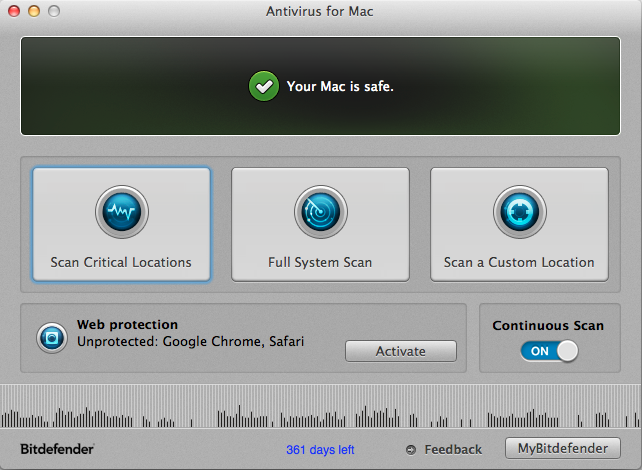
Here’s where Bitdefender steps in. The new Bitdefender Antivirus for Mac is specifically designed for Apple users, and Bitdefender is offering HindSight Technologies™ readers a free six month license. This is the full version that usually retails for $49.95, not some featured limited "special" edition. However, you’ll have to act quick as the offer is only available for 48 hours.
  • Continuous protection. Enjoy a seamless experience. Bitdefender’s lightweight, non-intrusive scanning technology offers malware detection for both Mac and Windows threats -- without the risk of slowdowns.
  • Online safety. Phishing scams don’t discriminate users by OS. Dodge fraud attempts while browsing, as Bitdefender warns you of any malicious websites. Mac users can activate TrafficLight browser add-ons to stay protected from any phishing or fraud attempts.
  • Auto-updates. Continue your work without interruptions, as Bitdefender silently updates its malware definitions without prompting you.
  • On demand scan. You can scan files manually, including USB devices, to protect yourself and others from malware infections.
To get your free six month version of Bitdefender Antivirus for Mac just click here. (Please note, promotional licenses need to be activated within 30 days.)
 
~ Wayne Williams

1.04.2014

Microsoft might have reason to fear Chromebooks after all

Microsoft might have reason to fear Chromebooks after all
Late last year, we wondered why Microsoft was seemingly wasting its time bashing Chromebooks, the low-cost browser-based laptops that have barely registered in consumer sales figures. However, Fortune’s Michael Helft writes that Chromebooks have the potential to give Microsoft major headaches in one of its important markets: Schools. In particular, Helft says that his sons’ school district has started buying up Chromebooks instead of PCs and he says that they’re delivering some real advantages.
 
“It’s not hard to see why our PTA and the school district opted for Chromebooks,” he explains. “Sure, they don’t have Office. But they do have the free Google Docs, which is an easy-to-use alternative and sufficient for most tasks required of elementary school students. As for the lack of Windows — or for that matter MacOS — that’s actually an asset for the cost-sensitive school environment. The machines boot up immediately, they can be shared easily amongst students, they never have to be upgraded or backed up, and they are always up to date.”
 
This is particularly interesting because it shows that Microsoft’s attempt to paint Chromebooks as mere “toys” might not be as effective as the company thinks. Sure, Chromebooks might not have all the high-end productivity tools that Windows PCs have but do first graders really need the full versions of Excel and PowerPoint preloaded onto their machines? It seems that what Google has done is address certain pain points that schools have with Windows machines — namely, their maintenance costs — in a way that Microsoft is having a hard time responding to.


4.26.2012

Google Drive launches with multiformat search

Google unveiled on Tuesday Google Drive, its online storage system. Allowing users to store any sort of data in Google's cloud, access is through the browser or an app for Windows, Mac OS, Android and, "in the next few weeks", iOS.


Once installed, the app maps Google Drive into the local system as a disk drive, letting users drag and drop files as normal.
Google Drive is the web giant's online storage system. Image credit: Google
Each user is given 5GB for free, with additional storage is available at $4 (£2.50) per month for Google Apps business users, up to a maximum of 16TB. Private users pay $2.49 for 25GB or 100GB for $4.99 a month.


The system is integrated with Google Docs and other Google applications, and adds collaborative commenting to a wide variety of data types — images, PDFs, video files — for workgroups sharing folders.


It also has comprehensive search across many data types, with Google attempting to automatically recognise images for keyword searching, and adding optical character recognition (OCR) to turn bitmap documents such as PDFs into text files.


"Search by keyword and filter by file type, owner, activity and many more. Drive can even recognise text in scanned documents using Optical Character Recognition (OCR) technology," Scott Johnson, Product Manager for Google Drive in a blog post. "This technology is still in its early stages, and we expect it to get better over time. Open more than 30 file types right in your browser — including HD video, Adobe Illustrator and Adobe Photoshop — even if you don't have the corresponding program installed on your computer."


"This is great news for business," David McLeman, managing director at Google Apps for Business reseller Ancoris told ZDNet UK. "Google Drive will make collaboration omnipresent and part of a new way of working in business. It's helping change the face of the modern desktop; people aren't thinking in terms of operating systems any more"


Rupert Goodwins