Cisco Learning Network Store Promotions Page
Showing posts with label Spotlight. Show all posts

1.11.2015

OS X Yosemite Spotlight vulnerability allows email spammers to access IP address and private data

 
Reports suggest a glitch in Apple’s OS X Yosemite is making it possible for spammers to steal IP addresses and other private data from unsuspecting users. As spotted by the German tech outlet Heise, the issue appears to be with Apple’s built-in Spotlight search and the way it treats Apple Mail results.
 
The glitch was replicated successfully when tested by IDG News Service and has to do with the way Spotlight will ignore user privacy options from within Apple Mail. The company suggests users turn off “load remote content in messages" from within their Mail settings in order to avoid tracking pixels and other scams that spammers might attempt in order to steal private information.
 
The problem is that when users search for something in Spotlight that brings back a Mail message of malicious nature, the remote content selection is ignored and the files are loaded up as part of the results. If a tracking pixel or something of the sort is loaded in this way, onlookers can easily pull IP addresses, system info, browser history/details and other things they shouldn’t be able to access.
 
At this point, there has been no response from Apple regarding the Spotlight vulnerability, but there are things Apple Mail users can do to protect themselves in the mean time. It looks as though the best way is to simply block Spotlight from accessing Mail content manually. Go to System Preferences, then into the Spotlight options where you’ll find a list of content that will be included in results, and then uncheck the "Mail & Messages" option.
 
~ Justin Kahn

10.21.2014

Apple seeks to allay concerns over Yosemite Spotlight data collection

Summary: Apple is ruffling features by collecting search and location data from OS X Yosemite users through Spotlight features that some argue should be off by default.
 
 
Apple's quest to be known as a company that makes products with built-in privacy hit another snag on Monday amid concern over query and location data it's collecting through Spotlight in iOS 8 and OS X Yosemite.
 
Spotlight for OS X Yosemite, as reported in the Washington Post on Monday, contains a little surprise for users, with the search tool now sending queries and location data to Apple. And thanks to a deal between Microsoft and Apple to display Bing results in Spotlight, it's also sending some data to Microsoft.
 
The feature update has annoyed some users, including developer Landon Fuller, who posted details at fix-macosx.com on how to restore privacy in OS X, chiefly by disabling several Spotlight settings in not just Spotlight but Apple's Safari browser too.
 
While Apple does outline Spotlight's new features in its documentation, Fuller doesn't like that the potentially invasive features are on by default — which he considers a break from past versions of OS X.
 
Apple explains in its "about" section for Spotlight that search queries and any Spotlight suggestions it offers are sent to Apple, while search results are not. Apple will also collect a user's location when users make a search and location data is on.
 
In response to the kerfuffle over the privacy implications of the feature, it's also published a separate support note explaining how to deactivate the features.
 
Apple issued a statement to iMore outlining that it doesn't retain the IP addresses of users' devices and "blurs" the location of the device so that Apple doesn't see the exact location. Also, the device identifier it does collect changes every 15 minutes, preventing it or third-parties from creating a profile based on search history. It also clarified that Apple only forwards commonly searched terms and city-level location information to Bing, while Microsoft doesn't store search queries or receive a user's IP address.
 
The company explains as much in its page about built-in privacy, pointing out that before Spotlight provides suggestions, it "considers things like context and location while protecting your privacy by using an anonymous identifier that refreshes every 15 minutes. You can always opt out of Suggestions and continue to use Spotlight solely for local search on your device."
 
Apple has attempted to distinguish itself from rivals, in particular Google, by claiming its business doesn't rely much on the collection of user data for advertising. It's also stepped up that messaging in response to concerns its products have backdoors and that it works with government agencies — a concern that held up the iPhone 6 and 6 Plus launch in China as regulators there extracted promises from Apple that its device was not a security and privacy risk. The third major privacy issue it's faced in recent months, of course, is Celebgate.
 
~ Liam Tung

10.01.2014

Is iOS 8 Spotlight Search Similar to the Ubuntu Dash?

If you’ve played with an iPhone or iPad running iOS 8 you might have spotted a new feature in Spotlight — a feature that bears more than a passing resemblance to a key part of the Ubuntu desktop.
  
Let me preface this by saying that good ideas catch on. That is a good thing. In culture, in literature, or in technology: we all benefit when people are free to take an idea and develop it in new, different ways. It’s a concept that most open-source frameworks are built on. Don’t like something? Fork it!
 
Back to Apple’s rejig of the Spotlight search feature in iOS 8. Apple has given Spotlight new features, features similar to those debuted by Ubuntu a few years back. Spotlight is now a search hub, for want of a better word.
 
Like in the Unity Dash, Spotlight in iOS 8 will throw up results from online sources, including iTunes, Wikipedia and Bing, alongside local files, photos and apps. It will even serve up relevant app suggestions where applicable — just like Unity’s ‘recommended software’ section.
 
 
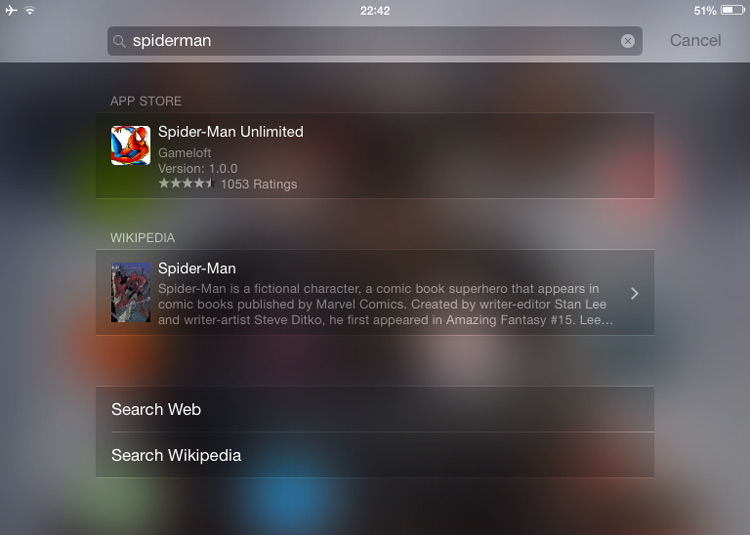
Results are grouped based on their source, with a small thumbnail shown alongside a brief snippet or link.
 
For example, typing in “Spiderman” throws out an App Store link and Wikipedia entry on the comic book character. Depending on the search term you may see movie times, nearby events or business, relevant web links, and so on.
 
 
Again, as with Unity, certain results can be clicked to reveal a short preview or snippet:
 
 
But unlike the Unity Dash there are no Amazon product results rearing their head thus far. But when you’re a company worth over half-a-trillion dollars, it’s not like you need them!
 
Apple do not (yet) have plans to allow third-party services to add in and extend the search functionality, something Ubuntu does allow through its “Scopes”.

Applentitlement

Now, by this point in the comparison, fervent Mac fans will be foaming at the mouth, incredulity rushing to their fingers, calling them into commenting action. To be fair, they have some reason to feel the need to rebut through Helvetica ALL CAPS.
 
Why? Well, firstly, the notion of a visual hub collating local files, apps, emails, contacts, music and other items is not novel or ‘unique’ to Ubuntu. Spotlight has long been a mainstay of Apple’s mobile and desktop OSes, and various Linux desktop shells/apps over the years have attempted similar things.
 
Secondly, it can be argued that the first true fusion of local and remote results to use smart matching began with productivity apps like Alfred, which served as inspiration for GNOME Do, Kupfer and, by extension, Synapse.
 
But it is only with iOS 8 (and the upcoming release of OS X 10.10 ‘Yosemite’ on the desktop) that Apple is expanding its search reach to cover ‘contextually relevant’ results in a way more accessible to the user.
 
Ubuntu amped up search on the Unity desktop shell through ‘Smart Scopes’ back in 2013.

Seriously, Don’t Miss the Point

Playing a game of “Who did what first” never ends well. And it’s not really what this article is supposed to be about. It’s about showing how different companies, projects and OSes tend to converge on the same problems but go about solving them in different — or not so different in this case — ways.
 
There is no shame in this. Is it likely that Apple actually flat out copied Ubuntu? Probably not. Inspired by it? Possibly…but given the insular nature of the Cupertino design team, even that would be a little arrogant to assume.
 
What this feature does show is that Canonical, in bringing this feature to the desktop and making it front and centre of their mobile OS, is acutely tuned to react and adapt to changing habits of users. While not always a hit in the implementation — the smart scopes server matching remains a little scattershot — they are often ahead in willing to break the status quo.
 
This instinct for what’s next bodes well for their mobile domination plans.
 
~ Joey-Elijah Sneddon

6.10.2014

Apple introduces Unity Scopes-like search and no one cries foul


Jack Wallen ponders the borrowing of Unity Scopes in OS X Yosemite and explains why he has disparate attitudes toward each. 

 
This week, Apple announced the new OS X Yosemite, and Linux users across the Linux-verse stood up and proclaimed "Oooo, I'd like to lay my hands on the lily-livered swab is writ that forgery!" Why so up in arms? Because Apple has done what Apple does -- riff on features from other platforms and claim they've recreated a wheel that will make your life far easier. What did they do this time? Let's chat.
 
One of the big features of OS X Yosemite is included in the Spotlight tool. For those who don't know, Spotlight is the OS X search tool that, up until Yosemite, searched the local drive. As of Yosemite, anyone who has touched the Ubuntu Unity Dash will notice something very similar to Scopes.
 
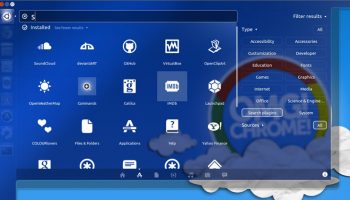
What are Scopes? If you open up the Unity Dash and do a search, the results will include local files and online results. In fact, Unity Scopes can search over 100 sources (users can configure what sources to use), which results in one of the single most powerful search tools on any desktop of any kind.
 
Apple has finally decided to add a Scopes-like feature into OS X (Figure A). When you press the [Command] + [Space] buttons, a new Spotlight box appears where you can search local and/or online results.
 
Figure A
 
 
Ubuntu Unity Scopes compared to Yosemite searching.
This functionality isn't new or unique to Unity. GNOME Do did the same thing (although not nearly as well, nor to the extent of Scopes). But when OS X adds previews of the search results in the Spotlight box, things start to feel hauntingly similar to Unity's Dash search.
 
There's a HUGE difference between these two features. The difference isn't in functionality, features, look, feel, or overall experience. What then, is the big diff?
 
Acceptance.
 
When Ubuntu released Unity Scopes, a very large and very vocal group from the Linux community cried foul, that Scopes was an invasion of privacy, was insecure, and would probably steal their identity...
 
...maybe not that last bit. But there was plenty of backlash from the community (many of whom didn't even use Ubuntu).
 
How will the Apple community react when they start using the Scopes-like feature in Yosemite? They'll love it. They'll realize how convenient it is to be able to, from one location, search their local drive, Wikipedia, Amazon.com, and countless other sources. There won't be an outcry about privacy. Why? There are a lot of reasons, some positive, some negative. For instance:
  • Apple users aren't nearly as paranoid about security
  • Apple users think of the future, not the present or the past
  • Apple users want the most convenient and user-friendly experience possible
This isn't to say that they are right or wrong. One of the reasons the Linux platform is as secure as it is rests squarely on the shoulders of the paranoia in the Linux community. That's a huge plus. But this same paranoia causes some users to point the finger of "security breach" at undeserving features. It has yet to be proven that Scopes is a real risk to security. Sure, Scopes can track your search history, but so can every browser that isn't in incognito mode.
 
As someone who frequently uses Scopes, I've never understood the outcry for something that makes your life exponentially easier. And now, Apple is going to have a Scopes-like feature that will flourish and might well grow beyond Unity Scopes in functionality -- simply because the users accept the feature with open arms. I've been using Linux for nearly two decades. I've fought hard to aid in the acceptance of the platform. There are times, however, when that fight seems to sometimes turn inward -- when members of the community begin to fight against those who try to extend the reach of the Linux desktop to a forward-thinking, modern user base. 
 
I'm not a fan of Apple products. I am, however, a fan of how Apple has managed to turn their product into something users want as much as they need. They've done this by making sure their product not only fits into the scope of today's computer usage -- but by also borrowing other technology and elegantly folding into their platform. In the end, Apple looks like they've re-invented a wheel that had already been re-invented. The difference is that Apple also re-invented they way users want and need to use their desktop.
 
Ubuntu says, "The ability to search online sources from your desktop will make your life easier," and the Ubuntu-using masses cross their arms and cry foul. Apple says, "The ability to search online sources from your desktop will make your life easier," and the OS X-using masses hold their arms up and cheer. 
 
Where's the disconnect?
 
What do you think? Is it time for a shift in attitude in either the Linux or OS X landscape? Should Linux users be less concerned with the security of features like Scopes, or should OS X users be more concerned? Share your thoughts in the discussion thread below.
 
~ Jack Wallen