Cisco Learning Network Store Promotions Page
Showing posts with label Enterprise. Show all posts

6.16.2016

Apple File System revealed at WWDC 2016, focused on encryption and SSD support

Apple recently announced the new Apple File System (APFS), replacing the decades-old HFS system.

Image: Josh Miller/CNET
On Monday, Tim Cook and his executive team took to the stage at the 2016 Apple WWDC event to discuss the latest updates to their core operating systems in the keynote address. One of the biggest releases for the enterprise, however, wasn't even announced.
 
As part of the updates with macOS Sierra, a new file system for storage called the Apple File System (APFS) is being released in developer preview. An explanation of the system was first spotted as part of a description for a system frameworks breakout session at WWDC:
 
"The Apple File System (APFS) is the next-generation file system designed to scale from an Apple Watch to a Mac Pro. APFS is optimized for Flash/SSD storage, and engineered with encryption as a primary feature. Learn about APFS benefits versus HFS+ and how to make sure your file system code is compatible."
 
As noted, APFS was created to replace the aging HFS and HFS+ systems, which Apple said were "developed in an era of floppy disks and spinning hard drives, where file sizes were calculated in kilobytes or megabytes." The APFS is built with Flash storage in mind and to handle millions of files that may be larger in size. 
 
Let's take a look at some of the potential improvements that APFS holds over HFS+. For starters, APFS supports 64-bit inode numbers vs. the 32-bit IDs supported by HFS+. APFS also has support sparse files, but HFS+ doesn't.
 
Another big improvement is the timestamp granularity. While HFS+ offers a 1 second timestamp granularity, APFS supports a 1 nanosecond timestamp granularity. This amount of detail would likely be used more for core OS files, and is a massive improvement in terms of file detail. 
 
To protect against crashes, APFS utilizes a copy-on-write metadata scheme to make sure that file systems updates are safe in the event of a crash.
 
With all the recent headlines about Apple's war for encryption, it's not surprising that APFS supports encryption natively. According to the developer documentation:
 
"On OS X, Full Disk Encryption has been available since OS X 10.7 Lion. On iOS, a version of data protection that encrypts each file individually with its own key has been available since iOS 4, as described in iOS Security Guide. APFS combines both of these features into a unified model that encrypts file system metadata."
 
Although hardware-dependent, APFS encryption supports AES-XTS or AES-CBC. The base storage unit for APFS is called a container, and users can choose one of three encryption models for each volume within a container: 
  1. No encryption
  2. Single-key encryption
  3. Multi-key encryption with per-file keys for file data and a separate key for sensitive metadata
APFS also adds support for both clones and snapshots. A clone is a instant, writable, copy of a file or directory that doesn't take up any extra space for the data. Clones will be useful in versioning and revisioning, depending on how you can diff them.
 
Snapshots, on the other hand, are read-only instances of a file system on a volume. Developer documentation states: "The operating system can use snapshots to make backups work more efficiently, and offer a way to revert changes to a given point in time." This means we'll likely see snapshots changing or replacing Time Machine backups.
 
A new copy-on-write design using I/O coalescing could help with both performance and reliability, and a new Space Sharing feature where multiple file systems can share space on a physical volume, but with more flexibility than traditional partitioning. 
 
While there are a ton of updates with APFS, there are still some limitations.
 
If you were holding out for a non-case-sensitive system, you're out of luck. APFS filenames are currently case-sensitive only. This may seem like a step backwards, because HFS+ can be configured as non-case-sensitive. But, it is only a developer preview at this point, so keep that in mind. 
 
Additionally, you cannot use an APFS volume as a startup disk, as a Time Machine volume, or as part of a Fusion Drive. FileVault encryption will not work on it, either. APFS formatted volumes won't work on OS X 10.11 Yosemite and earlier.
 
Interested parties can find the developer documentation for APFS here.
 
~ Conner Forrest
11.19.2015

Windows 10 popular among enterprise users

 
Almost half (49 percent) of companies which participated in a recent survey by Forrester Research say that they plan on upgrading to Windows 10 by 2016.
 
The news broke out yesterday, adding that 38 percent of workers who use a computer say they want Windows 10 on their next work laptop, with 9 percent already using it on their primary work device.
 
This is a big deal, as such fast adoption of a new operating system is not something we usually see, especially not in the enterprise world. If we are to compare these figures to what we had with Windows 8 a couple of years back, we will see the difference: 22 percent of business responded positively to the radically different OS back in 2012.
 
Like millions of other PC owners worldwide, many businesses chose to stay on Windows 7 rather than upgrade to the much-maligned Windows 8.
 
But it seems as Windows 10 has hit the nail straight on the head. It combines the user-friendliness of Windows 7 with touch-friendliness of Windows 8. Add some extra business management features to the mix, and you got yourself a great product.
 
Microsoft says that 14 million business users are on Windows 10 now, of 110 million users total. The company is focusing hard on attracting more business users, which is obvious with the addition of new features like Windows Store for Business.
 
Forrester says that it’s seeing a lot of interest in "smart glasses" like Google Glass or Microsoft HoloLens, as "backoffice" workers turn to them for things like warehousing, logistics, or maintenance.
 
Photo credit: Stanislaw Mikulski / Shutterstock
 
Published under license from ITProPortal.com, a Net Communities Ltd Publication. All rights reserved.
 
~ Sead Fadilpašić

11.08.2015

How many users are actually paying for Dropbox?

Stat attack: Dropbox has more than 400 million users worldwide. Out of that number, some 8 million are business users.
 
From those 8 million, there are more than 150,000 paying ones. Those are the numbers given by the company’s chief executive officer Drew Houston, during the Dropbox Open conference, held in San Francisco yesterday.
 
The company had 130,000 paying customers just a few months ago.
 
"We have added 50,000 paying business customers in the past 10 months", Houston said.
 
He also discussed the competition, without actually saying the company’s name. "We’ve added more paying business customers than they have in their lifetime, think about that", Houston said. VentureBeat believes he was actually talking about the publicly traded Box.
 
Dropbox’s unnamed "competitor" is facing a "challenge", Houston said, because it doesn’t "have that kind of bottoms-up adoption. It’s a lot harder for them to get customers".
 
During the conference Dropbox also announced the launch of Dropbox Enterprise, a tier of service that builds on Dropbox Business and is leaning toward the biggest businesses.
 
Dropbox Enterprise provides the same core security features, admin capabilities, and modern collaboration tools as Dropbox Business -- plus new deployment tools, advanced controls, and services and support designed specifically for large organizations.
 
With Dropbox Enterprise, IT can give employees the Dropbox they love while getting the advanced capabilities they need to effectively manage tens of thousands of users, protect company data, and get the most from the investment.
 
Published under license from ITProPortal.com, a Net Communities Ltd Publication. All rights reserved.
 
~ Sead Fadilpašić

11.07.2015

Why Apple is the forbidden fruit of enterprise IT

Users may love Apple products but making them work in business is causing headaches for this tech chief.

 
The irony of the mystical apple which is the forbidden fruit is not lost on me as I struggle to contemplate Apple and its products within my technology domain.
 
Apple is certainly in demand from my user base and the passion with which users consume this brand, and insist on it, is bordering on frenzy.
 
With each new release — however minimal and bland — comes a wave of workers determined to be one of the first to get the device off the shelf and into the office. As consumer tech, while I am not a frenzied fan, I can at least understand the appeal and attraction for iPhones and iPads (although the appeal of the Watch is very much lost on me).
 
However, what people don't understand and what businesses need to know is that Apple is not business friendly enough - for me at least. It's rules require a 30 percent of any app revenue go to Apple, and in addition, their closed infrastructure and rigid development standards mean that developing applications for its devices is certainly not seamless. When I say applications I mean business-driven professional applications that require harmonized infrastructure to fully operate with behind-the-scenes infrastructure and integration.
 
It changes its technologies so fast that mature businesses, that have to temper change, can never catch up to really be able to create the killer business app. The product lifecycles are as short as 12 months which causes even more issues with businesses that want to use and develop their technologies in an ever effective way.
 
I feel businesses are still treated as an afterthought to the development of Apple's products and now more importantly then ever increasing services.
  
I get it, we are not central to Apple's overall strategy nor - based on its success - do we need to be. However, our user base, who are Apple's customers, don't understand why we can't integrate their devices into an ecosystem of applications to allow them to use their precious devices to work.
 
This is the disjoint: users then love Apple but hate IT the people who can't make Apple work in the organization. We are blamed but I think Apple has the problem.
 
The Naked CIO is an anonymous technology executive.
 
~ Naked CIO

7.12.2015

Microsoft's 'feeble' enterprise security and virus protection is the worst

 
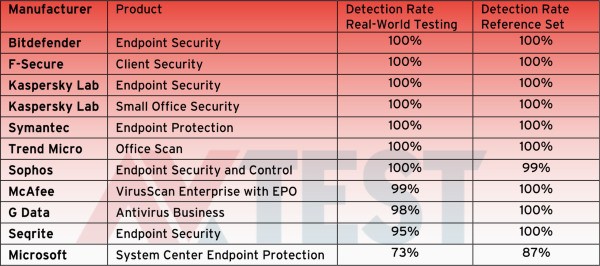
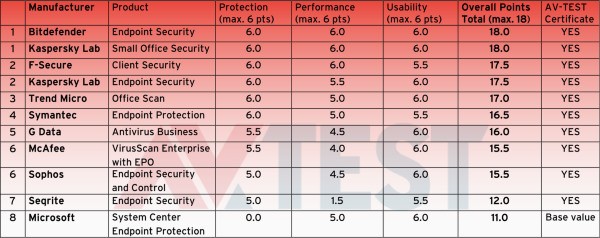
Tests carried out by independent security labs AV-Test show that Microsoft is at the bottom of the league when it comes to enterprise security and virus protection. The tests pitted 11 security solutions against each other, and Microsoft's Endpoint Protection 2012 from the Microsoft Management Suite System Center 2012 was found to offer the weakest protection.
 
In both enterprise network security tests and virus detection tests, Microsoft trailed behind the competition in eleventh place. What's particularly concerning is that as the tool tested is bundled software, it's likely that it is precisely what many businesses are relying on for protection.
 
The efficacy of Microsoft's security software for home users has long been questioned, but security is of even greater concern to business and enterprise customers. The antivirus tests carried out by AV-Test showed that Endpoint Protection picked up just 73 percent of infections, compared to between 95 and 100 percent for the ten opponents. It is ultimately labelled as being "much too feeble in the detection of malware". Products from Bitdefender, F-Secure, Trend Micro, Kaspersky Labs, and Symantec all received flawless scores.
 
 
AV-Test's focus on enterprise security throws up Windows 7, which is still very widely used -- over 60 percent of businesses use the operating system. The labs report that just 22 percent of businesses have upgraded to Windows 8.1, and 18 percent are still on Windows XP. But whatever version of Windows is in use, the tests make it clear that switching to an alternative to Microsoft is a very good idea when it comes to security. As the AV-Test puts it:
An economical option for protecting a corporate network is the use of the endpoint module, bundled in the Microsoft Management Suite System Center 2012. The test revealed, however, that this is not to be recommended. The solution was awarded 0 points by the testers in terms of its protection function, and it achieved only 11 out of 18 possible points.
 
The report says that there is now an excellent range of affordable security suites to choose from -- hit the site to check out the results in full.
 
Photo credit: ronfromyork / Shutterstock
 
~ Mark Wilson

5.13.2015

Microsoft goes public with its list of planned Windows 10 editions

Microsoft is taking the wraps off its SKU line-up for Windows 10. But it still isn't sharing many feature, pricing or licensing specifics.

Microsoft is going public with its list of planned SKUs, or editions, that it will make available for Windows 10 PCs, tablets, phones and embedded devices ahead of this summer's planned launch of the operating system.
 
Not counting the three embedded/Internet of Things (IoT) versions, there will be six Windows 10 SKUs: Home, Mobile, Pro, Enterprise, Education and Mobile Enterprise, according to a May 13 blog post from Windows Marketing chief Tony Prophet.
 
When Microsoft introduced Windows 8 in 2012, there were four main Windows 8 SKUs: The Windows 8 consumer SKU; Windows 8 Pro SKU for tech enthusiasts and business professionals; Windows RT, the version of Windows designed to run on ARM-based hardware; and Windows 8 Enterprise. Microsoft subsequently added a Windows 8.1 for Education SKU.
 
Microsoft is not yet disclosing the standalone pricing or the detailed feature set and licensing specifics of its Windows 10 SKUs.
 
As Microsoft said months ago, the company plans to make Windows 10 available as a free upgrade for consumers running Windows 7, Windows 8.x and Windows Phone 8.1 for the first year following availability of the Windows 10 operating system. Some business users -- those who want Windows 10 Pro -- also will qualify for the first-year-free deal, but enterprise customers will not, Microsoft execs have said.
 
Here's the Windows 10 SKU line-up:
 
Windows 10 Home: The consumer-focused desktop edition. This will include the core Windows 10 features, such as the Edge browser, Continuum tablet-mode for touch-capable devices; Cortana integration; free Photos, Maps, Mail, Calendar; Music and Video apps; and Windows Hello face-recognition/iris/fingerprint log-in for devices that support those technologies. On devices with screen sizes of 10.1 inches or less, users also will get Universal Office apps for free, once they are available.
 
Windows 10 Mobile: This is the SKU for Windows Phones and small Intel- and ARM-based tablets. This SKU will include the core Windows 10 features; free Universal Office apps once they are available; and support for Continuum for Phone, allowing customers to use phones as PCs connected to larger screens (but only on new devices supporting certain screen resolutions).
 
Windows 10 Mobile Enterprise: This is a version of Windows 10 Mobile for volume licensing customers only. According to the blog post, this SKU incorporates the latest security and feature updates to Windows 10 once they are available. There's no word if users will be able to delay these updates in order to test/stagger their delivery, which is offered under Windows Update for Business. 
 
Windows 10 Pro: A desktop version of Windows 10 for mobile workers, tech enthusiasts and other power users. This version is one of at least two -- the other being Windows 10 Enterprise -- that will allow users to opt for Windows Update for Business. Windows Update for Business will allow admins to opt to not receive all feature and security updates from Microsoft immediately after they are available.
 
Windows 10 Enterprise: This is the Enterprise version of Windows 10 that is available to volume-licensing customers. This version is not part of Microsoft's first-year-free upgrade offer, but those with volume-licensing Software Assurance customers will be able to move to this version as part of their licensing terms. The Enterprise version customers get access to the Long Term Servicing Branch of Windows 10 -- which allows them to opt to receive security fixes only and no new features as Microsoft rolls them out.
 
Windows 10 Education: This is the version for staff, administrators, students and teachers, and will be available through academic Volume Licensing. Microsoft officials say there will be paths for schools and students to upgrade from Windows 10 Home and Pro, but don't yet provide details on that front.
 
On the Windows 10 embedded device front, Microsoft also is planning to deliver Windows 10 Enterprise and Windows 10 Mobile Enterprise versions of the operating system for handheld terminals, ATMs, point of sale and other similar devices, as well as a Windows 10 IoT Core for small footprint, low-cost devices.
 
Microsoft execs still aren't providing granular details about upgrades, such as whether those who go for the first-year-free deal with SKUs like Windows 10 Pro will have the option of delaying/staggering their feature and security updates, the way enterprise users will be able to. Another unanswered question: Will Windows Phone users who are running the Windows 10 Mobile (and not Mobile Enterprise) version still be able to use Intune and Microsoft's Enterprise Mobility Suite to lock down their devices? Microsoft isn't yet saying.
 
"The Long Term Servicing branch being an enterprise level feature is the most interesting news here because that's the gateway for businesses who want to continue doing business as usual," said Wes Miller, an analyst with Directions on Microsoft.
 

10.24.2014

Apple in the enterprise: For some, it's already there

Summary: Apple's enterprise presence was on full display at the JAMF Nation User Conference, where more than 1,000 IT administrators gathered to share stories on how they're deploying Apple devices inside their organizations.
 
Jason Wudi, JAMF CTO
MINNEAPOLIS — At the JAMF Nation User Conference (JNUC), you'll be hard pressed to come across any Apple-in-the-enterprise naysayers.
 
That's because the JNUC plays host to more than 1,000 IT administrators who rely on some form of JAMF software to manage and deploy Apple devices inside their organizations.

JAMF was founded in 2002 — a time when most businesses ran Windows and Microsoft was the reigning king of the tech world — and has stayed on the Apple train since day one, making software for IT departments to manage Apple computers and mobile devices.

If JAMF's nearly 70 percent year-over-year growth is any indication, there are quite a few enterprise-level organizations taking advantage of (or being accepting of) Apple products within the inner workings of their operations. Even Apple touted its enterprise growth in its latest earnings report, with CEO Tim Cook citing enterprise gains across the board.

It's an interesting level of success for Apple, considering that the consumer tech giant has largely ignored the enterprise up until recently, relying on vendors such JAMF to churn out platforms that make its products fit for enterprise use.
 
But JAMF isn't complaining. According to JAMF CTO Jason Wudi, Apple's historically hands-off enterprise approach begets JAMF's own success, much like the Fords or GMs of the world have fueled the success of the likes of Alamo or Hertz.
 
"From that standpoint, I don't believe Apple would have to say that they are focused on the enterprise," Wudi said. "What they have done is make the information and capabilities available for vendors like a JAMF to fill in those gaps. Apple isn't standing on stage saying 'Look at what we do,' they are saying to people like us, 'Look at what you can do.'"
 
And perhaps the developer community is listening. Apple said this week that its number of registered enterprise app developers is up 39 percent from last year.
 
But that doesn't mean Apple has cleared the enterprise hurdle just yet, even with its much-hyped deal with legacy enterprise vendor IBM.
 
"We are very interested in the Apple/IBM partnership and we think its positive, especially since there is very little overlap between the companies," Wudi said. "But while I do think the customers will start to see more apps that they can start to use, I don't think IBM will come and change it all, and I don't see Apple coming back to the enterprise IT organizations thinking that the world has changed because of that relationship."
 
Enterprise growth from the inside out
 
As for Apple's latest batch of product rollouts, it remains to be seen if they do much to move the enterprise needle on their own. Instead, Wudi said the internal changes on the devices are likely to spur another wave of innovation among app developers, and in turn boost their enterprise presence — not the larger screens or the hardware tweaks.
 
Wudi said Apple has now created extensions that have connected the plumbing between worflows that was previously disconnected. Now developers and vendors can make apps that connect the workflows even further, especially on the iPad.
 
"The plumbing is there, the capabilities are there, and now the developers will build in the workflows that people will use to make the iPad a more productive device," he said. "So, it won't be because of what Apple did, but what they enabled on iOS 8."
 
The notion that the developers will drive growth is also one that Apple is seemingly in agreement with. During Apple's earnings call Monday, Cook pointed out a few "progressive" IT organizations that are deploying, managing and developing in-house apps for iPad.

New releases aside, Wudi said it does seem as though more IT departments have already started to accept iPads into an organization. In the past, iPads were limited to maybe a Web browser and email access, and now, as the comfort level and familiarity from IT has risen, iPads have been allowed more access to company resources.
 
From the vendor perspective
 
Given the fact that JAMF has built its business around device management, and since the launch of the iPhone in 2007, mobile device management, it's no surprise that the company is relishing in the recent boom of bring-your-own-device.

Still, the company stands steadfast behind Apple's products, and insists the concept that Apple devices can't be managed is incorrect.
 
"Every organization has an Apple product in it, even if it wasn't brought in through IT," Wudi said. "Apple devices are already in the enterprise. And not only are they there, when they are embraced and managed by a company, that company grows. So Apple is here. It's here and it's growing."

~ Natalie Gagliordi

10.12.2014

Microsoft's Windows 10: More on the 'under the covers' security, Store features

Summary: Microsoft's Windows 10 will include more than just user interface tweaks. Here are some of the expected security, manageability and Store changes coming to the next version of Windows client.
 
Now that the Windows 10 preview bits are available for any interested parties to test, many -- but not all -- of the coming new features in the operating system have come to light.
 
 
On October 1, Microsoft officials blogged in a fairly vague way about some of the coming features of potential interest to enterprise users. But these "under the covers" features were not explained or analyzed in detail -- at least up until now.
 
A quick aside, because I've been asked this question a few times: Microsoft made two different preview versions of Windows 10 available for download this week: The Technical Preview and the Technical Preview for Enterprise. The latter includes some enterprise-specific SKU features, such as Windows To Go, DirectAccess, BranchCache and AppLocker, that are not in the plain-old Tech Preview. Not all of the features mentioned in this post are part of either of these preview builds yet, but it sounds like they are on the Windows 10 roadmap.
 
Oliver Niehus, a Microsoft Principal Application Development Manager for Windows and Security, posted about some of the Windows 10 security, privacy and management features on his MSDN blog on October 1. By October 2, that post had been removed. But not before I got to do a little cutting and pasting.
 
According to Niehus, Microsoft is doing a lot of work on the security front with Windows 10. Microsoft has made Azure Active Directory a "first class citizen" with Windows 10, so that customers can use Azure AD identities to log into their devices "so users can get the same benefits as using an MSA (Microsoft Account) such as Store access, settings, sync and live tiles." Business also can use their existing Active Directory, federated in the cloud with Azure Active Directory, no Microsoft Account needed. Windows 10 also includes "next generation user credentials," like password alternative, which enables single sign-in everywhere.
 
"Threshold (Windows 10) builds data protection into the natural flow (and) integrates data protection at the platform level," Niehus blogged. It also enables per-application VPN, meaning it only allows specific apps to be on the VPN. Administrators will be able to restrict remote access to specific applications and/or with specific port/IP addresses. He cited as an example that IT will be able to allow IT access over the VPN, but restrict that access to specific ports or IP addresses. He also noted that IT can use the same list of apps for Enterprise Data Protection and allow them to access the VPN. Existing inbox VPN clients or Windows Store VPN clients for Windows Phone 8.1, or Windows Store VPN clients for Windows Phone 8.1 will all work with this functionality.
 
With Windows 10, there will be a unified store for Windows, Windows Phone and Xbox One, Microsoft officials said this week. But the new single Store will include a number of changes and improvements, according to Niehus. From his blog post:
 
"The (new) Windows Store will also support more than just modern apps. It will add desktop apps, as well as other types of digital content. We will provide many different ways to pay for apps. And we'll provide an organization store within the public Windows Store, where an org can place their own curated list of public apps as well as specific line-of-business apps that their employees need."
 
Microsoft is creating a new volume-purchasing program that will allow companies to buy apps in bulk, deploy those apps and manage the licenses, meaning reclaiming and re-using licenses when an employee leaves a company, for example. Microsoft will support using Azure Active Directory accounts to acquire organizational apps, and Microsoft Accounts for personal apps. Microsoft will give users the option to continue to sideload apps, if they'd prefer to continue to do so, or to deploy apps from the Windows Store by using new mobile-device-management controls to interact with the volume purchase program.
 
Organizations will have the option of using a mobile-device-management (MDM) service like Intune. The MDM service will communicate with the Volume Purchase Program so that Windows Store will do the "heavy lifting," Niehus blogged, meaning it will install the apps and acquire a license for the user.
 
Speaking of MDM, Microsoft is bringing MDM capabilities to traditional desktops and laptops with Windows 10. Additionally, Microsoft will allow third-party MDM offerings to manage both Windows and Windows Phone VPN-based remote access. Any VPN service provider will be able to create a remote-access app, and third-party VPN client apps will be distributable through the Windows 10 Store.
 
A couple of other enterprise-focused Windows 10 tidbits that weren't in Niehus' post: Windows 10's fast-updating feature is an opt-in thing, as Rod Trent of Windows IT Pro noted. There will be a locked-down version which will allow businesses to throttle how quickly their users get the regular updates to Windows 10 by using Windows Server Update Services.
 
Microsoft is starting to communicate about its System Center management plans for Windows 10. It also made available on October 1 a first technical preview version of System Center vNext via MSDN and TechNet.
 
~ Mary Jo Foley