Cisco Learning Network Store Promotions Page
Showing posts with label Gmail. Show all posts

11.06.2016

Hacker discovers Gmail vulnerability that leaves any account open to compromise

 
A student and security researcher from Pakistan has found a serious issue with Gmail that makes it possible for a hacker to take over any email address.
 
The vulnerability relates to the way Google handles the linking of a primary Gmail account to another email address for the purposes of message forwarding. In just a few steps it was -- before Google fixed the problem -- possible to take over ownership of an email address by tricking the system into sending out the necessary verification code.
 
If a hacker knows a secondary email address associated with a Gmail account he is looking to compromise, Gmail can be fooled into sending the account verification email to any address. The person who found the flaw, Ahmed Mehtab, explains the conditions in which the flaw can be exploited:
  • If recipient's SMTP is offline
  • If recipient has deactivated his email
  • If recipient does not exist
  • If recipient exists but has blocked a user
Over on HackRead, Uzair Amir shares details of how an attack can be carried out:
The attacker tries to verify the ownership status of an email address by emailing Google. Google sends an email to that address for verification. The email address cannot receive the email and hence, Google’s mail is sent back to the actual sender and this time it contains the verification code. This verification code will be used by the hacker and the ownership to that particular address will be confirmed.
Or, as, Mehtab puts it:
  • Attacker tries to confirm ownership of xyz@gmail.com
  • Google sends email to xyz@gmail.com for confirmation
  • xyz@gmail.com is not capable of receiving email, so email is bounced back to Google
  • Google gives attacker a failure notification in his inbox with the verification code
  • Attacker takes that verification code and confirms his ownership to xyz@gmail.com
The video below goes into a little more detail:
 
 
Photo Credit: Bloomua/Shutterstock
 
~ Mark Wilson

9.18.2016

Google redesigns Gmail for Android and the web

 
Gmail was designed to be a cross-platform email tool, but even Google recognizes the fact that it is far from perfect. With this in mind, Gmail -- and Inbox by Google -- are undergoing a redesign to improve things.
 
With the redesign, Google says that it is focusing on adjusting the formatting and general look so that it better suits the device emails are being viewed on. You may well have thought that this should have been the case from the beginning, but it seems that an update is in order.
 
Later this month, a new version of the Gmail app will roll out to Android devices, while web users will also see a tweaked version of Gmail. What the changes mean is that screen elements will be more intelligently resized according to the device they’re being viewed on. Google is referring to it as a new 'responsive design' and there are guidelines for developers to follow.
 
Writing on the Gmail blog, Google says:
Starting later this month, Gmail and Inbox by Gmail will support emails created with responsive design, meaning their content adapts to fit screens of all sizes. Text, links, and even buttons will enlarge to make reading and tapping easier on a smaller screen. If you’re on desktop, you’ll also see improvements, since emails designed for mobile can also adapt to fit larger screens.
~ Mark Wilson

3.25.2016

Google partners with Microsoft and other email providers to bolster Gmail encryption

 
If you are an email user, there is a very good chance you use Google's ubiquitous Gmail service. While there are countless other options, such as Outlook, AOL, Yahoo and more, the search giant's offering is quite popular. It is easy to see why -- it is easy to use, secure, and can double as a Google account for things such as Play access on the wildly popular Android.
 
Today, Google announces that it is making Gmail even more secure. With so much talk about enryption in the news nowadays, the search giant is enhancing its email service with improved TLS encryption. How is it doing this? By working with other email providers, such as Microsoft to make sure encrypted emails remain that way in transmission.
 
"To help ensure TLS encryption works as intended, we've teamed-up with a variety of industry partners -- including Comcast, Microsoft, and Yahoo! -- to submit a draft IETF specification for 'SMTP Strict Transport Security'. With this new proposed standard, companies can ensure that mail will only be delivered through encrypted channels, and that any encryption failures should be reported for further analysis, helping shine the spotlight on any malfeasance occurring around the Internet", explains Nicolas Lidzborski, Gmail Security Engineering lead and Jonathan Pevarnek, Jigsaw engineer.
 
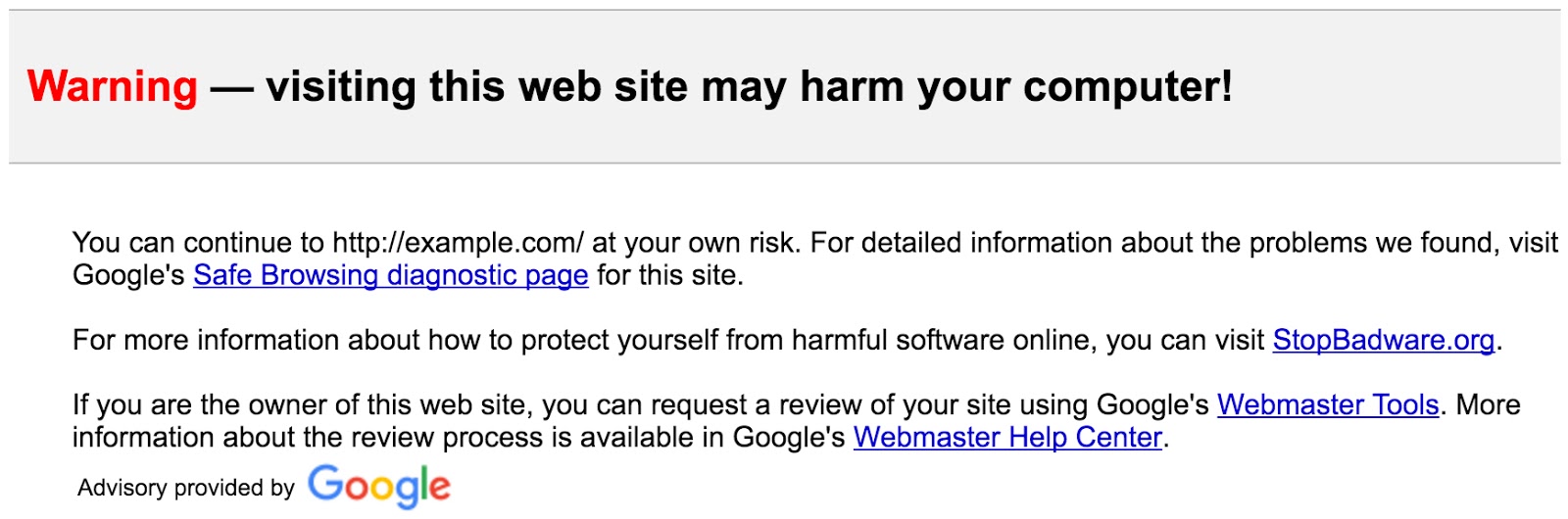
Lidzborski and Pevarnek further explain, "Safe Browsing already protects Gmail users by identifying potentially dangerous links in messages. Starting this week, Gmail users will begin to see warnings if they click these links, further extending this protection to different web browsers and email apps".
 
 
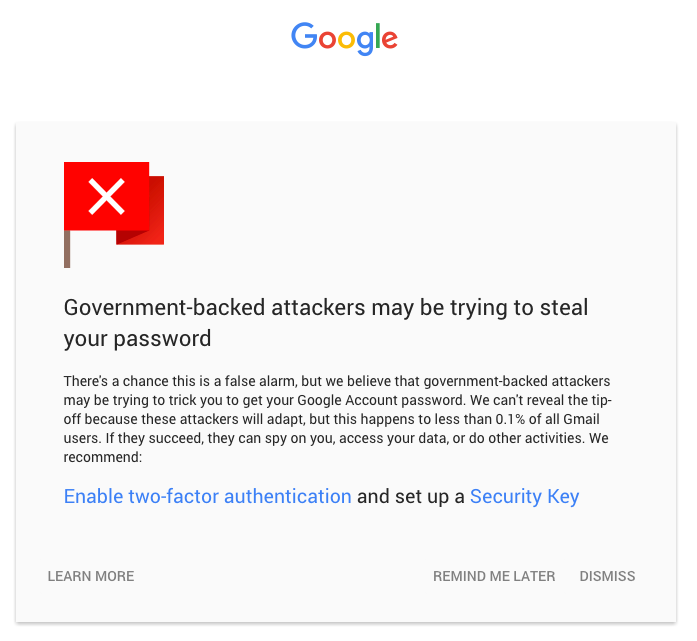
Another useful new feature is an enhanced alert for Gmail users being targeted by state sponsored hackers. Google says the number of such instances is minuscule -- less than 0.1 percent. For those rare cases, it will display the refreshed message as seen below.
 
 
If you are a Gmail user, do these improvements make you feel safer about the email service? Tell me in the comments.
 
Photo credit: Maksim Kabakou / Shutterstock
 
~ Brian Fagioli

2.12.2016

Gmail now warns you if your emails are not TLS encrypted

To celebrate Safer Internet Day the other day, Google gave away an extra 2GB of cloud storage to anyone who completed a simple security audit of their account. At the same time the company also introduced a couple of important security enhancements to Gmail.

The first change sees the appearance of a simple indicator that makes it clear when an email is received through, or is about to be sent through, a service that doesn’t support TLS encryption.  A broken padlock icon indicates that TLS encryption is not available, serving as a warning that there is the potential for the email in question to be dangerous or for the message to be intercepted.

Google points out that in order for TLS (Transport Layer Security) to be effective, it is important that it is supported by both the sender and the recipient of emails. If either party fails to meet this requirement, this is when the broken padlock indicator makes an appearance.

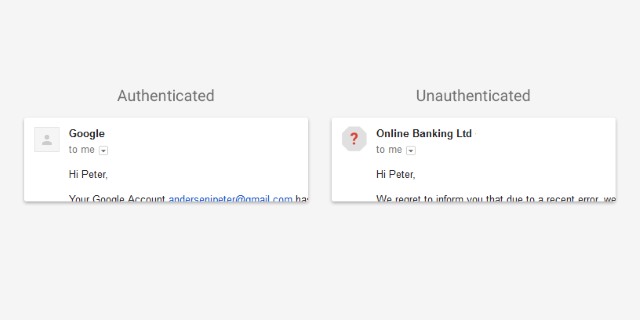
The second security feature makes it easier to tell when an email address has been authenticated. While you would normally expect to see an avatar for people you already have in your address book, non-authenticated senders have previously simply had a blank profile image. The latest change sees non-authenticated senders highlighted with a red question mark avatar which should be easier to notice.


Google says:
Not all affected email will necessarily be dangerous. But we encourage you to be extra careful about replying to, or clicking on links in messages that you’re not sure about. And with these updates, you’ll have the tools to make these kinds of decisions.
Photo credit: Butterfly Hunter / Shutterstock

~ Mark Wilson

11.13.2015

Gmail to issue warnings about emails sent without encryption

 
Google, like many other companies, is pushing people towards using secure internet connections. HTTPS is becoming the norm, but not everyone has caught on. To keep the security-conscious informed, Gmail is set to issue warnings about emails that are received through unsecure connections that do not use encryption.
 
A joint study involving Google, University of Michigan and the University of Illinois found that email is "more secure today than it was two years ago", with an increase in the number of encrypted emails sent. That said, there are still plenty of people who are not using secure connections and Google is keen to keep its users informed when they receive communication through unencrypted channels.
 
The general levels of interest in and awareness of security issues means that there has been an increase in the number of non-Gmail emails that are encrypted -- up from 33 percent to 61 percent over two years. Google also reveals that 94 percent of messages to Gmail have some form of authentication, and 80 percent of emails sent from Gmail to non-Gmail accounts are now TLS encrypted.
 
But while security is generally increasing, the use of encryption and secure connection is yet to hit 100 percent. With this in mind, Google is going to start warning its users about messages from non-Gmail accounts that do not use encryption.
 
Writing on the Online Security Blog, Google says:
To notify our users of potential dangers, we are developing in-product warnings for Gmail users that will display when they receive a message through a non-encrypted connection. These warnings will begin to roll-out in the coming months.
All email services -- Gmail included -- depend on the trust of their users. Partnering with top researchers helps us make the email ecosystem as a whole safer and more secure for everyone. Security threats won't disappear, but studies like these enable providers across the industry to fight them with better, more powerful protections today and going forward.
Photo Credit: Bloomua/Shutterstock
 
~ Mark Wilson

5.07.2015

Dropbox arrives in your Gmail with improved features

Dropbox is one of the most popular services for storing and sharing files online. Combine that with Google's Gmail, a widely used email service, and you serve up a recipe for success. Or at least the storage service thinks and hopes so.
 
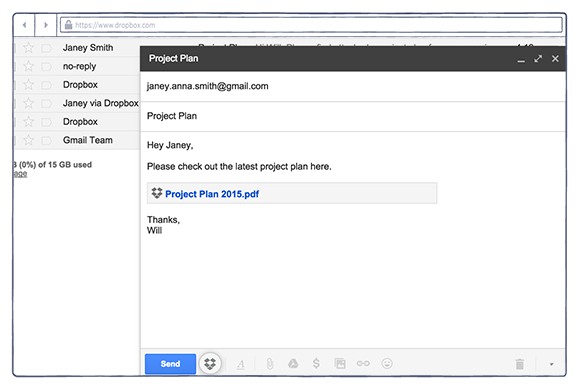
Dropbox is now arriving with improvements for that Gmail account you have, bringing easy storage sharing right to your desktop. This isn't entirely new -- an extension for Chrome has been available for a while now, but this update improves on things.
 
"For many of you, Gmail is one of those tools, helping you share information and stay connected. That’s why we recently built an extension for your Chrome browser that lets you attach Dropbox files right from your Gmail account. Today, we have a new version with improvements based on feedback from early users".
 
The new update allows you to send large files with just a click of the button, no more zipping up of files, make files easily accessible to anyone -- "Even if they don’t have Dropbox or the extension, recipients can see and download the attachments you send them". Finally, the ability to quickly save the files sent to you with just a simple click.
 
You can download the extension now and, if you already have it installed, then an update will be coming very soon.
 
~ Alan Buckingham

11.07.2014

Is Google Inbox a worthy replacement for Gmail?

Jack Wallen gets his golden ticket to Google Inbox and offers up his take on the next evolution of Google mail.  

 
About a week ago, I was finally invited into the fold of that mysterious world of Inbox. Like so many others, I had to find out what Google had up their sleeve. Could they improve the already outstanding Gmail app and web interface -- and just what is the reasoning behind the change?
 
After using Inbox for about a week, I already can see the light. Inbox is not just a worthy contender for Gmail, but a perfect evolution of the interface and system used by millions of people.

Why the change?

I'll say this, Inbox is a major change. It's just not an overhaul of the UI -- this is a fundamental shift in how you interact with your Gmail account. So much so that you'll wind up spending a fairly lengthy amount of time getting accustomed to the interface and how things work. In fact, I spent the first two days using Inbox thinking "Do I like this or not?" There were moments when I'd go back to the standard Gmail app and then think "Wow, maybe I don't like this now!"
 
It really was that polarizing to me. But eventually, some time around day three, I realized how much sense Inbox made. It threads emails into chronological chunks and categorizes email into the likes of:
  • Social
  • Promos
  • Forums
  • Updates
Ultimately, Inbox does a stellar job of helping you see what's important in a way that makes it easy for you to interact.
 
But why has Google decided to make this change? Simple. It unifies the Android and web-based experience into one easy-to-use machine of efficiency. Until now, the Android Gmail app and the web-based Gmail interface are two completely different tools. Google is about to change that. With Inbox, the experience is incredibly similar between Android and web. This is probably the single most important change for Gmail -- and a change that has been long over due.
 
With that said, let's get a bit more specific and take a look at what can you do with Inbox that you couldn't do with Gmail.

Quick interaction

The interaction with various email is probably the single best evolution to be found in Inbox. How? Imagine being able to very quickly reply to an email, snooze an email, add a reminder to an email, or delete an email. That is what you can do with Inbox. Just follow these steps:
  1. Open Inbox (assuming you've been invited to the party)
  2. Tap on an email
  3. At the top of the opened email (Figure A), tap one of the buttons
  4. Act accordingly
Figure A

Inbox running on a Verizon-branded HTC M8.
Say you want to snooze an email to re-appear at a later time. To do this, tap the clock button at the top of the email. When the snooze pop-up appears (Figure B), select a time (or pick a customized date & time) or pick a place.

Figure B

Snoozing an email.
For instance, you might want to snooze a particular email until you get to work. To do this, tap the Pick place button, and then tap the your pre-configured Work location. You can also manually enter an address to be used as the location. When you then arrive at the location, the email will reappear.

Grouping

Inbox also does a great job of grouping emails together. This means you can quickly see through all the clutter of promos, Forums, and Social email and get right to what matters -- email. If you're like me, you get a ton of email from various social forums and the like. With Inbox, I can much more easily delete all of those posts or just ignore them and quickly see the actual email from someone trying to communicate with me.

Another feature to the grouping element is the ability to quickly delete all emails in a group. Say, for instance, you want to delete all of today's social email. All you have to do is tap on the social grouping for the day, tap the menu button, and then tap Trash (Figure C).

Figure C

Quickly deleting emails from social networking sources.
You can also quickly pin an email and then, with the tap of a button, view only pinned email. This is a feature I have been waiting for. The ability to filter all but pinned emails makes Inbox one of the most easy-to-use mobile email clients that you'll find.
 
To take that even further, the interface for the web-based client is exactly the same. Once you know Inbox on one device, you'll know it on all.
 
Google has done the right thing with Inbox. Yes, the interface does take some time to get used to, but that time and effort is well spent. In the end, you'll enjoy a richer mobile Gmail experience and won't have to switch gears when moving from mobile to desktop.
 
Have you tried Inbox? If so, what's your take on the new evolution of Gmail? Share your opinion in the discussion thread below. 
 
~ Jack Wallen

11.04.2014

Next-gen Gmail with Material Design available for download

Summary: Google's Android Lollipop ready Gmail app is ready for download with support for Yahoo, Outlook and other non-Gmail accounts.
 
The redesigned Gmail app, which also supports non-Gmail accounts, is now available for download ahead of its official release on Google Play.
 
The revamped Gmail app for Android delivers a number of feature and design updates, with Google waving its Material Design wand over the app in preparation for the imminent release of Android 5.0 Lollipop.
 
The redesigned Gmail app. Image: Liam Tung/ZDNet
Some of the notable design changes include the addition of a solid red bar at the top of the inbox, and a changed approach to read emails, with the new app swapping out faded grey box for simply grey finer font text on a white background. Unread emails remain in bold.
 
Google has also cleaned up the top panel, removing the settings icon and the compose new email icon from the top right, where now only search remains. Settings have moved to the navigation panel and integrated as drop down menu from the user’s Google plus photo. Meanwhile, compose has shifted to the bottom of the screen as a floating red icon with white pen. The app also introduces new icons in the navigation panel for starred, important, sent, outbox, and drafts.
 
The other big change on the feature front is that Gmail now lets users add any email that supports IMAP/POP or Exchange, so users can add Yahoo, outlook.com, AOL Mail, and other accounts. In effect, the update makes the Gmail app the de facto email app for Android by cutting out the need to use the stock Android email app to manage non-Gmail accounts.
 
The new Gmail app should be available in a few days from the Google Play Store. However, users that don't want to wait can find the links on Android Police to download them independently.
 
The Gmail app is the latest to get the Material Design scheme it's encouraging developers to adopt in their apps for Android Lollipop, which is due for release in the next week or so. Other Google apps that have already been updated include the Google Play Store and Books.
 
~ Liam Tung

10.22.2014

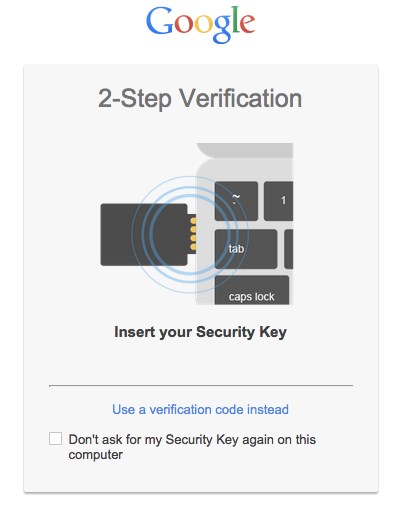
Log into Gmail with a USB drive -- Google adds support for Security Key

Two factor authentication (or two step verification, if you prefer) is very a la mode at the moment. Actually, it has been pushed by companies for some time, but a number of high profile security problems recently has brought it back to public attention again.
 
Enabling the security feature usually means entering a password as normal, in addition to a passcode sent to a mobile device. Today, Google makes things a little easier for, in its own words, "particularly security-sensitive individuals" by introducing support for Security Key.
 
Rather than relying on a mobile phone or tablet, Security Key reduces two factor authentication to working with a USB drive. Requirement for a physical 'key' greatly reduces the chances of security breaches and means it matters less if a third party determines your account password.
 
As Google explains in its announcement blog post: "Rather than typing a code, just insert Security Key into your computer’s USB port and tap it when prompted in Chrome. When you sign into your Google Account using Chrome and Security Key, you can be sure that the cryptographic signature cannot be phished".
 
Security is based on the open Universal 2nd Factor (U2F) protocol, so don’t be surprised if support is added to other services as well. This is not a security tool that will be universally embraced as Security Key is only compatible with Google Chrome, although it can be used with Windows, OS X, Linux and Chrome OS.

~ Mark Wilson

7.16.2014

Apple starts encrypting iCloud email, down for some users

Summary: As Apple works on its promise to improve the iCloud email service's security, an outage has affected some users. 
 
 
Apple is ramping up efforts to fulfill the promise to protect iCloud customers and encrypt email services.
 
While Apple is yet to announce any changes to the iCloud platform, which boasted over 300 million users last year, emails are now encrypted, whether inbound or outbound. In other words, @me.com and @mac.com email addresses are now protected.
 
The changes have been revealed through Google's transparency website. The website's function is to disclose the percentage of inbound and outbound emails that funnel through Gmail and other providers. As shown below, the iPad and iPhone maker's changes are in place:
 
 
Extra encryption can't be a bad thing for users, especially as the tech giant has endured recent criticism as one of the last email providers not to provide a good level of encryption between services. The criticism led to Apple promising to improve the situation. However, German publication Heise claims that Apple is using RC4 encryption, which is far from the most secure option available.
 
In related news, a small percentage of iCloud users are currently experiencing an outage. The service became unavailable at roughly 12.00 am ET Monday, and impacts 0.1 percent of users.
 
 ~ Charlie Osborne

7.11.2014

Gmail app vulnerability leaves iOS users at risk

 
Mobile security specialist Lacoon has released details of a new vulnerability in the Gmail app for iOS that may allow hackers to view or modify encrypted communications.
 
It allows attackers to use a Man-in-the-Middle (MitM) technique to impersonate a legitimate server using a spoofed SSL certificate.
 
This type of threat is usually prevented using certificate pinning where the app developer codes the intended server certificate within the app. This means if communication is re-routed the mobile app will recognize the inconsistency between the back-end server certificate as coded within the app, and the certificate returned from the fake server.
 
Lacoon has found that the Gmail iOS app doesn't perform certificate pinning. As a result a MitM attack could open up encrypted communications and the user would see no indication of suspicious activity.
 
Certificate pinning is implemented in Gmail's Android app so it looks like this could be an oversight. Yet although Google was informed of the vulnerability at the end of February and validated its existence it was still present at the time of writing.
 
Michael Shaulov, CEO and co-founder of Lacoon Mobile Security says, "Several months after providing responsible disclosure, Google has not provided information regarding resolution and it still remains an open vulnerability. This vulnerability leaves iPhone and iPad users at risk of a threat actor being able to view and modify encrypted communications through a Man-in-the-Middle attack".
 
Until such time as a fix is released, enterprises are advised to check the configuration profiles of devices to ensure they don't include root certificates, ensure that a secure channel like a VPN is used when accessing corporate resources, and perform network and device analysis to detect MitM attacks.
 
Image Credit: Pavel Ignatov / Shutterstock
 
~ Ian Barker

2.27.2014

Apple issues fix for glaring security flaw on Mac computers

An Apple logo is seen at an Apple store in Pudong, the financial district of Shanghai February 29, 2012.
 
(Reuters) - Apple Inc has issued fixes for a security flaw in its Macintosh computers that allows hackers to intercept data such as email, patching a major and embarrassing glitch that came to light several days ago.
 
The security update for users of Apple's OS X computer operating software follows a fix issued for iPhones last week, meaning all Apple device users now have access to the patch.
 
The flaw allowed attackers with access to a mobile user's network, such as a shared unsecured wireless service offered by a cafe, to see or alter exchanges between the user and protected sites such as Google Inc's Gmail or Facebook.
 
Governments with access to telecom carrier data could do the same, experts said.
 
On Tuesday, Apple said in a statement that the Mac security update also improved features such as its FaceTime videoconferencing service and email.

The flaw appeared related to the way in which well-understood protocols were implemented, and how Apple's software recognizes digital certificates used by websites to establish encrypted connections.
 
Researchers have said the bug could have been present for months. Apple has not said when or how it learned about the flaw in the way iOS handles sessions, in what are known as secure sockets layer (SSL) or transport layer security. Nor has it said whether the flaw was being exploited.
 
A spokesman for the company declined to comment on Tuesday.
 
~ Edwin Chan       

1.11.2014

Google linking of social network contacts to email raises concerns

SAN FRANCISCO (Reuters) - A new feature in Google Inc's Gmail will result in some users receiving messages from people with whom they have not shared their email addresses, raising concerns among some privacy advocates.
 
The change, which Google announced on Thursday, broadens the list of contacts available to Gmail users so it includes both the email addresses of their existing contacts, as well as the names of people on the Google+ social network. As a result, a person can send an email directly to friends, and strangers, who use Google+.
 
Google is increasingly trying to integrate its Google+, a two-and-a-half-year old social network that has 540 million active users, with its other services. When consumers sign up for Gmail, the company's Web-based email service, they are now automatically given a Google+ account.
 
Google said the new feature will make it easier for people who use both services to communicate with their friends.
 
"Have you ever started typing an email to someone only to realize halfway through the draft that you haven't actually exchanged email addresses?" the company said in a blog post announcing the feature. "You're in luck, because now it's easier for people using Gmail and Google+ to connect over email."
 
Google said that users who did not wish to receive email messages from other people on Google+ could switch the settings so that they receive messages only from people they have added to their networks of friends or from no one at all.
 
Some privacy advocates said Google should have made the new feature "opt-in," meaning that users should explicitly agree to receive messages from other Google+ users, rather than being required to manually change the setting.
 
Marc Rotenberg, the executive director of non-profit Electronic Privacy Information Center, called the new feature "troubling."
 
"There is a strong echo of the Google Buzz snafu," he said, referring to a social networking service that Google launched in 2010. Buzz initially used its Gmail users' contact lists to create social networks that the rest of the world could see, leading to an uproar and ultimately a settlement with the U.S. Federal Trade Commission.
 
Google said the new feature would not expose the email addresses of any Google+ users to strangers. Emails from strangers on Google+ will be routed to a special section within the recipients mailbox that is separate from messages from friends and other contacts. If the recipient does not reply to the message, Gmail will block any future messages from that person.
 
A Google spokeswoman said the company planned to send an email to all Google+ users during the next two days alerting them to the change and explaining how to change their settings.
 
One exception to the new feature is celebrities on Google+, who are followed by a large number of fans. According to the spokeswoman, the Gmail accounts of such public figures will not automatically receive emails from other Google+ users.
 
~ Alexei Oreskovic

6.04.2013

Yahoo discontinues Classic Mail, implements e-mail scanning

As promised, Yahoo on Monday discontinued their Classic Mail service and is requiring that all users upgrade to the new version in order to continue to use the service. Yahoo revealed that Classic Mail was being discontinued back in April but they conveniently left out one important bit of information regarding the new terms of service and privacy policy.

Those that agree to the updated ToS / privacy policy should take note of the fine print as acceptance includes automated content scanning and analyzing of your communications content. Yahoo says e-mail scanning will help deliver product features, relevant advertising and abuse protection.

Sound familiar? It should because it is the same sort of policy that Google employs with Gmail. Yahoo allows users to opt out of interest-based and contextual-based advertising resulting from scanned and analyzed communications content but there’s no way to opt out of the scanning and analyzing itself.

So what’s a Yahoo mail user to do if you don’t want to agree to these new terms? The only option at this point is to close your account and move to a different e-mail provider. Yahoo does permit users to download their Yahoo mail using IMAP via a different e-mail program like Outlook, Mac Mail or an app on your mobile device. But even still, you’ll have to agree to the revised terms of service.

How do you feel about Yahoo and Gmail scanning your messages for advertising purposes? One thing is clear - we certainly know Microsoft’s stance on the issue.


~ Shawn Knight

10.22.2012

10 reasons why Ubuntu 12.10 desktop blows away Windows 8

Takeaway: Ubuntu 12.10 has arrived, and Windows 8 is just around the corner. Jack Wallen says there’s no contest between the two.
 History is a grand teacher. And in recent years, Ubuntu Linux has had to deal with a few hiccups in its history. To be specific, when Ubuntu Unity arrived, Ubuntu Linux usage dropped dramatically. When Windows 8 arrives, people are going to have similar issues with the drastic (and not terribly intelligent) changes made to the user interface.
 But it’s not just Windows 8’s shortcomings that make Ubuntu 12.10 the better option. Ubuntu has made some serious progress in the realm of efficiency and user friendliness. With yesterday’s release of 12.10, the improvements continue. Let’s examine some of the reasons why Ubuntu 12.10 will blow away Windows 8.

1: Amazon search

This is something new to every desktop platform. With Ubuntu Unity’s Dash, when you run a search, the search results will include items that can be purchased from Amazon.com. This feature takes online shopping (be it personal or for business) to a new level. Hopefully, at some point, the API for this feature will spread out and users and businesses will be able to include their favorite shopping sites. With all other platforms, you have to go through the steps of opening up your browser, launching the site, searching for the product, and clicking the desired product.

2: Dash previews

When you do search in the Dash, Unity will give you an interactive preview of the results. If the results are audio files, you can right-click the file to get a preview window. You can either show that file in its folder or play the file. If the file is a document, the preview will allow you to open the containing folder, open the file, or email the file.

3: Interface based on efficiency

From the ground up, Canonical and the Ubuntu Unity developers focused on creating an interface that would make day-to-day work as efficient as possible. I can attest, after using Unity since it first launched, that 12.10 is the most efficient desktop interface I have ever used. Those accustomed to switching back and forth between the mouse and the keyboard will happily make user of the Launcher. Users who want a more efficient means of interfacing with their machine will zoom along with the Dash — fingers rarely leaving the keyboard for the mouse.

4: Remote login

This feature is simply amazing. At the Ubuntu login prompt, there are three options: User Login, Guest Session, and Remote Login. The Remote Login allows you to set up remote connections (through UbuntuOne), which you can then log onto from the login screen. No more having to log onto a session and then use a VNC or RDP tool to connect. Now you can gain fast access to those remote machines. You will not find such efficient means of gaining a remote desktop in Windows 8.

5: Integrated Web services

Ubuntu 12.10 has Web services directly integrated into both the Launcher and the Dash, making it one of the most well connected interfaces on the planet. The simplest example of this is the ability to have the arrival of Gmail announced in the notification area. But the Google integration doesn’t end there. Once you’ve authenticated that online account with Unity, you can search your Google Apps account from within the Dash and open files with a simple click.

6: Ease of app installation

This ties into the Dash, as do many other features in 12.10. Open the Dash, click on the Application Lens, search for an application, and right-click the listing to immediately install. There’s not even a need to open the Ubuntu Software Center to install applications. If you left-click on the search result, the Software Center will open. It’s wise to retain this option so that when applications have settings (such as plug-ins that can be installed alongside the application), the user can take advantage of them. Windows 8’s app store includes only Windows 8 (Metro) apps, and it’s not nearly as efficient as the Unity take on installation.

7: Gradual change in UI

Ubuntu 12.10 benefits from a user interface that has been in the wild for more than a year. During that year, Unity has been prodded and polished by users and developers alike. Unity has matured faster than any desktop I can remember. Unlike Unity users, Windows users are going to be tossed into the arena with little-to-no-introduction. Yes, the same thing happened with Unity. But in the case of Ubuntu, users were able to continue using either Classic GNOME or GNOME Shell while they learned Unity.

8: Same interface from server to tablet

One of Mark Shuttleworth’s goals has been to have an identical interface on all Ubuntu-powered devices. Now that the Linux kernel has tackled the ARM issue, Ubuntu will be able to find its way onto tablet devices. With users (and support) being able to enjoy the same interface on tablets, desktops, and servers, life will become much easier across the board.

9: Performance boost

A number of improvements combine to give Ubuntu 12.10 a significant performance increase. The merging of the Unity 2D and 3D, kernel improvements, OpenGL performance boosts, and the inclusion of the new X.org X Windows stack all make for a lightning fast Unity desktop. From Ubuntu 12.04 to 12.10, I have noticed a significant increase in both performance and reliability — and that was an upgrade install!

10: Share Links file sharing

Ubuntu already had a built-in cloud storage system — UbuntuOne. I’ve been using that system for quite some time now and have found it to be much richer than, say, Dropbox. But Canonical wasn’t happy with just the inclusion of cloud storage in Ubuntu. To take this to a new level, it decided to allow users to share files with others via Share Links. This feature lets you copy links to files within your UbuntuOne cloud storage and share those files with other users. Yet another tool in Ubuntu arsenal called “efficiency.”

Watershed release?

The user friendliness keeps piling on with Ubuntu 12.10. I fully believe this will be the release that opens the eyes of the public at large to Ubuntu. Once users see how much more friendly and usable Ubuntu is over Windows 8, they’ll be flocking to the open source desktop.

Do you agree that Ubuntu 12.10 has it all over Windows 8? What other factors do you think make one platform better than the other?

~ Jack Wallen


7.17.2012

450K Yahoo passwords online now: Is yours?

Takeaway: Hackers have posted 450K Yahoo email addresses and passwords online, and hint Gmail, Hotmail, other services are next. How can you check if your users’ accounts are among them?

Hackers posted more than 400,000 Yahoo Voice and email names and passwords and the posting might not be over yet.

Yahoo reps say they are working on the compromised system–not great timing for a beleaguered company enduring what Yahoo chair Alfred Amoroso called a “tumultuous” time for the company. The firm apologized in an online statement and did not comment further at this writing.

Not a Yahoo user? IT pros and security experts worry this most recent hack on Yahoo - allegedly perpetrated by a group calling itself d3dd3 - is likely “way bigger than Yahoo,” said Marcus Carey, in a Reuters report. Hotmail, MSN, Live, Gmail and other personal services are at risk, too, he said.

NOTE: If you want to check your own or other users’ Yahoo emails to see if they are part of the current leak, there’s an easy way to check here at Sucuri Malware Labs. Just type in the email address and search.

Plan for next time

Change passwords. Consider training customers on utilities like Lastpass. IT pros we interviewed across the board said users in enterprises who use open cloud-based email services, or other non-enterprise communication methods like Skype or Google Groups, should, at the very least, be using such utilities, which provide more control and protection in case of events like this one.

With so much data potentially compromised via users relying on such BYOD services as these, “the process (to avoid future attacks) is much easier if (users) have Lastpass,” said John Livingston, a tech pro for the American Red Cross in Savannah, Georgia. “Time to change your Yahoo, Google, Hotmail, and AOL passwords. And with LastPass, each site and service has a unique password, which limits damage if the password does get out. Changing passwords then is quick and easy. Plus if you’re a manager you don’t have to worry about remembering a new password.”

“Once this clears, I will be changing the passwords for Gmail, even though there’s no confirmation on that (hack) yet,” said Brian Geniesse, who works the IT tech desk at his firm in Monominee, Michigan. “Also be careful. Password managers can be hacked just the same.”

Yahoo is to blame ultimately, most IT pros we interviewed told us.

“Shame on Yahoo for not running normal security audits on (its) networks - and services that would have detected the SQL injection vulnerability (reportedly) used in the attack,” adds Dan Phillips, an IT pro in Cambridge, Ontario, Canada.

Geniesse expanded on that with a message that will resound with most IT pros and CTOs. Most people use weak passwords–see below.

“You can preach the use of LastPass and the like until you are blue in the face but users will never change their habits unless you force them,” Geniesse said. And “Yahoo needs to force some kind of password complexity to help protect their users.”

So many folks are checking the hack post, the hackers allegedly responsible are having trouble maintaining traffic load. Due to high traffic on this group’s site, the page with the Yahoo hacked emails and passwords is going up and down. We caught part of it in a cut and paste.
 When it was up earlier today, it read in part:
We hope that the parties responsible for managing the security of this subdomain will take this as a wake-up call … not as a threat …
There have been many security holes exploited in webservers belonging to Yahoo … �that have caused far greater damage than our disclosure (today). Please do not take (the posting) lightly. The subdomain and vulnerable parameters have not been posted to avoid further damage …
The author quotes author Jean Vanier from his book, Becoming Human: “Growth begins when we begin to accept our own weakness,” Vanier wrote.

If you’re a Star Wars, Star Trek or comic book fan, just change your passwords right away, other observers add. And talk your users into it to. Check this out: CNET’s Declan McCullagh wrote a program to analyze the most frequently used passwords using data from the post of 450K email addresses and passwords. He listed:
  • 2,295: The number of times a sequential list of numbers was used, with “123456? by far being the most popular password. There were several other instances where the numbers were reversed, or a few letters were added in a token effort to mix things up.
  • 160: The number of times “111111? is used as a password, which is only marginally better than a sequential list of numbers. The similarly creative “000000? is used 71 times.
  • 780: The number of times “password” was used as the password. Apparently, absolutely no thought went into security in these instances.
  • 233: The number of times “password” was used in conjunction with a few numbers behind it. Apparently, the barest minimum of thoughts went into security here.
  • 437: The number of times “welcome” is used. With a password like that, you’re just asking to be hacked.
  • 333: The number of times “ninja” is used. Pirates, unfortunately, didn’t make the list.
  • 137,559: The number of Yahoo credentials that were leaked.
  • 106,873: The number of Gmail credentials that were leaked. Hotmail, which was the next most frequently cited e-mail service, had fewer than half the number of users hit.
  • 161: The number of times “freedom” is used, suggesting a lot of patriotic users. “America” was used 68 times.
  • 161: The number of times the f-word is used in some combination. There are a lot of angry people out there.
  • 133: The number of times “baseball” appears as a password. It’s the most popular sport on the list, proving that it is indeed America’s national pastime. It just may not be the best password.
  • 106: The number of times “superman” is used as a password. That’s nearly double the amount of times “batman” is used and triple the frequency of “spiderman.”
  • 52: The number of times “starwars” is used. The force is not with this password.
  • 56: The number of times “winner” is used.32: The number of times “lakers” appears. It tied with “maverick,” although fortunately “the_heat” or “celtics” weren’t on this list.
  • 27: The number of times “ncc1701? is used as a password. For those of you who aren’t trekkies, that’s the designation code for the Starship Enterprise. “startrek” is used 17 times, while “ncc1701a,” the designation for the Enterprise used in later Star Trek movies, is used 15 times.
 ~ Gina Smith