Cisco Learning Network Store Promotions Page
Showing posts with label Antivirus. Show all posts

12.09.2016

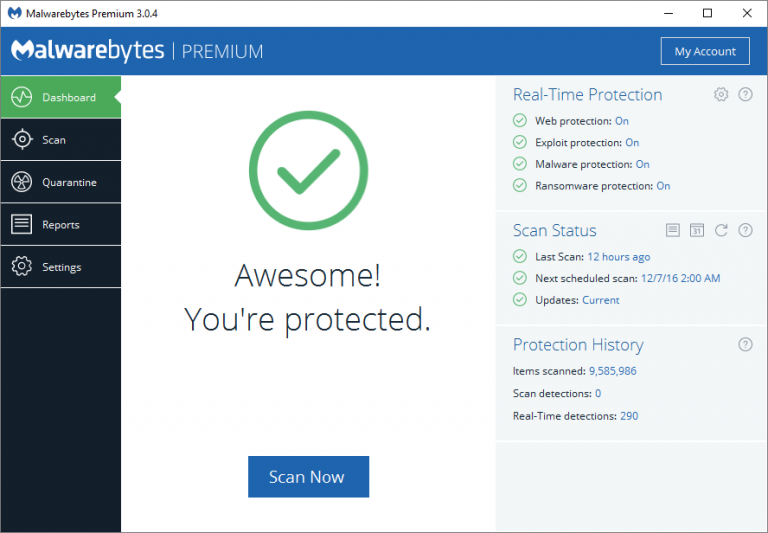
Malwarebytes 3.0 aims to replace your antivirus

 
Malwarebytes has released Malwarebytes 3.0, a new package which combines its anti-malware, anti-exploit, anti-ransomware and web protection technologies. You won’t see most of these in the free version, unfortunately. That’s still strictly on-demand anti-malware only, although the new product does allow you to check out the new features with a 14-day Malwarebytes Premium trial.
 
Both the free and Premium builds see major performance improvements, with scan speeds up to 4x faster than the previous editions.
 
Usability tweaks include integration with the Windows Action Center, automatic update checks (no scheduling required) and fewer reboots after some malware removals.
 
A redesigned and simplified interface ties all this together and gives you complete control over the new functionality. If you don’t need Malwarebytes’ anti-ransomware technology, for instance, you can turn it off in a couple of clicks.
 
Existing customers won’t have to pay anything extra for the new release. Just install Malwarebytes 3.0 over Malwarebytes Anti-Malware and it’ll automatically adopt your current license.
 
New users can purchase Malwarebytes 3.0 for $39.99 per year, 20 percent less than the previous combination of Anti-Malware and Anti-Exploit, and with Anti-Ransomware thrown in as well.
 
The company says this is "33 percent less than an average traditional antivirus", but if you want to use another antivirus as well, that’s okay too. Malwarebytes 3.0 still has a strong focus on compatibility, and should run happily alongside most other security tools.
 
Malwarebytes 3.0 is available now for Windows XP and later.
 
~ Mike Williams

2.24.2016

CrowdStrike improves ability to combat breaches

 
Effective cyber security is all about seeing threats and being able to respond to them quickly and effectively. Increasingly this means using the cloud to deliver intelligence.
 
CrowdStrike, a specialist in cloud-delivered protection, is launching a new version of its Falcon platform to deliver endpoint, detection and response functions along with advanced antivirus capabilities.
 
CrowdStrike's fully cloud-based Threat Graph model analyzes and correlates billions of events in real-time, spots anomalies, and detects behavioral patterns to track and stop both known and unknown threats. This model allows Falcon Host to act like a 'DVR,' providing retrospective visibility and unlimited cloud-recall capabilities. This forensic capacity helps cut the time and cost of incident response, while increasing the chances of containing and mitigating damage by allowing customers to search and query all endpoints in seconds.
 
Extension of the platform's APIs means customers can integrate existing third party intelligence and so don't waste their current security investments. Falcon Connector can also transmit Threat Graph information to a customer's preferred SIEM system.
 
There's a new ransomware blocking feature too, and added protection for Linux systems with Linux-specific behavioral defenses based on indicators of attack.
 
"Our enhancements of CrowdStrike's Falcon Platform reflect our core customer value for redefining next generation endpoint protection to stop breaches," says Dave Cole, CrowdStrike's chief product officer. "Continuing to advance IoA-based prevention with ransomware exploit blocking and machine learning capability are just a couple of the new features that we are announcing today. Expanding CrowdStrike Falcon’s sensor coverage to Linux platforms, combined with our established support for Windows and Mac, is another significant market-leading accomplishment that allows us to provide protection across all mainstream endpoint operating systems. We are committed to continuing to build new innovative capabilities to change the game in endpoint security and ensure that CrowdStrike customers are able to protect themselves against all threats, known and unknown, in the most effective and efficient manner possible".
 
You can find out more about the latest release on the CrowdStrike website.
 
Image Credit: Balefire / Shutterstock
 
~ Ian Barker

2.06.2016

Dridex botnet hacked to deliver free antivirus software


Widely used by cyber criminals to introduce malware onto systems, the Dridex banking trojan has been subject to a number of high profile investigations, and a takedown by US authorities last year.

These things don't stay dead for long, however, and Dridex is back in business. But in an interesting new twist it seems that the Dridex botnet has been hijacked to deliver the free Avira antivirus program rather than its more usual malicious payload.

Dridex is spread by spam, usually using a Word document with malicious macros. Once the file has been opened, the macros download the payload from a remote server, and the computer is infected. In the latest version though the links have been modified to deliver Avira instead.

"The content behind the malware download URL has been replaced, it's now providing an original, up-to-date Avira web installer instead of the usual Dridex loader," says Moritz Kroll, malware expert at Avira.

The company denies that it's behind the modification itself. "We still don't know exactly who is doing this with our installer and why -- but we have some theories," says Kroll. "This is certainly not something we are doing ourselves".

Explanations as to why this is happening include that it's an attempt to confuse detection processes. It could also be the work of white hat hackers who want their identities to remain secret. "While what they are doing is fundamentally helpful, it is also technically illegal in most countries, so they probably don't want to be known or identifiable," adds Kroll.

You can find out more about this unusual development on the Avira blog.

Image CreditJulien TromeurShutterstock

~ Ian Barker

5.28.2015

Antivirus products for Linux compared

 
Though Linux is often seen as being immune to malware it's still important to have protection, partly because Linux malware does exist, even if it’s rare, and partly to prevent the passing on of viruses to more vulnerable operating systems like Windows and Android.
 
Independent testing organization AV-Comparatives has been looking at the leading Linux anti-malware offerings to gauge their ease of installation, features and more.
 
Linux has only around a 1.5 percent share of the desktop market so there are relatively few antivirus programs aimed at home users. Also Linux software is usually installed via community-maintained repositories that make it harder to distribute malware.
 
The report doesn't rank the tested programs but does deliver an individual verdict on each. Singled out for praise are BitDefender Antivirus Scanner for Unices, which offers an easy to use graphical interface and good help facilities, ESET has a clear status display and good malware alerts, and eScan too is praised for ease of use though it provides only on-demand scanning and not real-time protection.
 
Kaspersky too is easy to manage and configure as is McAfee, both of which use a web console approach as does TrendMicro's Server Protect for Linux.
 
Others including Comodo Antivirus for Linux, and Dr. Web Anti-virus for Linux come in for criticism for needing use of the terminal for configuration, making them unsuitable for Linux novices. AVG Free Edition for Linux is criticized for being unable to run real-time protection without making the system inoperative.
 
As well as installing antivirus software, AV-Comparatives recommends that Linux users implement some basic security procedures including keeping installed software up to date, only installing from trusted sources, disabling services you don’t use and not logging in as root.
 
The full report with verdicts on all 18 programs tested is available to download from the AV-Comparatives site.
 
Image Credit: maimu / Shutterstock
 
~ Ian Barker

7.12.2014

Don't be a bonehead: Run antivirus on your Mac

Summary: Choosing not to run antivirus on a Mac is a boneheaded move that people choose to make based on nothing more than fanboy idealism, and has no place in the real world. Doubly so if your Mac takes on BYOD duties.
 
 
The other day I put together a Q&A for shifting from Windows to the Mac, and under my "must have" utilities I listed an antivirus tool. While many understood the logic of this and agreed with my decision, there were some who saw this as a silly indulgence.
 
It's not. In fact, choosing not to run antivirus on a Mac is a boneheaded move that people choose to make based on nothing more than fanboy idealism, and has no place in the real world. Doubly so if your Mac undertakes BYOD duties.
 
Here's why.
 
I consider security to be an important part of computer ownership. Security for me means keeping my hardware safe, keeping my data secure, keeping my network safe, and keeping the people around me safe. I'm a big believer that vigilance is a vital tool in the fight against malware, and that applying security patches in a timely fashion goes a long way toward keeping a platform safe.
 
But I'm also fully aware of the fact that there is no such thing as secure code. Operating systems are huge, and it doesn't matter whether that code is written in Redmond or Cupertino or somewhere else, it will be riddled with bugs. Windows XP was out for more than a decade, and saw three service packs and countless patches, but the bugs just kept coming. Patched bugs represent just the tip of iceberg when it comes to the actual vulnerabilities present in the code we are exposed to and use on a daily basis.
 
If you believe that your operating system is secure, you're deluding yourself. And if you try to tell others that your operating system of choice is better than someone else's, you're trying to delude others and don't be surprised if people think you're foolish.
 
When it comes to malware, I don't want it landing on my systems, I don't want it inhabiting my systems, and I don't want to pass malware on to others. That's the plan, and I work at achieving that by taking a three-pronged approach:
  • Vigilance and care in what I download and install, where I visit on the web, and who I allow to access my system.
  • Apply patches in a timely manner. Not installing a patch – unless you have a very good reason – is pure insanity.
  • Keep an antivirus running to scan files and live on or pass through my system.
The final stage is important not only because it protects my system from malware – and believe me when I say that Mac malware does exist, just not in the same numbers as malware for Windows – but it also scans for Windows malware, which prevents me from passing on nasties to other people. A little RAM and some CPU cycles is a small price to pay to get an independent eye cast over the bits that flow into my Macs. OK, I only seem to catch Windows malware, but even quarantining that helps to keep my network safe, and prevents me inadvertently sending bad code to others.
 
I understand that antivirus can be expensive, but I can't understand the mentality behind spending hundreds – if not thousands – of dollars on hardware, and then paint a big bull's-eye on it for hackers and other online ne'er-do-wells. And even if your Mac purchase has left you strapped for cash, there are many free alternatives available to choose from.
 
So don't be a bonehead, and run antivirus on your Mac
 
~ Adrian Kingsley-Hughes