Cisco Learning Network Store Promotions Page
Showing posts with label Samsung Galaxy Note 3. Show all posts

9.24.2014

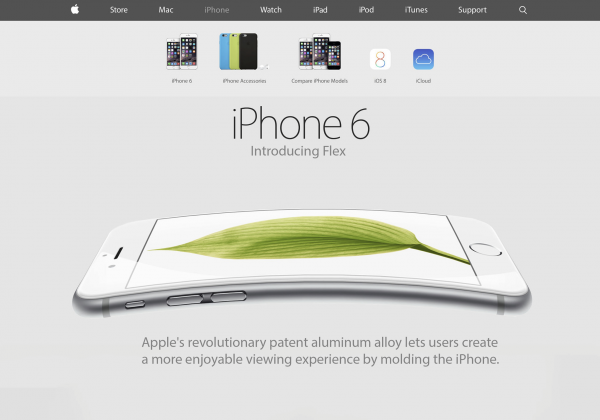
If your iPhone 6 or 6 Plus bends, it's Apple's fault


Apple could have a huge problem on its hands if iPhone 6 and iPhone 6 Plus are susceptible to bending. According to some early adopters, the new iPhones can show visible signs of damage after only a few days of normal use.
 
That's because the build quality does not appear to stand up to the challenges posed by pants' front pockets, which are causing the metal shells to bend near the cutouts for the physical side buttons. Light metal shell, meet thin profile.
 
Among the early adopters who have signaled the issue, lending credence to initial reports, is Geek.com's Russell Holly. He says that he never dropped his iPhone 6, but that it had been kept in a front pocket for "an extended period of time" while driving. Holly says that he only noticed the damage after seeing the first reports.
 
This suggests that there could be other folks unaware that their iPhone 6 or iPhone 6 Plus shares the same fate. BentGate or BendGate -- as the issue is commonly referred to as now -- may be more widespread than originally believed. But, even so, it is too soon to tell if it affects most, or all, new iPhones that have been sold so far. Apple staying mum about it does not help its cause.
 
I am inclined to believe that Apple did not thoroughly test its new devices, based on my engineering background. The signs are all too obvious. First of all, the side profile is thin. The thinner it is, the more likely it is for the body to cave under pressure. This should have immediately raised some concerns among Apple's engineering and quality assurance teams. Second of all, the metal shell has to be insanely thin also to achieve such low weights, which only adds to the bending risks. As I said earlier, put the two together and you have a recipe for disaster. It's a matter of physics here. Thicker side profiles and thicker metal would have helped. Or plastic, but that's a big no-no.
 
Take a look at how iPhone 6 Plus reacts while being bent.


Next, take a look at Samsung Galaxy Note 3 in a similar experiment. Notice how the plastic returns to its original shape afterwards. The difference is pretty substantial.
 
 
So what can you do if your iPhone 6 or iPhone 6 Plus is also bent? Well, if you can't live with it in this condition and Apple agrees to take it back, return it. It's that simple. It's not your fault, after all, it's Apple's for selling you a fragile device. If this is what happens after a few days of use, imagine how your iPhone will look at the end of your contract.
 
Photo Credit: TheDJtec
 
~ Mihaita Bamburic

9.24.2013

Samsung's Galaxy Note 3 has new leather-and-stitching look and more multitasking (hands-on)

BERLIN -- Samsung reckons people buy the Galaxy Note for the big screen, but stick around for the multitasking and S Pen features. So the Samsung Galaxy Note 3 has beefed up both, bursting with new ways to bring your handwritten notes to life, and new ways to use two -- or more -- apps at the same time.
 
The original Note was the first to bridge the gap between phone and tablet, heralding today's ballooning sizes of smartphone. Like previous Notes, the new Note 3 was unveiled at technology trade show IFA in Berlin, alongside the Samsung Galaxy Gear smartwatch and a 10.1-inch Galaxy Note 10.1. 
 
The Note 3 has been confirmed for US carriers AT&T, Sprint, Verizon, US Cellular, and T-Mobile, and will hit shops on 25 September in more than 140 countries. It'll emerge for the rest of the world come October.
 
Bigger but lighter 
The Note 3 sports a 5.7-inch, full high-definition screen, a slight boost from the Note 2's 5.5-inch display. But despite the bigger screen, the Note 3 is thinner and lighter, measuring 8.3mm and weighing just 168g. It's easy to hold in one hand -- in terms of weight, anyway; you can't work the screen with one hand unless you're the hitchhiker with the massive thumbs from that Uma Thurman film.
(Credit: Josh Miller/CNET)
The screen is as bright, colourful, and responsive as we've come to expect. You can do everything with your fingertip, as on most tablets, but the S Pen stylus gives you even finer control. 
 
Under that slablike screen is a beefy 2.3GHz processor with a whopping 3GB of RAM. All that power harnessed to a giant screen could empty the tank with alarming alacrity, but a 3,200mAh battery is there to ensure there's plenty of grunt left when you need it.  
 
And the Note has plenty of speed, too: it has 4G LTE for connecting to the Internet at high speeds, with support for the fastest category 4 4G. 
 
Around back is a 13-megapixel camera with LED flash. It's set in a textured, leather-effect rear edged in fake stitching. Perhaps stung by the criticism aimed at the cheap-looking glossy plastic of the Galaxy S4 and its ilk, Samsung is obviously going for the premium look of an expensive wallet, and, coupled with the classy metal rim, it actually works.  
 
Still, I can't help but smile at the timing: Samsung's fierce rival Apple has just ditched stitching from its iOS software because it looked dated. 
 
This chart details a full list of Galaxy Note 3 specs, and how the device compares with the Note 2.
S Pen
The distinguishing feature of the Note family is the S Pen, a dinky stylus stowed away in the bottom of the phablet. The Note 3 expands upon the S Pen's capabilities, making it more than an unnecessary accessory strictly for any old-timers who haven't yet figured out touch screens. 
 
As soon as you unsheathe the S Pen from its cubbyhole, the Air Command wheel appears on screen, floating on top of the app or home screen. You can also call it up beholding the S Pen hovering over the screen and clicking the button on the side of the stylus. The onscreen wheel includes icons that give you shortcuts to assorted clever features that use the stylus. 
(Credit: Josh Miller/CNET)
The most basic use for the S Pen is to scrawl a note or memo; but those notes and memos can then spring to life. Say you meet a pretty young thing at your pilates class and end up jotting down digits. After waiting the requisite three days -- don't want to look too keen -- you can call your new friend by drawing a box around the scribbled number and hitting the call icon.
 
It's not as smooth as I'd like, though. Hitting the call icon launches the dialer with the number in it, whereupon you have to hit call again. Clever as this is, there's still a screen press or two too many, which might put you off your seductive chat once you do get through to your potential new love interest.  
 
You can also bring to life addresses, links, or e-mail addresses that you've written down, by once again drawing a box around them and hitting the relevant icon to open the maps, e-mail, or browser apps.
 
Also on the Air Command wheel is an option to save snippets to a Scrapbook app. Draw a box around something you want to save, whether it's part of a Web page, an image, some text, or a YouTube video, and it's saved to the app. You can add your own tags or handwritten notes to each snippet, and later edit the saved text or open the Web page again.  
(Credit: Josh Miller/CNET)
The Scrapbook app syncs across Samsung devices, but unlike Evernote you can't access it online. Seeing as there's already an Evernote Android app, you might as well install that. 
 
With the S Finder you can search your Note 3, looking not only for files, music, and photos by name but also by date or tags. And you can search handwritten notes, even for hand-drawn symbols like a star.  
 
Type in a location, such as London, and S Finder will not only sniff out anything with the word London in it, but will ferret through your geotagged photos to find any snaps taken in London. You can refine the search by the past seven days, the past month or year, or other filters such as keywords.
 
More multitasking   
A bigger screen means more room for movies and games. That's all very well, but previous Notes came up with a next-level use for a big screen: simultaneous multitasking. When you've got all that leg room, why stop at one app when you can use two at the same time? 
 
With Multi Window, you can divide the screen in half between two apps. On the Note 3, more apps support Multi Window. You can drag and drop stuff between two apps: no more cumbersome copying text, switching apps, pasting it, switching back, copying the next bit, and so on and so on.  
(Credit: Josh Miller/CNET)
Instead, just use the S Pen to select what you want -- some text, a link, a phone number, or whatever -- and slide it neatly to the other app. 
 
You can grab the dividing line between the two apps and slide it about to choose how much space each app takes up. And you can even split one app in half to use the same app in two windows.  
 
For example, why not have two separate browser windows open at the same time to compare information? Or two separate chat windows, to chat with two different people behind each others' backs? Just whatever you do, don't mix up which one's which. 
 
If there's a pair of apps you often need to bring together, you can save them for quick access in future. And there's no limit to how many of these combinations the Note 3 remembers.  
 
More than one app multitasking 
But why stop at two apps? Sometimes you want to use an app very quickly without disturbing your main app. So selected apps can be called up to quickly float over your main app then be just as quickly pushed to one side, waiting to be called on again. The clever part is, you can have as many of these quick apps open or minimised at one time as you'd like. 
 
These quick access apps include the calculator, phone dialer, and the YouTube app. Grab your S Pen, call up the Air Command wheel, and select the option to call up one of the quick apps. Then draw a box or just a line where you want the app to appear -- any size, and anywhere on the screen. 
(Credit: Josh Miller/CNET)
Say you're browsing the Web and you see some numbers you need to crunch. Draw a box to open the calculator or phone app and do a quick sum or make a quick call from the numbers in your main app. If you're done with the quick app but think you may need it again, just minimise it. 
 
t then becomes a small round icon floating above the screen, ready to be moved unceremoniously around, opened again for more speedy calculations, or closed -- exactly like the Facebook's Chat Heads, now I come to think of it, only with apps instead of old friends who post too many baby photos.
 
Take Note
As phones get bigger and tablets get more ubiquitous, it's good to see a device do something different that actually justifies the increased size. The Samsung Galaxy Note 3's multitasking features are particularly well-thought-out -- but whether you think it looks good in leather is up to you.
 
~

9.06.2013

Samsung Galaxy Note 3 available for pre-order at AT&T, coming soon to T-Mobile and Verizon

Shortly after South Korean maker Samsung revealed the Galaxy Note 3, US mobile operators AT&T, T-Mobile and Verizon have announced important details related to the availability of the new smartphone in their respective portfolios.
 
The Galaxy Note 3 will first reach AT&T, where the smartphone is now available to pre-order, in Classic White and Jet Black color trims, for $299.99, alongside a two-year contract. The orders are expected to ship starting October 1. Alternatively, subscribers can also get the handset for $35 per month, through the AT&T Next program (it allows folks to switch to a new smartphone every year, instead of waiting the usual 24 months, by trading in the old one).

AT&T subscribers can also pick up the Galaxy Note 3 with a one-year contract, at which point of the cost of the device goes up to $549.99, and with a month-to-month plan for $724.99.
 
Verizon has revealed that Galaxy Note 3 pre-orders kick off today, at 9 AM EST. There is no pricing information nor official date of availability, at the time of writing this article.
 
T-Mobile subscribers looking to get the new Galaxy Note 3 will have to wait a tad longer. The US mobile operator has announced that it will officially launch the smartphone on October 2. At T-Mobile, the Galaxy Note 3 will be available for $199.99 down coupled with $21 monthly payments spread over the course of two years.
 
Both US mobile operators have also revealed information related to the Galaxy Gear, Samsung's smartwatch. At AT&T, the gadget will be available "in the coming weeks", while at Verizon it will be available to pre-order later today. T-Mobile provided more concrete data, saying that the Galaxy Gear will be offered in its stores starting October 2, for $299.99.
 
The highlights of the Galaxy Note 3 include: 5.7-inch Super AMOLED display with a resolution of 1080 by 1920; 2.3 GHz quad-core Qualcomm Snapdragon 800 processor; 3 GB of RAM; 3,200 mAh battery; 32 (AT&T model) or 64 GB of internal storage coupled with a microSD card slot (supports up to 64 GB memory cards); 13 MP back-facing camera with 4K (UHD) video recording; 2 MP front-facing shooter; Wi-Fi 802.11 a/b/g/n/ac; GPS with Glonass support; NFC (Near Field Communication); Bluetooth 4.0 LE (Low Energy); Infrared; Android 4.3 Jelly Bean coupled with Samsung-branded apps and features. The smartphone comes in at 151.2 x 79.2 x 8.3 mm and 168 grams.

~ Mihaita Bamburic

Samsung unpacks trio of Galaxy devices at IFA: Note 3 phablet, the Gear smartwatch and the Note 10.1 2014 Edition

Samsung on Wednesday hosted the second edition of their Unpacked Event in Berlin just ahead of IFA 2013. As anticipated, the Korean tech giant showcased two key products (and one surprise device) in their ever-expanding Galaxy line of devices – the Galaxy Note 3 smartphone, the Galaxy Gear smartwatch and the Galaxy Note 10.1 2014 Edition – in typical Samsung over-the-top fashion complete with an orchestra and all.
 
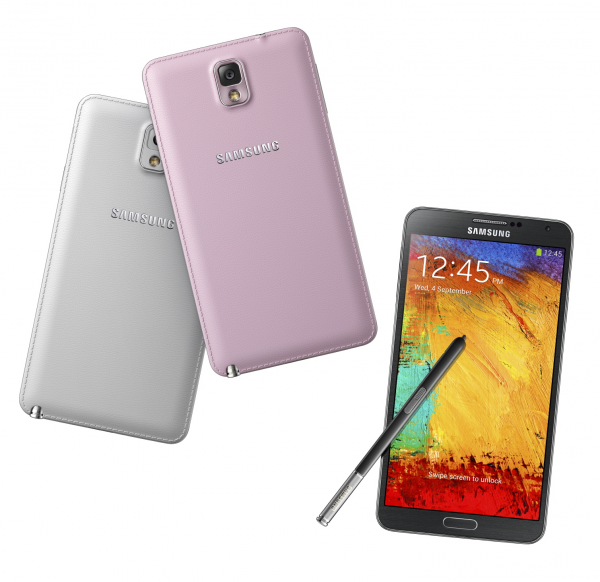
The Galaxy Note 3 features a new soft textured leather-like plastic back cover with stitching around the edges and a very thin front bezel. It now has a more premium look and feel – something that critics have complained about for some time when compared with metal designs from Apple and HTC. Rear panel cover colors include black, white and pink.
Despite having a larger screen, the Note 3 is actually thinner and lighter (5.9 ounces versus 6.4 ounces) than previous iterations. It includes a 5.7-inch SuperAMOLED 1080p display operating at 1,920 x 1,080 with 368 ppi pixel density, a 2.3GHz Snapdragon 800 processor for LTE models or a 1.9GHz Samsung Exynos Octacore for 3G variants, a 13-megapixel rear-facing camera with High CRI LED flash and smart stabilizer, 2-megapixel front shooter, 3GB of RAM, 32B or 64GB of storage, a microSD expansion slot, Bluetooth 4.0, Wi-Fi 802.11 a/b/g/n/ac and a 3,200mAh battery.
There’s a new and improved S Pen as well as category 4 LTE technology. The latter promises support for all types of LTE networks around the world. The device will ship running Android 4.3 and will come pre-loaded with Samsung Knox security software. It will ship on September 25 globally and arrive in Japan and the US starting in October.
Galaxy Gear is described as the true companion for Galaxy Note although it will work with a myriad of Galaxy devices via software update. Available in six different colors, the device itself is crafted from stainless steel and features a camera embedded in the wrist strap. Gear is capable of displaying various information like text messages or e-mails and it can even initiate a phone call through voice control. With a speaker and microphone strategically positioned in the wrist strap, you can talk through the watch by holding it near your face. This allows you to make and receive calls without taking your phone out of your pocket.
The Galaxy Gear carries a 1.63-inch Super AMOLED display with a resolution of 320 x 320. The strap-mounted camera isn't terribly impressive with a 1.9-megapixel BSI sensor and auto-focus lens. Inside is a single core 800Mhz processor, a 315mAh non-removable battery that's reportedly good for up to 25 hours of use, two internal microphones with noise cancellation support, a speaker, Bluetooth 4.0, accelerometer, gyroscope, 4GB of storage and 512MB of RAM. Expect to pay $299 for the timepiece when it ships in October.
Samsung's new Galaxy Note 10.1 2014 edition boasts the same 10.1-inch screen size as before in a package that weighs a little more than two ounces less than its predecessor. This time around, however, the device boasts a resolution of 2,560 x 1,600 (299 ppi) thanks to the WQXGA Super Clear LCD screen.
Inside is an 8,220mAh battery, options for 16GB / 32GB / 64GB of storage, a microSD card slot, 8-megapixel rear camera, 2-megapixel front shooter and the same 2.3GHz quad-core / 1.9GHz octa-core processor that will power the Note 3. It's also running 3GB of system RAM and will ship with Android 4.3 Jelly Bean. The Note 10.1 2014 Edition will ship in three different models: Wi-Fi only, Wi-Fi with 3G and Wi-Fi with LTE. It will be available in black and white during the third quarter although an exact release date and pricing hasn't been set as of writing.
 
~ Shawn Knight