Cisco Learning Network Store Promotions Page
Showing posts with label Windows 7. Show all posts

1.16.2017

Microsoft waves an 'early goodbye' to Windows 7, pushes Windows 10 upgrades

 
Although Microsoft claims that Windows 10 is now more popular than Windows 7, analyst firm NetMarkShare’s monthly usage figures paint a very different picture. In December, for example, Windows 10 hit 24.36 percent globally, but it's dwarfed by Windows 7's 48.34 percent share.
 
It’s clear that Windows 7 is going to remain the number one desktop operating system for some time to come -- globally at least -- but Microsoft is desperate for those users to switch to Windows 10 and warns that Windows 7 support is coming to an end, and that the OS has outdated security and can’t keep up with today’s security needs.
 
In a post headed 'An early goodbye to Windows 7! Support ends in three years' Microsoft's German press site tells users that in three years Windows 7 extended support will run out permanently, and that from January 14, 2020 there will be "no security updates, updates and no technical support from Microsoft".
 
It describes the move as a "logical decision" as "Windows 7 can no longer keep up with the increased security requirements" and sticking with the older OS actually leads to "higher operating costs" due to "increased malware attacks and even increased support requests".
 
If that’s not enough reason to switch, the page also points out that "Windows 10 is the only version of Windows that provides the appropriate support for the latest chips from Intel, AMD and Qualcomm. In addition, many programs are already being written or developed for the newer versions of Windows".
 
While Windows 7 support will run out in 2020, that’s still three years away yet, giving users and companies plenty of time to consider whether or not they want to switch, move to Linux or Mac, or just survive without extended support. There's certainly no rush to wave an early goodbye to Windows 7. Third-party security software will continue to work just fine on that OS for many years after the deadline.
 
The German post includes the usual FUD from Microsoft, and the grim picture that the software giant paints for Windows 7 isn’t entirely fair, but it does serve as a reminder that time is ticking on for the aging OS.
 
If you’re currently using Windows 7, what are your plans for the future? Will you upgrade to Windows 10, if so when, and if not, what do you intend to do once 2020 rolls around?
 
Photo credit: Vladimir Gjorgiev / Shutterstock
 
~ Wayne Williams

2.03.2016

How to uninstall the Windows 10 'Recommended' update and go back to Windows 7 or 8.1


Now that Microsoft is forcibly downloading Windows 10 onto unsuspecting Windows 7 and 8.1 users’ PCs there’s going to be a lot of unhappy customers faced with a new OS they never asked for nor wanted.

You can prevent this from happening by making sure the "Recommended Update" setting is unchecked on your PC, but if you fail to do this and accidentally allow the installation to go ahead (or maybe you tried Windows 10 and didn’t like it), the good news is it’s easy to roll things back to your original operating system.

Once the installation has completed you have 30 days to change your mind and go back to Windows 7 or 8.1.

All you need to do is click Start and launch Settings. Go to Update and Security and clickRecovery on the left. You’ll see the option to Go back to Windows 7 or Go back to Windows 8.1 (depending on which version of Windows you had before). Click on Get Started and follow the instructions.

Windows 10 is actually a decent operating system, so if you have actually installed it, I’d recommend at least giving it a good go before rejecting it out of hand. You do have a month in which make up your mind, and you can roll the OS back at any point within that time frame.

Image CreditRichard M Lee Shutterstock

~ Wayne Williams

1.16.2016

Microsoft gets aggressive -- after 18 months nextgen CPUs like Skylake will only support Windows 10

 
Microsoft's aggressive pushing of Windows 10 is becoming legendary, with everything from irritating nag screens, to automatic downloading of set up files. Now things are taking a slightly different turn as the company says that after July 17, 2017, 6th generation Intel Core Skylake processors and other nextgen CPUs will no longer be supported for Windows 7 and Windows 8.1.
 
The announcement comes somewhat out of the blue, and is all the more surprising considering Microsoft's track record of lengthy support periods. Once the new deadline is reached, Microsoft says that it will only release the "most critical" security patches to these now-unsupported platforms, and even then the patches will only be made available if they do not "risk the reliability or compatibility" of other systems.
 
Microsoft has been boastfully shouting about how many Windows 10 installations there have been since launch, but this latest move suggests that things are not moving as quickly as expected in the enterprise arena. In a blog post entitled Windows 10 Embracing Silicon Innovation, Executive VP Terry Myerson announced a number of "clarifications to [...] support policy". Of course, there is nothing to stop owners of nextgen processors from installing Windows 7 or 8.1 -- it just means that there will be no support from Microsoft. The company does provide some explanation for the decision, but it is likely to lead to further questions:
At the same time, we know many of these customers continue to rely on Windows 7 for its well understood reliability and compatibility. Windows 7 was designed nearly 10 years ago before any x86/x64 SOCs existed. For Windows 7 to run on any modern silicon, device drivers and firmware need to emulate Windows 7's expectations for interrupt processing, bus support, and power states -- which is challenging for WiFi, graphics, security, and more. As partners make customizations to legacy device drivers, services, and firmware settings, customers are likely to see regressions with Windows 7 ongoing servicing.
It's interesting to note that while Windows 7 is singled out for its "understood reliability and compatibility", the same description is not applied to Windows 8.1 despite it receiving the same support treatment. For home users this is unlikely to be too much of an issue -- although obviously there are some people who will be affected -- but it is a different story for enterprise customers. With this in mind, Microsoft has created a program that means the company will provide support for a range of Skylake devices, as detailed by PC World:

  • Dell Latitude 12
  • Dell Latitude 13 7000 Ultrabook
  • Dell XPS 13
  • HP EliteBook Folio
  • HP EliteBook 1040 G3
  • Lenovo ThinkPad T460s
  • Lenovo ThinkPad X1 Carbon
  • Lenovo ThinkPad P70
This list, which Microsoft will continue to update, specified which devices will be singled out for special attention.
For the listed systems, along with our OEM partners, we will perform special testing to help future proof customers' investments, ensure regular validation of Windows Updates with the intent of reducing potential regressions including security concerns, and ensure all drivers will be on Windows Update with published BIOS/UEFI upgrading tools, which will help unlock the security and power management benefits of Windows 10 once the systems are upgraded.
Microsoft's announcement is an interesting one -- not just for what it means, but for the way in which it was delivered. This is a fairly significant change (or 'clarification' if you like) to support policy, but it was hardly shouted from the rooftops. The blog post from Myerson also manages to bury the meat of the announcement by starting off with singing praise from partners and customers about how excited they are to be working with Microsoft and upgrading to Windows 10.
The post is also used to 'clarify' the Windows support policy:
  • Windows 7 will continue to be supported for security, reliability, and compatibility through January 14, 2020 on previous generation silicon. Windows 8.1 will receive the same support through January 10, 2023. This includes most of the devices available for purchase today by consumers or enterprises.
  • Going forward, as new silicon generations are introduced, they will require the latest Windows platform at that time for support. This enables us to focus on deep integration between Windows and the silicon, while maintaining maximum reliability and compatibility with previous generations of platform and silicon. For example, Windows 10 will be the only supported Windows platform on Intel’s upcoming “Kaby Lake” silicon, Qualcomm’s upcoming "8996" silicon, and AMD’s upcoming "Bristol Ridge" silicon.
  • Through July 17, 2017, Skylake devices on the supported list will also be supported with Windows 7 and 8.1. During the 18-month support period, these systems should be upgraded to Windows 10 to continue receiving support after the period ends. After July 2017, the most critical Windows 7 and Windows 8.1 security updates will be addressed for these configurations, and will be released if the update does not risk the reliability or compatibility of the Windows 7/8.1 platform on other devices.
As noted by Anantech, it is a little surprising that an announcement has not been forthcoming from Intel. But it does mean that fingers of blame will be pointed at Microsoft rather than individual manufacturers when companies discover that their hardware is no longer supported by the operating system they want to use. Is it a smart move on Microsoft's part that will ultimately be well-received, or is it a worrying development that sees the company exerting too much control over enterprise customers? Only time will tell.
Image credit: ollyy/Shutterstock
~ Mark Wilson

11.19.2015

Windows 10 popular among enterprise users

 
Almost half (49 percent) of companies which participated in a recent survey by Forrester Research say that they plan on upgrading to Windows 10 by 2016.
 
The news broke out yesterday, adding that 38 percent of workers who use a computer say they want Windows 10 on their next work laptop, with 9 percent already using it on their primary work device.
 
This is a big deal, as such fast adoption of a new operating system is not something we usually see, especially not in the enterprise world. If we are to compare these figures to what we had with Windows 8 a couple of years back, we will see the difference: 22 percent of business responded positively to the radically different OS back in 2012.
 
Like millions of other PC owners worldwide, many businesses chose to stay on Windows 7 rather than upgrade to the much-maligned Windows 8.
 
But it seems as Windows 10 has hit the nail straight on the head. It combines the user-friendliness of Windows 7 with touch-friendliness of Windows 8. Add some extra business management features to the mix, and you got yourself a great product.
 
Microsoft says that 14 million business users are on Windows 10 now, of 110 million users total. The company is focusing hard on attracting more business users, which is obvious with the addition of new features like Windows Store for Business.
 
Forrester says that it’s seeing a lot of interest in "smart glasses" like Google Glass or Microsoft HoloLens, as "backoffice" workers turn to them for things like warehousing, logistics, or maintenance.
 
Photo credit: Stanislaw Mikulski / Shutterstock
 
Published under license from ITProPortal.com, a Net Communities Ltd Publication. All rights reserved.
 
~ Sead Fadilpašić

10.14.2015

Now you can activate Windows 10 with your Windows 7 or Windows 8.1 product key

 
The release of Windows 10 has been a rollercoaster ride of excitement, frustration, and disappointment. But with the Insider program Microsoft has given itself a unique opportunity to address issues and try out new features, testing them out on hardcore users.
 
With the release of Windows 10 Build 10565 we see not only the introduction of a number of new features, but also a change to the way the activation process works. Some people have experienced problems activating Windows 10 after performing the free upgrade. A Windows 10 product key may no longer be needed, but this latest Insider build introduces the option of activating Windows 10 using a Windows 7, Windows 8 or Windows 8.1 product key.
 
The new process means that anyone who finds that Windows 10 complains about not being activated is now able to change their product key. It is also possible to use an old product key when performing a clean installation, but the same checks will be carried out to ensure that a qualifying device is being used.
 
Writing on the Windows Experience blog, Gabe Aul said:
We have received a lot of feedback from Insiders on making it easier to activate Windows 10 on devices that take advantage of the free upgrade offer to genuine Windows by using existing Windows 7, Windows 8 or Windows 8.1 product keys. If you install this build of the Windows 10 Insider Preview on a PC and it doesn’t automatically activate, you can enter the product key from Windows 7, Windows 8 or Windows 8.1 used to activate the prior Windows version on the same device to activate Windows 10 by going to Settings > Update & security > Activation and selecting Change Product Key. If you do a clean install of Windows 10 by booting off the media, you can also enter the product key from prior Windows versions on qualifying devices during setup. Refer to the Insider Hub for more information on these activation improvements including requirements.
Microsoft has not given any indication of the number of people who have experienced issues with activation, but it's safe to assume that a reasonable proportion of the estimated 110 million installs have been problematic. Having implemented a new system, the question has to be asked -- why was this not done from the start?
 
~ Mark Wilson

8.07.2015

How to find your Windows 10 product key

 
If you upgrade your computer from Windows 7 or Windows 8 to Windows 10, you probably have no idea what your product key is for the latest version of the operating system. The time may come when you want to perform a clean installation of Windows 10, and this is when you'll need that key.
 
It is not possible to use your product key for your old version of Windows to activate Windows 10, but during the initial upgrade process this key is converted into a new one. Using a special tool, you can find out the key that has been generated for you so you can make a note of it for future reference.
 
There are actually numerous tools that can be used to determine your Windows 10 code. One of the more reliable and comprehensive is ProduKey which is available free of charge -- there are 32- and 64-bit versions of the software available, so make sure that you download the correct version for your system.
 
ProduKey is provided as a compressed file, so unzip it and then run it. In a matter of seconds you'll be provided with the key you need which you can then make a copy of, email to yourself, write down, or backup in some other way for when you need it.
 
Grab a copy of ProduKey from the Nirsoft website.
 
Photo credit: koosen / Shutterstock
 
~ Mark Wilson

5.31.2015

Pre-order Windows 10 Professional OEM for $149.99

 
Microsoft has been promising that Windows 10 will see the light of day this summer for a while now, and current rumors suggest that we might hit RTM as early as July. Now a new listing on Newegg reveals -- perhaps -- that the Windows 10 release date is pegged for 31 August.
 
A pre-order listing for the OEM version of Windows 10 Professional has popped up on the site with a price tag of $149.99. Windows 10 Home OEM is listed for $109.99 Based on the previous pricing for OEM versions of Windows, it's fair to assume that this is the full version rather than the upgrade edition. The suggested release dates aside, the first thing that many people will jump on is the fact that Windows 10 has a price tag at all...
 
Microsoft has only said that upgrades from Windows 7 and Windows 8.x will be free of charge within the first year. There will be people who are upgrading from an older version of Windows, or are building a machine from scratch and need a full version of Windows to get up and running. This is who this version is aimed at.
 
Microsoft is yet to officially announce any sort of release schedule beyond 'summer' and the date has not been confirmed. It's entirely possible that this was a mistake by Newegg or wishful thinking, but it could just as easily be a guess on the website's part, or even just a marketing ploy. In the meantime, we probably have at least a few more preview builds to look forward to as we draw closer and closer to gold code.
 
~ Mark Wilson

5.12.2015

Windows Insiders will need a valid license to upgrade to Windows 10 RTM

 
At the moment you don’t need a Windows license to run the Windows 10 Insider Preview. Anyone can download an ISO, install it, and update the OS as new builds arrive. Microsoft wants to get feedback from as many users as possible to avoid repeating the catastrophe that was Windows 8.
 
But what happens when the preview versions stop and we reach RTM? We know the operating system will be free (in the first year) to anyone running a copy of Windows 7 or 8.1, but if RTM is a straight update, like all previous Windows 10 builds, does that mean every Windows Insider will be able to upgrade to RTM for free?
 
During a Twitter Q&A yesterday, Microsoft's Gabriel Aul was asked if Windows Insiders would be able to upgrade to Windows 10 RTM for free. His response was "Yes”.
 
That was something of a surprise, and had Twitter buzzing. Did he mean all Windows Insiders would automatically get a working copy of the finished version of Windows 10, with a valid license and activation?
 
Naturally, no. Aul clarified with a second tweet stating "You'll have to be upgrading from a system with a valid license for 7 or 8.x".
 
In other words, while a free upgrade would be a nice gift for Windows Insiders who helped shape the operating system, Microsoft isn’t about to give away the OS to absolutely everyone, only existing Windows customers will get a full, genuine upgrade. Which is the smart, and obvious thing to do.
 
Microsoft does seem to have a knack of confusing customers when it comes to exactly what "free" means. When the company first announced the OS would be free "in the first year" it had a lot of people, myself included, wondering if that meant it would be charging a subscription fee for the OS going forward, as it does with Office 365. Because that was certainly what might be expected from "Windows as a service". It took several attempts to properly clarify what was meant, and even now a large portion of Windows 10 users remain confused as to Microsoft's plans beyond that first year.
 
~ Wayne Williams

3.19.2015

Windows 10 to launch 'this summer' with free upgrades even for pirated copies

Summary: Windows 10 is officially in the home stretch, with Microsoft's top Windows executive committing to a summer launch date and, in a surprise announcement, offering free upgrades on PCs running pirated editions of earlier Windows versions.
 
Microsoft has inched closer to announcing an official release date for Windows 10. The new operating system, which is currently in a public preview release, "will launch in 190 countries and 111 languages around the world this summer," according to the company.

Executive Vice President Terry Meyerson, who runs the Windows division, made the announcement at the WinHEC conference in Shenzhen, China, yesterday.
 
In a separate interview, Meyerson told Reuters that the company plans to deliver free Windows 10 upgrades to all customers, even those running pirated versions of Windows. "We are upgrading all qualified PCs, genuine and non-genuine, to Windows 10," Meyerson told Reuters.

Update, 19-March: Microsoft has issued the following statement in regard to upgrades for "non-genuine" PCs:
We have always been committed to ensuring that customers have the best Windows experience possible. With Windows 10, although non-Genuine PCs may be able to upgrade to Windows 10, the upgrade will not change the genuine state of the license. Non-Genuine Windows is not published by Microsoft. It is not properly licensed, or supported by Microsoft or a trusted partner. If a device was considered non-genuine or mislicensed prior to the upgrade, that device will continue to be considered non-genuine or mislicensed after the upgrade. According to industry experts, use of pirated software, including Non-Genuine Windows, results in a higher risk of malware, fraud (identity theft, credit card theft, etc), public exposure of your personal information, and a higher risk for poor performance or feature malfunctions.
A launch in summer shouldn't come as a surprise. That schedule would square with the one Meyerson projected at the Windows 10 unveiling in San Francisco last fall, when he told reporters the company was aiming to deliver the completed version of Windows 10 by mid-2015.

The additional detail about free upgrades for "non-genuine" (i.e., pirated) copies of Windows was a surprise, and it leaves multiple unanswered questions. Earlier, Microsoft said that consumer PCs running Windows 7 and Windows 8.1 would be entitled to free upgrades to Windows 10 for the first year after the product is released. A Microsoft spokesperson confirmed via email that the plan to allow free upgrades for non-genuine copies of Windows applies to all markets and is not limited to China.
 
Meanwhile, the scheduling announcement leaves multiple unanswered questions. Because Windows 10 is designed to support continuous, rolling updates, it's possible to "launch" the product as an upgrade while still continuing to develop the core code and accompanying apps. Will the summer launch date also allow OEMs to deliver new Windows 10 PCs to customers, or will they have to wait until a later "General Availability" release? A Microsoft spokesperson was unable to answer that question for me.
 
In the Northern Hemisphere, summer ends on September 21. The newly announced launch date gives Microsoft only six months to complete development of Windows 10 and deliver it as a free upgrade to hundreds of millions of customers worldwide. That's an ambitious schedule, given that current preview releases are still missing key features such as the new Spartan browser and the just-announced Windows Hello and Microsoft Passport biometric framework.
 
In a separate technical track for Chinese OEMs, Microsoft disclosed supported upgrade paths for PCs and phones. Any PC running Windows 7 Service Pack 1 or the most recent release of Windows 8.1 can upgrade using the Windows Update path, as can phones running Windows 8.1. All other devices will need to be upgraded manually, using disk image (ISO) files. As previously announced, Windows RT devices will not be upgradable to Windows 10, although a future update will provide some features of the new OS.

(Thanks to Brad Sams at Neowin for discovering that presentation.)

~ Ed Bott

1.13.2015

Windows 7 mainstream support ends today -- should you panic?

 
Windows 7 is by far and away the most popular operating system, and likely to remain so for many years to come. Windows 8.1 did nothing to dent the older OS’s popularity -- in fact, it helped propel it to even greater heights -- and Windows 10 will have its work cut out to unseat Windows 7 from the top of the pile.
 
Every Microsoft operating system comes with five years of mainstream support in which the software giant provides security and non-security updates and complimentary online and telephone support, and today, Windows 7 Service Pack 1’s mainstream support comes to an end. So what does that mean for the legions of Windows 7 users?
 
Not a lot, truth be told. What it essentially means is Windows 7 Service Pack 1 is now entering the extended support phase. This lasts another five years (possibly longer, depending on Windows 7’s enduring popularity), and will ensure users continue to receive security fixes, and patches for known issues -- what’s required to keep the software and users safe -- but that’s all. Users will no longer receive non-security related updates or complimentary support.
 
The vast majority of users won’t notice any difference at all. All most people want is updates designed to make sure the operating system remains secure, and that won't change. So if you’re a Windows 7 user, you can breathe easy. For another five years, at least.
 
Businesses running Windows 7 can purchase paid support and an Extended Hotfix Support Agreement.
 
~ Wayne Williams

10.13.2014

Windows 10: How to quickly switch between the Start menu and Start screen

 
The main highlight in the Windows 10 Technical Preview is unquestionably the new Start menu. It is the perfect blend of the old and the new, mixing the Windows 7 Start menu with Windows 8's tiled Start screen.
 
If, however, you’re a Windows 8.x user who has become accustomed to working in the Start screen, you may not want to take the 'backward step' of returning to a Start menu. (My colleague Mark Wilson certainly feels your pain). The good news is Windows 10 lets you choose between the Start menu and Start screen, although switching backwards and forwards between the two modes is rather cumbersome. Fortunately, there’s a simple solution.
 
At the moment, the way to get the Start screen back is by right-clicking the taskbar and selecting Properties, then clicking the Start Menu tab and checking or unchecking "Use the Start menu instead of the Start screen". You then need to log out and log back in again to make the changes.
 
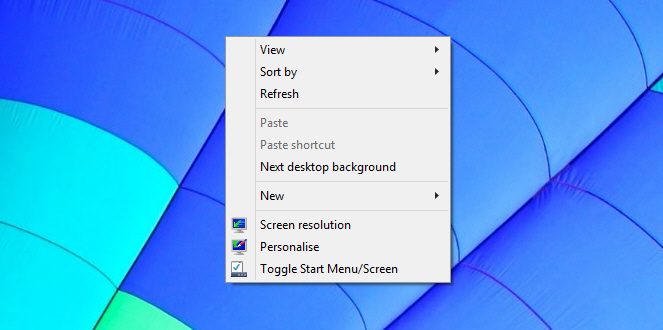
That is, obviously, a far from ideal situation, but thankfully a TenForums user has created a script which adds a Toggle Start Menu/Screen option to the desktop context menu. The process of installing it very simple, just grab the file from here, and unzip it. Move the Toggle_Start_Menu_or_Start_Screen.vbs file into C:\Windows then double-click the Add_Toggle_Start_Menu_or_Start_Screen_to_Context_Menu.reg file and approve the changes to the Windows registry.
 
Once installed, all you have to do is right-click the desktop and select the option to switch between the Start menu and Start screen. The beauty of this solution is you don’t need to log out and log back in to make the change, it just works.
 
There is another script available if you want to remove the toggle.
 
It’s a simple, and elegant solution and hopefully Microsoft will implement something similar in the finished Windows 10 release.
 

~ Wayne Williams

10.06.2014

Microsoft scores poorly in latest virus protection test for Windows 7


The number of products having perfect scores is up in AV-TEST's latest test for virus protection for Windows 7, and Microsoft is still at the bottom. 

AV-TEST Institute's August 2014 (Windows 7 SP1) test results
 Image: AV-TEST
Back in the day, a person could raise the hood, and get the car running again. That is no longer the case. Trying to decide whether an antivirus application is working or not is not all that different. There was a time when feeding an EICAR file to the antivirus program was enough of a test. In today's complex digital world, using EICAR to decide the value of an antivirus application is not enough. Like today's vehicles, antivirus software needs testing by experts.
 
Carrying the analogy further, one hopes to find a great mechanic who charges reasonable rates. Hoping to find an unbiased, independent test lab to decide which AV protection solution best fits the company's needs is also important. AV-TEST Institute is one test lab gaining that kind of reputation and is affordable -- providing detailed free test reports on most antivirus products now marketed.
 
AV-TEST Institute's August 2014 (Windows 7 SP1) test results are now available. The company reports on 33 antivirus applications: 24 consumer-oriented antivirus programs and 9 corporate-endpoint protection packages. This article focuses on the corporate antivirus test results, the consumer antivirus test results are posted here.
 
Here's more about AV-TEST and how the company works.

In-house testing software

To get accurate test results, the developers at AV-TEST use their own test software. Sunshine, one of the software tools, analyzes what happens to the test computer's (loaded with the AV application being tested) file system, registry, internal processes, and memory. Sunshine also monitors network traffic to and from the test computer when malware is executed.
 
VTEST, another AV-TEST software tool, melds 40 different antivirus scanners into a cohesive unit, allowing test engineers to monitor malware activity as it executes. After which the engineers compute reaction times of the antivirus product being tested.

Test modules

With the tools in place, AV-TEST staff then look at three specific categories: Protection, Performance, and Usability. Maik Morgenstern, part of the CEO team and technical director, clarified the significance of each during an email conversation.
 
Protection: This category tests an antivirus application's effectiveness against current online threats (zero-day and web/email malware). Each test computer visits 150 to 200 known malicious websites, and the protection software tool checks if the AV product can detect and block any attack. The test computer is also subjected to malicious files and watched to see if the AV software detects known threats embedded in the files.
 
The significance of visiting 150-200 websites for protection testing was unclear. How are the websites chosen? Morgenstern said, " AV-TEST systems crawl the Web looking for potential malicious content every day, analyzing tens of thousands of websites. If a harmful website is discovered, it is added to the test regimen."
 
Morgenstern also said that all computers loaded with an AV product being tested are subjected to the malicious URLs simultaneously to ensure each AV product faces the same parameters. After which the testers:
  1. Check if the malicious URL is blocked.
  2. If not blocked, the malicious content is allowed to download.
  3. If the download is not blocked, the malicious content is allowed to execute.
  4. If the malware is then detected, that fact is recorded; if not detected, the tester waits two more minutes to see if the AV product locates the malware.
  5. After the online portion is completed, the computer's system-state is checked to see if the malware was successful in altering any of the system files.
Performance: This testing measures the impact an antivirus package has on the speed of the computer. Five scenarios are covered: downloading files, visiting websites, installing applications, using applications, and copying files. The results are compared to a clean computer without AV software installed. The test is repeated multiple times to eliminate outliers, and allow AV-TEST engineers to calculate a stable average.
 
Usability: An AV program has to instill trust by not issuing false positives. Throughout testing an AV package, the test engineers track how many false detections are generated, and how they might affect users. The following test parameters are used:
 
● AV-loaded test computers visit 500 websites known to be benign; any false positives are noted.
 
● AV-loaded test computers scan thousands of files (also benign) looking for false detections.
 
● Forty popular and malware-free applications are installed on each computer with engineers noting whether the AV application considered the newly-installed program a threat.
 
That is how each antivirus program is tested. Now let's see what results the team at AV-TEST obtained.
 
Image: AV-TEST
The good news is obvious, and so is the bad news about Microsoft. For specific test results and more detailed explanations please refer to the online test results for each product. The next slide is a comparison of the current test results with two earlier reports, showing whether an application improved or not. The test scores (0.0 to 6.0) in each of the categories are arranged in the following order: Protection, Performance, Usability.
 
 Image: AV-TEST
Morgenstern's comment about the results is encouraging, "Overall, we are seeing a positive trend in the malware-detection results." He said, "Only the Microsoft products are falling behind with 20 percent smaller detection rates than the average."
 
Morgenstern also said, "Please note the percentages of the results are mathematically rounded. All test criteria were developed in close cooperation with the developers and users of these tools. Vendors could cross-check the results."
 
~ Michael Kassner

9.02.2014

Firefox 32 FINAL released for desktop, shows off HTTP caching improvements and other minor tweaks

Mozilla has released Firefox 32.0 FINAL for desktop, with Firefox for Android 32.0 due to follow.
 
While there are a lot of changes to both desktop and mobile builds, Firefox 32 doesn’t throw up any standout new features, instead concentrating on tweaks and minor improvements.
 
Firefox 32 FINAL now enables a new implementation of HTTP caching (dubbed v2) by default. This promises improved performance through tweaks such as optimized request prioritization, which should cut the loading times for large content while offering increased stability. The new feature is joined by the integration of generational garbage collection.
 
Firefox 32 also debuts support for Public key pining, which should prevent man-in-the-middle attacks through tighter checks of website certificates, which are used to verify a site’s identity and security.
 
Other new features see login metadata made visible in the Password Manager, while the Find toolbar now displays the number of found items. The Scratchpad developer tool also gains inline documentation and code completion.
 
The update also adds HiDPI/Retina support in the Developer Tools UI, and now displays hidden nodes differently when in mark-up review. The Inspector button has shifted position to the top left of the Developer pane and there’s a new Web Audio Editor – this needs to be enabled via the Developer settings button.
 
The new build also widens its HTML5 support, promises performance improvements for both Password and Add-on Manager tools and fixes a couple of platform-specific problems – [Cmd] + [L] should now open new windows even when no window is available on OS X, while text rendering issues in Windows 8.1 (and Windows 7 with Platform Update KB2670838) have also been resolved.
 
The update, which is officially released tomorrow, will be followed by Firefox 32 for Android. Platform-specific improvements include the ability to switch languages without closing the browser. A new Clear History control has been added to the History panel and the Gamepad API is finally enabled.
 
Other Android-only improvements include support for URL autocomplete on composition-focussed keyboards such as Swype. Support for Android 2.2 and ARMv6 processor chipsets have, however, been dropped. Other major unresolved issues mean that neither MP4 nor Flash videos will play.
 
Firefox 32.0 FINAL for Windows, Mac and Linux is available now as a free, open-source download.Firefox 32.0 FINAL for Android should be available shortly.
 
~ Nick Peers

7.07.2014

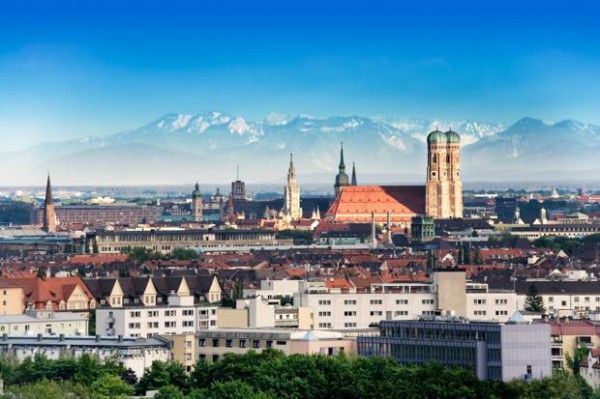
Ubuntu saves Munich millions -- should all governments switch to Linux?

 
Trust in government is not exactly at an all-time high. Sure, there are oppressive governments such as Iran and China that filter and block web content, but even the USA has a spotty record. With all the news of PRISM and other spying programs, it is hard to tell which way is up anymore.
 
One way to solve this dilemma is through transparency and honesty. Unfortunately, as long as governments use closed-source software, it is hard to audit and trust the actions. Today, Canonical announces that not only has Munich taken an open approach to computing with Ubuntu, but the city is saving millions of euros too. Using open-source software and saving money? Hell, maybe all governments should make the switch to Linux.
 
The city had the following needs:
  • Wide range of applications
  • Interoperability with other platforms
  • Regularly updated hardware support
  • Low management overhead
  • Freedom from vendor lock-in
"The project saw Debian deployed in 2006. But a more predictable update cycle was required and, with a policy of tendering for new hardware suppliers every four years, the promise of ongoing support for a wider range of devices. So, in 2009, the city switched to Ubuntu. With the need to sustain political backing throughout the process, blogs and newsletters were used to keep stakeholders up-to-date, while explaining the change in platform to users and support staff. Forums were set up to enable stakeholders to voice their concerns and ask questions. Processes were established to manage user requirements, develop new LiMux releases and test them before roll-out to user workstations", says Canonical.
 
The company further explains, "the switch from from proprietary software to open source has saved the city more than €10 million -- a figure that accounts for both the hire of external companies to implement solutions and the internal man-hours the city has invested in management, training and testing. By 2012, €6.8 million had been saved on Microsoft licensing alone. By August 2013, the cost of the entire project had reached €23 million, compared with an estimated €34 million just to upgrade to Windows 7 and new versions of Microsoft Office".
 
Munich deserves much respect for choosing the open-source route. By saving valuable taxpayer money and supporting an open philosophy to computing, it can be seen as double win. Of course, a government can still be secretive while using Linux -- a truly open approach to information will require an entirely new way of thinking. Still, it is a good start.
 
If Munich can find success and cost-savings with Linux, it begs the question -- should all governments, including the USA, embrace Linux and other open-source solutions? Tell me what you think in the comments.
 
~ Brian Fagioli

5.22.2014

China bans use of Microsoft's Windows 8 on government computers

A Microsoft Surface tablet is seen during the launch of Microsoft Windows 8 operating system in Hong Kong October 26, 2012.
Credit: Reuters/Bobby Yip
(Reuters) - China has banned government use of Windows 8, Microsoft Corp's latest operating system, a blow to a U.S. technology company that has long struggled with sales in the country.
 
The Central Government Procurement Center issued the ban on installing Windows 8 on Chinese government computers as part of a notice on the use of energy-saving products, posted on its website last week.
 
The official Xinhua news agency said the ban was to ensure computer security after Microsoft ended support for its Windows XP operating system, which was widely used in China.
 
"We were surprised to learn about the reference to Windows 8 in this notice," the company said in a statement. "Microsoft has been working proactively with the Central Government Procurement Center and other government agencies through the evaluation process to ensure that our products and services meet all government procurement requirements."
 
"We have been and will continue to provide Windows 7 to government customers. At the same time we are working on the Window 8 evaluation with relevant government agencies," Microsoft said.
 
Neither the government nor Xinhua elaborated on how the ban supported the use of energy-saving products or how it ensured security.
 
China has long been a troublesome market for Microsoft. Former CEO Steve Ballmer reportedly told employees in 2011 that, because of piracy, Microsoft earned less revenue in China than in the Netherlands even though computer sales matched those of the United States.
 
Last month, Microsoft ended support for the 13-year-old Windows XP to encourage the adoption of newer, more secure versions of Windows. This has potentially left XP users vulnerable to viruses and hacking.
 
"China's decision to ban Windows 8 from public procurement hampers Microsoft's push of the OS to replace XP, which makes up 50 percent of China's desktop market," said data firm Canalys.
 
~ Paul Carsten and Beijing Newsroom        

3.11.2014

A new Windows 8.1 update tries to win back desktop diehards

Summary: With its second major update to Windows 8 in less than 18 months, Microsoft is trying to ease the pain for Windows users who are befuddled by the Windows 8 interface on conventional PCs. Here's what you can expect. Will it be enough to calm the troubled waters?
  
Microsoft is about to deliver an update to Windows 8.1, its second significant set of changes since the launch of Windows 8 less than 18 months ago.
 
Last week, someone in Redmond inadvertently left the final update packages available on Windows Update for anyone to install. I’ve had a couple days to use the newly updated Windows interface on a handful of machines.
 
You can see exactly what’s changed in the gallery that accompanies this post: "A close-up look at Windows 8.1 Update 1." Here's some background on why this update exists.


The biggest mistake Microsoft made with Windows 8 was to deliberately eliminate some of the touchstones of the Windows 7 desktop interface, while still leaving most of that desktop intact. As I wrote a few months after the original release of Windows 8:

That decision alienated many desktop users and created a wedge issue that has distracted from the many impressive accomplishments in Windows 8. I know some people (myself included) who have adapted to the new ways and even prefer them. Those who would rather stick with the old paradigms can't catch a break from Microsoft, though. They need to tweak the system extensively and use third-party utilities to achieve the desired result.
Windows 8.1 was a first, very large step on the road to rectifying that mistake. This update—let’s call it Windows 8.1.1—is a continuation of those changes, designed to make the new OS work more smoothly on conventional PCs driven by a keyboard and mouse.
 
A word of warning: If you’re a Metro hater, this update will do almost nothing to make you feel all warm and fuzzy. The Windows 7-style Start menu is not coming back. This update sticks with the fundamental design principles of the Windows 8 interface, and nothing in it comes close to restoring the Windows 7 desktop interface. It is still the Windows 8.x interface, evolved, with that evolution clearly driven by powerful negative feedback.
 
Many of the changes that are at the core of Windows 8.1 Update 1 won’t really be visible until we see new PCs with this version of Windows installed as the base operating system. For traditional PCs that are designed for use with a keyboard and a mouse, the new OS will be configured to go to the desktop by default. It will also be less of a disk-space and memory hog, making it possible for this version of Windows to run on tablets with as little as 16 GB of flash storage.
 
If you install this update when it arrives in April (via Windows Update, not via the Windows Store), the first thing you’ll notice is a series of changes to the Start screen. Alongside the picture and name of the current logged-in user are a new Power button and a Search button. Both of them are designed to reduce the need to play Where’s Windows? with the well-hidden Windows 8 Charms menu.
 
There’s also an option to right-click on tiles on the Start screen or in the more complete Apps view screen, which lists every installed desktop program and app. That option exposes a new, familiar-looking context-sensitive menu so you can resize those tiles or pin them to the Start screen or to the taskbar.
 
Oh yeah, that’s the really big change in this update: The taskbar is no longer just for the desktop. It can include Windows Store (Metro style) apps, so you can switch between desktop programs and Windows Store apps with one click. And the new, unified taskbar is available from the Start screen and from any Windows Store app, with a simple gesture.
 
Move the mouse to the bottom of the screen in Windows 8.1.1 and the taskbar appears. I’ve seen some complaints that the action is inconsistent. It works fine on multiple test systems here. I think what others are seeing is a deliberate design decision. If you move the mouse pointer casually to the bottom of the screen, the taskbar doesn’t pop up as a distracting element. If you really want to see the taskbar, you move the mouse with purpose, or move it to the bottom of the screen and then, after a very brief pause, move it down ever so slightly.
 
From the taskbar, you can preview any running program or Windows Store app, just as you can on the desktop, and switch to it with a click.
 
The other big complaint from early users of Windows 8 was that it was impossible to figure out how to close or switch away from Windows Store apps. The solution in Windows 8.1 Update 1 is a new title bar, with Minimize and Close buttons, which appears when you bump the mouse up against the top of the screen.
 
What’s noteworthy about all these changes is that they appear only when you use a mouse. If you use a touchscreen to navigate through Windows 8, you’ll see the taskbar only on the desktop, and you’ll only see the new title bars if you use a mouse.
 
There are a few additional usability tweaks in this update, including some welcome changes in Internet Explorer. There are also fixes you can’t see, aimed at improving security and performance and swatting bugs.
 
Will this update quiet the I-hate-Metro crowd? Probably not. Will it make Windows users on desktop machines more productive? Almost certainly.
 
~ Ed Bott

1.01.2014

Windows 8.x claims 10% market share, but Windows 7’s massive gain is the real story

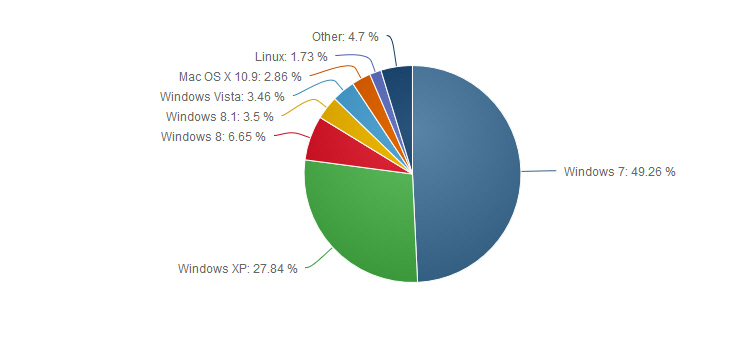
Great news for fans of Windows 8 and 8.1, Microsoft’s divisive operating system has finally claimed 10 percent of the desktop market. According to NetMarketShare, which monitors such things, in December Windows 8 lost 0.01 percent share, but Windows 8.1 grew by 0.86 percent. Windows 8 now has 6.65 percent of the market and Windows 8.1 is sitting on 3.5 percent, bringing the OS’s combined share to 10.15 percent. Great job Windows 8.x.
 
However, as seems to regularly be the case, the new operating system’s gain was dwarfed by that of its elder sibling. Windows 7 put on a growth spurt that’s nothing short of stunning.
 
In November, Windows 7’s market share grew by 0.22 percent. Or, to put it another way, gained four times as much market share as Windows 8 and 8.1 combined, which seemed impressive at the time. However, in December, the older OS grew by a staggering 2.62 percent to give it 49.26 percent of the desktop market.
 
Let me spell it out for you. The heavily promoted Windows 8.x -- two new operating systems combined -- grew by 0.86 percent. Windows 7, the much older non-promoted OS, leapt by 2.62 percent in the run up to -- and including-- Christmas. In other words, in a single month Windows 7 grew by a quarter of Windows 8.x’s total share.
 
All of this growth has to come from somewhere of course, and it comes at the expense of Windows XP which dropped from 31.22 percent to 27.84 percent, a fall of 3.38 percent. Windows Vista also contributed, losing a modest 0.11 percent share.
 
Mac OS X 10.9 (Mavericks) grew from 2.42 percent to 2.86 percent in December, for a moderate 0.44 percent gain.
 
 
Next month’s market share figures will be interesting, as they’ll show us just what sort of Christmas Windows 8.x had. Can Windows 7 continue to pack on market share, or was December’s surge a statistical anomaly? That certainly seems likely, although you never can tell with Windows 7 which has beaten Windows 8.x's gains in three straight months now.
 
~ Wayne Williams

12.21.2013

Column: Microsoft’s Mistake with the Xbox One

Microsoft missed the boat by not bolstering Windows cross-platform capabilities

Let’s begin with the most amusing part of the widely derided launch of the Xbox One: At least some of the game demos for the new system were run on a PC using Windows 7 and an Nvidia graphics card. See! Even Microsoft doesn’t use Windows 8 for gaming!
 
 
Microsoft used Windows 7-powered PCs to power their Xbox One E3 demos.
 
It’s not at all unusual for new consoles or games to run on PCs, but if only Microsoft really understood what that meant. At the heart of the new system are eight x86-64 cores, a GPU based on the AMD GCN with 768 cores total, 8GB of DDR3 RAM (3GB for overhead such as OS, and the remaining 5GB for games and operations), a 500GB hard drive, a Blu-ray drive, and integrated Wi-Fi and Kinect.
 
No PC gamer worth his box would turn up his nose at that kind of firepower for $500. It may not be a pure muscle system, but it’s more power than you usually can get for the price.
 
It’s even running a kernel with the same network, file, and graphic support used in the Windows family, which raises the possibility of cross-platform portability. The potential for this remains to be seen, particularly since Windows apps can’t be brought straight into XB1 without significant adaptation.
 
My question is: why?
 
With Microsoft's foothold in the PC market wobbling, why wasn’t XB1 a radical PC/console hybrid that allowed for full interoperability?
 
Microsoft could easily have taken that shot, and given Sony a good one-two punch. My question is: Why didn’t they?
 
~ Thomas McDonald


12.11.2013

Microsoft: We goofed on that Windows 7 end-of-sales date

Summary: Microsoft officials are now saying the end-of-sales date for PCs preinstalled with Windows 7 is 'to be determined,' rather than October 30, 2014.
 
Last week, Microsoft made it public that it planned to stop allowing its PC partners to sell machines with Windows 7 preloaded as of October 30, 2014.
 
The Redmondians are now saying that date was posted in error. The new official word is that Microsoft still has yet to determine when the Windows 7 preload cut-off date will be. (Neowin reported the change from October 30, 2014 to "TBD" over the weekend.)
 
A spokesperson supplied the following statement explaining the mix-up:
 
"We have yet to determine the end of sales date for PCs with Windows 7 preinstalled. The October 30, 2014 date that posted to the Windows Lifecycle page globally last week was done so in error. We have since updated the website to note the correct information; however, some non-English language pages may take longer to revert to correctly reflect that the end of sales date is 'to be determined.' We apologize for any confusion this may have caused our customers. We’ll have more details to share about the Windows 7 lifecycle once they become available."
 
Microsoft also confirmed that the other cut-off date -- the end of availability of boxed copies of Windows 7 sold at retail -- was, indeed, October 30, 2013.
 
It will be interesting to see if Microsoft ends up sticking with the October 30, 2014 OEM cutoff date or not. That timing would make sense if the Softies think they can get more Windows 7 users on a path toward upgrading (or at least considering upgrading) to Windows 8 within a year's time. If things aren't going so well, perhaps Microsoft will push the PC-preload date out further.
 
The end-of-support date for Windows 7, as of now, has not been extended. Mainstream (free, Microsoft-provided) support for Windows 7 with Service Pack 1 installed isn't expiring until January 13, 2015. Microsoft will continue to provide security fixes for Windows 7 for free until the end of extended support, which is January 14, 2020.
 
~ Mary Jo Foley 

12.10.2013

The stats don't lie: Windows 8.1 seriously underperforming compared to Windows 7

Following Windows market share on NetApplications, as I do every month, it’s clear to me that Windows 8.x isn’t the hit Microsoft hoped for. There are several reasons for this, all of which I’ve discussed previously -- dwindling PC sales, users dislike of touch and the Modern UI, and so on.
 
 
Last month Windows 7’s growth outpaced that of Windows 8.x by four fold, and it’s not the first time the older OS has proven the more popular choice either. It’s becoming something of a regular occurrence. Adoption of the tiled OS is slow, very slow. Especially compared with the strong pick up Windows 7 enjoyed from the start.
 
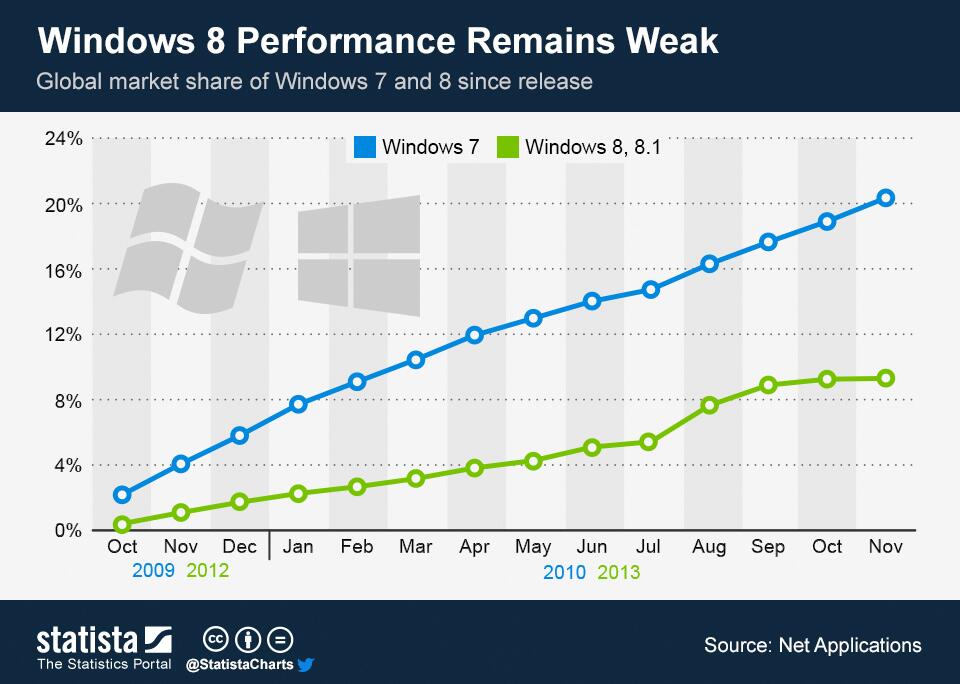
Statista has taken global market share of both Windows 7 and Windows 8/8.1 since launch and plotted the growth on a chart, and the difference is stark. While Windows 8.x has a respectable sounding 9.3 percent of the global market as of the end of last month, Windows 7 had claimed over twice that in the same time period (fourteen months).
 
And that’s not the worst part. While the Windows 7 graph shows a steep upwards trend, Windows 8.x growth is clearly slowing, and heading for a plateau. The launch of Windows 8.1 gave the OS a significant bump, but now the appeal is waning it seems.
 
It’s easy to make excuses for Windows 8.x’s failure to perform. Windows 7 adoption was higher because it followed the half-baked Windows Vista -- users on XP wanted a newer OS to switch to, and users on Vista wanted to get off it, quickly. Windows 7 was, and still is, hugely popular, and Windows 8.x is struggling to follow it.
 
But, however you look at things, Windows 8.1 was released a mere two months ago, and instead of the upwards curve you'd expect following a major launch we’re seeing significant slowdown.
 
It’s possible sales over the holiday period will boost market share for the tiled OS, and restart the (short-lived) growth spurt Windows 8.1 experienced at launch, but it would take a brave man to bet on that outcome.
 
Microsoft is advertising its new OS everywhere, the software is on all new PCs, but still consumers don’t seem interested. What else can the software giant do to boost Windows 8.x adoption?
 
~ Wayne Williams