Cisco Learning Network Store Promotions Page
Showing posts with label Web Browser. Show all posts

7.17.2016

Privacy alert: Maxthon web browser sends private data about users to China

 
In the world of web browsers, there are four or five big names to choose from but no end of smaller alternatives. One such browser is Maxthon, and security researchers have just discovered that this Chinese-produced browser is transmitting a wealth of data about users back to China.
 
Researchers at Fidelis Cybersecurity and Exatel found that Maxthon frequently sends zip files to Beijing over HTTP and this contains a terrifying amount of data about users' browsing habits. The ueipdata.zip file incudes, among other things, details of the sites visited by users, the applications they have installed, and what searches have been performed.
 
The data is contained within an encrypted file in ueipdata.zip called dat.txt, but the necessary decryption key can be easily calculated, researchers showed. They also demonstrated how the data could be intercepted as it made its way to China using a man-in-the-middle attack, and this data could then be used for malicious purposes.
 
The company behind the browser says that the data is collected as part of its optional User Experience Improvement Program (UEIP) and is completely anonymous. But security experts found that data was collected regardless of whether users opted in or out of the program.
 
Maxthon has responded to the allegations, saying it takes them "very seriously" and has "fully investigated this matter". CEO Jeff Chen says:
We at Maxthon take users’ privacy and information security seriously. We keep our users’ information secure and private. Maxthon has been in business for over 10 years and there has NEVER been a privacy leak to any third party. We are a truly international company with servers located in the U.S., EU, and Asia. We take endless efforts to improve our product to protect users’ security and privacy.
This is unlikely to be enough to calm the fears of those who have already been spooked by the discovery, however.
 
Photo credit: Blablo101 / Shutterstock
 
~ Mark Wilson
3.31.2015

50 shades of gray -- hands on with Windows 10 Build 10049, the dullest Windows ever

 
We might have waited ages for a new build of Windows 10, but a mere fortnight later and Microsoft has rolled out yet another update, again initially only to Windows Insiders on the Fast ring.
 
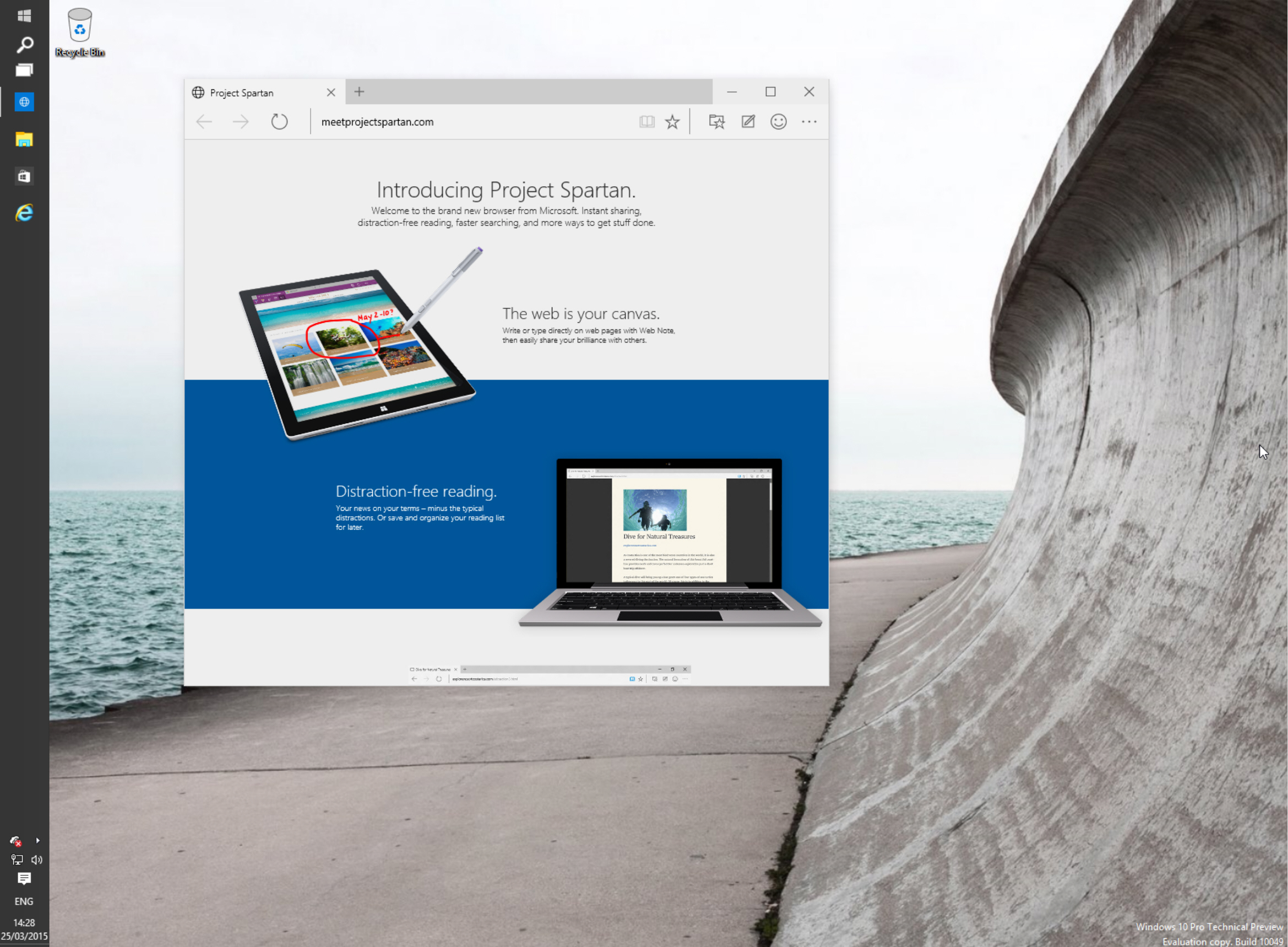
The star of this build is Project Spartan, Microsoft’s new web browser. It’s an early version, but it’s a good look at what the tech giant has been working on, and of course it comes with the new rendering engine. That’s not all that’s new in this latest OS build, however. Let’s take a more detailed look.
 
Since Spartan is the main (almost only) addition in Build 10049, let’s look at that first. The browser looks much as you might expect it to, with big square tabs at the top, and the address/search bar just underneath. To the right is a button for reading view (displays just the story, removing any distractions from around it) and a star so you can add a page to favorites or reading list. There’s a button for accessing favorites, reading list, history and downloads, one for making web notes, and another for providing feedback. As you use the browser, you’ll be asked questions, such as how easy it was to find certain features.
 
A More button gives you access to additional options, including Settings, which lets you customize the browser. Unlike Internet Explorer, Spartan is pretty basic which, it could be argued, is no bad thing in a browser. It does what you want it to, and it’s easy to use. Do I see myself using Spartan as the default browser? No, but it has potential and it’s not (in my opinion at least) awful like the Modern version of IE found stinking up Windows 8.x. That said, while the browser’s project name is quite exciting, Spartan looks as boring as hell.
 
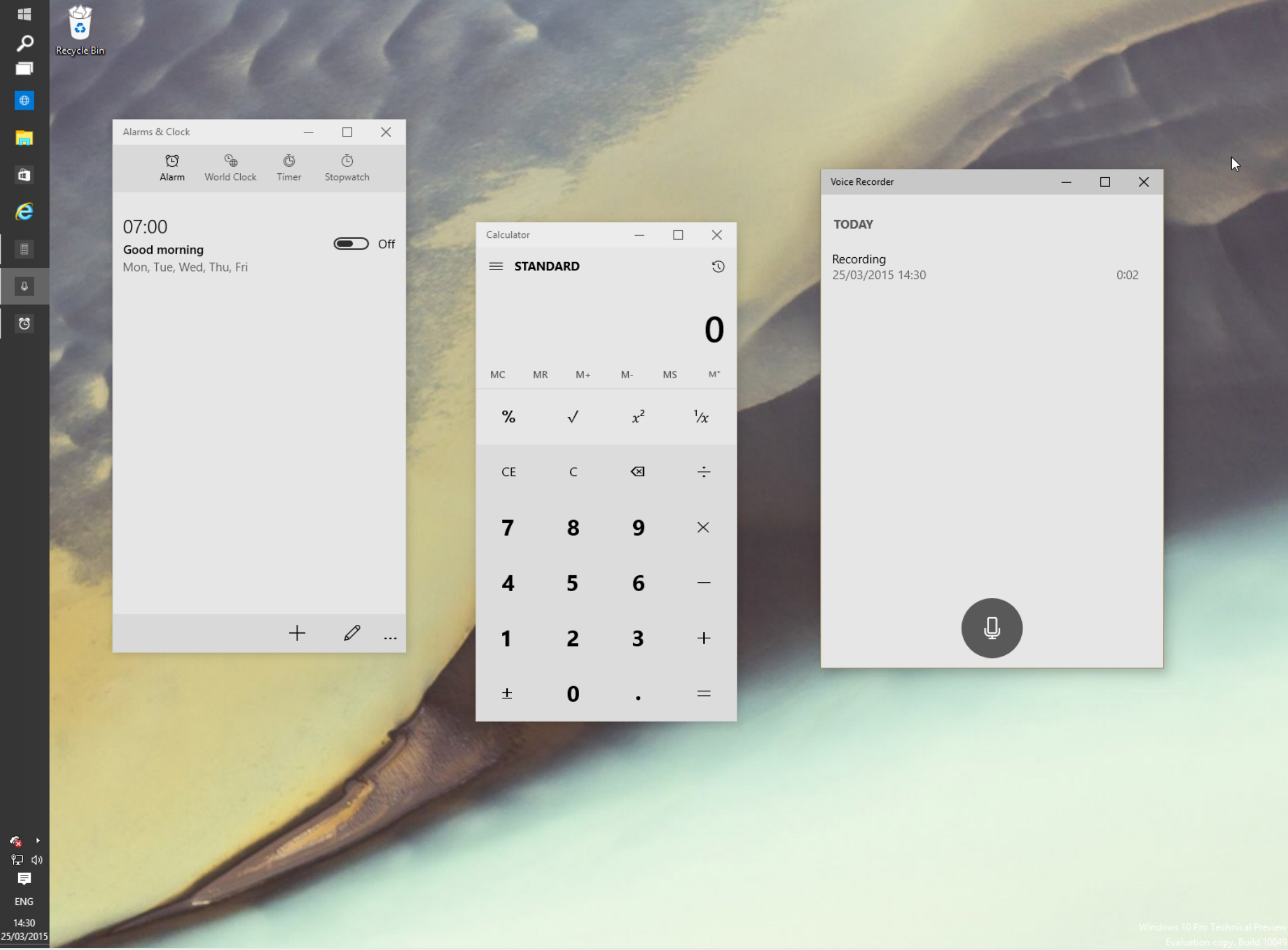
So what else has changed in build 10049? Well some of the included apps have had a makeover and now appear in white and gray, rather than dark as they did previously. Calculator, Alarms & Clock, and Voice Recorder all sport the lighter look, and frankly it’s dull, dull, dull. Microsoft might be shooting for classy here, but the end result is just bland. A few color accents would make a massive difference. Would it hurt to make the record button in the Voice Recorder red, rather than gray?
 
 
Windows XP was, at launch, described as a Fisher Price operating system with its bright, colorful (and child-like) buttons. Windows 10 seems to be the flip side of that, with each new version becoming more boring, and depressing -- visuals wise -- than the last.
 
There’s no option to switch between the light and dark themes in the apps, but hopefully that will be introduced in a later build.
 
And the option to make everything look and feel a lot happier would be good too!
 
Have you tried Build 10049 yet? What’s your view of it, and Spartan? Do you think it’s classy, or 50 shades of bland? Comments below.

~ Wayne Williams

3.21.2015

Fully patched versions of Firefox, Chrome, IE 11 and Safari exploited at Pwn2Own hacking competition

 
As in years past, the latest patched versions of the most popular web browsers around stood little chance against those competing in the annual Pwn2Own hacking competition. The usual suspects – Apple Safari, Google Chrome, Mozilla Firefox and Microsoft Internet Explorer – all went down during the two-day competition, earning researchers a collective total of $557,500 in prize money.
 
The event, which took place at the CanSecWest conference in Vancouver, was sponsored by the Hewlett-Packard Zero Day Initiative. During the first day, HP awarded $317,500 to researchers that exploited flaws in Adobe Flash, Adobe Reader, Internet Explorer and Firefox.
 
eWeek notes that the first reward, paid to a hacker by the name of ilxu1a, was for an out-of-bounds memory vulnerability in Firefox. It took less than a second to execute which earned him a cool $15,000.
 
Firefox was exploited twice during the event. Daniel Veditz, principal security engineer at Mozilla, said the foundation was on hand during the event to get the bug details from HP. Engineers are already working on a fix back at home, he added, that could be ready as early as today.
 
Another security researcher, JungHoon Lee, managed to demonstrate exploits against Chrome, IE 11 and Safari. As you can imagine, he walked away with quite a bit of money: $75,000 for the Chrome bug, $65,000 for IE and $50,000 for the Safari vulnerability. He also received two bonuses totaling $35,000.


~ Shawn Knight

8.07.2014

Internet Explorer gets more secure -- will start blocking outdated ActiveX controls

 
In the technology world, it is fashionable to bash Internet Explorer. There is that old joke that people only open IE once -- to download Chrome or Firefox. To some extent, that is true; however, Microsoft's web browser has been improving leaps and bounds. When I am on Windows, I enjoy using version eleven very much.
 
Unfortunately, the reason Internet Explorer got a bad reputation with some tech nerds, is that it was more susceptible to malware than other browsers. There was truth to this and I experienced it first-hand, when fixing and cleaning the computers of friends and family. Today, Microsoft announces that Internet Explorer is getting more secure by blocking outdated ActiveX controls.
 
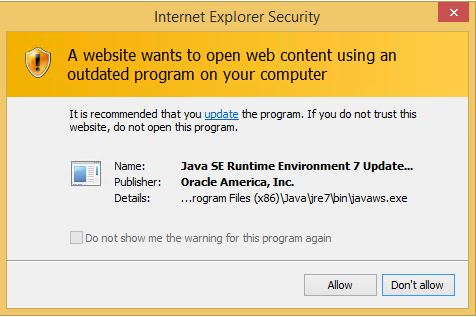
"Starting August 12th Internet Explorer will block out-of-date ActiveX controls. ActiveX controls are small apps that let Web sites provide content, like videos and games, and let you interact with content like toolbars. Unfortunately, because many ActiveX controls aren't automatically updated, they can become outdated as new versions are released. It's very important that you keep your ActiveX controls up-to-date because malicious or compromised Web pages can target security flaws in outdated controls to collect information, install dangerous software, or by let someone else control your computer remotely", says Microsoft.
 
The company further explains, "Internet Explorer uses a Microsoft-hosted file, versionlist.xml, to determine whether an ActiveX control should be stopped from loading. This file is updated with newly-discovered out-of-date ActiveX controls, which Internet Explorer automatically downloads to your local copy of the file. We are initially flagging older versions of Java, but over time will add other outdated ActiveX controls to the list".
 
You can see an example of the alert below:
 
Microsoft lists the following aspects of the blocking:
  • Know when Internet Explorer prevents a Web page from loading common, but outdated, ActiveX controls.
  • Interact with other parts of the Web page that aren’t affected by the outdated control.
  • Update the outdated control, so that it’s up-to-date and safer to use.
  • Inventory the ActiveX controls your organization is using.
This is a brilliant move by Microsoft that only helps to protect its users. While it is probably not enough to sway Chrome and Firefox users to start using Internet Explorer, it definitely helps to improve the browser's image. This forward-thinking regarding security makes me excited for Internet Explorer 12 and I cannot wait for its release.
 
Image Credit: 9nong / Shutterstock
 
~ Brian Fagioli

6.10.2013

Poll Results 2013: Chrome overtakes Firefox as the preferred web browser

Takeaway: Chrome is the clear new web browser boss according to a recent TechRepublic poll. The question now is why?
Credit DigitialTrends

In 2012, TechRepublic asked a very simple question: Given a fresh choice, which Web browser would you choose? The poll results in 2012 showed that Firefox was the most used web browser in 2012.
 
However, when it comes to information technology, change is inevitable, so a few weeks ago we asked the same question and discovered that Mozilla Firefox has been overtaken by Google Chrome as the preferred web browser among IT professionals on TechRepublic in 2013.

The details

Take a look at Figure A. The 2012 poll results show that over 50% of TechRepublic members preferred Firefox, with the second choice, Chrome, drawing only 20% of the state preferences.

Figure A

In 2012, Firefox was the clear leader.
Now, look at the 2013 results shown in Figure B. Chrome has surpassed Firefox as the browser of choice for TechRepublic members, jumping from 20% in 2012 to 39% in 2013.

Figure B

All hail the new browser king, Chrome.

Why did this happen?

Moving beyond the sheer numbers, I would like to discuss why this has happened. Increasingly, I have found Firefox to be a little unstable and to be a bit of a resource hog - has that been your experience? Is that one of the reasons Chrome has moved to the front of the line? What other reasons explain how Firefox has lost its top position to Chrome?
 
~ Mark Kaelin