Cisco Learning Network Store Promotions Page
Showing posts with label OS X. Show all posts

8.02.2016

Firefox 48 FINAL improves download protection as part of wider security crackdown

 
Mozilla has unveiled Firefox 48 FINAL for desktop. After the relatively minor releases of late, Firefox 48 contains a number of notable new features, both visible and behind the scenes, to excite users.
 
There’s improved protection against potentially malicious downloads, the requirement for add-ons to be both verified and signed by Mozilla before they will load, and a number of WebRTC enhancements -- and that’s just for starters.
 
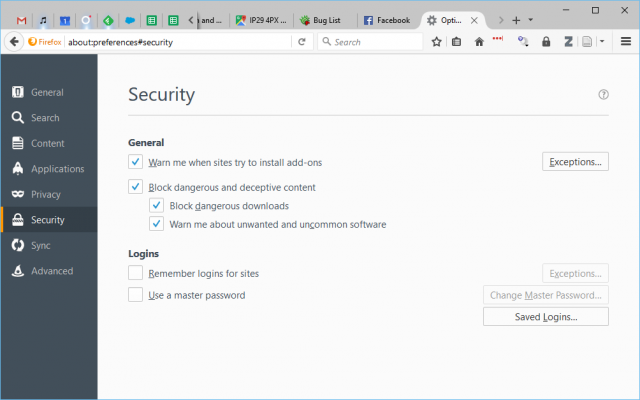
Firefox 48’s somewhat cryptic battle cray is "roar for moar protection against harmful downloads!". It refers to new features for blocking potentially malicious downloads and sees the Security tab of Firefox’s Options get a shakeup.
 
Users will now find a new "Block dangerous and deceptive content" option that includes two further options: "Block dangerous downloads" and "Warn me about unwanted and uncommon software", both of which are ticked by default.
 
Other security improvements include all add-ons requiring a digital signature (and verification) from Mozilla before they will load, while the media parser has also been redeveloped using the Rust memory-safe programming language to protect against potential exploit-based attacks.
 
Selected users will also see process separation enabled, splitting the main Firefox browser process from all loaded web content. This allows the latter to be sandboxed, blocking direct access to the filesystem for security purposes, but should also yield stability and performance improvements too.
 
One usability improvement sees the Awesome bar’s results list include a number of handy icons to help identify results from a user’s history, bookmarks or open tab.
 
WebRTC improvements include enabling delay-agnostic AEC, full duplex for GNU/Linux and support for ICE Restart & Update, while a bug leading to frequency distortions on Jabra and Logitech C920 webcams has also been fixed.
 
Windows users will now find the [Tab] and [Shift]+[F10] key combos work as they should when in customization mode, while GNU/Linux users gain visible Canvas performance improvements through support for Skia.
 
Developers gain a multitude of new features, including a geometry editor for moving absolute and fixed positional elements and the addition of a tree-map view to the memory tool for debugging purposes. Content Security Policy (CSP) is now enforced for all WebExtensions. The Firebug Theme has also been enabled for Developer Tools.
 
Firefox 48 FINAL is available now as a free, open-source download for Windows, Mac and Linux. Support for OS X 10.8 and earlier has now been dropped, while version 48 will also be the last version to run on Windows PCs without SSE2 CPU extensions.
 
~ Nick Peers

6.14.2016

Apple renames OS X to macOS -- upcoming 'Sierra' version will get Siri, Apple Pay, and more

If you are wanting a desktop operating system, you largely have two options -- Windows or OS X. To a lesser extent, consumers can opt for Linux-based operating systems, such as Chrome OS or Ubuntu, but Apple and Microsoft's offerings reign supreme. While OS X is arguably more elegant than Windows, it only comes installed on Apple's expensive hardware. Microsoft's OS is the best option for those on a budget.
 
One thing that was not elegant about OS X, however, was the name. It was not in line with the company's other operating systems -- iOS, watchOS, and tvOS. Not to mention, the 15 year old "X" branding was getting a bit long in the tooth. Today, Apple renames it to macOS, while also designating a new code name to the upcoming version -- Sierra. It looks to be the best Mac operating system ever.
 
"Siri on the Mac is now just one click away. The familiar features of Siri are now on the Mac with brand-new capabilities specifically designed for the desktop. Easily accessible from the Dock, menu bar or keyboard, Siri lets you use your voice to search for information, find files and send messages. For example you can ask Siri to locate a specific document you worked on last night, add a meeting to your calendar or start a FaceTime call. With Siri on the Mac, you can also drag and drop items from Siri search results into your documents or emails, pin Siri search results in Notification Center to keep an eye on information like sports scores or stock prices, and even adjust system preferences, set reminders and search your Photos library", says Apple.
 
Duing the event, I was quite impressed with the demo of Siri on macOS. She is deeply integrated with finder, offering high-quality contextual search. The voice assistant doesn't just fetch the weather, but it finds your documents too. Taking things a step further, the drag-and-drop functionality worked wonderfully, allowing seamless workflow in the operating system.
 
 
The other big feature is Apple pay on the web. The company explains, "users love to shop online using their Macs and with macOS the shopping experience in Safari is now even better. Apple Pay on the web makes it easy to make secure and private purchases when shopping on participating websites. You no longer need to share credit or debit card numbers with an online merchant and actual card numbers are not stored on your device, nor on Apple servers. Just look for the Apple Pay button at checkout on many of your favorite shopping sites and complete your purchase with Touch ID on your iPhone or by using your Apple Watch. Strong encryption protects all communication between your devices and Apple Pay servers, and Apple Pay does not track your purchases".
 
Strangely, rather than highlight biometrics on the Mac, Apple wants you to verify transactions using your iPhone or Apple Watch. I hope this will change with future hardware -- the company is probably not be ready to discuss features of future computers. With that said, if upcoming Mac computers lack fingerprint readers, it will be a huge blunder. Not every Mac user owns other Apple hardware, and if they do, they may not always have it with them. Maybe Apple just wants to keep Apple users buying multiple devices.
 
Another great feature is the ability to automatically offload local documents to the cloud to conserve space with "Optimized Storage". This will allow those with smaller storage drives to have more breathing room. On paper it sounds like a great idea, but as more and more folks surf the web on metered connections and jetpacks with limited data, this could end up being a costly headache. Not to mention, increased iCloud Drive storage is yet another monthly cost for users that utilize the functionality.
 
The operating system is full of other features too, like universal copy and paste, allowing you to share a clipboard between iOS and macOS. Plus, the ability to use "picture in picture" to conveniently watch a video while multitasking. The company has even enabled program tabs on the OS level so any app can be easily managed without any work from the developer.
 
All in all, this is shaping up to be the best Mac operating system ever. Developers can download the preview today, while existing OS X end users can upgrade when macOS becomes available in the fall. More daring home users can grab the public beta in July.
 
Are you excited for macOS Sierra? Tell me in the comments.
 
~ Brian Fagioli

5.13.2016

Opera 39 will boost your laptop's battery life by up to 50 percent

 
No matter if we are talking about Windows PCs or MacBooks running OS X, the browser that you use can have a major impact on your laptop's battery life. Tests suggest that if you want the best results you should stick to the default browser, Internet Explorer or Microsoft Edge on Windows, and Safari on OS X.
 
But, with Opera 39 soon to be released, Opera Software is basically claiming that the new version of its browser is far superior to any of its rivals. The trick is to activate the new power saving mode, which is available when you run on battery power.
 
Opera Software has performed some tests to see how Opera 39, which is currently available in the developer stream, stacks up against Google Chrome on a laptop running the 64-bit version of Windows 10. The results show a massive difference: the former delivers 2:56 minutes of battery life while the latter only manage 1:54 minutes. That is just shy of a 50 percent improvement, which, quite frankly, sounds unbelievable.
 
"Battery saving on Opera for computers is possible thanks to optimizations, such as reducing activity from background tabs, adapting page-redrawing frequency and tuning video-playback parameters", Opera Software explains. But, that is not all that is new.
 
"Some parts of the code have been simplified, while animated themes have been optimized. In this version, we are also testing a smarter way of managing memory, which ensures that constantly opened tabs like Gmail and Facebook will be much more responsive", the company adds.
 
What's more, the built-in ad-blocker, which was introduced in a recent version of Opera, also leads to a claimed improvement in memory consumption of up to 47 percent. With it and the power saving mode on users can expect "even better power savings and performance", Opera Software claims.
 
Based on the other tests I have seen so far how much battery life you get with a certain browser is dependent, among other things, on your laptop's hardware configuration. Certain devices perform better than others, no matter if their specs are similar. Still, while not everyone may see a 50 percent improvement in battery life by using Opera's new browser, there should be a major difference nonetheless.
 
Opera Software is pitting Opera 39 against Google Chrome because the latter is the most popular browser today. The company clearly wants to make an impression, so it is going after the leading player. That said, that boost in battery life is significantly higher than what you get when comparing Google Chrome to Internet Explorer, Microsoft Edge or Safari, so it stands to reason that Opera 39 should perform the best when compared to those other browsers too.
 
The testing has been performed on a Lenovo X250, with an Intel Core i7-5600U processor and 16 GB of RAM. That is a premium configuration, and those are the kind of devices that you can expect to reveal a dramatic difference in real-life use when switching browsers. The company says that it has timed the browsers on 11 popular websites, so your experience may vary depending on the websites that you most frequently access.
 
Opera Software has, sadly, not provided any results for any of the other competitors, nor has it done any testing on OS X. But, if those claims turn out to be true, its rivals would have some catching up to do.
 
Photo credit: Brian A Jackson / Shutterstock
 
~ Mihăiță Bamburic

4.19.2016

Viber introduces end to end encryption

 
The major messaging services are now placing a greater emphasis on their users' privacy and security, following the heated encryption debate started by Apple and the FBI. Viber has just announced end-to-end encryption support, making it the second leading player this month to introduce this feature after WhatsApp.
 
Viber has over 700 million users across the globe, but its end to end encryption feature will not be available everywhere right away. The company is focusing on Belarus, Brazil, Israel and Thailand first, with other markets to get the same treatment in the weeks that follow.
 
Viber is also rolling out an option to hide chats on users' accounts which, like end to end encryption support, will work on all the major platforms supported by the company: Android, iOS, Windows and OS X. The option to hide chats comes with support for four-digit PINs.
 
Speaking with TechCrunch, Viber COO Michael Shmilov says that his company has been working on enabling end-to-end encryption for a few years. Hopefully this means that the feature will be even better than what WhatsApp has introduced.
 
Viber's end-to-end encryption extends to both messages and calls, and includes group chats. There will be different levels of encryption, and users will be notified of it via a color-coded lock, to accommodate different types of conversations.
 
Viber claims that it will be able to tell when users could be compromised while chatting, at which point the app will show a red-colored lock to inform other users involved in that conversation.
 
No matter how you feel about encryption, it is good to know that the big players have their users' privacy and security in mind. Such measures, however, are only effective if messaging services do not cave under pressure and give governments, for instance, a special key, like BlackBerry has done for the Canadian police.
 
Photo credit: faithie / Shutterstock
 
~ Mihăiță Bamburic

3.07.2016

Microsoft acting like Donald Trump by attacking Apple MacBook Pro in new Surface Book videos

 
This may blow some peoples' minds, but both OS X and Windows 10 are great operating systems. True, Microsoft's latest offering has some major annoyances such as privacy concerns, but overall, it is solid. One major way the two OS experiences differ is with touch screens. Microsoft has embraced touch and drawing with its operating system, while Apple has not. In fact, the fruit-logo company has failed to manufacturer a touch-enabled laptop (some would argue wisely).
 
If you do not need a touch experience, or stylus, not having those things won't really matter. If you do need those things, however, a Windows 10 computer such as the Surface Book could be the smarter choice. To highlight this, Microsoft is straight-up attacking Apple's MacBook Pro in a series of new videos. Quite frankly, Microsoft seems a bit like a bully -- sort of like Donald Trump -- by attacking Apple in this way. Is the Surface Book truly better than Apple's offering as the videos suggest?
 
Unfortunately for Microsoft, all three videos are very similar. The big selling points as to why the Surface Book is better is the stylus and touch. While there is mention of Microsoft's offering having a higher resolution screen, the overall message is a bit of a one-trick-pony.
 
Yes, if you are an artist or have other needs for touch and a stylus, the Surface Book might be a better computer. With that said, a combination of a MacBook Pro and iPad Pro might be wiser. In that configuration, you could charge one while using the other, or in business, allow two employees to work simultaneously. A tablet/laptop like the Surface Book can only be one thing at a time, and for one person at a time.
 
Ultimately, both the Surface Book and MacBook Pro are excellent machines, although Microsoft's computer has been plagued with problems. With many of those bugs largely fixed, however, I think it is silly to say one is better than the other. If you need Windows and touch, obviously the Surface Book will better meet your needs. If you aren't dependent on Windows and don't use touch, Apple's refined and elegant MacBook is superb.
 
Do Microsoft's videos succeed in showing the Surface Book is better than the MacBook Pro, or do the ads fall short? Is the company being a bully like Donald Trump? Watch them below and tell me in the comments.
 
 
Photo CreditOllyy/Shutterstock
 
~ Brian Fagioli

2.25.2016

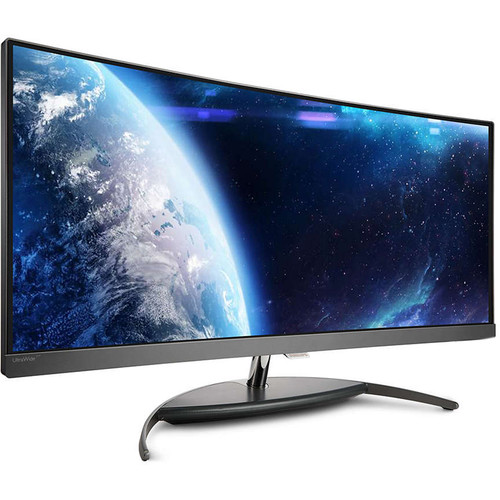
Philips announces 34 inch Brilliance UltraWide QHD Curved LCD Display (BDM3490UC)

Buying a monitor can be quite the daunting affair. Not only are there many styles to choose from, but various resolutions too. While 4K monitors are all the rage, some operating systems, such as Windows 10 and some Linux distros, are not optimized for higher resolutions. Text and icons will appear small, and increasing sizes in the OS can cause some programs to display blurry text. In my experience, only OS X scales well to high res monitors.
 
Keeping that in mind, it is understandable if you are willing to put up with those concerns, as images, movies and games can be absolutely gorgeous on high-resolution screens. Today, Philips announces a beast of a monitor -- 34 inches, curved, with a resolution of 3440 x 1440. While less than 4K, this resolution offers a very wide view.
 
"The 34 inch Brilliance UltraWide Curved LCD Display has a 21:9 panoramic aspect ratio with True 8 bit color depth for superb color accuracy as well as an UltraWide Quad HD 3440 x 1440 resolution for gorgeous detail with a pixel area that is 2.4 times larger than a Full HD monitor. The super widescreen makes the display ideal for viewing spreadsheets, editing multiple documents and running several programs at once. Additionally, the monitor's MultiView technology enables active dual connect and view, so that you can work with multiple devices like PC and Notebook side-by-side simultaneously, making complex multi-tasking work a breeze", says Philips.
 
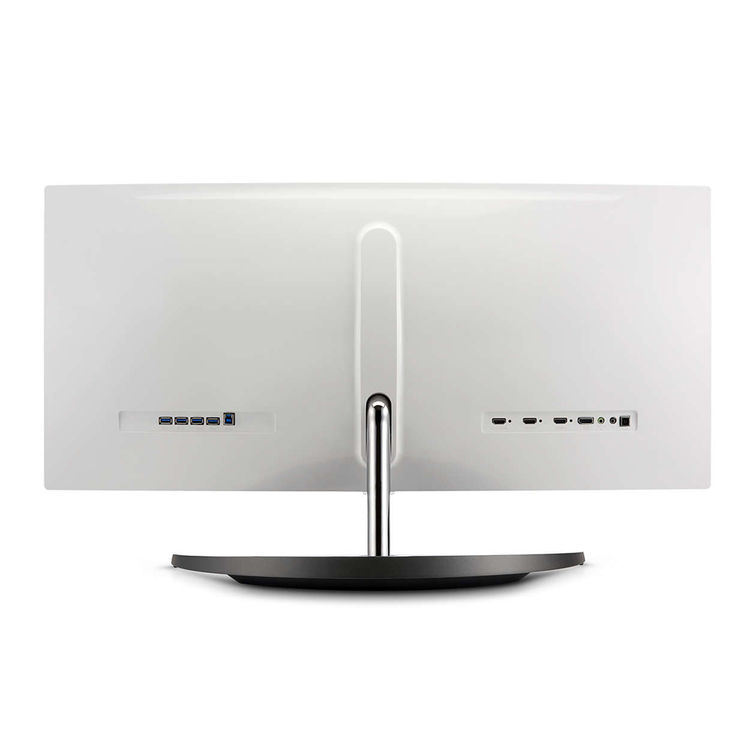
The company further says, "Setup and configuration of the Philips BDM3490UC is simple as it comes equipped with a variety of connectors including DisplayPort 1.2, HDMI 2.0, and HDMI 1.4 inputs. Included with the HDMI 1.4 input is MHL (Mobile High-Definition Link) functionality making it easy to stream content from the device directly to the display in 1080p quality. In addition to audio/video input connectors, this monitor comes equipped with four USB 3.0 ports supporting data transfer rates of up to 5 Gbps as well as the ability to charge connected mobile devices. To complete the multimedia experience, Philips has built-in, dual, 7W stereo speakers to fully engulf you in sound when viewing videos, gaming, and more".


Philips shares the following specifications.


If you are interested in purchasing this monitor, you can grab it now for $999. For some reason, it is exclusive to B&H Photo, found here.
 
Yes, the price is high, but you get what you pay for. A curved display of this size and resolution is on the higher-end of monitors. Not to mention, it has plenty of connection options, plus an integrated USB 3.0 hub. The BDM3490UC should last you many years with all of its features.
 
Will you buy it? Tell me in the comments.
 
~ Brian Fagioli

2.22.2016

Why Apple's shameless fight with the FBI is all about ego, not just cause

After spending the last few days soaking up as much as possible on the Apple-FBI San Bernardino iPhone spat, the evidence -- in my eyes -- has become crystal clear. Apple's planted itself on the wrong side of history here for numerous reasons, and is using nothing less than a finely scripted legalese tango in defending its ulterior motives.
 
As a part time, somewhat auxiliary member of the tech media at large, I'm a bit embarrassed at how poorly this story has been covered by my very own colleagues. Many of those who should undeniably have a more nuanced, intricate understanding of the technical tenets being argued here have spent the last week pollinating the internet with talking point, knee-jerk reaction.
 
Inadvertently, this groupthink is steering Apple's misguided arguments forward to a populace that otherwise relies on the tech media's prowess in unearthing the truth in such matters. This is one such case where technical altruism is blinding the real story at play here, which are Apple's design flaws -- in other words, inadvertent insecurity bugs -- found in the older iPhone 5c.
 
For those that haven't kept up on this story, you can get a great primer on where the Apple vs FBI situation stems from and its surrounding core facets. ZDNet's Zack Whittaker has a great FAQ post that digs into the major topics at hand in an easy to understand manner. No need to retread already covered ground in this post.
 
Apple's Framed Narrative in Twisted Prism of Encryption
 
The tech media is writing story upon story that makes mention of supposed backdoors the FBI is requesting, which entail things like "master keys" which could potentially unlock any encrypted iOS device. While there are far too many media stories I could link to which prove such misinformation dissemination, I'll point to posts like this one on Venturebeat and even coverage on the otherwise usually judicious podcast, This Week in Enterprise Tech (episode 177 is where the Apple/FBI case was dissected at length).
 
While this self-absolving narrative is making its rounds, let's not forget where this all began. It was Apple itself, in its now famous open letter which was published on Apple's website and signed off by no less than Tim Cook himself. And for that, shame on him.
 
 
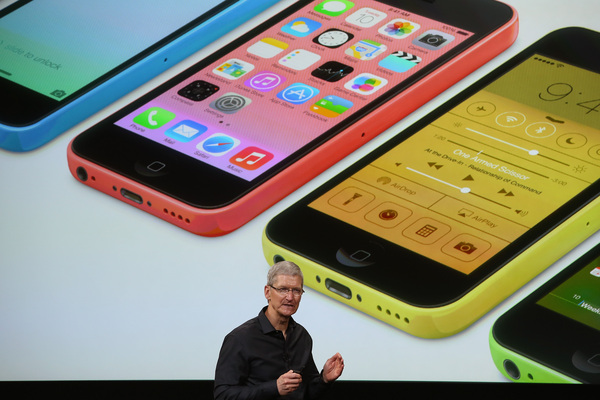
Many in the media have mistaken this to be a case about phone encryption, due to Apple's framing of the discussion in such a light. In reality, the FBI is merely asking Apple to help create a special iOS firmware for a single iPhone 5c which could disable forced-wiping after 10 entries, and altering the timeout delay between entries. Apple's attempt to sway the narrative leads me to believe it is more concerned about corporate image than public safety. (Image Source: Mercury News)
 
I know very well that as the leader of a massive publicly traded company, Cook has a duty first and foremost to his most critical stakeholders, those being Apple shareholders. But the finer point which Apple forgets in its shameless fight with the FBI is that the very sacred tenets of American democracy and capitalism have allowed his firm to grow to such unprecedented levels. There is very well a balancing act which needs to be distinguished in a free society that stands at the folds between security and privacy.
 
The FBI is not asking for any kind of encryption "master key" here, let's be very clear. Such a request would be an overreach of the inherent division that is required to ensure the greater security of data for the masses in question here. And such a request would be one that I would, as an IT professional, yet more importantly, a member of this society, be very succinctly be opposed to.
 
But this is not what has been asked of Apple, and not what's at stake for the company. This move is driven by a PR objective aimed at keeping Apple's ego and image in something it preaches so dearly: security.
 
FBI's Request Indirectly Forces Apple to Admit iPhone 5c Insecurity
 
If you're curious as to how I could come to such a conclusion, you can feel free to glean through the same well written, and lengthy, expose on this situation which convinced me on the subject with clear technical validation and reasoning -- not purely emotional knee-jerk reaction. The post is on the blog for a company called Trail of Bits which has noted deep expertise in security research.
 
Much of my very stance on the subject is also reflected in Mark Wilson's post from a few days ago right here on BetaNews. Even Trevor Pott of The Register penned a rather wordy, but pointedly accurate piece that confirms what the Trail of Bits blog post puts forth as a theory.
 
"What appears to be involved is a design flaw. Something about the iPhone 5C in question is broken," says Pott in his Register article.  That's right, a design flaw which happens to be the complete lacking of the "secure enclave" which is detailed at length in the Trail of Bits blog piece.
 
If this were a newer A7 or newer powered iPhone, the FBI's chances of getting in without asking for the dreaded pandora's box "master key" (which doesn't exist) would be next to zero. But Apple never included this security facet on its earlier phones, and herein lies the very nuanced tenet of what the FBI truly wants to be able to leverage.
 
The FBI doesn't want and has never asked Apple for any kind of master key. It's asking for mere assistance in re-engineering its way through a known security flaw in Apple's iPhone 5c device which doesn't tie PIN entry and authentication to the internal data through the use of this secure enclave. While Apple won't admit as much, this is very much so a security flaw that Apple obviously will never be able to fix for iPhone 5c owners, and naturally, has every intention to re-architect the argument on this situation to deflect any potential for this criticism to reach critical mass.
 
And even more acutely, the FBI and Justice Department aren't asking Apple to make this available to "all" future iPhone 5c devices recovered in the course of policing. The DOJ says Apple has the free will to "keep or destroy" this special firmware after its purpose is rendered for the FBI's requests. So Apple's consumer-focused defense that it is being asked to "hack its own users" is just another attempt to misconstrue the real intentions of law enforcement here.
 
One important fact which some of the media has glossed over is that the iPhone in question was not even a personal phone of the shooter. The device was actually a work-issued device that was handed out by the San Bernardino County Department of Public Health, and in turn, is considered employer property with all accompanying rights that employers have over the data stored on those devices.
 
 
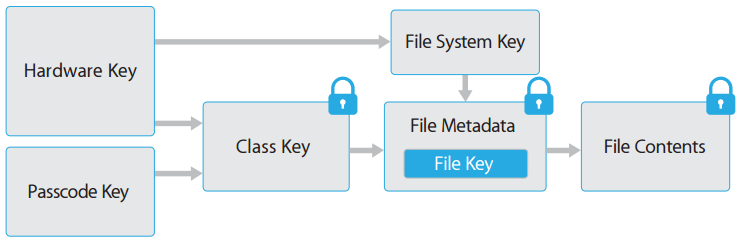
Apple's A7-powered and newer iOS devices all employ an internal lockbox known as the "Secure Encalve" which broker access to encryption keys used to access user data. The iPhone 5c lacks this very item, which makes the FBI's chances at getting into the San Bernardino shooter's iPhone very possible -- and technically proven feasible by security experts. But Apple's ego, partially built on an image of security, naturally forces its arm in trying to trump the FBI's request. (Image Source: Troy Hunt)
 
I'm not here to use Apple as a pincushion, as the industry at large needs to double down in its attempts to put its actions where its words are about security. But Apple deserves heat here, not only because it's putting shareholders first above national security, but because it has previously been guilty of trumpeting "security through obscurity" as I've covered at length in previous posts.
 
Any reasonable technology company is going to have bugs and defects in its devices and code. That's the nature of the beast, and understood by IT pros like myself. But Apple has built an empire in part by its clever marketing teams that have flaunted layers of security which supposedly beat and exceed those of any other company's competing products.
 
Sometimes, it is in the right and marketing matches reality.
 
But many times, like with the now-dead claims that OS X doesn't get malware which I fought against for years, Apple put greenbacks before fiduciary responsibility to be honest about its software and device capabilities. And while the cessation of the famous "I'm a MAC" advertising campaigns signaled a more subdued competitive standing on the OS X front, Apple's big moneymaker isn't in desktop computers anymore, it's in iPhones that it sells by the millions.
 
How does this round back to its reluctance to work with the FBI? Very simply, doing so would inadvertently admit that the iPhone 5c indeed has the security flaw which the FBI and the industry has exposed. And the problem for Apple is that it has created an ego bubble for itself which fans have bought into that has security as a notable keystone.
 
If that keystone falls here, Apple's back to square one with winning back its fans that place i-Devices on a pedestal most other manufacturers only wished they had.
 
Put in other words, it's Apple's ego at stake here. And it takes that very, very seriously if you haven't noticed.
 
Apple Has an Undeniable Duty to the Society it Built its Fortunes On
 
We've clearly established some very agreeable, black and white, facts surrounding this situation based on everything I've linked to above:
  1. This is not a debate or court-order surrounding any kind of encryption "backdoor" or "master key."
  2. The FBI is asking for acute access into a single iPhone based on a design flaw which has been exposed.
  3. Apple has the proven technical ability to render this special firmware locked to the iPhone in question.
  4. Apple has the court-ordered right to perform the procedures needed in its own facilities, and destroy the software created once complete.
As such, I'm convinced beyond any doubt that the abilities to get into this phone exist, and can be done so in a way to protect the universe of iPhone users at large from massive data grabs by legal overreach. Apple's denial in helping the FBI, as described earlier, is not grounded in technical validity, but rather being driven by a corporate ego that has grown too large for its own good.
 
Apple's feelgood and impenetrable stances on its device security are at risk of being exposed to the masses. For a company that has built its fortune around peddling a larger-than-life notion about its own security prowess, this would spell downright disaster in the marketplace, especially in the newfound re-emergence it has found in the previously reluctant Enterprise market towards its products.
 
But let's go beyond profitability reports and corporate egos, as the larger extrapolation here is Apple's duty that it owes to the citizens of this very nation. A country that is now in need of a compassionate about face by Apple so we can connect the dots on a terrorist situation that will not only help explain the events leading up to the San Bernardino massacre, but likely expose critical nuggets of information about other future plots or combatants.
 
Apple's attempt to paint this discussion in a sea of technicalities and promotion of the privacy of its users at large ends up falling on its face when the facts are dissected in sunlight. If that very sunlight means Apple's design flaws must be vaulted into public discussion, so be it. That's the duty it owes its users in being assured that its designs are not merely existing in a lab -- but being tested, sifted, and penetrated to make future generations of hardware better on the whole.
 
While our democracy has been historically opposed to gross intrusion of privacy, as seen in opposition to ad-hoc phone record dredging, a common sense approach towards nuanced security needs is something we cannot become blind to. Companies and advocates like Apple will try to smokescreen their intentions with public decrees like Tim Cook's in a blanket position on privacy, but even its future has just as much at stake if the terrorists can use an over-extended privacy veil as its own.
 
The day the Justice Department calls for blanketed  encryption"master keys" from Apple is the day I will stand with Apple. But that day is not today, as Apple has not and is not being asked as much.
 
Do the right thing, Tim Cook. Your company enjoys prosperity through the same democratic society that is pleading with you to put the future of our nation ahead of personal or corporate motives.
 
If future deaths could have been prevented acutely via that iPhone 5c you refuse to help unlock, what kind of responsibility will fall on Apple's shoulders? Only history will be the judge of that.
 
Image Credit: klublu/Shutterstock
 
~ Derrick Wlodarz

1.27.2016

Apple's Safari browser crashing for some users worldwide: The Verge

A man tests a mobile phone, an iPhone 6 by Apple in a shop in Munich, Germany, January 27, 2016.
REUTERS/MICHAELA REHLE
Apple Inc's Safari search browser is crashing for some users when they run a search from the address bar in both iOS and OS X devices, the Verge reported.

The problem appears to be affecting iOS and OS X devices worldwide, the Verge reported on Wednesday.

Apple's iPhones and iPads run on iOS, while its Mac computers operate on OS X.

The problem, which is related to Safari's search suggestions feature, can be rectified temporarily by disabling the feature or using the private mode option in the browser, the Verge reported, citing an iOS developer Steven Troughton-Smith. (bit.ly/1SiXArK)

Apple was not immediately available for comment.

Apple forecast its first revenue drop in 13 years and reported the slowest-ever increase in iPhone shipments on Tuesday.

~ Lehar Maan

11.23.2015

Modbook Pro: Yes, there is an OS X tablet and it's been available since 2012

As capable as the iPad Pro is for artists, there are those who want Apple to make a tablet that runs OS X. That's not likely to happen, but a third-party company has been making one for a while.

Modbook Pro
A tablet running OS X has been a pipe dream for some and a Los Angeles-based company, Modbook, has been making one since 2012. Since Apple doesn't sell nor license the OS to third parties, the Modbook Pro takes a radical approach.
 
When you buy a Modbook Pro you are essentially buying a 13-inch MacBook Pro that the company cannibalizes to make the tablet. Everything inside the MBP that makes it a Mac is incorporated in a tablet enclosure that is the Modbook Pro.
 
The tablet houses the computer, and has a 13.3-inch display that works with a Wacom pen. The MBP keyboard base unit is ditched in favor of a pure tablet device.
 
The company aims the Modbook Pro at the serious artist who needs a sensitive pen (1,024 levels of pressure sensitivity) for sketching, while also having a need for running OS X apps.
 
According to Modbook, the conversion to the tablet involves placing the MacBook Pro in the tablet housing and connecting it to the ModBook Pro via a USB 3.0 connection. This accounts for a lot of the five pound weight of the tablet.
 
In addition to an OS X installation, it can be ordered with just Windows, or it can be installed on the Modbook Pro in a dual-boot arrangement for those needing access to both OSes. This is Windows 7 according to the specifications.
 
The Modbook Pro tablet is nearly an inch thick, so it's not a slim device. It is configurable to suit the buyer's requirements, with CPU, memory, and SSD storage sizes to suit. It is available in a price range of $2,699 - $2,999 for OS X and $2,799 - $3,099 for Windows only. There is also an entry-level model for $1,899 that is a DIY version which ships with everything in a box for hardy souls willing to take on the daunting task of building the Modbook Pro themselves.

Using the MacBook Pro in this fashion voids Apple's warranty so the Modbook Pro comes with a one-year warranty of its own to cover the tablet.
 
The need for running OS X on a tablet aside, it sounds like it might be time for those considering the Modbook Pro to look at the iPad Pro with an Apple Pencil. It's a lot cheaper if nothing else.
 

9.18.2015

Pro tip: Manage Wi-Fi with Terminal commands on OS X

Jesus Vigo reviews Terminal commands used to enable, modify, and manage Wi-Fi connections on Macs in OS X. 

Image: Jesus Vigo
Coffee shops, malls, hotels, and now even cars are being made with built-in wireless hotspot features. Wi-Fi access is everywhere! And while it's been made relatively easy enough to connect to access points for consumers, sysadmins face a different challenge when having to manage wireless settings, especially on mobile devices.
 
For those leveraging mobile device management (MDM) platforms to push settings, this is a non-issue, but if the cost of these suites remains prohibitive or connectivity is spotty, the following Terminal commands can be used to manage Wi-Fi settings in OS X. They can even be incorporated into a script and deployed to remote end users.
 
Before moving forward with the various networksetup-based commands, please note that as of OS X 10.8, the AirPort Terminal command, which is what drives some of the changes made to Apple's AirPort wireless connections, has been hidden within the OS and must be referenced directly each time the command is run. To side-step this, run the command below first, which will create a symbolic link to the AirPort command itself so that it may be referenced each time without having to enter a long string of commands each time.
  • Create a symlink to the AirPort command in Terminal
    ln -s /System/Library/PrivateFrameworks/Apple80211.framework/
    Versions/Current/Resources/airport /Usr/bin/airport
     
  • Network connections list
    ​networksetup -listallhardwareports
     
  • Enable or Disable Wi-Fi
    networksetup -setairportpower en0 on (or off)
     
  • Secure Wi-Fi Settings
    airport prefs RequireAdminIBSS=YES 
    RequireAdminPowerToggle=YES
    RequireAdminNetworkChange=YES

Arguments

RequireAdminsIBSS=yes (or no) | Restricts creation of ad-hoc networks to admins.
 
RequireAdminPowerToggle=yes (or no) | Restricts power on/off of Wi-Fi to admins.
 
RequireAdminNetworkChange=yes (or no) | Restricts network changes to admins.
  • View available Wi-Fi networks
    ​airport -s
     
  • Join Wi-Fi network
    networksetup -setairportnetwork en0 SSID_OF_WIRELESS_NETWORK WIRELESS_NETWORK_PASSPHRASE
     
  • Create a Wi-Fi network profile
    networksetup -addpreferredwirelessnetworkatindex en0 SSID_OF_NETWORK INDEX_NUMBER SECURITY_OF_WIRELESS_NETWORK WIRELESS_NETWORK_PASSPHRASE 
SSID_OF_NETWORK | SSID of the network you wish to join/create a profile of.
 
INDEX_NUMBER | Numerical value to assigns a position in the list of preferred wireless networks. A value of "0" adds to the network to the top of the list.
 
SECURITY_OF_WIRELESS_NETWORK | Wireless network security type (ex.) WPA2.
 
WIRELESS_NETWORK_PASSPHRASE | Password or passphrase used to authenticate the password-protected network.
  • Delete a Wi-Fi network profile
    networksetup -removepreferredwirelessnetwork en0 SSID_OF_NETWORK
     
  • Remove all stored Wi-Fi network profiles
    networksetup -removeallpreferredwirelessnetworks en0
Though managing wireless network settings may seem trivial to some, in densely packed office buildings with dozens of Wi-Fi networks broadcasting their signals, data security is a big concern. Configuring wireless endpoints so that they're properly secured against eavesdropping from unauthorized networks is just one way in which network administrators work with system administrators to ensure that secured wireless access is granted through trusted networks and managed accordingly.
 
How do you manage Wi-Fi for Macs in your organization? Share your experience in the discussion thread below.
 
~ Jesus Vigo

9.16.2015

AirDrop exploit can be used to push malicious apps to iOS and OS X

 
A vulnerability has been discovered in iOS and OS X that could be used to install apps without permission, using AirDrop. The feature exists to provide a way for people to quickly send files from one device to another, but security researcher Mark Dowd has been able to exploit the vulnerability to push apps to iOS even if the user does not accept the file that is AirDropped.
 
Dowd has reported the vulnerability to Apple, but the company has failed to patch the problem so it still exists in iOS 9. Using a combination of techniques, it is possible to bypass the security screen that asks if an app is to be trusted or not, meaning that a malicious app can be installed without permission or notification.
 
Dowd was able to use his own Apple enterprise certificate to create a test app that could be run on any device. By using an enterprise profile, it was possible to bypass code-signing protections and install the app without any prompts being displayed. As well as installing apps without permission, the same technique can be used to overwrite files in both iOS and OS X.
 
Speaking with Threat Post, Dowd said:
When you send a package via AirDrop, it comes up with a notification on the target phone asking the user if they want to accept the package. The user has to unlock the phone to accept or decline it. It does NOT matter whether they accept it or not to trigger this bug -- the exploit has already happened by the time the notification is sent to the user.
He has also released a video showing the exploit in action:
 
 
Photo credit: Ellica / Shutterstock
 
~ Mark Wilson

8.22.2015

Chrome finally becomes memory and power efficient -- you can try it out now

 
It's no secret that Chrome for Mac (OS X) is a mess. It eats a ridiculously high amount of memory, energy and shortens the battery life. Google announced earlier this year that it was working on a fix. And now it is delivering on that promise. The latest Chrome build -- available via Canary channel -- is significantly less resource hogging, and surprisingly faster at the same time.
 
The company has been hard at work improving the memory consumption in its Web browser while also making the tabs snappier. You can read about the development process and feedback at Chromium's developer website. The build dubbed 45.0.2454.46 is also significantly lighter on the battery and is no longer making the laptop crazy hot. In a recent build, the company was testing interesting internal processes like tab discarding in the background. The idea behind it is simple: make the tabs you haven't used in awhile idle automatically. This would, under the typical condition, free up a significant amount of memory.
 
The company also made some changes in the stable version of Chrome earlier this month to increase the responsiveness of Web applications. “Starting in Chrome 41, V8 takes advantage of a new technique to increase the responsiveness of web applications by hiding expensive memory management operations inside of small, otherwise unused chunks of idle time. As a result, web developers should expect smoother scrolling and buttery animations with much reduced jank due to garbage collection”, it noted in a blog post.
 
The stable version of Chrome, however, doesn't offer these features just yet. But since it is already on version 44, we expect the version 45 to release on Windows and Mac soon. Till then, you can try out the beta build, though do note that due to its nature, it might have many rough edges, and could crash and trigger unanticipated actions.
 
~ Manish Singh

8.20.2015

Performing custom secure file deletion via the OS X Terminal

Apple's "Secure Empty Trash" option will perform a seven-pass random erase on the files in the Trash, but you may wish to change this up a bit.

When you delete a file from your hard drive, the system will by default just remove that item's directory entry but will leave its data structure on the drive intact. This allows the file's data to be overwritten, but it also means that until this happens, the file's data can be read and reassembled if needed, as is done by various file recovery utilities. To prevent files from being recovered, OS X comes with a secure erase option that overwrites the location of files on the disk with random data, which interferes with the file's data patterns and prevents it from being recovered.
 
Apple's "Secure Empty Trash" option is available in the "Finder" application menu.
 
Unfortunately, depending on the file size this can take a long time, since the system has to write data to the disk for each pass. For example, if you perform a secure erase on a 1GB file then you will have to wait for the hard drive to write 7GB of data to the disk before the routine is finished. This differs from a standard deletion where removing the entry from the directory takes a millisecond or two, regardless of the file's size.
 
Even though the idea of multiple-pass erases may provide ease of mind, for most intents and purposes a single pass of random data overwriting a file is enough to ensure no bit patterns of the original file can be detected and therefore render it irrecoverable. Unfortunately OS X does not have any options to change its default secure-erase routine, which uses a seven-pass erase scheme to overwrite the data.
 
Despite this, there is an option in OS X that can be used to better customize secure file deletion, which is the Terminal command "srm." If you are famiilar with the Terminal then the "srm" command has very similar syntax to the "rm" command, except that it has additional options for the secure erasing of the file, which are to overwrite it with zeros (with the "-z" tag), overwrite it with one pass of random data (the "-s" tag), or to use the Department of Defense recognized seven-pass deletion (the "-m" tag--for "medium"). If no specifications are issued, then the program will default to doing a 35-pass erase, which can take a very long time.
 
For people not familiar with the use of the command, all you have to do is the following:
  1. Open the Terminal and type the following, followed by a single space:
    srm -rfv -s
  2. Drag the files or folders to be deleted to the Terminal window (their full file paths should complete in the window).
  3. Press enter to delete them.
This option will perform the "Simple" or single-pass erase of the files, but if you change the "-s" to a "-m" then it will perform the seven-pass erase. If you just want to overwrite the file with zeros (which is also likely more than adequate for irrecoverably erasing files), then you can use the "-z" tag her instead. To have the program perform the full 35-pass erase, just remove this tag altogether so there is no "-s", "-z", or "-m" option in the command.
 
Do you have any tips or tricks for securely erasing files in OS X? If so then let us know in the commnts.
 
~ Topher Kessler

7.31.2015

Pro tip: Enable NTFS write support natively for OS X

Jesus Vigo explains the pros and cons of using Apple's default NTFS driver for native write support of NTFS-formatted drives in OS X. 

For years now, Apple has provided support for Microsoft's major drive formats—namely, FAT and NTFS. With full read and write support for FAT32, everything works well... until NTFS support is required.
 
Apple's native NTFS driver handles read capability, yet write support has long been absent from the equation. Even though write support is built in to the native driver itself, it's disabled by default in OS X, since Apple doesn't officially support writing data to NTFS drives.
 
Though Apple supports exFAT, an alternative format also created by Microsoft to read/write OS X and Windows, the fact remains that Windows drives are formatted with NTFS by default. This fact makes it very likely that you'll need to write data to an NTFS-formatted drive from a Mac at some point or another.
 
Luckily, NTFS write access can be enabled on a per-drive basis using Apple's native driver. Remember though that this solution is unsupported, so care should be taken to properly back up data should anything go wrong, such as data corruption and/or subsequent loss.
 
With this in mind, let's proceed.
  1. On your Apple computer, connect an NFTS-formatted drive to an external port. Take note of the volume name, as you'll need it later.
  2. Launch Terminal.app and type in the following command, entering the admin password when prompted (Figure A).
    sudo nano /etc/fstab
    Figure A
  3. This will open the fstab file that is blank by default. Now, using the volume name, enter the following command (Figure B).
    LABEL=VOLUME_NAME none ntfs rw,auto,nobrowse
    Figure B
  4. Press [Ctrl]+[O] to write the information to file, then press Enter to save the change (Figure C).
    Figure C
  5. Repeat steps 2-3 for each drive you wish to enable NTFS write support on, and then press [Ctrl]+[X] to close the file (Figure D).
    Figure D
  6. Next, eject the drive(s) and mount them again. This time, you'll notice the drive does not appear in the Finder. Select Go | Go to Folder... from the Finder menu, enter /Volumes, then press Enter to view the hidden volumes connected to your Mac. From here, you'll be able to drag and drop the volume(s) to the sidebar for easy access when reading and writing to/from, as it does not mount on the desktop unfortunately.
To undo the edits made to the etc/fstab file, simply load the file (as in step 2) and delete the entries created for each drive, then save and exit. That's it!
 
While this is quick and easy to implement, it's not without drawbacks, such as occasional instability, the fact that it's unsupported, and you can only enable it on a per-drive basis. If you manage multiple drives, need this to work quickly and efficiently, or if you're deploying this as a solution to multiple end users, then a more robust driver like those provided by 3rd-party developers (such as FUSE or Tuxera) might be a better solution for production or mission-critical needs.
 
~ Jesus Vigo

5.29.2015

Adware makers turn their sights on OS X

 
Hot on the heels of news that OS X topped the vulnerabilities charts in April comes Dr. Web's virus activity review for May which shows increasing quantities of adware and unwanted applications targeting the Apple operating system.
 
The company reports several programs aimed at OS X that either install adware, install other applications or inject JavaScript code into webpages.
 
Adware.Mac.InstallCore.1 cannot only install unwanted programs on the user's computer but also change the browser home page and the search engine used by default. The program incorporates debugging functions too -- once launched, it scans the system for the presence of virtual machines, anti-virus tools, and some other applications. If the scan returns positive results, the malware will not prompt the user to install additional programs.
 
There's similar functionality in Mac.Trojan.Crossrider which is distributed in the guise of an installation package (Safari Helper). Crossrider trojans may be familiar to Windows users but this variant specifically targets Apple systems. Running it triggers a stealthy installation of the FlashMall extension for Safari, Chrome, and Firefox. It also adds two applications to the system startup list: "WebSocketServerApp" and "Safari Security". The first is responsible for communication with the command and control server and the second one installs browser extensions. In addition the malware modifies the startup scripts for the browser extensions to be updated in the future.
 
Apple users may like to know they're not the only ones that are coming under attack. Linux.Kluh.1, developed by a Chinese hacker group, infects routers with the purpose of launching DDoS attacks. Linux.Iframe.4 is a malicious plug-in for the Apache web server that injects code into web pages browsed by users redirecting the victim to the web page run by cybercriminals.
 
Trojans continue to be the big threat to Windows systems with an overall increase of 14.9 percent in the amount of malware and riskware detected in May. Android users aren't safe either with an increase in numbers of banking and SMS trojans as well as the emergence of new ransomware.
 
There's been a big increase in malicious websites too with 221,346 URLs being added to Dr. Web's database in May. Many of these use social engineering techniques like sending bulk SMS messages informing the recipient that they have won a car. The message contains a link to a wesbite which tries to get visitors to part with their financial details.
 
More information on these and other threats is available on the Dr. Web site.
 
Photo Credit: Stephen Finn/Shutterstock
 
~ Ian Barker

4.14.2015

Apple's WWDC 2015 scheduled for June 8 through 12, will show 'the future of iOS and OS X'

 
Apple has officially set June 8th as the kickoff date for this year’s Worldwide Developers Conference. As usual, the event will take place at the Moscone Center in San Francisco, where developers will get to learn about the next major release of iOS and OS X. It's not unheard of for Apple to introduce new or updated hardware products at WWDC too, but for now all we have to go on is the teaser tagline “the epicenter of change” atop some colorful shapes.
 
Like last year, due to the large demand for tickets and limited space, Apple will be awarding tickets to attendees through a random selection system. Developers will be able to apply today through Friday, April 17 at 10 AM PDT, and they will know if they will be getting tickets by the following Monday. Those that can't make it can still watch a select number of the more than 100 technical sessions through a live stream provided by Apple.
 
On the software side, we haven’t heard much about what’s coming in OS X 10.11, but with iOS 9 Apple is said to be putting a huge focus on fixing bugs, improving stability and boosting performance instead of prioritizing new features.
 
In terms of hardware, some suggest the oft-rumored Apple TV refresh is finally coming -- that sort of looks like an Apple TV on the event invitation, doesn’t it?. The set-top box is expected to carry an A8 processor (or perhaps a variant of it), much more onboard storage than usual, an update to the operating system and support for both Siri and HomeKit. Apple is also known to be pursuing a number of content partnerships, in addition to their launch deal with HBO Now, and recently cut the price of its current Apple TV box.
 
~ Jose Vilches

3.10.2015

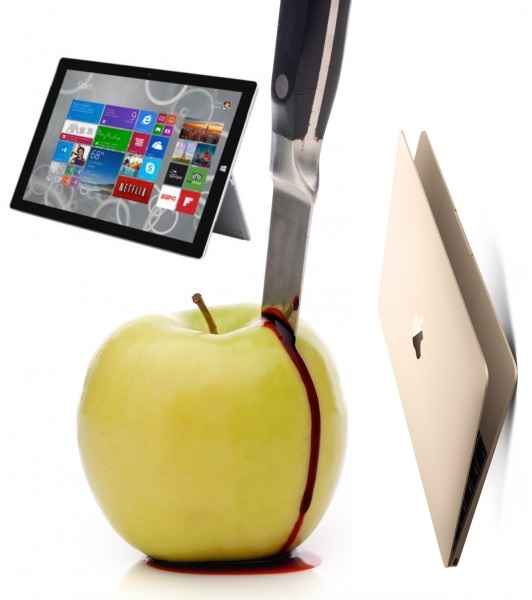
Sorry Apple, Surface Pro 3 is better than your new MacBook -- here are 6 reasons why

 
Apple makes extremely good computers; Mac Mini, iMac, MacBooks, Mac Pro -- you can't go wrong. With Apple's hardware, however, you have to pay to play; it is not an inexpensive experience. You know what? That's OK. Things are worth what people are willing to pay for them, and people are buying computers running OS X.
 
Today, while watching Apple's latest event, I started to fall in love with the "new MacBook", but quickly snapped back to reality; my Surface Pro 3 is better than this thing. Apple's latest laptop is arguably more attractive, but Microsoft's can do more, while offering a better experience.
 
1. Touch Screen -- The Surface Pro 3 is a friggin' tablet with a touchscreen. For many people, this is enough to make Microsoft's computer better. Come on Apple, it is 2015; people like this touch thing, it is not a gimmick. Could a touchscreen MacBook cannibalize iPads like the iPhone 6 Plus? It might hurt your tablet sales a bit, but regardless, OS X users deserve a modern experience. The fact that a Surface user can remove the keyboard and relax on the couch with a tablet is something your fans would love. Even if you don't make the screen removable, the ability to touch has its moments.
 
2. Stylus/Pen -- Not everyone uses a stylus or pen, but there is no downside to having it. Believe it or not, some people like to use handwriting when taking notes or working in a standing position. You know who else uses a pen? Artists. You know what brand many artists love? Apple. A capacitive stylus on an iPad is not ideal for pros; a digitizer is a must.
 
3. Windows -- This is partly subjective, but a fair point nonetheless; Windows is more popular than OS X, especially for business. Even if you prefer OS X, Windows has more available software, and that is an undeniable fact. For many college students and small business users, Windows makes more sense for this reason. Encountering software that requires Windows or Internet Explorer is a fact of life and a potential road block. Not to mention, OS X still cannot do simple things like window-snapping -- lame!
 
4. Regular USB port -- USB 3.1 type-C is the future, and Apple is on the forefront with the new MacBook. Unfortunately for Apple, this isn't the future; we are living in the present, where a traditional USB port reigns supreme. Apple's computer will require a dongle or converter cable to use a traditional flash drive or other USB device such as a hard drive or printer. It is one more thing to buy, one more thing to pack in a bag, and one more thing to lose. In 2015, the Surface Pro 3's USB port is the more useful of the two.
 
5. Better trackpad -- The Surface Pro 3 sells without the keyboard cover, but in reality it is a required purchase for the computer. While the trackpad isn't the best, it is already better than Apple's new variant. You see, because of the thin nature of the new MacBook, the trackpad no longer clicks. Instead, it uses pressure detection to register clicks and other gestures. The problem? The human brain likes physical feedback. The click of a trackpad or buttons reassure that a click has been registered. While I am sure Apple's haptic-feedback solution will be passable, it will likely be a frustrating productivity killer compared to a traditional click. Surface Pro 3 retains the clickable touchpad that consumers want.
 
6. Price -- Apple's new MacBook starts at $1299, while the Surface Pro 3 starts at $799.  True, this is the price without the type cover, so with it we are looking at about $930. The problem is, since the Surface Pro 3 is also a tablet, you need to add a $500 iPad to the MacBook for the tablet experience. This makes the new MacBook starting price $1,800. In other words, it is almost twice the starting price as the Surface Pro 3!
 
Where new MacBook is better
 
Of course, the new MacBook is better in a few departments; it is not a one-sided affair. Most importantly, Apple's new laptop features a newer Intel Broadwell chipset, which allows it to be fanless. By comparison, Surface Pro 3 uses the older Haswell and as a result, an audible fan.
 
The traditional clam shell design of the new MacBook will allow better lap-typing. The Surface Pro 3 works better than the previous generations in this regard, but is still a frustrating experience to say the least.
 
While the Surface Pro 3 is thinner than the new MacBook, that is without the keyboard cover. Once that cover is added, Apple's computer is thinner, making it the more svelte of the two.
 
Conclusion
 
Overall, Surface Pro 3 is the smarter buy for many people and the overall better computer. Hell, it is arguably half the starting price. With that said, die-hard OS X fans will likely stay in Apple's camp, and that is not a bad thing. Look, if you like Mac computers and they meet your needs, then the new MacBook is likely a great choice. If you want a touch screen computer that is also a tablet and, most importantly, runs the desktop operating system with the most software, Surface Pro 3 is for you.
 
Keep in mind, however, the Surface Pro 3 is last year's model; a 2015 Surface Pro 4 refresh with Broadwell would make Microsoft's win over Apple even greater.
 
Photo credit: Vince Clements / Shutterstock
 
~ Brian Fagioli

3.06.2015

Oracle: How about some adware to go with that new Java for Mac?

 
One of the things I -- and I assume a lot of fellow users -- like about using a Mac is that most OS X programs do not try to trick the user into installing adware. In fact, a lot of the programs I use do not even feature a typical setup, as they can be installed simply by copying them to the Applications folder. For someone coming from Windows, it may feel impossible to grasp at first -- yes, you can actually enjoy the install process. Wow!
 
Of course, there are developers who do not care about the experience their users have during and after the setup, so they bundle adware with their programs. Thankfully, on Macs it's easier to spot, but it's still something to look out for at times, especially if you wish to install Oracle's latest Java release.
 
Oracle is resorting to the same old tactics that Windows power users are well familiar with to trick OS X users into installing Ask's browser extensions and set its search engine as default, alongside Java 8 Update 40.
 
Prior to the release of Java 8 Update 40, Java was made available through standard installer packages. However, with the latest release, Oracle switched to an app-based installer, which makes it easy to bundle such adware. (That said, the "old" package installer, called JavaAppletPlugin.pkg, can be extracted from the new installer, allowing users to install Java 8 Update 40 as before.)
 
Before running the setup, the latest Java requires OS X users to enter their system password. This makes it easy to install Ask's crap down the road, unless the user deselects the "Set Ask.com as my browser homepage" box and clicks on "Don't Install" when presented with the option to install the Ask browser extension, the latter of which appears following the Java setup. Which is what, of course, I wholeheartedly recommend.
 
Since Mac users are accustomed to install methods akin to what I described in the first paragraph, they make easy targets. That said, I don't believe many non-experienced users will run into Java, as it is geared towards more advanced users -- like developers (Java is used, for instance, to make Android apps). They are, hopefully, likely to pay more attention to what's going on during the setup. Still, shame on you, Oracle!
 
Photo Credit: Leszek Glasner/Shutterstock
 
~ Mihaita Bamburic

3.04.2015

Apple plans fix next week for newly uncovered Freak security bug

The Apple logo is pictured on the front of a retail store in the Marina neighborhood in San Francisco, California April 23, 2014.  

Credit: Reuters/Robert Galbraith
 
(Reuters) - An Apple Inc (AAPL.O) spokesman said on Tuesday that the company plans to release a fix next week to mitigate the newly uncovered 'Freak' security flaw affecting Safari browsers on its iOS and OS X operating systems for mobile devices and Macs.
 
The vulnerability in web encryption technology could enable attackers to spy on communications of users with vulnerable software, including Apple's Safari browser and Google Inc's (GOOGL.O) Android browser, according to researchers who uncovered the flaw.
 
A representative for Google said he had no immediate comment. 
 
The Washington Post reported that the bug left users of Apple and Google devices vulnerable to cyberattack when visiting hundreds of thousands of websites, including Whitehouse.gov, NSA.gov and FBI.gov. http: 
 
Whitehouse.gov and FBI.gov have been fixed, but NSA.gov remains vulnerable, the paper cited Johns Hopkins cryptographer Matthew D. Green as saying. 
 
A group of nine researchers discovered that they could force web browsers to use an form of encryption that was intentionally weakened to comply with U.S. government regulations that ban American companies from exporting the strongest encryption standards, according to the paper. 
 

Once they caused the site to use the weaker encryption standard, they were then able to break the encryption within a few hours. That could allow hackers to steal data and potentially launch attacks on the sites themselves by taking over elements on a page, the newspaper reported.
 
The group of researchers dubbed the flaw Freak, for "Factoring RSA-EXPORT Keys," according to a website where they described the vulnerability.
  

~ Jim Finkle

12.25.2014

Sorry Apple fans, your precious Macs are at risk -- beware of Thunderbolt-injected rootkits

 
Apple makes really great products; Mac computers included. I respect the closed garden and restrictive hardware from a quality perspective, but I take umbrage with the high prices and questionable business practices. While OS X may look pretty from the outside looking in, after playing with it for long periods of time, it becomes apparent that all which glitters is not gold. My interest in Apple's operating system was very short-lived, as Microsoft's Windows is just a superior product.
 
Apple promoters are quick to point out the safety and security of Macs, as Apple is less likely to be targeted by malicious software and contains fewer vulnerabilities. As the smart people know, however, OS X is only "safer", as it has a far smaller install base. In other words, because of its lack of popularity, bad guys pay less attention -- its increased safety and security is a myth. I hate to break it to you Apple fans, but it turns out your precious Macs are currently at risk. Comically, this vulnerability is found in Thunderbolt -- you know, that wildly unpopular standard that Apple seems to love, but its accessories are too costly for many users. True, some Windows machines have Thunderbolt, but it is mostly an Apple affair, and now the fruit-logo company's computers are vulnerable because of its method of implementation.
 
"It is possible to use a Thunderbolt Option ROM to circumvent the cryptographic signature checks in Apple's EFI firmware update routines. This allows an attacker with physical access to the machine to write untrusted code to the SPI flash ROM on the motherboard and creates a new class of firmware bootkits for the MacBook systems. There are neither hardware nor software cryptographic checks at boot time of firmware validity, so once the malicious code has been flashed to the ROM, it controls the system from the very first instruction. It could use SMM, virtualization and other techniques to hide from attempts to detect it", says Trammell Hudson.
 
Hudson further explains, "our proof of concept bootkit also replaces Apple's public RSA key in the ROM and prevents software attempts to replace it that are not signed by the attacker's private key. Since the boot ROM is independent of the operating system, reinstallation of OS X will not remove it. Nor does it depend on anything stored on the disk, so replacing the harddrive has no effect. A hardware in-system-programming device is the only way to restore the stock firmware. Additionally, other Thunderbolt devices' Option ROMs are writable from code that runs during the early boot and the bootkit could write copies of itself to new Thunderbolt devices. The devices remain functional, which would allow a stealthy bootkit to spread across air-gap security perimeters through shared Thunderbolt devices".
 
Yikes. My colleague Mihaita touched on this earlier today; it is extremely embarrassing for Apple, and makes its computers highly susceptible to attack. Believe it or not, it is based on a two-year old vulnerability. What makes this particularly nasty, is that it doesn't matter if your computer is password protected; crafty hackers can simply wreak havoc by accessing your Thunderbolt port with a malicious device. Hell, malicious manufacturers can embed this in legitimate products, creating stealth-like hardware that users willingly install.
 
Does this make you trust OS X less? Tell me in the comments.
 
Photo CreditAngela Waye / Shutterstock
 
~ Brian Fagioli