Cisco Learning Network Store Promotions Page
Showing posts with label Skype. Show all posts

10.26.2016

Windows 10 'Creator’s Update' arriving next spring, and it's (mostly) all about 3D


At Microsoft’s Windows 10 event in New York, the software giant has lifted the wraps off the next big update of Windows 10, which it’s calling the Creator’s Update.

Yes, we know -- weird name, right? New in this update (among other things) will be a fresh version of Paint, called Paint 3D. This isn’t a minor update of the awful Paint program that most people have ignored for years, but rather a tool that lets you scan objects in the real world, and import them into a 3D environment.

Speaking at the event, Megan Saunders, general manager at Microsoft said "We want to make 3D creation for everyone. It has to be as easy as taking a photo", and from what we saw on stage, that certainly seems true.

A Community panel lets you pull in content created by other users, and creations you make or import, can be viewed in PowerPoint, and in 360 degrees through Microsoft’s Hololens AR headset. At the event, Microsoft also revealed a new app called HoloTour that works with regular VR headsets and HoloLens, and will let users explore locations around the world.

Microsoft is adding 3D support to Word, Excel and PowerPoint over the next year, and says Microsoft Edge will be the first browser to fully embrace 3D -- can you spot the theme here?
You can find out more about Paint 3D in the video below:


And more about 3D in Windows 10 Creator's Update in this new clip.

 
A new Twitch-like option in the Creator's Update will let Xbox owners broadcast their games. This is powered by Beam, which Microsoft acquired in August. The Update also gains faster and easier sharing -- drag and drop content to your favorite people -- and the ability to aggregate multiple communication platforms, such as email, Skype, and SMS.
 
The first builds of  Windows 10 Creator's Update will be made available to Windows Insiders later this week. The update will be available to all in Spring 2017.

~ Wayne Williams

10.23.2016

Amnesty International ranks message apps according to privacy -- Facebook wins!

 
Despite a desire to be more connected than ever before, people are simultaneously more concerned than ever about their security and privacy. This is certainly true when it comes to messaging tools, and the privacy features offered by a particular app or service can be what sways your decision to use it one way or the other.
 
Justice group Amnesty International has spent some time analyzing the privacy and encryption found in a number of popular messaging tools and compiled results in a ranked list. The findings make for interesting reading, not least because Facebook is ranked the most highly.
 
The organization looked at 11 popular messaging services, checking not only whether they made use of encryption, but also at the attitudes of the companies behind each of the services.
 
So what is Amnesty International interest in all of this? The organization is keen for human rights campaigners, whistle-blowers and people in need to be able to communicate securely without having to worry about whether their messages are being read by others.
Our communications are under constant threat from cybercriminals, malicious hackers, and unjustified spying by state authorities. Young people, activists and journalists who share personal details over messaging apps are especially at risk.
Many of us trust these apps with intimate details of our personal life. Companies that fail to take basic steps to protect our communications are failing that trust.
The group goes on to say:
Amnesty International is calling on companies to apply end-to-end encryption as a default. It is also calling on technology companies to clearly inform users of the level of encryption applied to their messaging services.
Facebook is praised for WhatsApp and Messenger for offering end-to-end encryption (although not by default in the latter) and for its transparency and interest in human rights. Apple finds itself in second place, and praised for its opposition to backdoors, while Google nestles in fourth position, largely because of Hangout's more questionable security and privacy.
 
Microsoft is in a very disappointing eighth place -- disappointing for both the company and users of its products. Skype is criticized for having been "a major target of government surveillance worldwide".  Amnesty International also says: "Despite Microsofts strong policy commitment to human rights, it is still using a weak form of encryption on Skype."
 
Here's the chart in full:
  1. Facebook: 73 / 100
  2. Apple: 67 / 100
  3. Telegram: 67 / 100
  4. Google: 53 / 100
  5. Line: 47/ 100
  6. Viber Media: 47 / 100
  7. Kakao: 40 / 100
  8. Microsoft: 40 / 100
  9. Snapchat: 26 / 100
  10. Blackberry: 20 / 100
  11. Tencent: 0 / 100
Photo credit: David M G / Shutterstock
 
~ Mark Wilson

9.27.2016

New cloud services aim to increase adoption of Skype for Business

 
Cloud-based unified communications are an attractive option for businesses, but a lack of effective management and monitoring tools is holding back many from deploying the technology.
 
Managed cloud services company Unify Square is addressing this with the launch of an extended lineup of Skype for Business (SfB) cloud and hybrid services to help enterprises transition from on premise, to hybrid or full cloud deployments.
 
The new release takes the company's existing PowerAssurance hybrid managed services system and adds some additional services. These include a Site Transformation Accelerator, a subscription-based service that handles site-by-site deployments of Modern Voice for SfB, supporting either Cloud PBX or on premise SfB servers for enterprises across the globe.
 
There's also UC RightTrack, an SfB envisioning, planning and best practice design workshop that helps enterprises move UC infrastructure from on premise to a hybrid or cloud environment. A Skype for Business network readiness service conducts a WAN and WiFi network assessment for hybrid and cloud environments. In a new partnership with Kollective, this service also offers an add-on option for a network readiness test for Skype Meeting Broadcast media streaming.
 
Unify Square also offers a Skype for Business user adoption service to educate and train employees and deliver cost savings early in the Skype for Business cloud transformation.
 
"As with all cloud deployments, a move to Skype for Business Online comes with inevitable unknowns and a need for extra planning and specialized deliver/operate services to be successful, as all IT environments are unique," says Sonu Aggarwal, CEO of Unify Square. "Our new cloud software and services offerings are based on years working in the field with Microsoft’s largest Skype for Business customers. They encapsulate this knowledge, and make it broadly available to others who are just now making the transition from on premise to the cloud, and various stages in between".
 
The solution will be on display at Microsoft Ignite or you can find out more on the Unify Square website.
 
Image Credit: Bloomua / Shutterstock
 
~ Ian Barker

4.16.2016

Microsoft Edge web browser gets plugin-free Skype, and that is great news for Linux users

As a Linux user, I have stopped using Skype recently. What was once a great experience on Ubuntu, Fedora, and other such operating systems, has been seemingly abandoned by Microsoft. Skype on Linux is barely usable nowadays, as the client has not seen an update in quite a while. This is rather tragic, as it is otherwise a great service on other platforms, such as Android, iOS, and of course, Windows.
 
Users of Windows 10 that use the Edge web browser are getting a cool update this month, as Microsoft is rolling out plugin-free Skype support. While that is cool, the really intriguing aspect is the potential for Linux users, as it should lead to similar functionality on browsers like Google Chrome and Firefox.
 
"Today, we're excited to announce that Skype for Web, Outlook.com, Office Online and OneDrive now support real-time, plugin free voice, video and group video calling on Microsoft's Edge browser, using the ORTC media engine that was recently embedded in Microsoft Edge", says The Skype Team.
 
The team further says, "today's launch is exciting news and is the first step towards fulfilling the commitment we've made to support WebRTC in Skype and Skype for Business. But we want to bring seamless calling to everyone, not just people using Microsoft Edge. To make this a reality, we will continue to work on enabling audio and video interoperability with Chrome and Firefox browsers, once they both support the H.264 video codec".
 
There you have it folks, not only is Microsoft focusing on its own Edge web browser, but Firefox and Chrome too. Since both of those browsers are available for Linux, it could once again make Skype a valid option for users of operating systems based on the open source kernel. Maybe this is why Microsoft has not been focusing on the Skype client for Linux.
 
Do you use the Edge browser? Are you a Linux user that leverages Skype? Tell me what you think of this news in the comments.
 
Photo credit: Viachaslau Kraskouski / Shutterstock
 
~ Brian Fagioli

10.13.2015

Windows 10 Insider Preview Build 10565 arrives on the Fast ring, includes Skype integration, Edge improvements

 
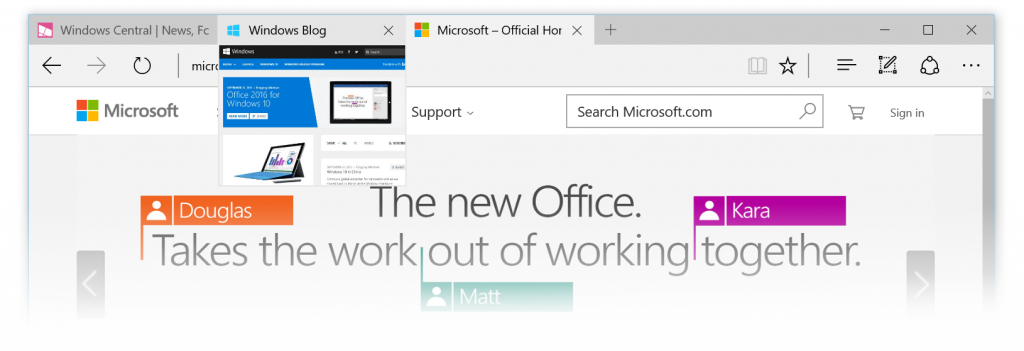
If you’re a Windows Insider on the Fast ring, Microsoft has a new Windows 10 preview build for you to try. Build 10565 has quite a lot of changes and new features, including integrated Skype messaging, calling and video, tab preview in Microsoft Edge, some new icons, and Cortana enhancements.
 
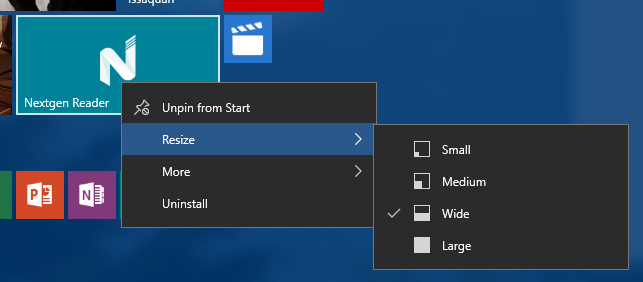
There are also improved context menus on Start, more vibrant title bars, and the ability to sync favorites and reading list items in Edge. A lot of annoying problems have been fixed in this build too.
 
The Skype integration is of course the big new addition. The inclusion comes through Messaging, Phone and Skype video Windows apps, and Microsoft warns that as this is an early preview you can expect "some bugs", so be warned.
 
Tab preview shows a glimpse of what’s on a website when you hover your mouse over an open tab, and the Cortana changes include reminders for movie and event bookings and being able to intelligently understand hand written notes.
 
You can read the full list of changes and bug fixes here.
 
Naturally, with this being a Fast ring release, there are some known issues to be aware of:
  • The search box does not work if you are in a locale where Cortana is not available. Microsoft is  currently investigating workarounds.
  • The Xbox app for Windows 10 will consume gigabytes of memory on your PC if you have any Win32 games (non -Windows Store games) installed on your PC that have been identified as games or added by you in the Xbox app. Closing the Xbox app will release your PC’s memory.
  • WebM and VP9 have been temporarily removed from the flight builds. Microsoft will continue to develop a VP9 implementation that it intends to ship in Windows. Expect VP9 to return soon in a future release.
  • Small form-factor devices, like the Dell Venue 8 Pro, that boot with rotation or virtual mode screen size set larger than the physical screen size will experience a bluescreen on upgrade and will roll back to the previous build.

The new build is available to Fast ring insiders now, except those in Russia and Turkey. If you live in either of those countries you'll have to wait a few more days for the build to make its way to you.
 
~ Wayne Williams

6.11.2015

Microsoft kills Skype Windows modern application -- a huge mistake

 
Skype should be the world's best communication solution. It is backed by one of the most powerful tech companies in the world, Microsoft, while having great name recognition. Unfortunately, the execution is very much lacking, especially on the company's own Windows operating systems. Skype is simply clunky and ugly, while offering jarring advertisements. It needs to be ad-free.
 
Today, Microsoft aims to make it a better experience, as it kills the Skype Windows modern application. Yes, the "modern UI" version you would install from the Windows Store is going away. In its place, Microsoft is hoping users will gravitate towards the traditional Windows program version. Unfortunately, this is a huge mistake.
 
"At Skype we want to help you do more together with the people you care about by delivering the best possible experiences to the devices you use. That’s why we’re simplifying your PC experience down to one app that you can use either with your mouse and keyboard or with touch. Starting on July 7, we’re updating PC users of the Windows modern application to the Windows desktop application, and retiring the modern application", says Aga Guzik, Microsoft.
 
Guzik further explains, "with the upcoming release of Windows 10 for PCs, it makes sense to use the Skype application optimized for mouse and keyboards use, capable of doing touch as well rather than 2 separate applications performing the same function".
 
Unfortunately, I think Microsoft is misguided here. They are killing the wrong version. They should instead be reinventing the modern UI Windows app version and killing the desktop version. Why? Because Windows apps can run in a windowed mode in Windows 10. It could easily be made mouse/keyboard optimized while retaining full screen usability for tablet users.
 
Remember tablet users, Microsoft? They will not want to use the traditional Skype desktop program. It feels like the company is neglecting tablet users as it looks to the future with Windows 10.
 
Sigh. What a blunder.
 
What do you think about Microsoft's decision? Tell me in the comments.
 

Photo Credit: BlueSkyImage/Shutterstock
 
~ Brian Fagioli

2.25.2015

Microsoft to drop Facebook, Google Chat integration in Outlook.com

Summary:Microsoft is discontinuing Facebook and Google Chat integration in Outlook.com, and is advising users to use Skype instead.
 
Within "the next couple of weeks," Microsoft will discontinue support for Facebook Chat and Google Chat in Outlook.com.
 
Microsoft notified Outlook.com customers of the pending change via an e-mail message from the Outlook.com team sent on February 24 (Thanks @lindhartsen)
 
Microsoft attributed the decision to drop Google Chat integration to Google's decision to discontinue the chat protocol used by the Google Talk platform.
 
A link to the Google decision points to a page noting that Google Hangouts replaces Google Talk and does not support XMPP. XMPP is the open-sourced Extensible Messaging and Presence Protocol, an IETF standard for instant messaging. (XMPP originally was called Jabber.)
 
There was no reason given for discontinuing Facebook chat integration.
 
"We understand that this may disappoint some of our customers, but we hope that you'll try Skype for Outlook.com chat, and voice, video calling, so you can take advantage of the more robust ways to keep in touch with friends and family," the e-mail message from the Outlook.com team said. 
 
I've asked Microsoft if the company has any more to say about the reason for the discontinuation of Facebook Chat or Google Chat support -- beyond the desire to push the company's own Skype instant-messaging service.
 
A spokesperson sent the following statement:
"Most Outlook.com customers already prefer to use Skype when they are chatting and we see this as a great option for anyone impacted by Google's decision to shut down Google Talk and associated APIs, or the recent deprecation of Facebook Chat for Outlook.com."
~ Mary Jo Foley 

10.09.2014

Microsoft updates chat features with new Skype for Mac, Windows desktop clients

Summary: Newly available Microsoft desktop Skype clients for Mac and Windows include improvements to chat and file sharing.
 
 
Microsoft is updating the chat functionality in its Skype desktop clients for both the Mac and Windows.
 
On October 9, Microsoft made available for download Skype for Mac 7.0 and a preview of the updated Skype for Windows (the desktop version, not the Metro-Style one). The focus of both of these updates is on improving chatting and file sharing, according to a new post on the Skype Garage blog.
 
"If you’re already using Skype on mobile, you’ll recognize some of these changes. We’ve made the Skype experience consistent whether you are using your mobile device or your desktop PC. Now, you’ll see thumbnail pictures of your contacts, a new bubble-style chat design, and consistent icons for chat, video calls and audio calls," said company officials.
 
Skype Mac and Windows desktop users will see file icons displayed when they share file types like Office documents and PDFs. They also, thanks to the new side-by-side design of the clients, will be able to multitask on voice or video calls.
 
~ Mary Jo Foley

6.22.2014

Microsoft to retire old versions of Skype -- Mac users should be worried

 
Hate all you want, but Skype is awesome. The fact that it is supported on like, everything makes it one of the best video chat solutions. It works on Linux, Android, Windows Phone, iOS, OS X -- it is the bomb. Microsoft shows no favoritism to platform when this software is concerned.
 
Today however, in a bit of shocking news, Microsoft announces that in an effort to move everyone to the newest version of Skype, it will be retiring older versions for Windows and Mac. Does this mean that outdated versions will move to Florida and join AARP? No, well...maybe. Actually, it is not at all clear what retirement means in this case.
 
"As we look ahead to the future, we're focusing our efforts on bringing the latest and greatest to the most recent versions of Skype. As a result, we are going to retire older versions of Skype for Windows desktop (6.13 and below) as well as Skype for Mac (6.14 and below) over the next few months" says Tom Huang, Microsoft.
 
Huang further explains, "don't panic -- whether you’re using Skype for Windows desktop or Skype for Mac, you can download and update to the latest version today for free. We encourage all users to update to the latest version today to continue using Skype without disruption".
 
Whoa, Whoa, Whoa -- stop the clock. Disruption? This seems to imply that Microsoft will purposely block access to older versions. However, the company is mum on that for now. But, you are a HindSight Technologies reader, so you should enjoy being on the most recent versions of software, right? As fas as I can tell, there is no downside to this, right? Wrong.
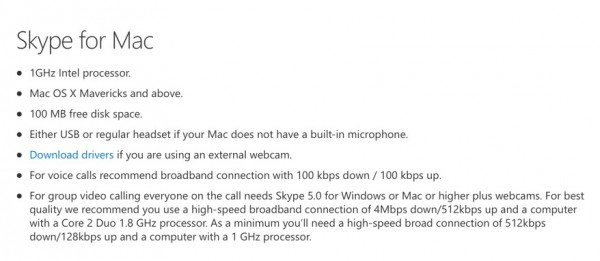
Newer versions of the Skype software may not run on older computers. Case in point, the new version for Mac requires Mavericks (OS X 10.9.x). This could mean that if your Mac cannot run Mavericks that you cannot use Skype! The Windows version however, is supported all the way back to XP SP3.

Are you worried about the potential "disruption" to older versions? Tell me in the comments.

Photo credit: Robert Kneschke / Shutterstock
 
~ Brian Fagioli

3.06.2014

Skype for Outlook.com finally available to all, gains HD video calling


Ten months ago, Microsoft announced it would be rolling out a preview version of Skype for Outlook.com in the United Kingdom that would allow users to make audio and video calls directly from their inboxes.
 
Three months later, the devices and services giant expanded the preview’s availability to five additional countries -- United States, Canada, Germany, France and Brazil -- and stated it would be rolling out the feature to the rest of the world "in the coming weeks". A mere seven months later and finally, today, Microsoft makes good on that promise, announcing that Skype for Outlook.com is now available to all. The service also gains support for HD video calls.
 
In a new blog post, Karen Tong, Senior Product Marketing Manager at Skype, writes: "With Skype for Outlook.com, you can easily connect with your Skype friends right from your Outlook.com inbox, so you can go from chat or email to a video call with just one click. If you haven’t had a chance to it check out, getting started is easy. Just download the plugin, link your Skype account to find your friends and start a video call or send an instant message without having to leave your inbox! The latest version of the plugin now has Mac support for Safari, so you have even more ways to connect with the people who matter".
 
As well as allowing users to make and receive HD video calls (provided they have HD compatible displays and webcams of course), Microsoft squashes a bug which caused calls to continue to ring after pick-up for users who were running both Skype and the Outlook.com plugin at the same time.
 
It might have taken Microsoft a ridiculously long time to make the feature available to all users of its webmail service (Karen Tong's blog post is headed "Skype Brings the World Closer Together, One Inbox at a Time", which is rather apt), but it got there in the end. Do you use Skype for Outlook.com?
 
~ Wayne Williams