Cisco Learning Network Store Promotions Page
Showing posts with label iCloud. Show all posts

11.29.2016

Plagued by Apple Calendar spam? Here's how to stop it

 
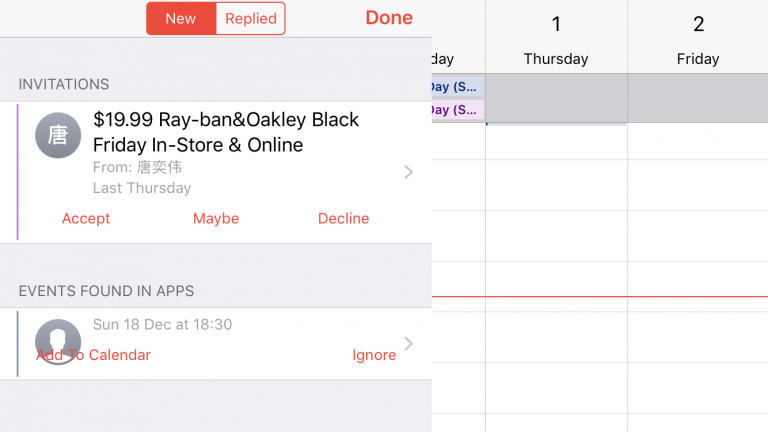
Recently a lot of people have been complaining about spam calendar invitations in iOS, and it’s something I’ve experienced too -- particularly on Black Friday. "$19.99 Ray-ban&Oakley Black Friday In-Store & Online" said one unwelcome invitation.
 
While you can easily decline these invites, that’s not the greatest idea because -- just like responding to a spam email -- it has the side effect of telling a spammer that your account is active. Thankfully, there is an easy way to stop them.
 
The problem happens because iOS and macOS automatically scan your inbox for invites so they can be added to the calendar. iCloud Photo Sharing is also affected.
 
To stop receiving invitations, you need to disable the auto-add calendar feature from your iCloud account.
 
To do this, follow these instructions:
  1. Go to iCloud.com and login with your Apple ID and password
  2. Go to Calendar. Click the gear icon and select Preferences
  3. Click the Advanced tab
  4. Next to Invitations, select the option to receive event invitations via email, rather than in-app notifications
  5. Click Save
While not perfect, this is the best solution for now. Hopefully Apple will fix the issue -- or at least allow people to mark unwanted invites as spam -- in a future update.
 
~ Wayne Williams

8.11.2015

iPhone 6 Plus balances benefits [Review]

 
Sometime within the next few weeks, Apple should announce successors to iPhone 6 and 6 Plus, and my review of the latter device is long overdue. Let's get to it finally and present the key finding first: If size matters, as in you want a phone with larger screen but that doesn't feel humongous, the 5.5-inch iPhone 6 Plus is a worthy choice. By measures that matter most—benefits from apps, calling, camera, data, performance, screen, and storage—the phablet is best of class.
 
As expressed in my iPhone 6 review, I regretted not buying the larger device after handing it. The Plus is big, but not overly large for my tastes. Hell, I bought Motorola-made and Google-branded Nexus 6 in January 2015 to replace iPhone 6; the screen is even bigger than Plus, at whopping 6 inches. I gained great value using either of the larger handsets, but gave up one for the other.
 
That's right. I switched from Nexus 6 in June 2015, and not for dissatisfaction. I love the phone. By the specs, the Google phablet is superior to  iPhone 6 Plus, but both deliver exceptional user experience. Google groupies laugh at iPhone 6 or the Plus as "Me-too" devices that catch up to or fall behind other high-end smartphones. That's because these people mistake the forest for the trees, using a clichĂ©. The trees are features and the forest are benefits, which are finely balanced—and that's this review's major focal point: Benefits.
 
Repeating for the umpteenth time: Your Starbucks coffee cup is one of the best illustrations of the difference between benefits and features. The wrapper that goes round the cup is a feature. Protecting your hand from burning is a benefit. Features and benefits are absolutely conjoined in things designed well. But they are nevertheless separate, and particularly among tech companies there is too much emphasis on features, when benefits matter more.
 
A smartphone or phablet isn't the sum of its features but balance of benefits. Apple understands this principle and handsomely applies it to both 6 variants. Google gets it, too, which is why Nexus devices are so wonderful.
 
Why I bought iPhone 6 Plus
 
My decision to abandon Nexus 6 started with a convergence of seemingly unrelated events, all within about 10 days:
  • Apple announced OS X 10.11 and iOS 9, and I wanted to test them
  • Apple unveiled its streaming music service, which I also wanted to test
  • My sister decided to give up Nokia Lumia Icon and needed a new handset
  • A freak electrical problem damaged my wife's Chromebook Pixel and required replacement
If not for my wife's Chromebook coming to untimely end, I would likely still own Nexus 6 today and would have taken advantage of the Project Fi invite that Google finally sent last week. Instead, my wife inherited Chromebook Pixel LS, which she loves; my sister bought the Nexus 6; and I used the proceeds from insurance and sis to replace both, with 13-inch MacBook Pro Retina Display and the Apple phablet.
 
Sizing up the Digital Lifestyle
 
iPhone 6 Plus and Nexus 6 are both exceptional phablets, and choosing one or the other is as much about digital lifestyle as device. Apple and Google sell lifestyle platforms around which someone builds stuff. The bitten-fruit company demands the more inclusive lifestyle, which hugely influenced my decision to give up the LS and N6 that I enjoyed and fit my more cloud-oriented lifestyle. For example, Apple Music isn't available without iTunes or iOS device; I couldn't test otherwise.

That said, more because of other developers' commitment, Apple is the Switzerland of mobile apps and cloud computing. I call iOS the "eat your cake and have it, too" platform. You can jump into the Apple lifestyle, while choosing from Google's. Meanwhile, the majority of the newest, third-party cloud-connected lifestyle apps are available for iOS before Android. Yum. Yum.
 
 
Google groupies will wave the comparable number of Android apps and selection. But it's not how many but which ones that matter. Number of apps is a feature, while meaningful selection is a benefit. The most useful Android apps also are available for iOS, or exclusively.
 
Let's cherry-pick pieces from the Apple lifestyle, which would be relevant to any iPhone 6 Plus buying decision, with caveat: iOS 9 is testing and final release is close. This list is based on the current version, iOS 8.4, and the next rev will offer additional lifestyle benefits.
 
Command me. iOS gives good speech-to-text capabilities, like Android, but Siri still sucks. If she was a living employee, the company would have fired her long ago. In the past, when Siri couldn't directly answer a question, I relied on the web searches she presented. But with iOS 7—and, sadly, carried forward to iOS 8—Bing is the search engine. Sorry, Google delivers more meaningful results.
 
Griping aside, Siri will get you around town and provide relevant, contextual information—there, Apple Maps is a help rather than hindrance (no more misdirections). She's not as proactive as Google Now, but as such not as snoopy. There's something stalker-like about Big G's app/service that creeps me out.
 
Still, Siri steers me wrong too often and can't compete with Google Now. Yesterday, my daughter wanted treats from Nomad Donuts. My wife and I were driving, and I asked Siri about the shop. Wow! It was just a few blocks away. But we arrived at, ahem, a less classy confectionary. That bitch brought me to the closest donut shop rather than the one requested.
 
If self-punishment is your thing, Siri is a great lifestyle companion. Our relationship is like Charlie Brown and Lucy. She promises that this time, she won't pull away the football when I run to kick it.
 
Cover me. As the Switzerland of mobile platforms, iOS offers the best cloud cover of them all. These benefits aren't exclusive to iPhone 6, but I would be remiss ignoring them, since they're core to any digital lifestyle. Simply stated: Connected-apps are aplenty.
 
For simplicity, let's focus on the Apple Way—iCloud Drive, which is new with iOS 8. The service is almost simple to a fault, because it's not obvious on iOS devices; access is from apps rather than a file manager (which is available on Yosemite or iCloud for Windows).
 
iCloud Drive finally catches competitors offering content access anytime, anywhere, and on anything (well, for the latter if an Apple-supported platform). Sync is excellent, based on my testing. "Set it, and forget it" is the design ethic, an attribute that made the original iPod so compelling. Simple sync is a huge benefit, and it works well with other Apple apps and services, such as calendar, contacts, and mail.
 
Grumble. Keeping with Apple's "You should always pay more" design ethic, the cloud costs. During San Diego Comic Con last month, I quickly exceeded my 20GB cloud storage and had to buy more: 200GB for $3.99 a month. By contrast, Google Photos storage is free for files less than 16MB. Pic syncing is what maxed out iCloud.
 
Share me. With this platform release cycle, Apple introduces the super useful Family Sharing. Think of it as "fair-use" applied to personal, digital content. I've complained for years about ebooks, music, movies, and the like being tied to a single account and not easily shared. Hey, mom can buy a CD or DVD and let the kids watch or lend it to grandma—but not her digital downloads. Sharing is a humungous benefit.
 
According to Apple: "Once you set up Family Sharing, family members get immediate access to each other’s music, movies, TV shows, books, and apps. Download what you want with a tap anytime you like. All without having to share an Apple ID or passwords".
 
This benefit alone is reason to consider iPhone 6 Plus or another iOS device and Apple's reward to long-time content buyers. Six people can share.
 
Play me. That brings us to Apple Music, which isn't available for non-iOS mobile devices. The streaming service in some respects supersedes Family Sharing. You can have both, but may not need to. The service is free during the first three months of operation and will later cost $9.99 individually or $14.99 for family fare.
 
You won't get much better music experience outside the Apple lifestyle, unless cost is limiting factor. In my testing, the streaming service offers broad selection, and the curated playlists are simply fantastic. Apple uses, gasp, real people rather than algorithms to curate music. I can't say enough positive about the overall experience but will try in my eventual full review.
 
Apple Music is one of the digital lifestyle benefits
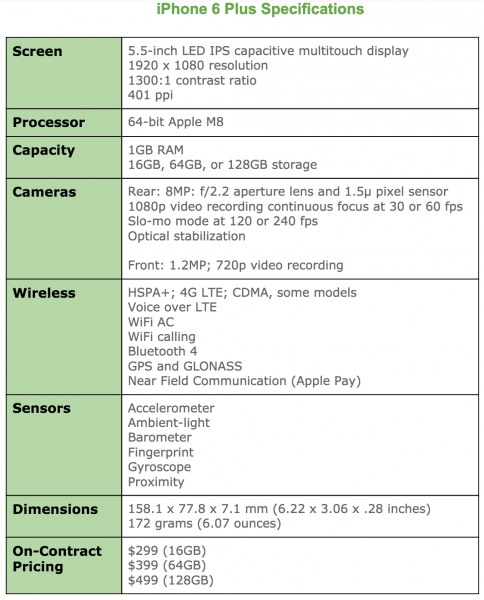
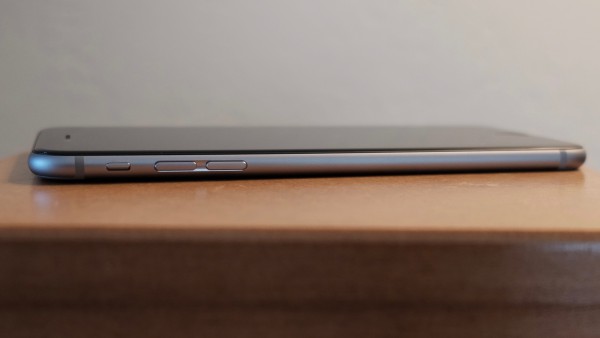
Watch me. If you would like to use Android Wear smartwatch with a mobile phone, you better buy into the Google lifestyle. Similarly, you'll want iPhone for Apple Watch. The data timepiece is fabulous companion for 6 Plus. The phone is large—158.1 x 77.8 x 7.1 mm (6.22 x 3.08 x .28 inches)—and the watch allows fast interaction with content or people without hauling the lug from your pocket.
 
Of course, this all fits into Apple's "You can always pay more" philosophy. Why buy one thing when you can get two, eh? I discuss user benefits in the next subhead, and screen-quality and size give many. But that means using a honking cellular carryall that may offend the hands of some users more accustomed to iPhone 5s-size handsets. Apple Watch makes getting phablet benefits a workable compromise: Big when you need it, small when you don't. That is, if you're willing to buy two thangs when one was good enough before.
 
Big Benefits in Plus Size
 
Perhaps you read this far and wonder where the hell is the hardware discussion. You got it this subhead, and the back-to-front approach is deliberate, because digital lifestyle and benefits should be first considerations when buying any modern handset, not price or features. The limited list sets the stage for features and benefits, which fit into a larger lifestyle lexicon.

Aesthetics. The design of the 6 Plus is reminiscent of iPhone classic—the original sold starting in June 2007. Rounded corners and curvy frame are the visible characteristics they share. Other reviewers point to iPod touch similarities, which is true of thinness, but the prominent aesthetic—rounded corners—inherits from the original.
 
The similarities only begin there. iPhone 6 Plus finely balances benefits against features in ways much like the classic. In 2007, Apple stripped back features available on other phones, such as 3G and MMS, to balance others: battery life and responsive interaction of the new sensors and touchscreen.
 
Balance is the overall design aesthetic and priority placed delivering benefits before the fanciest features. By the specs, iPhone 6 Plus is inferior to newer Motorola and Samsung flagship handsets.
 
However, my experience favors Apple's decision to deliver more by giving less. iPhone 6 Plus is extremely enjoyable to use, and joy is a benefit often overlooked in tech design. How you feel using a device matters much more than how you think about features. There, balance—how all the features fit together to deliver benefits—and the device's design mean everything.
 
The iPhone 6 Plus design is understated, which is a long-standing Apple aesthetic (see my June 2005 analysis). I've seen some complaints online about the plainness and critics calling the top and bottom back bans ugly. Picky. Picky.
 
Plainness isn't the problem. Apple is sometimes guilty of putting form before function, and this is where aesthetics can undermine usability. How a phone feels and how well it stays in hands and fingers are intertwined benefits. While I find that both newer iPhones feel quite good to hold and can be operated with one hand, the surface is too slick. I can't get good enough grip, and the curved rather than flat frame is one reason why. Both are the first iPhones for which I strongly encourage using some kind of case. Either will eventually slip from your hands otherwise, and Apple should be faulted for squandering benefits.
 
Design ethic inherits from the original iPhone
Sight. The screen delivers some of any smartphone's most important benefits. As such, I obviously wondered what the experience would be stepping down from the Nexus, which 6-inch display is 2560 x 1440 resolution and 493 pixels per inch. iPhone 6 Plus: 1920 x 1080 resolution and 401 ppi. I have no complaints, because the experience is excellent.
 
Some of that comes from a difference best described compared to iPhone 6, which resolution is 1334 x 750. The larger phone's screen is crisper, the glass seemingly less reflective, and the desktop so vivid it looks painted on. When first compared at Apple Store, I had to check to ensure I hadn't picked up a dummy phone with paper mockup pasted on. The three qualities deliver extreme benefits, particularly the muted reflectiveness.
 
Pretty much anything viewed on the iPhone 6 Plus screen looks superb. People upgrading from iPhone 3/G/GS or 4/4S might be overwhelmed by the spaciousness, while most 5/5s users will be pleased. Nice touch: Standard and Zoom modes. For my ailing, aging eyes Standard is just fine, however.
 
Sound. iPhone 6 Plus gives great audio—if you attach headphones or speakers. But the tinny, internal single speaker lacks much, particularly for someone steeping down from Nexus 6's dual front-facing speakers. That said, placement on the bottom frame (in vertical orientation) assures that notifications and phone rings can be heard.
 
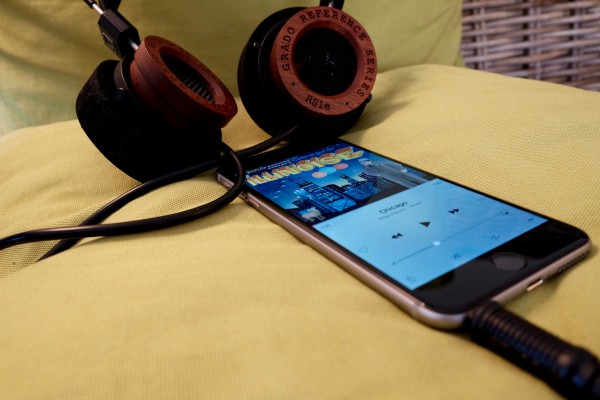
Connected to headphones, Apple Music streaming sounds fantastic. There's an immediacy to fullness and breadth of soundstage that's good to a fault. For example, with quality cans—Grado RS1e—I hear imperfections in the encoding, which on some tracks my ears perceive as over-modulation or muffled vocals.
 
Photography. More megapixels is meaningless, as I have asserted for years. Apple wisely sticks to 8MP, which is the reasonable limit, because cameraphone sensors are tiny (I would prefer 5MP). The greater packed the sensor with pixels, the more artifacts and other aberrations appear in photos. Like iPhone 5s, the 6 offers 1.5 micron pixels, which, among other benefits, let in more light than the standard 1.1 micron pixels, which tightly pack on 16MP phone shooters.
 
The f/2.2 aperture lens is good choice, and in my testing finely balances with sensor and software. I can't emphasize the importance of the latter and choices made when shooting and post-processing. In 2012, I used the 5MP Samsung Galaxy Nexus to shoot San Diego Comic-Con. One reason: The phone produced surprisingly good photos in low light, mainly because of the superb balance of features and wise settings choices made in auto mode. Something else: Google promised and the smartphone delivered instant-shutter response.
 
The catchup capability is one of iPhone 6 Plus's best photography benefits, particularly in HDR mode. Shutter response is fast. Immediate. But there is more: In my testing, the smartphone smartly chooses aperture, ISO, and shutter speed—and that's best observed in low-light settings. Color accuracy and white balance are generally spot on.
 
Most people are not professional photographers. They wouldn't know f-stop from exposure compensation. Rather than presenting confusing controls and numbers, Apple provides a nifty slider for adjusting exposure—lightness or darkness the user sees in the screen preview. Just tap the display. Other niceties, many carried forward from iPhone 5s and iOS 7 or long available elsewhere, include auto stabilization, face detection, and panorama mode.
 
Optical stabilization is available on iPhone 6 Plus, but not the smaller handset, and it's a differentiator that will be valuable to some shooters but not everyone. The technology is rather nifty, using the gyroscope in conjunction with the lens, which position changes, to reduce camera shaking that often blurs photos. Jim Harmer's Plus photo review is excellent primer for understanding the benefits.
 
iPhone 6 Plus camera smartly balances color and contrast
Gripe: The handset's body is thinner than the camera can accommodate, such that the lens juts out from the enclosure. It's an unacceptable design compromise that puts the lens at greater risk of damage and is, unfortunately, another reason to buy a back-fitting case. If cynical, you can chalk it up to the "You can always pay more" design ethic. Meaning: Back cover case is near necessity by design.
 
Most people will find iPhone 6 Plus photography to be satisfying at the least. There is no non-pro compact camera with fixed lens—meaning without telephoto—that I would recommend over this smartphone. Last week, I sold my beloved Fuji X100T, which is fixed lens. I rely on the Apple phablet when on the go, or for more demanding needs the interchangeable lens Fuji X-T1, which in July I bought during Comic-Con.
 
Videography. Apple delivers some nifty tricks shooting videos, and one is desperately-needed catchup: Continuous focus, a feature found on most major flagship smartphones. Fixed focus is one of older iPhones' biggest videography handicaps. On the 5 and 5s, you can tap to focus to start but there's trouble if you or the subject moves. In my testing, iPhone 6 Plus adjusts focus as promised. Finally!
 
Neat trick: Slow-motion at 120 fps or 240 fps. Slo-mo is super fun, but good luck easily exporting clips and keeping the slow speed. Direct upload from phone to YouTube is my method, as prescribed by phoneArena's helpful how-to guide.
 
The videocam can capture 1080p at 30 or 60 fps, and the latter is beneficial for shooting moving objects or finer-editing later on. Time-lapse videography enables other creative options, and Apple claims something called "Cinematic Video Stabilization", which supposedly lets you GoPro without buying one.
 
Longevity. Question everyone should ask about a smartphone: "How long can I use it before the battery dies?"  Long enough is my answer. Time period between charges is so great, I can't keep track. Even when using Apple Maps, which should be a battery killer, iPhone 6 Plus keeps going and going.
 
Apple claims 24-hour talk time over 3G, 14 hours watching videos, or 12 hours Internet over LTE or WiFi. I care about shooting photos and videos and uploading them to the cloud, while rumbling across social networks. These functions are more meaningful measures—and I easily get through the day with juice left over.
 
Responsiveness. Performance is an important benefit, and subjectively either elicits joy or generates frustration—and the latter emotion is one every manufacturer should avoid. I smile and assume you will, too: iPhone 6 Plus is speedy enough, even short a couple cores compared to Nexus 6. Either scrolling or opening apps and browsers is fluid and fast.
 
If you're looking for benchmarks, apologies but there are none here. They are for geeks hung up comparing features rather than looking at benefits. What matters more: How the device does daily tasks that are most important to you. By that measure, I have no complaints about subjective speed. However, I would say same about iPhone 5s. If you own the device and performance is your major buying criteria, expect to be surprised by the subjective speed sameness.
 
The Verdict Is In
I am satisfied enough with iPhone 6 Plus and believe that most buyers will be, too. That assumes they live the Apple lifestyle, or even an Apple-Google hybrid. Make digital lifestyle and assessment of benefits you want the first reasons for choosing smartphone or tablet. Specs don't matter, and they distract from what does.
 
Photo Credits: Joe Wilcox

~ Joe Wilcox

2.20.2015

New features escalate Apple and Microsoft's productivity suite competition

Users of Apple's iWork and Microsoft Office on iOS are getting new features in the never-ending productivity app war.

 
Microsoft Office remains the most popular productivity app suite in the world. However, for the owners of many iPhones, iPads, and Macs, Apple offers its iWork suite of apps for free. Pages, Numbers, and Keynote are more-than-servicable replacements for the venerable Word, Excel, and PowerPoint.
 
To compete, Microsoft offers iOS versions of its Office apps for free, with no subscription to Office 365 required. The apps are excellent, providing full compatibility with files created on other platforms and giving powerful editing features to users on the iPhone or iPad.
 
Both Apple and Microsoft offer excellent productivity suites, but that doesn't mean the companies are done adding new features.
 
Last week, Apple began offering access to its iWork for iCloud service to users who don't actually own any Apple products. The browser-based suite is meant to allow easy access to the full iWork suite of applications from any computer, Mac or PC, with online storage for files on Apple's iCloud Drive.
 
It's currently available only on Apple's iCloud Beta website, though it will likely be available on the main site soon. iWork for iCloud is something of a Google Docs competitor, offering nearly full-featured versions of Pages, Numbers, and Keynote in a browser. It does seem a bit unlikely that users will suddenly flock to iWork from Google Docs, but there's little reason for Apple to keep it locked down when its offering it to its own customers for free. It can only attract customers to the platform, particularly as it offers comprehensive collaboration tools that are silly to lock down behind what is effectively a device-based paywall.
 
Separately, Microsoft continues its years-delayed embrace of iOS. The company's iOS developers have added support for Apple's iCloud Drive to the iOS versions of Word, Excel, and PowerPoint. iCloud Drive, like competitors Dropbox (which Microsoft began supporting in Office for iOS a few months back) and Microsoft's own OneDrive, allows users to back up files to cloud servers and access them on other computers.
 
Apple makes it easy for developers to integrate iCloud Drive into their apps, and Office for iOS users will be able to save and sync their files to the platform without a Microsoft Office 365 subscription, though there are a few file type restrictions that keep users from opening non-Office files in the apps.
 
I'm still a bit surprised that Microsoft has chosen to largely open up the Office for iOS applications to users for free, but I suppose that's where the mobile app world has gone. Desktop users still have to pay, but as more and more users take advantage of mobile, it could be problematic for Microsoft in the long-term if it keeps giving away its apps, especially with all the focus that Apple and IBM are putting on iPads in the enterprise.
 
Mobile users are certainly benefitting from all of the options for productivity apps, including free offerings from Apple, Google and Microsoft, plus more targeted apps like Byword.
 
Do you use productivity apps on your iPhone or iPad? Let us know which apps you prefer in the discussion thread below.
 
~ Jordan Golson

9.11.2014

Apple slashes iCloud pricing, adds new 1TB tier

Summary: As promised in June, Apple has dramatically cut its cloud storage prices - but rivals are still undercutting it.
 
New iCloud pricing plans up to 1TB. Image: Apple
Along with the launch of two iPhone 6 handsets and the Watch yesterday, Apple has made good on its promise to slash iCloud storage prices, with tiers now going all the way up to 1TB.
 
Apple's new iCloud pricing was announced at its developer conference in June, signalling the company was finally willing to address criticisms over price, as well as rivals that had severely undercut it — most notably Google, which in May began offering 15GB of cloud storage for free, 100GB for $1.99 a month and 1TB for $9.99 a month.
 
The new iCloud pricing partly addresses the gap, offering 5GB for free, 20GB for 99 cents a month, and 200 GB for $3.99 a month, with the last bundle, which costs $48 a year, likely to be popular. In contrast, 55GB storage in iCloud previously cost around $100 a year.
 
Apple also released pricing for two additional tiers yesterday, including 500GB at $9.99 a month and 1TB at $19.99 a month.
 
In the UK, iCloud users can now get 20GB for £0.79 a month, 200GB for £2.99, 500GB for £6.99, and 1TB for £14.99. In France and Germany, those figures are €0.99, €3.99, €9.99, and €19.99. Up to 5GB is free across the board.
 
But while Apple has scaled up its storage capacity for users, iCloud is still more expensive than Google and Dropbox, with the latter last month introducing 1TB for $9.99 a month (a price it rather unfairly converted to €9.99/month in Europe).
 
Still, Apple's new pricing may have prompted Dropbox's price change, with its previous tiered model costing $9.99 a month for 100GB, $19.99 a month for 200GB, and $49.99 a month for 300GB.
 
Unfortunately for Apple, it's consumer-friendly pricing has launched to a backdrop of security concerns around content stored in iCloud following the recent celebrity photo leak.
 
To that end, Apple kicked off a new alert scheme to tell users when attempts are made to change their passwords, restore data to new devices, or when someone logs into to iCloud from a new Apple device.
 
And while the common security advice for users to prevent theft of data from iCloud was to enable Apple's two factor authentication, security researchers late last year drew attention to the fact iCloud two-factor does not protect iCloud backups, Find My Phone data and documents stored in the cloud.
 
~ Liam Tung

9.06.2014

Apple to add security alerts for iCloud users, says Cook: WSJ

Apple CEO Tim Cook delivers his keynote address at the World Wide developers conference in San Francisco, California June 2, 2014.
Credit: Reuters/Robert Galbraith

(Reuters) - Apple Inc (AAPL.O) is planning additional steps to keep hackers out of user accounts in the face of the recent celebrity photo scandal and will aggressively encourage users to take stricter security measures, CEO Tim cook told the Wall Street Journal in an interview.
 
Apple will alert users through email and push notifications when someone tries to change an account password, restore iCloud data to a new device, or when a device logs into an account for the first time, the report said. (on.wsj.com/1puYPl3)
 
Apple is moving quickly to restore confidence in its systems' security ahead of the crucial launch of its new iPhone next week.
 
Cook said Apple will broaden its use of the two-factor authentication security system to avoid future intrusions, the Journal reported.
 
The two-factor authentication requires a user to have two of three things to access an account, which may include a password, a separate four-digit one-time code, or a long access key given to the user when they signed up for the service.
 
The iPhone maker said it plans to more aggressively encourage people to turn on the two-factor authentication in the new version of iOS, the daily reported.  
 
"The usability battle will always be there but could you ever imagine using your debit card at an ATM and not entering a pin? That's two factor, something you have (a card) & something you know (a pin), and we all get along just fine," WhiteHat Security's Matt Johansen told Reuters.
 
Apple said on Tuesday the attacks that emerged over the Labor Day weekend on celebrities' iCloud accounts were individually targeted, and that none of the cases it investigated had resulted from a breach of its systems.
 
Some security experts have faulted Apple for failing to make its devices and software easier to secure through two-factor authentication, which requires a separate verification code after users log in initially.
 
Apple could also do more to advertise that option, they said. Most people do not bother with security measures because of the extra hassle, experts say, and the leading phone makers are partly to blame.
 
The iCloud service allows users to store photos and other content and access it from any Apple device. Security in the cloud has been a paramount concern in past years, but that has not stopped the rapid adoption of services that offer reams of storage and management of data and content off smartphones and computers.
 
Apple was not immediately available for comment.
 
~ Arnab Sen in Bangalore and Edwin Chan in San Francisco      
   

7.16.2014

Apple starts encrypting iCloud email, down for some users

Summary: As Apple works on its promise to improve the iCloud email service's security, an outage has affected some users. 
 
 
Apple is ramping up efforts to fulfill the promise to protect iCloud customers and encrypt email services.
 
While Apple is yet to announce any changes to the iCloud platform, which boasted over 300 million users last year, emails are now encrypted, whether inbound or outbound. In other words, @me.com and @mac.com email addresses are now protected.
 
The changes have been revealed through Google's transparency website. The website's function is to disclose the percentage of inbound and outbound emails that funnel through Gmail and other providers. As shown below, the iPad and iPhone maker's changes are in place:
 
 
Extra encryption can't be a bad thing for users, especially as the tech giant has endured recent criticism as one of the last email providers not to provide a good level of encryption between services. The criticism led to Apple promising to improve the situation. However, German publication Heise claims that Apple is using RC4 encryption, which is far from the most secure option available.
 
In related news, a small percentage of iCloud users are currently experiencing an outage. The service became unavailable at roughly 12.00 am ET Monday, and impacts 0.1 percent of users.
 
 ~ Charlie Osborne

7.08.2014

New Mac clipboard managers

Summary: There are a growing number of clipboard managers on the market, one it seems for almost any workflow. 
 
(Image: CNET; Apple)
Way back when, the original Mac and its successors popularized cut and paste and the Clipboard. It was all about a single clipboard and a single paste. However, there are a growing number of clipboard managers on the market that let users store and organize their clipboards, one it seems for almost any workflow.
 
The Macs in Chemistry blog recently mentioned two new clipboard managers: Paster by Kai Luo, and Collective 2 by Generation Loss Interactive. Interestingly, Paster uses iCloud for sync and supports Macs as well as iOS.
 
Collective 2 offers a number of useful search capabilities that let you find words and items in your copy history. The software supports text and its formatting. Users can also examine the details of copied items, such as the number of words or characters, or the size of an image.
 
If you're interested in this category, Chris Swain at Macs in Chemistry offers a detailed list of most solutions. Currently, there are more than 20 titles in the list.
 
At a recent BMUGwest meeting, moderator Lorca Hanns recommended Jérémy Marchand's Clipboard Center, which creates lists of "captured items." If you have duplicates on a list, they will be merged.
 
I've never trusted these particular utility apps. For no good reason. I've always just lived with one cut/copy, one clipboard, and one paste at a time. Maybe it's time to go clipboard happy!
 
~ David Morgenstern

5.29.2014

Upcoming Apple products are the best yet

SVP Eddy Cue promises that Apple's upcoming product pipeline is the best that he's seen during his 25 years with the company. 

 Image credit: Recode/Asa Mathat
Steve Jobs used to be the public face of Apple, but over the years, he began to give more executives stage time at the company's media events. One of those executives is Eddy Cue, Apple's senior vice president of Internet Software and Services -- basically, Apple's iTunes and iCloud products. He will also take charge of the Beats music subscription service when that acquisition closes later this year.
 
At the Code Conference yesterday, Cue and Beats co-founder Jimmy Iovine sat down with Walt Mossberg and Kara Swisher to discuss the future of Beats, the music industry, and Apple.
 
One of the most interesting statements came from Cue, who has been at Apple for 25 years and created Apple's online store in 1998, the iTunes Store in 2003, and then the App Store in 2008.
 
Surprising even the usually unflappable Walt Mossberg, Cue said that "we've got the best product pipeline that I've seen at Apple in my 25 years" with the company.
 
Mossberg noted that Eddy Cue's tenure covers Apple's rollouts of the iMac, iPod, iPhone, iPad, and MacBook Air -- "all widely recognized as pretty good products."
 
"I agree with you," Cue responded. But he reiterated his initial statement, saying "I believe... the products that are coming are great."
 
This isn't the first time that an Apple executive has made a bold proclamation about upcoming products. Earlier this year, CEO Tim Cook said the company was working on "really great stuff," and that it was planning to enter new product categories during 2014.
 
Among other things, Apple is rumored to be working on a wearable iWatch product that could have extensive health and medicinal tracking purposes. It has also been examining television for years and could be looking at launching a new Apple TV set-top box complete with an App Store.
 
For business customers, recent rumors have said the company will roll out its Touch ID fingerprint security system to all iOS products, including iPads, in its yearly refresh this fall. The Touch ID feature built into the iPhone 5s makes it easy for users to lock down their devices with little to no time lost, in comparison to entering passwords and PIN numbers. Though the feature currently only unlocks the phone itself and speeds app and music purchases through Apple's digital stores, it's easy to see how Touch ID could be expanded to unlock VPN and other secure protocols.
 
Expanding Touch ID would be key for business customers looking to maximize security on mobile devices. For this reason, it might be beneficial to hold off purchasing Apple equipment until September or October, when new models are expected to be introduced.
 
Separately, Cue was asked about the legacy that Steve Jobs left at Apple. He was slightly defensive at the idea that Apple needed to have a "reset" after he left, saying that Jobs had left the company in good hands.
 
"I think he'd be extremely proud of all the work that we're doing today and the products that we're building," Cue said. "I think we're continuing a lot of the legacy that he built."
 
Will you be waiting to buy new Apple gear until the annual fall refresh? Let us know in the comments below.
 
~ Jordan Golson


Here's how to unlock a hijacked iPad or iPhone

 
A number of iPhone and iPad users have fallen foul of a particularly nasty hack, in which they find themselves locked out of their devices unless they pay to have them unlocked.
 
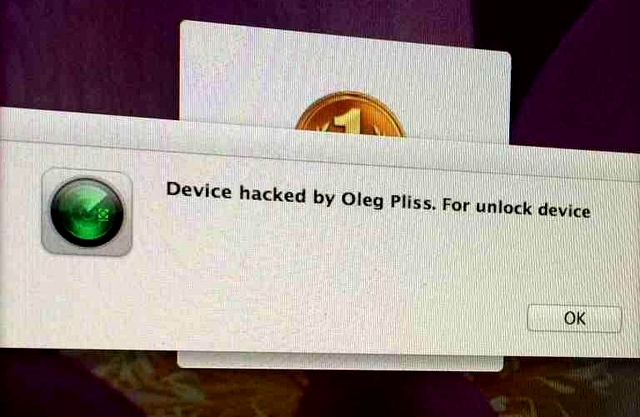
The extortionist leaves a message claiming to be from the well-known software engineer Oleg Pliss. A message on the screen reads "Device hacked by Oleg Pliss", and encourages the user to pay $100.
 
The exploit only appears to affect users connected to the iCloud service. A number of users, most of them from Australia, took to Apple's Support forums complaining of the same issue, saying they had been hit on multiple Apple devices at once and were forced to change iCloud passwords.
 
"iPad woke me at 4.30am with the message 'Your device has been hacked by Oleg Pliss' and sound -- I thought it was the morning alarm," wrote one user going by the handle deskokat.
 
"I then signed in to my powerbook -- but as a guest user -- VERY grateful I did. Message to say I'd been hacked there too, wouldn't let me sign out without erasing all data for that user. As there was nothing but a couple of expendable files on there, I signed out. And the guest user portal has been erased. I then went into my own (password protected) desktop, no hacking message. Have changed my Apple ID password".
 
The user also reported receiving a total 15 messages in their Hotmail account stating that their devices had been registered as "lost" through Find My iPhone services, suggesting that the theft-prevention service was ironically the vector of attack. However, there has been no confirmation on whether Apple's systems have been compromised, or whether it is simply poor password habits by the users.
 
One user, georz, has offered the following advice to fix the problem:
  • Turn off your phone
  • Plug your cable into the computer and have iTunes open (do not plug into the phone yet)
  • Press and hold the home key on your turned-off phone (for about 10 seconds).
  • If nothing happens, plug in the cable into your phone (keep holding the home key)
  • Wait until you see the picture of iTunes and the cable on the front of the phone
  • Your iTunes should then recognize the phone as an unidentified phone
  • Select restore factory settings (it should download some software) after approximately 15 minutes and automatically install it
  • The phone should go through some of the standard reset screens (usually black screen with apple icon and loading bar)
  • You will be prompted to restore the phone.... do this from iTunes not the phone
  • Throughout this process you must not let the phone or computer go into sleep mode, and don't disconnect
However, prevention is definitely better than a cure. Make sure your iCloud account has a strong password containing numbers, capital letters and symbols. Also ensure that you have set a passcode on the device, as the remote lock normally can be overridden by entering that passcode once you've visited iCloud.com and taken the device out of lost mode.
 
For devices that didn't have a passcode, the solution seems to be to go through the above process and then backup and restore the device via iTunes on OS X or Windows.
 

~ Paul Cooper

2.20.2014

Backups: iCloud isn't better than iTunes, and vice versa

Many users have opted to stop backing up their devices with iTunes in favor of storing everything in the cloud, but is this really the best option for iOS users? Let's take a look at the facts. 


iCloud backups changed the iOS ecosystem. Instead of having to manually back up your iOS device to iTunes, you can simply sync it to Apple's iCloud service and it will back up automatically. However, many iOS users have never connected their device to their Mac or Windows machine to perform a backup, yet alone a sync. In this article, we'll discuss the two ways that you can restore iOS (iTunes and iCloud) to a new or existing device. Each has its pros and cons, so you'll have to decide which one is better for you.

Backing up and restoring with iCloud

iCloud provides an easy-to-use backup solution that is more or less "set it and forget it." Once you've enabled iCloud Backups, it'll do a nightly backup of your device, assuming that you have a Wi-Fi connection. All of your photos, videos, stored application data, and iOS settings are whisked to the cloud every day to ensure that if an emergency strikes, all of your information is easily accessible.
 
On the down side, there quite a few items that iCloud doesn't back up, including any media content on your device that wasn't purchased through the iTunes Store and photos that you've synced over from your computer.
 
iCloud also has space restrictions. Apple provides 5 GB of free storage (which is usually good enough to back up one or even two devices if you don't store many photos and videos), but the pricing can get a little costly as you need more storage. Only your application data and stored photos and videos will actually take up storage on iCloud, though. Apple doesn't count iTunes content against this limit.
 
To enable iCloud Backup, follow these steps:
  1. Open the Settings app
  2. Go to iCloud
  3. Go to Storage & Backup
  4. Enable the option for iCloud Backup (Figure A)
In this same section, you can manually create a backup at any time by pressing the Back Up Now button. Under that button, you can also see the date of the last iCloud Backup.
 
Figure A
 
Enable the option for iCloud Backup.
You can restore from your iCloud Backup only after you have reset all of the settings and are in the iOS setup view. When you get the options to either Set Up as New iPhone, Restore from iCloud Backup, or Restore from iTunes Backup, tap Restore from iCloud Backup (Figure B). Here you'll be able to select the backup to restore and begin the restore process. Note: The backup will load from Apple's servers, so you'll need to be connected online throughout the entire restore process.
 
Figure B
 
Restore from iCloud Backup.

Backing up and restoring your iOS device with iTunes

iTunes is an older way to back up your iOS device. You can do this by plugging in your device (using either a 30-pin or Lightning connector) or by connecting compatible devices to the same Wi-Fi network as your Mac or Windows machine that's running iTunes.
 
It's important to note that where iCloud fails, iTunes takes over with the backup process. iTunes backs up everything: applications, application data, and all content stored on your device (including iTunes content). This is good for a few reasons, but mainly because it backs up all of your purchased content. This means that if an app or other iTunes purchase becomes unavailable in the iTunes Store, you'll still have a copy on your computer that can be loaded back to your device.
 
You can back up your iOS device on iTunes by performing the following steps:
  1. Open iTunes and select your iOS device
  2. Click File | Devices | Back Up 
  3. The first time you begin a backup, you'll be prompted to select what kind of content -- like photos, music, or apps (Figure C) -- that you want to back up 
If you're using iTunes 10.7 or earlier, or if you have the sidebar in iTunes 11 shown, then you can right-click on your device in the sidebar and select Back Up Now.
 
Figure C
 
Backing up apps to iTunes.
If you visit the Summary tab in the device window, you can enable wireless syncing (and wireless backups) to iTunes (Figure D). As long as your iOS device is connected to the same wireless network as your opened iTunes installation, it'll start syncing and back up your device at regular intervals.
 
Figure D
 
Enable iTunes wireless syncing.
Here's how you can restore iTunes backups to your iOS device:
  1. Open the latest version of iTunes, and connect your iOS device to your computer
  2. Choose File | Devices | Restore from Backup (Figure E)
  3. Choose the backup you want from the drop-down list, and click Restore 
If you're using iTunes 10.7 or earlier, right-click on your device in the sidebar and choose Restore from Backup.
 
Figure E
 
Restoring a backup from  iTunes.
While iTunes backups are an older form of technology and not as convenient as iCloud, they do provide immediate access to your data should something happen to your device (or iCloud account). iTunes restores are also faster than iCloud restores, because all of your data is stored locally on your computer running iTunes.

Which method should you choose?

We've talked about the two ways to backup and restore your iOS devices, but which should you use on a regular basis? Is one better than the other?
iCloud and iTunes backups differ in two main ways: 1) iCloud backups won't restore items on your iOS device that have been moved to your device and not purchased through iTunes (music, videos, etc.); and 2) If your iCloud backups become corrupt or your account is compromised, you won't be able to restore your device's contents.
Weekly iTunes backups, coupled with daily iCloud backups, can provide the best of both worlds. iTunes is a complete snapshot of your device at the time of backup, while iCloud captures snapshots of your device daily. This means that should iCloud or iTunes fail to restore properly, you can fall back to one or the other. iCloud can also take a while to restore (due to limitations of both your Internet connection and the speed of the iCloud servers) -- in comparison, iTunes can restore all of the content back to your iOS device very quickly.
Many users run into issues by restoring backups when upgrading iOS hardware. iTunes and iCloud backups are very thorough (copying key user preferences and files), and they can copy corrupt settings between older and newer generations of devices when restoring, leading to degraded battery life, crashes, and other system-wide oddities. As such, it's generally a good idea to setup your devices as new each time you get new iOS hardware; only restore backups created on devices to the same generation of device to prevent these issues.
In the battle of iCloud vs. iTunes, do you prefer one method of backup over another, or have you had issues restoring from older generations of hardware to newer generations? Please share your thoughts and experience in the discussion thread below.
 ~ Cory Bohon
 

11.15.2013

Apple rolls out iOS 7.0.4, includes new features, bug fixes

Summary: The iPhone and iPad maker rolls out the latest version of its mobile platform, including fixes and updates to its Spotlight search engine and iCloud Keychain. 
Apple has released a minor update to software running on iPhone, iPad, and iPod touch devices.
 
iOS 7.0.4 includes bug fixes, security patches, and a slew of new features and software improvements.
 
The update also fixes a major problem for some, which caused FaceTime video calls to fail. iPods that are not able to upgrade to iOS 7 have their own version to upgrade to, iOS 6.1.5.
 
The new update improves iCloud Keychain, which was introduced in iOS 7.0.3, and the latest version of the desktop software, OS X Mavericks. The cloud-based technology keeps the Safari browser's passwords and credit card data in sync across all your Apple devices.
 
Secondly, in Spotlight, the device's internal search engine, Apple has brought back the ability to search Google and Wikipedia from the results. The two services were removed when iOS 7 was first released in mid-September.
 
The software update applies to the iPhone 4, iPhone 4S, iPhone 5, and the two new smartphones, the iPhone 5c and 5s. It's also available for the iPad 2, the third and fourth generation iPads, iPad Air, iPad mini, and iPad mini with Retina Display. Fourth and fifth generation iPod touch models also receive the update.
 
Also on Thursday, Apple released a corresponding update to its Apple TV, updating the set-top box to version 6.0.2.
 
Users can update to the latest version by accessing the device's Settings, selecting General, then Software Update. In spite of the relatively small size of the update, it's recommended that users use Wi-Fi when updating.
 
~ Zack Whittaker