Cisco Learning Network Store Promotions Page
Showing posts with label Amazon. Show all posts

6.27.2016

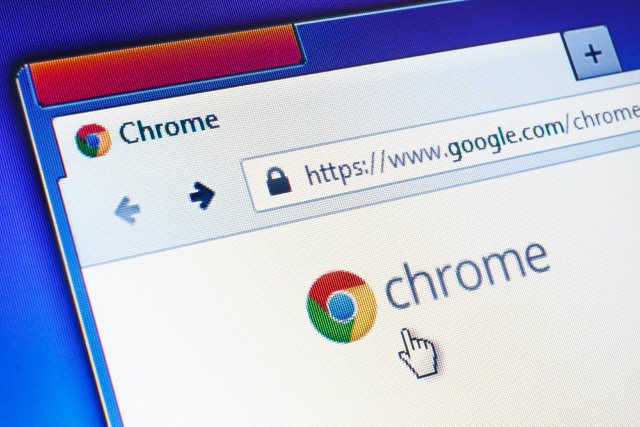
Chrome flaw makes it possible to copy DRM video streams such as Netflix

 
Security researchers from Ben-Gurion University Cyber Security Research Center (CSRC) have unearthed a vulnerability in Google Chrome that can be exploited to make copies of DRM-protected video streams. The problem affects all Chromium-based browsers, and makes it possible to circumvent Widevine encryption technology Google uses to secure streams.
 
Widevine has been used in Chrome for a while, after Google acquired it back in 2010. It has been used to prevent piracy of premium YouTube channels, and is also used to protect Amazon Prime and Netflix streams. Google was informed about the problem back in May, but is yet to issue a patch.
 
Researchers David Livshits and Alexandra Mikityuk say the flaw means that it is relatively easy to save copies of streamed videos, Wired reports. Widevine's encrypted media extensions are used to decrypt protected streams ready for playback, and the exploit takes advantage of the fact that the system fails to perform proper checks to ensure that the decrypted stream is only playing in the web browser. It is possible to intercept the video as it is passed from the CDM (Content Decryption Module) to Chrome's media player, and make a copy.
 
The researchers who discovered the problem have released a video that shows the exploit in action:
 
 
Full details of how the exploit works have not -- for obvious reasons -- been released, but it is described as being a simple bug. Google has not only failed to produce a patch, but does not seem in any rush to do so. In an email to Wired, a spokesperson said:
 
Chrome has long been an open-source project and developers have been able to create their own versions of the browser that, for example, may use a different CDM or include modified CDM rendering paths.
 
The Widevine CDM is also used by Firefox and Opera, but these browsers have not been probed to see if they are similarly vulnerable.
 
Photo credit: Evan Lorne / Shutterstock
 
~ Mark Wilson

9.17.2015

Amazon's new tablet line-up includes a dirt cheap $50 model

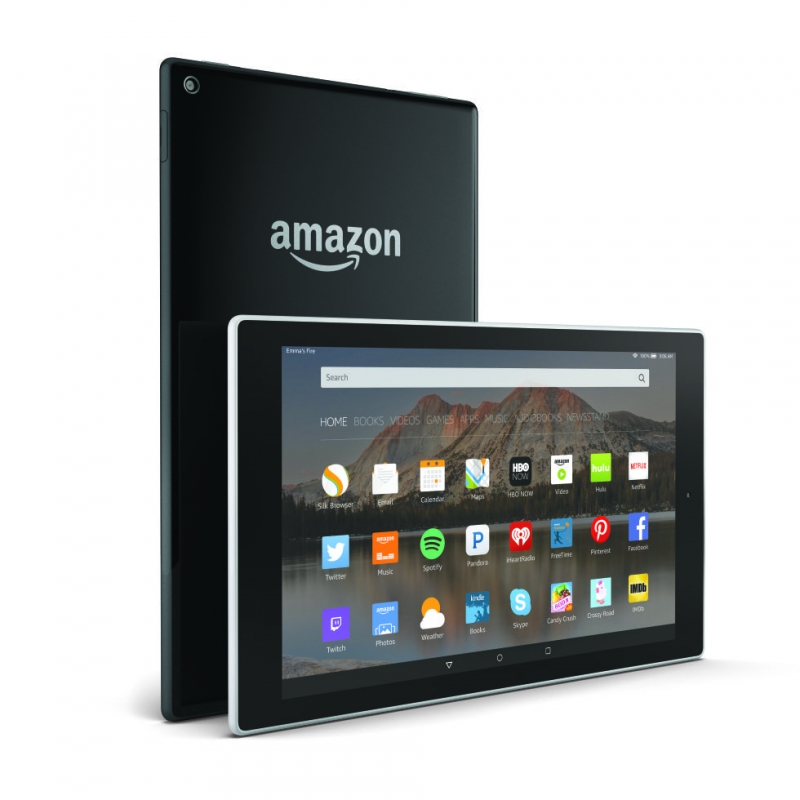
Amazon has today unveiled four new Fire tablets as part of a refreshed line-up, all of which are designed to be budget yet solid options for quick, easy media consumption.
 
The Fire HD8 and Fire HD10 are the two larger, more premium models, featuring 8- and 10.1-inch 1280 x 800 displays respectively. Amazon hasn't provided the full spec sheets for either of these tablets just yet, but we do know both feature partly-metal bodies that are 7.7mm thick, and Gorilla Glass-protected displays capable of 400nits of brightness.
 
The HD8 and HD10 are powered by unspecified 1.5 GHz quad-core SoCs, and both support 802.1ac Wi-Fi and feature microSD card slots. The HD8 will go on sale for $150 with 8 GB of internal storage, while the HD10 will be $230 and come with 16 GB of storage.
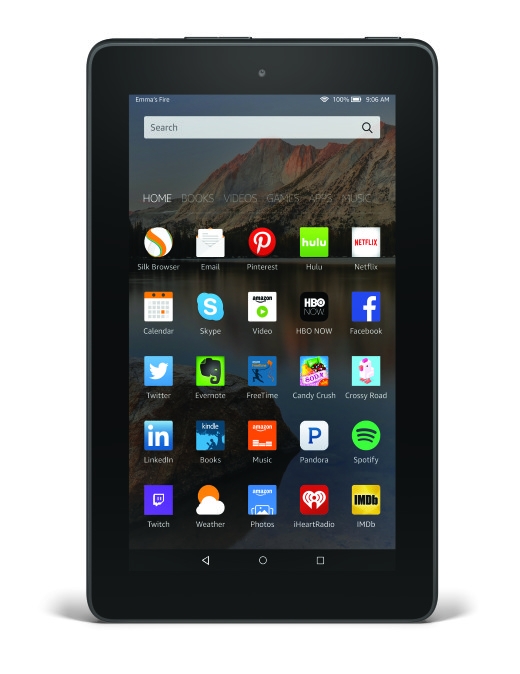
Perhaps the most compelling tablet Amazon has announced today is simply called the 'Fire': a 7-inch 1024 x 600 tablet that will retail for just $50. The Fire isn't going to be a performance powerhouse, featuring just a 1.3 GHz quad-core SoC, 8 GB of internal storage and 1 GB of RAM, but it will be a very cheap way to browse the web and watch movies on the go. The wallet-friendly tablet also comes with a microSD slot so you can add up to 128 GB of additional storage.
 
The Fire is so cheap that Amazon has decided to sell the tablet in a six-pack (as well as individually), where you essentially buy five tablets and get a sixth one for free. Amazon claim you might want a tablet that lives exclusively in each room of your house, hence the ability to buy the Fire in packs of six, but it could end up being a great gift option instead.
 
The fourth and final tablet Amazon has announced is the $100 Fire Kids Edition, which is essentially the very same Fire tablet with a kid-friendly case, a two-year warranty that includes accidental damage, and a year's subscription to Amazon's FreeTime Unlimited service that gives you access to a wide variety of children's books.
 
If you're interested in any of these tablets, they're available for pre-order now, and will begin shipping on September 30th.
 
~ Tim Schiesser

10.15.2014

Why I'm cashing in my iPad Air today

Summary: Another year, another round of tablet upgrades.
 
 
October cometh, and with that is the latest round of iPad upgrades. We don't know for sure what will be in the next version, although I took a stab at it around this time last year, so we'll find out in very short order whether I came close or not with my predictions.
 
When I heard just before I left on my vacation to Mexico last week that Apple was going to have an iPad event on the 16th, I immediately logged into Amazon Trade-In and put my iPad Air 128GB up for cash. They offered me a cool $407.
 
Gazelle and a few other companies do the same thing, but I find that Amazon is usually the best way to go, as their offers tend to be more generous and I spend a lot of money with them as a Prime customer anyway, so it doesn't matter much to me that it is for store credit.
 
If you decided that you were going to do the same thing today, assuming your device is in pristine, "like new" condition, you'd get $361. So in the course of a week, right after it was known a new version was going to be announced, the value of a used iPad Air depreciated $47.
 
My device of course has always lived in an OtterBox or some other heavy-duty protective case, so it's perfect. I've kept the original packaging, cable, and charger, so I expect that Amazon will give me the full $407. I sent it off via UPS today.
 
I am officially iPad-free, at least temporarily. My Surface 2 and Surface Pro will have to hold me over for a bit, and my iPhone 6 can fill the app gap.
 
Keep in mind that the iPad Air 128GB Wi-Fi was $799.00 brand new, so even with my $407.00 store credit offer from Amazon, that's a net loss of $392.00, or the equivalent of leasing an iPad at $32.66 a month over the course of a year.
 
It sounds nutty, but I do this every single year. Why? Because it's better than the device becoming absolutely worthless for current-generation apps within 2 or 3 years if I were to keep it.
 
Last year, I traded in my iPad 4th Generation 64GB for $387.50. And the year before that, I got $575.00 for my 3rd Generation 64GB.
 
See a pattern here? There's more and more iPads on the secondary market and thus the value of the current model depreciates more and more the same time every year.
 
I did actually consider keeping the current iPad Air and giving it to my wife, but she rebuffed my advances, preferring her Windows Phone and her touchscreen laptop.
 
Why not keep my iPads for as long as possible? Sure, plenty of people do that. They hand them down to their kids, maybe they don't need the latest and greatest stuff. But I'm a technology writer and I need to keep up with this junk, and I can easily make up the price of a new one with a few articles covering accessories and the like.
 
Still, it's not just keeping up with the latest and greatest. I bought the iPad Air, but I did not... love the thing.
 
I used it a lot, sure. I used it every day. I played games on it constantly. But it seemed to me beyond the basic form factor changes and the usual processor rev, the iPad Air was not a massive improvement over the iPad 4th Generation.
 
We did not get a fundamental display improvement over the 4th Generation with the iPad Air. We did not get magnetic induction charging. We did not get Touch ID. And frankly the stereo sound output on the iPad still kind of bites compared to some of its competitors. 
 
Now, if you waited two generations, maybe three generations until you upgraded, you might have noticed a big difference. But for those of us lunatics that need to have the latest model every year, the iPad Air was a bit of a letdown.
 
Sure, you could argue the move towards a 64-bit CPU and a discrete motion sensor processor is a big deal, but I actually haven't noticed tangible benefits of 64-bit processing yet, particularly with business applications like Microsoft Office or Apple iWork.
 
There were only a few games that I played over the course of that last year that I could have said that they worked fundamentally better than on the previous device. Perhaps they had graphic enhancements I wasn't able to examine side-by-side with the old model.
 
So maybe I'm getting a bit jaded.
 
You could also argue how much thinner and lighter the device was over previous versions. That's fine and good until you throw it in an OtterBox that adds an extra pound of weight to protect it from getting damaged, considering how fragile a device it is.
 
You know what I really want in the new model? Other than not making it out of eggshells and potato chips so I don't have to put armor plating on it? Besides adding inductive charging and Touch ID?
 
A much larger screen, like the rumored iPad Pro is supposed to have.
 
I'm getting older, I just got progressive lenses and I'm tired of looking at little screens with tiny fonts. I want 4K resolution with an active stylus so I can draw hyper-realistic paintings of my poodles and actually read something in the Kindle app without squinting.
 
I used to think it was enough, and I was really impressed with it when the iPad 3 came out, but 9.7" and 2560 pixels wide at 267ppi doesn't cut it anymore. My glasses prescription just went up over 2 diopters. I want in excess of 400ppi on a 13" display. Is that too much to ask?
 
Tank, I need business intelligence dashboards! LOTS OF DASHBOARDS!
 
Although it's not a hard requirement, what I would like to see from Apple is a heterogeneous multi-core SoC using big.LITTLE ARM architecture so the device conserves battery for apps that don't need all the horsepower, so we can get closer to 20 hours of battery life out of the tablet.
 
Of course, instead we'll probably get some souped-up version of the A8 with some better GPU than what the iPhone 6 uses, so I doubt it.
 
And I'd like some more RAM, please. 2GB would not be bad, it would beat the 1GB on the Air, but 4GB would be so, so much better. I mean how many times have you crashed an app on iOS because of a resource deficit?
 
Oh well. At least I have some more spending money now for whatever comes next.
 
Have you cashed in your iPad yet, hoping the new model will be better? Talk Back and Let Me Know. 
 
~ Jason Perlow 

9.18.2014

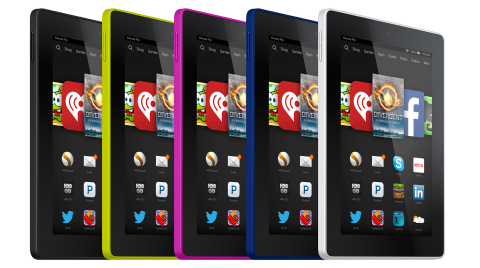
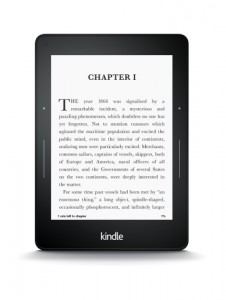
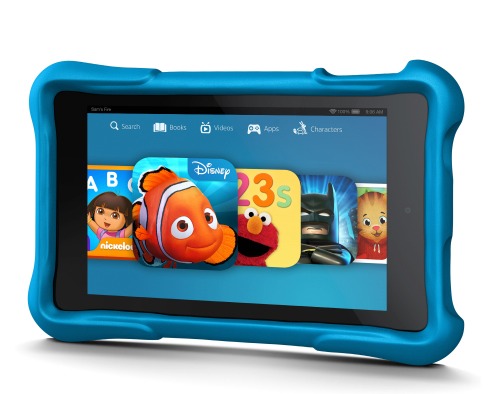
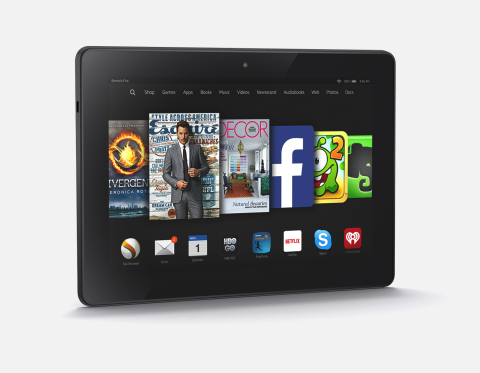
Amazon announces new Kindle Voyage, Fire tablets, Fire Keyboard and Fire OS 4 'Sangria'

 
Amazon is an innovative company that makes some great products and provides wonderful services. As a Prime member, I shop there very often to take advantage of the free two-day shipping. My family uses the Fire TV almost daily to watch movies and play games and I do all of my reading on the Kindle Paperwhite. Hell, the Fire line of tablets are very enjoyable too. The only arguable misstep is the Fire phone, which many reviewers panned, but I actually liked.
 
Today, Amazon surprises the tech world with a lot of new devices; three new Fire tablets (including one for kids), two new Kindle e-readers and a new version of its Android fork, Fire OS. Are you excited?
 
Many people wonder if it is necessary to own both a tablet and an e-reader, and it is a valid question. My answer has always been that it depends on how often you read. You see, e-ink technology is easier on the eyes and offers better visibility in direct sunlight. Amazon's new base-model Kindle is only $79.99 and now features a touch-screen. Really, at this price, everyone should own an e-reader to complement their tablet.
 
However, hardcore book readers should instead take a look at the new Kindle Voyage. Significantly more expensive at $199, it has a better build, better screen and most importantly, is back-lit for nighttime reading.
 
Amazon explains, "Kindle Voyage uses a brand new Paperwhite display, with the highest resolution, highest contrast, and highest brightness of any Kindle. With 300 pixels per inch, the new Paperwhite display delivers laser-quality text and images. The exclusive flush-front display stack uses specially strengthened glass, which is designed to resist scratches. Since regular glass would create glare, the cover glass on Kindle Voyage is micro-etched in order to diffuse light, ensuring you can read easily in bright light without glare. The etching pattern on the glass also serves to match the feel of paper".
 
If you are instead looking for a full-fledged color-screen tablet, Amazon has you covered there too with 3 new models. I am most excited by the affordability of the new Fire HD which starts at $99. However, the sub-$100 price is for a cramped 6-inch display; upgrading to 7 inches moves the price to $139. I find 7 inches to be about as small as I would want in a tablet, but children may like the smaller size.
 
Speaking of children, Amazon announces the Fire HD Kids Edition, which starts at $149 for a 6 inch variant. This seems to be nothing more than the new Fire HD with a rubber bumper. However, the exciting thing is not the hardware, but instead, the perks. You see, Amazon is offering a no-questions-asked 2 year warranty and a free year of FreeTime Unlimited, which provides over 5,000 books, movies, and games for free.
 
"Despite best intentions, kids break things. Fire HD Kids Edition has an unprecedented 2-year worry-free guarantee -- if they break it, we'll replace it. No questions asked", explains Amazon.
 
If you aren't on a budget and you don't have kids, Amazon has also refreshed its Fire HDX tablet and it looks to be very powerful. It is the first tablet to be powered by the Snapdragon 805, which is a quad-core processor running at 2.5GHz. Its starting price is $379.
 
"The team has packed an incredible amount of technology and innovation into the new Fire HDX -- an exclusive HDX display, a powerful quad-core processor, a 70 percent faster graphics engine, exceptional audio with Dolby Atmos, and the fastest Wi-Fi -- and it’s still startlingly light. Fire HDX combines best-in-class hardware with exclusive features and services from Fire OS 4 including Firefly, the Mayday button, Family Library, ASAP, and more", says Jeff Bezos, Amazon.com Founder and CEO.
 
Whether you buy the HD, HD Kids Edition or HDX, please know that you will be running a forked version of Android that is customized by Amazon, called Fire OS. This too is getting updated to 4.0 and carries the codename of 'Sangria'.
 
"Fire OS 4 is based on KitKat and adds features and services to make it faster and easier to use. For example, Fire OS includes ASAP (Advanced Streaming and Prediction) which predicts the movies and TV episodes you’ll want to watch and starts them instantly, and Smart Suspend develops a device-specific profile for when the tablet is typically not in use and proactively turns wireless off and on to deliver up to 25 percent more standby battery life", says Amazon.
 
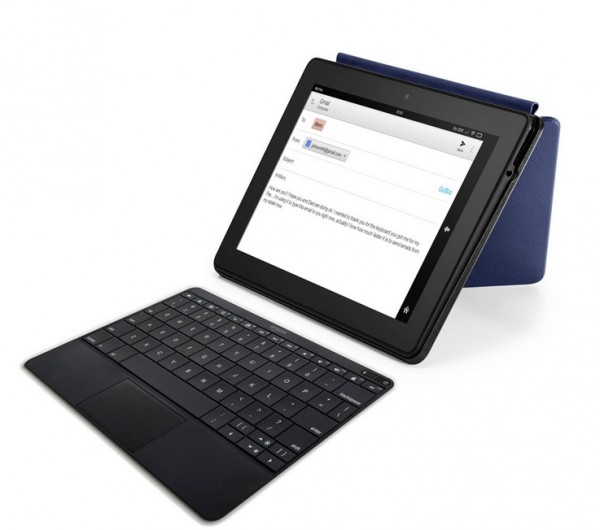
Not content with new devices and a new operating system, Amazon also announces a new Bluetooth keyboard, designed for the Fire HDX. While it is made for that tablet, it should in theory work with any operating system that supports a Bluetooth input device.
 
Amazon explains, "tablet keyboards have been frustrating to use because they work for typing but not for navigation, so you have to keep switching between typing on the keyboard and reaching up to tap the tablet display. Fire Keyboard solves this by including a trackpad within its incredibly thin and light design -- it weighs just 7 ounces and is 4.8mm thin, 30 percent thinner than a #2 pencil. Fire Keyboard also includes Instant Search -- just start typing and the search bar will appear, letting you search across your content libraries, Amazon.com, and the web. The keyboard connects magnetically to the new Fire HDX 8.9 Origami cover making it simple to carry and easy to remove if you aren’t using it -- since the Fire Keyboard is detachable you can place it as close to or as far from the tablet as you’d like for the most comfortable typing position".
 
You've got to hand it to Amazon, as they kept these new products very secret and virtually-free of leaks. Plus, it is perfectly timed for the holidays, as people will soon start their Christmas shopping. A $99 tablet under the tree should make both the gift giver and receiver happy.
 
All of these new devices are available for pre-order at Amazon's website. Will you buy them? Tell me in the comments.
 
~ Brian Fagioli

7.20.2014

Amazon starts Netflix-style book service amid publisher spat

A zoomed illustration image of a man looking at a computer monitor showing the logo of Amazon is seen in Vienna November 26, 2012.
Credit: Reuters/Leonhard Foeger
 
(Reuters) - Amazon.com Inc launched a $9.99-per-month subscription service on Friday that lets customers read as much as they choose from its library of more than 600,000 digital books.
 
Subscribers to the Kindle Unlimited service can read e-books, including "The Hunger Games" and "Life of Pi," on Amazon's Kindle e-reader or any device with a Kindle app. Subscribers also have access to thousands of audio books. The launch of Kindle Unlimited comes as Amazon remains mired in a months-long contract dispute with the No. 4 U.S. publisher Hachette Book Group, owned by France's Lagardere, over how to price e-books. Amazon is also in talks about digital book pricing with Simon & Schuster, owned by CBS Corp.
 
Amazon's move to offer the Kindle Unlimited service reflects consumers' growing preference toward subscription-based models for consuming digital media, such as Netflix Inc for movies and television shows and Spotify for music.
 
The new Amazon service will compete with others in the market, including Oyster, which charges $9.95 per month for unlimited access to more than 500,000 titles.
 
In an interview, Oyster's co-founder Eric Stromberg said he was not surprised by Amazon's move but that his company's partnership with major publishers gave Oyster a higher-quality catalog.
 
"They've tried to pivot from transaction to subscription-based in other forms of media - music, movies, kids' books - and had limited success," Stromberg said of Amazon. 
 
"Through our partnerships with Harper Collins and Simon & Schuster, two of the largest publishers in the world, we’re able to deliver to our audience a vast and deep catalog of the best books in the world," he said.
 
Amazon, which drove the growth of e-books after launching the Kindle in 2007, has branched out into other forms of digital content in recent years. It offers streaming video and music for members of its Prime program and is developing original content.
 
Unlike its other streaming services, Amazon does not require Kindle Unlimited users to be Prime members, who pay $99 a year for free two-day shipping in addition to content.
 
The combative negotiations between Amazon and Hachette have set the publishing world on edge. Earlier this year, Amazon delayed delivery of some Hachette titles, including sought-after print versions and, at one point, it removed a pre-order option for "The Silkworm," by Harry Potter author J.K. Rowling writing as Robert Galbraith.
 
Hachette authors James Patterson, Malcolm Gladwell and Stephen Colbert have openly criticized Amazon for its tactics. Amazon responded by saying its goal was to maintain low prices and a high level of service for its customers. 
       
~ Deepa Seetharaman

12.10.2013

Samsung reportedly poised to blow up tablet market with $135 tablet

Samsung reportedly poised to blow up tablet market with $135 tablet
Samsung has seen Google and Amazon’s best efforts at selling super-cheap tablets and it’s apparently getting ready to do them one better. According to the latest rumors from SamMobile, Samsung is planning to release a new tablet next year called the Galaxy Tab 3 Lite that it will sell for a mere €100 (USD $135), making it by far the cheapest Samsung tablet ever released. There’s no information available yet on the rumored tablet’s specifications although SamMobile expects them to be “respectable” because Samsung is releasing both a Wi-Fi-only version and 3G cellular version of the device. No release date has been confirmed although it does sound like it would be a good candidate to launch at the Consumer Electronics Show in January.


10.22.2012

10 reasons why Ubuntu 12.10 desktop blows away Windows 8

Takeaway: Ubuntu 12.10 has arrived, and Windows 8 is just around the corner. Jack Wallen says there’s no contest between the two.
 History is a grand teacher. And in recent years, Ubuntu Linux has had to deal with a few hiccups in its history. To be specific, when Ubuntu Unity arrived, Ubuntu Linux usage dropped dramatically. When Windows 8 arrives, people are going to have similar issues with the drastic (and not terribly intelligent) changes made to the user interface.
 But it’s not just Windows 8’s shortcomings that make Ubuntu 12.10 the better option. Ubuntu has made some serious progress in the realm of efficiency and user friendliness. With yesterday’s release of 12.10, the improvements continue. Let’s examine some of the reasons why Ubuntu 12.10 will blow away Windows 8.

1: Amazon search

This is something new to every desktop platform. With Ubuntu Unity’s Dash, when you run a search, the search results will include items that can be purchased from Amazon.com. This feature takes online shopping (be it personal or for business) to a new level. Hopefully, at some point, the API for this feature will spread out and users and businesses will be able to include their favorite shopping sites. With all other platforms, you have to go through the steps of opening up your browser, launching the site, searching for the product, and clicking the desired product.

2: Dash previews

When you do search in the Dash, Unity will give you an interactive preview of the results. If the results are audio files, you can right-click the file to get a preview window. You can either show that file in its folder or play the file. If the file is a document, the preview will allow you to open the containing folder, open the file, or email the file.

3: Interface based on efficiency

From the ground up, Canonical and the Ubuntu Unity developers focused on creating an interface that would make day-to-day work as efficient as possible. I can attest, after using Unity since it first launched, that 12.10 is the most efficient desktop interface I have ever used. Those accustomed to switching back and forth between the mouse and the keyboard will happily make user of the Launcher. Users who want a more efficient means of interfacing with their machine will zoom along with the Dash — fingers rarely leaving the keyboard for the mouse.

4: Remote login

This feature is simply amazing. At the Ubuntu login prompt, there are three options: User Login, Guest Session, and Remote Login. The Remote Login allows you to set up remote connections (through UbuntuOne), which you can then log onto from the login screen. No more having to log onto a session and then use a VNC or RDP tool to connect. Now you can gain fast access to those remote machines. You will not find such efficient means of gaining a remote desktop in Windows 8.

5: Integrated Web services

Ubuntu 12.10 has Web services directly integrated into both the Launcher and the Dash, making it one of the most well connected interfaces on the planet. The simplest example of this is the ability to have the arrival of Gmail announced in the notification area. But the Google integration doesn’t end there. Once you’ve authenticated that online account with Unity, you can search your Google Apps account from within the Dash and open files with a simple click.

6: Ease of app installation

This ties into the Dash, as do many other features in 12.10. Open the Dash, click on the Application Lens, search for an application, and right-click the listing to immediately install. There’s not even a need to open the Ubuntu Software Center to install applications. If you left-click on the search result, the Software Center will open. It’s wise to retain this option so that when applications have settings (such as plug-ins that can be installed alongside the application), the user can take advantage of them. Windows 8’s app store includes only Windows 8 (Metro) apps, and it’s not nearly as efficient as the Unity take on installation.

7: Gradual change in UI

Ubuntu 12.10 benefits from a user interface that has been in the wild for more than a year. During that year, Unity has been prodded and polished by users and developers alike. Unity has matured faster than any desktop I can remember. Unlike Unity users, Windows users are going to be tossed into the arena with little-to-no-introduction. Yes, the same thing happened with Unity. But in the case of Ubuntu, users were able to continue using either Classic GNOME or GNOME Shell while they learned Unity.

8: Same interface from server to tablet

One of Mark Shuttleworth’s goals has been to have an identical interface on all Ubuntu-powered devices. Now that the Linux kernel has tackled the ARM issue, Ubuntu will be able to find its way onto tablet devices. With users (and support) being able to enjoy the same interface on tablets, desktops, and servers, life will become much easier across the board.

9: Performance boost

A number of improvements combine to give Ubuntu 12.10 a significant performance increase. The merging of the Unity 2D and 3D, kernel improvements, OpenGL performance boosts, and the inclusion of the new X.org X Windows stack all make for a lightning fast Unity desktop. From Ubuntu 12.04 to 12.10, I have noticed a significant increase in both performance and reliability — and that was an upgrade install!

10: Share Links file sharing

Ubuntu already had a built-in cloud storage system — UbuntuOne. I’ve been using that system for quite some time now and have found it to be much richer than, say, Dropbox. But Canonical wasn’t happy with just the inclusion of cloud storage in Ubuntu. To take this to a new level, it decided to allow users to share files with others via Share Links. This feature lets you copy links to files within your UbuntuOne cloud storage and share those files with other users. Yet another tool in Ubuntu arsenal called “efficiency.”

Watershed release?

The user friendliness keeps piling on with Ubuntu 12.10. I fully believe this will be the release that opens the eyes of the public at large to Ubuntu. Once users see how much more friendly and usable Ubuntu is over Windows 8, they’ll be flocking to the open source desktop.

Do you agree that Ubuntu 12.10 has it all over Windows 8? What other factors do you think make one platform better than the other?

~ Jack Wallen