Cisco Learning Network Store Promotions Page
Showing posts with label Office 2013. Show all posts

11.01.2014

Microsoft: Next Office for Mac coming in 2015, new Outlook is available now

After a long wait, Microsoft announced today that the next version of Office for Mac will finally see the light of day in 2015. Mac users will be able to get their hands on a public beta in the first half of next year, with the final version to arrive before the end of 2015. The latest official version of Office for Mac, Office for Mac 2011, launched more than four years ago.
 
Microsoft does not reveal what the upcoming Office for Mac will be called, but, seeing as it launches in 2015, it is possible that the software giant will stick to the current naming scheme and call it Office for Mac 2015. What we do know is that it will include Excel, OneNote, PowerPoint and Word, which will make it less feature-rich than Office 2013, which has been available on Windows for nearly two years.
 
Microsoft also explained why the next Office for Mac did not arrive shortly after Office 2013, as it had been expected:
Historically we have released a new version of Office for Mac approximately six to eight months after Office for Windows. However, following the release of Office 365 we made the conscious decision to prioritize mobile first and cloud first scenarios for an increasing number of people who are getting things done on-the-go more frequently. This meant delivering and continuing to improve Office on a variety phones (iPhone, Windows Phone, and Android) and tablets (iPad and Windows) brought together by the cloud (OneDrive) to help people stay better organized and get things done with greater efficiency at work, school, home and everywhere between.
The next Office for Mac will be available for free to Office 365 subscribers, but Microsoft will also make it possible to buy "perpetual" licenses, for those who are not yet ready to shell out for its yearly subscription. That said, I think that it may be better value for money to just opt for Office 365, and enroll your Mac to your subscription as, of late, it also gives you unlimited cloud storage via OneDrive.
 
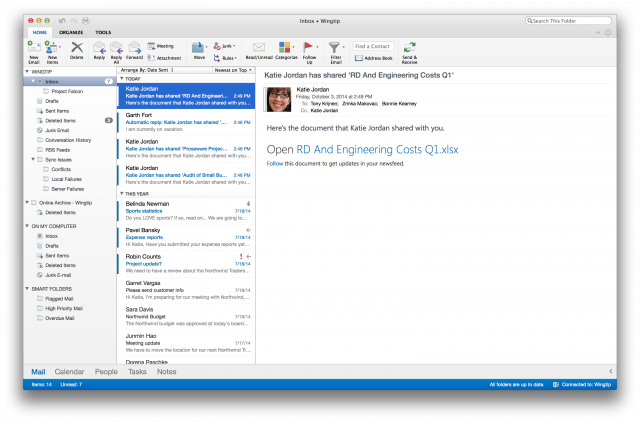
Today's announcement is not just about the next Office for Mac, as Microsoft today launched the new Outlook for Mac. It is designed to deliver a consistent experience that is in line with what you get by using Outlook on Android, iOS, online and Windows. On top of the "fresh look and feel", it also comes with other improvements, as you might expect.
 
The biggest changes are increased reliability and performance, a revamped user interface with improved switching between Ribbons, online archive support for searching archived Exchange emails (stored on-premise and in the cloud), push email support with Office 365, quicker sync and download with Exchange Web Services, support for Master Category List and improve access delivery for category lists, and, last but not least, syncing between Mac, OWA and Windows clients.
 
It is a substantial improvement over the last Outlook for Mac, which is part of Office for Mac 2011. The new Outlook for Mac is only available for Office 365 subscribers, and can be downloaded from Office 365 Portal (for business users) or My Account (home users).
 
~ Mihaita Bamburic

2.26.2013

Microsoft loses yet another fanboy

Takeaway: Another one bytes the dust as Microsoft (and its ugly licensing practices) pushes a long-time fan away. Jack Wallen looks at what’s in store for Microsoft.

No, it’s no one famous. It’s not even someone that has ever appeared in the media, in a meme, or participated in a hashtag or flashmob. Microsoft lost one of the fanboys I happen to work with. This person is one of those guys that gets it on many levels. Not only is he incredibly intelligent, he’s also a brilliant bench technician.

But when Microsoft started announcing their licensing terms for Office 2013 — he started asking me questions. The questions all began with “So Jack, talk to me about Linux.” And so I did. It didn’t take long after that before he had installed Ubuntu 12.10 over his Windows 7 installation and was happily working, sans Microsoft, without missing a beat.
You may be asking yourself, what exactly in the new licensing terms of Office 2013 could turn a long-time Microsoft fan away? Let me list some of the bigger points:
  •  Each license is tied to a Microsoft Live account
  • Only five licenses can be attached to a single account (we have clients that blow through ten MS Offices a week — this could cause problems).
  • Each license will forever be tied to a single machine.
Those are just the nastier points of the license, points that will cause multiple levels of grief for end users. These licensing terms assume that machines don’t break — and when they do, users don’t mind coughing up another roll of cash for another license.

Wrong and wrong.

Machines break. Sometimes, machines arrive faulty — such that the fault won’t show itself until a few days (or weeks) after the fact. What are those users going to do? Purchase Office 2013 twice within a few short weeks?

To that, Microsoft will say, “You can subscribe to Office 365″. To that, I will say, use Google Docs for free and not have any problems.
Over the last year, Microsoft has done more to turn people to alternatives than they have in a long time. First it was releasing one of the most un-intuitive user interfaces to ever grace the computer screen. Now it’s the MS Office license change. In short, Microsoft is losing fans and users. Where are they turning? Linux. More and more people are finally seeing there is an alternative and that alternative is actually BETTER!

“All those wasted years.”  I say, shaking my head, trying to hide the smile on my face.

Companies and consumers have handed over a great deal of money to Microsoft. How are they repaid for their loyalty? A slap in the face and a tug on the wallet. This mess will not end well for Microsoft. It will, on the other hand, end well for the likes of Ubuntu and LibreOffice.

Many of us have been saying this moment was inevitable. At some point we saw the binary on the wall — Microsoft was going to burn the one bridge it couldn’t afford to burn — the one between Redmond and the legion of fanboys. It may not happen overnight, but the fans of one of the largest companies to have ever graced the bits and bytes will turn their backs and look toward more open pastures. When that happens, Linux will finally get the due it’s owed. This cascade effect will have Microsoft scrambling to re-tune their business practices.

Of course, we’ve heard that tune before. Microsoft will probably attempt to win this in a courtroom and not where it should — in the hearts and minds of consumers.

~ Jack Wallen


1.29.2013

Microsoft Office 2013 now available to consumers

After teasers and tweets, it's really no secret that today is the big day when Microsoft launches Office 2013. The suite has already been available for TechNet users since mid-November, but in typical Microsoft fashion the consumers are the last to get their hands on the goodies.

Office 2013 Home and Student, Home and Business, and Professional, as well as Office 365, are currently available for purchase in different markets, including United States, United Kingdom, Germany and Australia, with pricing adjusted depending on the region.

US pricing goes as follows: Office Home and Student 2013 is the cheapest available version at $139.99, while Office Professional 2013 goes for broke at a whopping $399.99. The in-between, Office Home and Business 2013 is available for purchase at $219.99.

Prospective customers can also purchase individual Office 2013 products, such as Word 2013, Excel 2013 and PowerPoint 2013 for $109.99 or $79.99, with the latter pricing available with a non-commercial license. In contrast to the previously mentioned products, OneNote 2013 goes for less, $69.99 or $49.99, respectively (again the second price is for the non-commercial license).

Microsoft also offers Outlook 2013, Publisher 2013 and Access 2013 for $109.99, Visio Standard 2013 runs for $299.99, Visio Professional 2013 and Project Standard 2013 go for $589.99, with Project Professional 2013 topping the charts at $1,159.99.

At a first glance Office 365 Home Premium is the cheapest entry to the club, but unlike its other siblings Microsoft demands $99.99 for a one-year subscription to use the office suite, whereas the others come without an expiration date. The upside, however, is that Office 365 Home Premium can be run on 5 PCs or Macs and it comes with 27GB of cloud storage via SkyDrive. Office 365 University is available for $79.99, $20 less than the standard edition.

~ Mihaita Bamburic

1.28.2013

What you need to know about Microsoft's 'New Office'

Even though Microsoft's lips have been sealed shut on the topic, launch of Office 2013 (and the new Office 365) is imminent. Speculation is fueled by the Office 2013 available on its Home Use Program (HUP) website, something which has customarily preceded most prior Office launches. If the show is about to begin, then all of these preparatory charades are quite the indicator.

Martin Brinkman provided a wonderful in-depth preview on Office 2013 this past summer, and the
great majority of what he covered is still valid in the final bits. I've personally been using a MSDN copy of Office 2013 Pro Plus since about late October and am quite pleased with the product. Ever since Microsoft dabbled with x64 capability in Office 2010, in-house developers increased memory and security aspects that 64-bit provides and the result is a smoother, safer Office experience. Microsoft posted a long Technet article on the benefits of x64 Office 2013 this last summer.

There's a surprising level of confusion out there, even among fellow IT professionals, about what the new flavors of Office entail. And rightfully so, with Microsoft making reference to Office 2013 and Office 365 interchangeably as of late -- even coining a new unified term, the "New Office". After some careful research on the web and doing some of my own digging, I've come to a pretty good understanding of where Microsoft is headed with everything Office-related. Here's the full scoop.

Office 2013 = Office 365 = "New Office"

Office 2013 is all-but-confirmed for a January 29 launch under three different-but-related product names. You may see reference to any of these monikers, depending on which route you're heading with your Office upgrade path. Thanks to Microsoft watcher Mary Jo Foley, we now have a pretty crisp picture of where all these editions fall into line.

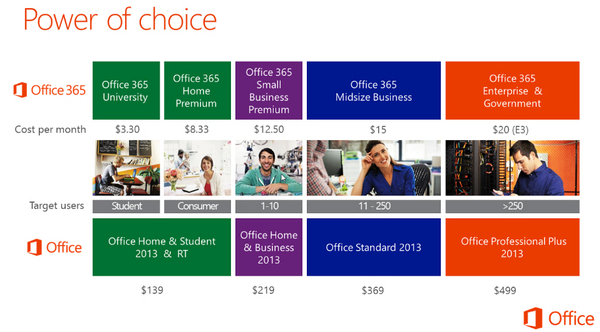
The key distinction between the editions here lies, first and foremost, in whether you plan on going the cloud-based subscription route, or if you are going the boxed copy route. The more traditional physical copies of Office 2013 follow a similar pattern of previous releases, especially if you are familiar with Office 2010's flavors. For $140 you will be able to pick up the Home & Student edition; Home & Business will run $219; and Professional will cost $400 (not shown below). Office 2013 Standard and Pro Plus are available through the educational and Software Assurance channels only, meaning you won't be able to purchase these in any store.

Microsoft truly believes, however, that the cloud subscription route (Office 365) is where the public wants to go. I'm personally a boxed-copy kind of guy, so the subscription model is a tough sell, but I can't predict what others will think of this. Adobe paved the way for the pay-as-you-go model when they took Creative Suite to the cloud earlier last year, and Microsoft has followed suit with Office.
Looking at the matrix above, you'll notice how aggressive Microsoft is with the monthly price tags, especially at the Office 365 Home Premium and University levels. Home Premium is probably the juiciest option of all, allowing for up to 5 devices to be used on a single subscription for under $9 per month. This edition of Office 365 is the one Microsoft hopes to lure people over to who are used to the boxed Home & Student edition, that has offered multi-user installation rights since version 2003. Microsoft has nixed this nicety in Office Home & Student 2013, presumably to bait home users to switch over.

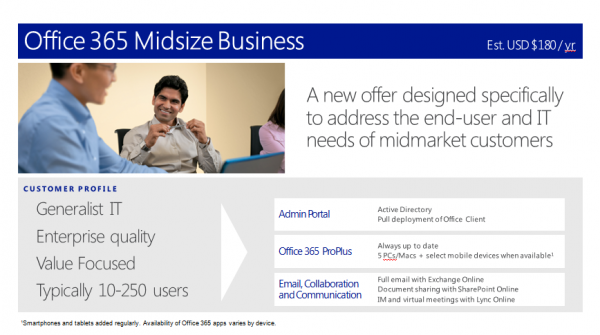
Another item that confuses some folks: which editions of Office 365 will most resemble the traditional O365 offerings aimed at businesses. More specifically, the Office 365 flavors that feature Exchange Online, Lync Online, etc. Through various outlets, it has been confirmed that the Small Business Premium level and higher will be the ones that contain downloadable Office 2013 copies alongside Microsoft's hosted Exchange Online, Lync Online, and the other business-centric items companies care about.
These new business focused subscription levels will fit alongside Microsoft's current Office 365 lineup, which has price points for every comfort level. I'm personally curious to see where Microsoft takes the new Small Business Premium offering, since I ratted out the current Small Business (P1) Plan pretty heavily in a previous op/ed on Office 365. One of my biggest gripes about the current P1 offering is its lack of 24/7 phone support for customers, even though the Email Only plan (which costs $2 less per month) does get full phone support treatment. Hopefully, Microsoft listened to the complaints about this discrepancy and will make some changes come later this month.

Current Office 365 Customers get Hit with Improvements as Well

One of the nice parts about the upcoming unified Office 2013/Office 365 launch: Microsoft is
going to extend quite a few improvements to its current Office 365 customer base as well. Not
to be left behind, they are going to be notified via their web portals about a looming "refresh"
that will introduce quite a few new features and enhancements. Seeing as I've already moved some
of my FireLogic customers to Office 365, this will definitely be a pleasant surprise.

Some of the biggest things hitting O365 during the next refresh cycle include:
  • All Office 365 customers with access to Web Apps currently will be getting their newest iterations as they become available. The initial (current) versions of the Office Web Apps were admittedly a bit weak and Microsoft has both polished their look and upped their feature sets quite heavily.
  • Lync Web App will be getting HD video capability and group-chat multi-user simultaneous conferencing capability. The current version of Lync Web App is pretty poor, so this will be a welcome improvement on all levels.
  • Subscribers with access to downloadable Office copies will get their links updated to Office 2013, as Microsoft will be retire Office 2010 download links. Keep in mind that Office 2013 requires Windows 7 or 8 (sorry Vista users).
  • The first ones to get access to the "new" features above will be Exchange Online-only customers, followed by E-level customers. The rest of the editions will follow suit afterward. The entire upgrade of the existing Office 365 network will be done by November 2013, Redmond claims.
The new landscape of what Office 365 looks like is starting to become more clear, as the lines blur with what Microsoft considers solely "traditional Office software" in the way we used to know it. Soon the "New Office" will be just that: a fresh, bold direction for a flagship product that has
withstood the test of time. When Microsoft proclaimed it was "All In" with the cloud a few years back, now we can safely say it wasn't joking around.

Want your Boxed Copy of Office? It will cost You (a Bit) Extra

If there's one way to stick it to those who prefer to get their software the old school way, it's to tack on an artificial price premium. Not only that, but Microsoft is killing off one of the finer points with purchasing the boxed edition of Office (Home & Student edition, specifically) in that every flavor will have a single user install limit. Seeing that Home & Student 2013 costs a few more bucks than 2010, it's more than a little upsetting.

It's fairly clear that Microsoft's reasoning behind the price premiums is to slowly carrot-and-stick
users onto its Office 365 plans. Joe Wilcox does a good job in outlining the new price points for the
boxed editions of 2013, and the results won't win over any fans who were planning on upgrading via DVD. License to license: 180 percent increase between Office Home and Student 2010 and 2013 versions and 76 percent for Home and Business. Looked a differently, Microsoft nearly trebles Office Home and Student 2013 for anyone wanting three licenses.

Was it a good idea on Microsoft's part to raise these prices so sharply? Yes and no. If you believe in the manifest destiny of Microsoft's Office 365 cloud path, then yes, winning over users via a price war may be the ticket. However, even among my own customer base, there are many users who refuse to pay for a subscription on a piece of software that has always been known for its boxed copy releases. Changing that attitude among those potentially upgrading will be a difficult sell.

SkyDrive is on a Bold Crash Course with Google Drive, Dropbox

Perhaps one of the most under-the-radar aspects of the recent Microsoft wave of updates is the continual push to get SkyDrive adoption on the up and up. To a certain extent it's working quite well. My Google Apps customers have been loving Google Drive since it came out in mid 2012, but SkyDrive's "me-too" approach to the online storage market is a welcome competitive strategy. In my own informal testing, it's a solid alternative to Google Drive, and for already-heavy Office users, it may be a no-brainer.

It's nice to know that Skydrive now offers 7GB of free storage space (topping Google Drive, which only has 5GB free), which is pretty commendable, seeing as the popular Dropbox only offers a measly 2GB. Office 365 Home Premium users get an even sweeter deal, however, because Microsoft
tosses in a bonus 20GB of SkyDrive space per user. The storage is completely stackable on the free
7GB already available, bringing you to a whopping 27GB at no extra cost. I have my reservations about moving to a subscription-based model for my Office needs, but this may be the freebie that brings me over the top.

And unrelated to SkyDrive, Microsoft announced 60 free Skype minutes per month on Office 365 Home Premium subscriptions. If you happen to be one of those folks who increasingly use Skype as a phone replacement, this could be of good value to you as well.

Will Microsoft's push to unify Office and Office 365 be a Winning Strategy?

It's anyone's guess if the cloud model for Office is the right way to go. On the outset, yes, the pricing is darn attractive and the fringe benefits you get scream value, especially over that of the boxed editions. But tossing freebies and likable pricing at users won't change the fact that there is a perception gap that Microsoft has to hurdle. No matter which way you slice it, Office started its life as a boxed product and there is a sizable user base that will likely never see it any different way.

I'm going to give Microsoft the benefit of the doubt on this experiment. The critics claimed that Exchange users would never take their email to the cloud; yet Office 365 got its rise to glory by tearing down the notion of on-premise servers. If Microsoft has its way, perhaps more of its core software base will move into a subscription model, paving the way for a fresh new era at Microsoft. Perhaps this could be the start of Microsoft reinventing itself and getting us prepared for a future of paying monthly for the software we need.

Is this necessarily such a bad approach? While I'm personally an old-school guy when it comes to my software, I think if the price is right and the terms are customer-centric, then the cloud can actually be a good thing. As users we are already accustomed to paying monthly for our cell service and internet service, so adding Office rights to that mix may not be so crazy after all.

~ Derrick Wlodarz


9.19.2012

Microsoft readies Office 2010 to Office 2013 upgrade program

Summary: Microsoft is said to be prepping to launch its latest Office upgrade offer this fall, and give qualifying users a choice of different Office versions to which they can move.


Just like it does with Windows, Microsoft typically offers its Office customers an upgrade guarantee program, allowing them to buy the current version of a product with a free or discounted upgrade to the next one being part of the package.

One of my contacts said the Office 2013 upgrade guarantee will begin in about a month's time -- specifically on October 19. If this is correct, users purchasing Office 2010 between that date and the end of the covered period (which my same contact said is April 30, 2013) will get some kind of guaranteed upgrade to Office 2013 once it is generally available.

Microsoft officials have not shared public guidance as to Office 2013's planned release-to-manufacturing (RTM) or general availability dates. My sources have heard that the RTM target is November 2012, with general availability slated for February 2013. (Those with TechNet/MSDN and volume-licensing agreements would likely get the final bits shortly after they RTM.)

Microsoft offered the Office 2010 tech guarantee program for those purchasing Office 2007 as of March 2010. The period of coverage was seven months, roughly the same amount of time the Office 2013 tech guarantee supposedly will last.

The Office 2010 tech guarantee upgrade program was free. It's unknown whether the Office 2013 one will be, as well. If Office follows Windows' lead, it may not be. Microsoft announced it will be charging those who purchase Windows 7 PCs between June 2 and January 31, 2013, $14.99 to obtain an upgrade to Windows 8 Pro once it is generally available. The Windows Vista upgrade program before this was free.

My contact sent me a couple of screen shots of what allegedly appeared briefly on the Office.com/offer page (which is not currently available), which I have included below.
It appears the upgrade offer for Office will be for Windows users who purchase Office 2010 Home & Student, Home & Business 2010, Professional 2010 or University 2010 and Mac users who purchase University 2011 or Home & Student 2011 between October 19 and April 30, 2013. Windows users who buy these SKUs will have a choice of upgrading to Office 365 Home Premium (which is currently one of the new Office versions that is being beta tested) or Office 2013 SKUs that are more comparable to what's out there already.
The chart above shows some of the differences between Office 365 Home Premium and these more traditional Office 2013 releases. Office 365 Home Premium can be installed on up to five PCs and/or Macs and is licensed to a user as a one-year subscription, which will need to be renewed to continue usage. The more traditional Office 2013 SKUs can be installed on only one Windows PC with a non-transferrable license. (The Office for University and Mac Home & Student users will have the option to upgrade to Office 365 Home Premium only.)

I am not sure whether these Office upgrades will be free, but given there's no visible price on these screen shots, I'd say there's a chance.

I've asked Microsoft for comment on the details and dates of the coming Office upgrade program but have yet to hear back.

Update: Microsoft officials said they had no comment on anything about the alleged Office upgrade program.

Update (September 17): Microsoft officials confirmed all the details about the upgrade offer, including the start and end dates and the SKU listings. The listed upgrades will be free to users who purchase Office 2010 between October 19 and the end of April, officials said.

~ Mary Jo Foley