Cisco Learning Network Store Promotions Page
Showing posts with label Fedora. Show all posts

3.30.2016

Fedora 24 Alpha Linux distribution now available with GNOME 3.20

 
If you are a big GNOME fan -- like me -- then there is one distribution you must try -- Fedora. The Linux-based operating system -- the same that Linus Torvalds uses -- is a great way to have a vanilla GNOME experience. Desktop environment aside, it is also both stable and fairly cutting-edge, offering modern packages and kernels.
 
Today, Fedora 24 reaches public Alpha -- you can download it now. While using an Alpha operating system on your main computer is probably not a great idea, there is one specific thing that makes such an early version very attractive -- GNOME 3.20. While the ISO does not contain the final version of 3.20, you can update to final immediately after installation by using either Software or DNF in terminal. Huzzah!
 
"The Alpha release contains all the features of Fedora 24's editions in a form that anyone can help test. This testing, guided by the Fedora QA team, helps us target and identify bugs. When these bugs are fixed, we make a Beta release available. A Beta release is code-complete and bears a very strong resemblance to the third and final release. The final release of Fedora 24 is expected in June", says Remy DeCausemaker, Fedora Community Action and Impact Lead, Red Hat.
 
DeCausemaker explains, "we have decided not to make Wayland, the next generation graphic stack, the default in Fedora 24 Workstation. However, Wayland remains available as an option, and the Workstation team would greatly appreciate your help in testing. Our goal is one full release where the non-default Wayland option works seamlessly, or reasonably close thereto. At that point we will make Wayland the default with X11 as the fallback option".
 
If you want to give Fedora 24 Alpha a spin, you can download an ISO below. I highly recommend choosing "Workstation" which uses GNOME, but you can also try other desktop environment "Spins" by clicking on the appropriate link. This includes KDE, Cinnamon, Xfce, Mate, and LXDE.
 
Again, using this on your main computer, or production machine, is not recommended. You may want to try a virtual machine install instead. If you do encounter any bugs, be sure to report them -- this will help to make the beta, and ultimately the final version, better.
If you download it, please tell me what you think in the comments.
 
~ Brian Fagioli

9.26.2013

Linux desktop environment Gnome 3.10 now available

When it comes to Linux, the potpourri of available desktop environments can be both scary and exciting. It can be a hard decision for a beginner, but a fun one too. Over the years I have tried a plethora of environments and they all have strengths and weakness. Ultimately, I fell in love with the controversial Gnome 3. I say controversial because the changes from version 2 to 3 were quite radical and many users did not like them. However, as version 3 progresses and improves, Gnome 2 loyalists are starting to take notice.
 
Yesterday, the newest iteration, Gnome 3.10 was released. According to the Gnome website, "the GNOME project is proud to present GNOME 3.10. The release comes six months after 3.8, and contains 34,786 changes by approximately 985 contributors. It contains major new features as well as a large collection of smaller enhancements. 3.10 provides an improved experience for users, as well as new capabilities for application developers".
 
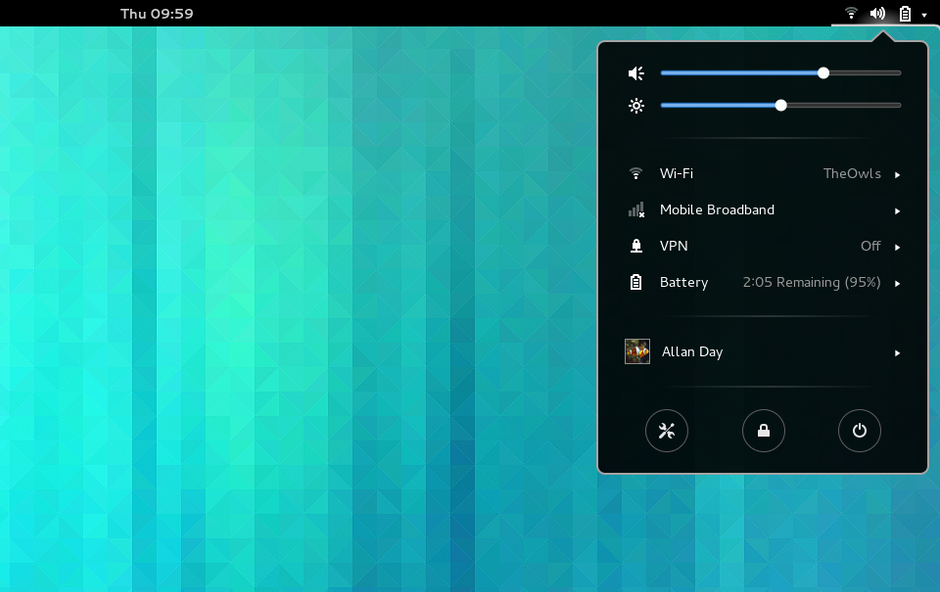
"This is the fifth major update to GNOME 3. It builds on the foundations that we have laid with the previous 3.x releases and offers a greatly enhanced experience. The exciting new features and improvements include a new application picker in the Activities Overview, a redesigned system status area, support for hi-dpi displays, Flickr integration in Photos, and new applications for music, maps and notes", says Matthias Clasen of Gnome.
 
The following Gnome applications have been updated for the release:
  • Music is planned to be the default audio player application for GNOME 3, and it is making its debut in GNOME 3.10 as a technology preview. Music provides a clean and focused interface for browsing your music collection according to Artist, Album or Track. Support for playing music from media servers (via UPNP) and fetching music from online sources is planned for the future.
  • Maps is a new map viewer application for GNOME. Based on collaborative OpenStreetMap data, which is contributed to by hundreds of thousands of people across the globe, it allows you to browse street maps and satellite images. Maps allows you to search for the names of towns, cities and landmarks, or for places of interest such as "cafes near Main Street, Boston" or "Hotels in New York". The new GNOME geolocation framework, which has been created for GNOME 3.10, is used to identify where you are, show maps for your current location, and find places when you search.
  • Photos is a new application that was first introduced in GNOME 3.8. Since then, it has matured and is now a fully-fledged member of the core application set. Photos allows you to browse, organize and print your pictures, and has Online Account integration. Pictures from your Flickr account can be browsed directly through the application, and support for other online photo services is already being worked on. Photos can also be used to send your photos to be displayed on other devices, such as DLNA-enabled TVs and phones and other computers running GNOME.
  • Notes was originally introduced in GNOME 3.8 as Bijiben. Since then it has matured, and has gained the ability to store notes using ownCloud. Notes provides a simple interface for writing, browsing and searching notes, and automatically saves your work so you don't lose it.
  • The stopwatch and timer in Clocks now have an animated analog timer which both looks great and gives additional feedback. Clocks also has geolocation support in 3.10: if possible it will automatically detect where in the world you are and show a clock for the closest city.
  • The Tweak Tool has had a complete refresh for GNOME 3.10. The configuration options it provides have been reorganized to make browsing easier, and the layout and labelling of each option has been updated to make them easy to understand.
  • Web, the GNOME browser, has had a number of improvements for 3.10. Like many other applications, its titlebar and toolbar have been combined into a header bar. This gives more screen space to show web pages in. Web has also gained integration with system search, so that you can search your browsing history and open pages directly from the Activities Overview. Finally, as a part of our effort to protect your privacy, the default web search engine has been switched to DuckDuckGo.
  • Boxes is now able to import file system images, including QEMU (.cow, .qcow and .qcow2), raw disk images (.img), VirtualBox 1.1 (.vdi), VMWare 3 and 4 (.vmdk), VirtualPC (.vpc) and Linux Compressed Loop images (.cloop). Version 3.10 also includes many small user interface improvements.
  • Documents has gained the ability to browse and read documents stored on ownCloud.
  • Contacts has had a lot of user interface improvements, including an updated contacts list, better looking contacts pane, and new dialogs for linking contacts and changing your address book.
  • The Document Viewer now has DjVu support and a new search results sidebar. It also includes the long-awaited PDF caret and keyboard navigation support. This feature places a movable cursor in text pages, allowing you to move around and select text with your keyboard. Caret navigation can be activated by pressing F7. The work for this feature was funded by the Friends of GNOME accessibility campaign.
  • In Boxes, it is now possible to drag and drop files between your computer and virtual machines. This will automatically work with new virtual machines that have been created using the express install option. Non-express installs or older virtual machines require a new spice-vdagent; Microsoft Windows virtual machines require spice-guest-tools.
This update to Gnome 3 will be available for some distributions soon but Fedora users must wait for version 20 in December. Sadly, it will not make it into the default version of Ubuntu Gnome 13.10 which is due in October. However, Ubuntu users should be able to update using a PPA.
 
I have been testing the pre-release version of Gnome 3.10 (3.9.90) and have been very satisfied. I am extremely excited to install the final version. Are you excited too? Tell me in the comments.
 
~ Brian Fagioli

6.05.2012

Fedora to be signed by Microsoft

Takeaway: Fedora’s hand forced in the battle to comply with Secure Boot specifications

Fedora 18 will support UEFI’s Secure Boot feature by using Microsoft’s sysdev signing service, to sign its initial bootloader.

The plan and the reasoning behind it for Fedora’s next release, was detailed in a blog post by Red Hat’s Matthew Garrett. Garrett has provided a running dialogue on the problems faced by Fedora and Red Hat, to operate with the upcoming UEFI Secure Boot enabled hardware.

Garret said that future releases of Fedora will have a bootloader that is signed using Microsoft’s signing key, because there is a very high probability that Microsoft’s key will be bundled will all hardware, to be Secure Boot compatible. Since this option is available to any Linux distribution, it prevents Fedora being in a better position than smaller distributions, due to its backing and mindshare.

The signed bootloader will do nothing more than load a version of Grand Unified Bootloader (GRUB), the standard Linux bootloader, that is signed with a Fedora signing key. This version of GRUB will be prevented from module loading and running arbitrary code at runtime, two features that are unrestricted presently.

Following on from this, the Fedora kernel will now also be signed and will have its command line sanitised, to avoid functionality that would allow an attack to cause a signed kernel to launch arbitrary code.

Fedora will be signing all the modules and drivers that it ships, and restricting access to PCI, which will mean that graphics cards will need kernel drivers; also, user modesetting will be removed.
“Secure boot is built on the idea that all code that can touch the hardware directly, is trusted, and any untrusted code must go through the trusted code. This can be circumvented if users can execute arbitrary code in the kernel. So, we’ll be moving to requiring signed kernel modules and locking down certain aspects of kernel functionality.” wrote Garrett.

“If we produce signed code that can be used to attack other operating systems, then those other operating systems are justified in blacklisting us. That doesn’t seem like a good outcome.”

Users can remove these restrictions by disabling Secure Boot.

Prior to coming to this decision, Fedora explored the possibility of creating a Fedora key and having vendors include that key in their hardware, it was dismissed for two reasons; it would not be possible to get the key into each and every vendor’s hardware, and that it would have put Fedora in a privileged position.

“As one of the larger distributions, we have more opportunity to talk to hardware manufacturers than most distributions do. Systems with a Fedora key would boot Fedora fine, but would they boot Mandriva? Arch? Mint? Mepis? Adopting a distribution-specific key and encouraging hardware companies to adopt it, would have been hostile to other distributions. We want to compete on merit, not because we have better links to OEMs,” Garrett said.

Another alternative was to create a generic signing key for Linux, but this was seen as prohibitively expensive to maintain, and no organisation stepped forward to handle it.

Garrett was at pains to stress that while he is a Red Hat employee, these are only the plans for Fedora, not Red Hat.

~ Chris Duckett