Cisco Learning Network Store Promotions Page
Showing posts with label Passwords. Show all posts

2.02.2016

NSA's lead hacker offers security tips


An interesting talk happened recently during the Usenix Enigma security conference in San Francisco. It was held by Rob Joyce, basically the number one hacker of the US. He is the head of NSA's Tailored Access Operations, or TAO. That's pretty much the government's hacking team, tasked with breaking and entering into the systems of its enemies. Or allies, if need be.

This man, who assumed the position of hacker-in-chief just a few months before Edward Snowden blew the whistle on the whole ordeal, spoke about a lot of things which Wired summed up in one smart sentence -- he explained how to keep people like him out of your systems.

Although everyone agrees that he probably didn’t say anything about TAO's classified operations, he did say a couple of interesting things.

1. NSA Hunts Sysadmins

The NSA will always look for the credentials of network admins and pretty much anyone with high levels of access. It will also look for hardcoded passwords in legacy protocols.

2. No Crack Is Too Small

If your system has a crack and NSA can find it, it will use it. No matter how small and insignificant it might be. Do not underestimate what even the tiniest of cracks can do to your system.

3. BYOD Is Dangerous

If you use your own device to connect to your company’s network, make sure to keep it safe, use it only for work and don’t give it to your kids. Joyce said that Steam, the Internet-based digital distribution platform for games, is a huge security threat.

So basically, if you want to stay safe, limit access privileges for important systems and segment the networks. Patch up your systems and remove any legacy protocols. And remove hardcoded passwords.

A more detailed overview of the conference can be found on this link.

Published under license from ITProPortal.com, a Net Communities Ltd Publication. All rights reserved.

Photo Credit: igor.stevanovic/Shutterstock

~ Sead Fadilpašić

1.14.2016

Updated Android.Bankosy malware steals passwords sent through voice calls

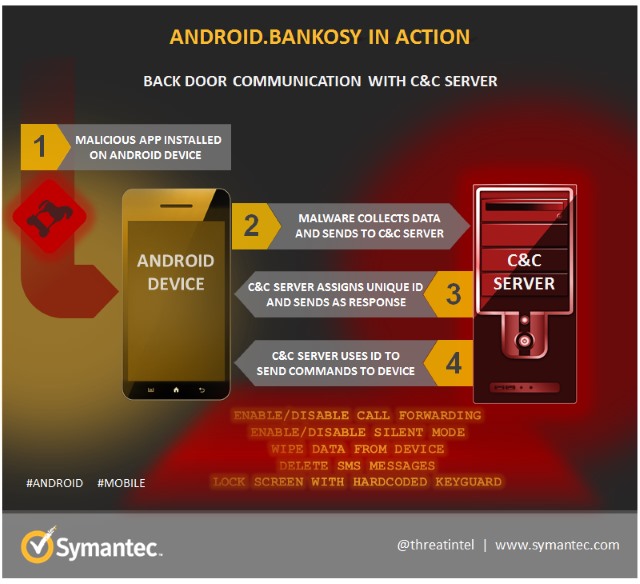
Around a year and a half ago, Symantec warned about the personal data stealing malware Android.Bankosy. Now the Trojan has been updated so it can steal passwords delivered via voice call-based two-factor authorization systems.
  
Such 2FA systems are is often used by banks to communicate one-time passcodes to people. While these have usually been delivered via SMS, voice call delivery is becoming increasingly common. Malware makers are keen not to miss out on data stealing opportunities, and the Android.Bankosy introduces a call-forwarding feature that sends 2FA calls to a C&C server so the code can be intercepted and exploited.
  
The malware enables call-forwarding on an infected phone, and is also able to enable silent mode to avoid alerting a victim about incoming calls. A successful attack is dependent on a victim's basic login credentials having already been stolen, but the malware represents a worrying new development in breaking through banking security.
Detailing how Android.Bankosy works, Symantec's Dinesh Venkatesan says:
Once the malware is installed on the victim's device, it opens a back door, collects a list of system-specific information, and sends it to the command and control (C&C) server to register the device and then get a unique identifier for the infected device. If the registration is successful, it uses the received unique identifier to further communicate with the C&C server and receive commands.
Most of the commands supported by the malware are common and trivial for typical back door or financial Trojans, such as intercepting incoming SMS, deleting SMS messages, wiping the data, etc. Out of these multiple commands, the most relevant for Android.Bankosy is call_forwarding; when this command is received by the malware from the C&C server, it executes a payload to enable call forwarding.
 
Full details of the malware is available from Symantec.
 
Photo credit: Mmaxer / Shutterstock

~ Mark Wilson

12.28.2015

How to view saved Wi-Fi passwords in Windows 10, Android and iOS

So many stores, service stations, coffee shops, pubs and so on offer free Wi-Fi that you probably have countless networks saved on your phone or laptop. Having a password saved on your computer is great, but how can you get the password so you can use it on your phone as well?

Rather than trying to hunt down a member of staff to ask, or hunting high and low for that tiny sign that shares the password, you can instead view the wireless passwords you have saved. Read on to find out how to retrieve these passwords in both Windows 10 and Android.

If you already have the password for a wireless network saved on your laptop and want to retrieve it to use on your phone -- or share with someone else -- things are quite simple. The same method works in Windows 7, Windows 8.x, and Windows 10, but it's important to note that you need to be connected to the network you are trying to retrieve the password for.

  • Press the Windows key and R, type ncpa.cpl and press Enter.
  • Right click on the wireless network adaptor and select Status.
  • Click the Wireless Properties button.
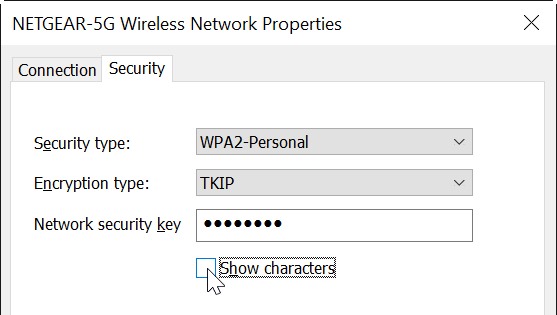
  • In the Properties dialog that appears, move to the Security tab.
  • Click the Show characters check box, and the network password will be revealed.

If you want to retrieve a saved wireless network password from Android or iOS, you'll have to have a rooted or jailbroken device -- sadly, there is no standard way to pull up security credentials. It's worth noting that there are several apps out there in Google Play that claim to reveal Wi-Fi passwords; while some of these work, there are also numerous malicious tools out there, so it's best to use an alternative method.

If you're using Android, install a copy of the free file browser ES File Explorer.

  • Navigate to the data/misc/wifi folder on your device -- it will not be visible on non-rooted phones.
  • Open the file called wpa_supplicant.conf and you will see a list of saved Wi-Fi networks complete with their passwords.
To retrieve a Wi-Fi password on a jailbroken iPhone, you can check in the Keychain access app if you have a Mac connected to the same network, but there's another method if you prefer to do it all from your phone.
Grab yourself a copy of WiFi Passwords from Cydia.
Fire up the app, and you'll be presented with a list of all of the passwords your iPhone has for saved wireless networks.
Photo credit: Marynchenko Oleksandr / Shutterstock

~ Mark Wilson

6.18.2015

Researchers uncover major security flaws in iOS and OS X that allow for rampant password theft

 
A group of security researchers have revealed zero-day vulnerabilities within iOS and OS X that allow an attacker to wreak havoc on Apple’s ecosystem.
 
The group, comprised of researchers from Indiana University, Peking University and Georgia Institute of Technology, recently published their findings in a paper titled Unauthorized Cross-App Resource Access on Mac OS X and iOS.
 
In it, they demonstrate how it’s possible to upload malware to the App Store and the Mac App Store by circumventing Apple’s vetting process. From there, the malware can also steal credentials from Apple’s password management system Keychain, from other installed apps and even from Google Chrome.
 
The team said it first notified Apple of the issue in October 2014; Apple asked for six months to fix the issue. In February, Apple staff asked for an advanced copy of their research paper. It’s now eight months later and the vulnerabilities still exist in the most recent versions of Apple’s software.
 
The researchers told The Register that Google’s Chromium security team removed keychain integration for Chrome, saying the issue likely couldn’t be rectified at the application level.
 
Just how big of a deal is this? According to the researchers, more than 88 percent of apps they tested were completely exposed to the attack.
 
As 9to5Mac notes, the best advice for now would be to exercise caution when downloading apps from unfamiliar developers.
 
~ Shawn Knight

3.16.2015

Yahoo introduces On-demand passwords and demoes end-to-end-encryption

 
The idea of forgetting the password for your email account might seem odd, but it happens. You might be one of those people who signed up for a Yahoo email address years ago, moved on to something better, and now only check in every few months to see if you've missed anything.
 
To combat the problem of forgotten passwords, Yahoo is introducing a new feature called On-demand passwords. There's no need to battle through the process of answering security questions to reset your password when you forget it; now you can create a temporary password that gets sent to your phone.
 
Chris Stoner, Director of Product Management, explains that the new feature eliminates the stress and anxiety that goes hand in hand with forgetting a password. It’s an option that’s only available in the US for the time being, but it's hard to imagine that it wouldn’t roll out to other parts of the world if it proved successful. In a blog post, Stoner wrote:
Today, we’re hoping to make that process less anxiety-inducing by introducing On-demand passwords, which are texted to your mobile phone when you need them. You no longer have to memorize a difficult password to sign in to your account -- what a relief!
In order to get the feature set up, you will have to remember your password at least once so you can log in and access your account settings. Head to the Account Security section of settings, activate the On-demand passwords feature, and confirm your phone number.
 
Yahoo also announced a preview of a new end-to-end encryption system. The feature will come to Yahoo Mail, and it is hoped that it will be implemented by the end of the year. The source code is available on GitHub and the video below was shown at SXSW by way of an introduction:
 
 
Photo credit: Brt / Shutterstock
 
~ Mark Wilson

7.17.2012

450K Yahoo passwords online now: Is yours?

Takeaway: Hackers have posted 450K Yahoo email addresses and passwords online, and hint Gmail, Hotmail, other services are next. How can you check if your users’ accounts are among them?

Hackers posted more than 400,000 Yahoo Voice and email names and passwords and the posting might not be over yet.

Yahoo reps say they are working on the compromised system–not great timing for a beleaguered company enduring what Yahoo chair Alfred Amoroso called a “tumultuous” time for the company. The firm apologized in an online statement and did not comment further at this writing.

Not a Yahoo user? IT pros and security experts worry this most recent hack on Yahoo - allegedly perpetrated by a group calling itself d3dd3 - is likely “way bigger than Yahoo,” said Marcus Carey, in a Reuters report. Hotmail, MSN, Live, Gmail and other personal services are at risk, too, he said.

NOTE: If you want to check your own or other users’ Yahoo emails to see if they are part of the current leak, there’s an easy way to check here at Sucuri Malware Labs. Just type in the email address and search.

Plan for next time

Change passwords. Consider training customers on utilities like Lastpass. IT pros we interviewed across the board said users in enterprises who use open cloud-based email services, or other non-enterprise communication methods like Skype or Google Groups, should, at the very least, be using such utilities, which provide more control and protection in case of events like this one.

With so much data potentially compromised via users relying on such BYOD services as these, “the process (to avoid future attacks) is much easier if (users) have Lastpass,” said John Livingston, a tech pro for the American Red Cross in Savannah, Georgia. “Time to change your Yahoo, Google, Hotmail, and AOL passwords. And with LastPass, each site and service has a unique password, which limits damage if the password does get out. Changing passwords then is quick and easy. Plus if you’re a manager you don’t have to worry about remembering a new password.”

“Once this clears, I will be changing the passwords for Gmail, even though there’s no confirmation on that (hack) yet,” said Brian Geniesse, who works the IT tech desk at his firm in Monominee, Michigan. “Also be careful. Password managers can be hacked just the same.”

Yahoo is to blame ultimately, most IT pros we interviewed told us.

“Shame on Yahoo for not running normal security audits on (its) networks - and services that would have detected the SQL injection vulnerability (reportedly) used in the attack,” adds Dan Phillips, an IT pro in Cambridge, Ontario, Canada.

Geniesse expanded on that with a message that will resound with most IT pros and CTOs. Most people use weak passwords–see below.

“You can preach the use of LastPass and the like until you are blue in the face but users will never change their habits unless you force them,” Geniesse said. And “Yahoo needs to force some kind of password complexity to help protect their users.”

So many folks are checking the hack post, the hackers allegedly responsible are having trouble maintaining traffic load. Due to high traffic on this group’s site, the page with the Yahoo hacked emails and passwords is going up and down. We caught part of it in a cut and paste.
 When it was up earlier today, it read in part:
We hope that the parties responsible for managing the security of this subdomain will take this as a wake-up call … not as a threat …
There have been many security holes exploited in webservers belonging to Yahoo … �that have caused far greater damage than our disclosure (today). Please do not take (the posting) lightly. The subdomain and vulnerable parameters have not been posted to avoid further damage …
The author quotes author Jean Vanier from his book, Becoming Human: “Growth begins when we begin to accept our own weakness,” Vanier wrote.

If you’re a Star Wars, Star Trek or comic book fan, just change your passwords right away, other observers add. And talk your users into it to. Check this out: CNET’s Declan McCullagh wrote a program to analyze the most frequently used passwords using data from the post of 450K email addresses and passwords. He listed:
  • 2,295: The number of times a sequential list of numbers was used, with “123456? by far being the most popular password. There were several other instances where the numbers were reversed, or a few letters were added in a token effort to mix things up.
  • 160: The number of times “111111? is used as a password, which is only marginally better than a sequential list of numbers. The similarly creative “000000? is used 71 times.
  • 780: The number of times “password” was used as the password. Apparently, absolutely no thought went into security in these instances.
  • 233: The number of times “password” was used in conjunction with a few numbers behind it. Apparently, the barest minimum of thoughts went into security here.
  • 437: The number of times “welcome” is used. With a password like that, you’re just asking to be hacked.
  • 333: The number of times “ninja” is used. Pirates, unfortunately, didn’t make the list.
  • 137,559: The number of Yahoo credentials that were leaked.
  • 106,873: The number of Gmail credentials that were leaked. Hotmail, which was the next most frequently cited e-mail service, had fewer than half the number of users hit.
  • 161: The number of times “freedom” is used, suggesting a lot of patriotic users. “America” was used 68 times.
  • 161: The number of times the f-word is used in some combination. There are a lot of angry people out there.
  • 133: The number of times “baseball” appears as a password. It’s the most popular sport on the list, proving that it is indeed America’s national pastime. It just may not be the best password.
  • 106: The number of times “superman” is used as a password. That’s nearly double the amount of times “batman” is used and triple the frequency of “spiderman.”
  • 52: The number of times “starwars” is used. The force is not with this password.
  • 56: The number of times “winner” is used.32: The number of times “lakers” appears. It tied with “maverick,” although fortunately “the_heat” or “celtics” weren’t on this list.
  • 27: The number of times “ncc1701? is used as a password. For those of you who aren’t trekkies, that’s the designation code for the Starship Enterprise. “startrek” is used 17 times, while “ncc1701a,” the designation for the Enterprise used in later Star Trek movies, is used 15 times.
 ~ Gina Smith