Cisco Learning Network Store Promotions Page
Showing posts with label Metro. Show all posts

10.02.2014

Chromebooks are in trouble -- HP unveils $199 Windows laptop and low-cost tablets

 
When I bought my first Chromebook, the 2012 Samsung model, I did it mostly for one reason -- price. I drove down to my local Best Buy and was blown away by how inexpensive it was; at $249 it looked like a MacBook Air and promised good battery life. Even though I knew the limitations of Chrome OS beforehand, I still handed over my money thinking I could find a place for it in my home. For the most part it was OK; I mean, it changed the way I thought about computing, but it soon became apparent that it could not replace my Windows machine. I didn't return it; I kept for basic typing on the go, but I later sold it as it collected dust. You see, my iPad Air when coupled with a keyboard-case was a better portable machine.
 
Now, in 2014, Chromebooks are making huge strides in homes, schools and the enterprise, but Windows still reigns supreme. While I do recommend Chromebooks for people low on cash that only have basic computing needs, today this changes. You see, HP announces the $199.99 Stream 11 laptop, and with a price that low, why would you bother with Chrome OS?
 
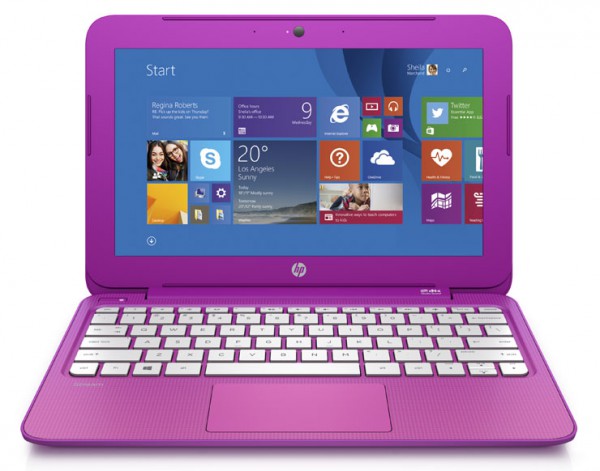
"Customers can enjoy entertainment in high-definition (HD) with an 11.6 inch HD display or 13.3 inch HD optional touch display. While the innovative fanless design with high efficiency Intel Celeron processor and 32GB of eMMC flash memory allows for quiet, cool operation and quick file recall. Stunning colors and stylish gradient design available in Orchid Magenta and Horizon Blue are sure to turn heads", says Hewlett Packard.
 
While HP is tight-lipped on specs, according to Engadget (who got to play with them in person), they will be powered by a Celeron N2840 CPU and 2GB of RAM. Battery life is promised to be up to 8 hours and 15 minutes, which is more than enough for a day of college classes or some quiet time at the library. Speaking of quiet, it is fanless, so there will be no noise from a whirring fan. Best of all though, both models have HDMI output, so they can serve as a media machine when connected to a TV, or desktop when connected to a monitor, keyboard and mouse. Hell, the 13.3 inch model can even be quipped with a 4G modem that comes with 200MB of data per month for life.

 
Arguably, the only downside is the limited colors. They look to me to be pink and purple, but HP calls them "Orchid Magenta and Horizon Blue". Wasn't there a children's TV show called Blue's Clues with a dog named Blue and a dog named Magenta? Maybe that show was the inspiration, but I digress; while colors should be gender neutral, these colors seem to me as a bit feminine, at least as society has traditionally dictated. I would have no problem owning and using a pink laptop, but I can foresee it being an issue for some shoppers. An option for black or silver would probably be appreciated.
 
HP has also announced new tablets, powered by an Intel Atom Z3735G. Sadly, the slates will only have 1GB of RAM, and I am worried that it will not be enough. Hewlett Packard says, "the HP Stream 7 and HP Stream 8 Windows tablets keep customers connected to work, friends and content all at an exceptional value. The cloud-connected, Intel-powered 7 inch and 8 inch tablets include one year of Office 365 Personal and 60 minutes of Skype each month, 1TB of Microsoft OneDrive storage for one year,  and a full Windows 8.1 experience. The HP Stream 8 tablet includes an optional 200MB of free 4G data each month with no annual contract for the life of the device".
 
HP lists the following prices:
  • The HP Stream 11.6 inch diagonal starts at $199.99.
  • The HP Stream 13.3 inch diagonal starts at $229.99.
  • The HP Stream 7 Tablet starts at $99.99.
  • The HP Stream 8 Tablet starts at $149.99.
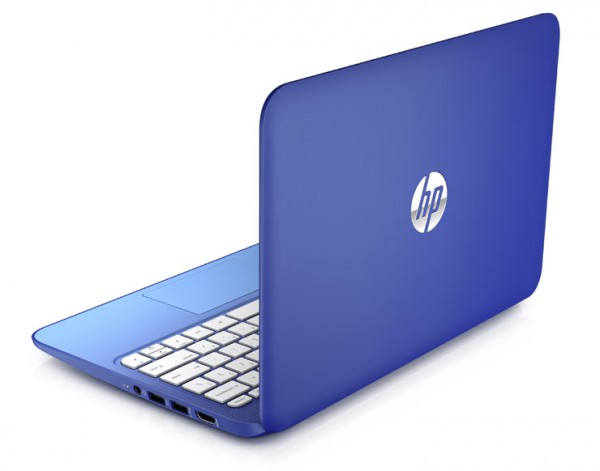
Sure, this $199 HP Windows laptop is hardly top of the line, but it is more than enough for the average home user. Believe it or not, the laptops even come with a $25 credit to the Windows Store, for buying apps or games. Technically, with that said, you could look at the price as only being $174.99 -- a steal.
While I hate putting down the Chromebook, it is just impossible to justify a purchase of a low-end Google-powered machine when you can buy a true PC for under $200. Don't forget, running the Chrome browser in Metro Mode on Windows is pretty much the Chrome OS experience anyway. Low-end Android tablets are safe for now, but trouble could be on the horizon there too; if Microsoft closes the app-gap (a big "if"), a $99 Windows tablet could be very attractive.
 
Will sub-$200 Windows laptops kill the Chromebook? Tell me in the comments.
 
Image Credit: Barnes and Noble
 
~ Brian Fagioli

2.19.2014

Neowin: Windows 8 UX designer says Metro is "the antithesis of a power user"


Since the first beta leak.. well.. since the first pre-beta image leak, Windows 8 has had a mixed reaction. Some believe that the new Metro or Modern interface has seriously affected their workflow, whereas some accepted the Start Screen as a welcomed addition and replacement to the cluttered almost 20 year old Start Menu.


Whatever your view is on the new interface, Jacob Miller, a UX designer for Microsoft that worked on Windows 8, has shared some personal views and responses to criticisms on the /r/technology subreddit under the username "pwnies."

"I want to talk about why we chose Metro as the default instead of the desktop, and why this is good in the long run - especially for power users.
...but not in the way you might think.
At this point you're probably expecting me to say that it's designed for keyboard execution, or some thing about improved time trials for launching programs, or some other way of me trying to convince you that Metro is actually useful. I've talked about those in the past extensively on reddit, but for this discussion let's throw that all out the window. For this discussion, assume that Metro is sh*t for power users (even if you don't believe it to be)." - Miller
Miller continued on to explain that the design team split users into two groups: content creators and content consumers:
  • Content creators were explained to be power users: they have multiple windows open across multiple monitors, they sometimes even have virtual machines that also have their own nested levels of complexity.
  • Content consumers were explained to be casual users who just use basic social media platforms, view photos, and so on. They were described as the computer illiterate younger siblings, the older grandparents, or the mother "who just wants to look up apple pie recipes."
Windows 8 was designed for the latter group: the content consumers. This is also where Metro stems from: it is a platform that's "simple, clear, and does one thing (and only one thing) relatively easily." Miller described Metro as the antithesis of a power user.
 
~ Steven Parker