


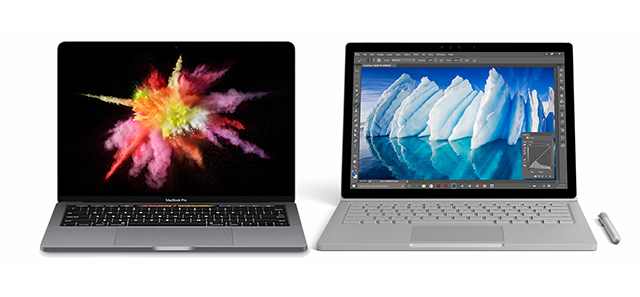
Which you go for will likely depend on whether you’re a fan of Microsoft or Apple, but if you’re not firmly entrenched in either camp, and need a little guidance to decide which laptop to go for, here are all the details you need.
Obviously, the Surface Book i7 and MacBook Pro 2016 aren’t exactly like for like. The Surface Book’s display detaches, for one thing, and it’s touch screen, but let’s see how they compare generally.
Design
The new Surface Book keeps the same design as the previous one, including the slightly divisive hinge that means the book doesn’t fully close. The screen can detach from the body and be used as a tablet. The laptop has a magnesium alloy body.
The new MacBook Pro is -- you guessed it -- lighter and thinner than previous models. It has an all-metal body, and keeps the same simple, but stylish look, albeit with a few tweaks, such as a much larger touchpad.
Size and Weight
The MacBook Pro is available in two screen sizes -- 13.3-inch and 15.4-inch. The Surface Book only comes in one size -- 13.5-inch. Because Apple is fixated with thinness, it’s no surprise to see the MacBook Pro is the slimmest product at 0.6-inches, versus Surface Book’s 0.9 inches. As for weight, the MacBook Pro weighs in at 3lbs for the 13-inch device, and 4lbs for the 15-incher. The Surface Book is 3.3-3.6lbs, depending on the model (dGPU models weigh more).
Display
As I mentioned earlier, the Surface Book’s screen detaches, while the MacBook Pro’s doesn’t. The Surface Book only comes in one screen size -- 13.5-inch, while Apple’s product can be had in 13.3-inch and 15.4-inch sizes.
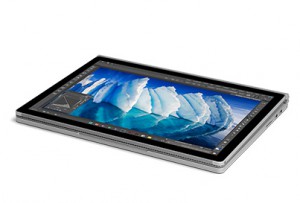
The Surface Book offers a higher resolution display -- 3,000 x 2,000, versus 2,560 x 1,600 for the 13-inch MacBook Pro, and 2,880 x 1,800 for the 15-inch model.
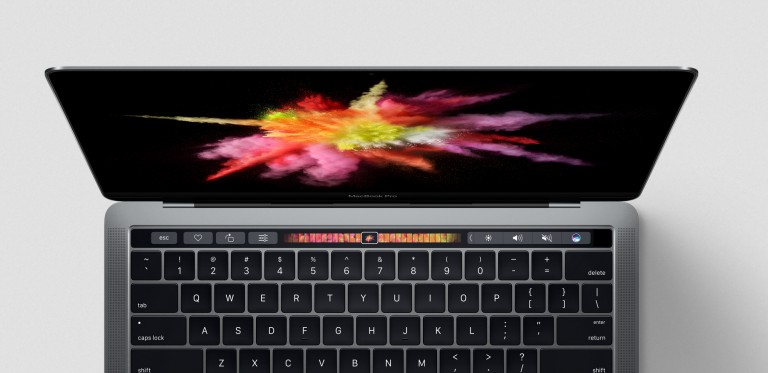
The Surface Book has a full touch screen, and you can use it in tablet mode. The MacBook Pro has a Touch Bar, a long OLED Retina display that sits in place of the old function keys at the top of the keyboard. You can use this in various ways, and additional functionality will be added in time.
Security
The MacBook Pro offers Touch ID, so you can log into your laptop using a fingerprint. Surface Book doesn’t have a fingerprint scanner, but does have Windows Hello, which uses facial recognition to log you in.
Processors
The Surface Book and MacBook Pro can both be had in a choice of configurations, so you can opt for a sixth-generation Intel Core i5 or i7. The Surface Book offers either Nvidia GTX 965M GPU or Intel HD graphics, while the MacBook Pro has Integrated Intel Iris Graphics 540. The larger 15-inch model adds a Radeon Pro (450 or 455) chip for 3D gaming.
Input
The Surface Book comes with a Surface Pen, so you can draw on screen. That sort of behavior isn’t possible on the MacBook Pro, but you do get the Touch Bar and a super-sized touchpad with pressure-sensitive Force Touch technology.
Battery Life
If you’re a road warrior, the most juice you can get out of your laptop between charges the better. Apple’s battery life is not spectacular in this case. The new MacBook Pros promise around 10 hours of battery life, while the Surface Book claims between 12 to 16 hours.
Storage and Memory
The 13-inch MacBook Pro and the new Surface Book i7 are available in 256GB, 512GB and 1TB storage configurations. The 15-inch MacBook Pro can be had with a 2TB SSD. Memory-wise, both the MacBook Pro and Surface Book can be had with 8GB or 16GB of RAM.
Ports
Apple has come under some fire for its ports choices with the new MacBook Pro. It offers four USB-C ports -- that double as Thunderbolt 3 ports -- which can be used for Thunderbolt, USB, DisplayPort, HDMI, VGI, and charging. (The basic 13-inch model only has two USB-C/Thunderbird 3 ports). This means you may need a dongle to attach certain hardware. There’s no SD card reader.
The Surface Book has two full-sized USB 3.0 ports, and an SD card reader.
Software
Apple's MacBook Pro runs macOS Sierra, while the Surface Book runs Windows 10 -- It’s Siri vs Cortana here. You could opt to install Windows 10 on your MacBook Pro if you want to, but you can’t install macOS Sierra on your Surface Book.
Price
The price for the entry-level MacBook Pro starts at $1,499, but you won’t get the Touch Bar for that. If you want the new Touch Bar, you’ll have to pay $1,799, which will get you the 13.3-inch display and the Core i5 CPU, 8GB of RAM and a 256GB SSD. The price for the 15-inch MacBook Pro, with Core i7 CPU, 16GB of RAM, and Radeon Pro 450 graphics, starts at $2,399.
The Surface Book starts at $1,349, for which you get the Core i5 CPU, 8GB of RAM, and a 128GB SSD. Opt for the i7 version, with 256GB SSD, and 8GB of RAM, and you can expect to pay $2,399. Choose the 1TB version with 16GB RAM and the price jumps to $3,299.
Specs:
| Surface Book | MacBook Pro | |
| Processor | Intel i5, i7 | Intel i5, i7 |
| RAM | 8GB/16GB | 8GB/16GB |
| Screen Size | 13.5-inch | 13.3inch/15.4inch |
| Resolution | 3000x2000 | 2560x1600/2880x1800 |
| Graphics | Intel HD -- Nvidia GTX 965M | Intel Iris/-- Radeon Pro 455 |
| Thickness | 0.9-inch | 0.6-inch |
| Weight | 3.3-3.6lbs | 3lbs (13-inch)/4lbs (15-inch) |
| Touch Control | Full touch screen | Touch Bar/Touch ID |
| USB Ports | 2 USB 3.0 Type A | 2x (13-inch), or 4x (15-inch) Thunderbolt 3 |
| Battery Life | 12-16 hours | 10 hours |
Summary
For the money, the Surface Book provides a better all round deal, and the screen can be used as a tablet, which is a welcome bonus. The MacBook Pro is a svelte beast, with good looks, and future-proof ports which might require you to use a dongle or two for now, but which will be standard in the coming years. You also get a choice of screen sizes, which can be useful depending on your needs and personal preference.
There's no right or wrong answer when it comes to which laptop you should get, only opinion. If you're thinking of buying one of these laptops, please share your reason for doing so in the comments below.
~ Wayne Williams


