


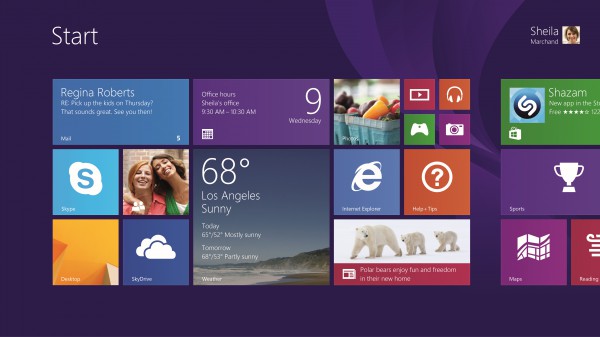
Today, Microsoft officially launches Windows 8.1 to the public, after almost two months since its new operating system reached the RTM status. The latest release is packed with many new features and improvements over its controversial predecessor, Windows 8, including the revival of the Start button and the much-awaited option to boot straight to the Desktop and avoid the Modern UI.
Just like Windows 8, Windows 8.1 is available to consumers in just two editions: base and Pro. The former is aimed at home users while the latter also includes features such as BitLocker encryption and hosting Remote Desktop Connections that are suitable for business use. There are also pricing differences between the two.
Windows 8.1 is available for $119.99 while Windows 8.1 Pro can be had for $199.99. Windows 8 users will be able to upgrade to the corresponding Windows 8.1 edition for free. Meanwhile, those who wish to upgrade from Windows 7, Windows Vista or Windows XP will have to pay full price for Windows 8.1.
Windows 8.1 users can upgrade to Windows 8.1 Pro by shelling out $99.99. Similarly, Windows Media Center can be added to Windows 8.1 Pro for $9.99. Keep in mind that Microsoft will not supply a USB drive containing Windows 8.1, so if you wish to install it on a device that does not sport a DVD drive (that for some reason is still Microsoft's preferred packaging in 2013) you will have to make your own.
Windows 8 users are able to upgrade to Windows 8.1 without losing any data, Modern UI apps or legacy Windows software. The same cannot be said for those who use Windows 7, as Desktop software has to be reinstalled (unless a workaround is found). Microsoft recommends that Windows Vista and Windows XP users should perform a clean install of Windows 8.1.
What Is New In Windows 8.1?
My colleague Wayne Williams has written a comprehensive article on the new apps, features and improvements that are available in Windows 8.1. The transition will be less dramatic for Windows 8 users, while Windows 7, Windows Vista and Windows XP users will have to get used to major changes, both visual and under-the-hood.
Of the numerous changes, I can name the refreshed Modern UI apps, improved personalization options and multitasking and the Start button as the most important ones, over Windows 8. Users are likely to find that working in the Modern UI leads to a more pleasant experience. But, those who wish to avoid it can do so now if they so choose.
What Else Do You Need to Know?
Windows 8.1 will be available, starting today, in more than 230 markets worldwide and in 37 languages for those who are using Windows 8. Microsoft and its hardware and retail partners will offer Windows 8.1 devices starting October 18.
We have covered Windows 8.1 extensively here at HindSight Technologies. Here are the most relevant stories on the new operating system, that I advise you to read today, covering everything from the install or upgrade to the latest apps:
- Windows 8.1 launches today, here's what's new
- Can Windows 8.1 turn you into a Modern UI fan?
- What you need to know before upgrading to Windows 8.1
- Installing Windows 8.1 -- Easy, but potentially very time consuming
- Automate login and bypass the lock and Start screens in Windows 8.1
- Windows 8.1 for work: 27 great new features aimed at the office
- Windows 8.1 sets out to woo the enterprise
- Take a look at the revamped Store in Windows 8.1
- Microsoft details its creative apps ahead of the Windows 8.1 launch
- Microsoft showcases new Internet Explorer 11 features in Windows 8.1
- Microsoft highlights Reading List ahead of Windows 8.1 launch
- Microsoft unveils SkyDrive for Windows 8.1 Smart Files
- Microsoft shows off Skype and more in Windows 8.1
- Windows 8.1 is better, but will consumers finally switch?
- Why I love Windows 8.1
I have pulled the trigger. I adopted Windows 8.1 since Microsoft released the new operating system on MSDN. Now that it is publicly available, will you do the same?
~ Mihaita Bamburic


