Cisco Learning Network Store Promotions Page
Showing posts with label Touch Bar. Show all posts

11.23.2016

Why did Apple limit the MacBook Pro (2016) to 16GB RAM? Battery life

 
The recently unveiled MacBook Pro (2016) complete with its Touch Bar has been praised and criticized in just about equal measure. One of the biggest criticisms levelled at Apple is that RAM is limited to 16GB. Why such a cap on a professional device?
 
Apple has revealed that the reason for the limit is nothing to do with -- as some may have suspected -- keeping costs down (as if!), but rather due to concerns about battery life. The reasoning may be fairly sound, but the full explanation may not be enough to silence critics completely.
 
Speaking to MacDaddy Apple's Phil Schiller explains that increasing the amount of supported memory would mean using RAM that consumed more power. RAM with higher power consumption means shorter battery life. It was a balancing act. But there is more to the decision, as Schiller explains:
The MacBook Pro uses 16GB of very fast LPDDR memory, up to 2133MHz.
To support 32GB of memory would require using DDR memory that is not low power and also require a different design of the logic board which might reduce space for batteries. Both factors would reduce battery life.
He had previously said: "To put more than 16GB of fast RAM into a notebook design at this time would require a memory system that consumes much more power and wouldn’t be efficient enough for a notebook". His latest statement really just expands upon his initial explanation, presumably in the hope that it will convince complainers that the right decision was made.
 
Which side of the fence do you fall? Would you rather the RAM had been increased, or are you happy with less memory and longer battery life?

~ Mark Wilson

11.03.2016

Apple exec explains why "cumbersome" SD card slot removed from new MacBooks but 3.5mm jack remains

 
Just why does Apple love removing long-used ports from its products? It seems the outcry that followed the disappearance of the headphone jack from the iPhone 7 had no effect on the Cupertino company; it dropped most of the standard ports from the new MacBook Pro, including the SD card slot, yet kept the laptop's 3.5mm jack.
 
Speaking during an interview with The Independent, Phil Schiller, Apple’s Senior Vice President of Worldwide Marketing, explained the thinking behind axing the SD slot. He called the decision a “bold move” - similar to how removing the latest iPhone’s headphone jack took “courage.”
 
It seems the two main reasons behind the slot’s removal were because it is “cumbersome” and there are an increasing number of cameras that use wireless transfer technology.
Because of a couple of things. One, it’s a bit of a cumbersome slot. You’ve got this thing sticking halfway out. Then there are very fine and fast USB card readers, and then you can use CompactFlash as well as SD. So we could never really resolve this – we picked SD because more consumer cameras have SD but you can only pick one. So, that was a bit of a trade-off. And then more and more cameras are starting to build wireless transfer into the camera. That’s proving very useful. So we think there’s a path forward where you can use a physical adapter if you want, or do wireless transfer.
While Schiller has a point about more cameras using wireless, there are still plenty of models, even expensive DSLRs, that don’t have the feature. And was the SD card really such a pain when sticking slightly out of the MacBook's slot? Surely using a full USB-C SD adapter, as he suggests, would be a lot more cumbersome.
 
When asked why the 3.5mm jack was removed from the iPhone 7 but remains on the MacBook Pro, Schiller said that the jack is used for more than just headphones on the laptop. Apple kept it because “these are pro machines,” and many users “have setups with studio monitors, amps, and other pro audio gear that do not have wireless solutions and need the 3.5mm jack.” Suggesting that if people used the MacBook Pro's jack for just headphones, then it would have likely been dropped. But it could still be removed in future models, if a Apple survey from September is anything to go by.
 
 
The removal of so many standard ports, and the fact that not everyone is impressed by the new Touch Bar, has led to a fair amount of criticism being directed at the new MacBooks – something that has surprised Schiller. He did add, though, that he’s never “seen a great new Apple product that didn’t have its share of early criticism and debate — and that’s cool.”
 
Despite the negative reception from some quarters, Apple’s online store is apparently taking more orders for the new MacBooks than “any pro notebook before.”
 
~ Rob Thubron

10.30.2016

Trade in your MacBook and Microsoft could give you $650 off a Surface

Apple is clearly hoping you'll spend your hard-earned cash on making your next laptop a new MacBook Pro, but Microsoft has other ideas. If the lure of the Touch Bar is not enough to convince you to buy from Apple, Microsoft is dangling a carrot to sway you towards a Surface.
 
As the company has done before, Microsoft is offering a trade-in program for anyone willing to ditch their old MacBook in favor of a Surface Pro 4 or Surface Book. If you're ready to make the switch, you could save up to $650.
 
The offer is only valid until November 7, so you don’t have a great deal of time to think about things, but if you have a 'qualifying Macbook Air or Pro device' ("excludes iPads", Microsoft clarifies), the offer is well-worth considering.
 
To take  advantage of the offer, head over to the dedicated trade-in website to find out how much your old MacBook is worth. Next, you'll need to send your hardware off to Microsoft, and you'll then be provided with a promo code which you can use to obtain a discount off your Surface purchase.
 
Don’t think of this as an opportunity to off-load your crappy, knackered MacBook, though -- conditions apply:
To be eligible for trade-in, you must own the qualifying device, device must power on battery must hold charge and not be required to be plugged in to operate, and be in fully functional, working condition without broken/missing components, cracked display/housing, liquid damage, modification(s) or have device warranty seal broken to be considered working. Cannot be password protected, and include original chargers/accessories. Must contain hard drive.
Trade in and save.
 
~ Mark Wilson

Apple wants to limit how the new MacBook Pro (2016) Touch Bar can be used

 
When Apple unveiled the latest MacBook Pro, it was the Touch Bar that stole the show. But if you were expecting this touchscreen addition to the keyboard to become an all-singing, all-dancing fun parade, you may be disappointed.
 
Apple -- loving, as it does, to remain firmly in control of everything -- has issued developers strict guidelines that restrict how the Touch Bar can (or should...) be used.
 
The company is very keen for the Touch Bar to be seen as an extension of, or addition to, the keyboard, and not the screen. As such, Apple is keen to avoid the Touch Bar being anything other than useful -- and certainly avoiding the risk of it becoming a distraction. TechCrunch shares details of some of the guidelines that have been given to developers:
 
It remains to be seen whether developers choose to abide by these guidelines, or what sort of penalties -- if any -- might exist for those who decide not to. But it is safe to assume that there will be a burgeoning market of third party tools that go against everything Apple has set out.
 
~ Mark Wilson

10.27.2016

Could Apple make Mac laptop buying any more confusing?

 
The Mac laptop line, following today's new announcements, looks lots less like Apple and more like Compaq—where Tim Cook worked much earlier in his career, incidentally, long before the original IBM PC clone-maker's demise. Confusing. Complicated. These are apt descriptions that might just send the ghost of Steve Jobs skyward on either—take your pick—Halloween or Day of the Dead.
 
Among Apple cofounder's first tasks when returning to the chief executive's chair in 1997: Simplifying product families. Jobs cut the deadweight, surprising many people by killing off Newton, for example. Complex product lines define Apple under successor Cook, by contrast.
 
Gauging only by base models, without enclosure hues, Apple offers 11 different laptop SKUs: Two 12-inch MacBook (times four color combinations); two 13-inch MacBook Air (one color); four 13-inch MacBook Pro (three two-colors); and three 15-inch MacBook Pro (two two-colors). Granted, rivals like Lenovo offer way more SKUs. But the Chinese manufacturer isn't Apple and the expectations that come with the name.
 
Problem isn't so much number of base models—before they can be configured, adding many more—is the overlap of prices and capabilities among the different Mac laptops.
 
MacBook Pro 13
 
The cheapest MacBook Pro 13 is $1,299 for 2.7GHz Intel i5 processor, 8GB RAM, 128GB SSD, and Intel Iris Graphics 6100. But, wait, that's an older model. To get the new thang announced today, price is $1,499—and that's without the hottest new feature: TouchBar.
 
You do get a 2GHz Core i5 chip, 256GB SSD, Iris Graphics 540, brighter display, and newfangled Butterfly keyboard. But some buyers should rightly wonder why a 2GHz laptop costs more than a 2.7GHz one. Apple could argue it's a generational thing between Intel chips, and addition of extras like double the storage and thinner design. Something else: You keep your USB ports on the older and lose them on the newer (in favor of Thunderbolt 3 ports). Buy more, and you pay more to add adaptors and dongles, too.
 
What I have long called the Apple Pay-more Principle applies. The current generation MacBook Pro 13 sold for $1,299 yesterday—and core capabilities were same as costlier models. That's no longer the case. Entry-level is now last-year's MBP, and something newer costs $200 more. But don't be confused, and mistakenly buy the $1,499 model wanting TouchBar. To get the newest tech, the starting price is $1,799, making the true entry level $500 more than before today's big Apple media event.
 
For that $1,799 you get 2.9GHz Core i5 processor, 8GB RAM, 256GB HD, Iris Graphics 550, TouchBar and TouchID, and four Thunderbolt 3 ports. Honestly, for this price, 8 gigs is stingy. Doubling the storage costs $200 more. The three costlier MBPs are available in two colors, space gray and silver, while the $1,299 laptop is silver only.
 
MacBook Pro's compelling new feature is the TouchBar.
 
MacBook
 
Speaking of that price, and some buyer confusion, is 12-inch MacBook, which also starts at $1,299, but is grossly underpowered compared to MBP 13: 1.1GHz Core m3 processor, 8GB RAM, 256GB SSD, and Intel Graphics 515. Before today's new laptop unveiling, small size, display quality, and Butterfly keyboard were capabilities that set apart MacBook. That's still true when comparing entry-prices, given the 2.7GHz MBP is vintage March 2015 and is 14 percent larger and consumes 20 percent more volume than its successor.
 
Jump up in price to $1,499 and 13-inch MBP looks lots more attractive than the high-end 12-inch MacBook selling for $100 more. MBP now has a next-generation Butterfly keyboard and super-bright screen, all packaged into a considerably smaller enclosure. Neither laptop has the TouchBar. MacBook config: 1.2GHz Core m5 chip, 8GB memory, 512GB SSD, and Intel Graphics 515.
 
MacBook is lighter at 2 pounds, versus 3 lbs for MBP 13 but bulk and breath matter more. Comparative sizes: .52 x 11.07 x 7.74 inches versus .59 x 11.97 x 8.36 inches, respectively. Size is no longer much of a differentiator.
 
MacBook Air
 
Comparing screens, at 13 inches, there also is MacBook Air, which costs considerably less. Starting price is $999 for 1.6GHz Core i5 processor, 8GB RAM, 128GB SSD, and Intel Graphics 6000. This is Apple's value laptop, if you don't mind non-Retina Display. Before today's MBP announcement, the Air filled a niche for thin-and-light 13-inch Apple laptops. No longer. Price is its only compelling attribute—and only below $1,000.
 
The costlier $1,199 config is a real loser compared to $1,299 MBP 13, which weighs about the same but is smaller, while offering many more benefits, such as better screen, keyboard, processor, and speakers. MBA measures .68 x 12.8 x 8.94 inches. Why not pay another 100 bucks and get so much more from MBP 13? Some confused buyers may not see the difference.
 
MacBook Pro 13 (right) is smaller and thinner than MacBook Air.
 
There are good reasons to ask why Apple offers either 12-inch MacBook or MBA 13. Apple knows. During today's keynote, Phil Schiller, who heads up marketing, explained the rational for the $1,299 Pro without TouchBar: "We think that a lot of potential MacBook Air customers will be very excited about this product, too". He then went on to basically make a sales pitch for MBP 13, by pointing out the size advantages—12 percent thinner and consuming 13 percent volume than the Air. He described MBP 13 as "smaller" and "better in every way".
 
MacBook Pro 15
 
MacBook Pro 15 stands apart from the other laptops such that most buyer's shouldn't be confused. The laptop is considerably larger than the others, packs dedicated graphics, and is considerably more expandable with respect to external devices, like monitors. There is price differentiator, too: $2,399 and $2,799 base models.
 
That said, the Pay-more Principle once again applies. Like MBP 13, yesterday the entry-level 15-inch MacBook Pro offered same core features as the higher-end models. No longer. For the same $1,999, buyer's get vintage May 2015 laptop with 2.2GHz Core i7 processor, 16GB RAM, 256GB SSD, and Iris Pro Graphics. The newest thang now costs $2,399, which arguably is 100 bucks less than what it replaced. Config: 2.6GHz Core i7 chip, 16GB RAM, 256GB SSD, and Radeon Pro 450 graphics. All the goodies come too: Butterfly Keyboard, TouchBar and TouchID, etc. A $2,799 model doubles the storage, notches up to 2.7GHz chip, and bumps up to 455 graphics.
 
MBP, like Microsoft Surface Book targets a creative professional with specific computing-task needs. The buyer pays more and gets more, and benefits for the capabilities are clearer. However, Apple laptops with small screeners and lower selling prices crowd together, presenting somewhat confusing benefits for the cost.
 
Imagine the savings that Apple could pass on to customers or higher margins to its bottom line by streamlining manufacturing to MacBook Pro 13 and 15—particularly at a time when PC sales are falling. During Q3, shipments fell for the eighth consecutive quarter, according to Gartner. The new MBP makes the Air obsolete and gives little compelling reason to buy 12-inch MacBook. They're both dead weight.
 
Keep Steve Jobs' ghost in the grave and simplify, Apple.
 
Image Credit: Creativa Images / Shutterstock
 
~ Joe Wilcox

Apple's MacBook Pro with Touch Bar is 'absolutely incredible'

 
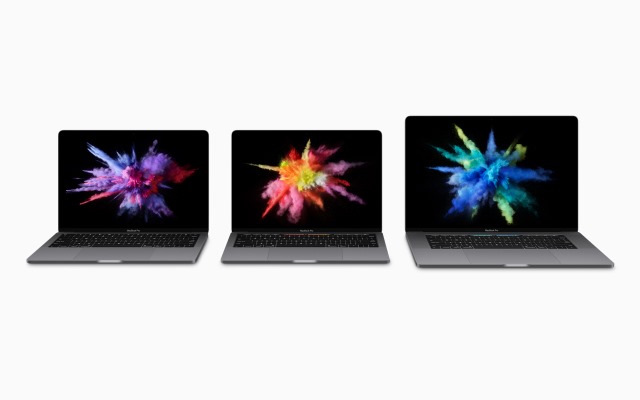
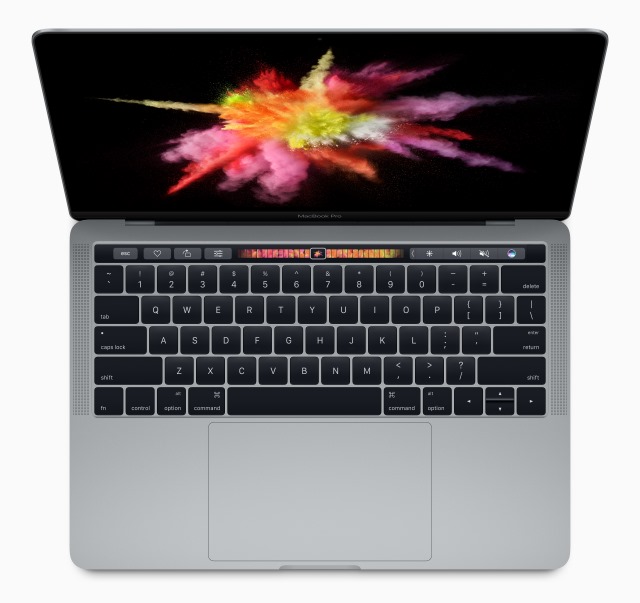
The star of Apple's event today was always going to be the new MacBook Pro. Other announcements may have been made, but they faded into insignificance compared to the latest addition to Apple's notebook range. This time around we see a 13- or 15-inch device with an all-aluminum design. In Tim Cook's words, it is "absolutely incredible".
 
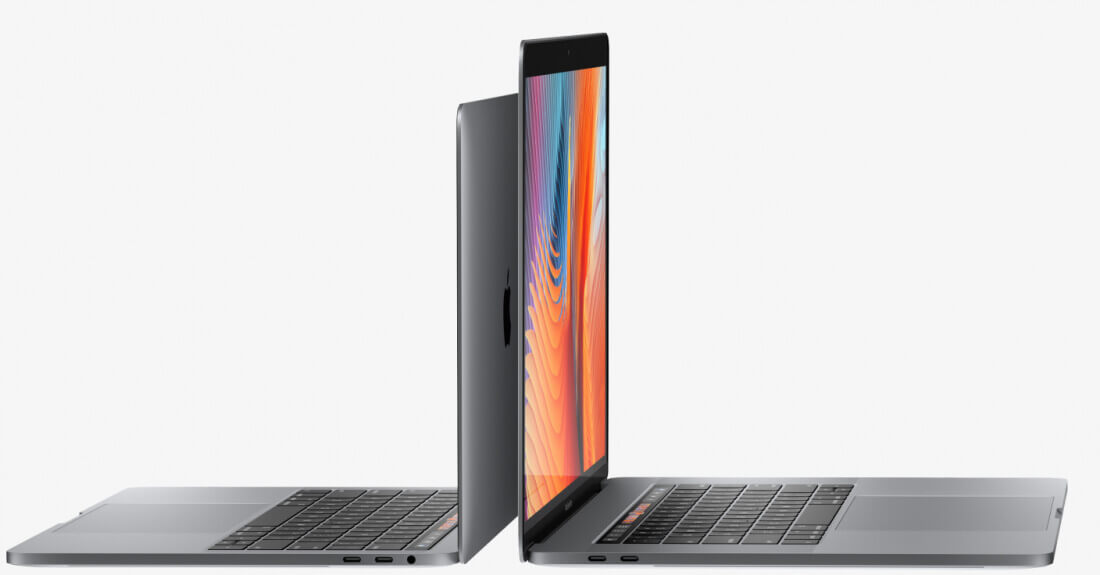
Both models are available in Silver and Space Gray, and it's the thinnest and lightest MacBook Pro ever made. Things have shrunk, things have grown. The new MacBook Pro is thinner and lighter than ever, but the trackpad is now twice as large -- it is huge. But the real show-stealer is Touch Bar.
 
We thought this
 
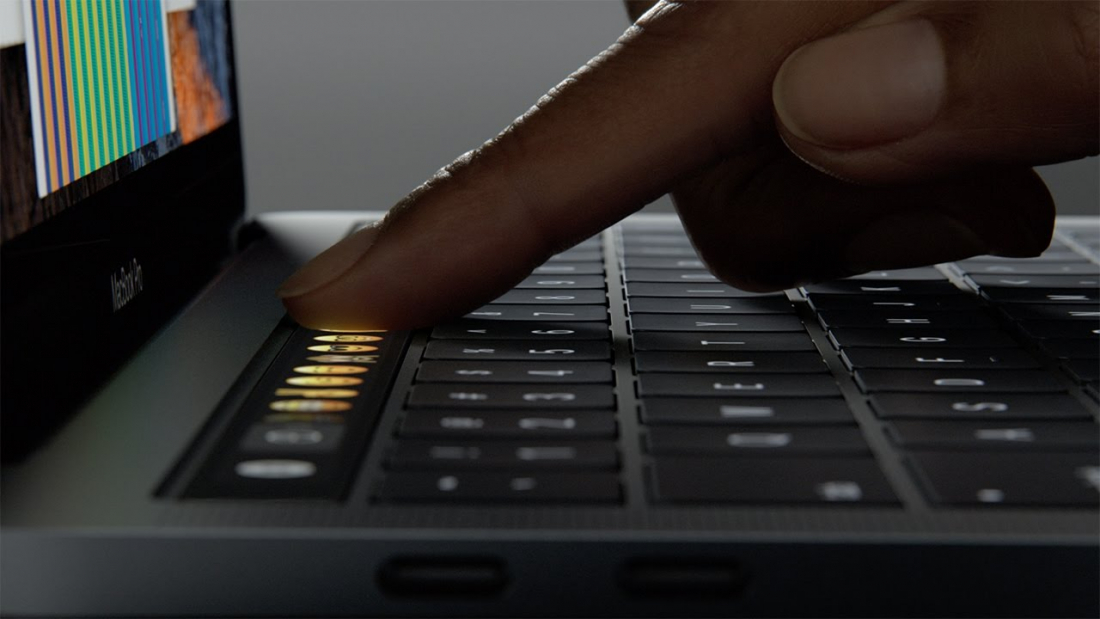
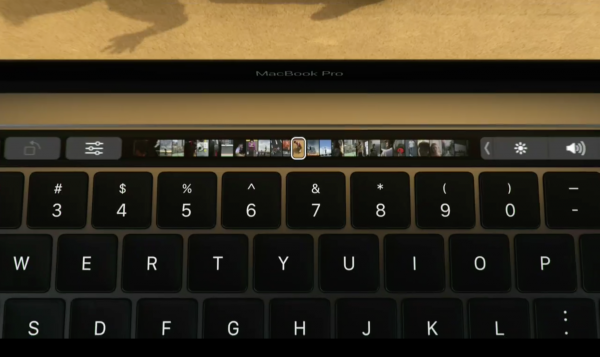
new killer feature may have been called the Magic Toolbar, but apart from the name change, it's very much what we expected. This is a Retina Display multi-touch panel that replaces the traditional row of function keys. That said, the function keys and Esc key remain, albeit in soft form.
 
 
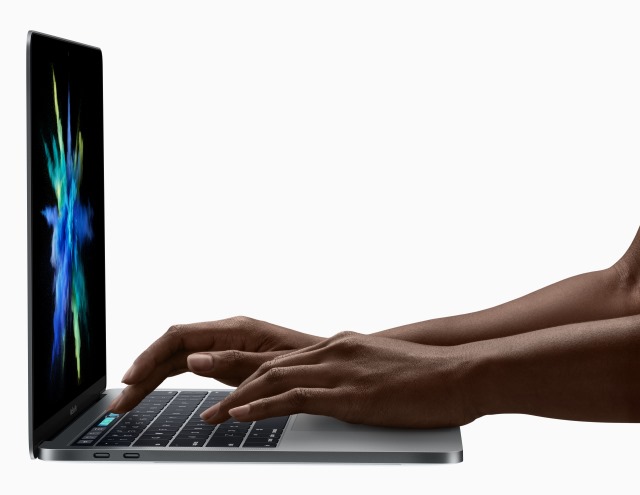
Touch Bar is touch and gesture sensitive and includes Touch ID so you can log into your MacBook Pro with a fingerprint. Touch Bar has built in system functions such as screen brightness, and it's context sensitive, so it shows buttons that relate to the current app. Quick type suggestions blends the autosuggest feature of iOS with the features of a regular keyboard, but whether this allows for faster typing remains to be seen. Just as Cortana has a dedicated button in Windows 10, so Siri now has a dedicated button.
 
The 13inch MacBook Pro is just 14.9mm thick (17 percent thinner than before), features 23 percent less volume, and weighs just 3lbs -- almost 0.5lbs less than before. For the 15-inch model the 15.5mm thickness means it is 14 percent thinner than before, there 20 percent less volume, and the weight is just 4lbs. Both feature an all-new keyboard design with second generation butterfly switch mechanism.
 
The screen is 67 percent brighter and offers a 25 percent wider color gamut. The 15-inch MacBook Pro features an Intel Core i7 Quad-core with 2133MHz memory, supports up to 4GB of VRAM, and includes an SSD operating at up to 3.1GB/s. The 13-inch model comes in i5 or i7 versions. Both models offer up to 10 hours of battery life.
 
 
There is also a 13-inch MacBook Pro without the Touch Bar for those looking to make a bit of a financial saving -- essentially replacing the MacBook Air. In all, there are three new models which have the following base specs:
  • 13-inch MacBook Pro
  • 2.0GHz dual-core Intel Core i5
  • Intel Iris Graphics 540
  • 8GB memory
  • 256GB SSD
  • 2 Thunderbolt 3 ports
  • Available for $1,499; ships today
  • 13-inch MacBook Pro with Touch Bar
  • Touch Bar and Touch ID
  • 2.9GHz dual-core Intel Core i5
  • Intel Iris Graphics 550
  • 8GB memory
  • 256GB memory
  • 4 Thunderbolt 3 ports
  • Available to pre-order todayfor $1,799; ships in 2-3 weeks
15-inch MacBook Pro with Touch Bar
  • Touch Bar and Touch ID
  • 2.6GHz quad-core Intel Core i7
  • Radeon Pro 450 graphics
  • 16GB memory
  • 256GB memory
  • 4 Thunderbolt 3 ports
  • Available to pre-order today for $2,399; ships in 2-3 weeks
Find out more at the MacBook Pro website.
 
~ Mark Wilson