Cisco Learning Network Store Promotions Page
Showing posts with label Ultrabooks. Show all posts

4.29.2015

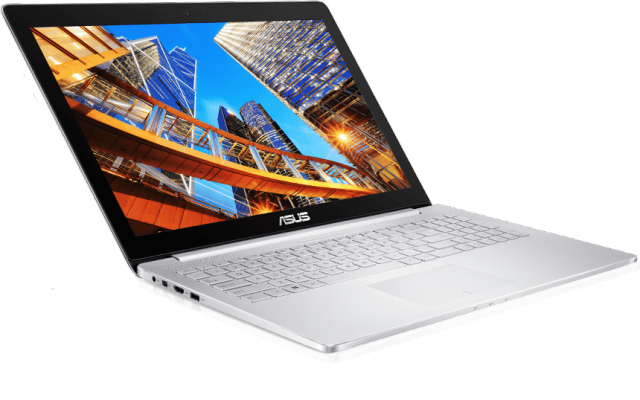
ASUS introduces the 15-inch ZenBook Pro UX501 high-end ultrabook

If you want a high-end 15-inch Windows laptop that is light and visually attractive you will most certainly not be spoilt for choice. PC makers are focusing on the smaller segments, which usually means a display size of around 13-inches. Sure, you can always grab a 15-inch MacBook Pro with Retina display and slap Windows on it, but that is not the same thing.
 
Fortunately, ASUS continues to include a 15-inch high-end option in its ZenBook lineup, as it just introduced ZenBook Pro UX501. It packs all the right features a buyer in this segment is looking for: ultra-high resolution screen, fast processor, lots of RAM, insanely fast SSD, dedicated graphics and a big battery, all in a package that is not much bigger and heavier than Apple's offering. What is not to like?
 
Let us go through the specs. First off, the display. It is a 15.6-inch IPS panel with a resolution of 3,840 by 2,160 and 100 percent sRGB color coverage, as well as 178-degree viewing angles. In practice, you will be able to scale at 200 percent, to get text rendered in a comfortable size, without degrading quality in the process. Pixel density is rated at 282 ppi (pixels per inch).
 
The 15-inch MacBook Pro with Retina display offers a much lower screen resolution of 2,880 by 1,800, which, using the same scaling option, would render everything at 1,440 by 900. Its pixel density is just 220 ppi, while viewing angles are comparable.
 
Inside the package, which comes in at 15.1 by 10 by 0.8 inches and 5 pounds, you will find a 2.6 GHz quad-core Intel Core i7-4720HQ processor, 16 GB of RAM, 512 GB PCIe SSD and Nvidia GeForce GTX 960M graphics with 2 GB of dedicated memory. The battery is a 96 Wh unit, which should help ZenBook UX501 deliver decent battery life.

 
 
There is something worth mentioning about ASUS' SSD of choice. It is capable of read and write speeds of up to 1,400 MB/s, which is nearly three times better than what you get from a typical SSD. Needless to say, you will be able to transfer large files in no time.
 
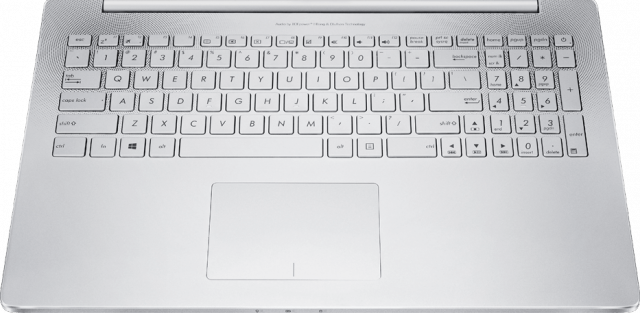
ZenBook Pro UX501 also packs Wi-Fi 802.11 ac and Bluetooth 4.0, a 720p camera on the front, backlit keyboard with a numeric keypad, one Thunderbolt port, three USB 3.0 ports, one HDMI port and an SD card reader. There is also "premium" audio.
 
 
The price? Well, that is going to put some people off. ASUS says that ZenBook Pro UX501, which is shipping now, costs a whopping $1,799. Still, it is much, much cheaper than a similarly-spec'd 15-inch MacBook Pro with Retina display; the model with dedicated graphics -- a slower GeForce GT 750M -- starts at $2,499.
 
However, you can expect Apple to introduce a refreshed model, sporting Broadwell processors, soon; meanwhile ZenBook Pro UX501 is likely to retain its Haswell-era processor for a long time to come. Something else that's worth pointing out is that while the big MacBook Pro with Retina display packs a slower dedicated video card the one that comes with its processor is actually much more powerful, being an Iris Pro Graphics 6200, instead of an HD Graphics 4600 like it is the case with ZenBook Pro UX501. It, of course, runs Windows 8.1.
 
~ Mihaita Bamburic
1.08.2014

Forget the MacBook Air, Samsung's new ultrabook touts even more battery life

 
Battery life has long been the Achilles' heel for Windows laptops, as manufacturers have mostly focused on other areas such as outright performance, portability or touchscreens. Consumers who have needed to use their device unplugged for a considerable amount of time have had to attach an external or extended capacity battery, turn to an Apple MacBook (Air) or even switch to a tablet.
 
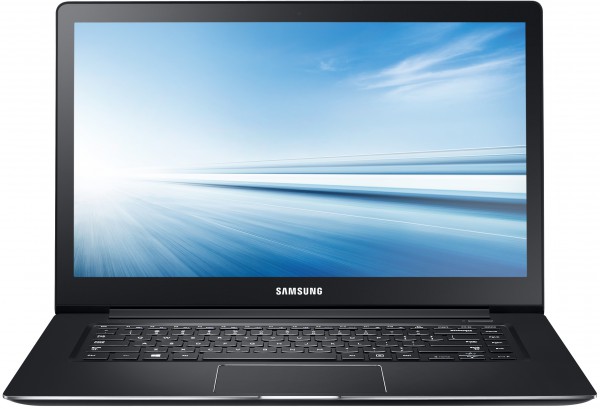
Samsung, though, is looking to change the perception that Windows laptops and great battery life do not mix. The South Korean maker's latest ultrabook, the ATIV Book 9 2014 Edition that was just unveiled at CES, touts 14 hours of battery life. If the device can deliver on its promise, it will be a game changer.
 

For reference, Apple's 13.3-inch MacBook Air (2013 generation) touts up to 12 hours of Wi-Fi browsing or 10 hours of video playback (on iTunes). Some tech blogs have managed to outmatch the company's estimates. However, based on my experience you should expect less when some multitasking or background tasks and syncing are involved.
 
Unlike other new ultrabooks, the ATIV Book 9 2014 Edition (not the catchiest of names, is it?) employs a more conservative display, resolution wise -- 15.6-inch panel with 1920 by 1080.
 
The main hardware features are: Intel Core i5 and Core i7 ULV (Haswell generation) processors, Intel HD Graphics 4400, 8 GB of RAM, up to 1 TB of SSD storage (dual units), 720p user-facing camera, two USB 3.0 ports, one USB 2.0 port, HDMI port, mini VGA port and an SD card slot.
 
The ATIV Book 9 2014 Edition runs Widows 8.1. Samsung says the ultrabook also has a "UL Certified ergonomically designed keyboard" for more comfortable and faster typing, SPlayer+ for lossless audio playback (which works together with the Wolfson DAC chip).
 
The ultrabook will be available in only a single trim, Solid Black, globally. There is no word yet on when the rollout will commence.
 
~ Mihaita Bamburic


3.23.2012

Tablets vs. Laptops: What Should You Buy?


It was only a year ago when the iPad was considered a netbook killer—remember netbooks?—but now many people are wondering whether tablets are good enough to replace a full-fledged laptop. The answer is simple: maybe. It really depends on your computing needs. Here’s a quick breakdown of what you should consider before deciding to buy either type of device for yourself or as a gift.

Tablet Pros & Cons

Led by Apple’s iPad 2, tablets are ideal for consuming content. They’re great tools for surfing the web, checking e-mail and Facebook, playing games, reading digital magazines and books, and enjoying movies and music. But that’s not all slates have going for them.


These devices turn on instantly and tend to last longer on a charge than your typical notebook. The best models offer 8 or more hours of unplugged use. That battery life advantage also extends to standby time. With tablets’ phone-like operating systems, you can set them aside for days and they will likely still have plenty of juice left.

The most popular tablet size is 9 to 10 inches, which is similar in dimensions to a magazine, but you’ll also find plenty of devices with 7- or 8-inch screens. These models are more portable, and can more easily fit inside a purse or jacket pocket. The iPad and similarly sized competitors tend to weigh 1.6 pounds or less, while 7- to 8-inch models weigh about a pound or less. Regardless of the size, tablets are lighter and easier to carry than laptops.


Tablets are particularly attractive as gifts because they’re more affordable than most laptops. The iPad 2 starts at $499, and there are several slates that start as low as $199. We haven’t seen many quality devices at that lower price, but it looks like the $199 Amazon Kindle Fire changes that with a great screen, a turbo-charged browser, and easy access to Amazon content. A good notebook costs $200 to $300 more.


As far as productivity goes, tablets are becoming increasingly versatile as more business-friendly apps proliferate. There’s the versatile iWork suite for the iPad, as well as robust third-party options such as Documents to Go and Quickoffice. Similar options are available for Android-based slates. Thanks to such cloud-based services as Dropbox and iCloud, the limited storage capacity of tablets is less of an issue than you might think, though tablets are not very useful without Internet connectivity.

Some tablets are designed to either pinch-hit for or replace a notebook. The ASUS Eee Pad Slider has a slide-out keyboard built in (pictured), while the Lenovo ThinkPad Tablet lets you take notes with a pen right on its display and comes with an optional keyboard case. Nevertheless, the keyboards on traditional laptops are bigger and more comfortable, and notebooks are simply better at some things, including word processing and video editing.

Laptop Pros & Cons

If the person on your list is looking to get real work done, a laptop continues to be your best bet. For one, they offer a superior text input experience, especially for those who touch type. Laptops also offer better viewing comfort, as they tend to feature larger and sharper screens. For example, the average notebook has a resolution of 1366 x 768 pixels, which fits a lot more information on the display than the 1024 x 768-pixel iPad.


You also shouldn’t overlook the fact that notebooks make it easier to multitask. That’s because you can more quickly switch between applications and see all of your open apps at once. The taskbar in Windows and the Dock on Mac OS X make it a cinch to toggle between programs. And Windows 7 goes one step further with Snap, which allows you to compare open windows side by side. Mission Control in Mac OS X Lion presents your open apps and Spaces on a single screen.

In terms of weight, notebooks are heavier than tablets, but their clamshell design makes outfitting them with a case less necessary. You just toss them in your bag and go.


Another area where notebooks excel is software. Yes, tablets offer access to lots of apps, but laptops pull ahead with the wealth of available productivity programs. Microsoft Office Starter Edition comes pre-loaded on many notebooks. Then there are free apps such as OpenOffice.org (which goes deeper than Office Starter) and Paint.NET for editing photos. And let’s not forget the desktop apps, such as Photoshop, that offer more precision and power than anything you’ll find on a tablet.


Then again, security software is popular for a reason. For now, at least, the vast majority of viruses, Trojans, and other malware live on notebooks. Windows machines are the most popular target by far, but some threats have popped here and there on Macs, too.


So what about price? The average selling price of a laptop is less than $600, and you can get a well-equipped model for an even lower price. For instance, the HP Pavilion g6x features an Intel Core i3 processor, 4GB of RAM, and a 500GB hard drive for $449. This notebook sports a 15.6-inch screen. The sleekest full-power laptops tend to cost more. Apple’s 11-inch MacBook Air starts at $999.


New so-called Ultrabooks follow the Air’s lead with fast boot times and super-slim designs. But the starting price for those machines is about $900. So if that person on your list wants a notebook that behaves more like a tablet, you’re going to pay more.

Verdict

It’s not really a matter of whether tablets are better than laptops or vice versa. It’s about what type of device is right for the job at hand, which is why plenty of people own a laptop and a tablet. But if you’re wondering whether a slate or a notebook is the better gift–or you only have the budget to choose one device or the other–it comes down to what the user plans to do with it. Tablets are better for play and some work, and laptops are better for work and some play. 

~ Mark Spoonauer, LAPTOP Editor in Chief