Cisco Learning Network Store Promotions Page

10.31.2014

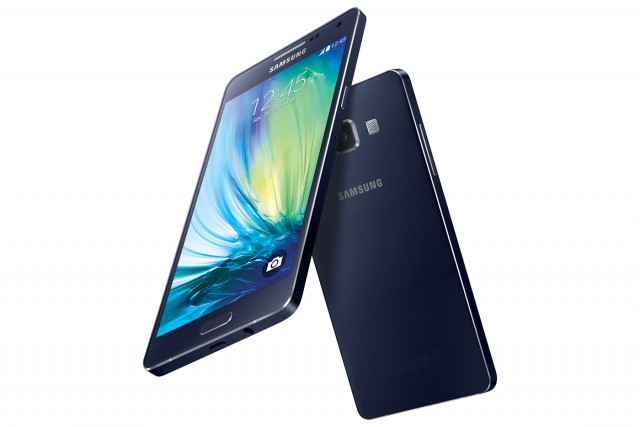
Samsung's new Galaxy A5, A3 smartphones boast very thin metal designs

 
Samsung is slowly moving away from its oft-maligned, all-plastic smartphone designs of the past, in an attempt to convince consumers that it too can make premium-looking and feeling devices. The first smartphone to reveal what the future holds was Galaxy Alpha, announced just a few months ago. Then Galaxy Note 4 came along, stepping things up even further in the high-end segment.
 
And now we see how Samsung's vision will impact its less expensive Galaxy devices, as the company just took the wraps off Galaxy A5 and Galaxy A3 today, two mid-range to low-end smartphones featuring "refined full metal unibody designs" that happen to be very, very thin (for whatever reason): 6.7 and 6.9 mm, respectively.
 
"The Galaxy A5 and A3 offer a beautifully crafted full metal unibody, slim design, superior hardware and the best possible social media experience", says Samsung CEO JK Shin. "These devices make our advanced Galaxy experience even more accessible to young and trend conscious consumers". In fact, Samsung is calling Galaxy A5 and Galaxy A3 its "slimmest smartphones to date", thanks to those low profiles.
 
And when Shin says Galaxy A5 and Galaxy A3 are designed for "young and trend conscious consumers", he means it. Both smartphones have 5 MP front-facing cameras, which should take quality selfies. But they also support 4G LTE connectivity, which means that those selfies should be uploaded in no time to Facebook or Instagram. Here's what Samsung says: "Users are also able to quickly and easily share photos or videos on their favorite social media channels with the device’s fast network speed of LTE Category 4 standard".
 
Both smartphones ship with Super AMOLED displays, a feature that is rarely seen in below-premium Galaxy smartphones (like Galaxy Alpha, Galaxy S5 and Galaxy Note 4). Galaxy A5 has the bigger panel, measuring 5.0 inches, with the higher resolution, of 720 by 1,280. Galaxy A3 makes due with a 4.5-inch screen with a resolution of 540 by 960. There's a similar thing going on inside. Here are the other noteworthy specs:
 
Galaxy A5: 1.2 GHz quad-core processor, 13 MP main camera, 2 GB of RAM, 2,300 mAh battery; 16 GB of internal storage; microSD card slot; Wi-Fi 802.11n; Bluetooth 4.0 LE; NFC (only in the 4G LTE model); Android 4.4 KitKat. It comes in at 139.3 x 69.7 x 6.7 mm and 123 grams.
 
Galaxy A3: 1.2 GHz quad-core processor, 8 MP main camera, 1 GB of RAM, 1,900 mAh battery; 16 GB of internal storage; microSD card slot; Wi-Fi 802.11n; Bluetooth 4.0 LE; NFC (only in the 4G LTE model); Android 4.4 KitKat. It comes in at 130.1 x 65.5 x 6.9 mm and 110.3 grams.
 
As you might have figured out after going through the specs, both will be sold in 4G LTE and HSPA+ versions. And, of course, they will feature Samsung's usual TouchWiz add-ons, like Ultra-Power Saving Mode and Adaptive Display.
 
 
Galaxy A5 and Galaxy A3 (pictured above) will be sold in Champagne Gold, Light Blue, Midnight Black, Pearl White and Platinum Silver, starting in November; the color names (trickling down from more expensive Galaxys) sound fitting for their upmarket designs.
 
I do have to wonder what Samsung means by "full metal unibody designs", as the backs of the two smartphones look like they are still made out of plastic (polycarbonate). That is not a problem in my eyes, as the design seems to work great for Galaxy Alpha and Galaxy Note 4 where the back cover can be removed to switch the battery and insert a microSD card. But that description may lead people into thinking that it will feature as much metal as an iPhone, which does not appear to be accurate.
 
~ Mihaita Bamburic

10.30.2014

Nexus 6 pre-orders sell out instantly -- Don't cry, there is still hope

 
If you are a fan of Android, there is something you may live and breathe for -- Nexus. True, fans may choose other devices for various reasons, but Nexus devices are the best way to get timely updates and a pure Android experience. As many of us have learned the hard way, non-Nexus devices may get stranded without updates and get left behind. Regardless of who is to blame, whether it is the manufacturers or the carriers, it can be an unpleasant experience to say the least.
 
The Nexus 6 is the newest Google handset, this time built by Motorola. Pre-ordering went live today, but something rather tragic happened -- it sold out. Yes, in merely a minute or so, the world raced to pre-order the smartphone and it is now out of stock from the Google Play Store. If you did not get to order one, you have my sympathies; it understandably sucks. However, all is not lost, you can still score one on launch day.
 
If you want a Nexus 6, you will have to be crafty. Using the online pre-order frenzy as an indicator, in-store interest will be high too. So, what does this mean? Well, much like the Apple fans, you may have to wait in a line, or try and place a pre-order at a store like Best Buy or at a carrier directly, such as Verizon or AT&T. Quite frankly, depending on where you live, you may be able to waltz into a local store, such as Best Buy, on launch day (November 12th) without issue. However, I caution that this may not be the case.
 
Probably the biggest disappointment you face is not getting the color or storage size that you desire. You see, the phone comes in both white and midnight blue, plus either 32GB or 64GB. You may have to settle for something you do not want. With that said, regarding color, don't forget that a case will cover it anyway. I would suggest focusing more on the storage size and making the color a secondary decision (they both look sexy, do not worry).
 
 
If you did not get to pre-order, what is your game plan? Tell me in the comments.
 
Photo Credit: 4634093993 / Shutterstock
 
~ Brian Fagioli

Cook brands Apple Pay rejection a 'skirmish' in mobile payment realm

Summary: Following the withdrawal of NFC support by US pharmacy chains, Apple CEO Tim Cook has brushed off such rejection as little more than a 'skirmish.'
 
Credit: CBS Interactive
Apple CEO Tim Cook has fired back against companies that have withdrawn support for Apple Pay, branding the change no more than a "skirmish" in the contactless payment realm.
 
As ZDNet reported Monday, two major US pharmacy chains — CVS and Rite Aid — disabled their near-field communication technology (NFC) terminals over the weekend. NFC technology is the backbone for contactless payment services such as Google Wallet and Apple Pay, and so customers of these companies now cannot use the new Apple service to purchase goods.
 
However, before the weekend, Apple Pay was operational in store.
 
A Rite Aid spokesperson said the company "does not currently accept Apple Pay," and the pharmacy chain is currently "in the process of evaluating our mobile payment options."
 
Rite Aid and CVS are not included in the list of over 500 companies signed up as Apple Pay partners. While this list includes firms such as Capital One, Visa, Chase and Square, Rite Aid and CVS are instead part of the Merchants Customer Exchange (MCX), a consortium of US companies — including Walmart and Best Buy — that is developing its own branded mobile payment system. The service, called CurrentC, will link merchants and consumers through deals, discounts and loyalty rewards — but will not be available until next year to the public.
 
After Rite Aid and CVS's decision came to light, Cook said at the Wall Street Journal Digital Live conference that the withdrawal of support was nothing more than a "skirmish."
 
"Merchants have different objectives sometimes," Cook said. "But in the long arc of time, you only are relevant as a retailer or merchant if your customers love you."
 
According to the Apple executive, over one million credit cards were activated within 72 hours of the mobile payment service's debut last week.
 
~ Charlie Osborne

10.29.2014

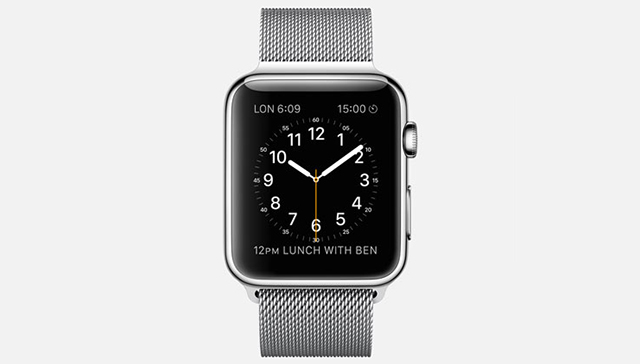
Apple Watch's Achilles' heel is short battery life

 
One of the main reasons why smartwatches are a tough sell today is battery life. Consumers expect them to work for a very long period of time on a single charge when, in reality, they only last for a day or two. It is no surprise then that, coupled with other issues related to the user experience, most people could not care less about them.
 
Not even the long-awaited Apple Watch looks like it will be able to match our expectations. When Tim Cook unveiled the device last month he left out details regarding battery life, which we took as a sign that we should not get our hopes up. A statement that Apple's CEO just made at the WSJ.D conference confirms our concerns.
 
Speaking of Apple Watch and how "profound" of an impact it could have in consumers' lives, Cook expects that users "will end up charging it daily" because they "are going to use it so much". He may have chosen his words carefully there, but the takeaway is that we should not expect Apple Watch to last longer than other smartwatches on the market, like Motorola's Moto 360, at least not in the current iteration, which will ship next year.
 
Truth is, there is only so much that can be done to improve battery life in a form factor that is this small. Apple Watch cannot pack a big battery, as it would be bulky and consumers might not want a smartwatch that is too thick or too big -- as it might look out-of-place. Apple may also be lacking the technology that ushers significant battery life savings -- given time, more efficient hardware will be manufactured.
 
But, for an expensive smartwatch such as Apple Watch -- it starts at $349 -- offering similar battery life to devices costing roughly half as much could be viewed as its Achilles' heel. It does not seem to add any killer features for the extra money, other than the benefits that come with being part of the all-in Apple lifestyle -- which may mean nothing to those not ready to follow the same path.
 
~ Mihaita Bamburic

Samsung Galaxy Note 4 Review... Continue ~ Final Thoughts

Final Thoughts

With the fourth generation of the Galaxy Note, Samsung has finally got it right. The Galaxy Note 4 is an awesome combination of useful software features and top-notch, cutting edge hardware. If you want a large-screened smartphone that succeeds in nearly all key areas, it’s hard to look past Samsung’s latest and greatest.
 
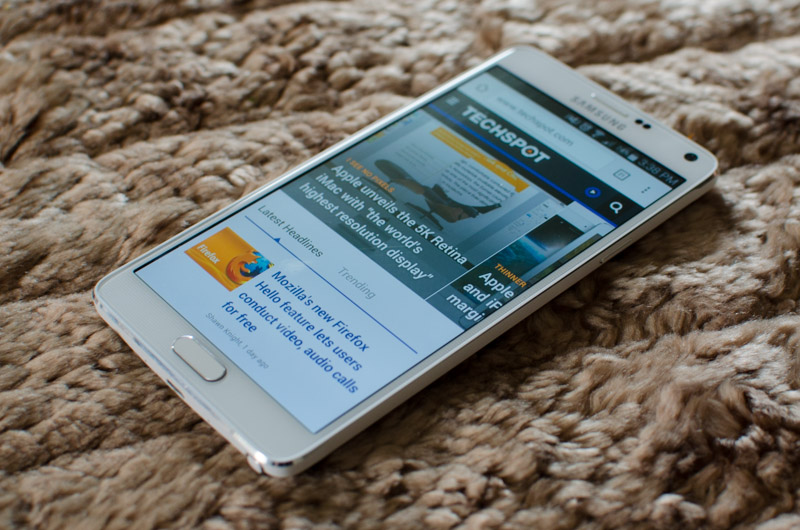
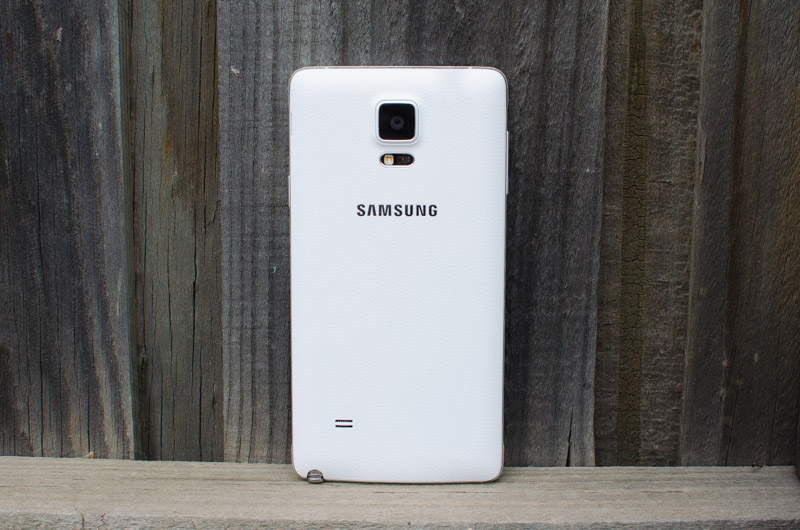
The biggest and most obvious change to the Note line is the refined design. Samsung finally ditched the cheap plastic in favour of a part-metal design, improving the plastic back cover in the process. The Note 4 is truly the first Galaxy product I’ve used that feels and looks like it’s worth the asking price, which is a massive step forward for the company. And this isn’t just token praising of improvement and effort: the Note 4’s has one of the better designs of the year.
 
 
The Note 4 camera is simply superb. It takes the stellar Galaxy S5 camera sensor and adds in the final piece of the puzzle, optical image stabilization, allowing it to deliver fantastic photos in nearly all conditions. Paired with a top-notch HDR mode, an improved selfie camera, and Ultra HD video recording, and you’re left with one of the best – if not the best – smartphone cameras available.
 
Samsung hasn’t held back when it comes to packing in the latest technology. Both models come with brand new SoCs, and each are exciting in their own right. The Exynos variant is one of the only SoCs on the market with ARM’s 64-bit CPU cores inside, while the Snapdragon 805 is Qualcomm’s beastly chip designed for Quad HD devices. Alongside up to Cat. 6 LTE, Wi-Fi 802.11ac and Bluetooth 4.1, this a potent hardware combination.
 
It’s also great to see the Note 4’s Exynos model holding its own against the Snapdragon model for the first time in generations. Benchmarks reveal the Exynos model has a 7% faster CPU, and most importantly a GPU that’s just marginally slower, which is a significant step forward for Samsung’s silicon division. No matter which variant you opt for, you’ll be blessed with top of the table performance that’ll satisfy you throughout a standard two-year contract.


The jury’s still out on whether upgrading to 2560 x 1440 displays is really necessary, though there’s no doubting the Note 4 packs an excellent Quad HD Super AMOLED. Brightness is the only real concern with this display, as it excels in viewing angles, sharpness, contrast and color quality (after a bit of tweaking). The size is also great for media consumption and note taking, so long as you can handle it.
 
Samsung’s software offering is as refined as it’s ever been. The S Pen is very responsive and provides some genuinely useful features throughout the operating system. S Note and S Health are great first-party apps, even if the new sensors for the latter are gimmicky, while other features like multi-window are much improved.
 
Despite all the strong points of the Note 4’s software, Samsung hasn’t been able to fully eradicate some of the clunkiness. Although improved, the settings screen is still long and somewhat hard to navigate, with options left, right and center. Some parts of TouchWiz don’t meld well with the stock Android experience either, giving the handset a disjointed feel from time to time.
 
 
As for battery, at this stage I’ve only been able to benchmark the Exynos variant, though it performs quite well. In most of our tests it produced better battery life than the Snapdragon variant of the Note 3, which is a big achievement for Samsung's SoC division and a great result for anyone looking to pick up the Note 4.

All things considered the Galaxy Note 4 is a terrific device, by far the best Samsung smartphone I’ve ever used, and a contender for the best large-screened handset you can buy.
 
~ Tim Schiesser  

Article Index

Samsung Galaxy Note 4 Review... Continue ~ Battery Life

Battery Life

Underneath the Galaxy Note 4’s rear cover is a 3,220 mAh battery running at 3.85 V, delivering a total capacity of 12.4 Wh. This is a slight upgrade on the Galaxy Note 3’s battery (12.1 Wh), which isn’t surprising considering both devices have the same sized display. Although the resolution has increased, which in turn requires more processing power, this will likely be offset by efficiency improvements in each SoC.
 
 
For the following benchmarks I only had access to the Exynos model of the Galaxy Note 4. While these results will give a decent overview of how the Exynos Note 4 fares in terms of battery life, they won’t necessarily give a good representation of mileage on the Snapdragon model. For the Note 3 and S5, for example, the Snapdragon model gave a few hours of extra life compared to the Exynos model. I’ll have to get longer hands-on time with a Snapdragon Note 4 before I can conclude which model delivers the best battery life.
 
One thing that should be noted for the Exynos variant is that this is the first smartphone SoC I’ve reviewed that’s manufactured using a 20nm process. Previous Exynos devices, such as the Galaxy S5 G900H and Galaxy Note 3 SM-N900, had 28nm SoCs inside, meaning the Note 4 should see efficiency gains from moving to a smaller process node.
 
 
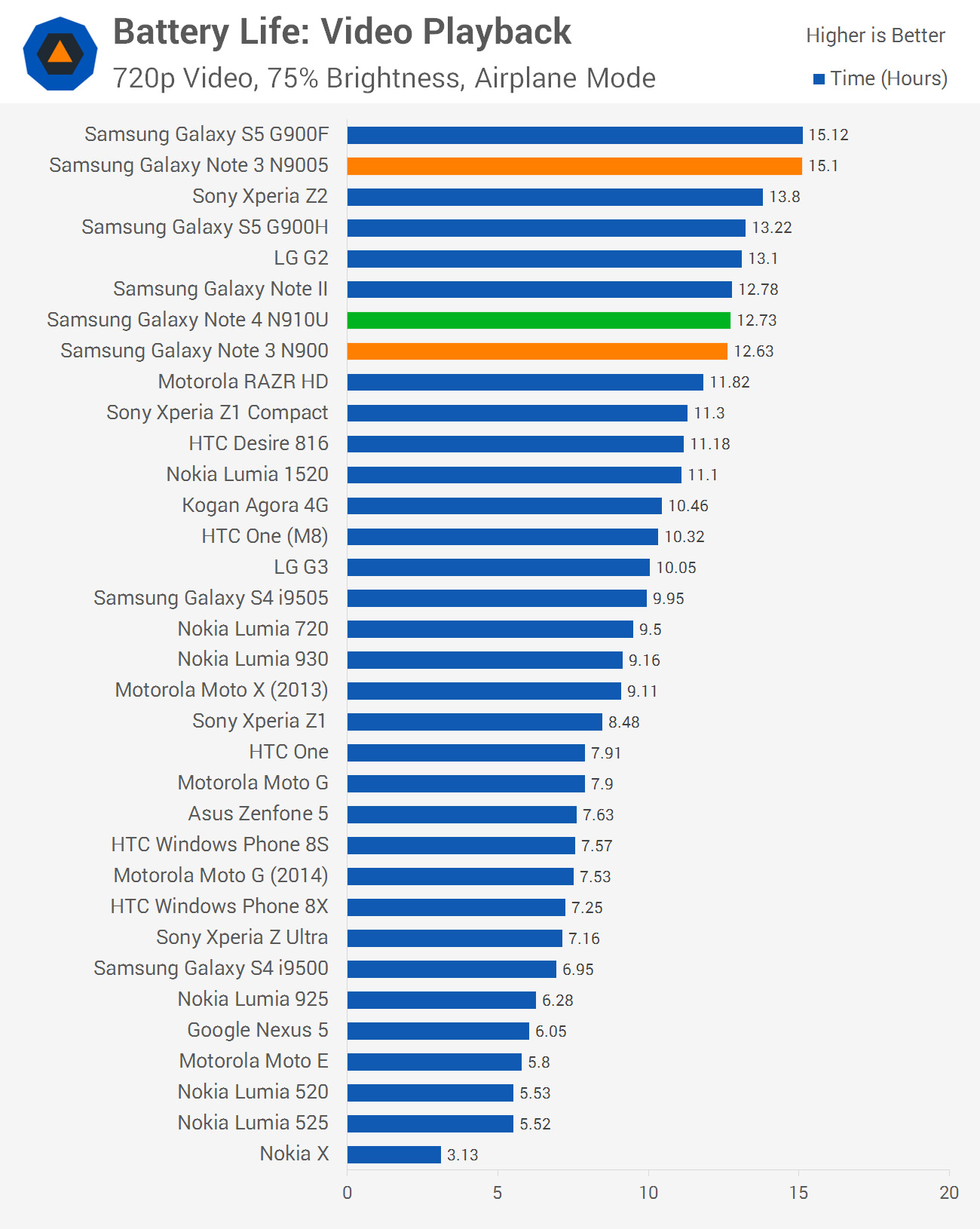
For video playback, the Note 4 Exynos variant lasts for just as long as the Note 3's Exynos variant. This indicates that any efficiency gains in the new SoC's decoding block have been offset by losses in other areas, potentially the higher-resolution display.


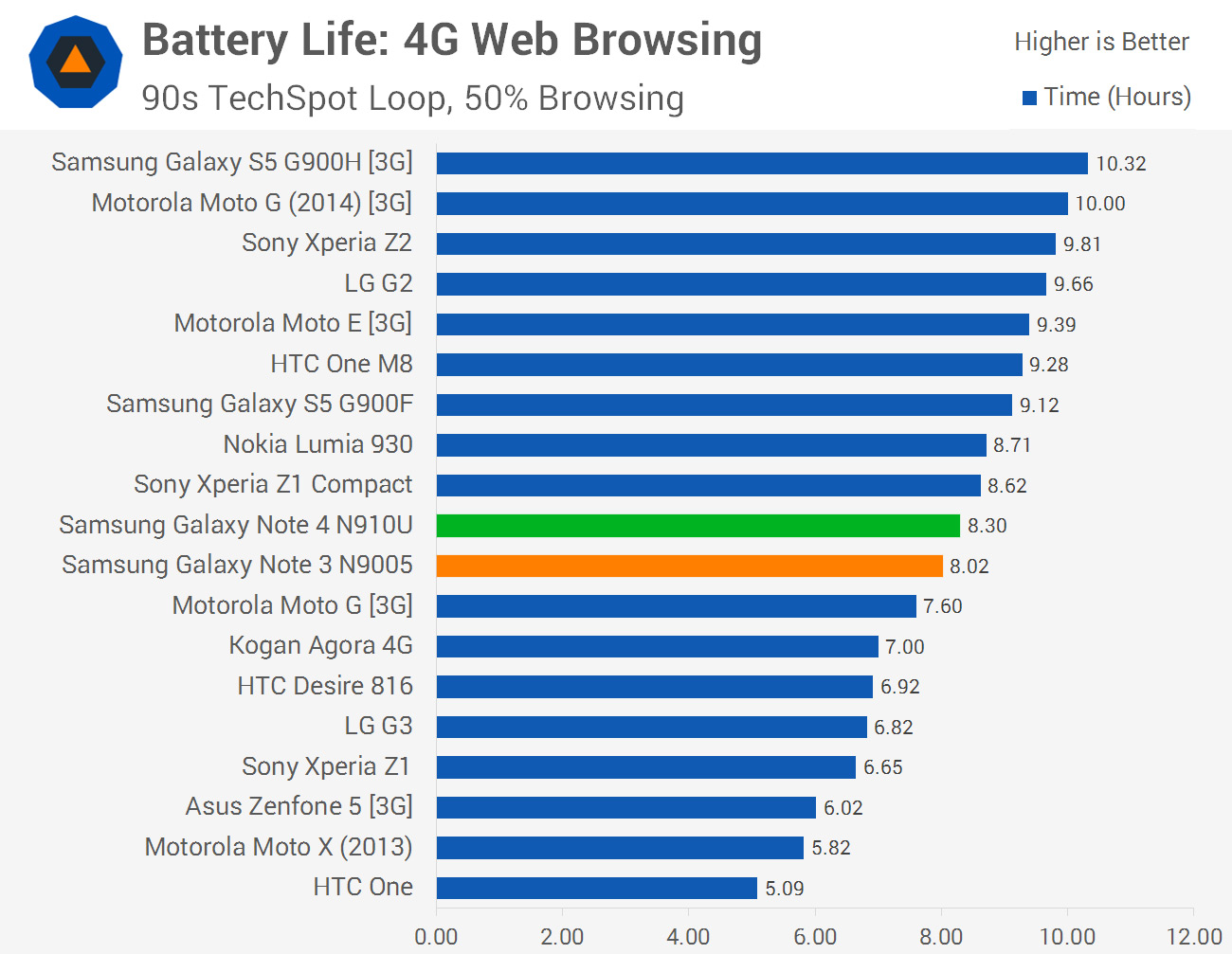
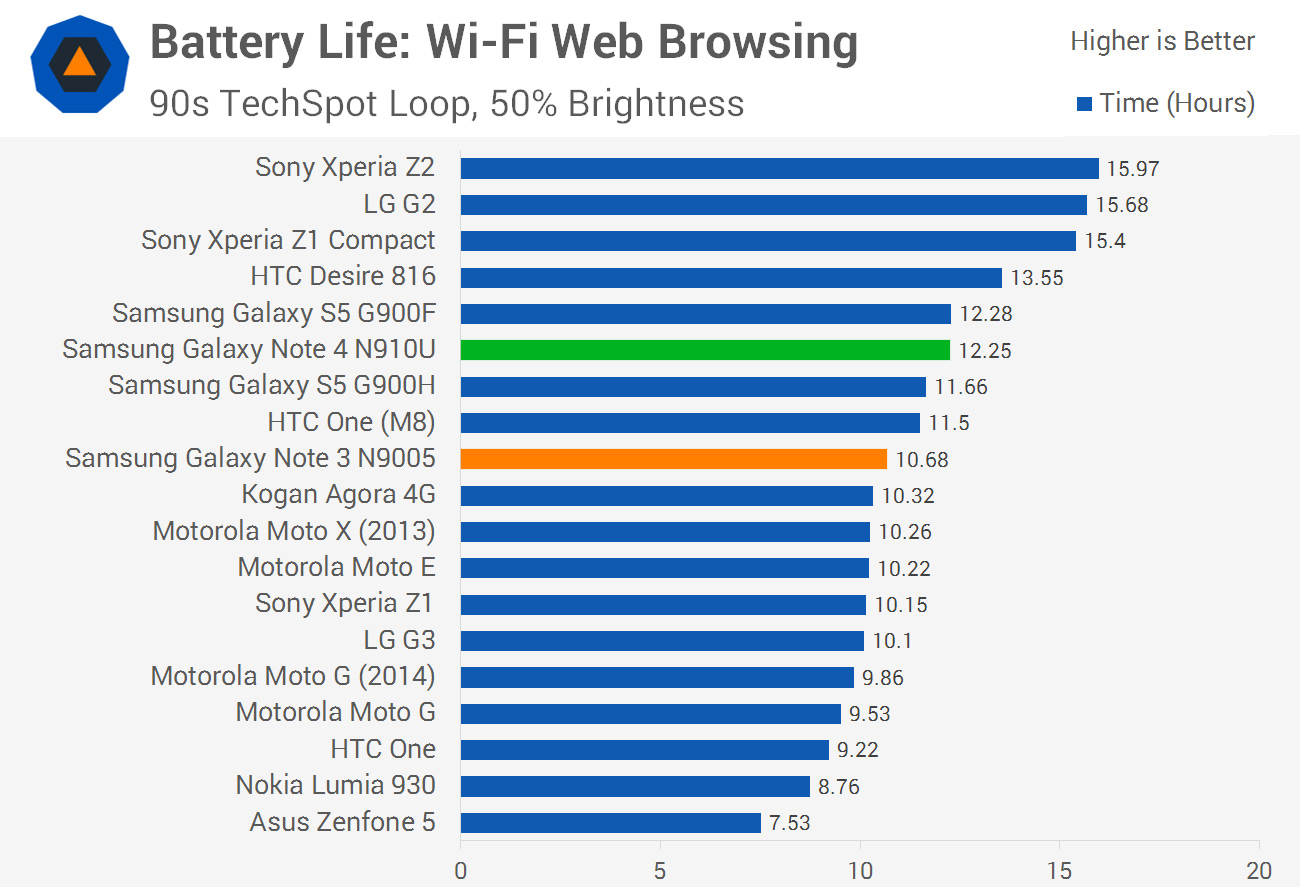
In our web browsing tests the Exynos Galaxy Note 4 performs surprisingly well. In both Wi-Fi and LTE situations this Note 4 variant outperformed the Snapdragon Note 3, which already produced decent battery life. Having competitive battery life is a significant step forward for Samsung's silicon division, though I'll have to see how it performs against the Snapdragon 805 model at a later date.
 
 
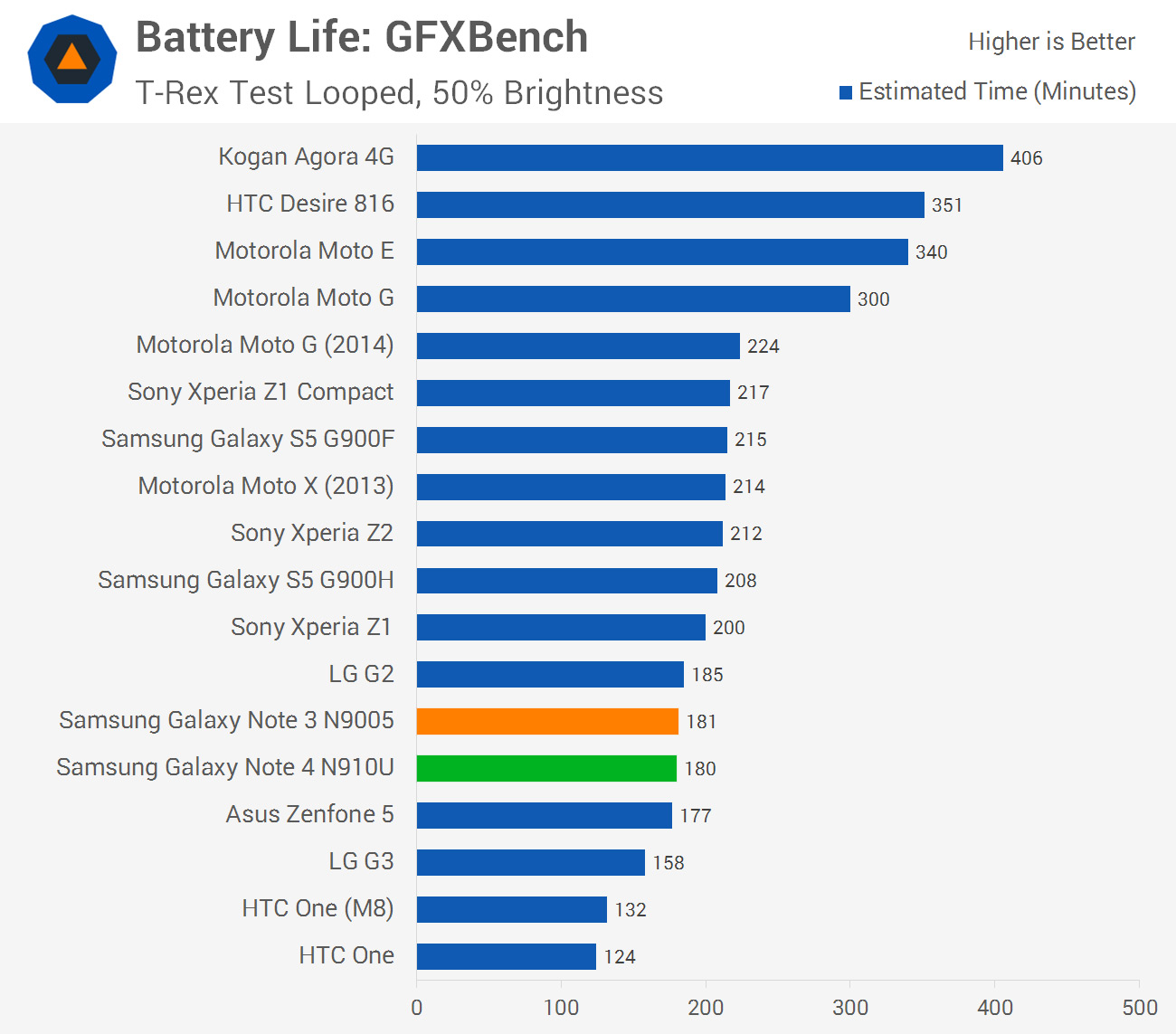
In GFXBench the Note 4 lasts just as long as the Note 3, but less time than both S5 variants. This is even with throttling that takes affect after five minutes into the run.


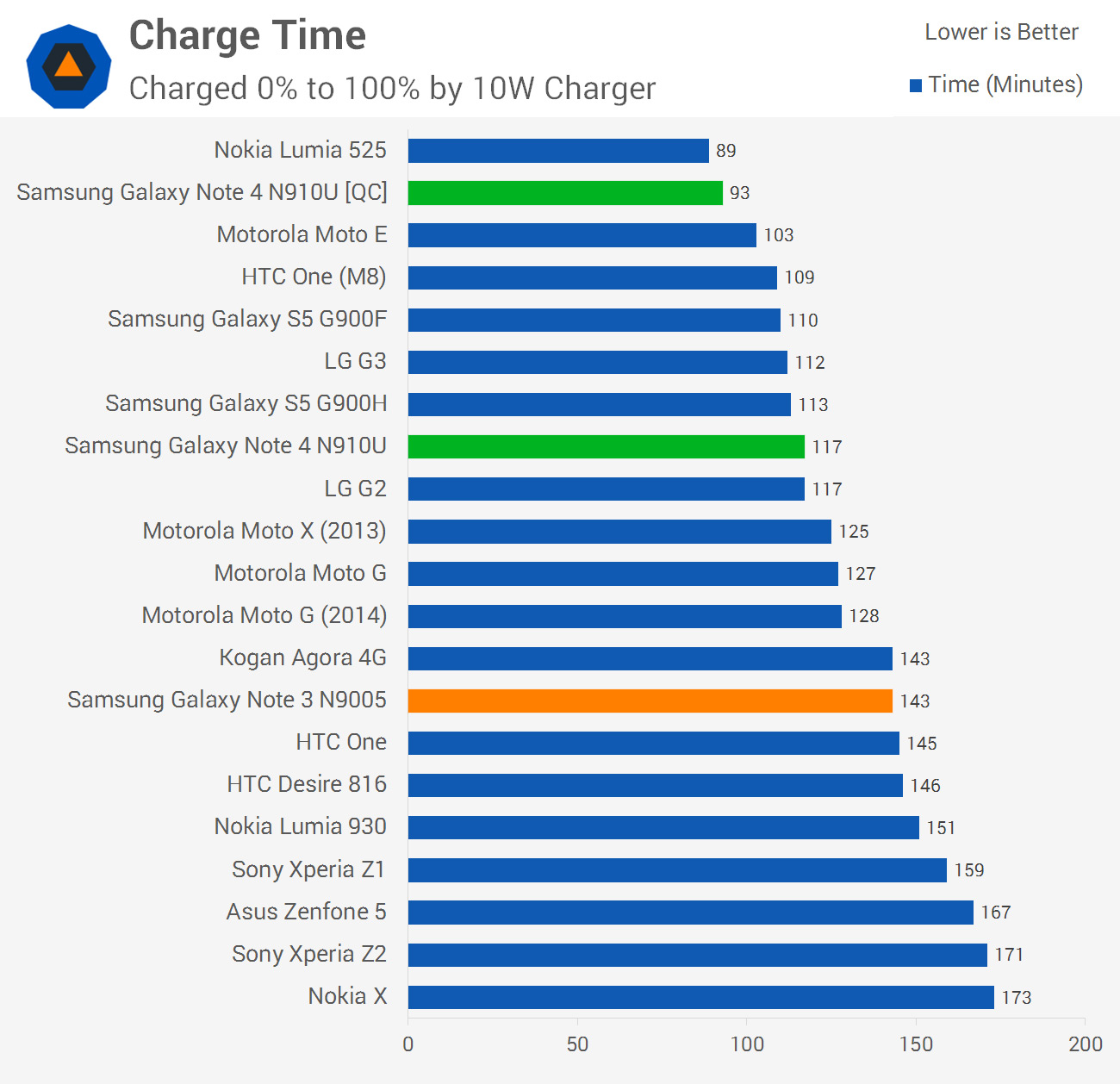
Both variants of the Galaxy Note 4 support quick charging, which is activated by plugging the device into a compatible charger (such as the one included in the box). In the above chart I've compared results for quick charging and standard charging through a 10 W wall charger, with both providing acceptable charge times.
 
Naturally quick charge is a superior charging method, so whenever you have the chance you should charge the Note 4 using the included wall charger.
 
The Galaxy Note 4 comes with several power saving modes: a standard one that restricts performance and background data, and what Samsung calls ‘ultra power saving mode’. When this mode is activated, the display switches to black and white, all connectivity features are disabled when the screen is off, and a limited subset of applications can be accessed. Although the phone’s features are limited in ultra power saving mode, it’s very effective at prolonging life when the battery gets low.


~ Tim Schiesser 

Article Index

10.28.2014

Samsung Galaxy Note 4 Review... Continue ~ Camera Features and Video Quality

Camera Features and Video Quality

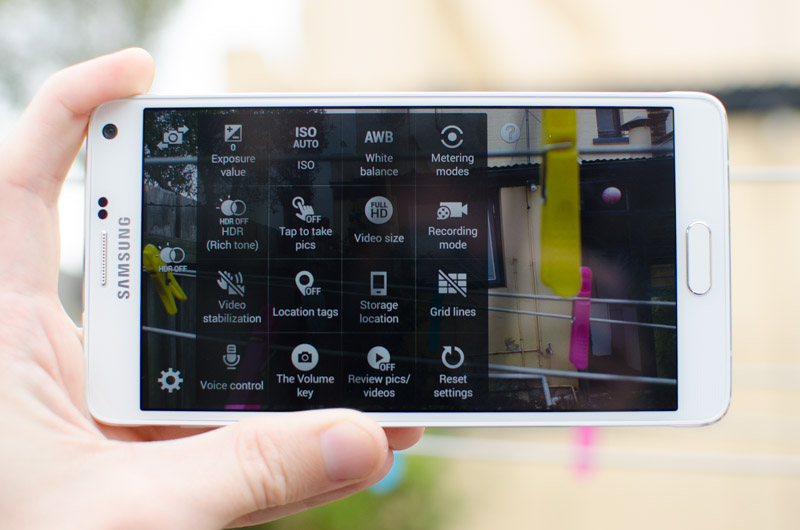
The Galaxy Note 4 comes with a strong set of camera features like previous Samsung handsets, though this time around they’ve made it easier for end users to grasp. The camera interface has had a lot of its clutter removed in favour of a few basic buttons, and very little focus and shutter lag allows you to capture images very quickly.

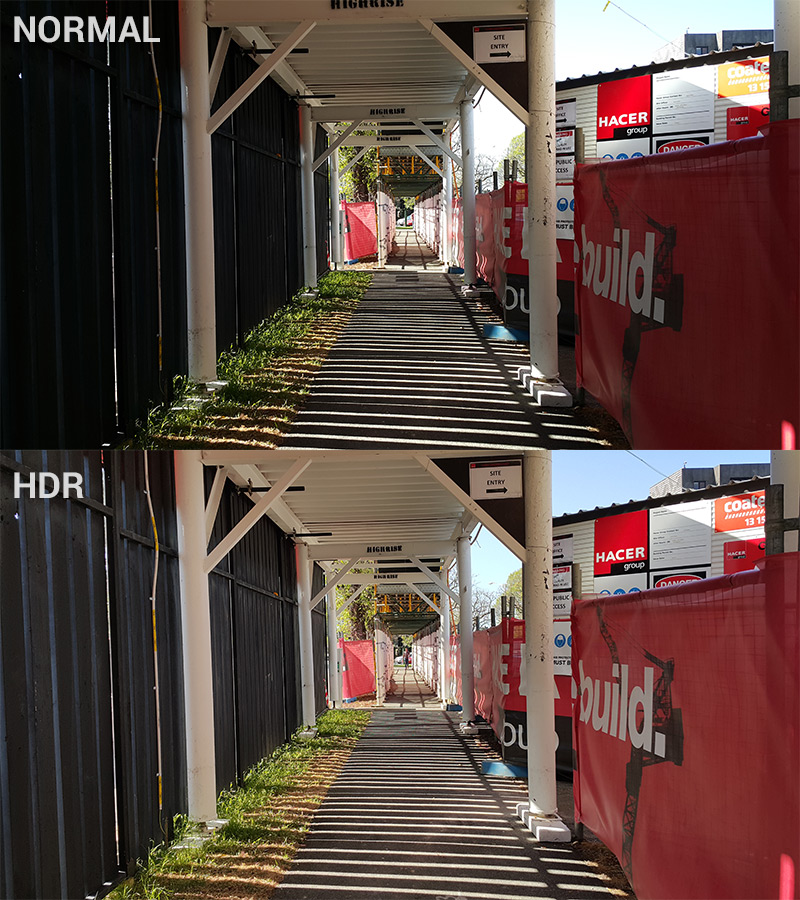
The only setting that Samsung hasn’t hidden is HDR mode, which once again is fantastic on the Galaxy Note 4. In scenarios with lots of shadows or high contrast, enabling HDR mode really brings out the detail in these areas. Samsung continues to be a leader with mobile HDR technology, and thanks to the latest hardware you also get a live HDR camera preview, allowing you to see exactly what the camera will capture.


Despite improvements to HDR over the past few years, getting to a point where it’s basically real-time, it’s still not suitable for all conditions which is why there’s a toggle. Occasionally I found HDR photos to look a bit too washed out, dulling what would otherwise be a good image. Ideally I’d like Samsung to have an auto-HDR mode as well like many competing products, but I guess this will have to wait for a future device.

Hidden under the settings cog you can find all the usual features, including live effects, flash settings, timers, and manual controls. Video settings are also found under here, because the camera app does not separate the video and still modes. None of the settings should come as a surprise to regular smartphone camera users, especially those who are familiar with the Galaxy S5.


Under ‘mode’ is where most of the special camera features can be found. Some of these aren’t too interesting – shot & more allows you to apply effects to burst shots, beauty face smooths out your blemishes, and dual camera takes photos with both sensors simultaneously – though others could be useful.

Selective Focus is unchanged from the Galaxy S5, simulating background blur in a semi-effective way. The mode is restrictive in its requirements, and doesn’t always correctly find the edges around a subject, but when it does the results can be quite pleasing. Virtual Tour is also unchanged from the Galaxy S5, and to be honest, it’s a feature I never found to be all that useful.


Rear Cam Selfie is a genuinely useful feature that solves a tricky problem with wanting a better quality selfie from the rear camera: how do you hit the capture button? The mode scans for a face, counts down for two seconds when it registers one in the frame, and boom, you have a selfie from the rear camera without having to hit the capture button.

The front-facing camera also gets a new photo mode: Wide Selfie. Basically this is a panorama mode for your selfies, allowing you to tilt the Note 4 to get more people into the frame. It works surprisingly well and could come in handy if you want that perfect group selfie that has everyone in it. It should also be mentioned that in regular selfie mode, tapping the heart rate monitor will take photo, though I never found that to be overly useful.

As for video, the main shooting mode the Note 4 supports is 4K Ultra HD at 30 frames per second with a bit rate of 48 Mbps (High profile H.264), meaning one minute of footage will occupy a whopping 360 MB of space. Audio is recorded in stereo with a bitrate of 244 kbps, which is above what we usually see for smartphone video recording.


Most 4K recording from smartphones is excellent, and the Note 4 is no exception. Downscaled to 1080p (unfortunately I don’t have a 4K display to test with just yet), the footage looks crisp and highly detailed; it’s as good quality as 30 still images from the camera displaying on my monitor every second. It also looks excellent on the Note 4’s Quad HD display, definitely a notch above the 1080p shooting mode.

Other modes the Note 4 supports include smooth motion (1080p at 60 FPS), fast motion (basically a time lapse), and slow motion (720p at 120 FPS). On that last shooting mode, Samsung offers a 1/8x slow motion mode, which would indicate it captures footage at 240 FPS. But don’t be fooled: it simply captures 720p120 and plays it back at a stuttering 15 FPS, so I’d recommend sticking to 1/4x.


The above video was recorded in the Note 4's 1080p 'Smooth Motion' (aka. 60 FPS) mode. Although YouTube does now support 60 FPS playback, if it's not working for you, you can download the video directly.

For those interested in deeper tech specs, the 1080p60 mode records at 28 Mbps, which is decent for this sort of recording and provides excellent quality smooth motion. 720p120 is 12 Mbps when played back at 30 FPS, indicating it captures at 48 Mbps, which is likely a hardware limit.


~ Tim Schiesser  

Article Index
Samsung Galaxy Note 4 Review... Continue ~ Camera: 16 Megapixel Image Quality

Camera: 16 Megapixel Image Quality

Despite both the Galaxy Note 4 and Galaxy S5 packing a 16-megapixel camera, internally the hardware is slightly different. The S5 used a Samsung S5K2P2XX CMOS, while the Note 4 switches back to Sony and uses an IMX240 sensor. The specs between the two sensors are largely the same: 1/2.6” in size, a native aspect ratio of 16:9, a pixel size of 1.12 µm, and a maximum resolution of 5312 x 2988. The IMX240 is paired with an f/2.2 lens with a 35mm-equivalent focal length of 31mm, and, finally, we’re getting optical image stabilization (OIS).


The front camera is a Samsung S5K6D1YX, which is a 3.7-megapixel 1/5.4” CMOS with 1.12 µm pixels, capable of capturing 2560 x 1440 images in a native 16:9 aspect ratio. This is a tidy update on previous selfie cameras Samsung has deployed, and allows the Note 4 to capture front-facing images that will display natively on the device’s screen. The sensor is paired with a 23mm f/1.9 lens.

 
Right off the bat, the Galaxy Note 4 is an excellent smartphone camera. The addition of OIS assists with photography across the board (not just in low light), and improvements to image processing make the camera more accurate than ever before.


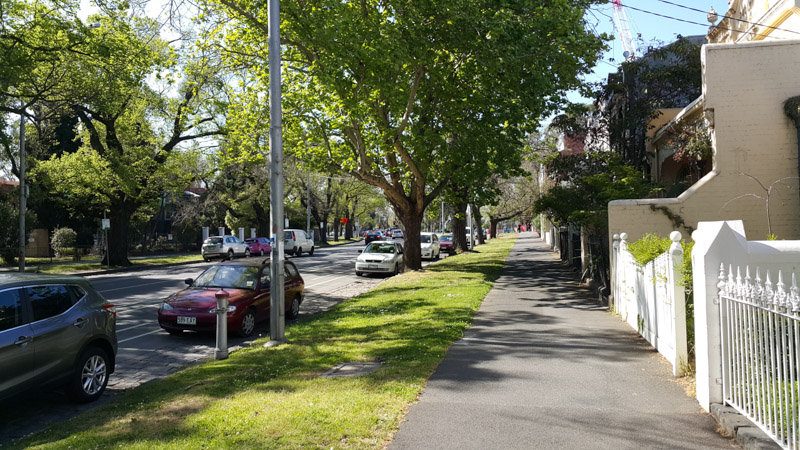
The Note 4 is a superb shooter in good lighting. Whip out the camera in strong sunlight and you’ll find vibrant yet accurate color representation and very decent dynamic range for such a small sensor. Metering is absolutely perfect, leading to shots that I always felt had spot on white balance, tone and exposure. The f/2.2 lens provides decent bokeh as well, and although it’s not as pleasant as wider apertures, macro shots can look quite good.
 
Autofocus from this camera system is quick and accurate, and combined with above average camera optics leads to sharp 16-megapixel images. Samsung has toned down the sharpness filter applied post-capture compared to the Galaxy S5, landing in a sweet zone between being oversharp or too soft. Unfortunately some of the other filters Samsung has applied reduce fine detail, and this is especially noticeable on wide shots, however this sort of fine detail is typically lost on most smartphones I’ve seen.
 
 
So long as you don’t zoom in too far on your wide shots, the 16-megapixel sensor provides enough headroom for cropping and zooming, though images do look at their best when kept uncropped and downscaled to the display you’re viewing them on. I can’t see many manufacturers progressing past 16-20 megapixels on current smartphone sensors for some time, especially with current CMOS technology.


One thing I noticed with the Note 4 is that the Gallery app applies a noticeable sharpening filter to all images displayed in it. This is likely to compensate for the reduction in sharpening in the images themselves, and to really highlight the quality of the Quad HD display when viewing photos, albeit in a way that cheats. I definitely prefer how the sharpening occurs on the device side rather than the photo side, though ideally neither would happen (and to be honest, Samsung, your display is sharp enough as is that the sharpening filter isn’t warranted).


Moving to less ideal photography conditions and the Galaxy Note 4 still shines. This is largely due to OIS, which compensates for minor shakes when capturing images and allows the camera’s software to use low shutter speeds without risking a blurred image. With the Galaxy S5, the camera tended to use a shutter speed that was too low in poor conditions, causing many photos to be blurred. This doesn’t happen with the Note 4.
 
Not only are photos taken on cloudy days or indoors well exposed and not particularly grainy, but they also feature good color saturation and accurate tone. Expect sharpness as well, and not nearly as many post-processing artefacts as you would have seen with the S5. OIS is simply a massive inclusion for this camera array, and allows Samsung to take the Note line’s camera capabilities to the next level.


Photos taken at night with past Samsung smartphone cameras tended to be unusable, but that’s not the case with the Note 4. The device performs well after the sun goes down, taking photos that allow you to actually see what’s going on. The small size of pixels in the sensor means that results aren’t as good as you’d see on the HTC One M8 or iPhone 6 Plus, though I’m happy to say that the Note 4 competes in this area.
 
The rear camera also comes with a single-tone, single-LED flash. Like most smartphone flashes, the Note 4’s flash is only suitable in emergency situations, as it has a tendency to wash out close subjects, and it’s ineffective on subjects that are further away.
 
 
As for the front-facing camera, the upgrade from 2.0- to 3.7-megapixels is respectable, providing an extra level of detail that can be displayed natively on the Note 4’s Quad HD panel. A focal length of 23mm gives it a field of view that’s large, allowing multiple people to fit into a single selfie. I was also pleased with the color quality from this camera, though it’s not a patch on the rear shooter.
 
 
~ Tim Schiesser  

Article Index


Samsung Galaxy Note 4 Review... Continue ~ Exynos & Snapdragon Performance

Exynos & Snapdragon Performance

For this review, thanks to the assistance from fellow editor Shawn, I’ve managed to compile benchmarks for both the Snapdragon 805 model and the Exynos 5433 model. Personally I’ve been using the Exynos variant, so my impressions of the phone are based on that handset, but it appears as though both handsets are quite evenly matched.
 
 
There are a large number of Galaxy Note 4 models on the market, larger than the number of SoCs Samsung has used, so the model numbers seen in the benchmarks that follow may not correspond to what you’ll see in your country. However, the vast majority of the hardware between the Snapdragon variants and the Exynos variants is the same, so you should expect near identical performance.
 
The Exynos model we used is the SM-N910U, which is the model on sale in Asia. For the Snapdragon variant, Shawn benchmarked the SM-N910T, the T-Mobile model in the United States. These devices can easily be compared to the Galaxy Note 3 models: the SM-N900 for Exynos, and SM-N9005 for Snapdragon; and the Galaxy S5: G900H for Exynos and G900F for Snapdragon.


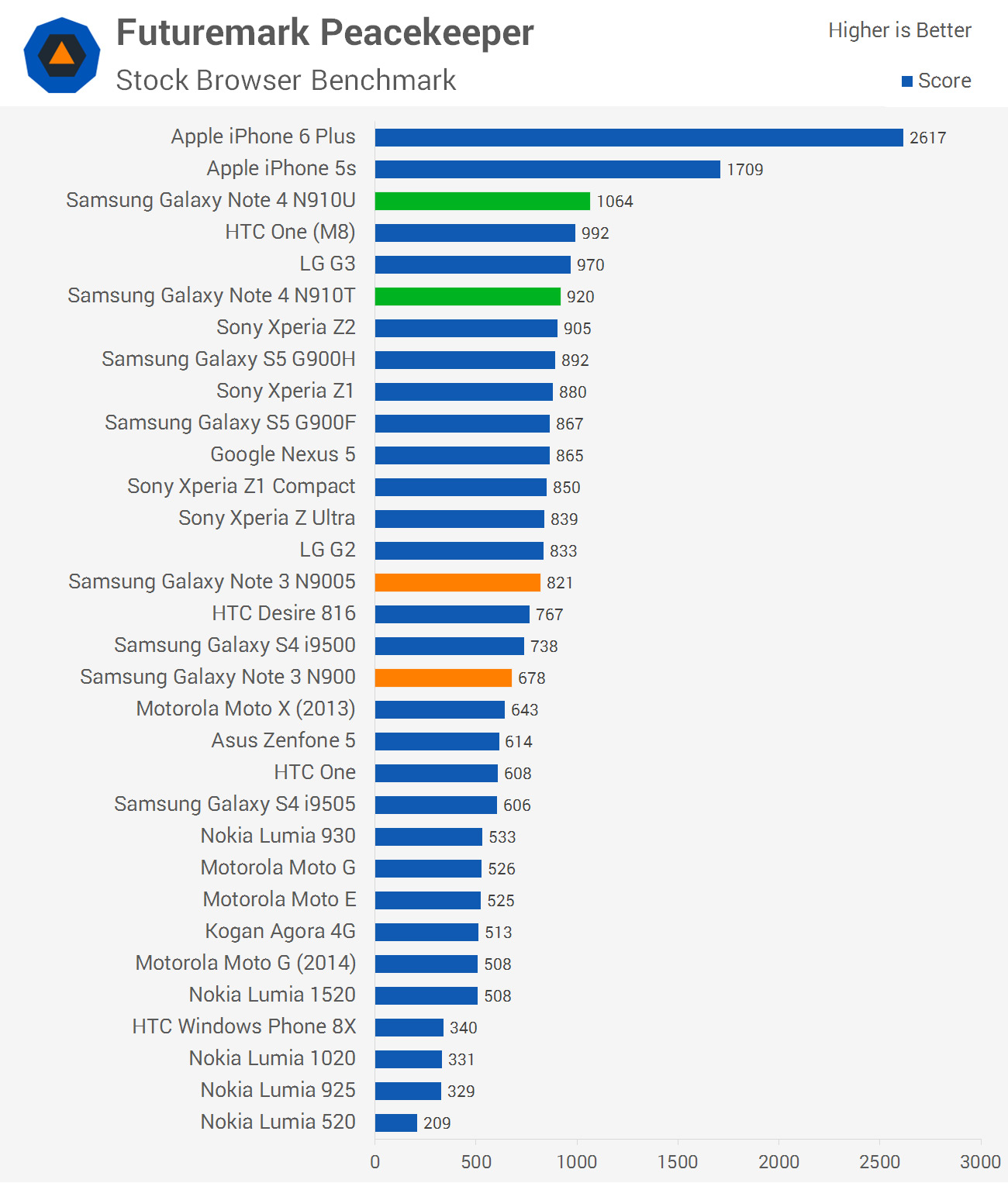
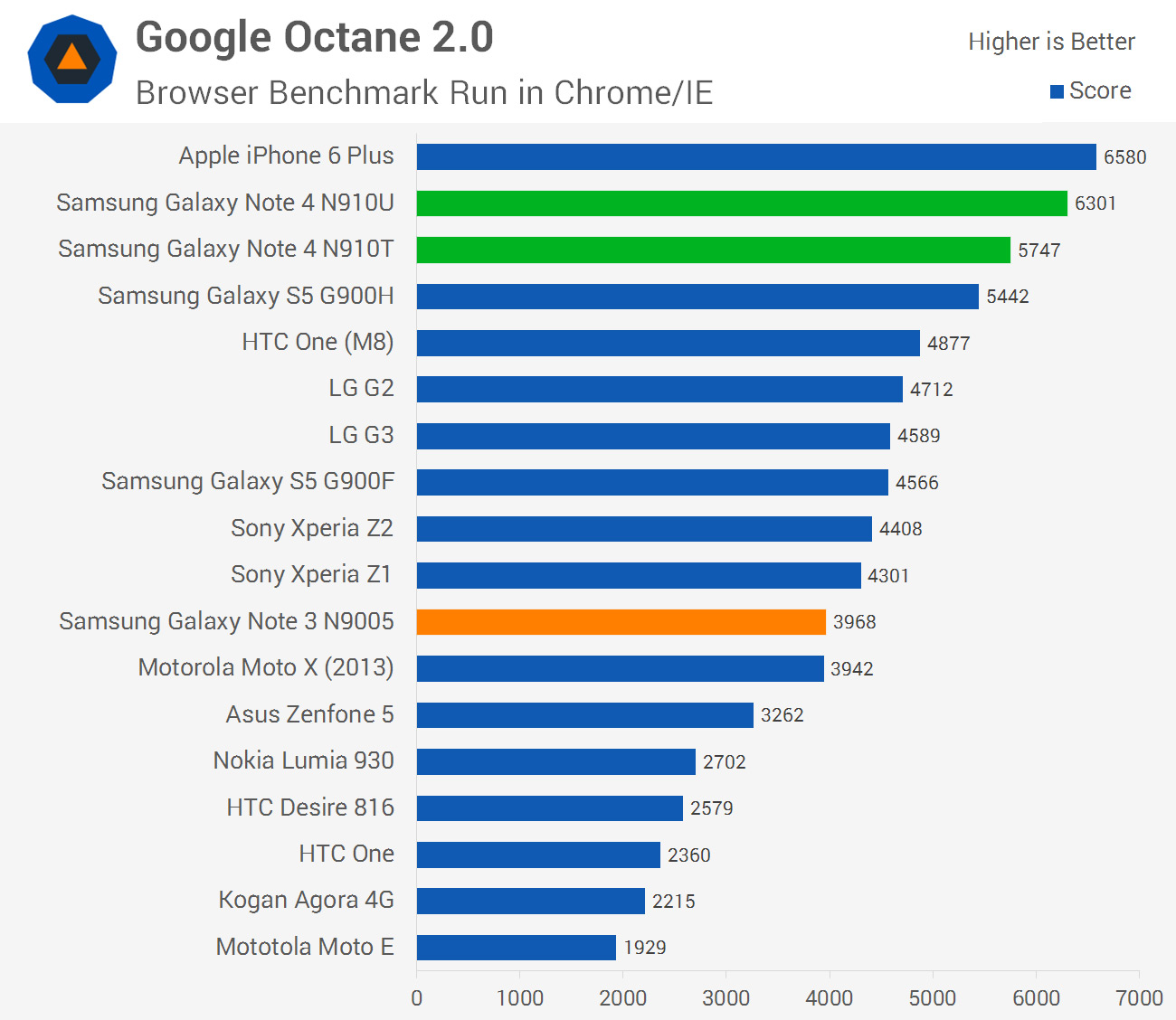
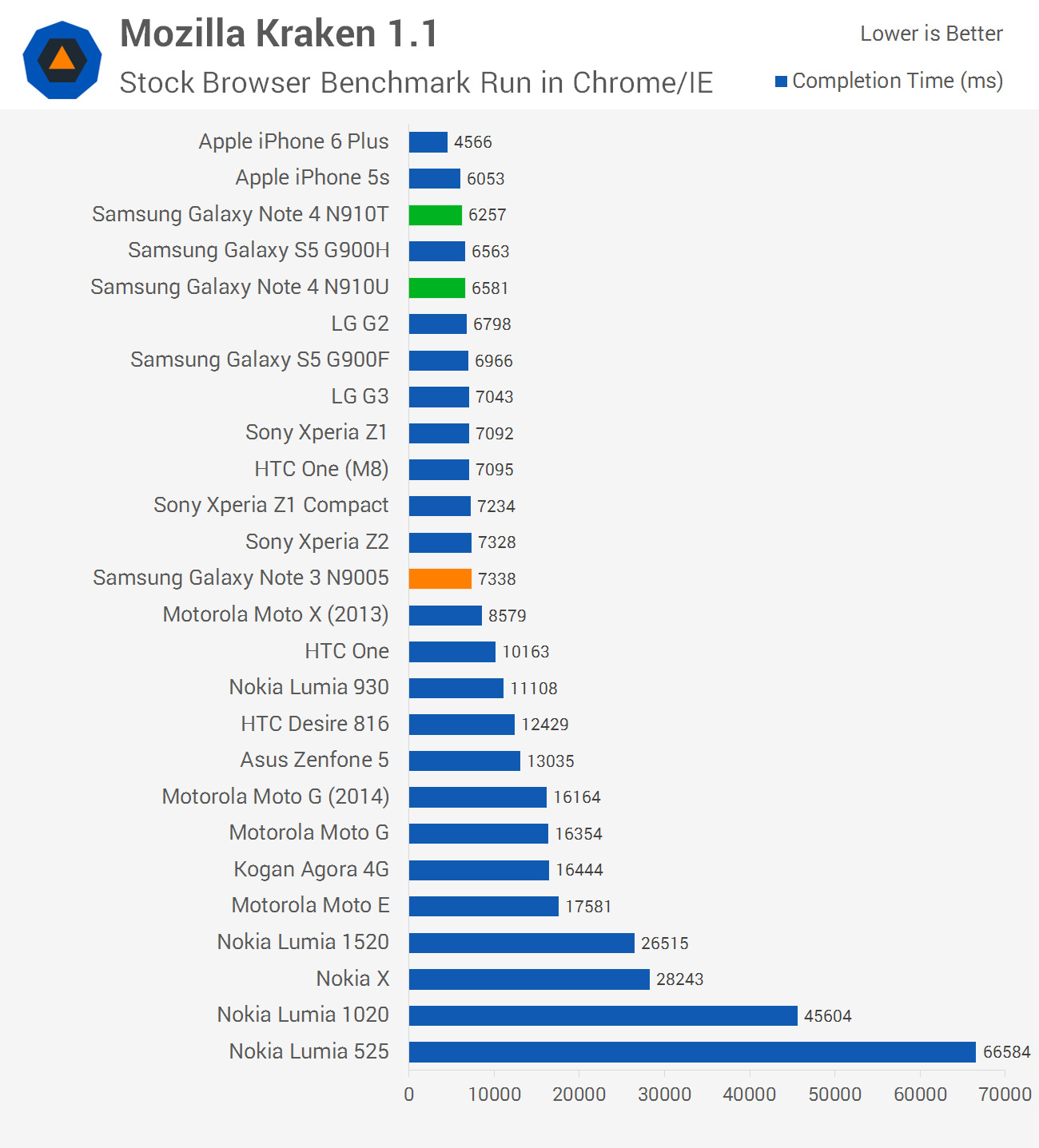
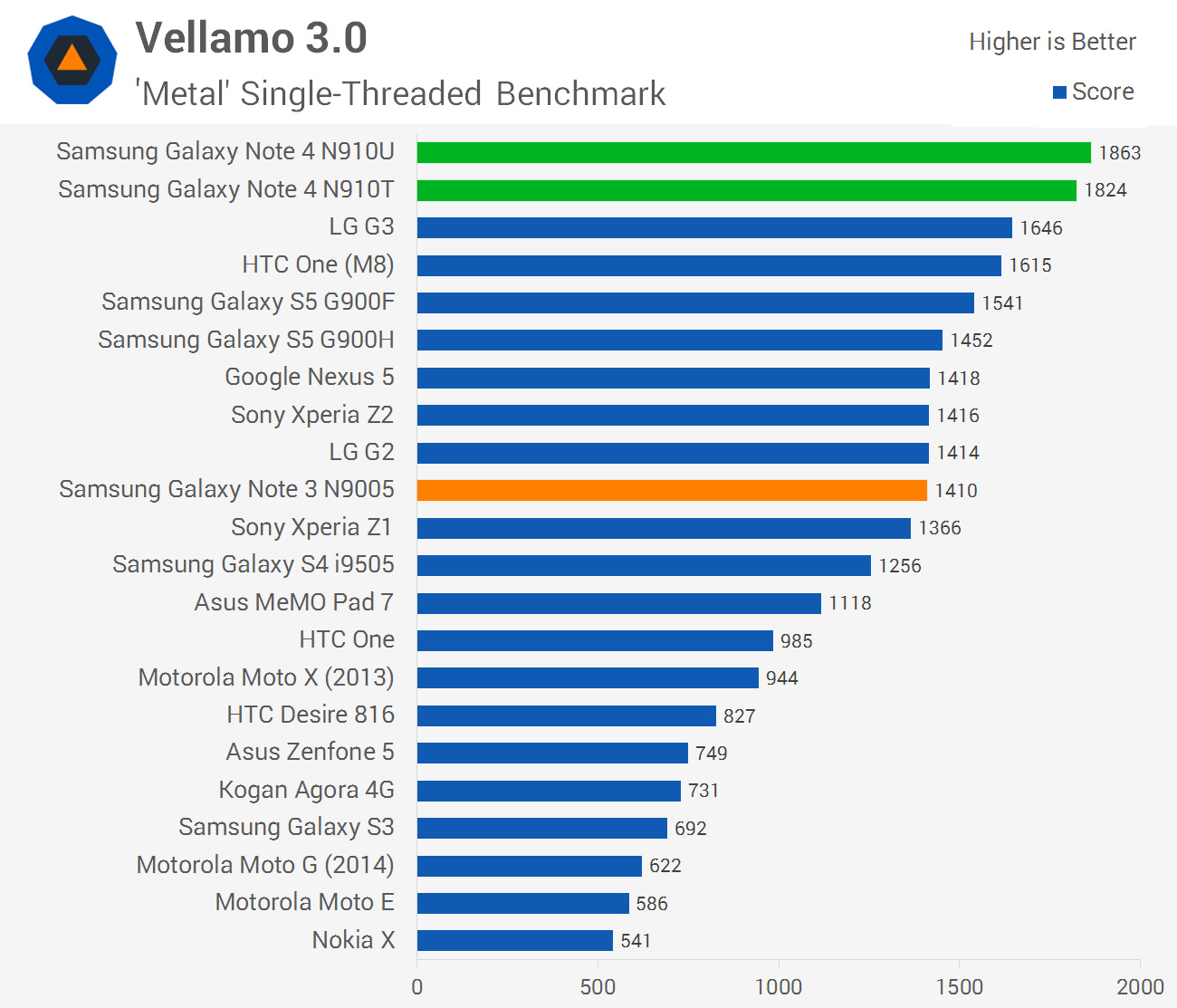
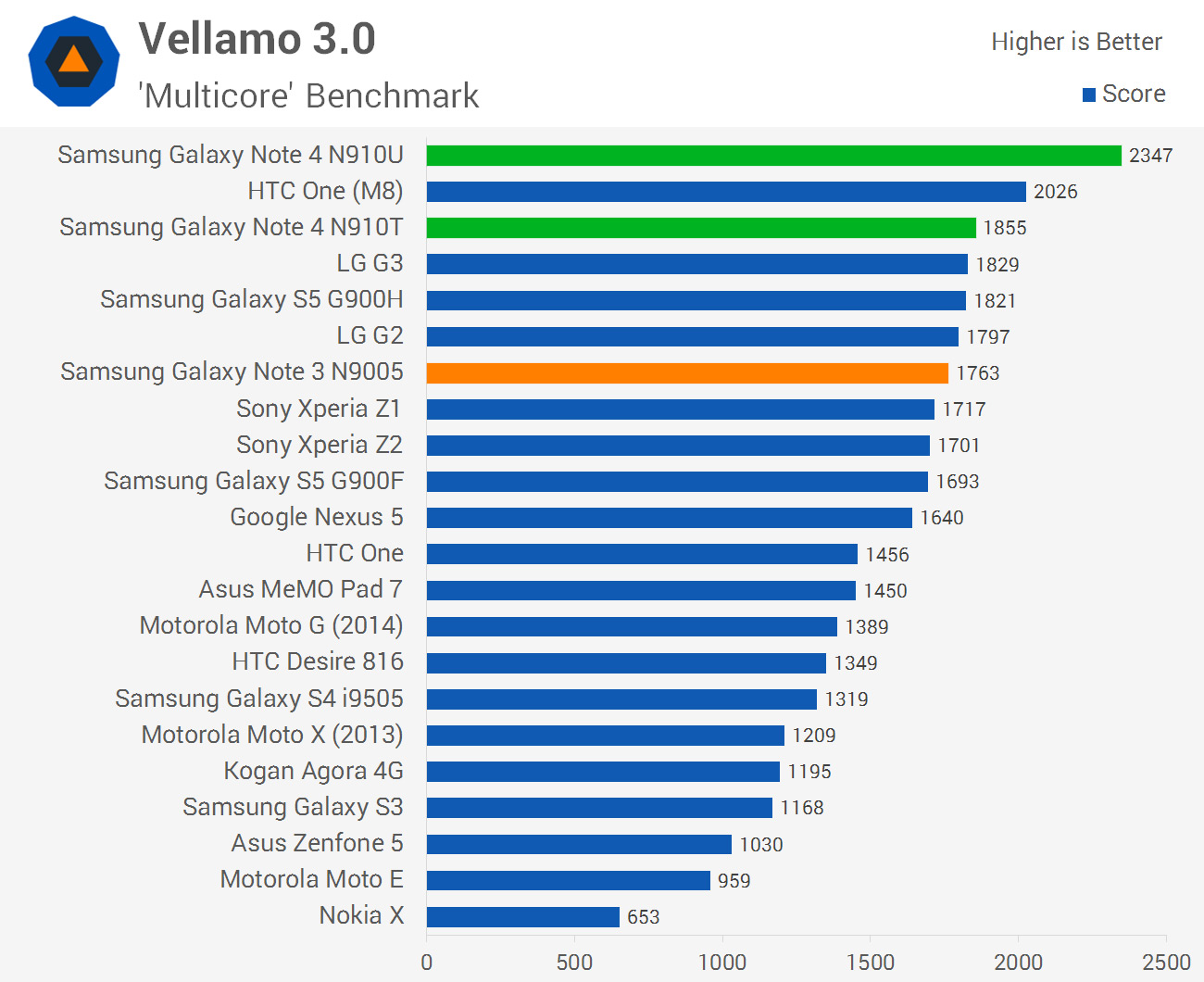
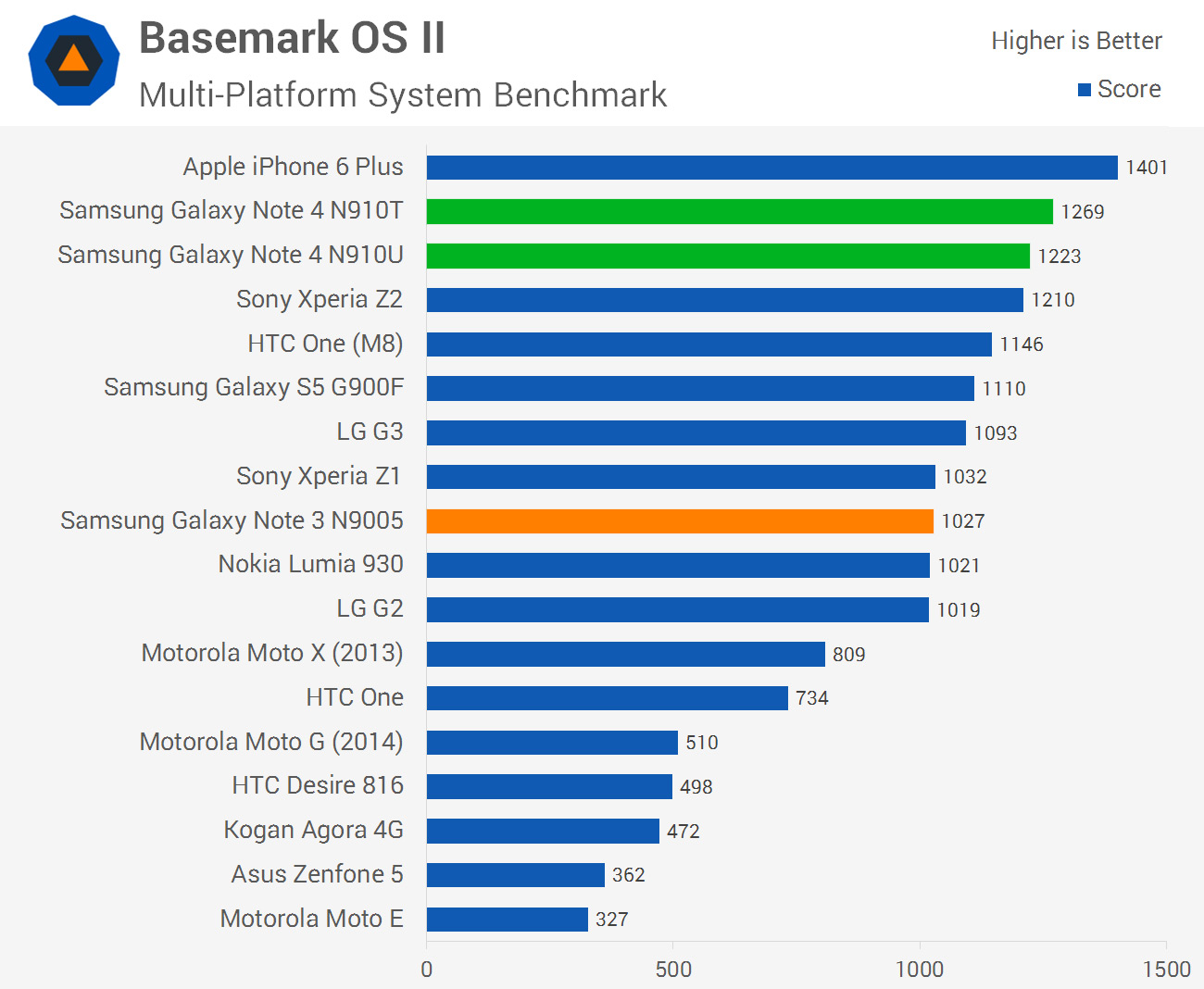
Across our CPU-heavy benchmarks, we get the first glimpse of how powerful both the Snapdragon 805 and Exynos 5433 are. Starting with the Snapdragon 805, we’re seeing an average performance increase of 13% over the 2.5 GHz quad-core Snapdragon 801, which is slightly higher than the corresponding jump in clock speed between the chips. This corresponds well from the information available on the new Krait 450 CPU cores in the Snapdragon 805, which have been upgraded slightly from an architecture standpoint.


What gets really interesting is the Exynos 5433. Samsung absolutely aren’t backing down when it comes to their home-grown silicon, boasting comparable CPU performance to Qualcomm’s top-end chip. Admittedly this is achieved over eight cores working in tandem, but it gives you an idea of how powerful ARM’s Cortex-A57 cores are compared to Qualcomm’s high-end offering. At 1.9 GHz and paired with some Cortex-A53s, the Exynos 5433 model is, on average, 7% faster than the 2.7 GHz Snapdragon 805 in CPU-heavy tasks.
 
Compared to the last Exynos model I benchmarked, the Exynos 5 Octa 5422 found in the Galaxy S5 G900H, we can get a near like-for-like look at what performance improvements we’re getting from ARM’s new architecture. The Exynos 5422 has four Cortex-A15 CPU cores clocked at 1.9 GHz paired with four Cortex-A7s clocked at 1.3 GHz in a big.LITTLE environment. These clock speeds are identical to the Exynos 5433, but with new architecture we can expect better performance, even while running in 32-bit mode.
 
On average, the Exynos 5433 is 18% faster than the Exynos 5422 in CPU-loaded tasks. ARM expects a 20-30% performance improvement going from A15 to A57 CPU cores in 32-bit mode, so I’m pretty happy with what the results show. Keep in mind that these benchmarks will also be utilizing the A53 cores in the Exynos 5433, which might not see as large a performance gain over the A7s (and the results hint in this direction).


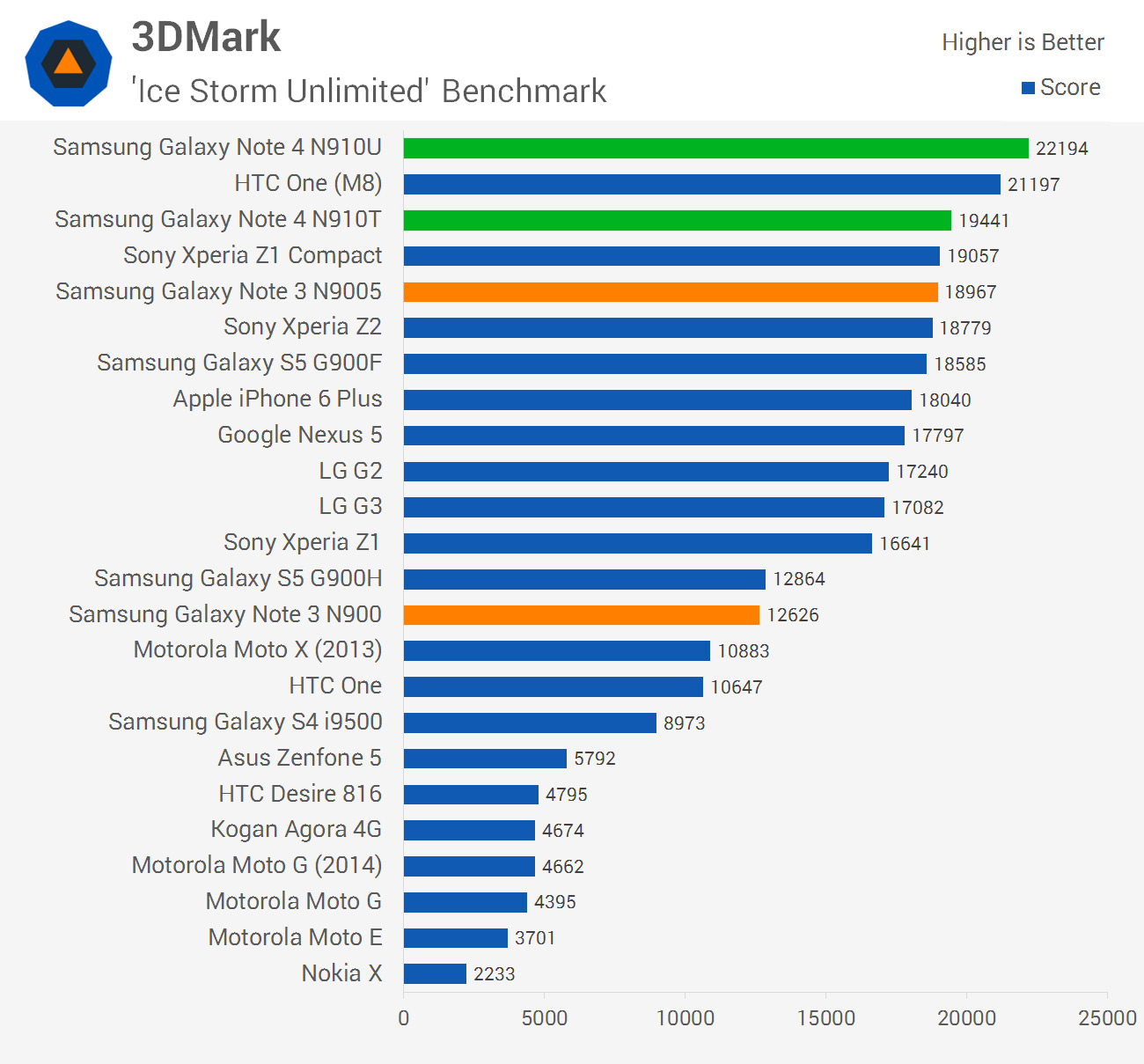
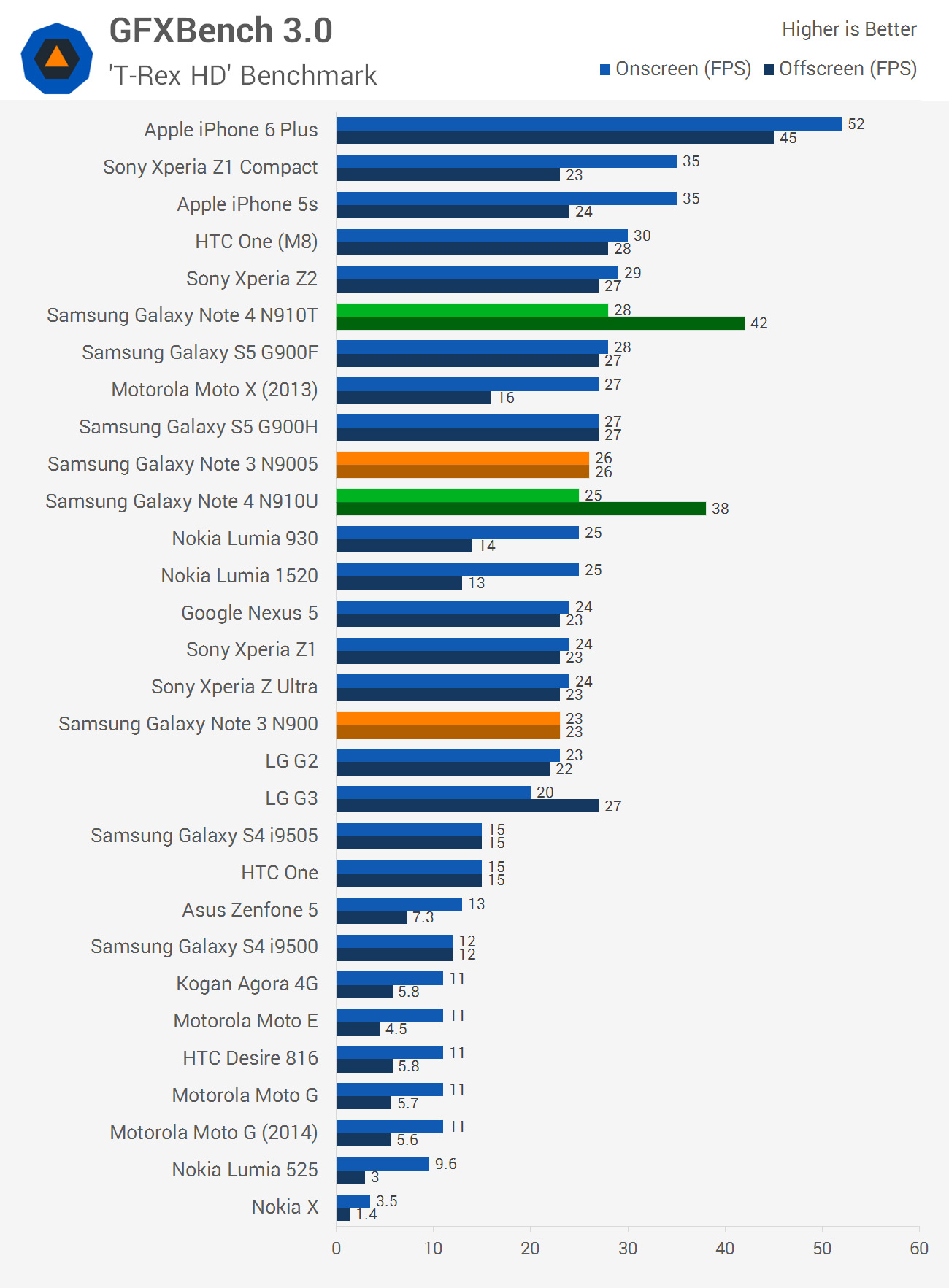
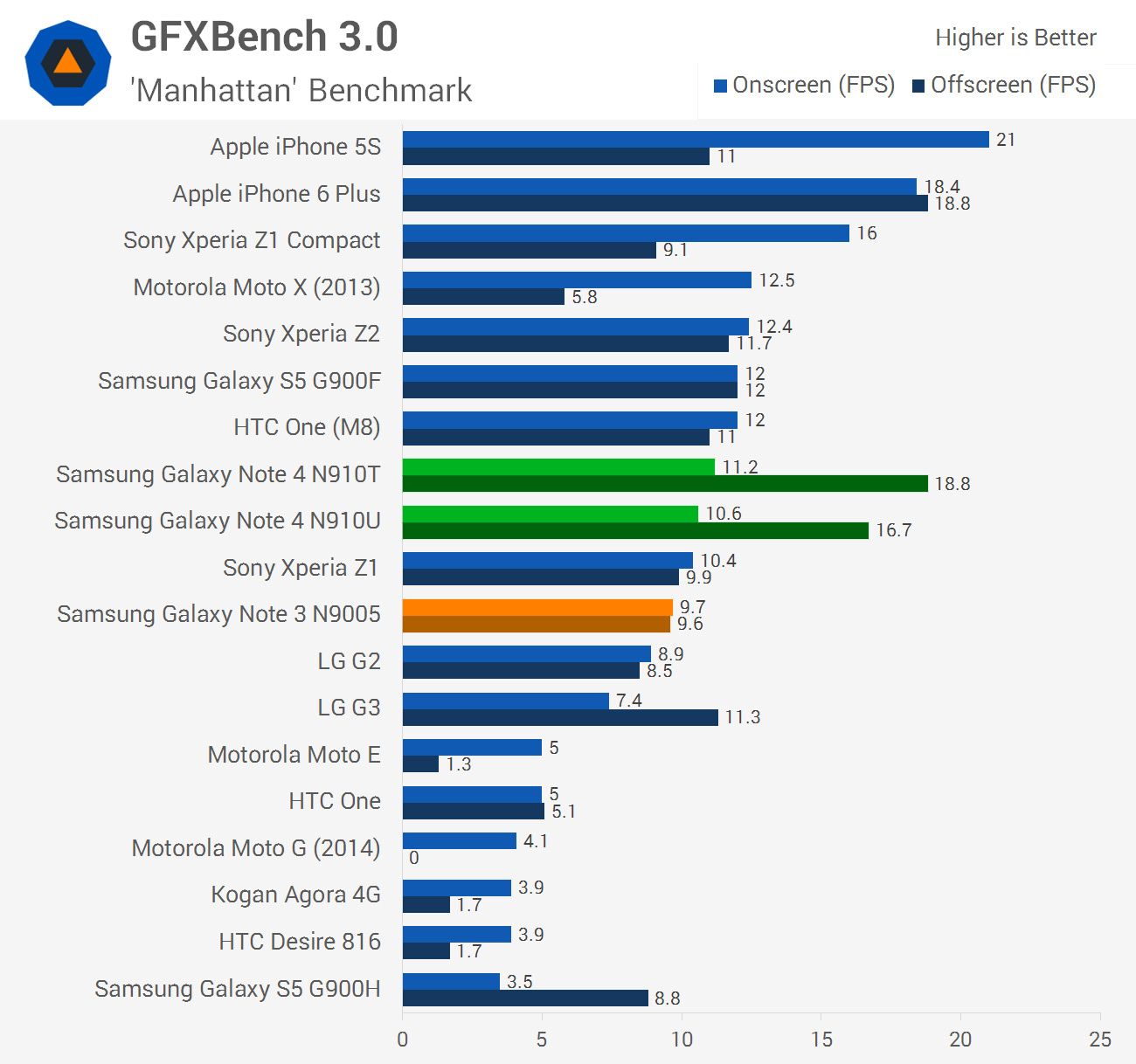
Graphics has, over the past few generations, been a weak point for Samsung’s Exynos chips. I’m glad to say that this is no longer the case, with the Exynos 5433 bringing a significantly improved GPU to the table that holds its own with the Snapdragon 805, which itself has improved over past chips. The Snapdragon model holds just a 5% lead over the Exynos model on average, which is a massive improvement over the 67% lead the Snapdragon 801 had over the Exynos 5422.
 
In this respect, I can safely conclude that the GPUs in each Note 4 are on par. This is a significant win for Samsung’s microprocessor division, and removes one of the main downsides to purchasing the Exynos variant of a Galaxy product.
 
While I’m on the topic of the Exynos 5433, its Mali-T760 GPU was a whopping 58% faster than the Mali-T628 in the Exynos 5422 in my testing. This indicates that, as I expected, Samsung is using the Mali-T760MP8 in the Exynos 5433, which is certainly a performance beast. The Mali-T628 in its configuration in the Galaxy S5 was really only suitable for flagship graphics on a 720p display, whereas the Mali-T760 is a true Quad HD GPU.
 
Gains aren’t as drastic in the Snapdragon 805 model, but Qualcomm didn’t need to advance as rapidly in this area, as they already had a strong graphics division. On average the Adreno 420 GPU in the Snapdragon 805 is 39% faster than the Adreno 330 in the Snapdragon 801: certainly nothing to sneeze at.
 
These two new GPUs do have to render to 1440p displays that feature 77% more pixels than previous-gen 1080p panels, and in this respect they’re both well suited. You won’t get quite as high frame rates in intense 3D applications as you would from a Snapdragon 801 rendering to a 1080p display, but these more powerful chips are still very capable of running flagship titles from the Play Store.


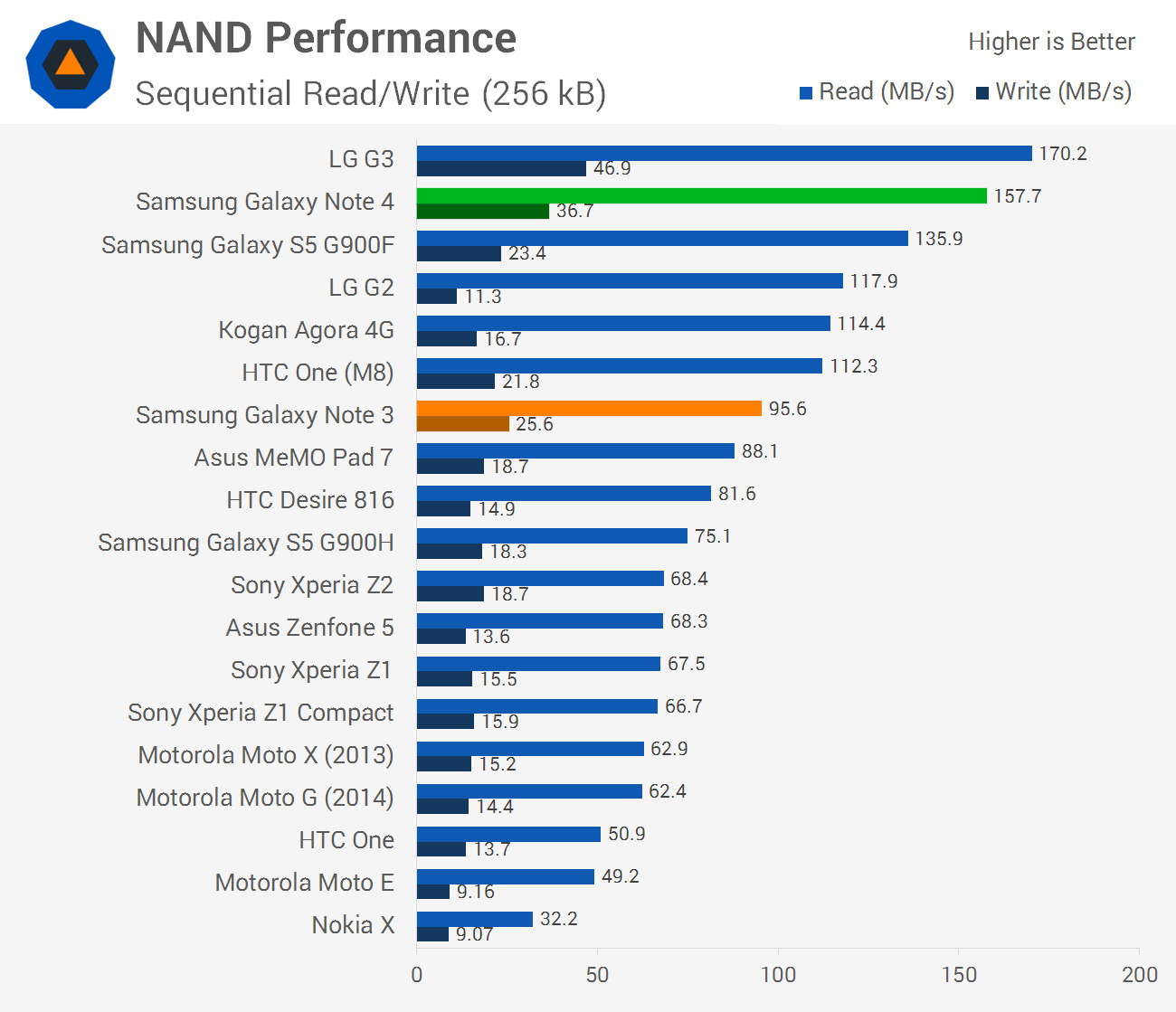
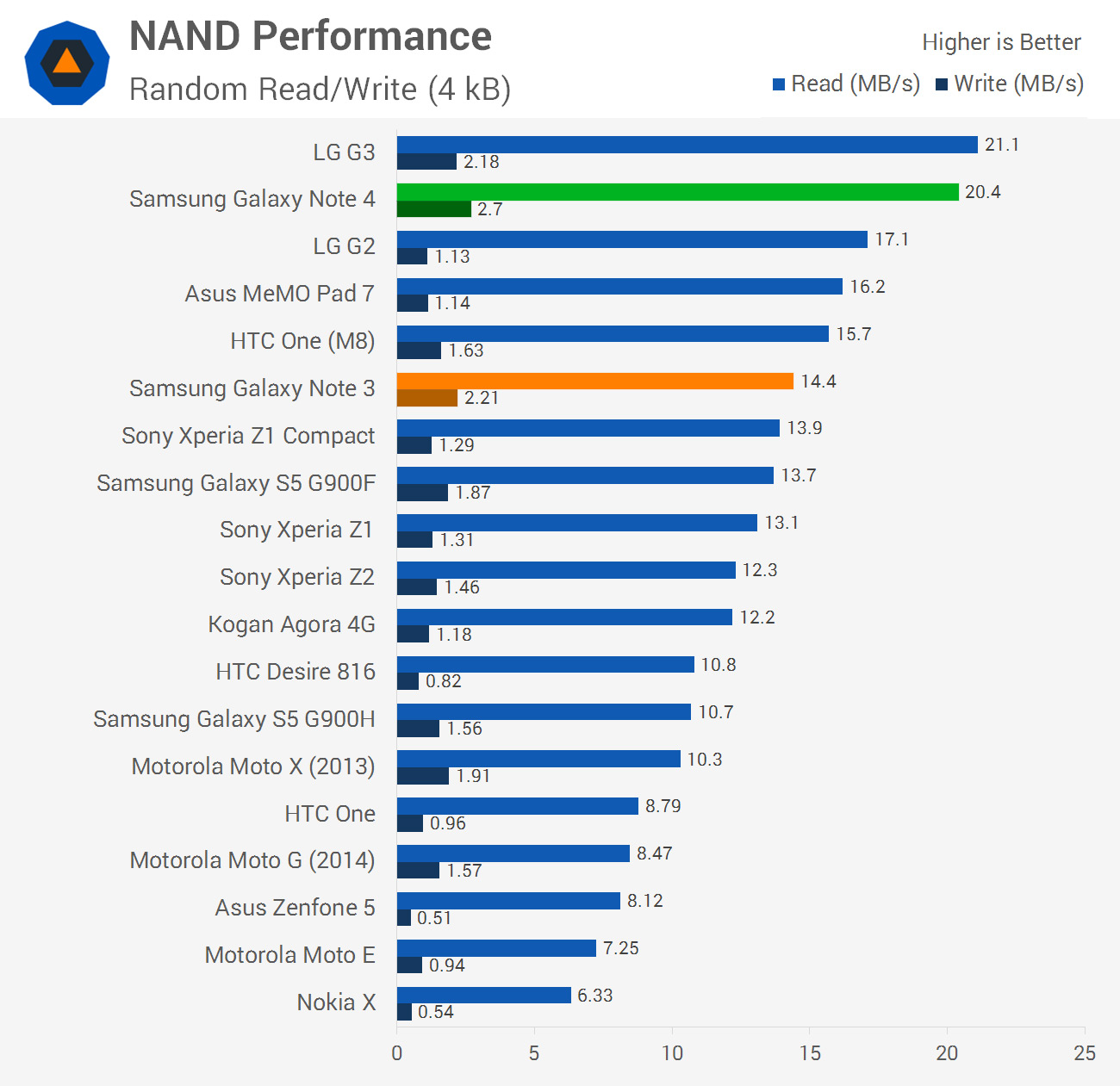
The Galaxy Note 4 slots in behind the LG G3 to take second spot in NAND performance. It’s good to see Samsung especially addressing random read/write performance in the hardware upgrade coming from the Galaxy S5, which was a weak spot in past handsets.

One thing that should be noted is that Samsung has decided to drop the microUSB 3.0 port in favour of standard microUSB 2.0. This means that read/write speeds drop from 100/60 MB/s to 35/35 across USB, which slows down transfers. I imagine the regression in this area is for aesthetic reasons: microUSB 3.0 is a large and potentially awkward port (if you’re trying to use a microUSB 2.0 cable), so it looks like Samsung may be waiting for the Type-C connector to become more widespread before switching back to high-speed USB.
 
Just on storage, the Galaxy Note 4 comes with 32 GB of internal NAND that can be expanded through the microSD card slot found beneath the rear cover. Can’t complain with this setup, though I wouldn’t say no to more internal storage.
 
 
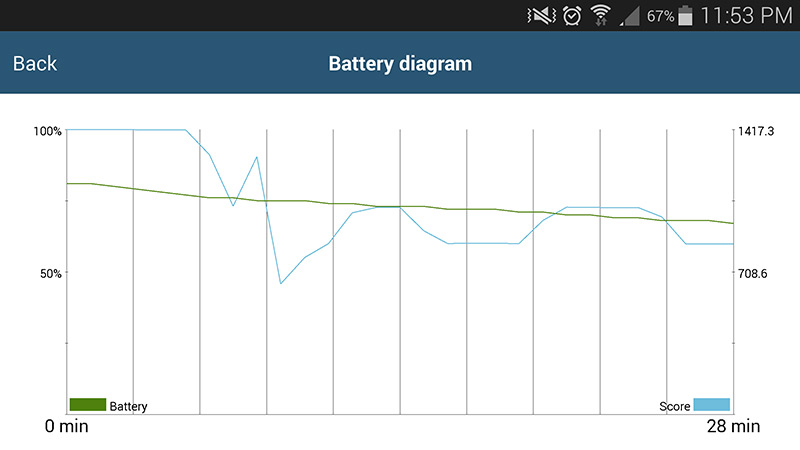
I did notice throughout my benchmarking runs that the Galaxy Note 4 throttles its SoC to a pretty significant level after around five minutes of heavy CPU/GPU load. After the end of a 30 minute run the Note 4 had lost just under 50% of its peak performance, as you can see in the graph above. Note that these results are for the Exynos model; I’ll have to examine the Snapdragon model in more detail later, although I suspect it throttles to a similar extent.

Also note that average peak performance is what we have listed in our benchmarks. That is, the benchmarks illustrate the performance you can expect when the SoC isn’t being throttled.


Article Index


10.27.2014

Samsung Galaxy Note 4 Review... Continue ~ Hardware Overview

Hardware Overview

Like the past few generations of Samsung flagships, there are two main models available, one with Qualcomm Snapdragon internals, and another with Samsung Exynos inside. For several years now the Snapdragon model has been the one most commonly sold, highlighting Qualcomm’s dominance in the SoC space over this period. However, Samsung continues to sell an Exynos model not just to show what their tech is capable of, but also to provide a cheaper option for some markets and to gather feedback on the performance of their own silicon.

With the Galaxy S5, for example, Samsung marketed a Snapdragon 801-powered model with LTE for most developed markets, while the Exynos 5422 model (that lacked LTE) was available in select regions. In my performance review of the Galaxy S5 I discovered that although the Snapdragon 801 model was faster and supported LTE, the Exynos variant was $50 cheaper and still held its own despite somewhat weaker hardware.
 
 
When it comes to the Galaxy Note 4, both models have been upgraded significantly from a hardware perspective relative to the Galaxy S5, the Exynos model especially. I still expect the Qualcomm model to be more prevalent in the market though, as the Qualcomm brand is well established in the minds of people who read in-store spec sheets.
 
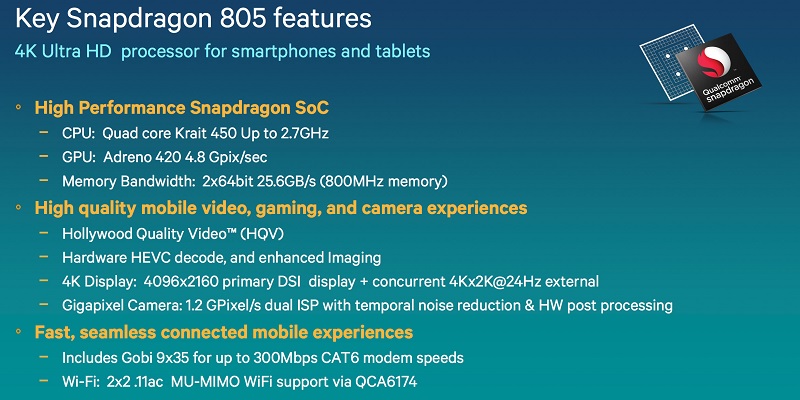
The Qualcomm variant of the Galaxy Note 4 packs a Snapdragon 805 APQ8084 SoC, which is new to the TechSpot test bed. As it’s an APQ designated part, the chip lacks an in-built LTE modem; however, Samsung has indicated that this model supports Category 6 LTE (300 Mbps down, 50 Mbps up through 2x20 MHz carrier aggregation), suggesting it’s utilizing Qualcomm’s fourth-generation Gobi MDM9x35 modem.

 
Aside from needing a dedicated modem, the APQ8084 is a beastly chip. It’s still built on a 28nm HPm process and uses an ARMv7-A instruction set, but has received updates in almost every area compared to the Snapdragon 800/801. For starters, we’re looking at four Krait 450 cores clocked up to 2.7 GHz. Krait 450 is a moderate upgrade on the Krait 400, providing slightly more speed per clock. This means we can expect a jump in performance larger than the relative increase in clock speed over the cores.
 
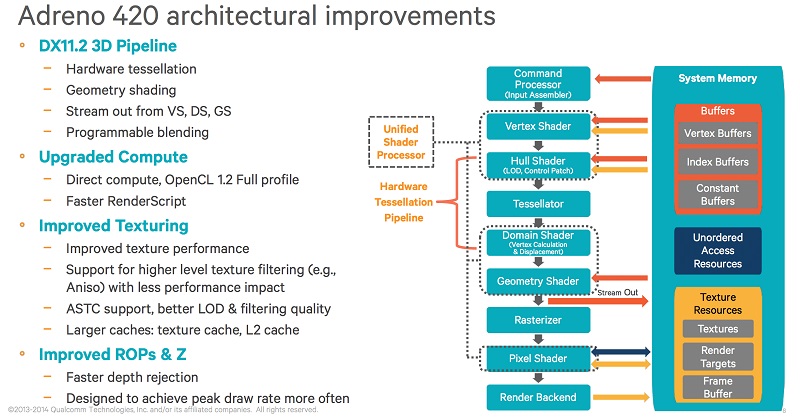
As for the GPU, Qualcomm is packing in the Adreno 420, which now supports OpenGL ES 3.1 and Direct3D 11.2. Clocked at up to 600 MHz, Qualcomm is reporting that the Adreno 420 delivers 40% better performance and a 20% reduction in power compared to the Snapdragon 800’s Adreno 330, which is impressive.
 
On the memory side, we’re looking at a pretty significant jump in theoretical bandwidth compared to the Snapdragon 801. The 801 provided 14.9 GB/s of bandwidth through a 32-bit dual-channel LPDDR3 controller clocked at 933 MHz; in the 805, this has been upgraded to quad-channel at 800 MHz. As such, the Snapdragon 805 is capable of a maximum 25.6 GB/s of throughput when talking to the 3 GB of on-board RAM in the Galaxy Note 4.
 
 
The improvements don’t stop there: the Snapdragon 805 also supports HEVC (H.265) decoding on hardware for the first time. Not only that, the image signal processor (ISP) has been upgraded to support 1.2 gigapixels of throughput per second, good enough for 4K/30 video capture or 1080p/120. The dual-ISP design supports up to 55-megapixel cameras.

On the connectivity front, the Snapdragon 805 provides dual-band Wi-Fi 802.11a/b/g/n/ac with MU-MIMO, Bluetooth 4.1 (yes, not 4.0 anymore), and IZAT Gen8B A-GPS+GLONASS.
 
And now that you’ve digested all that information about the Snapdragon 805, there’s another model to talk about. Again, the Note 4 is a high-end device, so it requires the best that Samsung has to offer. Enter the new Exynos 7 Octa SoC that Samsung detailed shortly after the release of the Note 4. The chip falls into a new line of SoCs from Samsung, and it’s the second 20nm HKMG chip from the company (after the Exynos 5 Octa 5430 in some Galaxy Alpha models).
 
Interestingly, the Exynos 7 Octa 5433 is the first chip out of Samsung to use ARM’s 64-bit capable ARMv8-A architecture. Unfortunately, as Android 4.4.4 doesn't support 64-bit architectures, this SoC runs in 32-bit mode for the Galaxy Note 4. It’s possible that 64-bit support will be added by the time the Note 4 receives an update to Android 5.0 Lollipop, though I wouldn’t count on it. That said, actually delivering an ARMv8 chip at this stage is quite a significant achievement, even if 64-bit support isn’t enabled, so I’ll take what I can get.
 
 
Before I dig too far into the actual specs of the 5433 (or what I can find on it), moving to 20nm is an important step in itself. Samsung is now a node ahead of Qualcomm in actual shipping silicon (though their 20nm parts aren’t too far away), and should have an edge in power consumption and/or performance if they play their cards right, at least compared to the 28nm Snapdragon 805.
 
Like past Exynos products, the Exynos 7 Octa 5433 is a big.LITTLE part, meaning it uses a combination of “little” low power cores in tandem with “big” performance-oriented cores. It also supports heterogeneous multi-processing with global task scheduling, allowing the small and big cores to operate simultaneously. Theoretically this should provide the perfect mix of performance and power efficiency, although for the past few years I’ve had Qualcomm ahead on both fronts. This may change with the 5433, though.
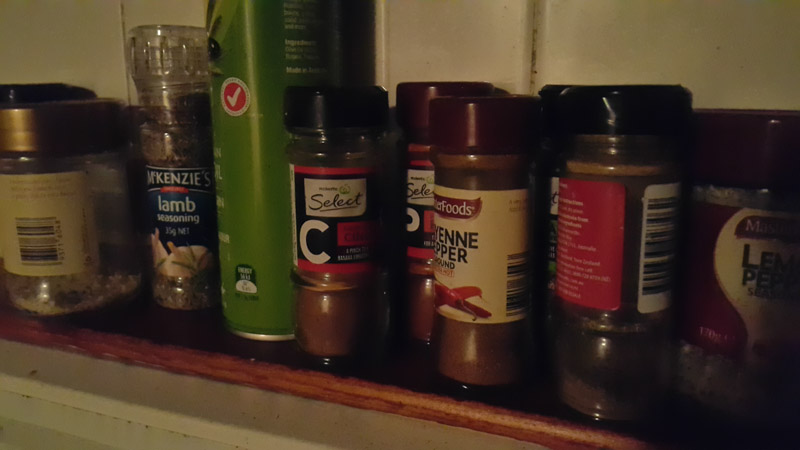
 
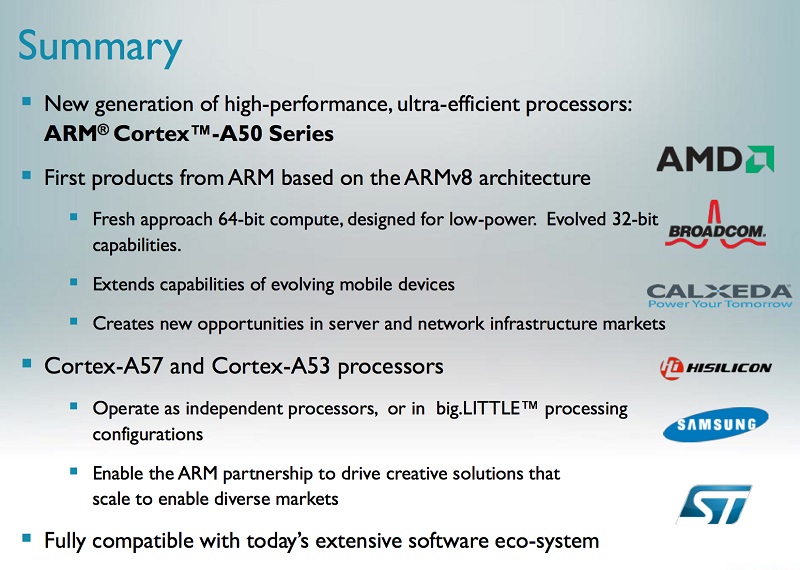
The big update to this Exynos 7 Octa we’re seeing in the Galaxy Note 4 is the use of both ARM Cortex-A57 and Cortex-A53 CPU cores. The Exynos 5433 uses four A57s clocked at 1.9 GHz and four A53s clocked at 1.3 GHz, making the SoC an octa-core part. More important than the core count, though, is the architecture behind these new cores, which has been upgraded significantly over the A15/A7 cores of the past.
 
 
The Cortex-A57 is ARM’s current flagship CPU core, supporting 64-bit applications and packing improved performance compared to the Cortex-A15. ARM states that, at the same clock speed, an A57 core will be around 20-30% faster than an A15 under 32-bit workloads (it’ll be even faster in 64-bit mode, but that’s not relevant for the Galaxy Note 4 at this stage). These cores are used in the Exynos 7 Octa for high-performance tasks like gaming and image manipulation.

The Cortex-A53 is paired with the A57 as it’s more power efficient, though it’s still should deliver improved performance compared to the A7 it replaces. Like the A57, it supports 64-bit applications, and ARM claims it performs around the same level as the Cortex-A9, but with a smaller die and better energy efficiency. This means that the A53 today, complementing the more powerful A57, will be able to deliver a 2012 flagship level of performance as merely a low-power core.
 
Samsung claims their new Exynos 7 Octa’s CPU is 57% faster than the CPU in their Exynos 5 Octa, though they weren’t exactly specific about which Exynos 5 Octa they were comparing their latest SoC to. I also suspect that Samsung’s figures factor in the CPU running in 64-bit mode, which is not supported on the Note 4 (at least at this stage).
 
 
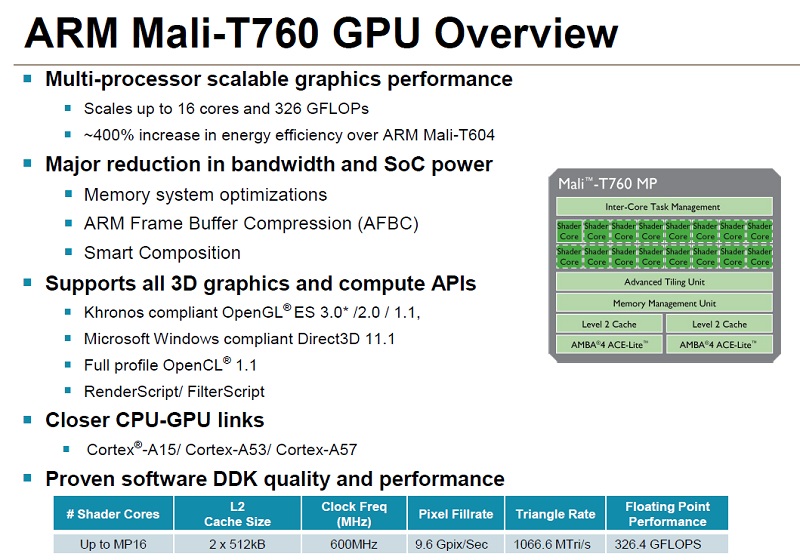
The GPU used in the Exynos 5433 is also from ARM, this time the Mali-T760 clocked at 700 MHz. Like the jump to Cortex-A5x cores, we’re seeing a generational jump in GPU as well. Although this GPU still uses ARM’s Midgard architecture, it’s now in its third generation, which (like most upgrades in the mobile space), promises better performance and energy efficiency compared to its predecessors.
 
I’m not completely confident on the specifications of the exact Mali-T760 variant used in the Exynos 5433, though I expect it’s the eight-core model. This would give it, at least on paper, performance above what the Adreno 330 provides in the Snapdragon 801. How the GPU compares to the Adreno 420 in the Snapdragon 805 will be quite interesting, as in the past Qualcomm has had a significant advantage in this space. Samsung themselves claim a 76% performance improvement over the Mali-T628MP6.
 
 
As for the memory controller, the Exynos 5433 uses a dual-channel 32-bit LPDDR3 controller clocked at 825 MHz, providing 13.2 GB/s of bandwidth. This is around Snapdragon 800 levels of throughput, so it’s a bit behind the Snapdragon 805. How restrictive this will be remains to be seen; I’d expect graphics could be an area that the limited bandwidth affects.

Samsung isn’t ready to fully integrate a networking solution into the same die as the Exynos SoC, so extra chips are needed to facilitate Wi-Fi, Bluetooth, LTE and other connectivity features. Luckily Samsung has used high-end parts for the Exynos variant of the Note 4, meaning you’ll get largely the same features as the Snapdragon model, including LTE (for once) thanks to an Exynos 303 modem.
 
The Exynos model packs Category 4 LTE (150/50 Mbps), which should suffice for most countries worldwide (though as I mentioned earlier, I still expect the Snapdragon model to be more prevalent). There’s also HSPA+, GSM/GPRS/EDGE, Wi-Fi 802.11a/g/b/n/ac, Bluetooth 4.1, and A-GPS+GLONASS.
 
 
Note that the model numbers listed above are the ones we benchmarked for this review. There are many more models with either the Snapdragon 805 or Exynos 7 Octa inside.
 
Both models also have an infrared LED for controlling TVs, and NFC on-board. As far as hardware goes the Snapdragon and Exynos models are the closest I’ve seen from Samsung in quite some time, and it’s especially important to see both now with LTE inside.
 
 
~ Tim Schiesser

Article Index